
Best Product Analytics Tools for Startups: 7 Options Compared by the Job They Do
Choose product analytics tools by the work your team must repeat: GA4 for acquisition-led questions, Mixpanel or Amplitude for product-led analysis, and PostHog or Statsig when engineers connect measurement with releases and experiments. Heap suits retrospective interface questions; Pendo connects adoption analysis with guidance. Compare two candidates using the same events, identities and business outcome before committing.
On this page
What does a product analytics tool do that web analytics does not?
Product analytics software follows what people and accounts do inside a product over time: which steps they complete, where they stop, whether they return and how behaviour differs between groups. Web analytics usually starts with acquisition, pages, sessions and website outcomes.
The boundary is not absolute. GA4 has funnel explorations, while dedicated product tools increasingly include web analytics. The practical difference is the recurring analysis, identity model and workflow each tool makes usable for your team.
For example, “which campaign produced signups?” and “which trial workspaces reached a successful integration within seven days?” need different denominators. An administrator, buyer and analyst can be three people in one workspace. Counting visitors does not automatically answer the workspace question.
Define that question in the product analytics setup plan, then use the Mixpanel versus GA4 comparison when deciding whether one or both belong in the stack.
How do the seven tools compare at a glance?
Start with the tool whose operating model fits the person who will use it, then eliminate plans that fail a hard requirement. The free allowances below are monthly; events, sessions and active users are different billing units.
| Tool | Strong reason to shortlist it | Free monthly allowance | First constraint to test |
|---|---|---|---|
| GA4 | Acquisition through verified signup | Standard product is free | Account-level questions and export limits |
| Mixpanel | PM or growth owner building repeatable reports | 1M events; 10K replays | Five saved reports per seat; paid group analysis |
| Amplitude | Shared analysis and experiment workflows | 2M events; 10K replays | Ten saved charts, one-year access, no behavioural cohorts on Free |
| PostHog | Engineers joining analytics with release investigation | 1M events; 5K replays; 1M flag requests | Separate product meters and dropped events at free limits |
| Heap | Questions about previously captured interactions | 10K sessions; six-month history | Account analytics and export/replay packaging |
| Pendo | Adoption analysis paired with in-app guidance | 500 monthly active users | Sampling and creation restrictions above the allowance |
| Statsig | Experiment-led engineering teams | 2M events; 50K replays | Experiment setup, event volume and warehouse entitlement |
Sources: Google standard analytics, Mixpanel plans, Amplitude plans, PostHog pricing, Heap plans, Pendo Free, Statsig plans.
If the shortlist is clear but the tracking is not, our product analytics implementation work connects the questions, events and reports with your developers. A trial is useful only when the data underneath it represents the intended customer action.
What are the practical pros and cons of each tool?
Shortlist the tool whose strengths match the recurring job and whose limits your team can operate. Evaluate each required feature in the plan you intend to retain.
GA4 for acquisition-led questions
- Best for: Acquisition, landing pages and a small set of verified website or app outcomes.
- Pros: Acquisition reports and funnel explorations can connect traffic sources with verified website or app outcomes.
- Cons: Workspace-level questions can require modelling beyond visitor reports.
- Free tier and startup offer: Standard GA4 is free; evaluate that general offering rather than assuming a temporary startup award.
- Choose it if: A known acquisition cohort can be traced to signup and the first-value outcome.
- Skip it if: The same recurring account question still requires an unowned manual join.
Define outcome events, campaign conventions, permitted collection and identity handling. A form-button click is weaker evidence than an accepted signup. For B2B, test the account question directly; a report about visitors may require additional modelling to represent a workspace.
Trial task: follow one acquisition cohort through signup and a verified first-value event, then reconcile it with application records. If the same account question requires a manual export every week, include that recurring work in the buying decision.
Mixpanel for PM-owned funnels and reports
- Best for: A PM or growth owner changing segments and sharing repeatable product reports.
- Pros: Funnel exploration supports repeatable onboarding analysis with segments the report owner can adjust.
- Cons: Account reporting and scheduled export requirements can require paid add-ons.
- Free tier and startup offer: Free includes one million monthly events; the eligible Startup Plan offers a first year under its separate conditions.
- Choose it if: The owner can rebuild and explain the onboarding report in the plan you will keep.
- Skip it if: The proposed package cannot support the required account analysis or data exit.
For B2B, Group Analytics is a Growth or Enterprise add-on. Check the intended account report in the plan you would actually buy. The Growth pricing guide explains how that choice changes the forecast.
Experiments also need their own allowance: Free includes 1,000 monthly experiment users, or MEU, while Growth includes 5,000. Free experiment reporting pauses at its allowance while flags keep serving; Growth continues with overage billing. Experiment plans and behaviour
Trial task: have the report owner build an onboarding funnel, explain the denominator and repeat the task a week later. Record where engineering help was needed. If you already run it, diagnose the reason for replacing Mixpanel before restarting selection from zero.
Amplitude for shared analysis and experimentation
- Best for: Several teams reusing behavioural definitions across analysis, experiments and follow-up.
- Pros: Behavioural analysis, feature experiments and web experiments can support a shared product workflow, subject to plan entitlements.
- Cons: Access to an experiment or flag does not establish access to its results.
- Free tier and startup offer: Free includes two million monthly events; qualifying startups can evaluate the Growth startup offer and its later plan terms.
- Choose it if: The proposed production plan supports both the analysis and the downstream workflow.
- Skip it if: A successful demonstration depends on capabilities available only during the trial.
Free permits one active feature experiment and one web experiment, with unlimited flags, but the pricing comparison excludes experiment results and feature A/B/n testing from Free. That distinction matters more than the broad phrase “experimentation included”. See the current plan comparison and Amplitude pricing guide.
Trial task: define an onboarding population, independently reproduce its membership and use it in the next planned workflow. Verify that the intended production plan supports that second step, rather than relying on temporary trial access.
Amplitude's May 2026 relationship with Statsig adds another buying question: which product, support arrangement and roadmap are you contracting for? The platforms should still be evaluated against the job you need done.
PostHog for engineering-led investigation
- Best for: Engineers connecting analytics, replay, flags and experiments with shipped releases.
- Pros: A shared workflow can replace repeated investigation across separate tools.
- Cons: Separate product meters and data-loss behaviour at limits need active monitoring.
- Free tier and startup offer: Free includes one million analytics events monthly; startup credits have eligibility, expiry and product exclusions.
- Choose it if: An engineer and PM can explain the same release population and outcome.
- Skip it if: Consolidation adds capabilities nobody owns or does not retire any useful work.
Its free plan retains events and metadata for one year; replay has a separate retention window. Products have separate meters. Identified-event handling and group requirements can change the analytics estimate, so model logged-in usage rather than quoting the cheapest anonymous-event rate. Events above the free allowance are permanently dropped. Reaching a configured paid billing limit can also permanently drop subsequent events, so an affordable spending cap still needs a data-continuity alert. PostHog pricing and limits
Trial task: take one known release, identify the exposed population, inspect its funnel and review relevant recorded sessions. Ask the engineer and PM to explain the same result. The PostHog versus Mixpanel pilot develops this comparison.
List which existing subscriptions could actually be retired. Merely enabling more capabilities creates more evidence to maintain. Use PostHog alternatives by capability and the guide to retiring an unnecessary tool when consolidation is the reason for switching.
Heap for retrospective interface questions
- Best for: Teams asking new interface questions after a release.
- Pros: Previously captured interactions can support later event definitions.
- Cons: Autocapture cannot recreate a backend outcome that was never recorded.
- Free tier and startup offer: The checked Free plan allows 10,000 monthly sessions with six-month history; do not assume unverified startup terms.
- Choose it if: A retrospective definition reproduces the intended interaction in controlled captured traffic.
- Skip it if: Required account analysis, replay or warehouse export falls outside the proposed package.
The current packaging places account analytics in Pro, Heap Connect as a Pro add-on and warehouse integration in Premier. Replay is a paid add-on on Pro and Premier. Confirm those items separately instead of treating autocapture, account analysis and replay as one purchase. Heap pricing
Heap can also accept server-side custom events. A click on Import and a completed import should remain separate events.
Trial task: define an interaction over controlled captured traffic, compare it with the authoritative completion event, then change the button or page structure and check what breaks. Contentsquare completed its Heap acquisition in December 2023; verify the product and support scope in the current offer.
Pendo for adoption analysis and in-app guidance
- Best for: A team that both measures feature adoption and maintains in-app guidance.
- Pros: Adoption reporting and targeted in-app guides connect diagnosis with an intervention in the product.
- Cons: Sampled reporting and creation restrictions can change the Free workflow above its allowance.
- Free tier and startup offer: Free permits 500 monthly active users; verify any separate offer rather than assuming paid trial features remain.
- Choose it if: The intended operator can target a guide and explain its exclusions and outcome.
- Skip it if: Reporting is the only need and a maintained guidance system already serves the intervention.
Pendo Free uses unique visitor IDs for its 500-MAU allowance. Above it, reports use a random sample of 500 visitors and creation of new guides, NPS surveys and segments is blocked. A working paid trial therefore does not prove the ongoing free workflow will remain usable. Pendo Free scope
Trial task: identify customers who have not used an important feature, preview a targeted guide and test exclusions. Judge the downstream task completion, not whether a message appeared. Decide who retires obsolete guidance after interface changes.
Statsig for experiment-led product development
- Best for: Engineering teams whose releases depend on flags and experiments.
- Pros: Analytics and replay can be evaluated alongside assignment and exposure.
- Cons: Cloud and warehouse-native deployments have different purchasing scopes.
- Free tier and startup offer: The checked Developer plan includes two million monthly events and 50,000 replays; verify any separate startup terms.
- Choose it if: A known A/A test reconciles assignment, exposure and outcomes.
- Skip it if: The team cannot own reliable experimentation inputs or the required warehouse entitlement.
Pro is listed at USD 150 per month with five million events, then USD 0.05 per additional 1,000 events, and 100,000 replays. Warehouse-native deployment is listed under Enterprise. These are different offerings. Statsig pricing
For example, six million billable events under those Pro assumptions produce USD 150 + 1,000 × USD 0.05 = USD 200 for the month, before other applicable charges. This is a pricing illustration, not a quote.
Amplitude calls the 5 May 2026 change a strategic partnership: it takes on Statsig's brand and customers and maintains/develops the existing cloud and warehouse platform. Do not translate that into an unsupported claim that it acquired the whole company. Confirm current contract and support terms. Amplitude announcement
Trial task: run a controlled A/A test, then one real experiment on a known flag. Reconcile assignment, exposure and outcome counts before interpreting lift.
Which product analytics tools handle experiment analysis?
Several do, but assigning a variant, observing exposure and showing statistical results are separate capabilities. Check all three in the plan being evaluated. The experimentation platform comparison adds a sample-size calculation, retained-plan checks and eight candidates organized around the metric and assignment workflow.
| Platform | Experiment path | Buying or validation check |
|---|---|---|
| Mixpanel | Native flags or external exposure events; sequential, frequentist and Bayesian methods | MEU allowance and reporting pause/overage behaviour |
| Amplitude | Feature and web experimentation | Free includes limited active experiments but excludes results |
| PostHog | Flags, events and synced warehouse metrics; Bayesian or frequentist analysis | Flag-request billing and eligible metric types |
| Statsig | Experiment-led platform with flags and analytics | Cloud versus warehouse product and exposure reconciliation |
| GrowthBook | Warehouse-oriented experimentation | Metric definitions, compute and editor seats |
Mixpanel can read third-party or in-house assignments through a configured exposure event, conventionally $experiment_started, sent when the user is first exposed. It also documents CUPED, a method using pre-experiment behaviour to reduce variance, and Bayesian analysis currently marked open beta. Mixpanel experiment documentation
PostHog links variants to replay and supports metrics from synced warehouse tables. Its experiment overview describes both statistical engines; CUPED support is limited to eligible metrics, not every report. Experiments are metered through feature-flag requests.
GrowthBook's cloud Starter includes three users, one project and unlimited flags and experiments; Pro is USD 40 per seat per month. GrowthBook plans
To explain an outcome, inspect the relevant funnel, guardrails and predeclared segments alongside the overall result. Replay can suggest why a problem occurred; it does not estimate causal lift. A segment discovered after inspecting many results is a hypothesis for another test. Check for sample ratio mismatch before reading lift.
Which product analytics tools accept server-side events?
All seven are product analytics tools with server-side tracking routes, each with different identity, authentication and entitlement rules. Prefer authoritative backend events for completed business outcomes, while retaining client-side context where it is needed.
| Tool | Server-side route | Detail to verify |
|---|---|---|
| Mixpanel | Server SDKs or HTTP API | Stable user/account IDs and retry handling |
| Amplitude | HTTP V2 API | Deduplication uses insert_id with device_id where supplied, within the app and seven-day window |
| PostHog | Server SDKs and capture API | Person-profile handling, shared IDs and per-SDK features |
| Heap | Track API | Identity/user ID mapping and idempotency key |
| Pendo | Track Events API | Dedicated shared secret and your plan's API entitlement |
| GA4 | Measurement Protocol; Google also documents a Data Manager API upgrade path | Preserve web/app identity and collection context |
| Statsig | Server SDKs | Exposure and outcome definitions for the experiment |
Mixpanel recommends server collection where possible and estimates that blockers can lose client events for 30–50% of users. That is Mixpanel's estimate, not a forecast for your audience. Measure your own gap before judging whether server-side tracking is worth the cost. Mixpanel collection guidance
The Amplitude HTTP V2 reference defines its deduplication scope. PostHog lists SDKs including Node.js, Python, Go, Ruby, PHP, Rust and .NET; its current Java documentation covers server-side event capture, and Elixir is now maintained by its core team. Do not assume browser replay or autocapture exists in a server SDK. SDK comparison
Pendo's Track Event shared secret differs from the subscription key. Its Free documentation restricts API access, so do not assume server-side Track Events are included just because the plan lists Track Events.
Google describes Measurement Protocol as a supplement to tagging. It also provides a Data Manager API upgrade guide. The GA4 server-event guide explains the context to preserve; a backend HTTP response alone does not prove the event produced the intended report.
Which tools let you export raw event data through an API?
Choose an export route by completeness, latency and replay behaviour as well as API availability. A reporting API that returns a chart is different from retrieving the underlying event records. Each row states its request, time or data-volume unit.
| Tool | Raw-data route | Operational limit or tradeoff |
|---|---|---|
| Amplitude | Export API returns ZIP archives containing JSON event files | Up to 4 GB and 365 days per request; default four concurrent and 360 hourly requests |
| Mixpanel | Raw Event Export; scheduled Data Pipelines add-on | Raw API: 60 queries/hour, three/second, 100 concurrent |
| PostHog | Query API for bounded requests; batch exports for ongoing movement | Query endpoint: 2,400 requests/hour plus applicable read budget |
| Heap | Heap Connect/warehouse integration | Pro add-on versus Premier inclusion |
| GA4 | BigQuery raw export | Standard daily export: one million events/day; streaming adds cost and has completeness caveats |
Amplitude export ranges use server upload time, not original event time, and data can take about two hours to become available. Its pricing page's “Exports” row sits under Zoning Insights, so it should not be used to infer raw Export API restrictions. Test a required export in the target project rather than relying on a similarly named feature. Amplitude Export API
Mixpanel's raw export reference specifies its limits. Data Pipelines is a Growth/Enterprise add-on with a 30-day trial, exporting to cloud storage or warehouses including BigQuery, Snowflake, Databricks and Redshift Spectrum. Confirm the scheduled destination and cadence separately from ad hoc API access.
PostHog's API limits distinguish query access from regular exports. Its batch destinations include S3, Snowflake, BigQuery, Postgres, Redshift, Databricks and Azure Blob Storage, with documented schedules from five-minute through weekly intervals.
GA4 streaming has no volume limit but is best effort and may contain gaps. It is not simply an unlimited version of a completed daily table. Check the GA4 BigQuery export limits against Google's export documentation.
For an export acceptance test, send an event late, export the relevant ingestion period twice and verify that the destination receives the event once after your deduplication step. Retain the extraction checkpoint and count reconciliation. A download button does not establish a dependable exit path.
Which tools make a later migration easier?
A later migration is easier when the plan you keep lets you take out three things: the raw events, the links between anonymous and known IDs, and the tracking plan that says what each event means. The routes in the table above cover the events. Compare the rest before you sign.
- Identity links: Mixpanel Data Pipelines exports identity mappings and user profiles with the events. Amplitude's Snowflake export has an option to export all merged Amplitude IDs, and PostHog's batch exports include a persons model beside events. Without that mapping, the next tool cannot tell which anonymous history belongs to which customer.
- Tracking plan: Mixpanel Lexicon emails a CSV export to owners, admins and analysts, with up to 5,000 events per file. The Lexicon Schemas API stores definitions as JSON Schema but returns only events that have a schema, so take the CSV for a complete copy. Amplitude Data's CSV export covers events, event properties and user properties on all plans, but not custom events, transformations or default Amplitude entities. Its Taxonomy API reads the same entities and has been open to every plan since 7 May 2026.
- Open source and self-hosting: Mixpanel, Amplitude and PostHog all publish their browser SDKs under open-source licences (Mixpanel and PostHog under Apache 2.0, Amplitude under MIT). The tracking calls are still vendor-specific, so an open SDK does not shorten a migration by itself. PostHog also offers a self-hosted Docker Compose deployment under the MIT licence, which keeps the event store on your infrastructure; PostHog calls self-hosted deployments officially unsupported.
- Collection through a CDP: When the product sends events through Segment or RudderStack, the analytics tool is a destination that receives data from the CDP, and the tracking plan and its validation sit in the CDP. Segment Protocols is an add-on for Business plans only; RudderStack tracking plans start on its Free plan with one plan of five events. Changing analytics tools then starts with a new destination rather than new tracking calls, though identity rules and property mappings still need retesting.
Run an exit test during the trial: export one week of events, the identity mapping and the tracking plan, load them into a scratch warehouse table and rebuild one funnel. The guide to moving events between analytics tools covers the import side, and where the tracking plan should live compares keeping the master copy in a repository, a CDP or a vendor tool.
Which tools handle millions of events a day?
The published ingestion limits of Mixpanel, Amplitude and GA4 sit well above a few million events a day, so raw ingestion capacity is unlikely to be the first constraint. What changes is the contract, the way servers send events and the size of every query and export. One million events a day is about 30 million in a 30-day month, already above Mixpanel's published Growth tiers; about 3 million a day passes Amplitude Plus's 70 million ceiling.
| Tool | Pricing or volume ceiling to plan around | Server-side batch limit | Published ingestion limit |
|---|---|---|---|
| Mixpanel | Growth tiers stop at 20M events a month; sales quotes above that | Import API: 2,000 events and 10 MB uncompressed per request | About 30,000 events a second, or 2 GB of JSON a minute, per project |
| Amplitude | Plus lists up to 70M events or 700K MTUs a month; Growth and Enterprise are quoted | HTTP V2 on Growth and Enterprise: fewer than 2,000 events and under 1 MB per request | 50,000 events a second per project; a user or device above 30 a second is throttled |
| PostHog | Per-event rates are published beyond 250M events a month; annual credit purchases of USD 1M or more go to sales | Batch endpoint: no event-count cap; body under 20 MB by default | None stated on the capture API page |
| Statsig | Pro adds USD 0.05 per extra 1,000 events with no stated ceiling; Enterprise is custom with volume discounts | Server Core SDK batches 2,000 events by default; requests over 10 MB are dropped | None stated in the Server Core documentation |
| GA4 | Standard daily BigQuery export is limited to 1M events a day; streaming export has no volume limit | Measurement Protocol: 25 events and 130 kB per request | 100M non-conversion requests an hour per standard property |
Sources: Mixpanel pricing, Mixpanel Import API, Mixpanel rate limits, Amplitude pricing, Amplitude HTTP V2, PostHog pricing, PostHog capture API, Statsig pricing, Statsig Server Core, GA4 Measurement Protocol limits, GA4 BigQuery export.
Treat published rates as a starting point at this volume. Mixpanel and Amplitude move to quoted contracts, PostHog discounts annual credit purchases from 20% at USD 25,000 to 40% between USD 500,000 and USD 999,999, and Statsig offers Enterprise volume discounts. Ask each vendor to quote the same forecast volume, then compare the quotes with what product analytics costs at higher event volumes on published tiers.
Server-side sends need batching and retry rules. Size each request to the batch limit and handle 429 responses: Mixpanel recommends exponential backoff with jitter starting at 2 seconds, and Amplitude says to pause the affected user or device for 30 seconds. A backend job that sends many events under one system ID can hit Amplitude's per-identity throttle long before the project ceiling.
Query and export limits start to bind as well. Mixpanel's raw export allows 60 queries an hour, and an Amplitude Export API response cannot exceed 4 GB; Amplitude points larger hourly volumes to its S3 export. A standard GA4 property above 1M events a day needs event filtering or the streaming export, which adds BigQuery cost at USD 0.05 per GB. Amplitude Export API limits
The warehouse-native route can cost less when events already land in your warehouse and a data owner maintains the models, because a tool that queries the warehouse swaps per-event fees for seats and warehouse compute; Mitzu, for example, includes unlimited events on every plan. Compare the warehouse-native options below, then price the added compute with the guide to when warehouse compute replaces per-event fees.
How do warehouse-native and warehouse-connected options differ?
Ask where queries run and whether data is copied. A connector can move data into a hosted tool without making that tool warehouse-native.
Tools such as Mitzu and GrowthBook work with data already modelled in a warehouse. Mitzu's monthly Analyst plan is USD 149 with three editor seats and unlimited events; Team is USD 749 with ten. Its interface shows the SQL behind answers. GrowthBook offers bring-your-own-warehouse across its cloud plans. Statsig places warehouse-native deployment under Enterprise. Mitzu pricing, Mitzu architecture
Datadog Experiments, developed from Eppo, and Optimizely Warehouse-native Analytics, formerly NetSpring, are additional candidates when experimentation or warehouse analysis is the central job.
Mixpanel's warehouse connectors are available on Growth and Enterprise, rather than Free; they bring data into Mixpanel. A hosted connector therefore does not establish native execution. PostHog explicitly says its queries run on PostHog compute, including when external warehouse tables are synced in. PostHog architecture
The reverse direction is also useful: export product events to your warehouse through Data Pipelines, batch exports, Heap Connect or GA4 BigQuery export, then join billing and CRM data there.
Only choose the native route when a data owner can maintain the tables and metric definitions. Include warehouse compute and operational work in the comparison. The warehouse-native and warehouse-connected guide covers the broader shortlist and cost model.
Which overlapping tools belong beside this shortlist?
Some adjacent products can replace part of the shortlist, rather than merely supplement it. Evaluate their actual reports against the same question.
Fullstory, LogRocket and Contentsquare combine replay or digital-experience investigation with product analytics. They may fit when debugging and session context drive the purchase.
Plausible and Matomo focus on web analytics, useful when website traffic and conversion reporting are the job. See privacy-first GA4 alternatives. LaunchDarkly covers release control and experimentation. BI over modelled warehouse data can serve financial or operational reporting without replacing an interactive product-analysis workflow.
Which tool would we shortlist by who will run it?
We choose the starting configuration around the product question, identity model and operating work the team can sustain. The useful choice changes when those requirements change.
| Operator and job | First evaluation | Runner-up | Why compare them? |
|---|---|---|---|
| Founder answering acquisition questions | GA4 | Mixpanel when recurring product questions remain | Avoid another tool until the existing reports reach their limit |
| Engineer combining analysis with releases | PostHog | Statsig | Test investigation versus experiment-led operation |
| PM rebuilding funnels and segments | Mixpanel | Amplitude | Compare independent report creation and shared definitions |
| Data team with maintained warehouse models | A warehouse-native candidate | Hosted analytics with a tested export | Compare reuse of existing models with the work of operating them |
Founders who need answers without an analyst
Start with GA4 if acquisition is the decision. For recurring in-product questions, shortlist Mixpanel and require a saved funnel a founder can reopen and explain. B2B account views may change the plan. Asking Mixpanel questions through MCP can help retrieve answers, but it does not fix ambiguous event definitions.
With limited time and budget, judge product analytics platforms for founders by what one person can keep running: one tool whose free tier covers the forecast volume, a short list of outcome events tied to the next milestone, such as activation or first payment, and one report reviewed every week. Check the startup offers in the free-tier comparison before paying for a first year.
Engineers who want to instrument events quickly
Compare PostHog and Statsig when analytics, flags, experiments and replay belong in one development workflow. Interface autocapture can reduce initial tagging work, but accepted payments, completed imports and other outcomes need explicit events. Use a tracking plan with typed contracts and identify/reset rules across client and server. SDK capabilities differ by platform; one server SDK cannot record browser sessions.
“Engineering analytics” can also mean software-delivery and team-productivity metrics. That is a different category from the customer-behaviour tools covered here.
Product managers who build their own reports
Compare Mixpanel and Amplitude when a PM changes segments and shares funnels each week. Give Amplitude additional consideration when several teams need governed definitions and experiment workflows, then verify the required tier. Run Mixpanel versus Amplitude on your own data.
For feature adoption, ask each trial to show which users or accounts completed the feature's main action within a set window after release, and how many repeated it the following week. Add Pendo to the shortlist when the same PM also has to guide non-adopters inside the product; for analysing user behaviour alone, Mixpanel or Amplitude covers the job.
Data teams with a warehouse
Consider warehouse-native options when product events and billing already meet in maintained tables. Otherwise, a hosted tool with a tested scheduled export can produce useful answers sooner without pretending the warehouse model already exists.
If timing is the unresolved decision, read when a startup actually needs a product analytics tool before buying capabilities for a future team.
How do free tiers compare on one workload?
Translate the same activity into each billing unit before comparing allowances. A single application's MAU count does not explain how many events, sessions or experiment exposures a vendor will bill. Use how tracked users, events and sessions are billed to define the relevant population before comparing free limits.
Suppose a fictional product has 800 distinct active people, four sessions each and 30 qualifying events per session. Assume one analytics identity per person and no other event sources.
| Workload | Calculation | Monthly volume |
|---|---|---|
| Active people | 800 distinct IDs | 800 |
| Sessions | 800 × 4 | 3,200 |
| Events | 3,200 × 30 | 96,000 |
This fits the headline event allowances of Mixpanel, Amplitude, PostHog and Statsig, and Heap's session allowance. It exceeds Pendo Free's 500-MAU allowance. It says nothing yet about account reporting, saved-report limits, replay volume, export access or experiment users.
Add anonymous visitors, backend events and internal environments to the estimate. Then include maintenance and any required add-ons. The product analytics pricing comparison develops that forecast.
Startup offers can change the first-year bill. Mixpanel lists one free year for eligible companies under five years old with up to USD 8M raised; Amplitude lists a Growth scholarship for fewer than 20 employees and less than USD 10M raised. PostHog offers USD 50,000 credits for 12 months, subject to its company-age, funding and account requirements. Verify eligibility and the post-credit bill before choosing a tool. Mixpanel programme, Amplitude scholarship, PostHog startup terms.
How should company stage narrow the evaluation?
Let the maturity of the recurring work limit the shortlist: establish dependable outcomes first, then evaluate self-service reporting and shared controls as the number of users of the data grows.
Before reliable repeat usage: prioritize observing a small number of meaningful outcomes and learning why customers struggle. Choose one owner and one maintained analytics destination. Do not spend the next month reproducing the same empty funnel in six products.
When product and growth work becomes repeatable: test whether the people making decisions can create, interpret and reuse reports. The cost of repeated analyst requests matters alongside the subscription. Shared definitions become more valuable as more people ask similar questions.
When several teams depend on the data: evaluate permissions, change management, group analysis, export needs and recovery from bad instrumentation. Ask for evidence that the required capability exists in the proposed plan. A successful individual trial does not establish suitability for a larger operating model.
These are changes in work, not universal employee-count thresholds. A five-person B2B startup may need account analytics immediately. A larger consumer product may still have a simple person-level measurement problem.
How should you run a two-candidate evaluation?
Use the same permitted journeys, identities and observation windows in both candidates. First resolve hard constraints such as data location, supported SDKs and required account reports; a high aggregate score should not hide a missing requirement.
Write the population, outcome and decision. For example: “For trial workspaces with a complete seven-day observation period, identify where successful setup fails and decide which onboarding step to change.” That is a buying requirement an operator can test.
Include successful setup, failed setup, retry, returning user, logout, shared device and account switch where applicable. Specify expected results before opening the reports.
Eliminate candidates that fail a hard requirement before comparing their reports. Then test correctness and the intended owner’s ability to reproduce the result before confirming the retained plan and complete cost.
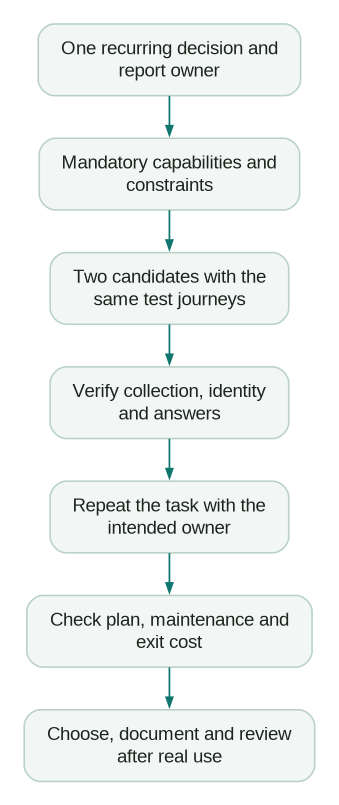
Read diagram as text
- Name the recurring decision and report owner to Candidate meets mandatory requirements?.
- Candidate meets mandatory requirements? to Exclude the plan or revise the shortlist: No.
- Candidate meets mandatory requirements? to Test the same journeys and known outcomes: Yes.
- Test the same journeys and known outcomes to Identities and outcomes reconcile?.
- Identities and outcomes reconcile? to Repair collection or identity and retest: No.
- Repair collection or identity and retest to Test the same journeys and known outcomes.
- Identities and outcomes reconcile? to Intended owner can repeat the analysis?: Yes.
- Intended owner can repeat the analysis? to Fix the workflow or evaluate another candidate: No.
- Fix the workflow or evaluate another candidate to Candidate meets mandatory requirements?.
- Intended owner can repeat the analysis? to Confirm plan export and upkeep cost then choose: Yes
Evaluate correctness, team usability and operability separately. Can the owner reproduce the answer? Can they change a segment without undocumented assistance? Can the team detect missing events, manage access and retrieve the raw records it needs?
If assistant access is a buying requirement, compare their MCP servers with the same report definitions, identities and permission tests.
A seven-day outcome needs a fully observed cohort. A two-day trial can test collection and report configuration, but it cannot turn pending customers into failures. Record the chosen tool, rejected requirements, plan assumptions and maintenance owner, with the exact report definitions attached.
The analytics tool selector skill can turn these findings into a recommendation memo with hard requirements, workload forecasts and the cost of switching.
What should pass before you sign or expand collection?
The intended operator should be able to repeat a useful analysis, and the implementation owner should be able to explain its data path. Run these checks in the plan you intend to retain.
Checklist
- Name the recurring decision and whether it counts people, accounts, workspaces or attempts.
- Reconcile controlled journeys with known application outcomes.
- Test a retry, logout and account switch without duplicate or misassigned activity.
- Have the intended user rebuild a segment and explain the denominator.
- Confirm required reporting, experiment and export capabilities after trial access ends.
- Forecast events, sessions, identities and experiment usage separately.
- Test late-arriving data and repeated export ranges.
- Include recurring maintenance, warehouse compute and overlapping subscriptions in the cost.
- Record the decision and the evidence that would justify revisiting it.
Use the analytics tool selector skill to record hard requirements, forecast each billing meter and compare the cost of the configurations that pass your evaluation.
At Martechdevs, we can turn that shortlist into an implemented event model and validated reports. Start with the $99 martech audit if the question is still unclear, or request an implementation scope for defined tracking and reporting work.
Keep reading
Browse all Product Analytics guides
 Product Analytics
Product analytics setup for SaaS: 20 events to evaluate
Plan SaaS analytics around customer value. Evaluate 20 events, choose client or server triggers, connect identities and validate five useful reports.
Jafrin Akter AloLast updated 13 min read
 Product Analytics
Mixpanel Implementation Mistakes: Identity, Events and Counting Rules
Debug Mixpanel identity splits, duplicate events, stale properties and misleading funnels, with a tested retry-payload example and user-versus-job fixture.
Jafrin Akter AloLast updated 11 min read
 Product Analytics
PostHog Implementation Mistakes: Capture, Identity and Replay
Diagnose duplicate pageviews, identity mistakes, replay privacy gaps and missing recordings with an explicit export journey and synthetic QA probes.
Jafrin Akter AloLast updated 13 min read
Product analytics
See the implementation scope, deliverables and acceptance checks.
Questions people ask
What is the best free product analytics tool?
For event volume, Amplitude and Statsig allow two million monthly events; Mixpanel and PostHog allow one million. Heap meters sessions and Pendo active users, while GA4 Standard is free. Check feature and over-limit behaviour: PostHog drops excess free-plan events, and Mixpanel Free experiment reporting pauses at its MEU allowance.
Can a free product analytics tool be enough?
Yes, when the needed workflow, volume, history and access controls fit. Check the features remaining after any trial ends. A free licence still requires implementation and maintenance, while a paid plan does not fix unclear events. Have the intended report owner reproduce a useful decision before increasing collection.
Which product analytics tools are open source, and is self-hosting cheaper?
PostHog offers an MIT self-hosted deployment that it describes as unsupported. GrowthBook has an MIT-licensed core, with enterprise directories under separate commercial terms and a free self-hosted plan. Include infrastructure, backups, upgrades and incident diagnosis and recovery before calling either cheaper.
Does autocapture remove the need for engineering?
No. Captured interactions still need stable meaning, identity and sensitive-field controls. Server-confirmed outcomes need explicit implementation when a click does not establish success. Test both the interface action and the completed business event, including retries and account changes, before treating captured activity as dependable evidence.
Should a startup run several product analytics tools?
Only when each has a defined job worth its collection and maintenance cost. Temporary parallel testing can support a decision. A separate experimentation platform can also be justified, but assignment, exposure and outcome definitions must reconcile across it and the analytics tool.
Sources
- Google: Standard analytics.
- Google: Funnel explorations.
- Google: Measurement Protocol.
- Google: Data Manager API upgrade.
- Google: BigQuery export.
- Mixpanel: Pricing.
- Mixpanel: Funnels.
- Mixpanel: Group Analytics.
- Mixpanel: Experiments.
- Mixpanel: Collection methods.
- Mixpanel: Raw Event Export.
- Mixpanel: Data Pipelines.
- Amplitude: Pricing.
- Amplitude: HTTP V2.
- Amplitude: Export API.
- Amplitude: Statsig partnership.
- PostHog: Pricing.
- PostHog: Experiments.
- PostHog: CUPED.
- PostHog: SDK comparison.
- PostHog: Java SDK.
- PostHog: Elixir SDK.
- PostHog: API.
- PostHog: Batch exports.
- PostHog: Warehouse architecture.
- PostHog: Startup programme.
- PostHog: Self-hosting.
- Heap: Pricing.
- Heap: Track API.
- Contentsquare: Completed Heap acquisition.
- Pendo: Free.
- Pendo: Track Events.
- Statsig: Pricing.
- GrowthBook: Pricing.
- GrowthBook: License.
- Mitzu: Pricing.
- Mitzu: Platform.
- Fullstory: Product analytics.
- LogRocket: Platform.
- Contentsquare: Product analytics.
- Plausible: Web analytics.
- Matomo: Analytics.
- LaunchDarkly: Platform.
- Statsig: Server SDKs.
- PostHog: Anonymous and identified events.
- Datadog: Experiments.
- Datadog: Eppo to Datadog Experiments.
- Optimizely: NetSpring and warehouse-native analytics.
- Mixpanel: Lexicon.
- Mixpanel: Lexicon Schemas API.
- Amplitude: CSV import and export.
- Amplitude: Taxonomy API.
- Amplitude: Taxonomy API now available on all plans.
- Amplitude: Snowflake export.
- Mixpanel: mixpanel-js licence.
- PostHog: posthog-js licence.
- Amplitude: Browser SDK licence.
- Twilio Segment: Destinations overview.
- Twilio Segment: Protocols.
- RudderStack: Tracking plans.
- Mixpanel: Import Events API.
- Mixpanel: Rate limits.
- PostHog: Capture API.
- Statsig: Server Core.
- Google: Measurement Protocol sending events.

Written by
Jafrin Akter AloData Engineer and Co-founder at Martechdevs and Growth and Analytics Partners
Jafrin writes practical guides to marketing technology, customer data, analytics and AI workflows. Martechdevs is a Growth and Analytics Partners company.