
Product analytics setup for SaaS: 20 events to evaluate
A useful SaaS product analytics setup connects real customer outcomes to trustworthy events, identities and reports. Start with the journey from account creation to first value and repeated value, then instrument the steps needed to explain where that journey succeeds or fails. The 20 events below are candidates for a collaborative reporting product, with their triggers, collection points and properties. Choose the ones your decisions need and adapt the rest to your product.
On this page

Installing an SDK can make events appear within minutes. It takes more thought to answer whether a team connected its data, produced a useful report, returned to use it and became a paying customer.
Build around those questions. An impressive event count is not an acceptance criterion. Use that decision list when choosing a product analytics tool.
Define the customer outcome and unit of analysis
Our illustrative product lets teams connect business data, generate reports and share them. Its first-value hypothesis is that a workspace produces a report from real data and a human member views it. That is a hypothesis to validate against later useful behaviour, not a universal SaaS activation event.
The workspace is the unit for this journey. A person can use several workspaces, and a paying account can contain several of them. Keep those relationships explicit. Counting people at one funnel step and workspaces at the next creates a rate with no consistent denominator.
Before implementing, answer:
- Which customer outcome will the first report measure?
- Which entity must complete it: person, workspace or commercial account?
- When does the observation window begin and end?
- Which accounts, users and environments are excluded?
- What action will the product team take if a step performs poorly?
Use the activation metrics guide to separate an early value signal from a later retention outcome. The implementation should support both without declaring that one causes the other.
Choose events by what the system can actually know
Use the browser or app for observed interactions such as a visible onboarding step or a report view. Use the service that commits a business outcome for successful operations such as creating a workspace or completing an import.
A click expresses intent. A successful server operation confirms a state change. A payment provider's verified event can establish payment state. Do not emit the same success event independently from all three and expect every destination to deduplicate it automatically.
For asynchronous work, keep an operation or job ID from request through completion. Delivery retries reuse the same event identity. A genuinely new job gets a new identity even if the same person requests it immediately afterwards.
Twilio's collection guidance recommends core events with contextual properties and a documented convention. Apply the event naming guide before the taxonomy spreads across several code paths.
Candidate events for registration and collaboration
These first five events establish who entered the product and how a workspace formed. The listed properties are additions to a common event envelope, not complete SDK payloads.
user_registered: emit from the account service after a new person record is successfully created. Include the stable user ID and registration method. Exclude logins, failed submissions and retries of the same creation operation.workspace_created: emit after the workspace is committed. Include workspace ID, commercial account ID where known, creator ID and whether it contains only demonstration data. This supplies the entry event for the example workspace funnel.member_invitation_sent: emit when the invitation is successfully created and handed to the delivery process. Include invitation ID, workspace ID and requested role. Do not describe it as email delivery or acceptance.member_invitation_accepted: emit after membership is committed for the accepting person. Include invitation ID, workspace ID and accepted role. Clicking an invitation link alone is insufficient.onboarding_step_viewed: emit from the client when a defined step is actually rendered under your visibility rule. Include a stable step code and onboarding version. Keep repeated views if they are useful, but count unique workspaces explicitly when analysing reach.
Do not include an invitee's email in the event name. Decide whether the analytics destination needs that personal field at all; invitation and membership IDs are often enough for the analysis.
Candidate events for connecting and importing data
These six events distinguish a customer starting setup from the system completing it. They also make failures diagnosable without requiring every analyst to inspect server logs.
integration_connection_started: emit when the client begins an explicit connection attempt. Include connection-attempt ID, provider code and workspace ID. Avoid firing again simply because a component rerenders.integration_connection_succeeded: emit from the service after the connection passes the checks required for usable access. Include the same attempt ID, integration ID and provider. A redirect back from an authorisation page is not sufficient by itself.integration_connection_failed: emit when that attempt reaches a terminal failure. Include a controlled error category and retryability indicator. Exclude credentials, access tokens and raw provider error text containing customer data.data_import_started: emit after an import job is accepted for execution. Include import-job ID, integration ID, workspace ID and an approved source-type code.data_import_succeeded: emit after required data is durably available and passes the import's success criteria. Include import-job ID, duration in a named unit and an appropriate row-count summary. Do not use this for a partially successful import unless the definition explicitly permits it.data_import_failed: emit when the job terminates unsuccessfully. Include import-job ID, controlled failure category and whether a customer or system retry is possible. A transient retry inside one job need not create another terminal failure event.
The distinction between connection and import matters. A valid credential does not guarantee usable data. Build the setup report so a product manager can tell which of those problems blocks first value.
Candidate events for producing and consuming value
These six events describe the central product job. Replace reports and exports with your own value-producing objects while preserving the difference between requesting work, completing it and using the result.
report_generation_requested: emit when the service accepts a new generation job. Include generation-job ID, report ID, workspace ID and template code. Repeated delivery of the same request should not create another accepted job event.report_generation_succeeded: emit when the completed report is durably available. Include job ID, report ID, workspace ID, duration and whether the input was real or demonstration data.report_generation_failed: emit for a terminal unsuccessful job, with the same identifiers and a controlled error category. Avoid sending the report contents or query text merely to explain failure.report_viewed: emit from the client when a human-facing report satisfies the documented render and visibility condition. Include report ID, workspace ID and viewing context. A successful generation does not establish that anyone saw the output.report_shared: emit when the product successfully creates the defined share action, such as an approved shared link or access grant. Include report ID, workspace ID and share method. It does not prove that a recipient opened the report.report_export_succeeded: emit when an export job produces its file successfully. Include export-job ID, report ID, workspace ID and file format. If actual download completion matters, instrument a separate supported observation with an honest definition.
Repeated value can be derived from these events over a suitable window. There is no need to invent user_retained as a browser event that guesses whether an entire cohort definition was satisfied.
Candidate events for commercial outcomes
The final three events connect product behaviour to the customer relationship. Treat billing state as evidence from an authoritative process, and preserve the commercial account even when no human actor is available.
subscription_started: emit when the billing integration confirms a new subscription under the agreed state rule. Include subscription ID, account ID, plan code and whether the subscription begins as a trial or paid arrangement. This event alone does not prove a payment occurred.payment_succeeded: emit for a confirmed successful payment, with payment ID, account ID, amount representation and currency. Derive first payment from history rather than treating every renewal as a new customer. Include a user actor only when the relationship is known.subscription_cancellation_requested: emit after a valid cancellation request is recorded. Include subscription ID, account ID and requested effective date. A request to cancel at period end is not the same event as service already ending.
Stripe's webhook documentation notes that deliveries can be duplicated and arrive out of order. Verify the source event, maintain processing state and define the business operation key. One payment can create several provider events; forwarding each as a fresh product payment event inflates the outcome.
Add refund, payment-failure or cancellation-effective events when a named report needs them. The list of 20 is a starting menu, not a reason to omit an important business fact or add an irrelevant one. Then connect product events to CRM and billing stages under one explicit customer or account definition.
Standardise the event envelope and destination adapters
Define shared fields once. The following example is a vendor-neutral contract for an export success, not a payload to paste unchanged into an SDK:
{
  "event_name": "report_export_succeeded",
  "event_id": "evt_export_job_204_success",
  "occurred_at": "2026-10-13T09:15:30Z",
  "schema_version": 1,
  "environment": "production",
  "actor_user_id": "user_1042",
  "account_id": "account_209",
  "workspace_id": "workspace_317",
  "properties": {
    "report_id": "report_815",
    "export_job_id": "export_job_204",
    "export_format": "pdf",
    "duration_ms": 840,
    "input_data_kind": "customer_data"
  }
}
Map the envelope to each destination's identity, timestamp and deduplication fields. Do not assume a custom event_id property activates vendor deduplication. Record those definitions in a tracking plan with event contracts.
Use the event naming convention skill to define one event vocabulary and validate the names each destination will receive.
For example, Amplitude's HTTP V2 reference documents millisecond timestamps and insert_id deduplication with defined scope and a seven-day window. An adapter must follow that API's rules; an ISO timestamp in the documentation envelope is not automatically valid in the API's time field.
Keep person, account and workspace identifiers separate. PostHog's Next.js guidance stresses consistent identity across client and server events. A shared naming convention without a shared identity convention still produces fragmented journeys.
Never treat an analytics identifier supplied by the browser as authentication or permission to access an account. The server should derive business ownership from its authenticated application context.
Build five reports that answer five decisions
Tools provide chart types; your team supplies the counting rules. PostHog's insights documentation describes trends, funnels, retention, paths and other views. Similar concepts can be implemented in other product analytics tools or the warehouse, subject to their supported analysis grain.
1. Workspace setup-to-value funnel. Start with eligible workspace creations, then successful connection, successful report generation from real data and a qualifying report view. Use a defined order and completion window. Decide which step deserves an onboarding or reliability change.
2. Connection and import reliability. Count attempts and jobs separately from workspaces. Break failures down by provider and controlled error category. Decide whether the obstacle is product guidance, provider access or the import service.
3. Repeated value by cohort. Group workspaces by entry period and measure a qualifying return event in a later, fully observed window. Decide whether first value is turning into a habit appropriate to the product's usage cadence. Then build the repeated-value cohort table with a fixed entry population and pending cells for incomplete windows.
4. Feature adoption among eligible workspaces. Measure sharing or export among workspaces that can use the feature and have produced a report. Separate reach, first use and repeated use. Decide whether low adoption reflects discoverability, access or limited usefulness.
5. Product journey to first payment. Connect the commercial account to its relevant workspaces and payment history. Define how multiple workspaces roll up and distinguish first payments from renewals. Decide where a useful product experience fails to become a suitable paid relationship.
An illustrative mature cohort contains 200 workspaces. Of those, 140 connect data, 80 generate a real-data report and 60 view that report within the defined window. Overall first-value completion is 30%. The connection-to-generation rate is about 57.1%, and generation-to-view is 75%.
Those rates locate observed gaps. They do not prove that a new tooltip or email will fix them. Investigate representative journeys and support evidence, then test an intervention.
Once these reports reconcile, an assistant can help investigate follow-up questions. The setup guides for Mixpanel MCP, Amplitude MCP and PostHog MCP show how to connect the relevant platform and check its answers against a known report. Preserve the same entity, event and observation-window definitions across both interfaces.
For a cross-vendor shortlist, check which analytics tools offer MCP servers and reproduce one of these known reports before trusting an assistant’s follow-up analysis.
Test the whole path before trusting the dashboard
Use a separate environment and a known scenario. One person creates a workspace, invites a colleague, connects a source, completes an import, generates a report, views it and pays. Record expected events and identities before executing the flow.
Build only the events needed for a named product decision, then prove the journey rather than the SDK call. Validate identity and retry behavior first, report definitions second, and the relevant production evidence before handover.
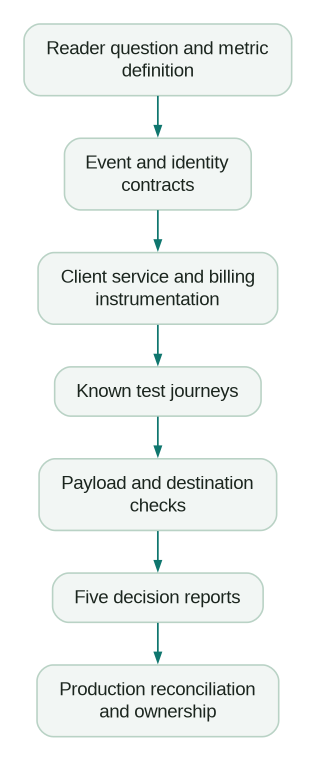
Read diagram as text
- Define the product outcome entity window and event contract to Instrument each fact at its browser service or billing owner.
- Instrument each fact at its browser service or billing owner to Known journeys identity boundaries and retries pass?.
- Known journeys identity boundaries and retries pass? to Repair the failed event identity or destination mapping: No.
- Repair the failed event identity or destination mapping to Instrument each fact at its browser service or billing owner.
- Known journeys identity boundaries and retries pass? to Build the reports for the selected product decisions: Yes.
- Build the reports for the selected product decisions to Entities denominators and mature windows reconcile?.
- Entities denominators and mature windows reconcile? to Correct the report definition or join and repeat: No.
- Correct the report definition or join and repeat to Build the reports for the selected product decisions.
- Entities denominators and mature windows reconcile? to Production evidence matches the appropriate source contract?: Yes.
- Production evidence matches the appropriate source contract? to Trace the first failing boundary and preserve coverage limits: No.
- Trace the first failing boundary and preserve coverage limits to Instrument each fact at its browser service or billing owner.
- Production evidence matches the appropriate source contract? to Use the result in a product review and hand over ownership: Yes
Repeat with failure, retry and shared-device scenarios. A useful test set includes:
- A connection failure followed by a new successful attempt.
- A job retried internally without becoming two completed jobs.
- A report generated successfully but never viewed.
- A person switching between two workspaces.
- Two people using the same browser after logout.
- A duplicate billing notification and an out-of-order notification.
- A denied or withdrawn analytics permission under the application's configured policy.
- A browser request blocked or interrupted while the business operation succeeds.
Check payloads, received events and report results. A console log proves only that a code path executed. A received event with the wrong workspace can still produce a plausible chart. For Mixpanel identity and event-count mistakes, verify the project’s identity model, stable retry envelope and funnel counting rules against that same known journey.
For a PostHog implementation, work through PostHog capture, identity and replay mistakes with the same known journey so navigation counts, authentication and recording rules are tested together.
For server-confirmed outcomes, compare counts against the application database under the same time and eligibility rules. For browser observations, understand expected coverage limitations rather than demanding equality with backend operations that measure a different fact. Check Amplitude identity, session and funnel mistakes when events arrive but the report counts the wrong person, session or business object.
Release by acceptance gates and maintain the definitions
There is no useful universal implementation duration. Existing identity quality, frontend frameworks, asynchronous jobs, billing complexity and release processes determine the work.
Estimate by deliverable: approved event plan, identity lifecycle, client instrumentation, service instrumentation, billing adapter, destination mapping, five reports and production verification. Name the person responsible for each and the dependency that can delay it.
If this replaces an existing setup, add historical exports, report continuity and a controlled cutoff to the scope. The GA4 or Heap migration guide covers identity mapping, backfill side effects and validation when moving to Mixpanel or Amplitude.
The identity merge guide covers login, logout and client/server consistency in more detail. Finish those checks before using a broken person count to judge activation or retention.
Checklist
- The first outcome, entity and observation window are agreed.
- Selected events have triggers, non-triggers, owners and required properties.
- Browser intent and server-confirmed outcomes remain distinguishable.
- Person, workspace and account relationships are explicit.
- Retry handling preserves operation identity and avoids duplicate successes.
- Sensitive fields and unnecessary destination routes are excluded.
- Known successful and failed journeys produce expected records.
- Reports use compatible denominators and mature observation windows.
- Production data is reconciled against appropriate source evidence.
- Schema changes and measurement incidents have an owner.
For the event and property definitions in this release, the event naming convention skill can check types, destination-name mappings and rename collisions.
Once those gates pass, use the reports in a real product review and record the resulting decision. If a chart repeatedly produces no decision, improve its question or remove it. Our product analytics work can help implement the event and identity contracts, validate the reports and leave the team with a setup it can maintain.
Keep reading
Browse all Product Analytics guides
 Product Analytics
Mixpanel Implementation Mistakes: Identity, Events and Counting Rules
Debug Mixpanel identity splits, duplicate events, stale properties and misleading funnels, with a tested retry-payload example and user-versus-job fixture.
Jafrin Akter AloLast updated 11 min read
 Product Analytics
PostHog Implementation Mistakes: Capture, Identity and Replay
Diagnose duplicate pageviews, identity mistakes, replay privacy gaps and missing recordings with an explicit export journey and synthetic QA probes.
Jafrin Akter AloLast updated 13 min read
 Product Analytics
Amplitude Implementation Mistakes: Identity, Sessions and Funnels
Fix Amplitude identity, session and funnel mistakes with a server-event payload, known customer journeys and checks for event-time context.
Jafrin Akter AloLast updated 11 min read
Product analytics
See the implementation scope, deliverables and acceptance checks.
Questions people ask
Which events should a SaaS product track first?
Track entry into the relevant customer journey, the operations needed to reach value, successful value delivery and the later behaviour that indicates continued usefulness. Add diagnostic failures where they explain an actionable obstacle. The exact events depend on the product; a reporting tool's export event has no automatic value in an unrelated SaaS application.
Is a signup an activation event?
It usually establishes access rather than product value. Activation should represent a specific early outcome your customers seek and should be evaluated against meaningful later behaviour. The example here uses a workspace producing and viewing a report from real data, with an explicit completion window.
Should events be tracked in the browser or on the server?
Use the component that can reliably observe the defined fact. Browsers observe views and interactions. Backend services confirm committed operations. Billing systems establish payment and subscription evidence. Keep the resulting events distinct and map their identities so one journey can be analysed across those sources.
Do we need all 20 events before launching analytics?
No. Choose the smallest set that supports the first decision and its essential diagnostics. Launch after identity, delivery and report checks pass, then expand where another question justifies the work. The event list is a menu with explicit meanings, not a collection quota. The startup analytics starter plan helps choose that first scope.
How do we know the setup is correct?
Execute known journeys, inspect the received payloads, verify identity across boundaries and compare server-confirmed outcomes with authoritative source records. Then check the actual saved reports using their stated entity, order and time window. Correct SDK calls alone do not establish correct business metrics.
Sources

Written by
Jafrin Akter AloData Engineer and Co-founder at Martechdevs and Growth and Analytics Partners
Jafrin writes practical guides to marketing technology, customer data, analytics and AI workflows. Martechdevs is a Growth and Analytics Partners company.