Product analytics MCP servers compared: Amplitude, Mixpanel, PostHog, Pendo and the rest
Data Engineer and Co-founder at Martechdevs and Growth and Analytics Partners
Last updated 14 min read
Amplitude, Mixpanel, PostHog, Pendo and Contentsquare publish official MCP servers, while Google's experimental GA4 server provides a read-only baseline. Choose the connection for the tool that holds your trusted measurement, then check its permissions, region, client limitations and costs. The acceptance test is whether it reproduces a known report, including the denominator and filters, rather than whether its explanation sounds convincing.
Which product analytics tools have an official MCP server?
The five hosted options below have vendor-published documentation checked on 17 October 2026. Google's GA4 implementation is a separate local, experimental option. We did not establish a separate official Heap MCP server from the primary sources reviewed; Contentsquare ownership alone does not prove that a Contentsquare connector can query a particular Heap account.
Use our marketing MCP server guide for the wider stack and Amplitude MCP setup guide for a detailed single-tool connection. For the underlying event definitions and reconciliation work, our product analytics implementation service covers the foundation these connections depend on.
| Server | Useful work surface | Control to check first |
|---|---|---|
| Amplitude | Analytics, charts, cohorts, experiments and taxonomy | Default access plus per-project read/write roles |
| Mixpanel | Reports, Lexicon, cohorts, dashboards and experiments | Organization enablement and existing project permissions |
| PostHog | Analytics plus flags, experiments and engineering workflows | Exposed tools, API scopes and AI-processing settings |
| Pendo | Product usage, feedback and supported Pendo actions | Separate read-only and write toggles |
| Contentsquare | Experience analytics, funnels and journey questions | Customer Admin setup and shared call allowance |
| GA4 | Reports and funnel queries | Local credentials with read-only Analytics access |
Amplitude
Amplitude enables MCP by default. Administrators can restrict organization access under Settings → Content Access → MCP and grant project-level Use MCP read/write actions. Amplitude MCP documentation.
- Best for: teams already using Amplitude for funnels, cohorts and experimentation.
- Pros: broad content access and explicit project-level read/write controls.
- Cons: available tools differ by client, and definition changes can affect production collection behaviour.
- Free tier and startup offer: Amplitude lists MCP across its plans; underlying feature and volume limits remain. Startup entitlements belong to the analytics plan, not an assumed separate MCP allowance.
- Choose it if: the saved Amplitude report is your reference answer and the required tool is exposed to your client.
- Skip it if: your required workflow depends on a tool missing from that client's subset.
ChatGPT receives approximately 25 tools, excluding replay and progressive discovery; Claude and Cursor expose a broader catalogue. A connector that works for a funnel question therefore does not prove replay analysis is available. Client-specific scope.
Mixpanel
Mixpanel provides US, EU and India endpoints, with OAuth and beta service-account authentication. New Free and Growth accounts created after 1 August 2026 have MCP enabled by default; other accounts need an organization administrator to enable it. Existing project permissions apply. The documented rate limit is 600 MCP requests per hour per user. Mixpanel MCP documentation.
- Best for: teams that want a conversational route to their existing Mixpanel reports and definitions.
- Pros: three regional endpoints and tools spanning analysis, content and Lexicon.
- Cons: some UI analysis capabilities are not exposed through MCP; service accounts and some tools remain beta.
- Free tier and startup offer: Free access can have Query API limits. Verify the actual plan and startup agreement rather than treating the server's hourly ceiling as the only limit.
- Choose it if: a representative saved report can be reproduced with supported query tools.
- Skip it if: the required query relies on unsupported cohort filters or historical profile fields.
The current docs say Run-Query cannot filter or break down by cohorts and MCP does not support SCD/profile-history fields. Those limitations can explain why a UI report and an MCP query differ. See Mixpanel MCP regions and checks before replacing a manually maintained report.
PostHog
PostHog's hosted endpoint is https://mcp.posthog.com/mcp; authentication routes the account to its US or EU region. The documented wizard command is npx @posthog/wizard mcp add. Its tool surface includes analytics and SQL, feature flags, experiments, replay and other product workflows. Connecting and calling tools is free, but LLM-backed tools may incur PostHog AI spend when AI data processing is enabled. PostHog MCP guide.
- Best for: engineers working with analytics, flags and experiments alongside code.
- Pros: a broad engineering workflow surface and documented tool filtering.
- Cons: a flag or experiment edit can change product behaviour; broad tool access deserves a deliberate review.
- Free tier and startup offer: MCP calls are free; ordinary product usage and eligible AI-powered tools are separate cost components.
- Choose it if: your approved workflow benefits from product evidence and controlled engineering actions in the same client.
- Skip it if: an analyst only needs a read-only report and the connection would unnecessarily expose release controls.
PostHog's setup page names several coding clients but not a dedicated ChatGPT setup tile. Its official server README explicitly documents ChatGPT/OpenAI client handling through a CLI-style tool surface. That is evidence of implementation support, not proof that a particular workspace has an official directory app enabled. Validate the custom connection in your client. Official server README. Our PostHog MCP guide covers a practical analysis workflow.
Pendo
Pendo requires an administrator to enable read-only MCP tools; write tools have a separate optional toggle. OAuth can access the user's subscriptions within the same region, while each service account is scoped to one subscription. Regional connections stay separate. Pendo connection documentation.
- Best for: teams already using Pendo for product experience and feedback workflows.
- Pros: separate read/write enablement and region-specific setup.
- Cons: official client integrations cover fewer regions than custom MCP connections.
- Free tier and startup offer: the setup document does not establish a universal free MCP quota or startup award; confirm subscription entitlement and charges.
- Choose it if: your required Pendo analysis or feedback operation appears in the enabled tools.
- Skip it if: the intended client app does not support your region and a validated custom route is unavailable.
The official ChatGPT app supports US and EU regions; the official Cursor integration supports US. Other supported regions need the documented custom connection. A service account for one subscription should not be reused as if it granted access to every customer subscription.
Contentsquare and Heap
Contentsquare documents MCP across Free, Growth, Pro and Enterprise. Customer Admins enable access, users inherit project permissions and analytics-returning calls draw from an account-wide pool. The current documentation reserves the Write permission for future tools: selecting it does not currently provide those write capabilities. Contentsquare MCP setup.
- Best for: Contentsquare users asking experience, funnel, journey and page-comparison questions.
- Pros: documented administrative access and a distinct allowance for analytics calls.
- Cons: the allowance is shared across the account; configuration calls and analytics calls are counted differently.
- Free tier and startup offer: Free includes up to 300 analytics tool calls per month. No separate MCP startup award is established by this documentation.
- Choose it if: your relevant projects and analysis tools are available through the configured Contentsquare connection.
- Skip it if: the proposal assumes it will query a separate Heap subscription without a verified supported path.
We are not claiming that no Heap connection can exist. We are keeping the recommendation within the official product and account scope that the checked documentation establishes. Ask the supplier to identify the endpoint, tools and entitlements for your specific Heap environment before including it in a rollout.
GA4 as a baseline
Google's official Analytics MCP repository labels the server experimental. It runs locally with Analytics read-only credentials and provides report tools, including run_funnel_report. It is useful for checking GA4 acquisition and conversion questions through the Data API. Google Analytics MCP repository.
- Best for: a team whose immediate question is already answered by a reliable GA4 report.
- Pros: official read-only implementation and no need to introduce a new analytics product for a simple question.
- Cons: it inherits GA4's reporting model, API limits and the available event definitions.
- Free tier and startup offer: standard GA4 and client/runtime costs are separate; experimental MCP availability is not a new analytics entitlement.
- Choose it if: GA4's metric and identity model fits the decision.
- Skip it if: the job requires account-level billing/product joins that your GA4 property does not model reliably.
The GA4 MCP setup guide explains the local route. Do not expose a local server publicly merely to make it look like one of the hosted endpoints.
How do writes, defaults and regions change the decision?
The important distinction is whether a tool only reads evidence or can change the definitions and experiences people depend on. An analytics connector can write more than a new chart.
Amplitude taxonomy writes require MCP write and tracking-plan permissions. Main-branch deletion or restoration can immediately change ingestion; other branches wait for merge. Creating a definition does not instrument an application. Amplitude taxonomy behaviour.
Mixpanel can change Lexicon, cohorts and content. PostHog can change flags and experiments. Pendo gates writes separately. Contentsquare's current write toggle is preparatory, while GA4's official server is read-only. Review the actual tools after login rather than assuming that a product called “analytics” only reads data. Mixpanel's MCP audit log is currently a limited-customer beta and excludes read-only and failed calls, so do not treat it as a complete execution record. Mixpanel audit-log limitations.
| Vendor | Data-region route | Connection acceptance check |
|---|---|---|
| Amplitude | mcp.amplitude.com/mcp or mcp.eu.amplitude.com/mcp | Match returned project IDs to the intended environment |
| Mixpanel | mcp.mixpanel.com/mcp, mcp-eu.mixpanel.com/mcp, mcp-in.mixpanel.com/mcp | Verify the project and region before running reports |
| PostHog | mcp.posthog.com/mcp, with account-based US/EU routing | Confirm the authenticated organization and project |
| Pendo | Matching US, US1, EU, Japan or Australia endpoint | Request the expected subscription ID explicitly |
| Contentsquare | Account MCP setup supplies connection details | Confirm the returned project is authorized for the task |
| GA4 | Local server with intended Analytics credentials | Match the property ID to the saved reference report |
Pendo's full regional URLs end in /mcp/v0/shttp, on app.pendo.io, us1.app.pendo.io, app.eu.pendo.io, app.jpn.pendo.io or app.au.pendo.io. Match the subscription's region. Pendo regional endpoints.
A correctly regionalized source connection does not by itself establish where the external assistant processes returned data. Include the AI client's workspace and data-handling terms in the security review for analytics MCP connections.
Which server fits your team's job?
Our default is the server attached to the product analytics tool your team already trusts. A second connector is useful when it brings a different kind of evidence, not merely because it has more tools.
| Situation | Start with | Runner-up or weaker fit |
|---|---|---|
| PM needs a weekly funnel and retention review | Existing Amplitude or Mixpanel saved reports | Native in-product AI when no outside context is needed |
| Engineer needs controlled flag or experiment work | Existing PostHog or Amplitude environment | Read-only analysis plus manual UI changes when approvals are not ready |
| Product team works from Pendo feedback | Pendo with read tools first | Existing Pendo UI if client-region support blocks MCP |
| Experience team investigates page friction | Contentsquare project connection | Existing UI for unsupported analysis or exhausted allowance |
| Agency has EU or India projects | Correct regional endpoints and separate client scopes | A single shared connection is a weaker fit for isolation |
| Startup has no reliable event model | Define tracking and select the analytics tool | Adding MCP first cannot repair missing instrumentation |
For the last case, use our product analytics tool selection guide. Switching vendors just to gain MCP access usually introduces migration costs before you have established a measurement benefit.
What does it cost to query analytics through MCP?
The full cost includes the analytics subscription, the external AI client, any paid internal AI tools and the time required to review results. The boundaries below were checked on 17 October 2026. Request allowances use their stated periods; no universal per-call USD price is established.
| Server | Documented cost or capacity boundary | Input needed for a workload budget |
|---|---|---|
| Amplitude | MCP across plans; no universal per-call dollar rate established | Underlying product entitlement and AI-client cost |
| Mixpanel | 600 requests/hour/user; Free Query API limits can also apply | Calls including discovery and retries per reporting job |
| PostHog | Free MCP calls; some LLM tools incur AI spend | Which requested tools invoke paid internal AI |
| Pendo | Setup page gives no universal rate | Contract entitlement and expected workload |
| Contentsquare | Shared analytics-call allowance | Remaining account pool and confirmed reset period |
| GA4 | Data API quotas and runtime/client costs | Query quota use, execution schedule and client plan |
Amplitude's pricing page, the Mixpanel server guide and the PostHog MCP guide support those distinctions. Compare plan economics separately in our Amplitude pricing guide when higher-volume or startup terms matter.
Contentsquare publishes 300 calls/month for Free, 36,000/year for Growth, 72,000/year for Pro and 108,000/year for Enterprise. These are account pools, not per-user allowances. Its page also discusses monthly resets alongside annual plan figures; confirm the contractual reset/enforcement period before treating an annual total as a guaranteed monthly allocation. Pro and Enterprise can buy extra capacity. Contentsquare call limits.
For an illustrative agency workload, 12 requests across each of 50 projects produce 600 requests. That consumes the full documented Mixpanel hourly allowance for one user, before discovery calls, retries or unrelated work. Spread the job over time, cap concurrency and leave headroom rather than scheduling exactly at the ceiling. Separate authenticated customer scopes still apply; shared rate capacity is not permission to mix customer data.
How do you check an MCP answer against the analytics UI?
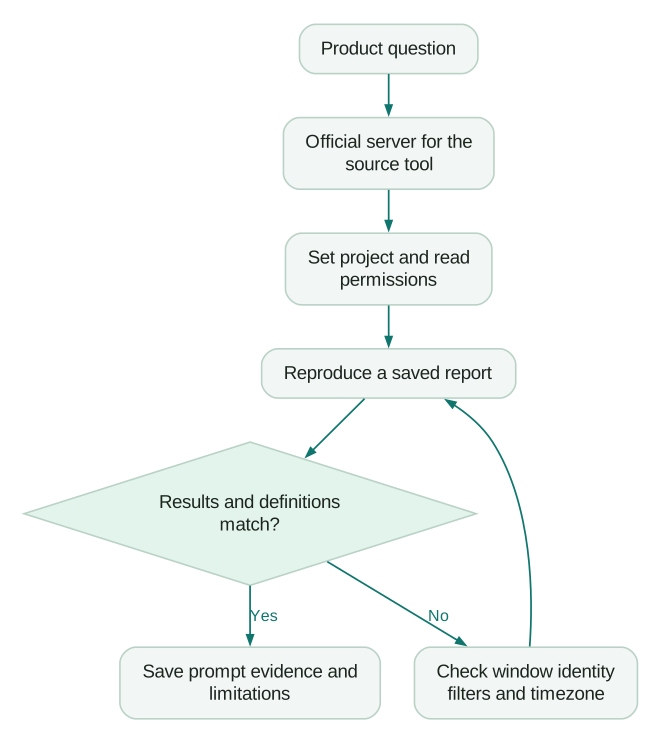
Reproduce one saved report with identical inputs before trusting a new narrative. Save the report URL, the prompt, the returned query definition and the expected result as a repeatable acceptance case.
- Fix the scope. Name the account, project, environment and report.
- Fix the population. Specify who enters the denominator and which internal, test or bot activity is excluded.
- Fix the time semantics. State cohort dates, timezone, conversion window and whether the cohort has finished that window.
- Fix the identity rule. Explain anonymous-to-identified handling and whether the unit is a user, device or account.
- Request the query before the conclusion. Require events, properties, filters, counting method and numerator/denominator.
- Compare the result. Reconcile discrepant records or aggregates before interpreting a change as customer behaviour.
- Save the limitations. Record unsupported query features, truncated responses and unavailable fields with the reusable prompt.
Amplitude specifically warns that dashboard chart queries can use chart defaults rather than saved dashboard filters. Mixpanel documents unsupported cohort filters and profile-history fields. Those are concrete checks when the assistant says it used “the same dashboard” but produces a different result. Amplitude troubleshooting and Mixpanel limitations.
Reproduce the saved activation report for the specified production project.
Use the supplied signup cohort, timezone, exclusion rules and seven-day
conversion window. State the user-identity rule and count unique users.

Before explaining the result, return the query definition, cohort size,
number activated, percentage and report link. List unsupported filters,
partial retrieval and any assumptions. If the MCP tool cannot represent
the saved report exactly, say which setting is unavailable and stop
before presenting the result as equivalent. Make no changes.
Read-only access still needs restraint. A query can retrieve individual profiles or replay-derived information if the server and role permit it. Keep personal information out of shared conversations when the job only needs aggregates.
Why can two tools report different activation rates?
Different windows and identity rules can change the numerator even when the intended cohort is identical. The right response is to reconcile the definitions, not average the two answers.
In this fictional example, an independently reconciled cohort contains 2,000 signups. Tool A reports 620 activations and Tool B reports 540. Both initially appear to answer “How many users activated?” but their definitions differ.
| Comparison step | Activations | Rate of the fixed 2,000-person cohort |
|---|---|---|
| Tool A's original 14-day window | 620 | 31% |
| Align A to B's seven-day window | 570 | 28.5% |
| Align the remaining identity treatment | 540 | 27% |
| Tool B's reconciled result | 540 | 27% |
The total gap is 80 activations, or four percentage points. Record-level checks attribute 50 to days eight through fourteen and a separate 30 to identity treatment after aligning the window. The groups are explicitly non-overlapping in this example: 50 + 30 = 80. This is illustrative arithmetic, not a benchmark or an observed vendor discrepancy.
Ask the assistant to produce those two reconciliations, using the matched signup cohort as the denominator throughout. In real data, identity changes can also change the denominator. If that happens, reconcile membership first rather than forcing the example's fixed 2,000 onto the result.
What should you fix before connecting a server?
Fix ambiguous events, inconsistent identities and undocumented metrics first. MCP changes how a question reaches the tool; it does not create the missing business definition.
Give the assistant readable event descriptions in Lexicon or the taxonomy, a maintained tracking plan, the production project and the rules for excluding tests. Keep business context concise enough to review. Distinguish a recorded fact from an inferred explanation, especially when an assistant is asked why a conversion rate moved.
Use the product analytics setup guide to assign owners for instrumentation, identity and report definitions. Then check the connection:
Checklist
- Three useful product questions and their owners are written down.
- The official server, project and data region are confirmed.
- An administrator reviewed default access and effective write permissions.
- A known report matches with the same window, timezone, filters and identity rule.
- Unsupported tools and partial results are reported explicitly.
- Call limits, AI-spend tools and external-client costs are understood.
- Prompts are saved beside the report links they reproduce.
- Any write to shared definitions or release controls has separate review.
If the first test exposes a measurement gap, request a product analytics implementation quote. If you need to locate the gap first, bring the two conflicting reports to a measurement audit.
Questions people ask
Can I connect more than one analytics MCP server at once?
Yes, in a client that supports multiple connectors and under its workspace rules. Keep each account and project explicit. Before comparing results, align cohort membership, identity, timezone, filters and conversion windows. Two tools can accurately answer different questions, so a disagreement does not by itself prove that either server is wrong.
Can an analytics MCP server change my tracking plan?
Some servers expose tracking-plan writes. Before granting them, assign an owner who can distinguish a schema proposal from an application change. Require the exact event or property, affected environment, intended downstream effect and a way to verify the result. Review the proposed diff before execution and save the resulting definition with the implementation ticket.
Is GA4 MCP enough for product analytics?
It can cover questions already represented well in your GA4 property, including supported report and funnel queries. Google's official implementation is experimental and read-only. For account-level retention, billing joins or product behaviour not captured reliably in GA4, use the appropriate product analytics model or warehouse rather than expecting a connector to supply missing evidence.
Can the assistant inspect individual users or session replays?
It may, if the tool and authenticated role allow it. Decide whether the question needs individual evidence before requesting it. For an aggregate conversion report, counts and definitions are usually sufficient. For a specific defect, restrict the investigation to the relevant session, keep the evidence in an approved workspace and avoid copying unnecessary personal details into shared chats.
Which product analytics MCP servers work with ChatGPT?
Amplitude, Mixpanel, Pendo and Contentsquare document ChatGPT routes, with tool or regional limitations. PostHog's official server README describes ChatGPT/OpenAI handling, although its main setup page lacks a dedicated ChatGPT tile. Verify the actual connection in your workspace; a compatible server does not establish that every region, tool or directory app is available.
Sources
- Amplitude: MCP server and permissions
- Amplitude: Pricing and MCP plan inclusion
- Mixpanel: MCP setup, tools, regions and limits
- PostHog: MCP server and AI-spend distinction
- PostHog: Official MCP implementation README
- Pendo: MCP connections and regional restrictions
- Contentsquare: MCP access and call allowances
- Google Analytics: Experimental MCP repository

Written by
Jafrin Akter AloData Engineer and Co-founder at Martechdevs and Growth and Analytics Partners
Jafrin writes practical guides to marketing technology, customer data, analytics and AI workflows. Martechdevs is a Growth and Analytics Partners company.