
Mixpanel Implementation Mistakes: Identity, Events and Counting Rules
Most misleading Mixpanel reports come from a mismatch between the business action, the event payload, the identity model and the report’s counting rules. Diagnose those layers in that order. Check the project’s ID Merge version, use stable user and occurrence identifiers, preserve event-time context and validate a small known journey before changing a funnel or trusting an aggregate conversion rate.
On this page

A funnel can look convincing while combining unrelated projects, counting retries as new actions or filtering old events by a user’s current plan. The chart does not know which interpretation the business intended. Your implementation must supply that meaning.
Start with one disputed decision, such as whether new workspaces reach their first successful export. A product analytics implementation should make the event sequence, identity and denominator inspectable. Rebuilding every dashboard before validating those foundations usually spreads the same mistake further.
What evidence should you collect first?
Choose a small set of known actions and record their expected results outside Mixpanel. Use application records where available: a workspace creation, a completed export job or a confirmed subscription change. Mark test activity explicitly and keep it out of production decision metrics.
For each action, capture the business reference, event name, occurrence time, user identifier, account or workspace identifier, sender and relevant payload fields. Then locate the corresponding ingested event. This produces a chain you can inspect from application success to reported conversion.
Do not begin by changing filters until the total looks plausible. A filter can conceal a duplicate sender or an identity split. Preserve the original report configuration, write down what is unexpected and find the earliest layer where the observed data differs from the specification.
For a software-as-a-service (SaaS) product, use the 20-event setup for the implementation sequence and the tracking-plan guide for its event contracts. This investigation needs a narrower starting point: one sentence describing when the disputed event happens and the fields required to answer the question. For an event rename, inventory its reports and consumers, define the old/new-name cutover, preserve occurrence IDs and test a report spanning the transition for omissions or double counting.
Are you using the correct identity model for this project?
Mixpanel documents separate Original and Simplified ID Merge systems. Check the project setting before following an implementation example; the mechanisms differ. Original ID Merge uses specific identity-linking events, while Simplified ID Merge uses the device and user identifiers carried by events. Original ID Merge and Simplified ID Merge have separate documentation for a reason.
For a Simplified project using a supported client software development kit (SDK), identify a known user with a stable internal ID and send an event after identification so the device and user identifiers appear together. Reset the SDK when the authenticated user leaves the session. Two distinct $user_id values cannot be merged through Simplified ID Merge. The Simplified identity guide describes these constraints.
Choose an ID that survives an email change. Keep third-party identifiers as separately named attributes when needed rather than making each integration invent a new primary user identity. A billing customer, a workspace and a person are also different entities; sharing a company does not make teammates one user.
Write down which service supplies the canonical user ID and how each sender obtains it. A browser using an application universally unique identifier (UUID) and a backend using an email address can create a split that no chart setting will repair.
| Project identity model | Linking mechanism | Transition to verify | Boundary to preserve |
|---|---|---|---|
| Simplified ID Merge | An event carries the device and known-user IDs together | Identify, then emit an event; reset at logout or session end | Two different known-user IDs are not merged |
| Original ID Merge | Its documented identity-linking events | Follow the Original guide’s explicit new-user boundary | Do not copy the Simplified reset recipe into this project |
The Original guide advises avoiding a reset on every logout because unnecessary anonymous identities can grow its identity cluster; reset at the documented explicit new-user boundary. Test shared-device separation deliberately. Original identity guidance.
Have you tested a shared device and a second device?
Test more than a clean signup. A realistic fixture includes an anonymous visit, login, a value event, logout, another user on the same browser and the first user signing in on another device.
The expected result is easy to state: the first user’s permitted anonymous and signed-in activity should connect according to the configured identity system, while the second user’s activity remains separate. The second device should connect to the first user only through the intended known identity.
Inspect the identifiers on each event and the resulting activity histories. The JavaScript SDK provides identify() and reset(); apply their transitions according to the project’s identity version. It also distinguishes stored profile updates from event tracking. Mixpanel’s JavaScript SDK documentation is the implementation reference.
Include session expiry and account switching in the test. A visible logout button is only one path out of an authenticated state. If your application can silently expire a session or switch organisations without leaving the page, the analytics state must follow the application’s actual identity and workspace context.
Allow for documented processing delays before declaring a failed merge from an aggregate chart. Keep the raw payload evidence so a delay can be distinguished from an event that never carried the required identity information.
Are browser and server events describing the same action twice?
Choose an authoritative sender for each business event. A backend job completion is often best emitted by the service that knows the job succeeded. The browser can separately describe the user opening the result. Those are two useful actions with different meanings.
Problems appear when both senders use the same success-event name for the same occurrence but create independent IDs and timestamps. A retry can create a similar duplicate if the event is rebuilt from scratch each time.
Mixpanel’s import application programming interface (API) defines duplicates using the combination of event name, time, distinct_id and $insert_id. Preserving only an order number in an arbitrary property is not equivalent to preserving that documented tuple. The import endpoint also provides strict validation and can ingest valid records from a partly invalid batch. The import API reference explains these behaviours.
Persist the event envelope when the business action completes. Retries should resend that envelope rather than manufacture a new occurrence time or identifier. With strict=1, a batch can return HTTP 400 after valid records were ingested. Inspect the failed records and fix validation errors before resubmitting those records; unchanged invalid payloads will fail again. Do not replay the whole batch with new identifiers. Import validation and retries.
The following Python example constructs repeatable payloads for a fictional export service. Its fixed UUID namespace and application-wide unique job reference produce the same occurrence ID on retry. If job numbers are unique only inside a workspace, include the workspace in the occurrence key before deploying this pattern.
from uuid import UUID, uuid5

NAMESPACE = UUID("b45bc477-089c-48de-9e84-cfe901997a4e")

def export_event(job_id, user_id, occurred_at, workspace_id):
    return {
        "event": "Export Completed",
        "properties": {
            "distinct_id": user_id,
            "$user_id": user_id,
            "time": occurred_at,
            "$insert_id": str(uuid5(NAMESPACE, "export-completed:" + job_id)),
            "workspace_id": workspace_id,
            "job_id": job_id,
        },
    }

first = export_event("job-81", "user-17", 1791936000, "workspace-4")
retry = export_event("job-81", "user-17", 1791936000, "workspace-4")
next_job = export_event("job-82", "user-17", 1791936060, "workspace-4")
assert first == retry
assert first["properties"]["$insert_id"] != next_job["properties"]["$insert_id"]
This example represents an authenticated backend event using the agreed canonical user ID; it does not establish an anonymous-device link. Here occurred_at is a Unix timestamp in seconds taken from the completed business record. Do not replace it with the retry time. In production, prefer storing the entire envelope in the application’s durable delivery process; the helper alone does not provide transactional delivery or protect against inconsistent input values.
Are changing properties rewriting the meaning of old events?
Decide whether a property describes the user now or the user when an action occurred. A current profile property such as plan=enterprise can be useful for contacting today’s enterprise users. It answers a different question from the plan on which an export happened three months ago.
Mixpanel’s regular profile properties represent the latest state and can be joined to historical events in reports. Event properties preserve the context sent with the event. The product also supports historical profile values through its documented Warehouse Connectors capability, as a paid add-on. The user-profile documentation explains the distinction.
| Question | Appropriate data | Mistake to avoid |
|---|---|---|
| Which users are on Enterprise today? | Current profile state | Treating the current plan as a historical snapshot |
| Which plan was active at first value? | Explicit event-time property or configured historical value | Relabelling old events after an upgrade |
| Which workspace owned this export? | Workspace context on the occurrence | Reusing stale context after an organisation switch |
For a plan-at-activation analysis, include an explicitly named event property such as plan_at_activation on the activation event, or use an intentionally configured historical property model. Do not label a breakdown “plan at signup” if it uses a mutable current profile field.
Audit persistent super properties too. They are convenient for context that should accompany events, but the application must update them when that context changes. A workspace switch can leave a stale workspace ID attached to later activity if the analytics state is not updated. Prefer an explicit event field for context whose correctness is critical to the analysis.
Does the funnel allow unrelated objects to form a conversion?
A user-level funnel can count a conversion without proving that the same job completed. For example, a user starts export job A, later starts job B and completes only job B. That person may count as converted while job A remains incomplete.
If the intended question concerns the same job, both steps need the same job reference and the report must enforce that continuity. Mixpanel supports holding an event property constant through funnel steps. Its default counting table describes Uniques as the first Step 1 entry, with up to one entry per breakdown segment. Totals permits re-entry after the previous attempt ends through conversion, timeout or exclusion. Sessions counts qualifying sessions. The guide also documents Optimized Re-entry: when enabled, it evaluates later entries while an earlier attempt remains active. Record that setting alongside the window and property continuity; a counting-method label alone does not establish one attempt per job. Funnels advanced concepts documents these settings.
Write the report definition in business terms first. “People who eventually completed any export” and “attempts that completed successfully” are both useful metrics. One describes adoption; the other describes operational success. Keep separate names, denominators and owners.
The following fictional three-user fixture uses completed observation windows and distinct job IDs. User A starts and completes job 1 before starting and completing job 2. User B never completes job 3; user C completes job 4. All completions fall inside the chosen window.
| User | Jobs started | Jobs completed | Completed any job? |
|---|---|---|---|
| A | 2 | 2 | Yes |
| B | 1 | 0 | No |
| C | 1 | 1 | Yes |
| Total | 4 | 3 | 2 of 3 users |
The user success rate is 2/3, approximately 66.7%. The job success rate is 3/4, or 75%. Neither result corrects the other: one measures adoption, the other completion reliability. Specify the funnel’s conversion window, order, continuity, filters and re-entry rules before expecting a report to reproduce the job result. If jobs overlap, calculate the job-grain result independently and inspect how the selected report handles those attempts.
Are environments and timestamps contaminating the result?
Check the project token and ingestion endpoint used by each application environment. A production frontend can still be paired with a staging backend sender. Test data mixed into production can make a new feature appear active before real users see it.
Review timestamps at the source, in the emitted payload and in the report timezone. Seconds and milliseconds can be confused during integration work, and replacing occurrence time with delivery time shifts delayed activity into the wrong period. Document units at every boundary rather than relying on the field name alone.
For a release comparison, preserve the application version or experiment assignment as appropriate event context. A date cut alone may mix old and new client versions, particularly in mobile applications or long-lived browser sessions. Do not attribute every change after deployment to the new interface until the relevant population is identified.
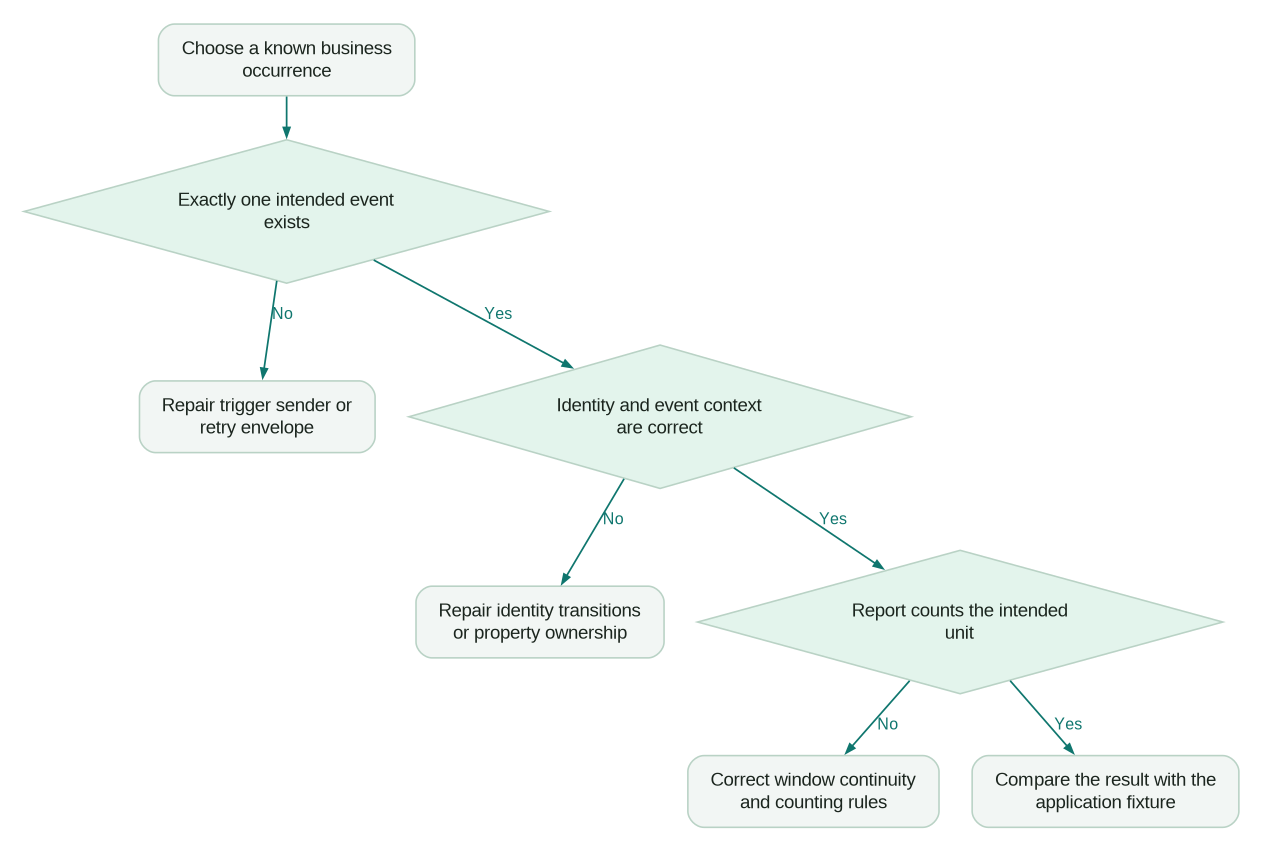
Read diagram as text
- Choose a known business occurrence to Exactly one intended event exists.
- Exactly one intended event exists to Repair trigger sender or retry envelope: No.
- Exactly one intended event exists to Identity and event context are correct: Yes.
- Identity and event context are correct to Repair identity transitions or property ownership: No.
- Identity and event context are correct to Report counts the intended unit: Yes.
- Report counts the intended unit to Correct window continuity and counting rules: No.
- Report counts the intended unit to Compare the result with the application fixture: Yes
What is enough evidence to close the issue?
A repaired chart is only one part of the evidence. Keep the controlled fixture, raw event samples and report definition together so another person can reproduce the conclusion.
Checklist
- The project’s identity version and canonical user identifier are documented.
- Login, logout, session expiry, shared-device and second-device journeys have explicit expected outcomes.
- Each critical business event has an authoritative sender and stable retry envelope.
- Event-time properties are distinguished from current profile state.
- Object continuity, conversion window and counting method match the metric’s business definition.
- The controlled fixture reconciles to application records before aggregate reporting is accepted.
When the underlying issue spans systems, use the identity-merge guide to map the wider relationship between identifiers. Review Mixpanel pricing separately if unnecessary capture or duplicate delivery also affects usage. Record what the bad data cost before the fix, including the affected decision and investigation time. Cost reduction is useful, but close the issue only when the report represents the intended business behaviour. If corrected data still cannot answer the required question, compare Mixpanel alternatives against the same fixture.
Keep reading
Browse all Product Analytics guides
 Martech AI
Mixpanel MCP server: connect Claude and get product answers you can check
Connect Mixpanel MCP to Claude, pick the right region, check permissions and build product analyses with clear definitions and counts you can verify.
Jafrin Akter AloLast updated 12 min read
 Product Analytics
Migrating from GA4 or Heap to Mixpanel or Amplitude
Plan a reliable analytics migration with export checks, identity mapping, stable import IDs, historical backfills, parallel reporting and a cutover checklist.
Jafrin Akter AloLast updated 15 min read
 Product Analytics
Mixpanel Pricing in 2026: Growth Tiers, Add-ons and What Your Team Will Pay
Mixpanel is free up to 1M events a month. On Growth, 5M events cost $613 a month or $438 billed yearly, up to 20M. See add-ons, overages and team budgets.
Jafrin Akter AloLast updated 16 min read
Product analytics
See the implementation scope, deliverables and acceptance checks.
Questions people ask
How should staff impersonation affect customer-adoption metrics?
Mark impersonated sessions explicitly and keep the staff actor separate from the affected customer and workspace. Support activity can help diagnose a problem without representing customer adoption. Decide which events belong in product-health metrics and which belong only in an audit trail. Replay a normal customer action and an impersonated action through the same reports, checking their identities, context and exclusions before using the combined totals.
What if a completed job is later reversed or invalidated?
Preserve the original completion and record the later reversal as a separate business occurrence with its own timestamp and reference. Decide whether the metric measures initial success or success still valid after a defined period. A report that answers the first question should not silently become the second. Keep the relationship between the two occurrences inspectable for any corrected outcome calculation.
Can a mobile app send a valid completion several days late?
Design for the original occurrence time and the delivery delay separately. A late event can legitimately change a historical result, but it should not be reassigned to today merely because the device reconnected. Keep the source payload, check the selected ingestion route’s acceptance rules and mark recent reporting periods as provisional where delayed arrivals are expected. Compare equal maturity windows when evaluating releases.
Should an automated job make its service account an active user?
Define whether the metric measures human adoption or useful account-level output. A scheduled job can deliver value without a person being active that day. Preserve the initiating person, executing service and workspace as separate fields where available. Count the outcome at the appropriate account or job grain, and exclude service identities from a human-user denominator unless the metric deliberately includes them.
How do we investigate a metric that changes only for one customer account?
Compare that account’s membership, entitlements, application version and event senders with an unaffected account. Check whether an integration, workspace transfer or unusual workflow changes the payload or denominator. Use authorised raw occurrence samples to trace the difference, while keeping customer data out of general debugging logs. A global tracking change is rarely the right first response to an isolated account-specific discrepancy.
Sources
- Mixpanel, Original ID Merge
- Mixpanel, Simplified ID Merge
- Mixpanel, JavaScript SDK
- Mixpanel, Import events API
- Mixpanel, User profiles
- Mixpanel, Funnels advanced concepts

Written by
Jafrin Akter AloData Engineer and Co-founder at Martechdevs and Growth and Analytics Partners
Jafrin writes practical guides to marketing technology, customer data, analytics and AI workflows. Martechdevs is a Growth and Analytics Partners company.