
How to build a tracking plan, with a template
Data Engineer and Co-founder, martechdevs
Last updated 11 min read
A tracking plan defines the customer actions you need to measure, the exact conditions that produce each event, the properties attached to it and the people responsible for keeping it reliable. Start with decisions the business needs to make. Work backwards to the minimum evidence required, then specify and test that evidence from the application through to the report or workflow that uses it.
Last updated: 9 September 2026.
“Track onboarding” leaves too much room for interpretation. One developer records a button click. Another records a successful API response. Marketing counts both as completed setup. The dashboard looks precise while the underlying question remains unanswered.
A useful plan makes the ambiguity visible before implementation. It tells engineering when an event should fire, helps analysts count the right unit and gives growth teams a reason to trust the audience entering a journey. It also tells everyone what should happen when the event is missing, duplicated or late.
Use the template below for one important journey first. Establish what each event means before distributing it across tools.
Start with a decision, then choose the events
Write the decision in a sentence: “We need to decide which part of connecting a data source prevents eligible trial workspaces from producing their first report.” This is specific enough to identify the necessary evidence.
For that question, you may need workspace creation, connection attempts, confirmed connections, classified failures and successful report generation. You probably do not need every navigation click in the application.
Give each proposed event a consumer. A consumer can be a defined metric, an investigation, an experiment or an operational workflow. “It might be useful one day” should go into a backlog with a question attached, rather than becoming permanent instrumentation by default.
Choose the journey before drawing its funnel. The guide to identifying key customer journeys covers how to select a customer outcome and establish whether its friction is worth addressing.
For every decision, write down:
- Population: who can reasonably complete the action, including exclusions such as employees and test accounts.
- Unit: person, workspace, account, session or order.
- Outcome: the observable result that counts as success.
- Window: how long the customer has to complete it.
- Action: what someone would change after seeing the result.
These definitions prevent an event inventory from becoming a substitute for a measurement strategy. A plan with fifteen well-defined events can answer a specific business question better than hundreds of undocumented clicks.
Separate the tracking plan from the data dictionary
The tracking plan specifies what should be collected and why. A data dictionary explains the fields and models available to people using the data. An observed event catalogue shows what the collection system has actually received.
All three are useful. Their disagreement is useful too: an event arriving in production but missing from the plan is something to investigate.
Twilio Segment's tracking-plan documentation describes a specification for events and properties and validation of incoming events against that specification. That is one implementation option. A small team can start with a versioned document and engineering checks, provided the document is connected to releases and someone maintains it.
Avoid creating three competing definitions. Link the event's specification to the warehouse field, metric definition and destination mapping. If “active workspace” changes, you should be able to find the events, models, reports and campaigns affected by the change.
Write an event contract that another developer can implement
An event name is only the first field. The rest of the contract should answer the questions a developer or analyst would otherwise have to guess.
Define the trigger and the non-trigger
For Data Source Connected, a possible trigger is: the backend confirms that the credentials work and persists the connection as available for use.
Opening the connection modal does not qualify. Neither does submitting credentials, receiving an error or refreshing a success page. These can be separate events if they answer a real question.
Choose the source that can establish the fact. A backend event is appropriate for a persisted connection. A browser event may be appropriate for an impression that only the browser can observe. When both sides instrument a journey, give them distinct meanings or an explicit reconciliation rule.
Define the entity and the identifiers
Keep the actor and the affected business object separate. A user connects a source inside a workspace. Later, an automated process may reconnect it without a human actor.
Use stable internal identifiers where possible. Record the workspace on the event at the time of the action. Reconstructing it later from the user's current workspace can assign historical activity to the wrong account after they switch teams.
An event ID identifies a particular occurrence. A connection ID identifies the connection. A user ID identifies the person. Treating these as interchangeable makes retries, repeated actions and distinct-customer counts difficult to interpret.
Specify properties beyond their types
For each property, record its meaning, type, allowed values, requirement and handling of missing data. A field called value with type number is still ambiguous. Does it represent cents, dollars, recurring contract value or money collected after refunds?
Segment's Track specification distinguishes the event name from its properties and defines reserved property meanings. If you use a vendor's reserved field, follow that meaning. Keep a clearly named business field when your definition differs.
For enumerations, decide how a new value reaches production. Silently mapping an unknown connector to an existing connector creates convincing but incorrect reports. An explicit unknown value, an alert or rejection may be more appropriate, depending on the field and downstream use.
A copyable tracking-plan template
This is an illustrative specification for a reporting product. It is a document format your team can adapt, not a drop-in configuration for an analytics SDK.
event: Data Source Connected
version: 1
status: proposed
decision: Identify obstacles to first useful report
business_owner: Product lead
implementation_owner: Integrations team
data_owner: Analytics owner

trigger: Backend validates access and persists a usable connection
must_not_fire:
  - Connection modal opened
  - Credentials submitted but not validated
  - Validation failed
  - Existing success page refreshed
source: Backend connection service
grain: One successfully completed connection operation

identifiers:
  event_id: Stable ID for this occurrence; reused on delivery retry
  connection_id: Internal connection ID
  workspace_id: Workspace owning the connection at event time
  actor_user_id: Internal user ID; null for an automated operation

properties:
  connector_type:
    type: string
    required: true
    allowed_values: [demo_connector, warehouse_connector]
  connection_kind:
    type: string
    required: true
    allowed_values: [initial, reconnection]
  initiated_by:
    type: string
    required: true
    allowed_values: [user, system]

time:
  occurred_at: UTC timestamp of successful persistence
  received_at: UTC timestamp assigned at ingestion

delivery:
  retry: Reuse event_id for the same occurrence
  deduplication: Keep one canonical occurrence per source and event_id
  late_arrivals: Include in event-time reporting after the next refresh

destinations:
  warehouse: Canonical event with restricted identity access
  product_analytics: Approved IDs and event properties
  crm: Derived workspace connected status, not the raw event stream

exclusions:
  - Credentials and access tokens
  - Raw connection strings
  - Free-text error bodies

acceptance:
  - A successful initial connection produces one canonical event
  - A failed validation produces no success event
  - Retrying delivery does not increase the canonical event count
  - Reconnection is distinguishable from initial connection
  - An automated operation permits a null actor_user_id
Replace the sample connector values with your actual supported values. Add links to the implementation ticket, validation evidence and the metric that consumes the event. Move the status from proposed to approved, implemented and verified as the work progresses.
The template deliberately separates a repeated business operation from a delivery retry. Reconnecting a source can be a new event. Sending the same original event again after a timeout should not create a second canonical occurrence.
For a first-connection activation metric, filter for the first qualifying initial connection per eligible workspace. Do not simply count every success event. That counting rule belongs in the metric definition linked from the plan.
Adapt the contract to SaaS, apps and ecommerce
The structure stays useful across products. The business meaning changes.
For SaaS, distinguish an invitation sent from an invitation accepted, and a report requested from a usable report completed. Record the account or workspace when the decision is account-level. Document whether automated background activity qualifies as customer use.
For a mobile app, specify the expected behaviour when events are queued offline or come from older releases. Keep both occurrence and receipt times when available. Decide how reporting handles late arrivals and device-clock anomalies. A chart based on receipt time answers a different question from a chart based on when the activity happened.
For ecommerce, separate checkout activity from completed purchases and refunds. Google specifies purchase and refund events, transaction identifiers and item data in its GA4 ecommerce documentation. It also specifies event-level currency when sending monetary value. Map your order model into those documented fields rather than assuming your internal names will populate standard reports correctly.
Keep the payment or order system as the reconciliation reference for financial events. Browser delivery can fail, customer consent can limit collection and a payment may complete outside the browser session. Explain these coverage differences before someone treats an analytics total as the accounting ledger.
Design destination mappings and data access explicitly
An event being useful in your warehouse does not make every field appropriate for every destination.
For each destination, specify the accepted event name, property mapping, identity field, permitted data and expected use. A CRM may only need first_connected_at and connected_source_count. Sending every technical event to it adds volume without improving the action a salesperson can take.
Keep names and email addresses out of ordinary analytics parameters, URLs, search terms and free-text fields, following Google's PII guidance. GA4's separately configured user-provided data collection has its own supported fields, policy requirements and setup. It is not permission to place personal details in arbitrary event properties. Apply each destination's requirements and your own collection policy before forwarding data.
Document consent and suppression behaviour as part of the integration. Specify what is collected under each state, which destinations receive it and how a change propagates. An analytics user ID does not, by itself, establish permission to send marketing messages.
The single customer view guide explains how to connect approved identifiers and derived fields without flattening every person, workspace and subscription into one record.
Plan for retries, changes and older clients
Write a deduplication rule where the canonical data is built. Do not assume every destination has the same duplicate-detection window or uses the same key.
For example, use a stable occurrence ID generated by the source and preserve it on retries. If an SDK generates a fresh ID for every retry, a warehouse rule based on that ID cannot recognise those deliveries as the same event. Confirm the actual behaviour of your collection path.
Treat breaking semantic changes as changes to the contract. Renaming a button does not necessarily change an event's meaning. Changing Report Created from “job accepted” to “report successfully generated” does.
Decide whether to introduce a new event or a new version, how long old clients remain supported and how analysts distinguish the definitions. Segment's event-versioning guidance supports multiple event definitions and documents the integer context.protocols.event_version value used for validation. This is specific to Segment Protocols; a generic version field does not automatically activate that behaviour.
Keep a change log with the effective release, owner and affected consumers. Where definitions cannot be reconciled, show a break in the trend instead of stitching incompatible numbers into a smooth line.
Verify the whole path before relying on the event
Seeing a payload in a browser debugger is one checkpoint. It does not establish that the warehouse received it, the transformation preserved it or the report counted it correctly.
Use a controlled test account and record the expected result before executing the action. Follow its identifier through collection, ingestion, transformation and the destination that will use it.
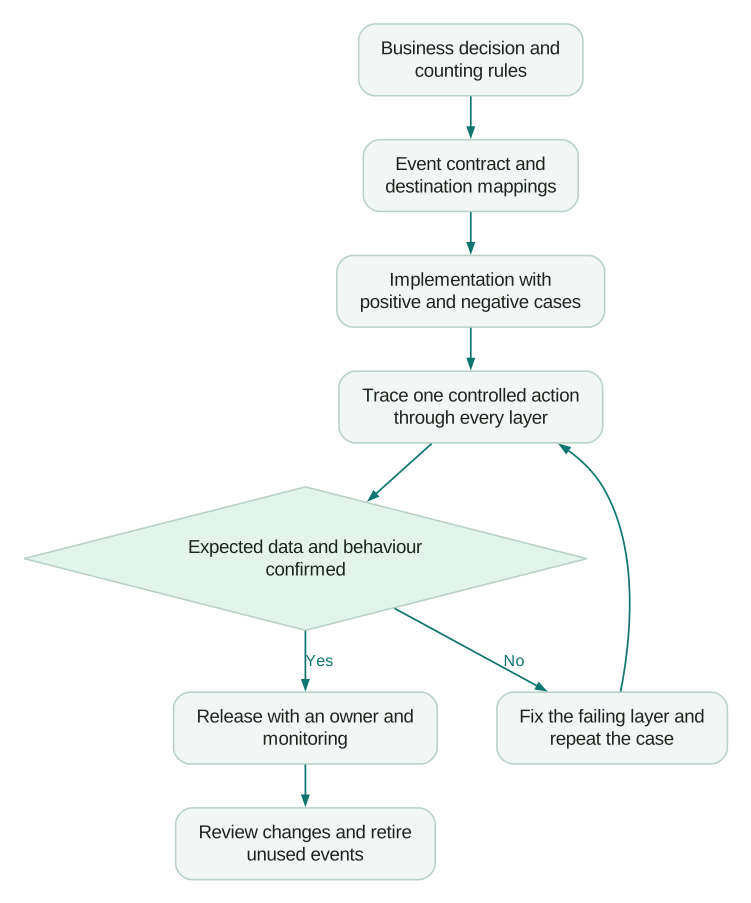
Test a normal success, a normal failure, a repeated action, a delivery retry and a missing optional field. Add account switching, offline use or older clients where the product supports them. Test prohibited fields to confirm that the intended filtering or rejection actually occurs.
For the template example, two deliveries with the same occurrence ID should produce one canonical event. Two genuine connection operations with different IDs should remain two events, while the first-connection metric still counts the workspace once.
Record the observed payload, canonical record and resulting metric or workflow state. If a release changes important tracking, include this evidence in the release acceptance process.
Keep the plan useful after launch
Assign a business owner who can explain why the event exists and a technical owner who can fix its collection. An analyst or data owner should maintain the counting rules and monitor the resulting dataset. One person can hold several roles in a small team; the responsibilities still need names.
Monitor required-field completeness, unrecognised values, duplicate occurrences, delivery delay and reconciliation differences. Interpret volume changes alongside traffic, releases and product availability. A lower event count can reflect fewer customers, a product defect or broken instrumentation.
Choose alert thresholds from the consequences of the event and observed behaviour. A missing purchase stream deserves a different response from an optional tooltip impression. Avoid copying an arbitrary “acceptable error rate” into every event.
Review the plan when the product, metric or destination changes. Retire unused events only after checking their consumers. Preserve historical definitions so future analysis can explain what the data meant at the time.
Tracking-plan acceptance checklist
- Every event supports a named decision, metric or workflow.
- The population, counting unit and observation window are defined.
- The trigger and conditions that must not trigger it are explicit.
- Actor IDs and business-object IDs are separate.
- Required properties include meanings, types and allowed values.
- Monetary fields specify units, currency and the business definition.
- Retry, deduplication and late-arrival behaviour are documented.
- Destination mappings and permitted fields have been reviewed.
- Positive, negative and repeated-action cases have been traced end to end.
- The report or workflow produces the expected result for a controlled example.
- Changes have a versioning or migration policy and named owners.
- Monitoring and the response to a failure are assigned.
Begin with one journey your team already wants to improve. Fill in its event contracts and trace a controlled action through to the resulting report. If you need help implementing the plan, our analytics and tracking service connects those definitions to verified collection and destination mappings.
Questions people ask
What is a tracking plan?
A tracking plan is the agreed specification for collecting behavioural data. It defines the events, their triggers, properties, identities, destinations, owners and verification rules. Its purpose is to make a business question measurable in a consistent way.
Who should own the tracking plan?
Give one person responsibility for keeping it current, with named business and implementation owners for each event. Product or growth explains the decision; engineering implements the trigger; the data owner verifies the counting rules and downstream use. A small team can combine roles without leaving those responsibilities implicit.
How is a tracking plan different from a data dictionary?
The plan defines what should be collected and the conditions for collection. The dictionary explains the data available to consumers, including fields and derived models. Link them so a change to an event can be traced to the metrics and workflows it affects.
Which events should a SaaS product track first?
Start with the events required to understand one important customer outcome, such as first useful result or successful renewal. Include the eligibility and failure evidence needed to interpret that outcome. Do not copy another product's event list without checking whether the same actions represent value in yours.
Do we need a paid tracking-plan tool?
You can begin with a versioned document, implementation tickets and repeatable checks. A dedicated tool becomes more useful when many teams, event producers or destinations make manual coordination unreliable. Evaluate validation, change management and ownership needs before buying it.
Sources
- Twilio Segment, Protocols Tracking Plan, documentation accessed 9 September 2026.
- Twilio Segment, Spec: Track, documentation accessed 9 September 2026.
- Google Analytics, Measure ecommerce, documentation accessed 9 September 2026.
- Google Analytics, Best practices to avoid sending personally identifiable information, documentation accessed 9 September 2026.
- Google Analytics, User-provided data collection, documentation accessed 9 September 2026.
Written by
Jafrin Akter AloData Engineer and Co-founder, martechdevs
Jafrin Akter Alo is a data engineer and co-founder of martechdevs, where the team has delivered 74+ martech, data and growth stack implementations.