
PostHog Implementation Mistakes: Capture, Identity and Replay
Data Engineer and Co-founder, martechdevs
Last updated 10 min read
A reliable PostHog implementation needs separate decisions for navigation events, business outcomes, identity and session recording. Most problems appear when automatic collection is assumed to handle all four. Check who owns each event, how authentication changes identity, what replay can expose and which sessions qualify for recording. Then validate a complete journey with known outcomes and synthetic privacy probes.
Last updated: 11 September 2026.
Installing a snippet is the start of the work. A useful implementation lets a product manager distinguish a failed workflow from a tracking failure, and lets an engineer reproduce that distinction without guessing at configuration.
This guide focuses on web implementations. Mobile SDK behavior and supported options differ, so do not copy browser settings into a native application without checking its SDK documentation.
A product analytics setup should leave the team with an event ownership map and repeatable acceptance journeys. Those artifacts are more valuable than a dashboard full of activity that nobody can explain.
Mistake 1: Letting automatic and manual pageviews compete
PostHog's JavaScript configuration separates interaction autocapture from pageview capture. It supports capture_pageview: 'history_change' for single-page applications; the effective default depends on the selected SDK defaults. JavaScript configuration.
If a framework integration captures route changes and a custom router effect also sends $pageview, one navigation can create two pageviews. Turning off click autocapture will not resolve that duplicate path.
Find every initialization and capture path in the application, including tag-manager snippets, framework providers and imported client singletons. Choose one owner for pageviews. Then record whether a pageview means a document load, a route transition or another explicitly defined view.
Test a direct load, a client-side navigation, a browser-back action and a page refresh. Keep the expected count separate from implementation details such as component renders. A component can render several times without the user seeing a new logical page.
Do not suppress every repeated URL blindly. A user can legitimately return to a page, while a query parameter change may or may not represent a new view. Define that behavior before writing a deduplication workaround.
When upgrading the SDK, review the selected defaults and explicit settings together. A configuration copied from an older example can behave differently from a current framework guide even when both initialize successfully.
Mistake 2: Treating interaction capture as business confirmation
PostHog can automatically collect supported clicks, form interactions and navigation events. Those interactions are useful evidence about the interface. They do not establish that the application successfully completed an operation. Autocapture documentation.
For example, an export button can be clicked while the request later fails. A form can be submitted while validation rejects the data. An apparent conversion based on those interactions measures intent rather than the promised outcome.
Use different names for the stages. An illustrative export flow could contain export_requested, export_succeeded and export_failed, with a stable export_job_id linking them. Decide which system owns each event and what application state permits it to be sent.
The backend should own a backend-confirmed success. If the browser also needs a success event for another purpose, give it a distinct meaning rather than sending the same business event twice.
Include retry behavior in the contract. A retry of one job is not necessarily a new business attempt, while a deliberately created second job is. Preserve enough context to explain the distinction in the destination and your application records.
Our event naming guide helps make the difference visible. The strongest event names describe a specific state change rather than the UI element that happened to initiate it.
Mistake 3: Identifying users before a trustworthy identity exists
PostHog's frontend identification connects an anonymous identity with a stable authenticated identifier. Backend events need the same identifier if they are intended to describe that person. Its documentation also recommends resetting on logout to separate future activity from the logged-out user. Identifying users.
Do not call identify with a shared placeholder while authentication loads. Values such as a generic guest label can combine unrelated people if they are treated as one distinct ID. Wait until the application knows the authenticated identity.
Use a stable internal user key. Keep workspace and project keys as separate context. One person can operate in several accounts, and one account can contain several people.
For backend capture, derive the authenticated user from trusted application state. An analytics identifier passed by a browser is context, not permission to access that person's data.
Test these transitions as a single sequence: anonymous visit, signup, authenticated operation, logout, anonymous visit and a different person's login. Then test the original person on a second device. Inspect the events attached to each identity, not just the number of profiles.
Reset behavior must be deliberate. Resetting on every route change can fragment a valid journey; failing to reset on logout can attach later activity to the wrong person. Record the actual SDK method and transition order used by your application.
Mistake 4: Confusing anonymous events with a privacy policy
In PostHog, anonymous versus identified events concerns person-profile processing and available analysis. The JavaScript SDK and backend SDKs can have different defaults. In particular, backend capture is identified by default, and suppressing person processing does not make an already linked distinct ID unrelated to its person. Anonymous versus identified events.
That classification does not tell you whether a custom property contains information your team intended to exclude. A supposedly anonymous event can still be badly designed if someone adds a private document title to its properties.
Create a property allowlist for decision-critical custom events. For a report export, the approved context might include job ID, workspace ID, format and a bounded result code. It may not need the report's contents, recipient address or raw exception text.
Keep uncertainty explicit. If the event lacks a required workspace ID, treat that as a schema failure to investigate rather than silently assigning it to a generic workspace. A generic fallback can make the report look complete while collapsing unrelated activity.
The tracking plan should identify which fields are required, which are optional and which must never be sent. That makes review possible at the code boundary instead of relying on people to notice an unusual property after ingestion.
Mistake 5: Assuming masked inputs make the whole replay safe
PostHog documents input masking and text masking separately. For web replay, general text is not masked by default. It also provides element blocking and URL redaction controls. Masking runs before the relevant data is sent. Replay privacy controls.
A customer name can appear in an input, a heading, a notification, a URL or an attribute. Masking one surface does not prove the others are excluded. Likewise, a replay setting is not automatically a rule for every custom analytics property.
Use synthetic probes in a test account. Put clearly fake marker strings in an input, a displayed heading, a route query parameter and a custom event property. Use different strings for each surface so a leak can be traced to its source.
For example, QA_INPUT_ONLY_817 and QA_HEADING_ONLY_817 are harmless markers, not real customer data. Perform the journey, inspect outbound payloads and inspect the stored event or replay that the team will actually use. Confirm both that excluded markers are absent and that safe structural context remains useful.
Inspect custom attributes too. Autocapture can be configured to include selected attributes, and custom ignore lists can replace defaults. Review the effective list rather than assuming an existing exclusion remains active after a new configuration is added. Autocapture controls.
Repeat the probe after changes to rich-text editors, search results and notification components. These surfaces often move information from a masked input into ordinary displayed text.
Mistake 6: Treating replay triggers as page-level exclusion rules
Current PostHog recording controls combine trigger groups, matching conditions, sampling and minimum duration. The documentation is explicitly scoped to current defaults and describes differences from earlier configurations. A URL trigger starts recording; the recording can continue after the visitor leaves that URL. Recording controls.
Therefore, “start on the setup page” does not mean “record only the setup page.” If the next page contains information that should not be recorded, apply the appropriate masking, blocking or programmatic control and verify it.
Sampling introduces another common diagnostic mistake. If a session is not selected, an analytics event can exist without an associated recording. That absence does not establish that replay is broken or that the action never occurred.
For QA, use a dedicated test configuration with known eligibility and a controlled recording rate. Test the intended trigger, a nonmatching journey and a journey that leaves the matching area. Restore the planned production rules after validation.
Keep the distinctions visible in incident reviews. “No replay available” can mean not eligible, not sampled, below the duration threshold, blocked capture or another failure. The investigation needs those possibilities before drawing conclusions from the missing recording.
Mistake 7: Checking only the first consent choice or HTTP status
PostHog's collection controls include opt-in and opt-out behavior for the current device. The documentation explains that consent storage can be separate from analytics identity storage; a choice in one origin is not automatically shared with another. Data collection controls.
Implement the policy your business has chosen and test the full lifecycle. In a setup that requires permission before collection, a fresh visit, rejection, acceptance, withdrawal and return visit should each have an explicit expected result. Test every participating subdomain.
Do not use a successful SDK call as evidence that the policy was followed. Inspect the relevant network traffic and stored state. Also verify that server-side capture follows the same intended rules where applicable; browser opt-out does not configure your backend code by itself.
Receipt needs its own check. PostHog's API documentation says capture can return HTTP 200 while a project is over its billing quota, with limited resources described in the response body. API overview.
That makes “the endpoint returned 200” an incomplete ingestion test. Monitor the destination, ingestion warnings and billing state alongside application delivery logs. Our PostHog pricing guide explains why limits are operational decisions as well as spending controls.
Build one acceptance journey with explicit expected outcomes
Consider a synthetic report-export journey in a test environment. The tester opens a workspace, navigates to a report, attempts an export that fails validation, corrects the input and successfully exports once.
The expected outcome is two export attempts, one failure and one success. Automatic clicks may add diagnostic events, but they must not turn the business success count into two.
Use a specification such as this for the test runner or manual QA record. It is an original test manifest, not a PostHog API payload:
{
  "case_id": "export_retry_817",
  "environment": "test",
  "expected_business_events": {
    "export_requested": 2,
    "export_failed": 1,
    "export_succeeded": 1
  },
  "expected_pageviews": 2,
  "required_properties": ["export_job_id", "workspace_id"],
  "forbidden_probe_values": [
    "QA_INPUT_ONLY_817",
    "QA_HEADING_ONLY_817",
    "QA_QUERY_ONLY_817"
  ]
}
The pageview count assumes one direct workspace load and one route change to the report, with no other navigation. Adjust it when the journey changes. The failed and successful attempts should have distinct job IDs if your application creates a new job for the corrected attempt.
Save the application outcome, outbound event sample, received business events and replay review together. A defect should then have a location: application state, capture, identity, transmission, ingestion or interpretation.
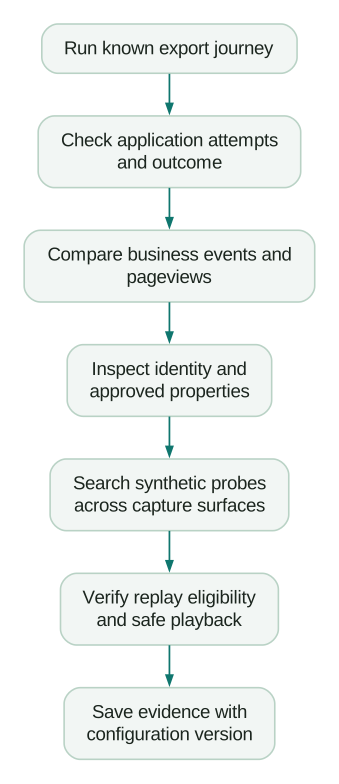
Before release:
Checklist
- One owner captures each logical pageview and each business outcome.
- Failed operations do not produce success events.
- Anonymous, login and logout transitions preserve the intended identities.
- Synthetic privacy probes stay out of every excluded capture surface.
- Recording triggers are tested after leaving the matching page.
- Permission changes and return visits match the intended collection policy.
- Destination receipt is checked beyond a successful HTTP response.
Run the same journey after authentication, routing, replay or SDK changes. A small repeatable specification gives the team a stronger foundation than repeatedly eyeballing a dashboard after every release.
Questions people ask
Does disabling autocapture stop all PostHog tracking?
No. Interaction autocapture, navigation capture, custom events and replay have separate controls. Review the effective configuration for each collection path. If the goal is a complete opt-out, use and test the documented collection controls.
Why does one route change create two pageviews?
Two collection paths may be reporting the same logical view, such as automatic history tracking and a manual router effect. Find the owner of each emitted event before adding a suppression rule. Test direct loads, back navigation and refreshes after the fix.
Why is an event present but its replay missing?
The session may not have qualified for recording or may not have been selected by sampling. Duration thresholds and recording configuration can also matter. Investigate eligibility separately from whether the analytics event arrived.
Can we use an email address as the identity key?
The more useful default is a stable internal user identifier that does not change when an email changes. Whatever key you choose, use it consistently across browser and backend events. Keep account identifiers separate so multiple colleagues do not collapse into one person.
Are the sample checks enough to approve every implementation?
They cover a useful diagnostic journey, not every application or data surface. Extend them to the workflows, platforms and collection rules your product actually uses. Preserve concrete expected results so additional tests remain meaningful rather than becoming a generic checklist.
Sources
- PostHog: JavaScript configuration. Accessed 11 September 2026.
- PostHog: Autocapture. Accessed 11 September 2026.
- PostHog: Identifying users. Accessed 11 September 2026.
- PostHog: Anonymous versus identified events. Accessed 11 September 2026.
- PostHog: Replay privacy controls. Accessed 11 September 2026.
- PostHog: Control which sessions are recorded. Accessed 11 September 2026.
- PostHog: Data collection controls. Accessed 11 September 2026.
- PostHog: API overview. Accessed 11 September 2026.
Written by
Jafrin Akter AloData Engineer and Co-founder, martechdevs
Jafrin Akter Alo is a data engineer and co-founder of martechdevs, where the team has delivered 74+ martech, data and growth stack implementations.