
Migrating from GA4 or Heap to Mixpanel or Amplitude
Data Engineer and Co-founder, martechdevs
Last updated 11 min read
A successful analytics migration preserves the meaning of your important reports while making the next analysis easier. Moving every old event is not enough. If identities split, clicks become completed outcomes or a backfill changes the live customer profile, the new dashboard can look convincing and still be wrong.
Last updated: 28 September 2026.
Define what must work after the move
Start with the decisions the team already depends on. Choose a small set of reports such as trial activation, repeated use of a core feature and conversion to a paid account. Name the owner, counting unit, qualifying events, exclusions and observation window for each.
Classify the current reports as rebuild, retire or retain in the old system. A report with no owner or current decision does not need automatic migration. A board metric with a long historical series needs a documented continuity plan even if nobody enjoys maintaining it.
Keep these deliverables separate: live collection, historical events, identity mappings, report definitions and downstream workflows. Cohort exports, alerts, experiments and lifecycle campaigns may depend on the old system. An event import does not establish that those dependencies have moved.
Use the tracking plan guide to agree the target event meanings before translating payloads. Record intentional definition changes. If the old “activation” event meant a button click and the new one means a successful backend operation, the historical line must show that break.
Inventory the history you can actually extract
From GA4
Inspect the existing BigQuery dataset before promising historical coverage. Record the earliest available date, missing dates, included streams and the fields present during each period. A recent link or an old dashboard is not evidence that the underlying raw events are available for import.
Google's BigQuery export documentation distinguishes raw exported events from the additional processing in Analytics reports. It also describes daily tables and best-effort streaming exports. Use completed daily data for historical work where available, and account for late updates rather than treating intraday data as a final archive.
An aggregate such as “200 signups last month” cannot reconstruct which people signed up, their event order or the properties attached to each signup. Preserve useful aggregate history as a reference series when raw records are unavailable. Do not manufacture individual events to make the destination chart resemble the old total.
GA4 may still have a separate acquisition or advertising role after product reporting moves. Decide that explicitly before removing its collection.
From Heap
Heap Connect's schema exposes events, users, sessions and identity-related information through supported exports. Confirm your subscription's export access, the events selected for sync and the actual history available. An export entitlement is part of the migration scope, not an assumption to discover at cancellation.
Heap warns that one physical event can appear in multiple event-definition tables with the same event ID. For example, one click might match both “Connect Button” and “Onboarding CTA.” Importing both as independent copies of the same target event inflates activity.
Export the relevant definition logic alongside the rows. Decide whether overlapping definitions become one canonical event, separate intentional analytical events or properties. Preserve the original ID so the decision can be checked.
Heap's sync documentation says changing a labeled event can rebuild its downstream table. Freeze a versioned export for each import batch. A table that changes during the migration is not a stable manifest of what you sent.
Create the identity crosswalk before importing
An analytics platform's internal user key is not necessarily your application's person ID. Preserve the source IDs, but select a stable application identity for known people and a separate device identity for anonymous activity. Keep account and workspace IDs distinct from both.
For Heap S3 exports, the identity-resolution documentation specifically requires handling user migrations; S3 does not resolve them for you. Its warehouse export behavior differs. Verify the export mode rather than copying an S3 recipe to every destination.
Build the crosswalk from authoritative mappings. If two old records cannot be confidently connected, keep the uncertainty visible. Matching a company domain does not prove that two people are the same person. Do not merge every employee into the billing contact.
Mixpanel distinguishes Original and Simplified ID Merge. Check the target project's mode before implementing identity calls. A populated project cannot simply switch modes. An old alias recipe is not a universal migration instruction.
Amplitude uses device, user and Amplitude IDs. Send the same stable known-user ID in live and historical data. Do not assign a fake shared user ID to anonymous records or assume differently assigned known-user IDs will become one person automatically.
Test a known user on two devices, an anonymous visitor who signs up, logout followed by another user, and a person switching workspaces. Compare both the event history and the report population. Our identity merge guide explains the mapping and failure cases in more detail.
Normalize event meaning, time and provenance
Create a staging representation before building destination payloads. Each staged event should retain the source system and project, original event ID, canonical event name, occurrence time, relevant identities and approved properties.
This illustrative record describes your migration staging layer. It is not a valid vendor API request as written:
{
  "source_system": "heap",
  "source_project": "project_demo",
  "source_event_id": "event_104",
  "source_actor_id": "heap_user_901",
  "event_name": "integration_connected",
  "occurred_at": "2026-09-28T12:34:56.123Z",
  "user_id": "user_27",
  "anonymous_id": null,
  "account_id": "account_8",
  "properties": {
    "integration_type": "crm"
  },
  "migration_batch": "history_2026_09"
}
Keep the occurrence time separate from export and ingestion times. Preserve the source time zone and precision during conversion. A seconds-versus-milliseconds mistake can move an event by decades; silently truncating precision can also collapse records that were distinct.
Review property types and meaning. A string "false" is not the boolean false. A user's current plan is not necessarily the plan at event time. Revenue needs a clear amount representation and currency, and retries need a stable business operation ID.
For a source without a reliable unique event ID, establish a persistent staging key from available source evidence and test its uniqueness. Person ID plus timestamp is not universally sufficient. Do not generate a fresh random key every time you reread the same export.
Make repeated batches safe without erasing real events
Use one deterministic migration ID for each intended target event. Heap documents a source user ID plus event ID as the key for an individual event table. Preserve that compound source key before mapping destination identity. This original Python helper includes both, plus the project, source and canonical event name. All five inputs must be stable across retries:
import hashlib
import json


def migration_event_id(source, project, original_actor, original_id, canonical_event):
    parts = [source, project, original_actor, original_id, canonical_event]
    if any(not isinstance(value, str) or not value.strip() for value in parts):
        raise ValueError("All identity parts must be nonempty strings")
    encoded = json.dumps(parts, ensure_ascii=False, separators=(",", ":"))
    return hashlib.sha256(encoded.encode("utf-8")).hexdigest()[:36]
The helper keeps the first 36 hexadecimal characters so its output fits Mixpanel's documented $insert_id limit of 36 bytes and permitted character set. Keep the five-part source key in the ledger too, and reject any generated-ID collision between different keys before upload; hashing is not proof of uniqueness.
The batch label is deliberately absent. Retrying an event in a new batch should not create a new identity. Freeze the source-key and event-name mappings too: changing the canonical name changes this key. A corrected mapping requires a controlled replacement or repair plan, not an unexamined rerun.
Consider an illustrative Heap export with six rows for the same source user. Two event definitions both describe event e101; one row describes e102; two exports repeat e103; and one row describes e104. After mapping the overlapping definitions to the same canonical event, the intended result is four target events. Deduplicate by the stable identity and check that repeated rows agree on payload content.
A conflicting amount, timestamp or user mapping is not a harmless duplicate. Quarantine it for a defined correction decision. Conversely, two real events from the same user at the same timestamp must survive when they have distinct source IDs.
Maintain a batch ledger containing source file checksum, mapping version, source row count, intended distinct-event count, submitted IDs, accepted count and unresolved errors. Vendor deduplication is an additional protection. It does not replace a durable record of what your job already sent.
Use the destination's import contract
Importing into Mixpanel
The Import Events reference documents the required event fields and recommends strict=1 validation. A critical detail: a request returning HTTP 400 can still have ingested the valid records from a partly invalid batch. Read the response details before deciding what to retry.
Map the stable migration ID to $insert_id, alongside the correct event name, identity and time. Choose the region and authentication documented for the actual project. Validate a small sample in a test project before increasing volume.
Mixpanel's deduplication reference distinguishes query-time behavior from raw exports and later compaction. It does not promise general upsert behavior. Do not treat resending a changed payload as a guaranteed historical correction, and do not interpret every duplicate in a raw export as a duplicated report result.
Importing into Amplitude
Amplitude provides a Batch Event Upload API for large uploads. The payload follows its HTTP event format, uses region-specific ingestion endpoints and has documented size, identity and rate limits. Use those current API limits when designing the worker.
The HTTP V2 contract uses Unix milliseconds for event time and documents deduplication using insert_id with device identity within a seven-day window. Map your stable event key correctly and keep an external ledger for reruns beyond that window. A newly generated device ID on each retry undermines the intended identity and deduplication behavior.
Amplitude's self-service migration panel currently lists Amplitude, Mixpanel and PostHog as sources. That list does not establish a direct GA4 or Heap migration. Plan the export, transformation and supported import path for those sources instead of promising a button that is not documented.
For either destination, inspect rejected records, throttling and accepted counts. Log only the identifiers and error details needed for diagnosis. A successful transport response is one checkpoint; the expected events and identities must also appear correctly in reports.
Decide how much history earns its migration cost
Import history that supports a named comparison. A twelve-month renewal question may justify more coverage than a newly launched feature. Keep rarely used legacy history in a documented archive when importing it adds cost or confusion without changing a decision.
Amplitude's backfill guidance identifies two important side effects: historical user properties can overwrite current values, and earlier events can move a user's first-seen date. It documents $skip_user_properties_sync for avoiding the property update. Test the chosen treatment before using it in a live project.
A separate historical project can isolate old definitions, but it also separates that history from live journeys. A combined project supports continuity only when identity and event meaning match. Choose deliberately and label the boundary for report readers.
Backfill cost includes extraction, warehouse processing, destination ingestion, validation and the people resolving exceptions. Confirm commercial treatment before sending the full dataset. The product analytics pricing guide explains why an old event timestamp is not sufficient evidence that an import will be free.
Record exactly which history was retained, omitted or transformed. Never give a chart an apparently continuous date range when its event definition changed silently halfway through.
Run both collection paths long enough to test the real workflow
Start the new live path before retiring the old one. Send equivalent, permitted business observations to both destinations and validate the adapters separately. Preserve destination-specific collection rules rather than assuming permission or payload fields transfer automatically.
Choose a documented cutoff between historical and live data. A useful partition is historical events with occurrence time before timestamp T and live events at or after T. Then account for late-arriving records, queued clients and failed deliveries. The timestamp rule alone does not prove complete coverage.
If backfill and live collection overlap, either preserve the same stable event identity across both producers or exclude records already accepted through the other path. Separate random IDs for the same operation can defeat deduplication even when each producer works correctly on its own.
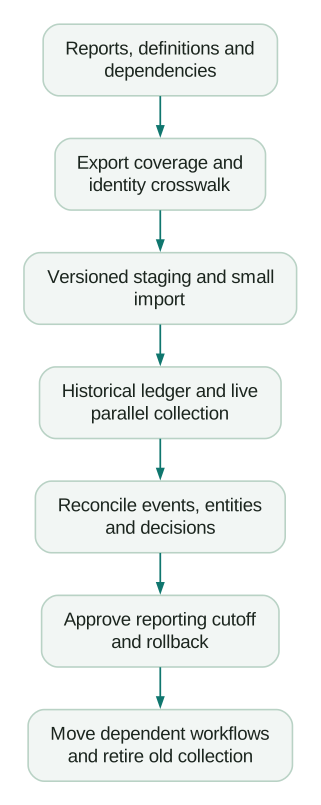
Reconcile in layers: accepted business operations, intended canonical events, identified people or accounts, then the report. Align filters, time zones, funnel order and observation windows before comparing results.
For an illustrative backend-controlled cohort, suppose there were 250 accepted setup completions. The new destination received 247 unique qualifying operations, giving 98.8% delivery coverage. The three missing operations represent a 1.2% gap. Investigate their IDs and causes; a generic “within 5%” tolerance would conceal a known defect.
Browser-only populations may differ because of permitted collection, blockers or device conditions. Explain those differences separately. Do not set a universal demand that every headline user total match exactly across tools.
Cut over reporting, then retire dependencies
The report owner should approve the reproduced definitions and documented differences. Engineering should approve collection and recovery behavior. The people operating campaigns or alerts should confirm that their dependencies point to the new source and will not fire twice during the transition.
Write a rollback plan before the reporting switch. Define the condition that returns decision-making to the previous report, the person authorized to act and how ongoing data will remain available. Rolling back a dashboard does not automatically undo imported identities or restore a dataset that was deleted.
Keep the agreed reference exports and old definitions for the approved retention period. Remove unnecessary access and collection only after dependencies are accounted for. Confirm cancellation terms and the remaining ability to export before ending the old subscription.
Checklist
- Priority reports have owners and explicit counting rules.
- Export coverage, gaps and plan entitlements are documented.
- Identity mappings pass known and anonymous journey tests.
- Overlapping Heap definitions have an intentional target mapping.
- Stable event IDs and a durable import ledger support safe retries.
- Rejected records and partial successes are accounted for.
- Backfill cannot silently overwrite approved live profile values.
- Historical and live boundaries include a late-arrival policy.
- Important discrepancies have explanations and named owners.
- Downstream workflows, rollback and retirement are approved.
Our product analytics service can help scope the mapping, backfill and acceptance work. For a migration quote, bring the source platform, available export period, approximate volume, identity model and the reports that must survive. Those details are more useful than a promise to “move everything.”
Questions people ask
Can I migrate historical Heap events into Mixpanel?
Yes, when you can export the necessary records and map them to the import contract. Check export entitlements, history, identity resolution and overlapping event definitions first. Saved reports and downstream workflows need their own migration work.
Can I move GA4 report history without raw event data?
You can preserve aggregate reports as historical references. They cannot recreate individual event sequences, identities and properties that are absent from the available source. Establish actual raw-data coverage before committing to a backfill.
How long does a migration take?
Estimate from the reports, event mappings, identity exceptions, export access and observation windows. Technical collection can be checked before a full retention window matures. A fixed duration without those dependencies is not a dependable project estimate.
Should we run both analytics tools in parallel?
Usually, for a bounded validation period with an owner and exit criteria. The period must accommodate the journey being compared. Check cost, permitted collection and duplicated downstream actions while both paths operate.
Will the old and new dashboards match exactly?
Only where the underlying population, event meaning and counting rules are equivalent. Reconcile critical business operations and explain remaining differences. Matching a wrong old definition is not a useful acceptance criterion; an intentional correction needs a visible historical break.
Sources
- Google Analytics: BigQuery export and reporting differences
- Heap: Connect export schema
- Heap: Duplicate event IDs across definition tables
- Heap: Changes during data sync
- Heap: S3 identity resolution
- Mixpanel: Identity management modes
- Amplitude: Device and user identity
- Mixpanel: Import Events contract
- Mixpanel: Event deduplication
- Amplitude: Batch Event Upload API
- Amplitude: HTTP V2 event format and deduplication
- Amplitude: Supported self-service migration sources
- Amplitude: Historical backfill side effects
Written by
Jafrin Akter AloData Engineer and Co-founder, martechdevs
Jafrin Akter Alo is a data engineer and co-founder of martechdevs, where the team has delivered 74+ martech, data and growth stack implementations.