
Martech stack rationalisation: cut unnecessary cost without breaking the work
Data Engineer and Co-founder, martechdevs
Last updated 12 min read
Martech stack rationalisation means deciding which tools to use better, reduce, replace or retire based on the jobs they perform and the cost of maintaining them. Begin with business capability and dependencies, then calculate the savings available on the actual contract dates. A subscription is ready to remove when the required work has a verified successor or is deliberately ending.
Last updated: 22 September 2026.
Fewer products can make a stack easier to run. They can also make it more expensive if a cheaper-looking replacement needs manual exports, a higher licence tier or weeks of engineering to preserve an essential workflow.
The target is a lower-cost, maintainable way to perform the work that matters. The tool count is only one input.
Use industry utilisation figures carefully
The widely repeated martech waste numbers describe different things.
Gartner's public summary of its 2025 Marketing Technology Survey says that 49% of tools are actively used. That measures tool use, not the proportion of spending you can cancel. An unused feature, an idle paid seat and an unnecessary subscription each require a different decision. See Gartner's current martech summary.
Vertice's July 2026 update reports 65% of SaaS licences as unused or underutilised in its data for Q2 2026. Its underutilised category concerns tools where fewer than half the purchased licences are used. That does not mean every licence in that category is idle, or that your company can save 65% of its software bill. These are vendor-derived spend insights, not a representative audit of your business. Vertice explains its classification.
Use those findings to ask better questions. Then inspect your own seats, capabilities and outcomes. A product can have one active administrator and still execute thousands of useful background actions. A frequently opened dashboard can still support no meaningful decision.
Define the work that must survive
Before discussing vendors, list the business capabilities your team needs. Keep each one concrete enough to verify:
- Capture a valid lead and assign an owner.
- Join product activity with the correct customer account.
- Suppress an onboarding reminder after the account activates.
- Send a permitted lifecycle message and retain delivery feedback.
- Report trial activation using an agreed cohort definition.
- Give support the subscription context needed to resolve a ticket.
For each capability, name the user, input, output, critical condition and business owner. This is the unit to preserve during consolidation. Product categories such as “CRM”, “analytics” and “automation” are too broad to establish equivalence.
For example, two messaging tools may both send email, while only one currently handles a required event trigger, account relationship or preference model. That difference might justify keeping it, changing the workflow or implementing a replacement. It needs a decision, not an assumption based on matching feature labels.
Use the stack mapping template to record the systems and connections. The broader stack audit process helps establish the evidence. Rationalisation uses those findings to make portfolio decisions and sequence the changes.
Separate unused capacity from an unnecessary product
There are several kinds of waste, and they need different interventions.
Unused seats: compare assigned licences with people who need the paid capabilities. Check the workflow of occasional users before removing access. A quarterly reporting owner can be essential despite low weekly activity.
An oversized tier: list the features that require the present plan. A downgrade may be possible even when the product remains useful. Test the complete dependency, including custom data models, permissions, reporting and integrations.
Unused purchased capacity: compare committed events, contacts, credits or sends with measured demand and realistic variation. Understand what consumes the unit. A contact count and a monthly active-user count can produce very different bills for the same audience.
Duplicate execution: two systems independently maintain the same segment, send the same lifecycle message or calculate the same metric. Investigate why both exist. A temporary migration overlap is different from permanent duplicate ownership.
A capability nobody operates: assess the operating gap: missing training, bad source data, absent ownership or lack of demand. Paying less will not repair an unreliable account model. More training will not create a business need that does not exist.
This distinction gives you cheaper options than a full migration. Recovering ten unneeded seats can be a contained change. Replacing the system that supplies account identity may require a substantial project even if its invoice is smaller.
Give every product a specific disposition
Adobe's rationalisation framework uses four categories: promote, consolidate, negotiate or retire. For a small team, turn each label into an explicit next action.
- Promote: keep a useful capability and address the reason it is underused. Assign an owner, an implementation or training task, and an outcome to check.
- Consolidate: move a required capability to a chosen system. Identify what must be rebuilt, tested and maintained there.
- Negotiate: retain the product while changing seats, capacity, tier or commercial terms where available.
- Retire: end an unnecessary capability or remove a product after its required work has moved successfully.
Do not leave “consolidate” as a permanent status. Record the destination, accountable owner, acceptance criteria, commercial deadline and unresolved dependencies. If those are unknown, you have a candidate for investigation rather than an approved removal.
Compare the full replacement, including hidden dependencies
For a consolidation candidate, ask the team to demonstrate the required job in the proposed destination. Use your fields, identities and edge cases. “The platform supports automation” is not evidence that it can reproduce the workflow you need at the proposed price.
Look beyond the visible interface:
- Which applications write to this product or read from it?
- Which fields, identifiers and calculations does it control?
- Which scheduled jobs, webhooks, forms and embedded assets depend on it?
- Which users or service accounts authenticate through it?
- Which histories, reports, preferences and pending actions must remain usable?
- Which limits or paid features does the replacement introduce?
Downgrades need this review too. HubSpot documents that losing all Enterprise subscriptions changes what you can do with custom objects, including record editing and custom-object workflows. Its downgrade guidance also describes data-sync consequences and features that may remain available through another retained subscription. The impact depends on the exact combination of hubs and tiers. Read the current downgrade documentation against your configuration before treating a lower quote as equivalent capability. Accounts covered by Limited Release pricing also need their applicable terms checked; the custom-object guide explains that entitlement distinction.
For analytics, avoid automatically deleting one tool because both contain funnels. The Mixpanel versus GA4 comparison shows how to evaluate distinct reporting and integration jobs. Equally, two products do not both deserve renewal merely because different teams prefer their interfaces. Demonstrate the recurring work and the cost of performing it with the proposed alternative.
Put contract timing into the savings calculation
Separate three figures: the eventual recurring saving, the change in cash outflow over your decision period, and the internal capacity released. Combining them can make a weak project look attractive.
Here is a fictional example with explicit assumptions:
- The old tool costs $1,200 a month, billed monthly, with six non-cancellable months remaining.
- The replacement adds $400 a month in software and $100 a month in hosting, starting in month one.
- Migration costs $6,000 upfront.
- The old tool is retired at the end of month six, with no termination fee or refund.
- Prices stay constant; tax, financing and any additional labour costs are excluded.
After retirement, the recurring cash saving is $1,200 minus $500, or $700 a month. That is an $8,400 annual run rate once the change is complete.
The first twelve months tell a different story. Keeping the old tool would cost $14,400. Migrating costs $7,200 for the remaining old commitment, $6,000 for twelve months of the replacement, and $6,000 upfront. Total cash outflow is $19,200, which is $4,800 more than keeping the old tool for that year.
During the first six months, the project spends an additional $500 a month relative to doing nothing. After the $6,000 migration cost, the cumulative gap is $9,000 at the end of month six. Recovering it at $700 a month takes almost thirteen more months. Cumulative cash benefit first becomes positive at the end of month nineteen, assuming the stated monthly payment timing.
The calculation is:
Recurring saving after retirement = 1,200 - 400 - 100 = 700/month
First-year keep cost = 12 × 1,200 = 14,400
First-year change cost = (6 × 1,200) + (12 × 500) + 6,000 = 19,200
First-year cash benefit = 14,400 - 19,200 = -4,800
Gap after month 6 = 6,000 + (6 × 500) = 9,000
With an annually prepaid contract, build the model around actual payment dates instead. A monthly-equivalent cost helps comparison but does not establish when money leaves the bank or whether a refund is available.
If the change also releases analyst hours, report those separately. Specify what useful work will replace the old work. Salary already being paid does not disappear because a spreadsheet takes less time. Capacity value can justify a project, but it should not be presented as cash saved unless spending actually falls.
Finally, test the uncertain assumptions. Every extra month of overlap in this example delays a $1,200 avoided old-tool payment. A higher replacement tier, paid export or contractor extension also changes the case. Show the effect before approval.
Decide between a suite and specialist tools through a working trial
Consolidating into a suite can reduce the number of interfaces, contracts and separate identity models you maintain. It can also move several critical workflows onto one commercial and technical dependency. A specialist tool may preserve an important capability while adding another connector to own.
Evaluate the actual alternatives with the same scenario. For example: a trial account has two users, one unsubscribes from marketing, the account upgrades during a delayed workflow, and a billing update arrives twice. Can the proposed arrangement reach the right state and avoid an inappropriate repeated action?
Record the configuration required, missing features, ongoing operator effort and failure recovery. Check whether a critical capability requires an upgrade across the whole suite or a separate add-on. Ask how you would export data and replace the arrangement again later.
Choose a broader suite when it performs the required jobs well enough at a lower maintained cost. Keep a specialist when its useful difference outweighs the integration and operating burden. The result can be a mixed stack with clear responsibilities.
Retire a system in controlled stages
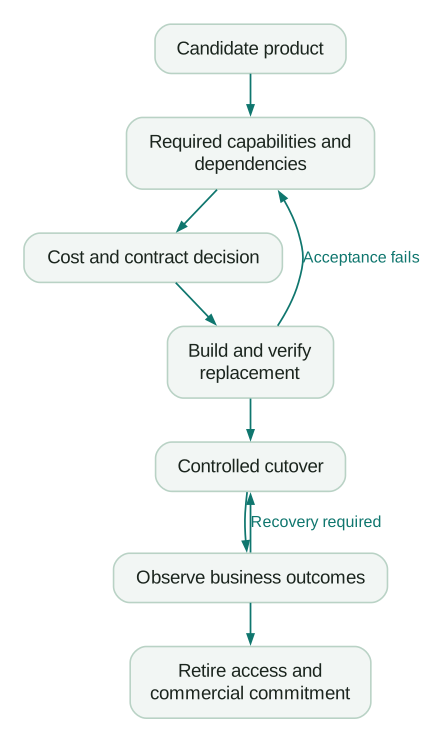
Start with a bounded capability or customer segment where you can verify the replacement. Define who may authorise the switch and which result would require stopping or reversing it.
Preserve the data and the rules
Exporting contacts is not the whole migration. Preserve the relationships and history needed for current operations, plus preference and suppression state. Keep only the historical data you have a defined reason to retain, with the right access and retention arrangements.
Vendor formats can matter. Customer.io distinguishes email suppressions from its GDPR-related identifier suppressions, and its documented GDPR suppression CSV hashes IDs and email addresses with SHA-256. That export is not a plain contact list ready to import into any replacement. Plan an appropriate matching and suppression mechanism instead of assuming file availability guarantees portability. Customer.io's suppression documentation explains the distinction.
List templates, workflow logic, dashboards and integration settings separately from customer rows. Confirm that the replacement can perform the required work from the preserved information. An archive nobody can query is not an operational substitute for a report the team still needs.
Control pending and duplicate actions
Decide what happens to people already waiting in a workflow. They may need to finish in the old system, move at a defined checkpoint or exit entirely. Re-enrolling every imported record can repeat onboarding messages or recreate sales tasks.
During a parallel comparison, let the replacement calculate candidate actions without executing customer-facing sends or writes unless those actions are explicitly part of the controlled test. Compare eligibility and state first. Two systems performing the same live action is not a safe way to establish that their logic agrees.
Define recovery in terms of state. If new customer activity occurs after cutover, returning to the old system may require reconciliation. Simply switching an old workflow back on can act on outdated records. Record which changes need to be replayed and how repeated actions are prevented.
Close the operational and commercial ends
After the agreed observation period and acceptance checks, remove obsolete jobs, webhooks, tokens and access according to the retirement plan. Check embedded forms, tracking references and external consumers too. Archive the documentation needed to explain historical reporting.
Confirm the commercial action separately. Disabling a workflow does not cancel a subscription. A cancellation request does not prove a renewal has been avoided. Keep the effective date and acknowledgement with the decision record, then inspect the following invoice.
Review decisions on a useful cadence
Keep a small register of products, owners, commitments, notice deadlines and dispositions. Review near-term renewals early enough to investigate and execute changes. The required lead time comes from your contract and migration, not a universal thirty-day rule.
For a new purchase, ask for the capability gap, expected usage, accountable owner, ongoing cost and exit route. For an experiment, choose a review date and a condition for continuing. That prevents a trial subscription from becoming permanent through neglect.
Track realised outcomes after each change: cash outflow, manual work, failed updates, message errors and the availability of required reports. A removed invoice is one part of the result. If operators rebuild the same capability manually, include that cost in the review.
Rationalisation decision checklist
- The capability being preserved or ended is explicit.
- Usage evidence distinguishes seats, features, capacity and background work.
- Business and technical owners have reviewed the decision.
- Required integrations and identifiers are mapped.
- The proposed tier supports the actual replacement workflow.
- Contract dates, notice requirements and commitments are verified.
- Cash timing is separate from recurring savings and released capacity.
- Exports preserve required relationships and suppression state.
- Pending actions and repeated delivery have a defined treatment.
- The replacement has passed agreed normal and exception cases.
- Cutover, observation and recovery have accountable owners.
- Obsolete access is retired and the commercial change is confirmed.
If the commercial case is clear but the dependencies are not, complete the connection map before cancelling. Martech integration support is useful when the work is moving identity, data and customer actions reliably between systems. The deliverable should be a functioning replacement with checked outcomes and a completed retirement, not another tool recommendation.
Questions people ask
What is martech tool sprawl?
It is the accumulation of tools and instances without clear responsibility for their purpose, cost and relationship to the rest of the stack. The problem is not defined by a fixed number of products. A small stack can be poorly controlled, while a larger one can have distinct, well-maintained capabilities.
How much of our martech stack should we use?
Use the capabilities needed to perform valuable work, with appropriate capacity and ownership. Trying to activate every available feature can add unnecessary process. Measure whether required jobs work, whether purchased seats or units match demand, and whether unused paid capability can be removed without losing something important.
Should we cut the least-used tool first?
Investigate it first, but distinguish human logins from operational use. A connector or backup reporting process can matter without frequent interface activity. A good early removal candidate has confirmed low value, few dependencies, an available commercial exit and a clear way to preserve any required work.
Is consolidating into one platform always cheaper?
No. Compare the licence tier, capacity, add-ons, migration, integrations and ongoing work needed for the same business capabilities. A suite can reduce coordination costs; a specialist can prevent expensive workarounds. Validate the actual workflow and calculate the change over the contract period that matters.
When can we claim that a tool removal saved money?
When the avoidable spending actually ends, after accounting for replacement and transition costs over the stated period. Show recurring run-rate savings separately from first-year cash benefit. Report released employee time as capacity unless it causes a genuine reduction in expenditure.
Sources
Written by
Jafrin Akter AloData Engineer and Co-founder, martechdevs
Jafrin Akter Alo is a data engineer and co-founder of martechdevs, where the team has delivered 74+ martech, data and growth stack implementations.