
Mixpanel pricing in 2026: events, add-ons and the cost you can control
Data Engineer and Co-founder, martechdevs
Last updated 9 min read
Mixpanel's current event-based plans include one million monthly events free. On the entry Growth configuration, additional events cost $0.00028 each, before applicable add-ons; larger commitments can have lower rates. Your bill depends on the events ingested across the organisation, the purchased features and the contract. Measure those inputs before committing volume, especially if you use autocapture, historical imports or warehouse syncs.
Last updated: 14 September 2026. Public USD pricing before taxes; examples use the stated list-rate assumptions.
The event stream decides much of the bill before anyone opens a report. A repeated background event can cost more than the activation event your product team actually uses to make a decision.
How much does Mixpanel cost per event?
Mixpanel's public pricing lists a one-million-event free allowance and Growth pricing from $0.28 per thousand additional events. Enterprise is quoted. Use the rate shown in your own plan when modelling a larger commitment or legacy agreement.
For the current entry Growth model, the base calculation is:
Billable additional events = max(monthly qualifying events - 1,000,000, 0)
Base event charge = billable additional events × $0.00028
At this rate, an extra million events above the allowance costs $280 before add-ons. Removing an unnecessary million can therefore matter more than a small percentage discount on the remaining volume.
Martechdevs' product analytics work starts with the questions and event definitions that justify collection. If you are still selecting a platform, use the Mixpanel versus Amplitude comparison alongside the pricing model.
What counts towards usage?
Mixpanel calculates event usage across projects in the organisation. Its current billing guidance excludes specified identity operations and user-profile updates. Modern plans count ingestion time, while some legacy accounts use event timestamps. Free accounts that exceed the allowance lose report access until reset or upgrade, without an overage bill. Mixpanel billing documentation.
Read the organisation's billing usage rather than treating a dashboard count as the invoice. Report filters, time zones, event dates and ingestion dates can describe different populations.
Audit each source separately: application SDKs, server events, autocapture, imports, warehouse connectors and test environments. Then rank event names by volume and identify which decisions or workflows depend on them.
A useful event inventory records name, source, monthly volume, owner, purpose and downstream dependencies. Add whether the event represents a business action, a technical diagnostic or a repeated state snapshot. That distinction helps remove waste without damaging analysis.
How do Group Analytics and Data Pipelines affect the bill?
For the entry Growth overage model, Mixpanel documents Group Analytics at 40% and Data Pipelines at 20% of the calculated additional-data charge. These percentages apply to the described overage calculation; they are not a universal quote for every enterprise contract or feature package. Add-on charging details.
Group Analytics supports analysis at an account or other group level. Data Pipelines exports data to a warehouse or cloud storage destination. Determine whether you need those jobs before adding the packages.
For the following original examples, adding both means multiplying the base event charge by 1.6. Group Analytics alone means 1.4; Data Pipelines alone means 1.2. Keep any separately quoted features outside this simplified calculation.
What might teams of 10, 25 and 50 people pay?
Headcount is context, not the billing unit. These are illustrative workloads using the entry Growth rate, no negotiated discounts and only the stated add-ons.
Ten people, 800,000 monthly events
Assume a small B2B product tracks a focused set of activation and retention events. Its 800,000 qualifying events fit within the free allowance. The event charge is $0 if the selected plan's features meet the team's needs.
A feature requirement can still change the purchase. Account-level analysis, governance or export requirements should be priced explicitly rather than inferred from low event volume. Record both the capacity requirement and the feature requirement.
Twenty-five people, five million monthly events
Assume four million events fall above the free allowance. Base event cost is 4,000,000 × $0.00028, or $1,120 a month. Group Analytics adds $448 under the stated model, producing $1,568.
Adding Data Pipelines contributes another $224, bringing the simplified total to $1,792 a month. At unchanged usage for twelve months, that is $21,504 before taxes, other features or a negotiated commitment.
Use this as an upper-level comparison point for a quote. Ask whether a right-sized commitment improves the rate and whether your actual account qualifies for the same allowance. Do not sign an annual volume based on a single month containing a one-off import.
Fifty people, fifteen million monthly events
Assume fourteen million additional events. The base charge is $3,920 a month. Group Analytics contributes $1,568 and Data Pipelines $784, producing $6,272 with both under this example's model.
The $3,920 figure is therefore the base event calculation, not the all-in bill with both add-ons. This distinction matters when a pricing comparison presents a plausible headline while leaving required features outside it.
At this scale, request a volume quote and compare it with a cleaned event forecast. A company with fifty staff and a low-volume product can spend much less; a smaller consumer company can send far more.
Why can a historical import increase this month's bill?
Under ingestion-based billing, a newly processed historical event belongs to the current consumption period even when its event timestamp is old. That makes a backfill a purchasing decision as well as an engineering operation.
Before importing, estimate record count, included event types and the period of history that the analysis actually needs. Test a narrow slice, validate identity and properties, then approve the remaining volume with the billing owner.
For an original example, importing eight million historical qualifying events at the marginal $0.00028 rate adds $2,240 if the regular workload already uses the allowance. Under the same add-on assumptions, both packages would increase that incremental amount to $3,584. A committed rate can change the result.
Avoid using a full historical reload as the first repair for a small modelling problem. Identify the specific defect and the supported correction method. Broad reprocessing can add cost while preserving the original error.
How do warehouse connectors change the forecast?
Mixpanel's warehouse connector documentation distinguishes append-style ingestion from mirroring. Mirror behaviour can account for inserts, updates and deletions, so repeated changes to old records can create usage beyond newly created business events.
Choose the mode that matches the data's meaning. An immutable event history and a table whose rows are repeatedly updated have different requirements. Using append behaviour for mutable records can produce inaccurate data, even if its cost looks lower.
Estimate monthly changes before turning on a sync. Include initial load, routine additions, updates, deletions and repair runs. Compare connector usage after a small trial with the predicted count and investigate any large difference.
For example, a source table with one million rows does not imply one million events every month. The initial load and subsequent changes depend on the connector mode, query and update pattern. Use observed billing usage to refine the forecast.
How can you reduce the bill without losing useful analysis?
Remove unnecessary collection where it originates or through a supported ingestion control. Hiding an event in the interface does not stop it arriving; a reporting filter also leaves ingestion unchanged.
Start with the largest low-value sources. Repeated page instrumentation, heartbeat events, staff activity, bots and duplicate client/server senders are common categories to investigate. Verify each category against actual use before excluding it.
Scope autocapture to the questions it helps answer. Explicit business events such as workspace_activated can coexist with useful interaction capture, but collecting every possible interaction indefinitely is a choice with a recurring cost.
Use profile updates for traits when that matches the data model. A customer's current plan is a trait; a plan change is a historical action. Removing the change event solely to save money can destroy an analysis that depends on when the change occurred.
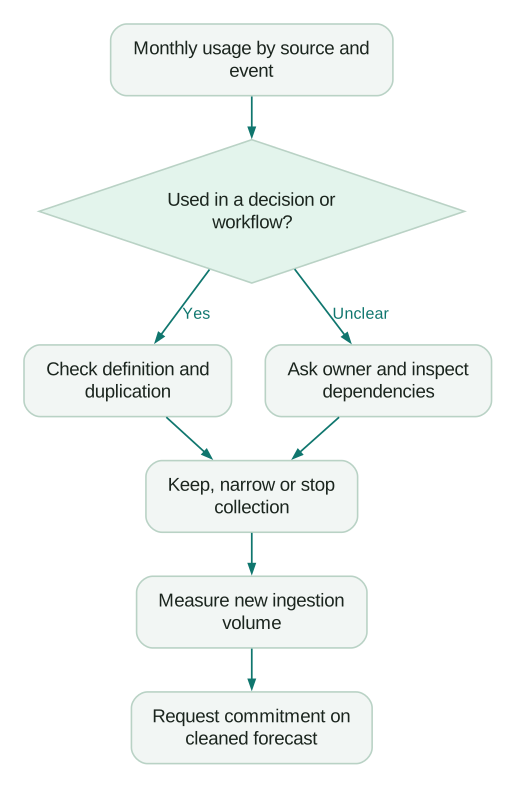
Keep a change log for removed events. Analysts need to know whether a decline represents customer behaviour or an instrumentation decision. A smaller bill is not useful if the retention report silently changes meaning.
When is an annual commitment sensible?
Commit after the event stream has stabilised enough to forecast. Review several representative months and upcoming launches, imports or seasonality. Separate steady production volume from temporary testing and migration activity.
Compare total annual cost under a low, expected and high scenario. Include unused committed capacity, excess usage, add-ons and the cost of any required tier. Ask how changing the commitment affects the rate and renewal price.
An illustrative cleanup that removes three million unnecessary monthly events saves $840 a month at the stated base rate. With both example add-ons, the avoided charge is $1,344. If the work takes twelve hours at an assumed $90 an hour, its $1,080 internal cost is recovered in less than a month under those assumptions.
That is a planning calculation, not a promised client result. If the contract already commits the volume, cash savings may arrive only at renewal. The immediate benefit may instead be capacity for useful events without increasing the commitment.
Does Mixpanel offer a startup programme?
The current Mixpanel startup programme requires incorporation less than five years ago, no more than $8 million raised, no previous paid plan and no prior redeemed Mixpanel offer. It offers a free first year on its Startup Plan, with up to one billion events per year; participants must start sending data within 90 days of acceptance.
Apply before becoming a paid customer if you appear eligible. Confirm acceptance and the actual programme terms before budgeting around the benefit. Put a transition review on the calendar well before the free year ends.
During the programme, forecast the eventual paid configuration using normal usage and required features. A generous allowance is useful for learning, but it can hide a collection pattern that becomes expensive later.
A purchasing and cost-control checklist
- Confirm your billing model, allowance and contracted marginal rate.
- Measure organisation-wide usage across all projects and sources.
- Separate ongoing events from backfills and connector changes.
- Price account analysis, exports and other required features explicitly.
- Review high-volume events for a named business use.
- Remove duplicates and ineligible test traffic at ingestion.
- Check warehouse sync mode and expected change volume.
- Model low, expected and high usage before committing annually.
- Check startup eligibility before buying a paid plan.
- Assign a billing owner and an action plan for usage alerts.
At Martechdevs, we build product tracking around useful events, dependable identity and questions the team can act on. Start with the free martech AI audit, or explore an AI assistant built around your approved workflows.
Questions people ask
Is Mixpanel priced per employee?
The event-based plans discussed here meter product activity. Employee count does not determine event volume. Feature needs and contract terms can still change the selected plan.
What happens when the free allowance is exceeded?
Mixpanel's documented Free behaviour limits report access until the allowance resets or the organisation upgrades, without charging overages. Do not treat Free as an unlimited production reporting plan. Watch usage before a business-critical reporting period.
Does hiding an event reduce its cost?
Hiding changes discovery or presentation, not whether the event is ingested. Stop unnecessary collection through an appropriate source or ingestion control. Check dependencies before removing data used by a report or workflow.
Is MTU pricing available?
Mixpanel documents an Enterprise monthly-tracked-user option starting at $20,000 a year, available through sales rather than online purchase. Compare an actual quote with your event-based forecast. The ratio of events to active users matters more than the label on the plan.
How should we compare Mixpanel with Amplitude on price?
Use the same event population, required account analysis, exports, permissions and billing term. Then compare actual quotes or current calculator outputs, including startup eligibility. The Amplitude pricing guide covers its different allowances and terms.
Sources
- Mixpanel, Pricing, checked September 2026.
- Mixpanel, Billing and event-pricing documentation, checked September 2026.
- Mixpanel, Warehouse connectors, checked September 2026.
- Mixpanel, Startup programme, checked September 2026.
Written by
Jafrin Akter AloData Engineer and Co-founder, martechdevs
Jafrin Akter Alo is a data engineer and co-founder of martechdevs, where the team has delivered 74+ martech, data and growth stack implementations.