
Identity merge in Mixpanel, Amplitude and PostHog explained
Data Engineer and Co-founder, martechdevs
Last updated 11 min read
Identity merging connects events that belong to the same person across anonymous visits, authentication and devices. A reliable implementation uses one stable application user ID, preserves the anonymous identity until the supported linking step and resets identity at a real logout boundary. Mixpanel, Amplitude and PostHog implement these steps differently, so diagnose the project mode, SDK and actual event payloads before attempting to merge existing profiles.
Last updated: 28 September 2026.
If one customer appears as three users, the first question is where the identifiers diverged. The browser may send a database ID, the backend an email and a billing integration a customer ID. Calling every one of those values “user ID” does not make them interchangeable.
The opposite failure is worse: several people appear as one user because a shared browser, a reused placeholder or global server state assigned their events to the same identity. A lower user count is not evidence that the merge worked.
Separate the identities you are trying to connect
Keep these concepts distinct:
- Application user ID: the stable identifier for a person in your authenticated product.
- Anonymous or device identifier: a locally persisted or otherwise supported identifier used before the person is known. It is not proof of a unique human.
- Analytics profile identifier: the destination's representation of the resolved user, which may contain several observed identifiers.
- Account or workspace ID: the organisation or product environment involved in an event.
- Billing customer ID: an identifier belonging to the payment system, with a maintained relationship to the commercial account.
One person can use several workspaces and devices. Several people can share one account, browser or payer. Model those relationships rather than merging them all into a person.
Choose the application user ID once, including string format and namespace. user_1042, 1042 and an email address are different identifiers until a supported mechanism links them. Preserve leading zeros and case where they are part of the identity; do not apply text normalisation to IDs without understanding the source.
Use email as a mutable attribute when a stable internal key exists. A customer changing their address should not require recreating their analytics history.
Understand the normal authentication lifecycle
The desired lifecycle has four transitions: anonymous browsing, successful authentication, continued authenticated use and logout.
Before authentication, keep the same permitted anonymous identity across the visit. After the application verifies the user, apply the stable user ID through the SDK's supported method. On a later page load with an authenticated session, restore that identity consistently. At logout or a genuine transition out of the authenticated session, reset the client identity according to the SDK's rules.
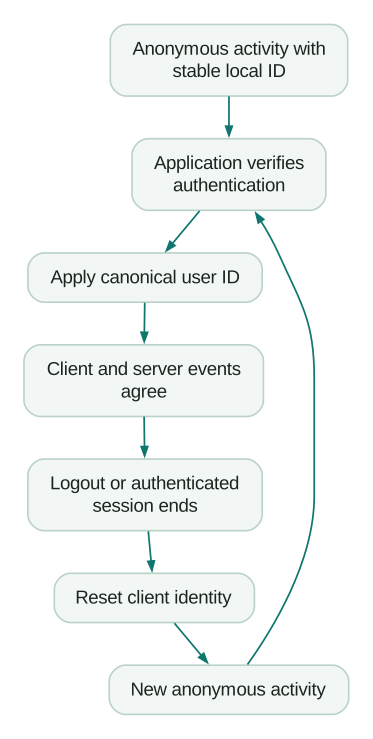
Do not treat an initial loading state as logout. In a single-page application, user = null may mean that the session request has not returned yet. Resetting on every such render can split one anonymous visit into many identities.
Make authentication state explicit, for example loading, anonymous and authenticated. Trigger identity changes from actual state transitions. This is application design guidance; the SDK does not know whether your null means “loading” or “signed out.”
Apply the application's tracking-permission policy throughout. Changing an identifier does not create permission to collect events that were otherwise disabled.
Mixpanel: check the project's identity mode first
Mixpanel documents both Simplified and Original ID Merge. Its identity overview says the mode cannot be switched directly once a project contains data. Original mode uses identity events with different cluster behaviour, so an old alias recipe should not be applied indiscriminately to a Simplified project.
For Simplified ID Merge, $device_id and $user_id establish the identity mapping. The client flow is to call identify after authentication, send an event carrying the identified context and call reset at logout. The documented link requires an event containing both identifiers; merely seeing the identify call in application code is insufficient evidence.
When troubleshooting, inspect the event before authentication and the first event afterwards. Confirm that the expected device identifier survives the transition and the user identifier matches the backend's format.
For server events, follow the identity fields required by the project's mode and ingestion path. Do not assume that manually sending an arbitrary distinct_id produces the same linking behaviour as the configured browser SDK.
Keep an inventory of CDP or connector settings alongside the project mode. A correct frontend and an integration using another identity convention can still produce fragmented events.
Amplitude: setting a user ID and identifying properties are different operations
Amplitude's unique-user documentation describes device IDs, user IDs and Amplitude IDs. Anonymous activity can be associated with a known user when the linking evidence is present. It also states that Amplitude cannot merge two different user IDs through that normal identity mechanism. Sending one person under two permanent user IDs therefore requires more than a later profile-property update.
In Browser SDK 2, setUserId sets the application's user identifier. An Identify object updates user properties. These are different jobs despite the terminology shared with other tools. Setting an email property through an Identify call does not establish that the current user ID should change to your application's canonical ID.
Amplitude's browser identity-reset documentation says reset clears the user ID and generates a new device ID. Use that at the intended logout boundary so the next person's activity does not inherit the previous identity context.
Check both the SDK package and version before copying a code example. Legacy JavaScript examples using getInstance() and current Browser SDK examples are not interchangeable syntax.
If browser events use user_1042 and a worker uses 1042, fix the producer contract. Document the affected historical interval and evaluate supported recovery options separately from the code correction. Future consistency does not prove past reports have been repaired.
PostHog: distinguish identification, aliasing and repair operations
PostHog's identification guide describes linking anonymous activity with a known distinct ID through identify. Aliasing connects supported additional identifiers but has restrictions on IDs already used for identified profiles. It is not a general-purpose instruction to merge every pair of records that looks similar.
The same guide documents reset at logout. It also describes reset(true) for resetting the device ID, a separate option worth checking against your intended device analysis.
For existing incorrect links, PostHog offers a Split IDs operation, but warns that historical event treatment is not guaranteed. Its force-merge operation is explicitly presented as dangerous and without normal safeguards. Use the documented repair workflow only after proving which records represent the same person and understanding its consequences.
PostHog's People documentation describes ingestion warnings when a merge between already identified users is refused. Check those warnings when identify or alias calls appear to run but profiles remain separate.
Also distinguish anonymous events from person profiles. A recorded anonymous distinct ID is not automatically evidence of a duplicate known customer. Investigate whether the person ever authenticated on that device and whether the expected linking event arrived.
Make browser and backend identities agree
Choose a single function or service contract that produces the analytics user ID from the authenticated application identity. Reuse its result rather than rebuilding the string independently in a browser, API and background worker.
Where an anonymous browser event must link to a server-side signup event, pass the appropriate browser identity context through your supported collection path. Validate that it remains attached to the correct request.
An analytics header is untrusted client input. It can help attribute a measurement event, but it must not determine which customer's records the server allows someone to read or change. Authorisation belongs to the application's authenticated context.
On the server, keep identity scoped to each request or job. A process-wide mutable “current user” can leak one request's identity into another when requests overlap. Background jobs should carry the relevant actor and account context explicitly, and system-generated events should not invent a human actor.
For B2B products, changing the active workspace should update workspace or group context. It should not replace the person's user ID with the workspace ID. The single customer view guide explains the underlying person-to-account relationships.
Diagnose duplicates from an event trace
Choose one affected test user and collect a small chronological trace across the relevant producers. Include the event name, occurrence time, source, anonymous identifier, user identifier and account or workspace context. Use approved test data rather than copying customer details into an unrestricted debugging document.
Work through these failure patterns:
- Anonymous activity stays separate after signup: check whether the device identity changed before linking, whether the destination received the linking event and whether the project mode supports the expected mechanism.
- Only backend events are separate: compare exact user ID strings and project credentials. Check whether a billing customer or account ID was incorrectly used as a person ID.
- One person becomes many on page reload: check repeated SDK initialisation, disabled persistence and reset calls tied to loading or render states.
- Two people become one on a shared browser: inspect logout reset, session expiry and any reused placeholder ID.
- An email change creates another user: check whether email was used as the primary identifier and whether the application changed the value sent to analytics.
- Only some devices remain separate: confirm that authentication sets the same canonical user ID on every platform and that events are reaching the same intended project.
Do not start with a bulk merge. First stop the producer that is creating the defect. Otherwise, a repair job has to compete with new bad data.
Test both correct linking and correct separation
A good identity test proves two things: one person is connected where evidence supports it, and different people stay separate.
Use an explicit fixture such as this planning record:
scenario: two_people_and_two_browsers
known_users: [user_1042, user_2087]
steps:
  - browser: one
    action: anonymous_visit
    local_identity: anonymous_a
  - browser: one
    action: authenticate
    user_id: user_1042
    expected_link: anonymous_a_to_user_1042
  - browser: two
    action: authenticate
    user_id: user_1042
    expected_known_person: user_1042
  - browser: one
    action: logout_and_reset
    next_local_identity: anonymous_b
  - browser: one
    action: authenticate
    user_id: user_2087
    expected_link: anonymous_b_to_user_2087
must_remain_separate: [user_1042, user_2087]
This is a test specification, not executable SDK configuration. Execute it against the actual project and inspect the resulting profiles and events. The exact local identifiers and processing delay depend on the tool and SDK.
The intended result contains two known people. The first person's two browser sessions resolve together; the second person's session remains separate. Do not expect every raw identifier to disappear from exports, or infer the result solely from a total-user chart that also includes unrelated anonymous activity.
Extend the fixture with app reopen, session expiry, a failed login, account switching, another device and delayed backend delivery. Include the application state in which tracking is disabled. A reset must not accidentally re-enable collection.
Repair existing data with a documented boundary
Separate three work items: fixing future event production, evaluating historical identity repair and updating reports affected by the defect.
For each proposed historical link, retain evidence from an authoritative relationship in your product. Matching names, similar emails or shared network addresses are not enough to conclude that two profiles represent the same person.
Export an appropriately scoped diagnostic record before a repair and confirm the vendor's supported operation for the actual project mode. Check profile-property conflicts, affected cohorts, experiments and downstream audiences. Some changes influence more than the user-count chart.
When a historical repair cannot be established or performed reliably, mark the affected period and define a trustworthy reporting boundary. A warehouse model may support a separate reconciled analysis if the necessary source mappings exist, but that does not automatically rewrite the product tool's historical identities.
Do not delete users merely to make a count agree with a target. Deletion and recollection can remove evidence, alter reports and introduce another break. Choose a supported migration or correction based on the documented data and intended outcome.
Check commercial and analytical effects separately
Identity defects can change conversion, retention, cohort membership and user-based billing measures. The exact commercial effect depends on the platform and your contract; a corrected profile count does not guarantee a retroactive invoice adjustment.
Compare reports using the same dates, filters, environment and entity. A CRM account count should not equal a product analytics person count when accounts contain several people. Likewise, anonymous visitors who never authenticate cannot all be reconciled to a database user.
After a correction, explain any visible change in the metric. A lower distinct-user denominator can raise a conversion rate even when no customer behaviour changed. Keep that measurement change separate from claims of product improvement.
Use the product analytics setup guide to connect identity tests to the reports that depend on them.
Use a release checklist for identity changes
- The canonical person ID is stable, documented and consistently formatted.
- Person identity remains separate from account, workspace and billing IDs.
- Project identity mode and SDK versions are recorded.
- Anonymous identity survives the intended linking transition.
- Authenticated identity is restored on app reopen.
- Logout and session-expiry behaviour prevent cross-person contamination.
- Client, API and background-job events use compatible identity contracts.
- Loading states and ordinary renders do not trigger unnecessary resets.
- Positive-link and required-separation fixtures pass in the actual destination.
- Historical repair limits and affected reports are documented.
If funnels remain fragmented after these checks, our product analytics service can trace the identity lifecycle across the application, collection layer and destination. The useful deliverable is evidence of correct linking and separation, with a clear boundary around any history that cannot be repaired.
Questions people ask
When should identify be called?
Apply the known user identifier after successful authentication and restore it when an authenticated application session reopens. The method differs by SDK: Mixpanel and PostHog use identify calls for their documented client flows, while Amplitude Browser SDK 2 uses setUserId for the user identifier. Verify the subsequent payload and destination result.
Should we reset identity on every page load?
No. A normal page load or loading state is not a logout. Repeated resets can fragment anonymous visits and disrupt continuity. Reset at the intended authentication boundary using the SDK's documented behaviour, and test shared-browser use and session expiry explicitly.
Can we use email as the user ID?
Prefer an immutable internal person ID when one exists. Email can change, can be shared and may differ between product and billing systems. If an existing implementation uses email, plan the transition and historical consequences before changing producers to a new identifier.
Can every duplicate profile be merged later?
No. Supported operations depend on the vendor, project mode and identifiers already used. Some apparent duplicates lack sufficient evidence to link; other corrections have historical limitations. Fix the producing code first, then evaluate supported repairs and document any remaining measurement boundary.
Why do user counts change after an identity fix?
The system may now connect events previously counted under separate identities, or separate events incorrectly pooled together. Filters and cohort membership can change with that resolution. Explain the implementation change and compare the underlying events before describing the movement as customer growth or improved conversion.
Sources
Written by
Jafrin Akter AloData Engineer and Co-founder, martechdevs
Jafrin Akter Alo is a data engineer and co-founder of martechdevs, where the team has delivered 74+ martech, data and growth stack implementations.