
Mixpanel MCP server: connect Claude and get product answers you can check
Mixpanel’s Model Context Protocol (MCP) server lets an AI assistant investigate product data. The useful outcome is a defensible answer: which customers reached value, where the journey broke and what deserves attention next. Connecting the server is only the first step. You still need the right project, a precise metric and a way to check the result.
On this page
What can the Mixpanel MCP connection read or change?
Mixpanel MCP queries analytics and writes dashboards, Lexicon, cohorts and metrics within project permissions. Tools.
Start with one recurring question. For a product lead, that might be whether new workspaces reach their first successful integration. For growth, it might be which acquisition cohorts retain after their initial activation. A founder might need to distinguish more signups from better customer quality. For questions spanning paid acquisition and customer records, compare MCP servers across the marketing stack before adding another connection.
Our product analytics implementation connects that decision to the event definitions, account model and reference reports the assistant needs.
Write down the decision the answer should change. If every possible result produces the same action, improve the question before building an automated reporting workflow.
Which access settings and regional endpoint do you need?
Use the project region. Free/Growth accounts created after 1 August 2026 default to MCP enabled; otherwise an admin enables it in Settings → Org → Overview. Changes can take 15 minutes; Free Query API (application programming interface) limits can apply. Setup.
| Project region | MCP endpoint | Verify before analysis |
|---|---|---|
| US | https://mcp.mixpanel.com/mcp | Selected organisation and project ID |
| EU | https://mcp-eu.mixpanel.com/mcp | The project is actually in the EU region |
| India | https://mcp-in.mixpanel.com/mcp | The project uses the India region |
Have the administrator confirm which projects and actions the connecting identity needs. A growth investigation usually does not require permission to reorganise every team's definitions. Check the actual role and client controls; adding “read only” to a prompt does not remove account permissions.
Also decide which AI workspace may receive the results. Mixpanel's AI policy describes its own AI processing arrangements. Do not assume those arrangements automatically govern a separate assistant account your company connects. Review that account's contract and configuration, especially before retrieving individual profiles or replay-derived information.
How do you connect Claude or Claude Code?
In Claude, connect Mixpanel with OAuth; use Settings → Connectors and the regional URL for a custom connection. Connection guide.
For Claude Code, use the remote HTTP syntax documented by Anthropic. This example configures the US endpoint:
claude mcp add --transport http mixpanel https://mcp.mixpanel.com/mcpReplace the URL for EU or India before running it. Inside Claude Code, open /mcp, select the connection and complete authentication. The command adds configuration; it does not establish that the account can answer your intended query. Anthropic's documentation explains connection status and reauthentication.
Do the first check in a new conversation:
List the projects available through this connection. Show their IDs and names. Do not create or modify anything. Wait for me to select the production project before analysing data.
Select by ID as well as name. A project called “Production” can still belong to the wrong organisation, and a staging project can contain plausible-looking test data.
Then request one existing report you already understand. Ask the assistant to explain the metric, time range and filters before discussing its result. Compare the returned definition and numbers with the report in Mixpanel. This establishes a useful baseline without inventing a new analysis during the connection check.
If authentication succeeds but access fails, confirm the organisation setting, selected region and project membership. Capture the failing operation and error for the administrator. Repeating the same vague question is unlikely to reveal which access condition is missing.
Which business definitions should the assistant receive?
Provide the decision, counting entity, event meanings and observation window as maintained context. Business Context supports organisation and project notes. Organisation admins manage company-level context; project owners and admins manage project context. Use the company layer for business vocabulary and the project layer for the actual measurement rules.
Here is an illustrative context note for a business-to-business (B2B) product. It is an analysis specification, not a Mixpanel API payload:
decision: identify where new workspaces fail to reach initial value
environment: production
entity: workspace
identifier: workspace_id
cohort_entry: first_workspace_created
success: first_integration_connected
success_window: 14 days after cohort entry
timezone: UTC
exclude: internal workspaces and approved test accounts
reconnections: do not count as first integration
required_breakdown: acquisition_route_at_workspace_creation
unknown_values: retain as a separate group
output: counts, rates, definitions, missing data and evidence links
The note needs an owner who can explain why these rules exist. “Activated user” is insufficient when the subscription belongs to a workspace. “Integration connected” is insufficient when one implementation fires on a button click and another fires after a successful backend response.
Ask the assistant to discover the available events and properties and map them to the specification. If the account model or required historical property does not exist, stop the analysis at that gap. Counting people and relabelling them as workspaces would produce an answer to a different question.
Put verified trigger definitions, exclusions and field meanings into your tracking plan. Context should point to maintained definitions rather than becoming a second, contradictory dictionary.
How should Lexicon affect the investigation?
Use Lexicon to establish what an event means before interpreting its count. Lexicon holds event and property descriptions, owners and saved definitions. Its Verified Data feature is documented for Enterprise customers. Confirm availability before making it part of a rollout requirement.
A useful description of integration_connected explains the successful state transition, whether it is emitted by the backend, which workspace it belongs to and how retries are represented. “User connected an integration” leaves the important questions unanswered.
For missing descriptions, have the assistant prepare proposed text with evidence from instrumentation or an accountable event owner. Review each proposal before saving it. A fluent description inferred from a name can turn an uncertain event into an apparently authoritative definition.
Verified Mode flags unverified data without excluding it. Audit-log access is limited beta for organisation admins/owners; read-only and failed calls are not logged. MCP controls.
Maintain your own change record for approved edits: entity identifier, old description, proposed description, evidence, approver and time. That record is useful even when a vendor audit log is available because it captures the reasoning behind the change.
What should the query definition establish before a conclusion?
Establish the entity, event mapping, filters, counting method and full observation window before asking why a result changed. Mixpanel funnels have configurable ordering, re-entry, conversion windows and property attribution. Those settings change the question being answered. The funnel documentation is the reference when two apparently similar analyses disagree.
Use a prompt that makes the analysis reproducible:
Investigate the agreed workspace activation metric for the July and August 2026 entry cohorts. Use UTC and allow each workspace its full 14-day observation window. First show the available event mapping, entity model, filters and proposed query settings. Identify missing prerequisites. After the definition is confirmed, return eligible counts, activated counts, rates, acquisition-route breakdowns and links or query details sufficient to reproduce the result. Separate observations from possible explanations. Make no project changes.
The observation window matters. A workspace created yesterday has not had the same opportunity to activate as one created three weeks ago. Either compare fully observed cohorts or clearly label an early-progress measure with the same age for every cohort.
Keep the cohort-entry dates separate from the dates on which success events can occur. An August entrant may activate in September. Restricting every event to August can accidentally cut off its allowed conversion window.
Reconcile a known report before exploring a new product question. If the entity model or requested query is unavailable, use a supported route or state the gap; do not substitute a different population and keep the original metric label.
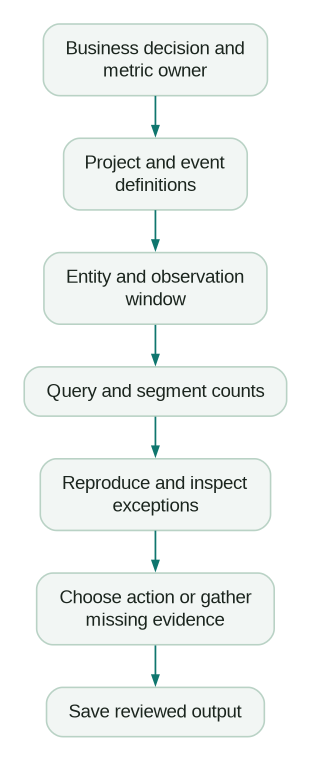
Read diagram as text
- Choose the metric owner and intended Mixpanel project to Access and one known report match?.
- Access and one known report match? to Resolve access or the known-report mismatch: No.
- Resolve access or the known-report mismatch to Choose the metric owner and intended Mixpanel project.
- Access and one known report match? to Map the entity events and observation window: Yes.
- Map the entity events and observation window to Required fields and query operations are supported?.
- Required fields and query operations are supported? to Use a supported route or state the missing evidence: No.
- Required fields and query operations are supported? to Retrieve counts and retain unknown segments: Yes.
- Retrieve counts and retain unknown segments to Independent rates and segment totals reconcile?.
- Independent rates and segment totals reconcile? to Repair the definition or query and repeat: No.
- Repair the definition or query and repeat to Map the entity events and observation window.
- Independent rates and segment totals reconcile? to Save the reviewed definition evidence and decision: Yes
Which MCP limits can change the analysis plan?
MCP allows 600 requests/hour/user. Run-Query excludes cohort filters/breakdowns and slowly changing dimension (SCD) fields for profile-property history. Limits.
A July entry cohort defined from events is not automatically the same operation as filtering by a saved Mixpanel cohort. If the required analysis needs an unsupported filter, use the supported interface and preserve the resulting definition. Do not silently substitute today's profile value for the historical property the question needs.
For a hypothetical workload, 20 investigations using 30 MCP requests each would consume 600 requests, leaving no allowance for other activity by that user. Those are assumed request counts, not a measured tool benchmark. Measure the actual calls, narrow unnecessary exploration and apply controlled backoff after a limit response rather than repeating the same broad prompt.
Can activation improve without either segment improving?
Yes. A higher share of workspaces from the better-converting route can lift the aggregate without changing either route's activation rate. Consider fictional, fully observed cohorts with stable workspace IDs and one shared activation definition.
Counts are workspaces; rates are activated divided by eligible workspaces. Each cohort has its full 14-day observation window.
| Entry month | Acquisition route | Eligible workspaces | Activated workspaces | Activation rate |
|---|---|---|---|---|
| July 2026 | Self-serve | 800 | 320 | 40% |
| July 2026 | Sales-assisted | 200 | 160 | 80% |
| July 2026 | Combined | 1,000 | 480 | 48% |
| August 2026 | Self-serve | 600 | 240 | 40% |
| August 2026 | Sales-assisted | 400 | 320 | 80% |
| August 2026 | Combined | 1,000 | 560 | 56% |
The headline improved by eight percentage points: 56% − 48%. Self-serve stayed at 40% and sales-assisted at 80%. The higher-converting route grew from 20% to 40% of the cohort, explaining the aggregate change without a segment improvement.
An answer saying “the onboarding redesign increased activation” would go beyond this evidence. A useful answer would identify the mix change and ask whether the extra assisted acquisition justified its cost. The product manager would still need evidence that the redesigned experience improved outcomes within a comparable population.
Ask the assistant to return the counts behind every rate, then calculate the rates independently. Check that segments reconcile to the eligible population. If 80 workspaces have no acquisition route, retain them as an unknown group; excluding them silently can change the headline.
The denominator check keeps the explanation tied to what these counts actually show. The activation metrics guide develops the measurement design further.
How do you turn the investigation into a useful team decision?
Once the result reconciles, save a decision note with its definition and evidence. Include the question, metric definition, evidence, uncertainty, proposed action and owner. Link the underlying report or preserve the query configuration so another person can inspect it.
For example, “investigate assisted-acquisition cost before scaling that route” is actionable. “Improve onboarding and optimise conversion” does not specify what the team should do or which evidence would justify it.
If a dashboard or cohort is useful, review its proposed contents and intended users before creation. Use a clearly named draft location. Inspect the saved object afterwards, including filters, sharing and description. Saving a report should preserve the definition you approved, not merely reproduce the headline number.
Keep repeated investigations bounded. Begin with one metric and one comparison, then expand only when a finding calls for it. This controls review effort and prevents a broad prompt from producing dozens of unrelated charts nobody will maintain.
When should you use the skill pack or Mixpanel Agent?
Use the skill pack for a repeatable workflow and the in-product Agent when the investigation belongs beside an existing report. The official Mixpanel AI plugin repository provides reusable workflows for report analysis, metric investigation, dashboards, Lexicon and tracking work. Its current plugin is named mixpanel; older region-specific plugins have been retired. Region is configured during setup.
For Claude Code, the documented installation is:
claude plugin marketplace add mixpanel/ai-plugins
claude plugin install mixpanel
Then run /mixpanel:install inside Claude Code and choose the engine and region. The plugin supports MCP or the Mixpanel Headless SDK. You do not need the plugin simply to use a working MCP connection.
A skill supplies a workflow. Inspect its proposed actions and the permissions of the connected account before using it for cleanup or creation. Keep your metric definitions authoritative even when a packaged workflow suggests a different default.
Mixpanel Agent is the assistant inside Mixpanel, with access to product analysis and content-creation capabilities. Use it when the work naturally lives alongside an existing report. An external MCP client is useful when the investigation also needs approved context from a repository or another connected system. Choose based on the job and the data you are prepared to expose to that client.
Use product analytics MCP servers compared to distinguish the connection’s tools and controls from the workflow supplied by a skill pack. Compare Mixpanel Agent against Amplitude’s AI on the same questions when choosing the in-product analysis experience. If the underlying platform still misses the requirement, compare Mixpanel replacement options before choosing another connection.
What should pass before the team relies on the connection?
Rely on the connection after a known report reconciles, the required query is supported and the reviewer can explain its counts and access scope.
Checklist
- One recurring decision and an accountable reviewer are selected.
- The connecting identity has the intended project access.
- The regional endpoint and AI workspace are approved for the data involved.
- A known report reconciles through the connection.
- Entity, event triggers, exclusions and observation window are explicit.
- Missing properties and unverified definitions remain visible.
- Counts, denominators and segment totals are checked.
- Proposed content changes have a review and change-record process.
- Saved outputs preserve their definitions and evidence.
- The pilot records useful decisions and review effort, not just prompt volume.
If the blocker is inconsistent events or an unclear account model, fix that foundation before automating more questions. Our product analytics work covers tracking definitions, implementation and reconciliation so a conversational answer can be traced back to a measurement your team trusts. Get the $99 martech audit or request a product analytics scope with the report and source events that need to agree.
Keep reading
 Product Analytics
Mixpanel Implementation Mistakes: Identity, Events and Counting Rules
Debug Mixpanel identity splits, duplicate events, stale properties and misleading funnels, with a tested retry-payload example and user-versus-job fixture.
Jafrin Akter AloLast updated 11 min read
 Product Analytics
Fullstory vs Mixpanel: Event Analysis, Replay and Product Decisions
Choose Fullstory or Mixpanel by the product decision and investigation workflow. Compare current analytics and replay offers, event costs and cohort calculations.
Jafrin Akter AloLast updated 11 min read
 Product Analytics
Mixpanel vs Amplitude API: Ingestion, Export and Query Limits Compared
Compare Mixpanel and Amplitude ingestion, export and query APIs: plan gates, payload limits, identity, warehouse feeds and a tested export-window planner.
Jafrin Akter AloLast updated 18 min read
AI readiness score
Check your tracking, data, context and access before connecting an agent.
Questions people ask
Can an unattended workflow use a service account instead of a personal login?
Mixpanel documents service-account authentication as beta for automated setups. Confirm availability and scoped project access, store the credential securely and assign an operating owner. Test revocation and failed authentication before scheduling work; a static credential does not itself establish safe automation. Authentication options.
What if a saved report changes after the investigation?
Retain the report definition and observation period used for the decision, then compare the changed version explicitly. A report link alone may no longer reproduce the filters or counting rule the reviewer accepted. Record whether the change corrects an error or answers a new question, and recheck decisions that depend on the affected result. Do not silently replace the evidence behind an earlier conclusion.
Can the assistant explain why an individual customer churned?
It can organise observed activity and identify questions to investigate, but a sequence of events does not establish the customer's reason for leaving. Check missing instrumentation, support history and relevant account context, then distinguish confirmed facts from possible explanations. Use the investigation to guide an appropriate follow-up or product review rather than presenting inferred motivation as something the customer actually said.
Can two analysts reproduce a result with different permissions?
First confirm that both selected the same project, report definition, observation cutoff and permitted data scope. Compare the underlying counts rather than the wording of the summaries. If one identity cannot access an input, record that incomplete scope instead of borrowing a colleague’s credentials. Use a shared, permitted reference case to locate the difference before treating it as model inconsistency.
How does a revised Business Context note reach the next investigation?
Save the approved organisation or project note and start a new MCP session so the assistant can load the updated context. Mixpanel's Business Context guide describes changes becoming available on the next session. Record the definition version in the analysis request, and check that the assistant used it before comparing results. A resumed conversation can still contain conclusions made under the older rule.
Sources

Written by
Jafrin Akter AloData Engineer and Co-founder at Martechdevs and Growth and Analytics Partners
Jafrin writes practical guides to marketing technology, customer data, analytics and AI workflows. Martechdevs is a Growth and Analytics Partners company.