
Mixpanel vs GA4: do you need both?
Data Engineer and Co-founder, martechdevs
Last updated 12 min read
Use both when you have two recurring jobs: understanding acquisition through Google's marketing ecosystem, and helping the product team investigate activation, adoption and retention. Keep one when it answers the decisions you actually make. A second analytics tool earns its place by removing a specific constraint, not by producing another version of the same dashboard.
Last updated: 15 September 2026.
The useful comparison starts with your questions, your customer identity and the people who need answers. Feature lists come after that. Otherwise you can spend months replacing the interface while carrying the same broken event definitions into the new tool.
Start with the decision that is currently too difficult
Write down three decisions from the last month that the team could not make confidently. For example:
- Which acquisition sources produce trial accounts that reach value within seven days?
- Where do administrators abandon the integration setup, and does the failure differ by integration type?
- Do accounts that adopt the reporting feature keep using it the following month?
For each question, identify the missing ingredient. Is the event absent? Is the account identifier wrong? Does nobody know how to build the report? Or can the report genuinely not express the required analysis?
Only the last two problems suggest a tooling constraint. Missing business events and unstable identity need implementation work whichever logo appears above the chart. Start with a tracking plan if the team cannot agree on what activation means.
A reasonable initial choice is:
- GA4 alone: your regular work centres on website acquisition, landing pages and a manageable set of conversion journeys, and the people responsible can answer those questions in GA4.
- Mixpanel alone: product behaviour drives the decisions, its reporting fits the team, and you have accounted for every Google-specific workflow you would lose or replace.
- Both: marketing needs GA4's integrations while product needs a separate, actively used analysis environment, with shared definitions and an owner for each.
These are starting positions. Validate them against a real question before buying or migrating.
Where the capabilities overlap
GA4 can analyse product journeys
GA4 is event based. Its funnel exploration supports ordered steps, open or closed entry, segment comparisons, step conditions and elapsed time. A closed funnel requires entry at the first step; an open funnel allows entry later. Users are counted according to the specified sequence, and the same user does not become multiple funnel entrants simply by completing it repeatedly. Those rules matter when you compare results with another product. Google's funnel documentation explains the mechanics.
So “we need a signup funnel” is not enough reason to add Mixpanel. Build that funnel in the tool you already have. Identify the specific limitation: a repeated reporting task that takes too long, an account-level question, or a required breakdown that the current setup cannot support reliably.
GA4 also has a strong practical reason to remain in many stacks: linking it with Google Ads enables conversion workflows based on key events and audience use across the products. Replacing a website report does not automatically replace those dependencies. Inventory the conversions and audiences that matter before removing the integration. Google documents what the Ads link enables.
Mixpanel can analyse acquisition
Mixpanel's JavaScript library captures campaign parameters and referrer information. Its attribution guidance also distinguishes initial acquisition properties from campaign values on events, and documents the stop_utm_persistence option for its recommended modern attribution behaviour. Inspect your installed configuration: a campaign carried forward as a persistent property is not necessarily the campaign associated with the current visit. Mixpanel's traffic attribution guide covers that distinction.
Mixpanel also documents bringing advertising cost, clicks and impressions into its data model through warehouse connectors or API pipelines. That can connect spend with product outcomes, but the data still needs matching campaign identifiers and a maintained import. Reading ad spend in Mixpanel and sending an eligible conversion signal back to an ad platform are separate jobs. Its ad spend documentation describes the inbound side.
The question is therefore not whether Mixpanel knows where users came from. It is whether its acquisition reporting and your integration work cover the workflows your team depends on.
Where a product team should evaluate Mixpanel closely
For product analysis, test the speed and clarity of moving from a result to the next question. Can a product manager find the failing step, isolate a relevant segment, inspect its subsequent behaviour and share an understandable report without rebuilding the analysis in a spreadsheet?
Mixpanel provides funnels and retention reports. The value of that combination depends on meaningful events. “Returned and did anything” can answer a broad usage question. “Returned and completed another successful export” answers whether customers repeated a particular value-producing action.
Retention settings need attention. Mixpanel distinguishes returning on an interval from returning on or after it, and supports rolling and calendar intervals. A weekly workflow should not be judged by an unexplained daily-return chart. Set the start event, return event, interval and completed observation period before comparing cohorts.
For B2B products, evaluate the unit of analysis early. Mixpanel's Group Analytics supports analysis using a group key such as an account or company ID. It is an add-on for Growth or Enterprise, rather than a feature to assume is included in every installation. Events need the appropriate group identity to support those questions. The Group Analytics documentation explains the model and availability.
Do not assume an account is healthy because one enthusiastic employee generates hundreds of events. You may need the number of distinct active members, the workflow completed and the account's lifecycle stage. Our SaaS activation guide explains how to define the outcome before choosing its report.
One tracking plan, explicit destination mappings
Running both tools works best when the business definition is shared and the delivery details are documented separately.
Take integration_connected. Define it as the first successful connection of a particular integration to a workspace after credentials have been verified. Decide whether reconnections count as new events and how retries are handled. Record the workspace, integration type, event time and relevant state at the moment of success.
Do not let one implementation fire when somebody clicks Connect while the other waits for a successful backend response. The events would have the same name and different meanings.
For each destination, document:
- Which approved fields are sent and which are excluded.
- How the internal event maps to a vendor event name and parameters.
- Which identifier represents a person, device or workspace.
- Which consent and collection rules apply to that destination.
- Who owns delivery, retries, duplicate prevention and debugging.
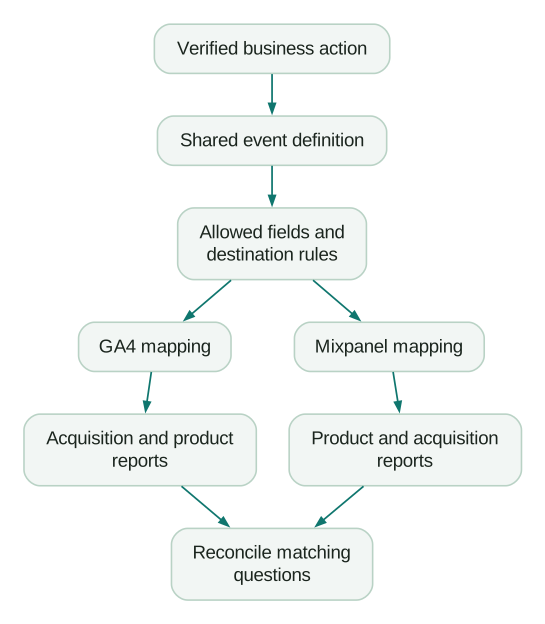
This design does not require a CDP. A small application can maintain explicit mappings in its own code. A larger operation might already have a governed collection service. Choose the delivery arrangement that your team can maintain; a second analytics destination alone is not a reason to introduce another platform.
Avoid forwarding the entire customer record to both products. Google's rules prohibit sending personally identifiable information through ordinary Analytics collection, including common mistakes involving URLs and form fields. Keep email addresses, customer-entered text and credentials out of a generic shared payload. Destination-specific permitted features need their own implementation. Google's PII guidance is a necessary implementation reference.
Shared identity does not mean identical identity processing
Choose a stable internal person ID for authenticated analysis and keep it distinct from the workspace ID. One person may belong to several workspaces; several people may belong to one workspace. Reusing an account ID as the person identifier collapses those differences.
For projects using Mixpanel's Simplified ID Merge, the documented client flow identifies the user at signup or login, sends an event that carries the user and device identifiers to establish their association, and resets the client when the user logs out. Missing the reset can mix activity from different people sharing a device. Existing projects must check which identity system they use before applying migration or implementation instructions. Mixpanel's identity guide explains the mechanism.
GA4 offers blended, observed and device-based reporting identity. Blended can involve modelling; device-based ignores collected User-IDs for reporting identity. Sending the same internal user ID to two systems therefore does not make every user total identical. Record the GA4 reporting identity in your comparison, along with the Mixpanel identity configuration. Google's reporting identity documentation describes the options.
Before rollout, test a first visit, signup, return visit, second device, logout, another person on the same device and a workspace switch. These cases expose more than a screenshot of an increasing event counter. The identity merge guide develops the data model and failure cases further.
How to compare the numbers without creating a permanent argument
Reconcile in layers. Start with business events that should be comparable, then investigate the reporting rules.
First, collection. For a controlled set of permitted test journeys, did the expected event reach each destination once, with the correct time and allowed fields? Inspect identifiers and delivery records. A successful request is useful evidence, but the event must also appear in the expected processing and reporting path.
Second, the population. Are both reports restricted to the same environments, countries, authenticated status, date boundaries and eligible customers? A browser-only collection path and a backend collection path can observe different populations. Document the difference instead of treating the more complete-looking chart as automatically correct.
Third, the counting rule. GA4 distinguishes active users from total users. Those metrics are not interchangeable with unique people who performed a selected event. Google's user metric definitions give you the first check when a headline user count differs.
Mixpanel funnels can count uniques, totals or sessions. A totals funnel permits re-entry after a previous attempt ends; a unique-user funnel answers a different question. Also align the sequence, allowed conversion time and event filters. Mixpanel's advanced funnel documentation explains those settings.
Fourth, the business entity. Consider this fictional trial cohort:
- 100 eligible workspaces contain 150 users in total.
- 45 workspaces reach the defined activation milestone.
- Across those workspaces, 60 users perform the qualifying value action.
Account activation is 45 / 100, or 45%. User participation is 60 / 150, or 40%. Both can be correct. Their five-percentage-point difference is not an analytics error to eliminate. The founder might need the account result to assess trial conversion potential; a product manager might need the participation result to investigate team adoption.
Finally, align maturity and history. GA4's user/event retention settings affect explorations and funnel reports, while standard aggregated reports are treated differently. Standard event retention generally offers two or fourteen months, with additional restrictions for large properties. Check the actual property and date coverage before proposing a year-over-year comparison that its exploration data cannot support. Google's retention documentation sets out those limits.
Keep a discrepancy log with a cause, evidence, owner and resolution. “Different platforms” is not an explanation. “One report counts workspaces and the other counts people” is.
Price the maintained system
GA4's standard offering is free. That removes a licence line, not the cost of implementation, reporting work or any separately billed infrastructure you choose to use.
At this review, Mixpanel's pricing page lists a Free plan with up to one million events a month and five saved reports per seat. Growth includes the first million monthly events free and offers higher event capacity. Group Analytics has separate add-on availability. Verify the plan, billing period, included capacity, overages and required features for your own quote; an old monthly-tracked-user comparison may describe a legacy contract.
Estimate event volume from the proposed instrumentation. In a fictional plan, 25,000 monthly active people generating an average of 40 ingested events each produce one million events. At 160 events each, the same audience produces four million. That is four times the event volume without acquiring another customer. Include anonymous activity, automated capture and other billable ingestion where applicable; this calculation is a planning example, not a vendor invoice estimate.
Then include maintenance. If each team defines signup independently, you pay for two implementations and the meetings required to explain them. A documented shared definition may create more value than a cheaper subscription.
Ask which reports somebody will actually use each week, who maintains them and what decision changes because they exist. Remove unused collection after checking downstream dependencies.
Run a bounded evaluation before committing to both
Pick one meaningful journey, such as trial signup to first successful integration. Use a small, approved event set with a known source of business truth. Give the evaluation a deadline that accommodates your real conversion window, rather than forcing a long sales cycle into a seven-day trial.
Have the eventual report users complete the same tasks: build the funnel, explain a drop-off, compare a relevant segment, identify the correct observation window and communicate a recommended action. Record the time, support required and errors in interpretation. A polished vendor demo does not tell you how your team performs those tasks.
Finish with one of three decisions: keep GA4 alone, retain both with explicit responsibilities, or replace the relevant GA4 workflows after validating their successors. If the evaluation exposes missing events, fix those before drawing a conclusion about the tools.
Checklist
- Three recurring business decisions are written down.
- The present constraint is identified as data, identity, skill or capability.
- Person and account definitions are explicit.
- Critical event triggers and destination mappings agree.
- Consent, allowed fields and shared-device cases are checked.
- Comparable event samples have been reconciled.
- Funnel, retention and reporting-identity settings are recorded.
- Actual users have completed the evaluation tasks.
- Costs include ingestion, required add-ons and maintenance.
- Every retained tool has an owner and a recurring job.
If the unresolved question is how to measure account activation and product adoption, product analytics implementation is the relevant next step. If it is acquisition tracking, event collection or GA4 reconciliation, start with analytics and tracking. Bring the question and the evidence gap; that makes the work much more specific than asking for another dashboard.
Questions people ask
Can Mixpanel replace GA4?
It can replace some reporting workflows if it collects the necessary data and your team can reproduce the required decisions. Check Google Ads conversions, audiences, website acquisition reporting and other downstream dependencies separately. A matching page-view chart is insufficient evidence that the whole GA4 implementation can be removed.
Is GA4 enough for an early-stage SaaS company?
It can be, particularly when the journey is simple and the team can answer its current acquisition and activation questions. Missing events are a reason to improve instrumentation. Add another tool when a repeated analysis constraint remains after the data and definitions are sound, and someone will own the resulting workflow.
How does Amplitude fit into the comparison?
Amplitude is another product analytics candidate with funnel, retention and other behavioural analysis capabilities, as its chart documentation shows. Evaluate it against the same actual questions, account model, governance needs, reporting tasks and total cost. Buying both Mixpanel and Amplitude for the same product questions needs a specific justification; feature overlap alone provides none.
Is Firebase Analytics a separate alternative to GA4?
Google Analytics for Firebase is connected to Google Analytics properties. Google's documentation states that the analytics data resides in the linked Analytics property, rather than inside the Firebase project. Evaluate the app's existing SDK, property and data streams before adding a duplicate collection path. See the Firebase analytics FAQ.
Should GA4 and Mixpanel report exactly the same numbers?
Expect comparable controlled events to reconcile when collection and definitions are aligned. Do not demand equality between different user metrics, account and person counts, modelling settings or funnel rules. Investigate unexplained differences, label intentional ones and agree which defined metric supports each decision.
Sources
- Google Analytics funnel exploration
- Connect Google Ads to Google Analytics
- Mixpanel traffic attribution
- Mixpanel ad spend
- Mixpanel funnels overview
- Mixpanel retention
- Mixpanel Group Analytics
- Google Analytics PII guidance
- Mixpanel Simplified ID Merge
- Google Analytics reporting identity
- Google Analytics user metrics
- Mixpanel advanced funnel concepts
- Google Analytics data retention
- Google Analytics standard offering
- Mixpanel pricing
- Amplitude chart documentation
- Google Analytics for Firebase FAQ
Written by
Jafrin Akter AloData Engineer and Co-founder, martechdevs
Jafrin Akter Alo is a data engineer and co-founder of martechdevs, where the team has delivered 74+ martech, data and growth stack implementations.