
GA4 BigQuery export: setup, costs, limits and ten starter queries
Data Engineer and Co-founder, martechdevs
Last updated 8 min read
GA4's BigQuery export sends event data into a Google Cloud dataset where you can query it with SQL and join it to other business data. Enable daily export for complete-day analysis, add streaming only when current-day access has a clear use, and monitor export health. The connection creates source data; you still need definitions, quality checks and reporting models.
Last updated: 25 September 2026.
The first useful question is rarely “How many events do we have?” It is usually why conversions differ, which journeys lose customers or how a campaign connects to paid revenue.
BigQuery gives you more control over those investigations. It also makes you responsible for choices that the GA4 interface normally handles, including user counting, session construction and attribution scope.
Set up the connection deliberately
Choose a Google Cloud project, enable BigQuery and confirm the data location before linking. The person creating the link needs the appropriate GA4 role and Google Cloud permissions. Google's guide lists the granular project and service permissions; broad project ownership is one possible route, not a reason to give every analyst administrator access.
In GA4, go to Admin → Product Links → BigQuery Links. Select the project and location, choose the streams and event exclusions, then select the required export modes. Review the settings before submitting. Google's setup instructions.
Keep a configuration record containing the property ID, project, region, timezone, streams, exclusions and owner. Region changes are a migration task, so settle location requirements before data starts accumulating.
Current links use a built-in resource identity; older links may use the legacy service account. Check the identity shown on your link before following an old permissions tutorial.
If the export feeds revenue reporting, Martechdevs connects tracking and warehouse models so the raw events can be reconciled with CRM and billing records.
Daily, streaming and Fresh Daily serve different needs
Daily export produces events_YYYYMMDD tables. Streaming populates events_intraday_YYYYMMDD during the day, with best-effort completeness and attribution limitations. Prefer completed daily tables for historical analysis. Fresh Daily is a separate option for eligible Analytics 360 properties. Export modes and caveats.
Do not add streaming because it sounds more advanced. Define the decision that needs current-day data, how incomplete data will be labelled and who will use it.
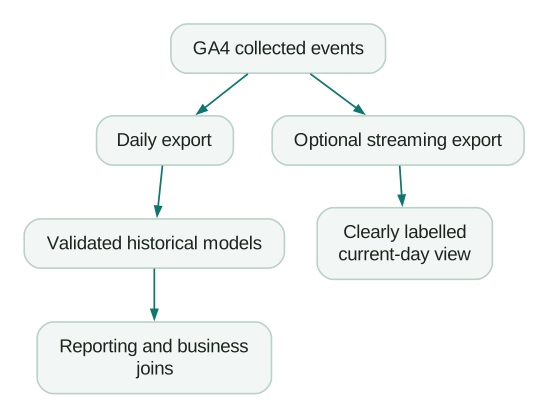
Daily tables can change as late data is processed. Build a rolling reprocessing window for recent dates and a way to repair older periods when Google reprocesses data or you change your own model. An append-only model that assumes yesterday is immutable will eventually miss corrections.
Know the limits before you depend on the export
Standard properties have a daily batch export limit of one million events. Persistent or substantial excess can pause daily export. Streaming does not have that event-count cap, but it is not an equivalent substitute for every daily-export use case. Review volume and intentional exclusions before the cap becomes an outage. Export limits.
The current BigQuery sandbox has a lifetime 10 GiB storage allowance that deletion does not restore, a monthly 1 TiB query allowance and automatic expiry after 60 days. It also restricts features including streaming and DML. Sandbox documentation.
Use it to evaluate a small dataset. For retained business history, configure billing, retention and monitoring deliberately. A free environment with automatic expiry is a poor place to assume data will remain available indefinitely.
Plan on collecting native event history from the link onward. Do not assume a new link will recreate earlier raw event tables. A historical report obtained through an API has a different structure and cannot recreate individual event sequences that were never exported.
What does it cost?
Budget separately for stored data, query processing, optional streaming and any other services in your design. The export volume alone does not determine the query bill.
Google documents an additional streaming charge of $0.05 per GB. Its approximate conversion of 600,000 events per GB is only an estimate; event size varies. Streaming export billing.
For on-demand queries in US-central1, the live price is $6.25 per TiB beyond the first monthly 1 TiB allowance. Active logical storage is approximately $0.023 per GiB-month, with the applicable free allowance. BigQuery pricing.
Here is a fictional workload model with the full allowances available:
- Average active logical storage: 50 GiB.
- Monthly query processing: 3 TiB.
- Optional streaming ingestion: 20 GB.
The simplified storage estimate is 40 × $0.023 = $0.92. Queries add 2 × $6.25 = $12.50. Streaming adds 20 × $0.05 = $1.00. Those categories total $14.42 before other services, taxes and operational work.
This is not a traffic-based quote. Two sites with the same visits can collect different numbers and sizes of events, while two analysts can scan the same stored data at very different frequencies.
Use date filters and selected columns, inspect query estimates and set maximum bytes billed where appropriate. Returning ten rows with LIMIT 10 does not necessarily limit the data scanned. BigQuery cost controls.
Prepare a small working dataset
The following original examples use GoogleSQL and recent daily export tables. Replace the project, property ID and date range. Run the setup and selected queries in the same multi-statement script or BigQuery session, because the working table is temporary.
These are starter analyses, not a tested implementation against your property. Review the query estimate and schema first. Older tables may lack newer attribution fields. The examples intentionally exclude intraday tables by using numeric date suffixes.
CREATE TEMP TABLE e AS
SELECT
  PARSE_DATE('%Y%m%d', event_date) AS event_day,
  event_timestamp AS event_ts,
  event_name,
  stream_id,
  user_pseudo_id,
  (SELECT value.int_value FROM UNNEST(event_params)
   WHERE key = 'ga_session_id') AS session_id,
  (SELECT value.string_value FROM UNNEST(event_params)
   WHERE key = 'page_location') AS page_location,
  (SELECT value.string_value FROM UNNEST(event_params)
   WHERE key = 'currency') AS currency,
  session_traffic_source_last_click.cross_channel_campaign.source
    AS session_source,
  session_traffic_source_last_click.cross_channel_campaign.medium
    AS session_medium,
  ecommerce.transaction_id,
  ecommerce.purchase_revenue AS purchase_revenue,
  privacy_info.analytics_storage
FROM `YOUR_PROJECT.analytics_PROPERTY_ID.events_*`
WHERE _TABLE_SUFFIX BETWEEN '20260901' AND '20260907';
The schema contains nested and repeated fields. Scalar subqueries extract individual parameters without multiplying event rows. These examples expect each selected parameter key to appear at most once per event; duplicate keys should trigger investigation. Export schema.
Google's basic query examples and advanced examples are useful references when extending the analyses.
1. Check event volume by day
Start with export health. A sudden zero or drop needs investigation before anyone interprets a funnel.
SELECT event_day, COUNT(*) AS event_count
FROM e
GROUP BY event_day
ORDER BY event_day;
Compare this with your expected collection pattern and export exclusions. A lower weekend count may be normal; a missing table is a different problem.
2. Inspect event names and frequency
SELECT event_name, COUNT(*) AS event_count
FROM e
GROUP BY event_name
ORDER BY event_count DESC;
Look for renamed events, accidental high-frequency firing and separate names for the same business action. Fix the collection contract before hiding the inconsistency in reporting SQL.
3. Count observed pseudonymous users
SELECT COUNT(*) AS observed_stream_user_pairs
FROM (
  SELECT DISTINCT stream_id, user_pseudo_id
  FROM e
  WHERE user_pseudo_id IS NOT NULL
);
This counts stream-and-pseudonymous-ID pairs. It is not a count of known people, accounts or GA4 active users. Null identifiers are excluded and measured separately in query ten. The chosen identity definition belongs in the report label.
4. Count observed sessions
SELECT COUNT(*) AS observed_sessions
FROM (
  SELECT DISTINCT stream_id, user_pseudo_id, session_id
  FROM e
  WHERE user_pseudo_id IS NOT NULL AND session_id IS NOT NULL
);
The session ID alone is insufficient because different users can share its value. This query counts sessions with observed events in the selected window, including sessions that began before it. A session-start report needs a different boundary definition.
5. Inspect session source and medium
WITH sessions AS (
  SELECT
    stream_id, user_pseudo_id, session_id,
    ARRAY_AGG(
      IF(session_source IS NOT NULL OR session_medium IS NOT NULL,
         STRUCT(session_source AS source, session_medium AS medium),
         NULL)
      IGNORE NULLS ORDER BY event_ts LIMIT 1
    )[SAFE_OFFSET(0)] AS acquisition
  FROM e
  WHERE user_pseudo_id IS NOT NULL AND session_id IS NOT NULL
  GROUP BY stream_id, user_pseudo_id, session_id
)
SELECT acquisition.source, acquisition.medium, COUNT(*) AS sessions
FROM sessions
GROUP BY acquisition.source, acquisition.medium
ORDER BY sessions DESC;
This uses the exported cross-channel session attribution fields where available. It keeps missing values visible. Do not silently substitute first-user source or event-collected UTMs and call the result the same session metric.
For older schemas, design and label a separate reconstruction. The Unassigned traffic guide helps distinguish missing attribution from channel classification issues.
6. Find first observed pages within sessions
WITH first_pages AS (
  SELECT stream_id, user_pseudo_id, session_id, page_location
  FROM e
  WHERE event_name = 'page_view'
    AND user_pseudo_id IS NOT NULL AND session_id IS NOT NULL
  QUALIFY ROW_NUMBER() OVER (
    PARTITION BY stream_id, user_pseudo_id, session_id
    ORDER BY event_ts, page_location
  ) = 1
)
SELECT page_location, COUNT(*) AS sessions
FROM first_pages
GROUP BY page_location
ORDER BY sessions DESC;
This is the first observed page in the query window. It may not be the true landing page for sessions that started earlier. Timestamp ties use a deterministic fallback; use available batch-order fields if exact event order matters. Normalise URLs carefully before combining query-string variants.
7. Inspect purchase events by currency
SELECT
  currency,
  COUNT(*) AS purchase_events,
  COUNTIF(transaction_id IS NULL OR transaction_id = '')
    AS events_missing_transaction_id,
  SUM(purchase_revenue) AS reported_purchase_revenue
FROM e
WHERE event_name = 'purchase'
GROUP BY currency;
This is raw reported purchase-event revenue. It is not deduplicated net revenue, and it does not subtract refunds. Separate currencies and check missing IDs before comparing with your order or billing system.
8. Find repeated transaction IDs
SELECT stream_id, transaction_id, COUNT(*) AS purchase_events
FROM e
WHERE event_name = 'purchase'
  AND transaction_id IS NOT NULL AND transaction_id != ''
GROUP BY stream_id, transaction_id
HAVING COUNT(*) > 1
ORDER BY purchase_events DESC;
Investigate repeats before choosing a deduplication rule. Confirm whether IDs are unique across stores or streams and whether repeated events contain corrected values. Keeping an arbitrary row can conceal an implementation error.
9. Build an ordered same-session funnel
This example requires view_item, then begin_checkout, then purchase, with strictly later timestamps at each step. All three must occur in the selected data window.
WITH views AS (
  SELECT stream_id, user_pseudo_id, session_id,
         MIN(event_ts) AS view_ts
  FROM e
  WHERE event_name = 'view_item'
    AND user_pseudo_id IS NOT NULL AND session_id IS NOT NULL
  GROUP BY stream_id, user_pseudo_id, session_id
), checkouts AS (
  SELECT v.*, MIN(e.event_ts) AS checkout_ts
  FROM views v
  LEFT JOIN e
    ON e.stream_id = v.stream_id
    AND e.user_pseudo_id = v.user_pseudo_id
    AND e.session_id = v.session_id
    AND e.event_name = 'begin_checkout'
    AND e.event_ts > v.view_ts
  GROUP BY v.stream_id, v.user_pseudo_id, v.session_id, v.view_ts
), purchases AS (
  SELECT c.*, MIN(e.event_ts) AS purchase_ts
  FROM checkouts c
  LEFT JOIN e
    ON e.stream_id = c.stream_id
    AND e.user_pseudo_id = c.user_pseudo_id
    AND e.session_id = c.session_id
    AND e.event_name = 'purchase'
    AND e.event_ts > c.checkout_ts
  GROUP BY c.stream_id, c.user_pseudo_id, c.session_id,
           c.view_ts, c.checkout_ts
)
SELECT
  COUNT(*) AS viewed,
  COUNTIF(checkout_ts IS NOT NULL) AS reached_checkout,
  COUNTIF(purchase_ts IS NOT NULL) AS purchased,
  SAFE_DIVIDE(COUNTIF(purchase_ts IS NOT NULL), COUNT(*))
    AS view_to_purchase_rate
FROM purchases;
The strict timestamp rule excludes ties. It also excludes purchases in later sessions. Those are explicit modelling choices, not universal definitions of conversion. Adjust the sequence and window to the actual journey before using the result to prioritise product work.
10. Measure identifier coverage by consent state
SELECT
  analytics_storage,
  COUNT(*) AS events,
  COUNTIF(user_pseudo_id IS NULL) AS missing_user_identifier,
  COUNTIF(session_id IS NULL) AS missing_session_identifier
FROM e
GROUP BY analytics_storage
ORDER BY events DESC;
This shows observed coverage. It is not a legal compliance audit or a count of unique people who refused consent. Use it to understand which records the session and user analyses omit.
Why these results can differ from the GA4 interface
GA4 reporting surfaces apply their own identity, modelling and aggregation behaviour. The event export gives you a different analytical surface. A distinct pseudonymous-ID count should not be expected to reproduce an interface metric with a different definition. Google's reporting comparison.
Reconcile one metric at a time. Match dates, timezone, streams, filters, identity and attribution scope. Record any remaining known differences rather than modifying SQL until the totals happen to agree.
For advertising comparisons, use the Google Ads versus GA4 conversions guide. For cross-system analysis, build stable models using the warehouse design guide.
Export acceptance checklist
- Property, project, region and timezone are recorded.
- Streams and event exclusions match the intended scope.
- Billing, retention and daily volume are monitored.
- Expected daily tables arrive and freshness is visible.
- Recent dates are reprocessed for late changes.
- Intraday and daily rows are not double counted.
- User, session and attribution definitions are labelled.
- Purchases reconcile to a business system with explicit differences.
- Query budgets and access permissions are configured.
At Martechdevs, we connect source systems to tested customer and revenue models, with documentation your team can maintain. Start with the free martech AI audit, or explore an AI assistant built around your approved workflows.
Questions people ask
Can I export old GA4 data after linking?
Do not plan on the native event export recreating pre-link history. You may be able to retrieve historical aggregated reports through other supported interfaces, but those are different datasets and cannot reproduce every event-level analysis.
Is the export free?
There is no separate standard GA4 license charge just to enable the native export, but BigQuery usage and optional streaming can incur costs. Sandbox and free-tier allowances have limits. Include retention and query patterns in your estimate.
Should I enable both daily and streaming?
Enable daily for historical analysis. Add streaming when a current-day workflow justifies its extra cost and incomplete-data handling. Keep their tables separate in the reporting logic so overlapping events are not counted twice.
Where is session source and medium?
Recent exports include session attribution under session_traffic_source_last_click, including cross-channel fields where available. Check your schema and date range. First-user acquisition and event-collected traffic source are different scopes.
Can AI write these queries for me?
Yes, but it needs the schema, metric definitions and validation rules. Review scan estimates and reconcile results. The BigQuery MCP guide explains how a compatible assistant can access a controlled query interface.
Sources
- GA4 BigQuery setup and limits. Accessed 25 September 2026.
- Export modes, processing and billing. Accessed 25 September 2026.
- BigQuery sandbox limits. Accessed 25 September 2026.
- BigQuery pricing. Accessed 25 September 2026.
- BigQuery cost controls. Accessed 25 September 2026.
- GA4 export schema. Accessed 25 September 2026.
- Google's basic query examples. Accessed 25 September 2026.
- Google's advanced query examples. Accessed 25 September 2026.
- Reporting surfaces comparison. Accessed 25 September 2026.
Written by
Jafrin Akter AloData Engineer and Co-founder, martechdevs
Jafrin Akter Alo is a data engineer and co-founder of martechdevs, where the team has delivered 74+ martech, data and growth stack implementations.