
GA4 key events: what they are, how to mark them and which to send to Google Ads
A GA4 key event is a collected event you mark as important to the business, such as a confirmed lead, purchase or sign-up. Google renamed GA4 conversions to key events in 2024, and a standard property can mark up to 30. To mark an existing event, open Admin → Data display → Events and select its star. Key events support business reporting; Google Ads conversions provide a separate advertising measurement and bidding configuration.
On this page
How do you mark an event as a key event?
In the correct GA4 property, mark an existing event in four steps:
- Open Admin.
- Under Data display, click Events.
- Find the event in Recent events.
- Click the star beside its name.
These steps follow Google's marking guide. For a name GA4 has not collected yet, use Create event, enter the name and enable Mark as key event. Choose its default value and counting method. For an event your site or app will send, select Create with code, then Create. Registering the name does not generate the business action. New-event setup.
Allow up to 24 hours for standard reports; marking does not change past data. Realtime updates within minutes after a fresh trigger once the configuration applies. Reporting timing.
| Term | What it is | Where it counts |
|---|---|---|
| Event | A collected interaction or occurrence | GA4 event reporting |
| Key event | An event designated important to the business | GA4 key-event reports and explorations |
| Conversion | An advertising measurement action with its own settings | Google Ads and GA4 Advertising |
Create the conversion, then inspect its campaign use separately; starring the event alone does not establish a bidding goal. Google’s key-event explanation.
What is a key event in GA4?
A key event marks a business outcome in Analytics. The GA4-to-Ads creation route needs a linked Ads account and excludes subproperties and roll-up properties. Google's key-event and conversion explanation.
Keep the three decisions explicit:
- What happened? The application confirmed a new workspace trial.
- Why does it matter? The trial is a measurable step toward becoming a paying customer.
- Should a campaign optimise toward it? That depends on the trial's quality, measurement reliability and relationship to the campaign's actual objective.
A tag firing successfully does not establish that the event is a useful bidding target. A high-volume event can be easy to measure and still encourage the wrong acquisition behaviour.
Promote a verified business outcome into a key event only when it serves reporting. Advertising is a separate decision: choose a measurement path that fits the campaign, then verify its counting, value and goal configuration before release.
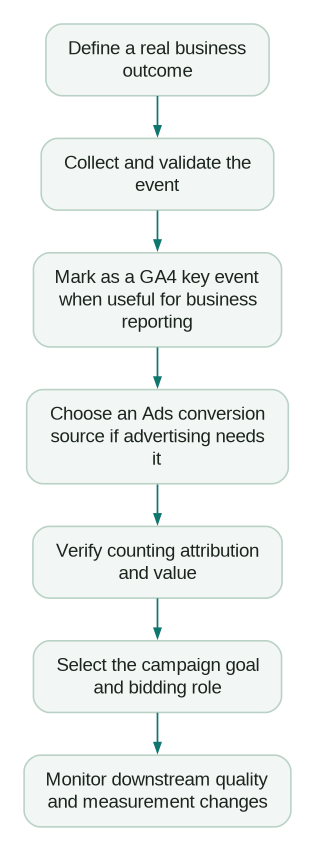
Read diagram as text
- Define the outcome entity and success evidence to Success failure and retry tests pass?.
- Success failure and retry tests pass? to Repair the trigger identity or duplicate path: No.
- Repair the trigger identity or duplicate path to Success failure and retry tests pass?.
- Success failure and retry tests pass? to Useful as a business-reporting key event?: Yes.
- Useful as a business-reporting key event? to Keep it as a diagnostic event: No.
- Useful as a business-reporting key event? to Mark the key event and verify its counting: Yes.
- Mark the key event and verify its counting to Advertising needs this outcome?.
- Advertising needs this outcome? to Monitor outcome quality and measurement changes: No.
- Advertising needs this outcome? to Source counting value and campaign goal fit?: Yes.
- Source counting value and campaign goal fit? to Correct the measurement path and goal settings: No.
- Correct the measurement path and goal settings to Source counting value and campaign goal fit?.
- Source counting value and campaign goal fit? to Monitor outcome quality and measurement changes: Yes
The GA4-based route is one option in that design. A native website conversion or an offline business outcome can also provide an advertising signal. Choose from the outcome backwards.
Our analytics and tracking implementation connects that definition to the actual tag, application outcome and destination evidence before a campaign relies on it. For help with GA4 itself, see GA4 consulting; for the Ads side, see Google Ads conversion tracking.
How do you verify the event before relying on it?
A key-event setting cannot verify that a form was accepted. Use a GA4 Event tag whose trigger represents confirmed success: an accepted form response, a created trial or a completed payment. Standard Google Tag Manager is free; the important implementation cost is getting the trigger and test right.
Check the Google tag's initialization separately. Google's missing session-context guidance identifies an incorrect Initialization trigger as a possible cause of missing session_start. Its documented setup uses Initialization - All Pages. Keep consent initialization in the correct order; moving a tag earlier does not create collection permission.
Use Preview to test success, failure, refresh and retry paths. If the debugging screen remains empty, use the seven DebugView checks to locate the first failed boundary. Publish a version note, then verify the collected event before marking it. After marking, allow the configuration to apply and run a fresh success journey; check the Realtime key-event card. Google’s verification tutorial allows a few minutes to a few hours for configuration to apply. The GTM mistakes guide helps diagnose duplicate triggers. For a backend-confirmed outcome, assess the Measurement Protocol implementation and its identity and timing requirements.
Which key events does GA4 mark automatically?
GA4 automatically marks purchases and specified app events in addition to the 30 or 50 you can mark. An Ads link with Ads Personalization adds further marked events. Inspect the list before interpreting an all-key-events rate.
| Condition | Events marked | Interpretation check |
|---|---|---|
| Web and app default | purchase | Reconcile transaction IDs and amounts with the order system |
| App defaults | first_open, in_app_purchase, app_store_subscription_convert, app_store_subscription_renew | Separate first use from paid subscription outcomes |
| Linked Ads account with Ads Personalization enabled | add_to_cart, add_to_wishlist, begin_checkout, session_start, view_item, view_item_list, view_search_results | Select the intended outcome before reading the combined rate |
These are the conditions in Google's current marking guidance. If session_start is marked, a session can qualify immediately after starting. An all-key-events session rate near 100% can therefore coexist with unchanged sales. Select the commercial outcome explicitly; review whether a diagnostic event should remain marked.
For purchases, verify the transaction rather than trusting the default label. Reconcile GA4 purchases with Shopify orders and account for refunds when evaluating revenue.
How many key events can you have?
Standard properties allow 30 marked key events; Analytics 360 allows 50. Google's 360 limits documentation also explains that an over-limit downgrade prevents adding a further key event until enough existing key events have been unmarked.
Our starting recommendation for a small team is three to eight clearly different business outcomes, chosen for the decisions they support. That is implementation guidance, not a Google limit or an industry benchmark. Use the GA4 pricing and limits guide before treating 360 as the solution to an untidy goal list.
A configuration limit and a reporting limit are separate. Thresholding and sampling can affect what a report displays even when your key events are configured correctly.
Which events represent a meaningful result?
For a self-serve SaaS, useful candidates might include a confirmed new trial, a defined activation milestone or the first successful payment. For a sales-led business, they might include an accepted demo request, a qualified lead or a converted customer.
Write a one-sentence contract before marking the event. For example: “trial_started occurs once when a previously ineligible workspace receives its first active trial entitlement.” That excludes clicking the trial button, retrying a failed request and adding another user to an existing workspace.
Document five details:
- The entity being counted: person, workspace, lead, account or transaction.
- The evidence of success: application state, accepted form response, CRM status or payment record.
- The conditions that should not trigger the event.
- The repeat and retry rules.
- The owner who can verify the outcome against business records.
If sales and marketing disagree on a qualified lead, review accepted and rejected examples together and agree observable acceptance conditions. Name an owner for exceptions before sending that outcome to another destination. A new integration cannot resolve a disputed business definition.
Use your tracking plan to hold this contract, with consistent names across destinations. An event-name list without trigger definitions leaves room for every integration to count a different version of the outcome.
The event naming convention skill can check the chosen names and destination mappings before those outcomes become key events.
If the report needs a custom breakdown, register and validate the relevant GA4 dimensions before relying on that field.
Do not mark every interaction merely to make the key-event rate look stronger. A scroll, a pricing-page visit and an accepted lead request can all provide information, but they do not represent equal commercial progress. Keep diagnostic interactions available for analysis without automatically promoting them into acquisition goals.
How do event count, key events and key-event rate differ?
Event count, key-event count and key-event rate are not interchangeable. The first counts collected events. The second follows the key event's counting configuration. A rate asks how many sessions or users contained the selected outcome, relative to the relevant population.
GA4 supports counting a key event once per event or once per session. A counting-method change affects future key events, not past data. Google's counting-method documentation explains those options.
For a purchase event, two real transactions in a session are two different business outcomes. For a registration event, repeated firing on refresh may be a bug. Changing to once per session can conceal that bug without preventing it from affecting other destinations or later sessions.
Work through a small example
Consider an illustrative, fully observed dataset with 10 users and 12 sessions. Only one event type is selected as the key event. User A triggers it twice in one session and once in another. User B triggers it twice in a third session. Nobody else triggers it.
| Metric | Calculation | Result |
|---|---|---|
| Event count | All occurrences of the selected event | 5 |
| Key events, once per event | Every occurrence | 5 |
| Key events, once per session | One count in each qualifying session | 3 |
| Session key-event rate | 3 qualifying sessions ÷ 12 sessions | 25% |
| User key-event rate | 2 qualifying users ÷ 10 users | 20% |
Google defines the session rate as sessions with a key event divided by total sessions in the Traffic acquisition report. It defines the user rate as users performing a key event divided by total users in the User acquisition report.
The five occurrences do not imply a 41.7% session conversion rate. Five divided by twelve is an event frequency per session, not the share of sessions containing the outcome. Keep the selected event, identity and report scope consistent when comparing rates.
Also distinguish GA4's session counting from the Google Ads Count setting. Ads offers One or Every for a conversion action after an ad interaction; One is not a permanent deduplication rule for a person, company or CRM lead. Google Ads counting options describe that separate basis. Validate the actual action and attribution configuration rather than assuming the two products' settings are synonyms.
Where do GA4 key events and advertising conversions appear?
GA4 key events appear in Reports and Explore; Ads conversions appear in Advertising.
| What you are measuring | Where to look | Configuration to inspect |
|---|---|---|
| Key-event outcomes | Reports and Explore | Property attribution and key-event lookback |
| Ads conversion performance | Advertising | Conversion attribution and windows |
| Conversion configuration | Advertising → Conversion management; Google Ads | Edit goal category and optimisation in Ads |
These Ads conversions do not appear in Reports or Explore and are not planned for BigQuery export. Each key event can create one web and one app conversion per linked Ads account; older Analytics conversions remain key events. Google's explanation.
Key events use property attribution settings; event-scoped conversion reporting can use advertising-focused data-driven attribution. Check model, scope and window before comparing credit, and avoid a universal “last non-direct click” label.
Which recent changes affect an older setup guide?
| Date | Documented change | Practical check |
|---|---|---|
| 16 January 2026 | Web conversion management and reporting beta | Verify your property's feature eligibility |
| 15 June 2026 | Consent Mode became the single control for relevant Google Ads cookies and IDs | Review ad consent settings when comparing periods across the change |
| 11 August 2026 | Custom click-through windows of 1 to 90 days and engaged-view windows of 1 to 30 days | Inspect the exact conversion window |
| 29 September 2026 | App conversions added to conversion reporting and management | Check app support in your property; rollout can vary |
The release dates and window ranges come from Google's release notes; the consent-control change is documented in its conversion discrepancy guidance. A screenshot from an older tutorial can describe a different interface or reporting basis.
When should you create an Ads conversion from a GA4 key event?
Use the GA4 route when you already have a reliable, well-defined event and its conversion capabilities fit the advertising requirement. This can keep the business definition consistent between acquisition analysis and the signal shared with Ads.
Verify the linked Ads account, auto-tagging and effective access first. In GA4, open Advertising → Tools → Conversion management → New conversion → Next. Select the Ads account and event, choose a category if prompted, then review and save. An unmarked event selected here becomes a key event. Availability can vary by property. Google's conversion-creation guide.
The same guide requires native Google Ads measurement for view-through conversions; Analytics imports do not provide that feature. Creating the action also does not establish its bidding role. Check that role and the campaign's selected goals in Ads.
Importing does not repair an event that fires before success, a broken consent sequence or a registration definition that combines prospects with invited teammates. Check the underlying collection path with the GA4 SaaS setup guide first.
A practical acceptance record should identify the source property and stream, event name, business definition, counting method and conversion action created. Record when the new configuration became effective so a later report does not silently compare two different implementations.
When is a native website conversion the better fit?
Choose a native Google Ads website conversion when its measurement features or operational ownership better fit the campaign, including a requirement for native view-through reporting. That is a feature-based decision, not proof that Analytics imports are inherently low quality.
Review enhanced conversions for web and leads where permitted user-provided data improves matching. Keep the business trigger aligned with the Analytics event if both are measuring the same outcome. Otherwise a native Ads purchase on a confirmation-page view and a GA4 purchase on confirmed payment may disagree because they are different definitions.
Use one documented primary measurement path per equivalent outcome in the campaign. A second action can be useful for a controlled comparison, but do not simply include both in bidding and assume Google will recognise them as the same sale.
Google's multi-source conversions beta supplements an eligible code-based website conversion with backend data. It matches transaction_id within the same action, rather than deduplicating separate actions. Analytics-imported and URL-based actions are excluded.
During the 14-day trial, additional conversions appear in reporting without affecting bidding, and matched value updates are disabled. Afterwards, those conversions automatically become biddable and matched uploaded values can override tag values. Verify identifiers, values and the transition date before adopting the feature. Multi-source trial and processing rules.
When is the right signal an offline business outcome?
If the outcome happens in a CRM or billing workflow, measure that outcome where it becomes known. A form submission cannot tell you whether sales accepted the lead or whether the customer paid an invoice later.
Define the stage precisely and preserve its real timestamp. For example, “qualified lead” might require the right market, a relevant use case and an accepted sales handoff. Merely opening the CRM record should not create the event.
Choose the supported upload mechanism for the current integration. Google's 2026 enhanced-conversions update describes unified settings and the migration of offline conversion and enhanced-conversions-for-leads uploads toward the Data Manager API, with legacy access qualifications. An old Google Ads API tutorial is not sufficient evidence that a new integration can use that path today.
The offline conversion implementation guide covers the delivery path. Keep an upload ledger: business record, outcome, occurred-at time, permitted matching identifiers, destination action and processing result. An upload accepted for processing is one stage; an attributed conversion available in the intended report is another.
Do not invent missing click IDs, backdate outcomes or replace a failed qualification with a softer event to make the upload succeed. If coverage is limited, quantify the eligible population and the unmatched share so the campaign owner understands the signal.
How do you choose the outcome a campaign should use for bidding?
Choose the closest reliable outcome to the campaign's economic objective, then verify the campaign's actual goal configuration. Primary and secondary describe a conversion action's optimisation role. Google says primary actions are used for bidding when their standard goal is used by the campaign. Secondary actions are usually observational, but actions in a custom goal can be used for bidding regardless of that label. The primary and secondary reference explains this exception.
Conversions created from Analytics default to secondary; change action optimisation in Google Ads when appropriate. Google’s action settings.
Inspect account-default goals and any campaign-specific overrides. Do not assume an action marked primary is necessarily the goal a particular campaign uses, or that secondary guarantees exclusion from every custom goal.
Select the closest reliable signal to the campaign's economic objective that the team can measure with useful frequency and delay. There is a tradeoff: a late closed-won event may express value well but arrive too slowly or sparsely for the intended operating cadence. A trial is earlier, but can reward poor-quality acquisition if it has a weak relationship with paying customers.
Check that relationship using mature cohorts. Compare the fraction of trials that become qualified or paid, broken down by meaningful acquisition groups. A larger trial count accompanied by falling paid conversion is a reason to inspect the goal and audience quality, not immediately celebrate cheaper acquisition.
Avoid adding the same customer's value at every stage
In an illustrative mature cohort, 100 leads produce 20 qualified leads and 5 wins. Assume each win contributes USD 2,000 of the same defined gross-profit measure. The cohort contributes USD 10,000, implying USD 100 per initial lead or USD 500 per qualified lead under those assumptions.
Those are alternative expected values at different stages. They are not three independent revenue streams. Adding lead value, qualified-lead value and full customer value into one undifferentiated optimisation total can count the same economic opportunity repeatedly.
Choose a stage/value design deliberately. State whether values are observed revenue, estimated future value or an incremental stage value. Recalculate estimates on mature cohorts and document the uncertainty. Do not assign a high arbitrary value to the event you want the dashboard to favour.
When amounts are incomplete, report the verified outcome count and the share with usable values. Keep unknown amounts separate from genuine zero values; do not silently turn missing values into zero revenue or present the covered subset as the whole cohort.
Why do key events show as Unassigned or (not set)?
Start with the missing or inconsistent field. A correct key-event designation does not fill gaps in acquisition or session context.
The GA4 Unassigned and (not set) diagnosis skill can distinguish a collection gap from a reporting artifact and draft the corresponding validation checks.
More GA4 fixes
- Unassigned channel: inspect the source, medium and session context using the Unassigned traffic diagnostic.
- A dimension shows (not set): identify the specific missing dimension with the dimension-by-dimension guide.
- The journey breaks at your app or checkout: test the cross-domain handoff.
- The outcome fires before success or twice: inspect GTM trigger and release mistakes.
- Routes change without a full page load: check duplicate single-page app views. They can distort the path around a correctly defined success event.
How do you reconcile reports before changing the implementation?
Align the outcome, date basis, time zone, counting method and attribution scope first. Use the full method for Google Ads versus GA4 conversion counts, and apply the same discipline when Meta reports more conversions. Follow the conversion diagnostics guide when the collection or processing stage fails. A reporting-date difference alone does not justify changing the tag.
Use the broader GA4 problem router when several symptoms overlap, and add an alert for each selected key event after the baseline is accepted.
What should pass before you release a goal change?
Release a goal change when its outcome, counting, value and campaign scope pass the same documented acceptance checks.
A handover should record the old and new success conditions, effective release, owner, controlled test and affected reports or campaigns. Explain which periods remain comparable even if the event name stayed unchanged. Unmarking a key event preserves its earlier key-event history. Google’s unmarking behaviour.
Checklist
- The outcome has a success condition, unit, owner and exclusion rules.
- Failure, refresh and retry tests do not create unintended duplicates.
- GA4 counting and Ads counting are documented separately.
- The chosen source supports the required advertising features.
- Equivalent actions are not unintentionally included twice in campaign goals.
- Primary, secondary, custom goals and campaign overrides are inspected.
- Values have a defined unit and do not silently add the same opportunity across stages.
- The change date and downstream quality checks are recorded.
At Martechdevs, we work with your developers to connect the outcome definition to its collection and destination checks. Start with the $99 martech audit, or request an analytics and tracking implementation scope for defined work covering tags, CRM outcomes and campaign goals.
Keep reading
Browse all Tracking & Attribution guides
 Tracking & Attribution
Why Google Ads and GA4 conversions do not match, and how to reconcile them
Google Ads and GA4 count conversions on different dates, models and rules. Align them step by step, check third-party estimates and report one number.
Jafrin Akter AloLast updated 14 min read
 Tracking & Attribution
GA4 Measurement Protocol: Send Server Events With the Right Context
Send useful GA4 server events with correct identity, timestamps, consent and validation. Understand session attribution deadlines and reconcile eligible outcomes.
Jafrin Akter AloLast updated 12 min read
 Tracking & Attribution
Offline conversion import: send qualified leads and revenue back to Google Ads and Meta
Send qualified leads and customer outcomes back to ad platforms. Design stable IDs, consent handling, upload monitoring and a controlled bidding rollout.
Jafrin Akter AloLast updated 15 min read
GA4 consulting
See the implementation scope, deliverables and acceptance checks.
Questions people ask
Are key events the same as conversions?
They now name different configurations. A GA4 key event identifies an important business action for Analytics reporting. A Google Ads conversion is an advertising measurement action that can support bidding when its goal settings permit. Older GA4 conversions became key events. Marking an event alone does not create an Ads action. Google’s distinction.
How do I make a form submission a key event in GA4?
Mark a dedicated event that fires after the form is accepted. If you only have a confirmation page, use Create event → Create without code, select page_view and match that URL, then enable Mark as key event. Do not mark every page view. Test revisits and failed submissions so the event represents actual success. Google’s no-code example.
Can I mark a key event retroactively?
No. The designation applies from the change onwards; it does not reclassify earlier collected events. Keep the effective change time and compare older event counts separately from the new key-event series. Otherwise, the start of reporting can look like a business improvement even when customer behaviour has not changed. Google’s timing rule.
Why can't I see the star to mark a key event?
Check the property and your effective role. Google's marking instructions specify Editor for an existing event and Marketer for a new key event. Its access reference also grants Marketers key-event editing, so the documentation is inconsistent. Ask the property administrator to check your permissions and missing control rather than assuming Viewer access is sufficient. Marking, roles.
Do GA4 key events show up in Google Ads automatically?
No. Create a conversion from the event in the linked Ads account. In GA4, use Advertising → Tools → Conversion management → New conversion, select the account and event, then review and save. Afterwards, inspect its optimisation role and campaign goals in Google Ads; creation alone does not establish that a campaign bids on it. Creation instructions.
Sources
- Google Analytics, Conversions versus key events
- Google Analytics, Mark events as key events
- Google Analytics, Create or modify key events
- Google Analytics, Analytics 360 limits
- Google Analytics, Release notes
- Google Analytics, Missing dimension values and session context
- Google Analytics, Key-event counting methods
- Google Analytics, Traffic acquisition report
- Google Analytics, User acquisition report
- Google Ads, Conversion counting options
- Google Ads, Create conversions from Analytics key events
- Google Ads, Multi-source conversions beta
- Google Ads, Enhanced-conversions settings update
- Google Ads, Primary and secondary conversions
- Google Analytics, Key-event setup and verification tutorial
- Google Analytics, Access and data-restriction management
- Google Analytics, About key events

Written by
Jafrin Akter AloData Engineer and Co-founder at Martechdevs and Growth and Analytics Partners
Jafrin writes practical guides to marketing technology, customer data, analytics and AI workflows. Martechdevs is a Growth and Analytics Partners company.