
Google Ads enhanced conversions: setup for web and for leads
Data Engineer and Co-founder, martechdevs
Last updated 11 min read
Enhanced conversions adds supported first-party customer information to conversion measurement so Google can improve matching to advertising interactions. For web outcomes, it supplements the measurement of actions such as a purchase. For lead generation, it helps connect the original enquiry with later outcomes recorded in your CRM. Start with a correct business event and a reliable data flow; enabling the setting does not establish that either exists.
Last updated: 1 September 2026.
Separate the outcome from the matching information
A purchase event says that a purchase occurred. Customer information such as a supported email identifier helps match that event. The two have different jobs.
If the purchase fires when checkout opens, enhanced conversions can make a false outcome easier to match. If a CRM upload marks every form submission as a qualified lead, better matching does not fix the qualification rule. Define the action, success condition, identity, time and value before adding matching fields.
For lead generation, write down the transition you want to send: for example, a lead first meets the agreed sales-qualification criteria. Specify whether requalification creates a new episode or whether the business counts the milestone once. A current-stage field without transition history cannot reliably answer when the event happened.
The GA4 key-events and Google Ads conversion guide covers outcome selection, counting and bidding roles. Use it before making every available CRM stage a primary conversion.
Account for the 2026 settings and API changes
Google's enhanced-conversion settings update combines web and lead enhanced conversions into a unified setting and allows supported tag, Data Manager and API inputs together. Older instructions that tell you to select exactly one implementation method may no longer describe the account interface.
The same update announces the migration of offline-conversion and enhanced-conversion-for-leads uploads toward the Data Manager API from June 15, 2026, with qualifications for legacy developer-token access. For new API work, use the current supported route and check any existing uploader's actual migration status. Do not assume every historical Google Ads API integration is already disabled or that it will remain supported indefinitely.
Unified settings do not make the event flows identical. Website collection, CRM outcome delivery and campaign goal configuration still require their own checks. They also do not provide blanket deduplication between unrelated conversion actions.
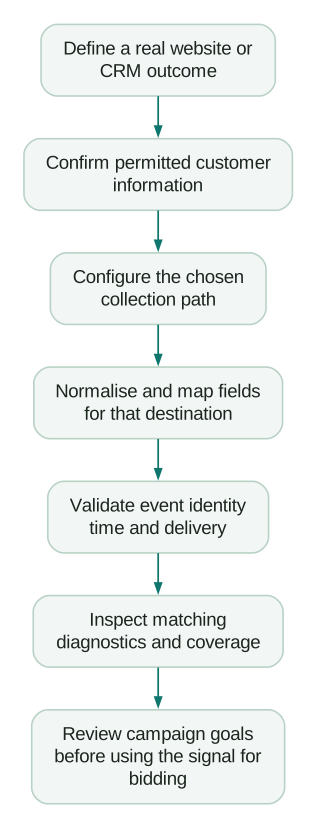
Choose the route your team can operate
For a website outcome already measured with Google Ads tags, configure supported user-provided data collection on the relevant Google tag or GTM implementation. Prefer a route whose event timing and field values you can inspect.
For downstream CRM outcomes, use an appropriate native integration, Google Ads Data Manager connection or custom Data Manager API pipeline. Google's Data Manager guide for enhanced conversions for leads describes connecting first-party sources for this purpose.
A native connector can reduce development work, but verify its stage rules, supported fields, sync timing, historical behaviour and error visibility. A custom API route is justified when those controls matter enough to own authentication, transformations, retries, monitoring and future API changes.
If you use HubSpot, its Google Ads conversion-event documentation supports CRM lifecycle changes and notes that only changes after event creation are counted. It also explains that separate configured lifecycle stages can each generate events. Do not mistake connecting the account for a historical backfill or for a decision about which stages should influence bidding.
Set up the web path around the actual successful event
Inventory the current Google tag, Ads conversion action and GTM container. Record the destination account, conversion ID and label, event trigger and existing transaction identifier. Confirm that one known successful outcome produces the expected base conversion before changing matching inputs.
Google's current GTM setup guide describes automatic detection, specified CSS selectors or JavaScript values, and code-based collection. It also requires the relevant feature terms and settings. Choose the method that fits the page rather than copying the first available example.
Use these implementation checks:
- Identify where approved customer data exists relative to the successful event. It may be on a preceding form rather than the confirmation page.
- Map the intended fields into the supported user-provided-data configuration. Keep them separate from ordinary analytics event parameters and URLs.
- Confirm that the destination and action are the ones you intend to enhance.
- Inspect the field values at the moment the tag reads them, including returning users, mobile layouts and embedded forms.
- Verify that consent defaults and updates reach the collection path before it acts.
Automatic detection still needs inspection. A page can contain the business's support email as well as the customer's address. A CSS selector can point to the wrong repeated form, disappear after a redesign or return an empty field after submission.
For an application you control, an explicit field handoff can be easier to maintain than a selector tied to visual layout. That is an engineering recommendation, not a requirement to rebuild a working supported integration. Document the source, owner and timing of each field either way.
Do not assume the form's submit attempt is the successful conversion. For an asynchronous form, keep data availability and outcome confirmation distinct. The application should establish that the submission or purchase succeeded before the business event is recorded.
Build the lead path as a business-event pipeline
For enhanced conversions for leads, connect the initial collection to an actual downstream outcome. Google's implementation checklist covers website collection, offline outcome actions, imports and validation before bidding changes.
Define the CRM contract with sales and operations:
- Entity: contact, lead, opportunity or account, with an explicit person-to-business-record relationship.
- Milestone: the condition that makes the outcome eligible, including required evidence.
- Occurrence time: when the milestone happened, retained separately from upload time.
- Event identity: a stable key for that outcome and, where appropriate, its episode.
- Value: the chosen business value, its currency and whether it is realised or estimated.
- Matching inputs: available, permitted first-party identifiers and retained advertising identifiers.
- Delivery state: pending, sent, accepted, rejected, retried and reconciled.
Preserve a valid GCLID when available. Google's lead diagnostics guidance recommends continuing to import existing GCLIDs and describes the requirement when no tag collects user-provided data. Enhanced matching is not a reason to discard useful click identifiers.
Keep retries tied to the same business outcome. Do not generate a fresh transaction identifier or replace the original occurrence time with today's date on every retry. Quarantine records with impossible timestamps or inconsistent identity rather than forcing them through.
For multiple funnel stages, use distinct definitions and avoid silently adding the same opportunity's full expected value at every stage. A qualified lead and a won customer can both be useful measures; their values are not automatically additive revenue.
Use the destination's exact normalisation rules
Do not apply one generic “hash customer data” function to every platform. The format before hashing is part of the matching contract, and different supported collection routes can handle that work for you.
Google's Data Manager formatting reference currently specifies lowercasing and removing whitespace from email inputs. For gmail.com and googlemail.com, it also removes dots and plus suffixes from the local part. Those dot and plus transformations do not apply to other domains. Phone inputs use E.164, including the plus sign and country code, before hashing.
The following local helper implements the documented Data Manager email transformation for already validated email inputs. It is not a universal email validator, a browser-tag recipe or a complete upload implementation. Keep the original CRM value; transform a separate outbound copy.
import hashlib
from typing import Optional

def data_manager_email_hash(raw: Optional[str]) -> Optional[str]:
    if raw is None:
        return None
    email = "".join(raw.split()).lower()
    if not email:
        return None
    local, separator, domain = email.rpartition("@")
    if not separator or not local or not domain or "@" in local:
        raise ValueError("Expected an already validated email")
    if domain in {"gmail.com", "googlemail.com"}:
        local = local.split("+", 1)[0].replace(".", "")
    if not local:
        raise ValueError("Empty normalised local part")
    normalised = local + "@" + domain
    return hashlib.sha256(normalised.encode("utf-8")).hexdigest()
Set the API encoding consistently with the output. This helper returns hexadecimal SHA-256. Do not hash it again in a later stage, pass a raw value into a field expecting a hash, or hash every address component indiscriminately. Google's UserData schema gives field-specific requirements and grouping rules.
The Meta Event Match Quality guide deliberately uses a different email example. Copying normalisation rules across destinations without checking their specifications can break an otherwise valid integration.
Validate API requests and retain the delivery evidence
For a custom pipeline, follow the current Data Manager offline-event guide to configure authorised destinations and map event identifiers, timestamps, monetary values and user data. Use the actual event time in the required format. Verify the operating account and conversion action, particularly when a manager account is involved.
The events.ingest reference supports validateOnly to validate a request without executing it. That is useful for checking a prepared request. Successful validation does not prove a future production event will match an advertising interaction or appear as an attributed conversion.
When production delivery is enabled, retain request references and record-level outcomes using the diagnostics supported by the chosen route. Reconcile eligible CRM outcomes to attempted, accepted and rejected uploads. Keep raw customer information out of routine logs.
If you are supplementing an existing website action through Google's multi-source feature, review its separate identity, value and trial-period rules. It is not interchangeable with uploading a later CRM milestone into a distinct action. The conversion diagnostics guide covers that distinction.
Diagnose “active” with zero or low coverage
First identify what the percentage measures. Coverage of eligible events, user-data availability, matched uploads and reported incremental measurement are different denominators. Save the exact action, report, time period and status before trying a fix.
Follow one known eligible outcome through these checkpoints:
- Did the underlying business event occur, and was its base conversion recorded correctly?
- Was supported customer information available and permitted at collection time?
- Did the selected collection method read the intended field rather than an empty or unrelated value?
- Were format, hashing, destination and consent settings correct?
- For leads, did the CRM outcome actually trigger an import, and was it accepted?
- Has the relevant diagnostic or reporting surface had time to process it?
Google's lead diagnostics distinguishes missing tag data, no attempted imports and no user-provided-data matches. These require different repairs. A tag that collects a lead's information cannot upload a future qualification event on its own.
Suppose an invented monthly audit has 300 eligible qualified-lead outcomes. The pipeline attempts 270 uploads, accepts 255 and rejects 15. Attempt coverage is 90%; acceptance among attempted uploads is 94.4%; acceptance relative to eligible outcomes is 85%. A connector showing a healthy acceptance rate can still leave 45 business outcomes unaccounted for: 30 never attempted and 15 rejected.
None of those ratios is an advertising match rate. Preserve the separate questions instead of labelling the 255 accepted records “255 recovered conversions.” Matching, attribution eligibility and reporting still apply.
Handle GA4 as its own supported configuration
Google Analytics has a documented enhanced-conversions feature for web streams. Configure Analytics user-provided-data collection and, when sharing the conversions with Ads, the relevant account link and import. The documentation explains the required activation for each setup.
Do not read an Ads-specific implementation limitation as proof that GA4 has no enhanced-conversion capability. Equally, importing a GA4 event into Ads does not establish that Analytics user-provided-data collection was enabled correctly. Inspect the actual source and setup route.
Keep customer information in the supported collection mechanism. Do not put an email into a normal GA4 event parameter as a shortcut. Confirm the property, linked account and data handling before trying to reconcile the resulting reports.
Consent and hashing are separate requirements
Google's customer data policy requires appropriate disclosure, consent where legally required, compliance with applicable rules and use of approved interfaces. Accepting platform terms is not the same action as obtaining the customer's permission.
Implement the organisation's approved collection policy and verify actual defaults, updates and denied states. Google's Consent Mode overview describes how signals affect tag behaviour. Do not change denied values to granted to make a diagnostic percentage rise.
Hashing alone does not establish GDPR compliance or make data anonymous. The UK's ICO explains that pseudonymised information can remain personal data. The business still needs a valid basis and appropriate handling for its actual use. Do not extend this implementation guide into a blanket legal conclusion for every jurisdiction.
Review the signal before changing bidding
Confirm outcome quality, delivery completeness and delay before making the new action an optimisation target. A sales outcome can be commercially meaningful but too sparse or slow for the planned campaign operation. A frequent early-stage signal can be easier to deliver but weakly related to customers.
Review campaign goals, primary and secondary actions, custom goals and any duplicate representations of the same outcome. The key-events guide explains why a secondary label alone is not a universal guarantee that an action cannot affect bidding.
Use this acceptance checklist:
Checklist
- The outcome and entity are explicit and independently verifiable.
- The collection and upload routes match the current account configuration.
- Fields follow the selected destination's format and hashing rules.
- Consent state is respected throughout collection and delivery.
- Real occurrence times and stable event identities survive retries.
- Eligible, attempted, accepted and rejected outcomes reconcile.
- Diagnostics are checked for the exact action and processed period.
- Campaign goals do not count equivalent outcomes twice unintentionally.
- Someone owns failed uploads, connector changes and API maintenance.
An analytics and tracking implementation should leave these checks behind. The useful result is a trustworthy outcome signal that your marketing and sales teams can explain, with enough evidence to maintain it after the initial setup.
Questions people ask
Are enhanced conversions for web and leads still different?
The account setting is unified, but the use cases and event flows remain different. A website outcome and a later CRM milestone require different collection points, definitions and delivery checks.
Do enhanced conversions replace offline conversion imports?
They improve the matching information available to a lead-measurement workflow. The later business outcome still needs to be sent through a supported connector or upload route. Enabling website collection does not create the CRM pipeline.
Why can the setup be active with no useful coverage?
The status may describe one component while data is missing elsewhere. Check field availability, collection timing, consent, formatting, destination and actual imports for the specific action. Separate accepted uploads from matched and attributed results.
Can GA4 use enhanced conversions?
Yes, Google documents a supported Analytics configuration with its own prerequisites and activation. Verify that route directly instead of assuming a GA4 import automatically inherits an Ads-specific setup.
Does hashing make enhanced conversions GDPR compliant?
No. Hashing is one technical step. The business must still assess and implement the lawful data use, disclosure, permission and handling requirements that apply to its circumstances.
Sources
- Google Ads: Enhanced-conversion settings updates
- Google Ads: Data Manager for enhanced conversions for leads
- HubSpot: Sync Google Ads conversion events
- Google Ads: Enhanced conversions with GTM
- Google Ads: Lead implementation checklist
- Google Ads: Lead diagnostics
- Data Manager API: Format user data
- Data Manager API: UserData schema
- Data Manager API: Send offline events
- Data Manager API: Validate and ingest events
- Google Analytics: Enhanced conversions
- Google Ads: Customer data policies
- Google: Consent Mode overview
- ICO: Pseudonymisation
Written by
Jafrin Akter AloData Engineer and Co-founder, martechdevs
Jafrin Akter Alo is a data engineer and co-founder of martechdevs, where the team has delivered 74+ martech, data and growth stack implementations.