
Offline conversion import: send qualified leads and revenue back to Google Ads and Meta
Offline conversion import sends later business outcomes, such as qualified leads and won deals, back to an advertising platform. Because qualification and closing happen after the form, outside Google Ads and Meta, this offline data integration is how those platforms learn which leads qualified or became customers. Capture the permitted matching identifiers when the lead arrives, preserve them through your customer relationship management (CRM) system and upload the actual outcome with its time and value. The integration is complete only when delivery, attribution eligibility and bidding configuration have all been verified.
On this page
A form fill tells Google that someone submitted a form. It does not tell Google whether the lead was spam, qualified for your service or became a $20,000 customer.
When the CRM contains that distinction but the advertising account does not receive it, optimisation can favour cheap submissions over valuable outcomes. The solution starts with a precise definition of the CRM event and a reliable connection to the original lead.
Which Google API should a new offline-conversion integration use?
For a new custom Google Ads offline-conversion integration, use the Data Manager application programming interface (API). Google's June 15, 2026 restriction blocks the older UploadClickConversions route for integrations whose developer token had no qualifying offline upload requests between December 17, 2025 and June 15, 2026. The documented error is CUSTOMER_NOT_ALLOWLISTED_FOR_THIS_FEATURE.
The current deprecation page notes that developer tokens have since been replaced by Google Cloud projects, while the historical restriction remains. This is more specific than saying every existing integration stopped working on June 15. Google Ads API deprecations.
Distinguish Data Manager, the interface and connectors in Google Ads, from the Data Manager API, the programmatic ingestion service. A native connector can be appropriate without your team writing API code. The guide to enhanced conversions for leads explains the first-party matching route. Data Manager API overview.
Martechdevs' analytics and tracking work connects campaign identifiers, CRM outcomes and platform diagnostics. When the stage or revenue model also needs repair, the work extends into CRM lifecycle implementation.
Which business outcome should become an imported conversion?
Choose an observable commercial transition with a defined counting unit, value rule and owner. A small sequence might include:
- Valid lead: a submission passes your validation and spam checks.
- Qualified lead: the record meets explicit fit and intent criteria.
- Opportunity created: sales accepts a defined potential deal.
- Won deal or paid customer: the agreed commercial event occurs.
Each event needs an owner and an observable trigger. “Sales thinks this looks good” is difficult to implement consistently. “The lead meets these three criteria and the qualification timestamp is set” is much easier to audit.
Keep refunds in GA4 separate from the rules used to adjust an imported advertising conversion.
Keep contact, account and deal counts separate. Five contacts associated with one opportunity do not automatically represent five won deals. If the conversion unit is a deal, create one event per relevant deal transition.
Use GA4 key events versus Google Ads conversions to distinguish the analytics event from the advertising conversion action. For a long sales cycle, a reliable intermediate outcome can provide earlier feedback. Its value should reflect the business model and should be labelled as an estimate when it is one.
A worked value example
Suppose a fictional company closes 20% of qualified opportunities, with an average contribution of USD 2,000 per won deal. Its expected contribution per qualified opportunity is USD 400.
Hypothetical values in USD. These describe one agreed outcome window and mature cohort, not vendor benchmarks.
| Input or result | Value | Meaning |
|---|---|---|
| Qualified-opportunity close rate | 20% | Observed input the real team would need |
| Contribution per won deal | 2,000 | The selected economic measure, not gross revenue |
| Expected contribution per qualified opportunity | 400 | 20% × 2,000 |
That calculation is useful only if the cohort, time horizon and economics are appropriate. Different products or markets may have different close rates. Update the estimate from mature cohorts rather than assigning every form fill the same impressive-looking value.
If both the estimated opportunity value and the final sale are included in bidding goals, decide how their values should interact. Adding $400 and $2,000 as though both are new revenue can distort optimisation and reporting.
Long B2B sales cycles, such as manufacturers
Offline conversion import for manufacturers often has to cope with orders that close months after the click, through quotes, samples, distributors and an enterprise resource planning (ERP) system. Import an earlier qualified stage that usually happens inside Google's import window, such as a quote sent, a sample shipped or a distributor accepting the lead, and give it an estimated value built the same way as the example above. The section on which timing limits determine whether an outcome is eligible explains the window itself.
Attach an ERP or distributor order only when the Google click ID (GCLID) or a hashed email address survives to that record. An order placed through a distributor with no link back to the original lead can't be matched to a click, so count it in business reporting instead of guessing which lead it came from.
When the order closes soon after the imported stage, restate that conversion's value to the order's value, using the same transaction ID and conversion action (Data Manager adjustment rules). The restatement replaces the estimate instead of adding the sale as a second conversion. Google's guide to adjusting conversions says automated bidding reads a restatement only if it arrives within 7 days of the conversion first being recorded, and that adjustments can be made within 54 days. An order that closes several months later falls outside both limits, so keep its revenue in CRM or warehouse reporting and use those mature cohorts to update the stage's estimated value.
Which identifiers must survive lead creation?
Capture genuine, permitted advertising identifiers and keep each type in its correct field. The Google Click Identifier (GCLID) identifies the relevant Google advertising click. Keep Google identifiers in their own fields: gclid, gbraid and wbraid are distinct values. Do not lowercase them, move one into another's field or invent one when it is missing. Use the Safari GCLID diagnostic when you need to establish whether the identifier reached the site before the CRM handoff.
The Data Manager API's adIdentifiers schema supports these identifiers, with different descriptions for GCLID and the iOS-related braid fields. The exact route must support the fields you intend to send. Event ingestion reference.
Also preserve the internal lead ID, creation time, relevant landing context and permission state. Enhanced conversions for leads can use appropriate first-party customer data to supplement matching. That data needs the destination's normalisation and hashing rules. Data formatting requirements.
Avoid one mutable CRM field that means “whichever click ID we saw most recently.” A person may submit multiple forms or engage with several campaigns. Keep acquisition records or event-level history so a later update does not silently rewrite the origin of an earlier opportunity.
Use the end-to-end checks to track B2B form submissions through to pipeline, where B2B means business-to-business. Test the path through redirects, embedded forms and cross-domain booking tools. A parameter visible on the first landing page is not enough if it never reaches the saved CRM record.
The GCLID capture and CRM mapping guide provides the field-level checks for that handoff, including invalid input and existing-contact conversion.
When payment happens in a hosted checkout, carry the GCLID through Stripe Checkout and verify the saved reference reaches the confirmed server-side outcome.
How do you keep one conversion separate from its delivery attempts?
Give each logical business outcome a stable identity and record deliveries separately. At minimum, retain:
logical_event_id
business_record_id
outcome_type
outcome_occurred_at
conversion_value
currency
matching_identifiers_reference
permission_state_reference
destination_account
destination_conversion_action
payload_version
delivery_status
request_id
last_attempt_at
This is an internal schema template, not a vendor upload-file format. It keeps the business event stable while allowing destination-specific payloads.
For example, deal_824_won_v1 could identify a particular won-deal transition. Retrying its delivery should not create deal_824_won_v2 unless a new logical event is intended. A correction to its value needs the supported adjustment mechanism and a clear audit trail.
Do not use the upload time as the conversion time. A deal won on Monday and uploaded on Tuesday still happened on Monday. Keep a separate timestamp for each attempt.
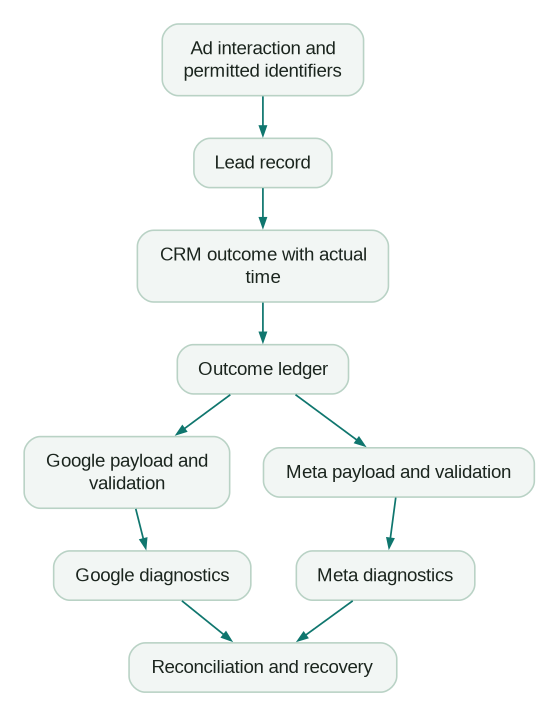
Read diagram as text
- Ad interaction and permitted identifiers to Lead record.
- Lead record to CRM outcome with actual time.
- CRM outcome with actual time to Outcome ledger.
- Outcome ledger to Google payload and validation.
- Outcome ledger to Meta payload and validation.
- Google payload and validation to Google diagnostics.
- Meta payload and validation to Meta diagnostics.
- Google diagnostics to Reconciliation and recovery.
- Meta diagnostics to Reconciliation and recovery
Which integration route fits the outcome you need?
Choose the route whose event, identifier and value semantics match the business outcome. A native lifecycle event and a custom deal-revenue event can require different designs even when both start in the same CRM.
For custom server-to-server tracking, plan authentication, identity, consent and retries independently of the browser. If the same qualified outcome should reach LinkedIn, use a separate mapping for LinkedIn Conversions API.
HubSpot's native conversion events
HubSpot’s current guide lists Marketing Hub Starter, Professional and Enterprise for native Google conversion events. Contacts need a GCLID or shared contact data, and lifecycle changes count after the event is created. Check the applicable event limit and configuration in the account. HubSpot Google conversion events.
Native lifecycle events use a fixed value. The former Use the Deal amount option is no longer available. A fixed estimate can represent a qualification event, but it cannot transmit each deal’s actual revenue. Use a separately designed supported pipeline when actual deal amounts are the requirement.
The same guide requires Included in account-level goals = Yes for lifecycle syncing and says Google Ads Manager-account setups cannot sync using Enhanced Conversions. Resolve those conditions before choosing this route for a measurement-only pilot; do not assume every native connector can sync under the bidding configuration you intended.
A native lifecycle event is not automatically a complete deal-revenue integration. The HubSpot Google Ads integration guide separates account connection, lead delivery and eligible conversion events. If one contact has several opportunities, or several contacts share a deal, test the associations and event count against your business definition.
Salesforce through Google Ads Data Manager
Google's current Salesforce integration supports post-lead outcomes and scheduled imports using eligible identifiers. The legacy Salesforce integration ended support on May 31, 2025, so use the current Data Manager workflow. Salesforce integration guidance.
Plan access to the relevant objects and fields, including the history needed to establish when a stage changed. A current opportunity stage by itself does not prove the exact time of an earlier transition.
Google also documents that the Data Manager Salesforce connection does not import Salesforce sandbox environments. Account for that in the testing plan instead of promising a sandbox connection the product does not support. Salesforce connector requirements.
A warehouse or custom API pipeline
Use a custom route when the outcome requires joins across CRM, billing and product data, or when native connector semantics do not match the business event.
For the Data Manager API, enable the service in the intended Google Cloud project, configure supported authentication and grant access to the destination account. An API key alone is not the supported authentication route. API access setup.
The warehouse can calculate the business event, but the delivery worker still needs validation, stable identities, diagnostics and recovery. The warehouse design guide explains the source models underneath that process. Compare other data activation routes when the required result is a CRM field, message or audience rather than an imported conversion.
How do you map the Google conversion payload?
Map the actual business occurrence to the intended account and conversion action, then validate the payload before ingestion. For the documented offline-conversion route, the destination identifies the Google Ads account owning the conversion action and the action ID. The conversion action uses the UPLOAD_CLICKS type. The event includes its actual timestamp and event source, with appropriate identifiers; value, currency and transaction ID should be mapped deliberately. Sending offline events.
Prefer a stable transactionId even where the API treats it as optional. It gives the integration an explicit event identity and supports the documented handling of matched records.
Keep currency amounts in the units expected by the destination. If the CRM stores $250 as 25,000 cents, convert it deliberately before upload. A technically accepted value can still be financially wrong.
Map the real consent state using the current schema. A copied example containing CONSENT_GRANTED is not evidence that the contact granted the required permission.
Validate a representative payload with validateOnly: true before ingestion. That checks initial structural requirements; it does not prove that an outcome will later match an eligible advertising interaction.
How do you handle immediate errors and later diagnostics?
The Data Manager API uses a fast-fail model for structural or required-field validation. One invalid record can reject the entire request. Optional-field problems may instead produce warnings, and further validation occurs asynchronously. Understanding API errors.
Build two checks into the worker:
- Inspect the immediate response, including field warnings. Keep rejected requests recoverable and fix invalid records before resending.
- Save the returned request ID and retrieve destination diagnostics. Follow processing until it reaches a final success, partial-success or failure state. Google recommends an initial wait and backoff rather than continuous polling. Request diagnostics.
For permission errors, verify both account ownership and the login path used by the integration. Having direct access to a child Ads account does not necessarily satisfy a request that specifies an inaccessible manager account.
For “conversion before click,” inspect time zones, event timestamps and the relationship between records. Correct the underlying data; do not move the conversion date forward simply to suppress the error.
Use Google Ads conversion warnings explained to distinguish a delivery defect from a reporting or eligibility issue. For unmatched clicks, separate expected non-Google outcomes from a regression in a known eligible cohort. Google's troubleshooting guidance notes that enhanced-conversion uploads can include outcomes from other channels, so not every uploaded event is expected to become Google-attributed. Offline import troubleshooting.
Which timing limits determine whether an outcome is eligible?
Check attribution eligibility, maximum upload age and connector extraction separately. They are different clocks:
- The conversion action's attribution window.
- The destination's maximum supported upload or identifier age.
- The connector's extraction or backfill window.
Google's import guidelines describe a 90-day limit from the associated last click for standard offline imports and 63 days for enhanced-conversion lead uploads. Your selected workflow and conversion window still determine actual eligibility. Offline import timing guidelines.
Connector extraction is a separate limitation. These Data Manager source windows describe retrieval, not a guarantee of attribution eligibility. GCLID import setup and source windows.
| Data Manager source | First successful retrieval | Subsequent retrieval |
|---|---|---|
| Cloud Storage, Amazon S3, HTTP, SFTP or Google Sheets | Previous 90 days | Previous 90 days each run |
| HubSpot or Salesforce | Previous 14 days | Changes reported since the last successful run |
| BigQuery, Redshift, Snowflake, MySQL or PostgreSQL | Previous 14 days | Previous 14 days each run |
A conversion can satisfy the advertising age limit yet remain absent because the connector never retrieved it. Verify the extraction result before treating a backfill as an attribution failure.
Upload promptly and at least daily where the workflow supports it. For a sales cycle longer than the supported attribution period, send a legitimate earlier qualification event if useful. Keep the final sale in business reporting even when it cannot receive platform credit.
How should the same business outcome reach Meta?
Meta uses Conversions API for the relevant event delivery. Its payload, matching identifiers, action sources and deduplication rules differ from Google's. Build a separate mapping from the same internal outcome ledger.
HubSpot can send Meta lifecycle-stage and form events, with documented eligibility and configuration limits. Verify the campaign's supported lead-optimisation workflow as well as the event sync. HubSpot Meta conversion events.
For a custom route, the Meta Conversions API (CAPI) setup guide covers the event identity, real click identifiers and browser/server overlap. Do not label a later CRM outcome as the original form submission or overwrite its occurrence time to fit a window. Then improve Meta Event Match Quality using valid matching evidence; a higher match score does not prove the business event was defined correctly.
Implement conversion tracking for ads in ChatGPT as a separate destination mapping, with its own event settings and reporting checks.
What must be verified before the event changes bidding?
Reconcile a completed cohort from the CRM to the outcome ledger, the upload results and the platform diagnostics. Report distinct counts for eligible business outcomes, attempted deliveries, accepted records and attributed conversions.
Then review the campaign goals. A form submission, qualified lead and won deal can all remain visible, but their inclusion in bidding needs an intentional strategy. Secondary actions included in custom goals can still affect Google bidding, so inspect campaign configuration rather than relying on the secondary label alone.
The Ads-versus-GA4 guide explains the reporting-date and attribution differences. Use actual business revenue for the company total and label platform-attributed value separately. The guide to why Meta can report more conversions than GA4 helps separate those measurement views.
What must pass before the integration is accepted?
Accept the integration when the outcome ledger, both processing stages and intended bidding configuration reconcile. Keep these checks with the owner’s recovery instructions.
Checklist
- Outcome definitions specify contact, account or deal as the counting unit.
- Genuine identifiers survive lead creation and CRM updates.
- Event time, upload time and stage history remain separate.
- Value, currency and fallback behaviour match the business definition.
- Consent and sharing rules are enforced before delivery.
- Each destination receives the correct action and account IDs.
- Validation failures and asynchronous diagnostics are monitored.
- Retries and adjustments preserve event identity.
- Backfills fit both connector and platform windows.
- Bidding goals are reviewed after measurement quality is established.
At Martechdevs, we implement tracking from the customer action through the records used in reporting and optimisation. Start with the free AI readiness checklist, or explore an AI assistant built around your approved workflows.
For a defined implementation, request a detailed Google Ads conversion tracking implementation scope covering identifier capture, the outcome ledger, destination mapping and recovery evidence.
Keep reading
Browse all Tracking & Attribution guides
 Tracking & Attribution
Google Ads conversion diagnostics: "setup is incomplete" and "needs attention" explained
Diagnose incomplete setup, inactive tags and enhanced-conversion alerts. Verify campaign goals, event delivery, offline uploads and the 2026 API changes.
Jafrin Akter AloLast updated 15 min read
 Tracking & Attribution
HubSpot Google Ads Integration: 7 Checks for Missing Leads and Conversions
Fix HubSpot Google Ads integration problems across account access, tracking templates, native lead forms, lifecycle events, conversion values and campaign goals.
Jafrin Akter AloLast updated 12 min read
 Tracking & Attribution
Why Google Ads and GA4 conversions do not match, and how to reconcile them
Google Ads and GA4 count conversions on different dates, models and rules. Align them step by step, check third-party estimates and report one number.
Jafrin Akter AloLast updated 14 min read
Google Ads conversion tracking
See the setup scope, acceptance checks and handover.
Questions people ask
How should we recover after a week of failed uploads?
Rebuild the pending set from the outcome ledger, preserving each event’s original occurrence time and identity. Check platform age limits and the connector’s retrieval window before replaying it. Submit a bounded batch, review both immediate and final diagnostics, then reconcile the recovered records. Do not change old timestamps to force eligibility or assume every business outcome can still receive advertising credit.
How should a reopened opportunity affect its imported qualification event?
Follow the documented meaning of that event. A qualification that genuinely occurred may remain valid even when the opportunity later reopens or loses. A mistaken value or classification needs the destination’s supported correction process. Keep the original transition and later change separate in business reporting; do not delete and recreate events merely to make the platform match today’s CRM stage.
Can a revenue correction also replace the Google click identifier?
Not for a matched Data Manager adjustment. The documented supported changes are value and currency restatement, plus user data supplementation when it was absent. Other matched-event fields, including the click identifier, remain unchanged. Required identifiers must still be supplied and validated. Investigate the incorrect relationship before choosing a recovery path, because an unmatched transaction ID can create a new conversion. Adjustment rules.
How should we report outcomes that have no usable advertising identifier?
Keep them in the business outcome total and identify them as unmatched or ineligible for the chosen delivery route. A supported first-party matching workflow may recover some coverage, but it should not invent a click or permission state. Compare eligible and unmatched cohorts so the marketing report shows its coverage boundary rather than quietly excluding legitimate customers from company revenue.
How should test leads be kept out of production uploads?
Give synthetic records an explicit test flag and prevent them from entering the production destination queue. Use a separate approved test route where available, while remembering that validation-only requests do not prove attribution. Include a test-record exclusion in reconciliation, then confirm that neither sample IDs nor test values reached the live conversion action.
Sources
- Google Ads API deprecations.
- Data Manager API overview.
- Event ingestion reference.
- Data formatting requirements.
- HubSpot Google conversion events.
- Salesforce integration setup.
- Salesforce connector requirements.
- Data Manager API access.
- Sending offline events.
- API errors.
- Request diagnostics.
- Offline conversion troubleshooting.
- Import timing guidelines.
- Connector extraction windows.
- HubSpot Meta conversion events.
- Conversion adjustments.
- Google Ads Help: How to adjust your conversions.

Written by
Jafrin Akter AloData Engineer and Co-founder at Martechdevs and Growth and Analytics Partners
Jafrin writes practical guides to marketing technology, customer data, analytics and AI workflows. Martechdevs is a Growth and Analytics Partners company.