
Why Google Ads and GA4 conversions do not match, and how to reconcile them
Data Engineer and Co-founder, martechdevs
Last updated 10 min read
Google Ads and GA4 often disagree because you are comparing different dates, conversion actions, attribution settings or counting rules. Standard Google Ads conversion columns assign results to the ad interaction date; GA4 event reporting uses the event date. Start by aligning the exact action and reporting basis, then investigate collection failures and duplicates.
Last updated: 22 September 2026.
Someone clicks an ad on 30 September and purchases on 2 October. A September Google Ads campaign report can include that purchase, while a September GA4 event report excludes it. Both can describe the same transaction correctly.
The mistake is treating a familiar label such as “conversions” as a complete metric definition. A useful definition also specifies what happened, when it is counted, which interactions can receive credit and how repeated actions are handled.
Start with a conversion contract
Before opening either dashboard, write a short specification for the outcome you are comparing:
- Business event: payment captured, qualified lead created or another precise state change.
- Identifier: order ID, lead ID or an equivalent stable record key.
- Timestamp: when that state change happened, including its time zone.
- Value: the agreed amount, currency and treatment of tax, refunds and discounts.
- Collection routes: Google Ads tag, GA4 import, CRM import or another source.
- Reporting rule: the date basis, count rule, eligible channels and conversion window.
For a purchase, “thank-you page loaded” may be only a proxy for the underlying payment. It can fire again on refresh, fail when someone closes the page, or run before an asynchronous payment completes.
Martechdevs' analytics and tracking implementation starts with this event definition and traces it through the collection and reporting systems. Without that agreement, making two charts match can reward the wrong implementation.
1. Align the date of the ad interaction and the date of the outcome
Google Ads provides conversion-time columns, including Conversions (by conv. time) and All conv. (by conv. time). Use the appropriate one when comparing with outcomes recorded on their occurrence date. This is different from the standard conversion columns used to relate outcomes to the advertising interaction. Google Ads conversion reporting.
Keep both views when they answer different questions:
- The interaction-date view helps evaluate the eventual return from a period's advertising activity.
- The conversion-date view helps reconcile outcomes that occurred during a period.
Do not divide this month's advertising spend by this month's conversion-date revenue and silently label the result as a mature campaign cohort's return. Some revenue may come from earlier spend, while this month's clicks may still be converting.
Also align time zones. A payment at 00:30 in Dhaka belongs to the previous calendar day in some other reporting zones. GA4 uses its property time zone and Google Ads its account time zone. Shared conversion settings.
2. Compare the same action and the right column
GA4 key events are events marked as important. A Google Ads conversion can be created from a GA4 event, but “all GA4 key events” and “Google Ads purchase conversions” remain different selections.
Segment the Google Ads report by conversion action. A total might combine purchases, qualified leads, phone calls and imported stages. If the question concerns purchases, isolate the relevant purchase action before comparing anything.
Primary and secondary settings affect reporting and optimisation. Primary actions are used for bidding when their standard goal is selected; secondary actions normally appear in All conversions for observation. There is a consequential exception: actions included in a custom goal can be used for bidding even when marked secondary. Primary and secondary conversion actions.
That exception matters during testing. Creating a secondary duplicate is not sufficient protection if someone then places it in the campaign's custom goal.
Maintain an action register with the source, business meaning, owner and campaigns using it. Archive the explanation for obsolete actions instead of relying on names such as purchase_new_final_2.
3. Separate counting rules from duplicate-event bugs
Google Ads supports counting every conversion or one conversion per ad interaction for the relevant action. GA4 key events can use once per event or the legacy once per session method. These units are different. Google Ads counting options and GA4 key-event counting.
Imagine one person submits the same enquiry twice in separate sessions after an ad click. A GA4 event count may show two occurrences, while an Ads action configured to count one records one eligible conversion.
Now imagine one order triggers a purchase tag twice because a page component mounts twice. That is a collection defect. A counting setting that reduces the visible total may conceal it, but does not repair the event stream.
For orders, inspect the transaction identifier across all routes. For leads, decide whether the unit is a form submission, a person, an enquiry or a qualified opportunity. Two legitimate enquiries from one person should not automatically be collapsed merely because the email address matches.
Measure duplicates before and after changing a count rule. Otherwise, a useful configuration change can be mistaken for a sudden drop in customer demand.
4. Match attribution scope and eligible channels
A session-acquisition report answers how a session was acquired. An event-scoped attribution report assigns credit for an outcome. Filtering GA4 Traffic acquisition to google / cpc does not make it equivalent to every Google Ads conversion report.
GA4 offers different attribution models and scopes. Record the model actually used in the selected report; do not apply the old blanket explanation that “Analytics is always last click.” GA4 attribution documentation.
For shared web conversions, Google's settings distinguish Google paid channels from paid and organic channels. Current conversion-management functionality also coordinates several settings across the products, with availability varying by property. Check the actual configuration instead of following a screenshot from an older interface. Creating and managing conversions.
A buyer might visit from a paid search ad, return through email and purchase later. A model distributing credit across eligible channels can assign a fraction of the purchase to Google Ads. That fraction is attribution credit, not a fraction of a real customer or payment.
This is why a fractional conversion total can be legitimate, while a payment database should still contain discrete transaction records.
5. Check the lookback window and interaction coverage
A conversion window determines how long after an eligible advertising interaction an outcome can count. A purchase outside that window can still exist as a GA4 event and as a payment in your order system. It simply may not qualify for that Ads action's attribution. Google Ads conversion windows.
Inventory click-through, engaged-view and view-through settings where applicable. A click-based website report should not be expected to reproduce all outcomes credited under a broader advertising interaction definition.
Use the actual conversion-lag distribution to judge the window. For a company with a long sales process, a short window may exclude commercially important outcomes. Extending a setting today also does not guarantee that every historical excluded outcome will be reconstructed.
The offline conversion import guide covers sending later CRM outcomes back through the appropriate workflow. Keep the original event time and eligibility rules intact when doing so.
6. Allow for processing and modelling
Google documents up to 24 hours for imported GA4 conversion data to become available in Google Ads. Historical activity from before an import is established is not automatically included. Conversions created through the Analytics interface are also secondary by default. GA4 conversion import guidance.
If yesterday's action is missing, distinguish a processing delay from a configuration error. If every eligible action from the last month is missing, waiting another day without checking the integration is a poor diagnostic strategy.
Modelled data adds another limit to row-by-row reconciliation. GA4 can estimate outcomes or attribution that cannot be directly observed, and attributed channel data may continue updating for up to 12 days after a conversion is recorded. Modelled key events.
Use a recent operational report for daily decisions and a mature reporting window for reconciliation. Label whether a metric includes estimates. You cannot demand an individual order ID for every fractional or modelled contribution in an aggregate platform report.
The Consent Mode guide explains the distinction between collection behaviour and modelling eligibility. Adding a consent configuration does not guarantee that a small property receives every type of modelling.
7. Trace the tag and import paths
Once the definitions line up, test the implementation. Follow one controlled outcome through the application, the browser request, any server endpoint, GA4 and the relevant Ads action diagnostics.
Common failure patterns worth testing include:
- A redirect removes an advertising click identifier.
- The GA4 event fires on a button click, while the Ads tag waits for confirmed success.
- One route respects the consent update and another uses stale state.
- A purchase event repeats on reload.
- Two separate conversion actions represent the same purchase and both are used for bidding.
- A server event arrives without the identity or context needed by its destination.
Keep failures tied to evidence. The fact that two totals differ does not establish which route is wrong.
Google's newer multi-source conversions beta can supplement eligible website conversion actions with backend data. Its documented deduplication is within a single conversion action; it does not automatically deduplicate two separate actions. Imported GA4 actions are not eligible for that particular feature. Multi-source conversions.
If you are introducing a backend route, the server-side tracking guide covers the decisions around event ownership, retries and reconciliation.
A reconciliation example that produces an explanation
The following numbers are fictional and deliberately simplified to avoid fractional attribution.
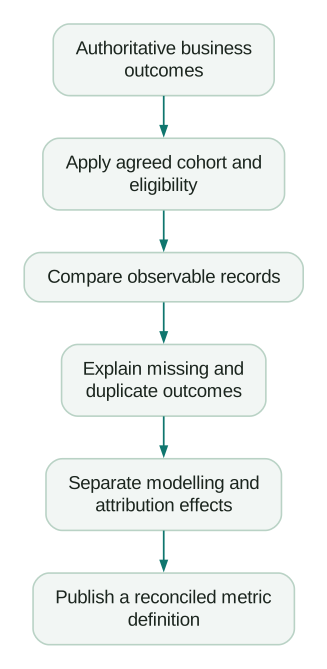
A finance system contains 120 paid orders completed in September. An Ads report shows 100 conversions in its standard interaction-date column. The apparent gap is 20, but subtracting those numbers does not diagnose anything.
After selecting the intended purchase action and conversion-time column, Ads shows 110. Investigation of the order cohort establishes:
- Ten of the 120 orders are not eligible for credit under that action's advertising-interaction rules.
- Of the remaining 110, five have a confirmed collection failure.
- The report also contains five duplicate outcomes caused by an incorrect event implementation.
The net total still equals 110. The matching aggregate hides two offsetting defects.
The repair is to remove the duplicate collection and recover the missing eligible events where the supported workflow allows it. A dashboard-only comparison would have declared success too early.
Which number belongs in the CEO report?
Use an agreed business outcome as the headline: paid orders, qualified pipeline, collected revenue or another measure owned by the relevant operational team. Specify its period, currency and adjustments.
Then show advertising attribution as a supporting view, with the platform and rules named. “September collected revenue” and “Google Ads attributed purchase value for September clicks” can both be useful. They should not share an ambiguous “revenue” label.
Do not add Google Ads and Meta attributed revenue and assume the result is company revenue. Different platforms can claim credit for the same transaction.
For budget decisions, combine consistent attribution reporting with experiments and business economics. A reconciled report establishes what a number means. It does not, by itself, prove that advertising caused every attributed sale.
Reconciliation checklist
- One business outcome and its authoritative record are defined.
- The exact conversion action is selected in Ads.
- Date basis and time zones match the comparison.
- Primary, secondary and custom-goal usage are checked.
- Counting, attribution channels and windows are recorded.
- Processing maturity is appropriate for the decision.
- A sample of observable outcomes is traced end to end.
- Missing and duplicate outcomes are measured separately.
- Modelled or unobservable differences remain labelled.
- Leadership reporting distinguishes business totals from attributed totals.
At Martechdevs, we implement tracking from the customer action through the records used in reporting and optimisation. Start with the free martech AI audit, or explore an AI assistant built around your approved workflows.
Questions people ask
Why are GA4 conversions not showing in Google Ads?
Check the property and Ads account link, the selected event, the import start date, collection status and the action's primary or secondary setting. Inspect All conversions for a secondary action and allow the documented import delay before concluding the integration failed.
Should I import GA4 key events or use the Google Ads tag?
Choose based on the required measurement features, event quality and operating model. A reliable shared GA4 event can simplify management; an Ads-specific implementation may support a different feature set. If you run both for comparison, control which action campaigns use and document the duplication risk.
Is a 10% or 20% difference acceptable?
A universal tolerance is not useful. A small difference caused by duplicate purchases is a defect; a larger difference explained by distinct attribution rules may be expected. Define tolerances for specific reconciliation checks and investigate changes from the established baseline.
Will switching both platforms to the same attribution model fix everything?
It addresses only one possible difference. Dates, eligible channels, windows, count rules, data collection and selected actions can still disagree. Change models to answer a business question, not simply to force two totals closer together.
Which platform is the source of truth for revenue?
Use the system that records the agreed financial event, with finance's definitions for refunds, tax and recognition. Analytics and advertising platforms provide behavioural and attribution views around that record. A warehouse can connect them while preserving each metric's meaning.
Sources
- Google Ads conversion reporting columns. Accessed 22 September 2026.
- Creating and managing shared conversions. Accessed 22 September 2026.
- Primary and secondary conversion actions. Accessed 22 September 2026.
- Google Ads counting options. Accessed 22 September 2026.
- GA4 key-event counting. Accessed 22 September 2026.
- GA4 attribution. Accessed 22 September 2026.
- Conversion windows. Accessed 22 September 2026.
- Importing GA4 conversions. Accessed 22 September 2026.
- Modelled key events. Accessed 22 September 2026.
- Multi-source conversions beta. Accessed 22 September 2026.
Written by
Jafrin Akter AloData Engineer and Co-founder, martechdevs
Jafrin Akter Alo is a data engineer and co-founder of martechdevs, where the team has delivered 74+ martech, data and growth stack implementations.