
Google Ads conversion diagnostics: "setup is incomplete" and "needs attention" explained
To fix “conversion tracking setup is incomplete,” first check the campaign’s selected goal and conversion action, then trace the intended outcome through its collection source. “Needs attention” can mean a different failure: missing matching data, an upload problem or inconsistent values. The reliable repair follows the evidence behind that specific alert, rather than installing another tag and hoping it clears.
On this page
Which layer raised the Google Ads warning?
Record the exact message, affected conversion action, source, account, last change and where the warning appears. A campaign recommendation, Google tag diagnostic, action tracking status and enhanced-conversions alert are different surfaces.
Start in Goals, Conversions and Summary, then open the affected action or diagnostic details. Google's conversion-summary guide describes the goals, actions and troubleshooting entry points. Use the detail behind a status instead of treating its colour as a root cause.
Use the surface and source to choose the next check. This is a troubleshooting map, not a claim that every alert has the same cause.
| Surface or source | First evidence to collect | What that evidence can establish |
|---|---|---|
| Campaign setup recommendation | Selected goal and action optimisation role | Whether the campaign targets the intended outcome |
| Website conversion action | Success trigger, destination ID and label, request | Whether the specific website event is delivered |
| Google Analytics 4 (GA4) import | Property, key event, account link and imported action | Whether you are inspecting the correct import path |
| Offline or customer relationship management (CRM) outcome | Business record, upload destination and processing result | Where the record stopped after the outcome occurred |
| Enhanced-conversions diagnostic | Affected matching field and eligible event population | Whether matching inputs are missing or malformed |
| App or phone conversion | Source-specific configuration and eligibility | A web-form test cannot validate these sources |
If ownership is split across the site, agency and CRM team, our analytics and tracking service starts with this shared outcome-to-report trace. One agreed action identifier and test record make the handoff much more useful than three screenshots of different dashboards.
Write down the intended business outcome too. “Demo request accepted by our application” is testable. “Conversion tag installed” leaves open whether the tag fires at the right moment or sends to the right action.
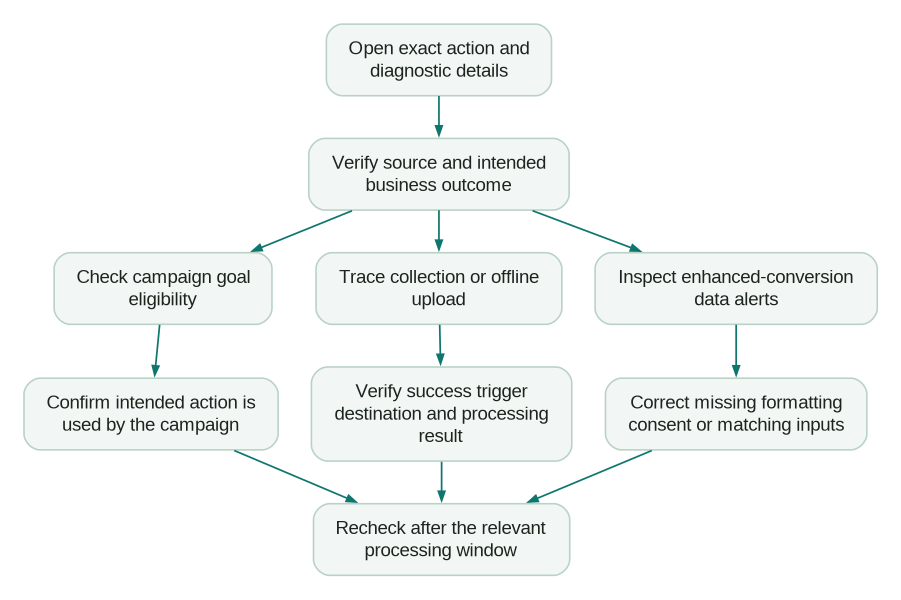
Read diagram as text
- Open exact action and diagnostic details to Verify source and intended business outcome.
- Verify source and intended business outcome to Check campaign goal eligibility.
- Verify source and intended business outcome to Trace collection or offline upload.
- Verify source and intended business outcome to Inspect enhanced-conversion data alerts.
- Check campaign goal eligibility to Confirm intended action is used by the campaign.
- Trace collection or offline upload to Verify success trigger destination and processing result.
- Inspect enhanced-conversion data alerts to Correct missing formatting consent or matching inputs.
- Confirm intended action is used by the campaign to Recheck after the relevant processing window.
- Verify success trigger destination and processing result to Recheck after the relevant processing window.
- Correct missing formatting consent or matching inputs to Recheck after the relevant processing window
The diagram is a diagnostic workflow. The status names alone do not establish which branch is failing in your account.
How do you fix “conversion tracking setup is incomplete”?
Treat this as a prompt to inspect the setup behind the campaign. Do not assume it has one universal fix or that it proves no conversions are being measured anywhere in the account.
First open the campaign's conversion goals. Check whether it uses account-default goals or a campaign-specific selection, then inspect the actions inside the selected goal. Confirm that the intended outcome exists, belongs to the expected account and has the intended optimisation role.
Google's primary and secondary action rules explain that primary actions participate in bidding when their standard goal is used. Secondary actions are normally observational, but inclusion in a custom goal can make them biddable. Marking an unrelated page view primary just to clear a warning changes the campaign's objective.
Next validate the selected action's source. A GA4 import will not be repaired by pasting a native Ads conversion label onto a page unless you deliberately choose to replace the measurement design. A website action can have a healthy sitewide tag while its outcome event never fires.
Save the goal configuration before changing it. If the intended action is already functioning and used by the campaign, inspect whether the alert refers to another action in the goal. Google's conversion-summary documentation notes that a missing-primary warning can concern a secondary or less important action. Diagnose that scope before rewriting a working goal.
What should you test when a website action is inactive?
For a website action, start a Tag Assistant troubleshooting session from the action's status. Begin at the landing page and complete the actual journey instead of opening the success URL directly. Google provides this workflow for unverified, inactive and needs-attention states in its Tag Assistant conversion guide.
Inspect three separate pieces of evidence:
- The relevant tag or container loads on the pages the journey actually uses.
- The conversion event fires only after the intended success condition.
- The event is sent to the correct conversion destination, with the expected fields.
A base tag on the homepage does not prove an outcome event exists. For a code-based website conversion, Google's Google tag guide distinguishes the sitewide tag from the event or phone snippet used for the conversion.
Compare the conversion ID and label against the action being diagnosed. Check for a staging destination accidentally deployed to production, a tag left in an unpublished Google Tag Manager (GTM) workspace or a second Ads account's label copied into the event tag. These are investigation hypotheses; confirm them in the payload or configuration before making a change. The GTM firing and trigger mistakes guide covers the container-side checks before you wait for the Ads status to change.
If the journey moved recently, test the new URLs. A migration can leave the marketing site tagged while the application, embedded form or replacement checkout uses a different collection path. Google's sitewide-tagging troubleshooting covers destination labels, page coverage, multiple domains, account links and related checks.
Do not click your own paid ad just to make the status change. The supported Tag Assistant workflow can verify the implementation without manufacturing paid traffic. A later attributed conversion in Ads is a separate reporting observation.
Does “no recent conversions” mean tracking is broken?
This status does not automatically mean a broken tag. Google's Tag Assistant guide notes that a successfully verified action can display no recent conversions before real conversions arrive. Verification and recent attributed activity are separate conditions.
Check whether the business actually received eligible outcomes during the relevant period. If sales received no demo requests, the absence of attributed demo conversions is not surprising. If sales received 40 and the action received none, trace a few eligible examples through the collection path before blaming low volume.
Also check whether you are looking at the right column. An observational action may be visible in All conversions without contributing to the campaign's primary Conversions total. Do not promote the action into bidding merely to make a familiar column populate.
Compare the conversion window, date range and expected delay. A long sales cycle and a recent campaign produce an immature cohort. Raising budgets to clear a diagnostic message does not establish that the implementation works. Then compare Google Ads and GA4 on the same date basis if their reported totals still appear inconsistent.
Use the key events and conversion-goal guide when the uncertainty concerns the selected outcome or its optimisation role, rather than the tag itself.
What does an enhanced-conversions warning actually mean?
Open the detailed alert and identify whether the base conversion is being recorded. Enhanced-conversion diagnostics can flag missing or malformed matching data even when the underlying conversion action is active. Google's web tag diagnostics reference distinguishes data-quality states and specific alerts.
Follow the affected field and collection method. The enhanced conversions implementation guide covers the collection design; this diagnosis should identify which part of that design failed. A warning is not permission to send every available customer attribute.
Missing user-provided data
Inspect when the permitted input becomes available relative to the conversion event. A common implementation hypothesis is that a form clears its fields before the tag reads them, or that an automatic selector no longer matches after a redesign. Test the exact form and success path.
For an application-owned flow, provide the supported integration with the necessary approved data at the appropriate time. Keep that data out of ordinary analytics parameters, URLs and public logs. Confirm the consent state associated with the event, including changes and saved preferences.
Google's consent debugging procedure shows how to inspect defaults, updates and tag behaviour. Fix contradictory or late configuration without overriding the visitor's choice.
Incorrect formatting or incomplete fields
Compare the payload with the documentation for the path you use. Determine whether the tag or integration hashes the input, or whether the upload expects a preprocessed value. Do not hash twice or assume a field is correct because its output looks like a long string.
Google's web diagnostics describe malformed email or phone inputs and missing required address components. The field-specific alerts identify the affected format. Correct the source mapping and repeat a controlled test with appropriate test data.
A valid-looking hash proves little about semantic correctness. It could represent the wrong person's field, an empty placeholder or a stale value from a previous submission. Verify where the input originated and which conversion it belongs to, without circulating raw customer data in the support ticket.
Low matching or no recent enhanced-conversion data
Review the eligible population and the diagnostic's stated observation period. A lack of alerts on a very small dataset is not proof of a complete implementation, and a coverage metric is not a revenue-lift measurement.
Separate events that legitimately lack a supported matching field from events that should carry one but do not. Investigate changes by form, application release and collection path. Report that coverage denominator alongside the rate so the team can distinguish improved data delivery from a changed audience mix.
What changed for enhanced conversions and uploads in 2026?
Google’s 2026 settings update dates the offline and enhanced-conversions-for-leads migration to the Data Manager application programming interface (API) from 15 June 2026, with legacy Google Ads API access limited by allowlisting. It also describes unified enhanced-conversion settings and concurrent inputs from tags, Data Manager and API connections. Check the actual account and request response; an announced rollout is not proof that every account presents an identical interface.
Do not enable a separate customer-list purpose merely to clear a measurement warning. Measurement setup, customer-data terms and audience-use choices need their own intended configuration.
For an existing integration, record the API, destination action and last successful job. Check actual responses and diagnostic results. Do not assume that a historically working Google Ads API upload path is the right choice for a newly created integration.
The account-level switch and the quality of the delivered record remain separate concerns. An enabled setting cannot repair a wrong outcome timestamp, inconsistent identity or an application that never sends the required data.
Why can an accepted offline upload still be missing from reports?
Trace one eligible CRM outcome through its source record, occurred-at timestamp and time zone, permitted identifier, destination and processing results. The offline conversion import guide covers route selection; diagnose the route actually in use before applying another uploader’s retry rules.
For missing or changed click context, trace the GCLID through forms and CRM changes before adjusting the upload configuration.
Google's offline discrepancy guidance covers account mismatches, timing errors, conversion windows and reporting-date differences. Keep the original business time intact. If a record appears to predate its ad interaction, investigate time-zone conversion, clock errors or the wrong matched interaction; do not move the business event to a convenient later date merely to pass validation.
Maintain separate delivery and reporting states. The names below are an internal incident-log design, not Google API status codes.
| Internal state | Required evidence | Next decision |
|---|---|---|
| Pending | Stable business ID and original outcome time | Deliver through the intended route |
| Validation rejected | Exact error and affected request | Repair the source mapping before retrying |
| Accepted for processing | Request identifier and any warnings | Inspect destination processing; do not call it attributed revenue |
| Processed but unreported | Destination result, date basis and action settings | Reconcile eligibility, count setting and reporting window |
| Reconciled or explicitly unresolved | Report observation and named owner | Close with evidence or escalate the remaining discrepancy |
The current Data Manager ingestion guide uses fast-fail validation: one invalid event rejects the entire request. A successful response returns requestId and may contain fieldWarnings; retain both and inspect destination diagnostics. validateOnly: true checks a request without ingesting it, so a successful validation is not delivery evidence.
The accepted total is not necessarily the attributed total. Google’s offline guidance puts typical processing below 12 hours, but allows up to 72 hours for conversions keyed by Google’s GBRAID/WBRAID click identifiers. Compare business outcomes using conversion-time columns and aligned time zones; upload date is not the default reporting date. If all records have unknown-click errors, investigate the implementation rather than assuming every rejection is harmless organic traffic.
For repeated jobs, preserve a stable business identifier and the intended deduplication fields. A retry should not become a new sale simply because the integration generates a new timestamp or identifier on each attempt. Document any supported adjustment path separately from creating a fresh conversion.
How do you diagnose multi-source conversion alerts?
For the multi-source conversions beta, check availability and action type first. It supports manually coded Google tag/GTM website actions, not imported GA4 or URL-based actions. Matching and deduplication happen within one action, not across two actions included in the same campaign goals. Then compare the shared transaction ID and value units between the tag and additional source.
The following synthetic fixture uses USD and one business transaction. The expected comparison is after your source-to-destination mapping; it does not prescribe a Google request schema.
| Field | Website observation | Backend input | Required mapped result |
|---|---|---|---|
| Transaction ID | order-123 | order-123 | Exact shared identifier |
| Amount | 99.00 dollars | 9900 cents | 99.00 dollars on both paths |
| Currency | USD | USD | Explicit agreement |
| Alternative bad ID | order-123 | 123 | Flag mismatch; do not silently invent a match |
Convert cents by dividing by 100 under this source contract. A backend value of 9900 sent as dollars is 100 times the intended 99, even though both values are valid numbers. Keep leading zeros, prefixes and case consistent instead of coercing identifiers into numbers. The multi-source alerts guide identifies inconsistent transaction IDs and value units as diagnostic causes.
The initial additional-source trial lasts 14 days. Google's multi-source diagnostics guide states that the additional conversions become biddable afterwards, even if diagnostic alerts remain. Record that date and resolve significant identifier or value errors before the transition.
Matched value updates are disabled during that initial trial. Google's Data Manager event-processing guide says uploaded values only override the tag's reported value after the trial ends. Check the transition date before treating an unchanged trial-period value as an upload failure.
This beta has its own availability and supported-action restrictions. Do not apply its deduplication rules to an ordinary GA4 import or a pair of unrelated conversion actions.
Which acceptance tests prove the business trigger is correct?
A useful test set proves both when the conversion should happen and when it should not. For an accepted demo request, run these cases in the appropriate controlled environment:
- Submit an invalid form: no accepted-lead conversion.
- Receive an application error: no accepted-lead conversion.
- Receive a confirmed success: one intended conversion event with the correct destination.
- Refresh or revisit the success screen: no new business lead created by the tracking implementation.
- Retry a request after an ambiguous response: follow the application's stable success and deduplication rule.
- Repeat the journey with the relevant consent choices: collection matches the documented design.
For purchases, replace the lead definition with the actual transaction and refund rules. For CRM outcomes, include a disqualification or stage reversal if that can occur in the business process.
Save redacted evidence from your own account: the affected action details, trigger sequence, destination, relevant payload fields, upload results and observation times. Public screenshots from another account cannot prove your implementation. Keep any customer identifiers out of shared incident notes.
When should you wait, and when should you escalate?
Distinguish a completed debug session from a refreshed diagnostic dashboard. Google’s Tag Assistant guide describes verification updates after approximately 30 minutes. Its sitewide troubleshooting guidance allows 24–48 hours for diagnostic and tracking-status changes after tag corrections, and notes that low traffic can produce misleading alerts. Other upload paths have their own processing intervals.
Waiting is reasonable after you have evidence that the intended event reaches the correct destination and you are inside the relevant processing window. Waiting is not a repair for a wrong conversion label, a failed request or an event that fires only in GTM Preview because the container was never published.
Avoid repeatedly changing tags during that interval. Save the release time and test result, then compare like-for-like data when it has processed. Multiple simultaneous changes make it difficult to know which one fixed the issue or introduced a new discrepancy.
Escalate with a compact evidence package if the result remains unexplained: source and destination identifiers, exact diagnostic text, redacted test evidence, occurred-at and submission times, processing responses and the report configuration used to look for the outcome.
What evidence closes the incident?
Close the incident when the intended business journey produces correct evidence through collection, processing and reporting, and an owner accepts any remaining limitation.
Checklist
- The warning is tied to a specific surface, source and conversion action.
- The campaign uses the intended goal and optimisation role.
- Successful and failed business journeys produce the expected events.
- Destination identifiers, values, currencies and timestamps are correct.
- Consent and enhanced-conversion inputs follow the approved design.
- Offline processing and any retry or adjustment behaviour are documented.
- The relevant status and reports were rechecked after processing.
- A named owner will repeat the acceptance test after future changes.
Use the tracking break map skill to connect the conversion warning to collection, processing and report evidence before closing the incident.
Make the accepted journey part of your GA4 alerting and incident checks, where those alerts monitor the underlying business events. Give each alert a source, owner, evidence link and escalation deadline; an alarm without a recovery decision just creates another dashboard to watch.
The tracking break map skill can organize that evidence from click through report and produce a fix and retest plan for its owner.
For help tracing a warning across the website, consent layer and advertising account, get the $99 martech audit or request a detailed Google Ads conversion tracking implementation scope. Bring the affected action, last change and a redacted example of an outcome that should have arrived.
Keep reading
Browse all Tracking & Attribution guides
 Tracking & Attribution
HubSpot Google Ads Integration: 7 Checks for Missing Leads and Conversions
Fix HubSpot Google Ads integration problems across account access, tracking templates, native lead forms, lifecycle events, conversion values and campaign goals.
Jafrin Akter AloLast updated 12 min read
 Tracking & Attribution
Google Ads Audit: Evidence, Priorities and Release Checks
Audit Google Ads goals, conversion tracking, search intent, targeting and budgets. Prioritize evidence-backed repairs with clear owners, acceptance cases and retests.
Jafrin Akter AloLast updated 12 min read
 Tracking & Attribution
Google Ads Conversion Label: Location, Tag Setup and Validation
Find the Google Ads conversion label, pair it with the correct ID, configure the native event and validate business triggers, values and transaction identities.
Jafrin Akter AloLast updated 10 min read
Google Ads conversion tracking
See the setup scope, acceptance checks and handover.
Questions people ask
What if the warning appears only on one translated checkout?
Compare that checkout with a working language using the same product, consent choice and payment outcome. Localisation can change form selectors, success-page routes, currency formatting or the embedded payment component. Keep the business event definition constant while inspecting those differences. Record the affected locale explicitly so a successful English test does not close a defect that still affects another customer journey.
Should a replacement action inherit the old action’s name?
Use a distinct, intelligible name during a planned replacement and keep the old identifier in the migration record. Reusing a familiar label can make two different actions look interchangeable in screenshots and exports. Document which campaigns switch, when they switch and how the before-and-after report should be interpreted. A naming change alone does not transfer measurement history or prove equivalent behaviour.
How do you investigate a failure that only one browser reproduces?
Record the browser version, consent state, extensions and exact journey, then repeat it in a clean profile you control. Compare requests and application outcomes before changing the production tag. A blocker in one test browser and a site-wide implementation defect require different responses. Keep both observations in the incident record; removing an extension proves a condition changed, not that every visitor can now be measured.
How should a tracking outage appear in the performance report?
Annotate the affected action, collection route and time interval, then distinguish observed results from outcomes whose measurement is uncertain. Keep a separate business-system count where available without presenting it as Google-attributed revenue. Explain which comparisons are compromised and when reliable observation resumes. Do not fill the gap with an average and quietly mix that estimate into the platform’s reported conversion total.
Who decides whether bidding should continue during the investigation?
The campaign owner should decide with the incident owner, using the affected outcome, spend exposure and evidence of severity. A harmless recommendation and inflated purchase values create different risks. Agree temporary limits or a pause when justified, record the decision and define the evidence required to restore normal operation. Engineering should repair the signal without silently changing the business objective to make the warning disappear.
Sources
- Google Ads: Manage goals from the conversion summary
- Google Ads: Primary and secondary conversion actions
- Google Ads: Use Tag Assistant for conversion actions
- Google Ads: Use the Google tag for conversion tracking
- Google Ads: Troubleshoot sitewide tagging
- Google Ads: Enhanced-conversion web tag diagnostics
- Google: Troubleshoot consent mode
- Google Ads: Enhanced-conversions settings updates
- Google Ads: Offline conversion discrepancies
- Google Ads: Multi-source conversions beta
- Google Ads: Multi-source conversion diagnostics
- Google Data Manager: Multi-source event processing

Written by
Jafrin Akter AloData Engineer and Co-founder at Martechdevs and Growth and Analytics Partners
Jafrin writes practical guides to marketing technology, customer data, analytics and AI workflows. Martechdevs is a Growth and Analytics Partners company.