
Why GA4 purchases don't match Shopify, and how to reconcile them
Data Engineer and Co-founder, martechdevs
Last updated 11 min read

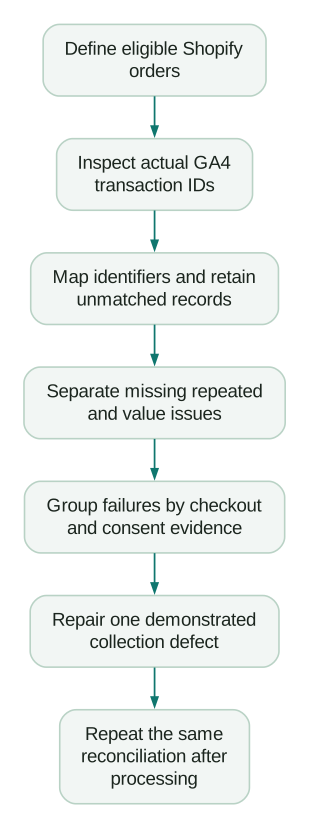
When GA4 purchases do not match Shopify, compare orders before changing tags. Establish which orders belong in the comparison, identify the transaction ID that your integration actually sends, and match those records to the analytics data. Then investigate missing purchases, repeated purchases and incorrect values separately. Two totals can match while the underlying orders are wrong.
Last updated: 3 September 2026.
Decide which Shopify outcome GA4 is supposed to measure
An order placed, a payment received and a sale after returns are different measures. Write down the intended event: for example, one purchase for each completed online checkout, with a separate process for refunds. If your business needs payment capture as the success condition, make that distinction explicit instead of assuming every order record means money collected.
Shopify's sales-report definitions explain that gross sales can include pending, cancelled and unpaid orders. Net sales deduct discounts and sales reversals; total sales also incorporates other components such as taxes, duties, shipping and fees. That is enough to invalidate a casual comparison between “Shopify sales” and one GA4 revenue metric.
Build the expected-order population deliberately:
- Choose the sales channels covered by the website implementation. Keep POS, manual and other-channel orders separate unless you intentionally collect them.
- Define the order and payment statuses that qualify.
- Exclude test records using an explicit rule and retain a count of the exclusions.
- Choose the relevant business timestamp and one reporting time zone.
- Decide how cancellations, partial refunds and later order edits are represented.
- Retain each currency separately before applying any documented conversion method.
This is a measurement contract, not a filter you adjust until the numbers look close. Save it beside the reconciliation so someone else can reproduce the expected total.
Freeze a completed period and keep the original exports
Use a period whose analytics processing has settled. Google says report processing can change data over 24–48 hours in its data-freshness guidance. Save when each export was taken, since a later refund or order edit can also change the business comparison.
Start with a Shopify order extract containing the identifier, displayed order name, sales channel, status, timestamp, currency and the monetary components required by your definition. Retain the original values. Make normalised fields in separate columns.
For GA4, obtain purchase information with transaction IDs, values, currencies and dates from the appropriate report or retained event export. Save the selected property, stream, filters and metric definitions. A channel-attribution report is not your first reconciliation dataset: it allocates credit, which introduces a different set of questions.
If you already retain the GA4 BigQuery export, use it to inspect available event-level fields and collection patterns. Document that you are reconciling that export, rather than claiming its raw records are identical to every modelled or processed GA4 report.
Check completeness before joining. A report export with a row limit, a date filter on the wrong timestamp or purchases from another stream can create a convincing but false list of missing orders.
Inspect the transaction ID instead of guessing its format
Take one known successful order and inspect the transaction_id in the actual GA4 purchase payload. Compare it with the order's displayed name, underlying ID and any prefix or transformation added by the integration.
An order name such as #1042 and an underlying order ID are not interchangeable strings. A checkout token and a customer ID are different entities again. The correct join depends on what the sender uses, not which column happens to look familiar in an export.
Shopify's GTM custom-pixel tutorial maps the checkout's order ID to GA4's transaction ID in its example. That does not establish what every app or historical implementation sends. Inspect yours.
Use a mapping record with the store, raw analytics transaction ID and canonical order ID. Confirm several ordinary orders and several problematic ones. Only remove prefixes or transform identifiers after proving the rule. Stripping every non-numeric character can create collisions or conceal that two sources use different identifiers.
For multiple stores, include the store identity in the warehouse join. Displayed order numbers may overlap. A correct identifier in one store can match the wrong order when exports are combined without a store key.
Google's transaction-ID guidance requires a unique identifier for each transaction, warns against sending an empty string, and scopes its purchase deduplication guidance to web streams. Keep the same identifier for repeated delivery of the same purchase; do not reuse one constant identifier across different orders or users. Exclude personal information from the identifier.
Build a worksheet that exposes offsetting errors
Create four tabs: untouched Shopify orders, untouched analytics records, reconciliation, and analytics-only exceptions. Use the last tab for analytics records with no matching eligible order. A left join from Shopify alone will hide those extra records.
In the reconciliation tab, keep one row per expected business order. Count matching analytics purchase records before selecting or aggregating values. Do not make the join appear clean by taking the first match and silently dropping the others.
Copy this illustrative CSV into a worksheet. The IDs and figures are invented. analytics_rows means rows in the audited purchase dataset, not a claim that GA4 always retains repeated requests in its reports. Here, the two rows for order 1003 came from two different raw transaction IDs that the audit mapped to the same business order.
order_id,expected_currency,expected_item_value,analytics_rows,analytics_currency,analytics_item_value,status
1001,USD,100,1,USD,100,matched
1002,USD,80,0,,,missing
1003,USD,120,2,USD,240,possible_duplicate
1004,USD,100,1,USD,90,value_mismatch
1005,EUR,80,1,USD,80,currency_mismatch
There are five expected orders and five analytics rows. An aggregate count comparison appears perfect. The order join reveals that only four expected orders have any analytics record, giving 80% observed coverage. One is missing, one has a possible duplicate, one has the wrong value, and one has a currency problem. Only one row passes every check shown.
Use separate flags in a real worksheet because issues can overlap. Useful flags are missing record, repeated business outcome, currency mismatch, value mismatch, timestamp mismatch and unresolved identifier. A single status column is convenient for presentation but should not erase a second defect.
For each exception, add the raw transaction IDs, integration name, payment method, checkout flow, consent evidence if available, error evidence, owner and retest result. Use unknown when evidence is absent. A browser event that did not arrive cannot tell you its own consent state; you need separate, appropriately collected evidence to establish that explanation.
For amount comparison, first require matching currencies and definitions. Use a tolerance appropriate to the currency's precision and your rounding rules. Do not sum EUR and USD or accept a fixed percentage difference simply because it makes the reconciliation pass.
Group missing orders by where collection could have failed
Once the join is sound, compare missing and matched orders across payment methods, devices, checkout changes and post-purchase flows. Look at rates within each group, not just raw counts. A popular payment method will naturally account for many misses if it handles most orders.
For example, 20 missing orders out of 1,000 card orders is a 2% observed miss rate. Ten out of 100 orders through another flow is 10%. The smaller raw count is the stronger diagnostic signal. This does not prove the payment method caused the failure; it tells you which journey to reproduce first.
Check the page where the checkout event actually occurs
Shopify documents that checkout_completed normally fires on the thank-you page, but with upsells or post-purchase offers it fires on the first upsell page instead. It does not fire again on the thank-you page. If the page responsible for triggering it never loads, the event is not triggered.
A trigger tied only to one thank-you URL can therefore miss an important flow. Inspect the customer event and the outgoing purchase payload during the actual checkout path. Include an order that accepts an offer and one that declines it. Then check whether a later change in the order amount requires a separate reconciliation or adjustment process.
Check privacy state without treating missing permission as a defect
Shopify's pixel privacy documentation distinguishes app-pixel requirements, custom-pixel settings and APIs for initial and updated customer permissions. A banner appearing on the storefront does not prove that every pixel receives the intended state throughout checkout.
Inspect the declared requirements and the actual initial state and updates for the implementation. Test allowed and denied paths according to the store's approved policy. Do not force permission to granted merely to increase measured coverage.
Separate expected non-collection from a technical failure in an eligible flow. Both can lower observed coverage, but they require different explanations. Never infer consent solely from the country, payment method or fact that a purchase is absent.
Check the destination and the installed integration
Shopify's GA4 setup guide uses the Google & YouTube channel and explains that certain ecommerce events are collected automatically after setup. If that is your chosen implementation, first confirm its connection and destination property.
Inventory any additional theme code, custom pixel, GTM container and server sender. Write down which one owns purchase collection. Installing a second implementation because the first report looks low can create duplicate coverage while leaving the original missing flow unresolved.
Treat repeated purchases as a business-event problem
For a suspected duplicate, inspect the two raw records and establish whether they represent the same order or two legitimate business outcomes. Check transaction ID, event name, sender, timestamp, value and any order adjustment.
Typical hypotheses to test include an old sender left active during a migration, separate senders using different identifiers, and a trigger that emits a fresh purchase when an order-status page is revisited. Do not call a repeated network request a reported duplicate without inspecting processing and the audited dataset.
Preserve one stable business-event identity across retries. Review the event naming and migration guide when consolidating senders so that trigger ownership and version changes remain explicit.
A server path is not a universal repair. Before adding one, define its success condition, identity, permissions, timestamps, retry handling and relationship to the browser path. Server delivery cannot make an unpaid order a paid purchase, and duplicated server/browser coverage can still be wrong.
Reconcile revenue components separately from order coverage
If the order exists in both systems, compare the amount contract. Google's purchase event reference defines value as the sum of item price multiplied by quantity, excluding shipping and tax. Currency accompanies the monetary value.
Consider an illustrative order with $100 of merchandise after discounts, $8 shipping and $9 tax, with no other charges. The checkout total is $117, while the specified GA4 item value is $100. A $17 difference does not establish missing revenue until you decide which components each selected metric includes.
Inspect the item prices after discounts, quantity, currency, shipping and tax fields. Do not assume a generic integration example maps every financial field exactly as your reporting definition requires. If it sends the complete checkout total as item value while also sending shipping and tax separately, document and correct that mapping against the destination specification.
Keep later refunds distinct from the original purchase event. Google documents a refund event linked by transaction ID, with item information for item-level refund measurement. Confirm whether your actual integration supplies refunds; purchase collection alone does not establish that it does.
Use two views when needed: the original order cohort with its later adjustments, and financial activity by the date each sale or reversal occurred. Mixing those views makes a month-end discrepancy almost inevitable. Retain the dates instead of moving a refund into a different period to match a dashboard.
Verify the repair with the same rules
Change one demonstrated defect, record the release time and repeat the original comparison after processing. Report eligible orders, matched orders, unresolved IDs, suspected duplicates and amount exceptions separately. A single improved total is insufficient evidence.
For a custom pixel, use Shopify Pixel Helper to inspect the subscribed events and errors. Shopify's GTM tutorial says Google Tag Assistant's Troubleshoot tag feature cannot detect tags inside custom pixels. A negative result from an incompatible debugger does not prove the pixel is absent.
Before closing the issue, verify these cases:
Checklist
- An ordinary purchase reaches the intended property with the correct identifier and item value.
- The affected payment or post-purchase flow passes the same check.
- Allowed and denied privacy paths follow the intended collection policy.
- A failed or abandoned checkout does not create a successful purchase.
- Refreshes and retries do not create a second business outcome.
- Currency and rounding checks pass without mixing currencies.
- A refund follows the documented process or its absence is explicitly recorded.
- Analytics-only records and missing orders are both reviewed.
- The saved comparison can be repeated by another person.
Once collection is understood, investigate attribution differences separately. An analytics and tracking review should leave you with this order-level evidence, a clear repair and a repeatable check. Equal dashboard totals are not the deliverable.
Questions people ask
Should I send Shopify's order name or order ID to GA4?
Use a stable, unique transaction identifier and document the mapping. Inspect the active integration before changing anything. If you change formats, preserve a historical mapping so old and new records remain reconcilable; do not send both as separate purchases.
Why does GA4 only count some Shopify purchases?
Possible explanations include the comparison's order population, missing checkout-page events, privacy settings, browser delivery failures or an incorrect destination. Reconcile identifiers first, then reproduce the specific missing flows. The total alone cannot identify the cause.
Does a matching purchase count mean tracking is correct?
No. Missing and repeated orders can cancel each other numerically. Verify order-level matches, values and currencies, and retain analytics records that do not match an eligible business order.
Will server-side tracking make GA4 equal Shopify?
It may address a demonstrated delivery gap, but it introduces another sender that needs correct identity, permissions and event semantics. It does not automatically align order statuses, refunds, reporting dates, currencies or attribution.
How large a discrepancy is acceptable?
There is no universal percentage that proves correctness. Quantify explained non-collection, verified defects and unresolved cases separately. Prioritise the affected order value and decision risk, then monitor the same definitions after repair.
Sources
- Shopify: Sales reports and definitions
- Google: Data freshness
- Shopify: Create a GTM custom pixel
- Google: Minimise duplicate purchases with transaction IDs
- Shopify: checkout_completed event
- Shopify: Pixel privacy
- Shopify: Set up Google Analytics 4
- Google: Recommended event parameters
- Google: Ecommerce purchases and refunds
Written by
Jafrin Akter AloData Engineer and Co-founder, martechdevs
Jafrin Akter Alo is a data engineer and co-founder of martechdevs, where the team has delivered 74+ martech, data and growth stack implementations.