
GA4 "(not set)": diagnose the cause and fix the right report
Data Engineer and Co-founder, martechdevs
Last updated 10 min read
GA4 uses (not set) when information for a selected dimension is missing. The useful question is which dimension, on which events, for which period. A missing landing page, an absent campaign name and an empty custom parameter can look identical in a report while requiring different fixes. Start with a reproducible example, trace the relevant data and measure the affected population before changing tags.
Last updated: 5 October 2026.
Record the symptom before changing the setup
Save the report configuration and one affected date range. Include the property, web or app stream, exact dimension name, metric, filters and reporting identity. Write down when the issue first appeared and the last relevant release: a consent banner, tag container, redirect, checkout, application router or event schema change.
The prefix matters. First user source, Session source and an event-attributed source answer different questions. A campaign dimension specific to Google Ads also has a narrower meaning than a cross-channel campaign dimension. Google's traffic-source documentation distinguishes manual, cross-channel and platform-specific fields. Select the field that matches the investigation.
Use a completed period for the baseline. Google says reporting can continue processing for 24–48 hours, so today's incomplete report is a weak before-and-after comparison. Debug a fresh test immediately, then check its processed reporting later. Google's data freshness guidance explains the difference between Realtime, intraday and daily data.
Keep these symptoms separate:
(not set): a selected dimension has no usable value.- Unassigned: channel classification did not match a rule; start with the source and medium in the affected rows.
- A privacy or sampling notice: a reporting limitation that requires a different investigation.
- No events at all: first establish whether collection is working.
For the channel-classification branch, use the GA4 Unassigned traffic guide. For reporting restrictions, use the thresholds and sampling guide. Neither label proves that the underlying event disappeared.
Choose the branch that matches the missing dimension
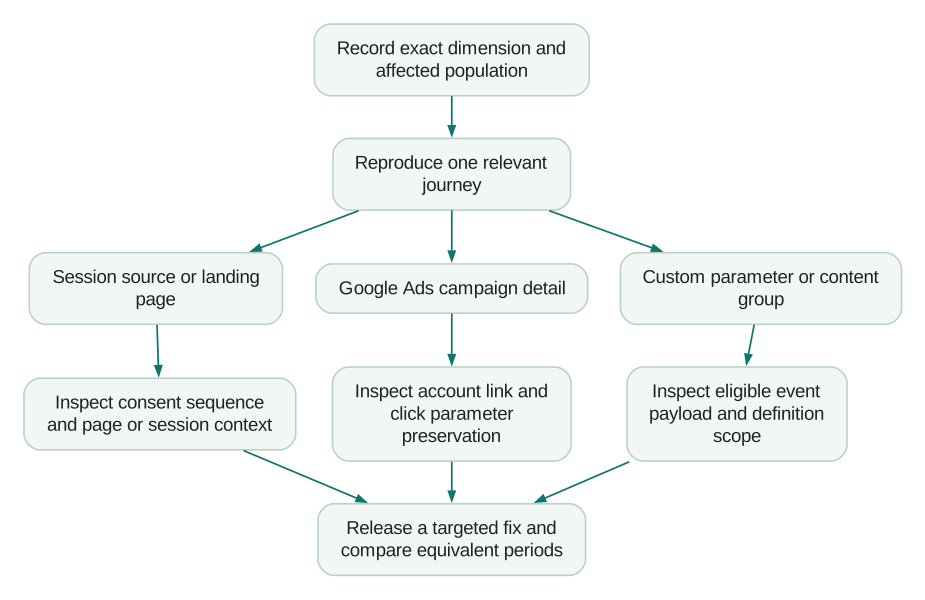
This order prevents a common mistake: adding more tags before proving which information the report lacks. A second implementation can create duplicate events while leaving the original gap untouched.
Session source / medium is missing
Google documents missing session_start as a cause of Session source / medium showing (not set). It also identifies a less obvious case: URLs containing srsltid can produce this result without a Google referrer, including when someone shares a modified search-result URL. Those sessions are not automatically organic search. See Google's dimension-specific explanation.
Treat these as hypotheses to test in the affected traffic. Do not infer that every missing source has the same cause.
Trace the beginning of the journey
In a clean test browser, open the actual landing URL through the intended entry path. Follow the consent choice and navigation that a visitor would make. In Tag Assistant, inspect the order of consent defaults, the Google tag and subsequent event tags. Record the stream receiving the events and whether an unexpected second configuration appears.
For a GTM implementation, check the Google tag's initialization trigger and any trigger exceptions. Consent initialization must remain earlier than tags that depend on its state. Moving a tag earlier without checking the consent sequence is not a complete fix.
Repeat the test for an accepted choice, a denied choice and an existing saved preference. These are different test cases. The expected collection behaviour must follow your implementation's consent design, rather than an assumption that every visitor produces the same identifiers or events.
Google's Tag Assistant consent procedure shows where to inspect defaults, updates and tag behaviour. Use the CMP's supported integration for GTM; do not bolt a competing consent implementation onto it.
Check the consent update, not just the banner
Google lists repeated use of the consent default command for a visitor's changed choice as an implementation error that can lose initial session information. Check for contradictory consent states across different senders as well. The documented (not set) causes include both patterns.
The repair is to make the sequence truthful and consistent. Set the initial state through the supported mechanism, then send the appropriate update when the choice changes. A banner that visually closes proves only that its interface reacted.
Also test a consent choice followed by an immediate redirect. Google's consent implementation guide warns that reloading without a same-page update, or updating as the page unloads, can lose measurement data. Inspect the actual network sequence rather than adding an arbitrary delay and declaring it fixed.
Investigate `srsltid` without rewriting all traffic
Take several affected examples and record their landing URLs, referrers and known sharing paths. Check whether a link copied from a search result was distributed in email, messaging or another page. A parameter left in a shared URL does not prove the recipient arrived from search.
If your own distribution process copied decorated URLs, use clean canonical destinations and your agreed campaign tags for future links. Do not relabel the historical traffic as organic solely because the URL contained srsltid. Do not strip every query parameter from every landing page; that can also remove information your measurement depends on.
Landing page is missing
Google identifies sessions without a page_view as a cause of a missing landing page. The same troubleshooting reference makes this a different branch from missing session attribution.
First establish whether the affected activity should have a web landing page. A background integration event and a human arriving on a website have different collection paths. Filter to the relevant web stream and journey before treating the entire row as an implementation defect.
For a web session, test a hard load, a client-side route change, browser back navigation and a return from authentication. For each intended page view, inspect the page location and the moment it is sent. Check whether the application disables automatic page views without supplying its intended replacement.
There is an easy duplication trap here. Setting send_page_view: false suppresses the configuration call's initial page view, but enhanced measurement can still send page views on browser history changes. A manual implementation must account for both sources. Google's page-view documentation explains the separate controls.
Choose one owner for each page-view trigger. Your acceptance evidence should show the initial page and each meaningful virtual navigation once, with the intended URL. Do not add a fabricated page view to a billing webhook simply to make Landing page look complete.
Google Ads campaign details are missing
First filter to traffic that should have Google Ads details. A newsletter visitor has no reason to carry a Google Ads ad group. Evaluating every session against an Ads-specific dimension makes normal non-Ads traffic look like a problem.
For the genuinely affected paid traffic, verify the linked customer account, property and stream. Check every account advertising the site, including one an agency or another team manages. Then inspect auto-tagging and the complete landing redirect chain.
Google's missing Ads data guide covers account links, up to 48 hours of link-processing time, auto-tagging and loss of gclid during redirects. It also describes testing whether a URL preserves a dummy click parameter. That test checks transport only; a made-up click ID cannot demonstrate valid campaign attribution.
For your own test, preserve the parameter's spelling, case and value through each redirect. Inspect the initial request, final page and measurement request where applicable. A parameter visible in the address bar for a moment may still disappear before the tag reads the page.
If you also use UTMs, document the complete tagging scheme. Google states that when a click identifier cannot be used as intended and UTMs are present, cross-channel source fields can derive exclusively from those UTMs. Partial tagging can therefore leave gaps. The manual and auto-tagging rules explain this fallback. Audit the URL generator or tracking template, not only the final report.
A custom dimension is missing
Trace one expected value through three places: the application state, the outgoing event and the custom definition. The definition's event parameter must match what is actually sent, with the correct scope. A readable display label does not rename a payload key.
For example, if sign_up sends signup_method, a definition pointing at sign_up_method will not read it. If the value describes one action, use an event-scoped definition. Google's event-scoped dimension instructions describe the mapping and say reporting becomes available after 24–48 hours once the data is sent and the definition exists.
Filter the report to events where the parameter is expected. A parameter attached to sign_up need not exist on every page view or scroll. That distinction changes the diagnosis more than the raw percentage of (not set) rows.
Consider this illustrative collection audit:
- There are 3,000 events in the selected period.
- Of those, 400 are
sign_upevents that should carrysignup_method. - Fifty of those sign-ups lack a usable method.
- The other 2,600 events are outside this parameter's contract and do not carry it.
Across all events, the missing share is 2,650 ÷ 3,000, or 88.3%. Among the eligible sign-up events, it is 50 ÷ 400, or 12.5%. The second number is the implementation problem to investigate. Filtering changed the denominator; it did not fix a single event.
Now segment those 50 failures by the collection paths available in your data, such as application version, stream or sign-up flow. If all failures follow one OAuth return path, that is a useful engineering ticket. “Reduce (not set)” is not.
Document expected fields and valid missing states in your tracking plan. Use an explicit, meaningful category such as unknown only when that state is part of the agreed definition. Filling every gap with a default can make completeness look better while concealing a broken trigger.
Content group is missing
Inspect a page view that should carry a group and evaluate the grouping rule against its actual URL. Check new routes, trailing slashes, localized paths and dynamically rendered pages. Test the rule before publishing a catch-all value that hides unmatched paths.
Google's content-group setup uses the content_group parameter and supports rules based on page paths. Its (not set) guidance also notes that combinations with automatic events such as session_start and first_visit can have no valid content-group value, and that an empty string can produce the symptom. Check the event combination before changing your taxonomy.
For a content-performance report, evaluate the page events and group assignment you intended to measure. Keep a separate list of newly unmatched routes so the content team can maintain the taxonomy as the site grows.
Server events need their own diagnosis
A server event arriving successfully does not prove it has the context required for every GA4 report. Google's Measurement Protocol overview describes the protocol as a supplement to browser or app collection and warns that a wholly server-to-server implementation may have only partial reporting.
Inspect the actual integration: which client or app-instance identity it uses, whether the event belongs to an observed session, which consent state applies and how the event timestamp is derived. Compare the integration's documented behaviour with the business event you are sending.
Do not borrow an unrelated session ID to force a renewal or delayed CRM outcome into an acquisition session. If the business needs account-level attribution across weeks, define that model in the warehouse and disclose its rules. A populated field created with the wrong identity is more misleading than a visible gap.
Verify the repair against the same contract
Save a small incident record with the affected dimension, eligible population, root-cause evidence, change, release time and expected result. Add the exact reproduction steps so another person can repeat the test.
Checklist
- The test reaches the same page, flow and stream as the affected traffic.
- Consent behaviour matches the visitor's choice throughout the journey.
- Each intended event fires once with its required fields.
- Redirects preserve the measurement parameters the implementation needs.
- Custom definitions point to the actual parameter and scope.
- The post-release comparison uses the same eligible population and processed reporting window.
- Legitimate missing states remain distinguishable from collection failures.
In the illustrative sign-up audit, a later period with 400 eligible events and 10 missing methods has a 2.5% failure rate. That is an observable improvement from 12.5%, provided the population and measurement contract remain comparable. It does not prove a revenue lift or tell you what the missing historical values were.
If the issue crosses consent, application code, GTM and paid-media redirects, an analytics and tracking implementation review should produce this evidence and a targeted repair plan. The deliverable is a trustworthy measurement path with a repeatable check, not a dashboard with its unknown row hidden.
Questions people ask
Is `(not set)` the same as Unassigned?
No. Start with the exact field. A missing dimension value and a channel rule that did not match are different findings, although they can occur together. Preserve the source and medium evidence while investigating channel classification.
What percentage of `(not set)` is acceptable?
There is no useful universal percentage. Define where the dimension should exist, exclude events outside that contract from the completeness denominator and investigate the remaining failures. A small gap affecting paid sign-ups may matter more than a large gap in a field irrelevant to most events.
Should I filter `(not set)` out of reports?
You can create a focused view for a specific question, but keep an unfiltered quality view and disclose the excluded share. Filtering changes what you see; it does not repair collection. Never present a filtered total as the complete population without explaining the exclusion.
Will fixing the tag fill in old missing values?
Do not promise historical recovery. Record the release boundary and verify new data. If retained raw records contain the missing evidence, a separately defined warehouse analysis may recover an answer; that does not establish that GA4's historical interface will be rewritten.
Should I change consent settings to reduce missing data?
Correct implementation errors so tags accurately follow the user's choice. Do not change the meaning of that choice to improve a report. Test the whole consent sequence, including saved preferences and redirects, and document any remaining measurement limitations.
Sources
- Google: What the value
(not set)means - Google: Traffic-source dimensions, manual tagging and auto-tagging
- Google: Data freshness
- Google: Troubleshoot consent mode with Tag Assistant
- Google: Set up consent mode on websites
- Google: Measure pageviews
- Google: Missing Google Ads data in Analytics
- Google: Create event-scoped custom dimensions
- Google: Create content groups
- Google: Measurement Protocol overview
Written by
Jafrin Akter AloData Engineer and Co-founder, martechdevs
Jafrin Akter Alo is a data engineer and co-founder of martechdevs, where the team has delivered 74+ martech, data and growth stack implementations.