
GA4 Cross-Domain Tracking: Preserve Sessions Across Your Journey
Data Engineer and Co-founder, martechdevs
Last updated 9 min read
GA4 cross-domain tracking connects measurement across related domains by transferring browser and session identifiers during navigation. Use the same web stream on both sides, configure the participating domains and verify the real transition, including redirects and consent behavior. A disappearing self-referral is not enough: the destination must receive the expected identity and the customer must still reach the intended page.
Last updated: 8 September 2026.
A marketing site, application and checkout can be one customer journey while remaining three separate websites. If measurement loses continuity at each boundary, the team may see extra users, broken funnels or a checkout domain credited for demand generated elsewhere.
The repair starts with the journey, not a domain list copied from a spreadsheet. Some destinations can participate in shared measurement. Others, such as a payment provider you cannot tag, require a different treatment.
Which domains belong in the same measured journey?
List the actual transitions that support the business question. For a SaaS trial, that might be a public website to an application on a different root domain, followed by a return to a confirmation page. For an event business, it might be a content site to a ticketing service that supports your tag.
For each transition, record the source hostname, destination hostname, navigation method, redirect chain, tag owner and consent implementation. Confirm that you are authorized to measure both properties and that the destination supports the required configuration.
Our analytics and tracking service treats these boundaries as testable handoffs. This matters because a domain can be listed correctly while one important button still uses a redirect path that loses the measurement context.
Do not add every external link to cross-domain measurement. A partner article, social network or unrelated product should not become part of your measured site merely because visitors can click it. The list should represent a coherent measurement scope.
Subdomains deserve inspection too. Shared cookie scope can already provide continuity, but custom cookie settings, separate implementations or consent behavior can interrupt it. Do not assume either that every subdomain needs a special workaround or that every subdomain is automatically correct.
How should you configure GA4?
Google's GA4 guidance requires the same G- ID from the same web data stream on the participating pages. In that stream, open Configure tag settings, then Configure your domains, and add the appropriate matching conditions. Google recommends this Admin-based approach for ordinary GA4 cross-domain setup. GA4 cross-domain setup
Before saving, compare the configured conditions with the real hostnames in your navigation inventory. Check variants such as www, a booking subdomain and a regional checkout hostname. A condition that looks plausible is not evidence that it matches the production route.
Avoid configuring the same behavior independently in several places without documenting precedence. Google's developer guide notes that a manually supplied linker parameter can override the domains configured in Admin. If the implementation already contains a custom linker object, inspect it before assuming an Admin change controls the result. Google cross-domain developer guide
Publish the necessary tag changes through your normal release process and retain the previous configuration. Cross-domain work often spans two teams, so record which deployment makes each side ready. A source deployed on Monday and an incompatible destination deployed on Friday creates a measurable gap in between.
What does the linker parameter prove?
The _gl parameter carries the cross-domain measurement context through the navigation. The source decorates the outgoing URL, and the destination tag reads a valid incoming linker value. Google documents that linker parameters expire after two minutes and are added at click time. How the domain linker works
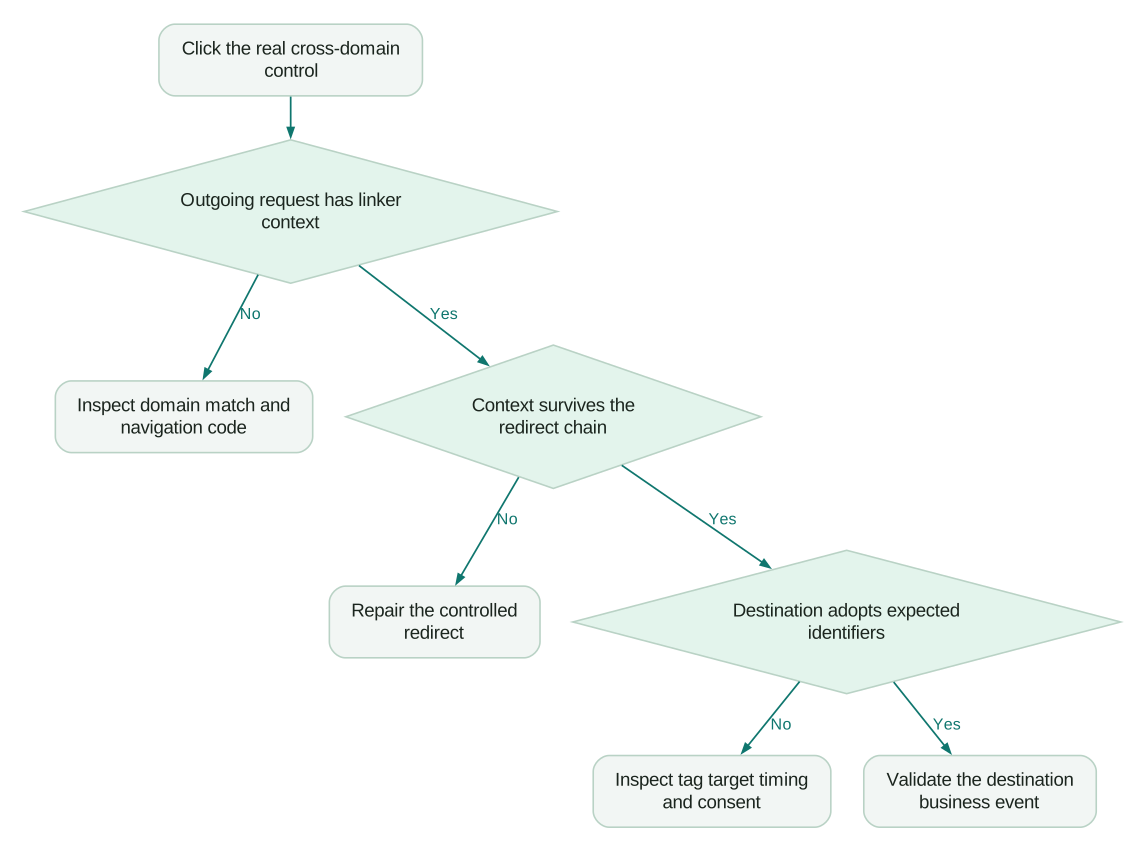
That gives you three separate checks: decoration, transport and adoption. Seeing _gl in the address bar supports the transport check. It does not establish that the destination used the intended stream or adopted the expected identifiers.
Do not save a decorated URL and reuse it as tomorrow's test link. Start each test on the real source page and perform a fresh navigation. Similarly, do not insert a copied _gl value into an email campaign or a static button as a permanent fix.
Test the actual interaction. An ordinary anchor, a submitted form and a JavaScript-controlled navigation are different mechanisms. Google identifies script-triggered navigation and stopped click propagation as potential obstacles to automatic decoration. A developer should inspect the specific implementation rather than attaching another generic click listener to every page. Cross-domain troubleshooting
For forms or custom navigation, verify the supported setup for that mechanism. Do not assume that a test using a plain link approves a checkout flow that submits a form to another host.
How do you verify identity on both sides?
Use a controlled browser with the intended consent state. Record the GA4 client ID and session ID on the source, navigate immediately through the real interface, then record them on the destination after its tag initializes.
The Google tag API supports retrieving client_id and session_id with get. The callback can return undefined when a field is unset. Use the correct target ID and do not interpret an unavailable value as a fabricated identifier. Google tag API reference
This read-only diagnostic snippet is for a test page where gtag is already loaded and the tag has initialized. Replace the placeholder ID. It reads values; it does not configure cross-domain measurement or send an event.
const measurementId = 'G-REPLACE_ME';
const fields = ['client_id', 'session_id'];

fields.forEach((field) => {
  gtag('get', measurementId, field, (value) => {
    console.log({
      host: location.hostname,
      field,
      value: value ?? 'unavailable'
    });
  });
});
Keep the output in your restricted QA evidence. Do not publish real browser identifiers in screenshots or support forums. Where gtag is not exposed by your setup, use the appropriate tag debugging tools and inspect the collected event parameters with the implementer.
A consented, immediate transition within an active session should preserve the intended client and session context. It should also produce the expected destination page event in the same stream. Check both identifiers, the measurement target and the event itself.
A session timeout changes the expected result. GA4's default is 30 minutes of inactivity, and the configured timeout can differ. Do not diagnose a genuine timeout as a cross-domain defect simply because the client ID remains stable while the session ID changes. GA4 sessions
A worked three-domain acceptance test
Consider an illustrative subscription business with three controlled domains:
learn.example.comhosts the marketing article.example-app.nethosts signup and the application.example-checkout.orghosts a checkout that supports the same GA4 stream.
All three participate in the same consented test journey. The tester starts with a tagged campaign landing, opens signup, creates a test account and reaches checkout without an inactivity timeout. The chosen business outcome is a verified subscription, not the click on the checkout button.
Record each hop as a separate row in your internal QA log, even if the reporting view eventually shows one journey. Use synthetic labels such as client_A and session_A when presenting the example to colleagues.
The expected sequence is:
- Marketing landing:
client_A,session_A, correct campaign landing URL. - Application signup:
client_A,session_A, expected signup page. - Checkout:
client_A,session_A, expected checkout page. - Confirmation: the same active context and one verified subscription event under the event ownership rule.
Suppose signup shows client_B, while checkout preserves client_B. The later hop works, but the journey already broke at the first boundary. Investigating the checkout merely because it is nearest the conversion would waste time.
Suppose all three preserve client_A, but the confirmation sends two subscription events. Cross-domain continuity passed; event ownership failed. Keep those findings separate so the fix does not unnecessarily change a working linker configuration.
Finally, repeat with a route that redirects through a regional host. If the first request contains _gl but the redirected request does not, the defect sits in transport. The visible final URL alone will not reveal where it disappeared.
How do you find the redirect that breaks measurement?
Enable preservation of the browser network log before clicking. Follow the document requests from source to destination, including HTTP redirects and client-side changes. Compare the relevant query parameter at every step.
Google explicitly identifies redirects that remove _gl as a cross-domain failure mode. Preserve the required parameter through the controlled redirect chain and confirm that the final tagged page can read it. GA4 redirect troubleshooting
Keep the fix narrow. A redirect service should not blindly copy every query parameter to every destination. Review which measurement parameters are needed, where they may be forwarded and whether sensitive fields appear in the same URLs.
After fixing transport, repeat the ID comparison. This catches a second defect where the parameter survives but the destination fires a different tag or reads the URL after another script has removed the context.
Why is referral exclusion a different fix?
Unwanted-referral configuration tells Analytics not to use a matching referrer as a traffic source. Google lists payment providers and other business-service returns as common uses. That rule does not transfer browser identifiers between domains. Unwanted referrals
If you cannot tag a payment provider, adding its domain to a cross-domain list does not create measurement inside that provider. Instead, assess the return journey, unwanted-referral handling and how the verified payment outcome reaches your own reporting system.
This distinction matters when a self-referral disappears after a configuration change. The report may look cleaner while identity remains broken. Verify continuity directly before claiming that the funnel has been repaired.
Do not add internal UTM parameters to compensate for a broken handoff. They introduce campaign labels into an internal journey and can make acquisition analysis harder to interpret. Use a dedicated internal navigation event when the business needs to measure the handoff itself, and follow a consistent UTM naming policy for actual acquisition campaigns.
What changes after the setup works?
One expected change is easy to misread as a regression: enhanced measurement does not generate ordinary outbound click events for links to domains configured for cross-domain measurement. If the team uses those clicks as a handoff KPI, replace that dependency with an intentional event definition. Google outbound click behavior
Evaluate source, medium and conversion reports only after the controlled journey passes. Keep the rollout date annotated in your analysis so a reduction in apparent users is not mistaken for a drop in demand.
Segment checks by browser, consent state and journey type. A successful consenting desktop test does not prove continuity for every visitor. The Consent Mode guide explains why measurement behavior must be interpreted in the context of consent rather than forcing a cookie-based expectation onto all traffic.
Use this release checklist:
Checklist
- Every participating page uses the intended web stream.
- Domain conditions match actual production hostnames.
- The real links, forms and scripted transitions are tested separately.
- Redirects preserve required context through to the tagged destination.
- The immediate consented journey preserves the expected client and session identifiers.
- Payment-provider referrals and untaggable destinations have a separate documented treatment.
- Handoff reporting no longer depends on suppressed automatic outbound clicks.
- The final business event is sent once by its designated owner.
If reporting still looks wrong after these checks, investigate the event and attribution definitions. GA4 unassigned traffic covers a different class of acquisition reporting problem; changing the cross-domain list is not a universal remedy.
Questions people ask
Do all domains need the same GA4 measurement ID?
For Google's documented GA4 cross-domain setup, participating pages use the same G- ID from the same web data stream. Verify the destination tag rather than relying only on the source configuration. A domain list cannot repair a page sending data to an unrelated stream.
Is seeing `_gl` enough to confirm success?
No. It shows that linker context reached a URL, but the destination still needs to adopt the expected identifiers. Compare client and session context and validate the destination event in the intended stream.
Does cross-domain tracking join people across devices?
It supports continuity across participating domains during the browser navigation. It is not a general cross-device identity system. Treat authenticated user identity and browser-level continuity as separate design questions.
Should I add a payment provider to the domain list?
Only when it genuinely supports the participating measurement setup. If you cannot tag it, review unwanted referrals and the return flow instead. Preserve an authoritative payment record so the measured conversion does not depend solely on a browser redirect.
Why did outbound click events disappear after setup?
Google excludes links to configured cross-domain destinations from ordinary enhanced-measurement outbound clicks. That can be expected behavior. If the transition matters as a KPI, define a deliberate handoff event with its own trigger and acceptance test.
Sources
- Google: Set up cross-domain measurement, accessed 8 September 2026.
- Google: Measure activity across multiple domains, accessed 8 September 2026.
- Google tag API reference, accessed 8 September 2026.
- Google: About Analytics sessions, accessed 8 September 2026.
- Google: Identify unwanted referrals, accessed 8 September 2026.
- Google: Measure outbound clicks, accessed 8 September 2026.
Written by
Jafrin Akter AloData Engineer and Co-founder, martechdevs
Jafrin Akter Alo is a data engineer and co-founder of martechdevs, where the team has delivered 74+ martech, data and growth stack implementations.