
Event naming conventions for Mixpanel, Amplitude, PostHog and GA4
Data Engineer and Co-founder, martechdevs
Last updated 9 min read
A useful event naming convention gives each event a stable name, a precise meaning and an explicit mapping to the tools that receive it. Use a consistent object-and-action pattern for custom events, keep variable details in properties and separate the stored identifier from its readable display label. For a new implementation feeding several analytics tools, lowercase snake_case is a practical default, with destination-specific mappings for recognised events such as GA4 purchases.
Last updated: 21 September 2026.
Report Created, report_created and reportCreated may look equivalent to a person. A destination can treat them as different events. Worse, two developers can send the same name for different moments: one when the customer clicks a button and another when the report finishes successfully.
The first problem fragments your charts. The second makes a clean-looking chart answer the wrong question. Naming rules need to address both.
Name the business fact before choosing the casing
Start with the object and the completed action. For a reporting product, report_created should represent an agreed creation outcome. If the system needs several minutes to generate the report, use separate names such as report_generation_requested, report_generation_succeeded and report_generation_failed when those distinctions support a real decision.
Do not call all three report_created and hope that a success property will make every analyst select the right rows. It can be better to use one event with an explicit outcome when the analysis consistently needs all attempts, but make that design choice deliberate.
Define the trigger, non-trigger and counting unit beside the name. An event could mean one completed job, one saved object or one user's interaction. Those units produce different totals.
Twilio's collection best practices recommend an object-and-action structure, consistent casing and properties for variable context. The convention works because a person can infer the general meaning, while the event definition supplies the details a name cannot carry.
Use a canonical name and a separate display label
For a new multi-tool implementation, a reasonable custom-event policy is:
- Use lowercase snake_case, starting with a letter.
- Choose a domain object followed by a specific action or outcome.
- Keep names short enough for the most restrictive destination you intend to use.
- Put identifiers, plan names, dates and UI locations in properties.
- Keep a readable display label and full description in the tracking plan.
- Reserve tool-specific names and fields for their documented functions.
Examples include workspace_created, member_invitation_accepted, report_export_succeeded and subscription_cancellation_requested.
This is an implementation recommendation, not a universal requirement from Mixpanel, Amplitude or PostHog. An established, consistently implemented Title Case taxonomy can be perfectly usable. Do not migrate it merely to make the raw names match someone else's preference.
Mixpanel's Lexicon distinguishes an ingested name from its display name. Amplitude's display-name documentation similarly says that changing a display label does not change raw data. Use these facilities when the problem is readability rather than event meaning.
For example, the raw name report_export_succeeded can display as “Report Export Succeeded” without requiring every producer, warehouse query and integration to change.
Account for GA4's rules explicitly
Google's event naming rules require event names to start with a letter and use letters, numbers and underscores rather than spaces. Names are case sensitive. Google also maintains reserved names and prefixes, with differences between web and app contexts.
The collection limits set a 40-character event-name limit for tag and SDK collection. A conservative internal rule is to keep custom names below that limit, leaving room for future clarity without relying on the boundary.
Check event names, parameter names and user-property names separately. Their limits and reserved fields are not interchangeable. A parameter being accepted in an event does not necessarily mean you can register the same name as a new custom dimension.
Do not reuse automatically collected names for unrelated business facts. For instance, calling a completed application report page_view makes its meaning conflict with page measurement. Also avoid inventing custom fields that shadow a destination's identity or timestamp fields.
Maintain the relevant reserved-name checks from the current documentation. A short copied list in an old spreadsheet will eventually become incomplete.
A Segment Title Case event does not automatically break GA4
Segment recommends Title Case in its general collection guidance, while GA4 does not accept spaces in raw event names. That does not mean every Segment-to-GA4 integration fails.
The current GA4 Cloud destination documentation says Segment replaces spaces with underscores and offers a Lowercase Event Name option for custom events. It also supports explicit action mappings.
The practical problem is knowing which transformation your configured path performs. Report Created could become Report_Created or report_created, depending on that configuration. A separately instrumented browser event might use a third spelling.
Record the final destination name rather than relying on a connector's default. Check whether two source names collapse into the same output after lowercasing or replacing spaces. Plan Selected and plan_selected should not accidentally become two producers for one apparently clean destination event.
A successful transformation also does not prove that properties, identity or timestamps mapped correctly. Inspect a received event in the destination.
Map standard destination events by meaning
Some destination event names carry documented semantics and parameters. Google publishes a recommended event reference, including events for sign-up, login and purchases.
Map your canonical event to one of those only when the meaning matches. user_registered can represent a completed sign-up if that is its trigger. A click on “Create account” does not establish the same fact.
Similarly, a GA4 purchase mapping needs a real purchase definition and the relevant transaction and item data. Renaming a billing-page visit to purchase will make a conversion number move without improving measurement.
An illustrative registry can keep these mappings visible:
events:
  user_registered:
    display_name: User Registered
    trigger: persisted_user_registration
    unit: newly_registered_person
    destinations:
      mixpanel: user_registered
      amplitude: user_registered
      posthog: user_registered
      ga4: sign_up
  report_export_succeeded:
    display_name: Report Export Succeeded
    trigger: export_job_completed_successfully
    unit: export_job
    destinations:
      mixpanel: report_export_succeeded
      amplitude: report_export_succeeded
      posthog: report_export_succeeded
      ga4: report_export_succeeded
This is a planning format, not vendor configuration. The real adapter also needs approved property mappings, identity, timestamps and event-delivery rules. You do not have to send every event to every destination; list only the routes that support a defined use.
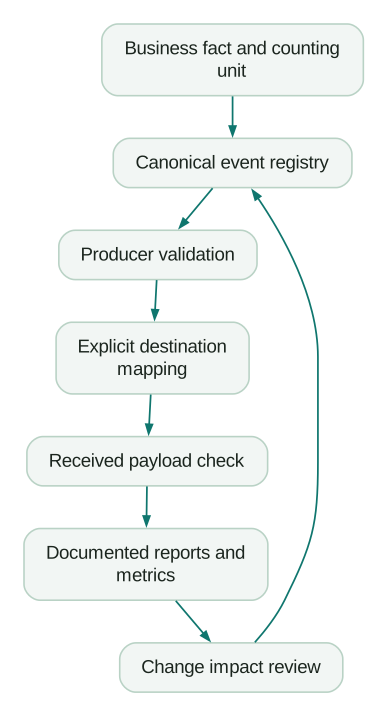
Put context in properties without creating another taxonomy problem
Prefer report_export_succeeded with export_format: pdf over separate event names for every file format. Prefer plan_selected with a stable plan code over names that embed a changing commercial plan label.
Keep property names and types consistent. A boolean should not alternate between true, "true", 1 and "yes". A duration needs a documented unit such as milliseconds. A money amount needs a currency and a clear representation.
Use enumerated values when a property supports a limited set of choices. For example, export_format might allow pdf and csv. Introduce a new value through the same review process as a new event if it changes reporting or downstream behaviour.
Avoid putting arbitrary user text, email addresses, tokens or full URLs with sensitive query parameters into event names. Review property contents too. Moving a value from the name into a property does not make it appropriate for every destination.
Separate properties recorded at event time from a person's current profile. If you need to know which plan the account had when the export occurred, record that context with the event or join to reliable historical state. A current profile value can answer a different question.
The tracking plan guide provides the wider contract for triggers, fields, ownership and allowed destinations.
Validate syntax and mapping collisions before release
A basic syntax check can catch spaces, unexpected casing and overlong names. It cannot tell you whether the event represents the right fact.
The following Python example implements the conservative custom-name policy above and rejects duplicate destination names. It is intentionally stricter than some vendor APIs, and it is not a complete GA4 reserved-name validator.
import re

def validate_custom_mapping(mapping, reserved_names):
    seen = {}
    for canonical, destination in mapping.items():
        for name in (canonical, destination):
            if not re.fullmatch(r"[a-z][a-z0-9_]{0,38}", name):
                raise ValueError(f"Invalid custom event name: {name}")
        if destination in reserved_names:
            raise ValueError(f"Reserved destination name: {destination}")
        if destination in seen:
            raise ValueError(
                f"Collision: {canonical} and {seen[destination]}"
            )
        seen[destination] = canonical
    return True

custom_events = {
    "report_export_succeeded": "report_export_succeeded",
    "workspace_created": "workspace_created",
}

validate_custom_mapping(custom_events, {"page_view", "session_start"})
The two names in the example denylist are illustrative, not Google's full list. Keep standard-event mappings in a separately reviewed registry so an intentional sign_up or purchase mapping is not confused with an arbitrary custom event.
If two producers intentionally map to the same event, require equivalent triggers and an agreed deduplication rule. Do not bypass a collision check merely because both teams prefer the same dashboard label.
Rename without manufacturing a growth spike
First determine what is changing.
If only the label is unclear, a display-name update may be enough. If the trigger or counting unit changes, treat it as a semantic change. A historical click and a future completed operation should not be presented as one unchanged measure.
Before changing a raw event name:
- Inventory its producers, destination mappings, saved reports, audiences, experiments and warehouse models.
- Record the old and new definitions, the reason for the change and the release boundary.
- Update consumers to understand the transition where appropriate.
- Test the new producer in a separate environment or controlled release.
- Compare known actions against received events and published metrics.
- Remove obsolete production emissions after the agreed migration period.
Avoid dual-emitting old and new events into a metric that counts both. Ten real exports can become twenty events without one extra customer action. If a migration requires overlap, preserve an operation identifier and define how each report avoids double counting.
PostHog's Actions documentation describes combining related events for analysis and giving them a useful name. That is an analytical definition over events, not proof that historical raw records have been rewritten. Document equivalent distinctions in each destination.
For an incompatible definition change, use a new event or a versioned metric and annotate the reporting break. Keeping a continuous line is less valuable than keeping a truthful one.
Give the convention an owner and a practical review rule
Store the registry near the implementation or in a controlled tracking-plan tool. Each event should have an owner, purpose, definition, properties, destinations and the reports that depend on it.
A proposed event earns its place when someone can name the decision or debugging question it supports. “We might need it later” is a weak reason to collect a new stream of detailed customer behaviour.
Review changes at the same time as the product change. The engineer knows where success is actually committed; the product or growth owner knows which outcome matters. Agree before a name becomes part of production history.
Checklist
- The event describes a specific fact, with a documented counting unit.
- Its custom identifier follows the chosen syntax and length policy.
- Variable values live in approved, typed properties.
- Tool-managed events and fields retain their documented meaning.
- Final destination names and standard-event mappings are explicit.
- Mapping transformations cannot create an unintended collision.
- Received payloads have been checked in each destination.
- Display-name changes are distinguished from raw-data changes.
- Renames account for existing charts, audiences and dual-emission risks.
- An owner can explain and approve future changes.
For the wider implementation, use the SaaS product analytics setup guide. If the existing taxonomy is already fragmenting decisions across tools, our product analytics service can help map the definitions and migrate the events without disguising changes in meaning.
Questions people ask
Should event names use snake_case or Title Case?
For a new implementation feeding GA4 and several product tools, lowercase snake_case is a practical custom-event default. Title Case can remain useful as a display label. Existing consistent Title Case events do not need a migration solely for style; verify their destination mappings and actual received names first.
What does object-action naming mean?
The name identifies the thing involved and what happened to it, such as workspace_created or member_invitation_accepted. It helps readers understand the general fact. A full definition must still specify the trigger, success condition and counting unit, because the name alone cannot distinguish every implementation detail.
Can one tracking plan feed Mixpanel, Amplitude, PostHog and GA4?
Yes, if it includes explicit destination mappings and destination-specific field rules. A shared plan does not require identical raw payloads or every event going to every tool. Validate identity, names, types and supported operations in each receiving system.
Will changing a display name fix historical raw event names?
No. Mixpanel and Amplitude distinguish display labels from ingested data, and PostHog actions provide an analysis layer over matching events. A friendlier label can improve readability without rewriting old records. Check the behaviour of each feature before assuming that an export, SQL query or integration will see a changed name.
How should we version an event?
Preserve the name when the meaning remains compatible, such as adding a documented optional property. When the trigger, counting unit or interpretation changes, record an explicit version boundary and decide whether a new event or metric is needed. Update consumers and prevent overlap from counting the same action twice.
Sources
Written by
Jafrin Akter AloData Engineer and Co-founder, martechdevs
Jafrin Akter Alo is a data engineer and co-founder of martechdevs, where the team has delivered 74+ martech, data and growth stack implementations.