
GA4 Unassigned traffic: what it means and how to fix it
GA4 Unassigned traffic means the selected channel group's rules could not classify the collected traffic. The cause may be an unfamiliar source and medium, missing session information or inconsistent event collection. Start with the underlying fields and affected journeys. Changing channel rules before finding the cause can make a report look cleaner while leaving the measurement problem intact.
On this page
What does Unassigned mean in GA4?
Unassigned is the fallback when no channel rule matches. It describes a classification result, not a particular acquisition source. When Session source / medium is (not set), the default channel group can also become Unassigned because the required information is missing. Google's tagging guidance, Google's explanation of (not set)
Keep these labels separate:
| Label | What to investigate | Evidence to retain |
|---|---|---|
| Unassigned | Why channel rules did not match | Source/medium pair and selected channel group |
(not set) | Why this dimension has no usable value | Exact dimension, affected events and collection fields |
| Direct | Whether referral information was absent or the visit was direct | Landing URL and observed referral context |
(other) | Whether high-cardinality values were aggregated | Report dimensions, filters and row context |
Direct can include visits with no clear referral source; it is not interchangeable with Unassigned. Google describes (other) as an aggregated reporting row. Direct traffic, default channel definitions
Choose the key events whose attribution matters before prioritising repairs. If the source fields themselves are empty, use the guide to missing (not set) values to investigate that distinct problem. A tracking repair should restore both source context and the confirmed business outcome.
Before investigating, capture five details: the report and channel-group dimension, date range, affected source/medium pairs, affected events or landing pages, and the first date the pattern changed. That record helps distinguish a campaign taxonomy problem from a release that changed collection.
Check the denominator before calling it a spike
Suppose Unassigned sessions stay at 100 while total sessions fall from 10,000 to 2,000. The share rises from 1% to 5%, even though the Unassigned count has not increased.
| Period | Unassigned sessions | Total sessions | Unassigned share |
|---|---|---|---|
| Before | 100 | 10,000 | 1% |
| After | 100 | 2,000 | 5% |
This example does not establish that the 100 sessions are harmless. It changes the first question: investigate why total traffic fell as well as why those sessions are unclassified. Compare counts, rates and affected business outcomes together.
How do you fix Unassigned traffic in GA4?
To resolve Unassigned traffic in GA4, start with the affected source/medium pairs, then test campaign parameters, tag order, consent and session identity before changing channel rules. Follow this diagnostic order:
Use the GA4 Unassigned and (not set) diagnosis skill to record the incident, test the candidate causes and verify the repair in new data.
- Record the five diagnostic details above and compare absolute counts with percentages.
- Confirm that you are comparing dimensions at the same reporting scope.
- Break Unassigned down by Session source / medium and inspect the channel rules.
- Test the full campaign URL after redirects, including incomplete tags and ad identifiers.
- Inspect Google tag initialization and consent transitions.
- Separate browser events from Measurement Protocol and server-routed events.
- Reproduce the cross-domain transition if the problem begins after navigation.
- Separate web and app streams, event names and device types to narrow the affected implementation.
- Fix the smallest confirmed cause and send controlled new test traffic.
- Validate both the source fields and the business event before deciding whether historical reclassification is justified.
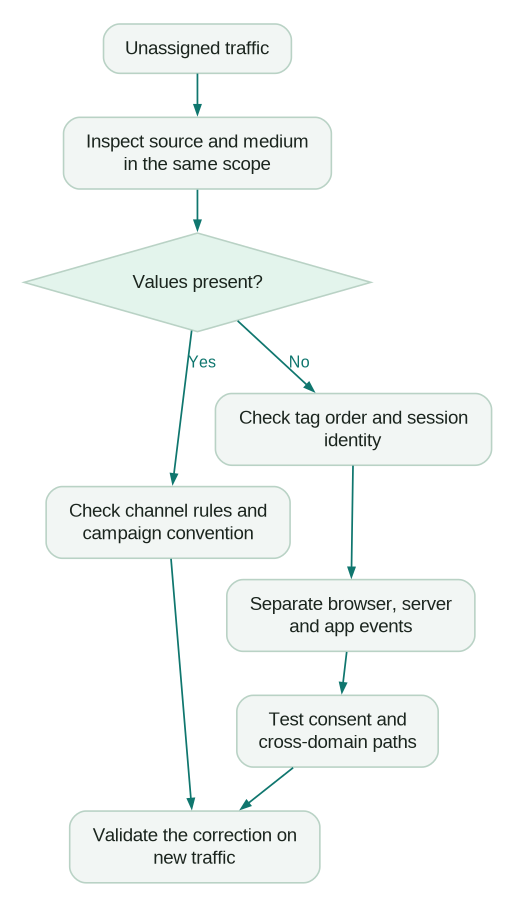
Read diagram as text
- Inspect source and medium to Values present.
- Inspect source and medium to Values missing.
- Values present to Test channel rules and campaign tags.
- Values missing to Trace initialization consent and identity.
- Test channel rules and campaign tags to Fix the confirmed cause.
- Trace initialization consent and identity to Fix the confirmed cause.
- Fix the confirmed cause to Validate new traffic and outcomes
Which reporting scope should you compare?
Use session-scoped dimensions and Sessions for a session-traffic investigation. First-user dimensions describe acquisition of a user. Session dimensions describe the source of a session. Event-scoped attribution answers a different question about credit for key events. Google documents these as separate scopes. Traffic-source dimension scopes
Begin with Session default channel group and Session source / medium alongside that metric. Do not compare that count directly with an event-scoped channel row and conclude that one report is broken.
For example, a customer first discovers you through organic search, returns through an email campaign and later purchases. Different reports may answer how you first acquired that customer, what drove the return session, or which touchpoints receive purchase credit. Write the question at the top of your investigation before exporting data.
Keep the selected channel group visible too. A custom group can classify a source differently from Google's default. A dashboard that silently switches between them makes comparisons difficult even when collection is consistent.
Cause 1: do source and medium match a channel?
Compare the collected pair with the current GA4 default channel group rules. Rules ignore case; S = source, M = medium, listed = Google source category.
| Channel | Matching cues | Evidence to inspect |
|---|---|---|
| S or M: email, e-mail, e_mail, e mail | Trace the actual email link | |
| Affiliates | M: affiliate | Check the partner link template |
| Referral | M: referral, app, link | Inspect the browser referrer |
| Organic Social | Listed social S; or M: social, social-network, social-media, sm, social network, social media | Compare the source with its social origin |
| Organic Video | Listed video S; or M contains video | Verify the video link placement |
| Organic Search | Listed search S; or M: organic | Check the search referral context |
| Paid Search/Social/Video | Listed S plus paid pattern | Retain ad click and campaign evidence |
| Shopping | Listed shopping S/campaign; paid pattern identifies Paid Shopping | Verify the store feed or campaign origin |
| Paid Other | Paid pattern without a specific match | Check whether a more specific paid rule applies |
| Display | M: display, banner, expandable, interstitial, cpm | Inspect the campaign medium |
| Audio | M: audio | Trace the audio campaign link |
| SMS | S or M: sms | Inspect the text-message link |
| Mobile Push Notifications | M ends push, contains mobile/notification; or S: firebase | Trace the notification deep link |
| AI Assistant | M: ai-assistant | Separate recognized referrals from manual tags |
Paid-medium pattern: Google's default channel rules
^(.*cp.*|ppc|retargeting|paid.*)$See the full reference for shopping, cross-network and linked-ad conditions.
Example: a newsletter medium that looks sensible but does not match
For manual traffic with no overriding rule, mailchimp / newsletter misses Email; mailchimp / email matches.
Test the full pair, not medium alone. Keep the publication or campaign identity in source, campaign or content fields rather than making medium carry every detail. The UTM naming guide helps establish a small approved vocabulary.
The UTM convention and registry skill can turn the corrected source/medium pairs into approved link recipes with a predicted channel and a launch test.
AI traffic now has a dedicated channel
Google introduced the AI Assistant channel on 13 May 2026. Recognized assistant referrers receive medium ai-assistant and campaign (ai-assistant). This means older advice to classify all AI referrals manually is incomplete. Google Analytics release notes
The custom media ai and chatgpt alone do not satisfy that rule. Do not rename legitimate traffic solely to force a desired total; first inspect the actual referrer and collected fields. Keep recognized assistant referrals separate from manually tagged links when you compare the results. Use the full setup guide to track ChatGPT, Gemini and Perplexity visits in GA4.
Cause 2: where is campaign information lost?
Compare the published link with the final URL and first measurement request to find where campaign information disappears. Test the published link through the same shortener, redirect, localization and consent flow that a visitor uses. Capture the final landing URL and the first measurement request.
Google lists incomplete manual tagging, disabled auto-tagging and missing Google Ads links among causes of (not set) in relevant reports. It also notes that copied URLs carrying srsltid without a Google referrer can produce (not set) and should not be assumed organic. Google's missing-value guidance
Use a controlled comparison:
| Test | What it isolates | Comparison to save |
|---|---|---|
| Direct visit to the fully tagged landing URL | Landing-page collection | Expected tags versus first collected fields |
| Visit through the real campaign link | Redirect and link rewriting behavior | Each hop and its retained parameters |
| Repeat in the same consent state | Keeps consent consistent while comparing URLs | Consent state and tag sequence for both runs |
| Compare final URL and request fields | Where attribution information disappears | Final source/medium values versus collected values |
If a redirect preserves utm_source but removes utm_medium, fix the redirect. Adding a broad custom channel rule would only conceal the incomplete data. Similarly, a Google Ads campaign name missing from an Ads-specific report is not sufficient evidence that all session attribution failed; compare the affected dimensions.
Check the aggregate-parameter diagnostic
The July 2026 release added diagnostics for missing GBRAID and gad_ identifiers. In a report's Data quality indicator, look for Campaign data accuracy is affected by missing URL parameters. Open View URLs to identify affected paths. This is a displayed diagnostic label, not a parameter named gad_missing. Parameter-stripping diagnostic
Google says these aggregate identifiers support campaign attribution when standard click identifiers cannot provide it. Preserve automatically added parameters through redirects; do not manufacture their values. Aggregate identifiers
The diagnostic points to an implementation problem, but its absence does not prove every campaign is correct. Your controlled URL tests should still cover the specific paths associated with the Unassigned increase.
Cause 3: could tag order or consent break the session?
Yes. Late tag configuration or an inconsistent consent transition can disrupt session information. Google recommends initializing the Google tag before event calls. A late configuration can change the identity after earlier events were sent. Inconsistent cookie prefixes can create separate identity stores. Tag ordering guidance
For a GTM implementation with missing session_start, Google's troubleshooting instructions add the Initialization - All Pages trigger to the Google tag and remove its previous trigger. Consent defaults must still be established at the appropriate earlier consent stage. Changing a trigger is not permission to ignore the visitor's choice. Session source troubleshooting
Inspect a fresh session in Preview or Tag Assistant. Record the consent state, initialization, first page view and first business event in order. Compare the failing path with a known working page. If only one application route fires a custom event before configuration, repair that route rather than replacing every tag. For the container settings behind this order, see Google Tag Manager mistakes that drop session context.
Google also identifies two consent errors: using default where a consent change needs update, and sending denied-consent events after an initially granted state, creating a separate session without session_start. Consent implementation errors
Test refusal, acceptance and later changes separately. A visitor who declines analytics is not an implementation defect. The defect is inconsistent handling of the state the visitor actually chose. See the Consent Mode guide for the surrounding design.
Cause 4: can server events join the intended session?
Server events need the original identity and valid session timing to join the intended session; HTTP success alone does not establish attribution. The Measurement Protocol can acknowledge receipt without establishing that the payload was valid or processed as intended. Measurement Protocol reference
For a web event, retain the appropriate browser identity and session information from the original interaction. Do not substitute a CRM contact ID for a GA4 client ID. For session attribution, Google requires the session ID, a request no later than 24 hours after session start, and an event timestamp within that session. Measurement Protocol use cases
Consider this illustrative fixture, with all times in UTC:
| Item | Timestamp | Interpretation |
|---|---|---|
| Online session starts | 17 October, 09:00 | Session-attribution clock starts |
| Online session ends | 17 October, 09:25 | End of the eligible event-time interval |
| Actual event occurs | 17 October, 09:12 | Within the original session |
| Request sent | 18 October, 08:30 | 23.5 hours after session start |
| Late retry sent | 18 October, 09:30 | 24.5 hours after session start |
The first request satisfies the illustrated timing conditions if it carries the correct identity and session. The late retry misses the session-attribution request window. An event that actually occurred at 11:00 must not be backdated to 09:12 merely to make it fit.
Use a supported session ID returned by the Google tag or GTM; the web protocol accepts both numeric values and documented string formats. timestamp_micros uses microseconds. Keep event time, request time and ingestion time separate in your logs. The Measurement Protocol guide covers payload design and validation; this article's fixture tests timing logic, not a live delivery.
Check mixed browser and server routes
When server-side tagging manages a separate client ID, Google says the stream's measurements must consistently pass through that server path. Sending some directly to Google and some through the server can fragment identity. Server-side identity guidance
Inventory the routes by event name. A purchase sent by the backend and a page view sent by the browser may be intentional, but their identity contract must be explicit. Check retries and duplicate delivery too. A reduction in Unassigned caused by dropping the affected purchase events is not a repair. Our server-side tracking guide explains the architecture choices.
Cause 5: does a domain handoff break attribution?
A domain handoff can break attribution when identity or linker information is lost. Inspect the transition between the marketing site, app and checkout. The destination may receive a fresh identity, initialize too late or lose linker parameters in a redirect. Google documents redirect stripping as a cross-domain failure mode. Cross-domain troubleshooting
Validate the cross-domain handoff step by step, comparing client and session IDs at each boundary. Also verify that the confirmed transaction is collected once. A cross-domain defect can create referrals, Direct, missing values or Unassigned depending on the surrounding data; do not diagnose it from the channel label alone.
If only app events are affected, separate the app stream from the web stream before applying browser fixes. A web linker setting cannot correct an app instance ID or an SDK initialization problem.
What can you fix in historical reports?
Changing a campaign link or tag configuration improves future collection. It does not recreate source data that was never recorded.
A custom channel group can reclassify historical data when the original fields support a defensible rule. Its report definitions can apply retrospectively, while changing the property's primary channel group affects that primary dimension going forward. Custom rules are evaluated in order, so a broad early rule can absorb traffic intended for a later category. Custom channel groups
For the mailchimp / newsletter example, a documented email rule may be reasonable because the original values identify a known campaign practice. For missing source and medium, a rule that declares everything Paid Social would invent certainty.
Keep the default group available as a comparison. Name the business purpose of the custom group, document its rule order and retain an unknown category. Explain the change in dashboards so a marketing lead does not mistake a classification revision for newly acquired traffic.
How do you validate the repair against business outcomes?
Create a small set of controlled visits covering the affected sources, pages and consent states. Record the expected source/medium, expected channel and expected business event before running them.
A useful release check has two outcomes: the repaired traffic classifies as intended, and the important events still arrive correctly. For a lead journey, verify the successful submission rather than only the form click. For a purchase journey, compare the event with the confirmed transaction. Keep that outcome definition consistent across the before-and-after comparison.
Compare equivalent time windows after normal processing, keeping weekday mix and campaign changes in mind. Track both the affected pair and total traffic. If a fix reduces Unassigned by 100 but total sessions also fall by 100, investigate whether data was lost.
What should your diagnostic checklist cover?
Keep evidence for classification, collection and business outcomes together so a cleaner channel chart cannot hide missing events:
Checklist
- Save the report scope, date range, affected pairs, events and first-change date.
- Compare Unassigned counts with total traffic and business outcomes.
- Test the exact source/medium combination against current rules.
- Follow campaign URLs through the actual redirect chain.
- Inspect the first collected event and session identity.
- Test consent acceptance, refusal and changes separately.
- Validate server event IDs, event time and request time.
- Compare identifiers across any domain transition.
- Confirm the repair preserves the important events and avoids duplicates.
- Document any historical reclassification and leave unknown data visible.
Use the GA4 Unassigned and (not set) diagnosis skill to record the affected view, test candidate causes and prepare a same-scope repair check.
For help tracing a specific failure, get the $99 martech audit. A tracking repair scope can then cover the affected journeys, systems and acceptance tests.
Keep reading
Browse all Tracking & Attribution guides
 Tracking & Attribution
GA4 setup for SaaS and apps: the events and settings that matter
Set up GA4 for a SaaS acquisition journey. Define events, test consent and cross-domain tracking, choose Ads goals and verify revenue, identity and export.
Jafrin Akter AloLast updated 14 min read
 Tracking & Attribution
GA4 Bounce Rate Looks Wrong? 5 Checks Before You Change the Page
Diagnose unexpected GA4 bounce rates. Check duplicate views, key events, engagement timers, session scope and weighted averages before changing your page.
Jafrin Akter AloLast updated 10 min read
 Tracking & Attribution
Google Analytics API: Reports, Configuration and Event Collection
Choose the GA4 Data API, Admin API or Measurement Protocol. Run a report, configure access, paginate results and plan quotas with practical examples.
Jafrin Akter AloLast updated 10 min read
Analytics & tracking
See the implementation scope, deliverables and acceptance checks.
Questions people ask
Why did Unassigned traffic suddenly spike?
Check whether the count increased or other traffic fell. Then compare the timing with new campaigns, tag releases, consent changes and server integrations. Save the first affected date and source pairs. A stable count with a shrinking denominator requires a different investigation from a new group of unclassified visits.
Is Unassigned the same as Direct?
No. Inspect the source and medium behind each row. One investigation may concern absent referral information; another may concern a known pair that does not fit the selected channel rules. The correct repair depends on that evidence. Keep Session source / medium visible so the two labels can be investigated against comparable underlying fields.
What should an agency send when its campaign links appear as Unassigned?
Ask for the exact published links, campaign launch times, redirect or shortener path and the intended source/medium values. Request one controlled visit through the real link with the agreed consent state. Compare that evidence with the receiving property's first request before assigning responsibility to the campaign manager or the website team.
Is a small amount of Unassigned normal?
There is no universal percentage that proves your implementation is healthy. Establish a baseline by source, event and business impact. A small share concentrated in high-value purchases can matter more than a larger share of low-value visits. Investigate changes and unexplained concentrations.
When should the analytics owner escalate an Unassigned issue to engineering?
Escalate when a reproducible journey loses parameters, changes identity unexpectedly or sends the business event before the required configuration. Give engineering the failing transition, expected values, observed request and a passing comparison case. A known source/medium pair that simply misses the selected classification rule usually needs a taxonomy decision first.
Sources
- Google: Default channel groups
- Google: Tagging best practices
- Google: What (not set) means
- Google: Direct traffic
- Google: Traffic-source scopes
- Google: Analytics release notes
- Google: Parameter-stripping diagnostic
- Google: Aggregate identifiers
- Google: Measurement Protocol reference
- Google: Measurement Protocol use cases
- Google: Cross-domain setup
- Google: Custom channel groups

Written by
Jafrin Akter AloData Engineer and Co-founder at Martechdevs and Growth and Analytics Partners
Jafrin writes practical guides to marketing technology, customer data, analytics and AI workflows. Martechdevs is a Growth and Analytics Partners company.