
GA4 Custom Dimensions: Scopes, Setup and Missing Values
GA4 custom dimensions make selected custom event parameters, user properties and item attributes available for analysis. Choose the scope that matches the fact, send the value, register the exact field and validate fresh data after processing. Registration does not create a value that tracking omitted. Treat it as a reporting setup step, not a way to backfill an earlier measurement gap.
On this page

What is a custom dimension, and which scope should you choose?
A custom dimension is a descriptive field you register for reporting. Its scope determines whether the field describes an event, a user or an ecommerce item. A custom metric instead measures a numerical quantity, such as the number of rows exported. Custom dimensions and metrics
| Scope | Illustrative field | Meaning to preserve |
|---|---|---|
| Event | export_format=csv | The format of this particular successful export |
| User | learning_track=technical | A person-level learning preference |
| Item | print_finish=matte | The finish of this particular item in an ecommerce event |
These are example custom fields, not built-in GA4 dimensions. Use a predefined dimension when it already answers the question. A second custom definition for a transaction ID or standard page dimension consumes a slot without improving the underlying measurement. Definition guidance
GA4's custom-definition scopes are Event, User and Item. There is no custom Session scope in that schema. A value you send on a session's first event does not automatically become a session-wide custom dimension. CustomDimension resource
Keep historical event context separate from current user state. If someone exports a report from a Team workspace and later moves to Enterprise, plan_at_export=team should still describe that export. Sending the workspace plan as a user property is also ambiguous when one person belongs to several workspaces.
The GA4 implementation service can scope the collection, definitions and report checks together. The useful deliverable is a trustworthy breakdown of a defined outcome, rather than a longer list of fields.
What should you name and document before implementation?
Document the question, parameter key, scope, permitted values, expected events and owner in one register. Keep the display name separate from the field that the application sends.
| Register entry | Example | Validation |
|---|---|---|
| Report question | Which export formats are used after successful completion? | Count completed exports, not button clicks |
| Display name | Export format | Readable label in GA4 |
| Parameter and scope | export_format, Event | Exact match to the event payload |
| Allowed values | csv, pdf | One spelling and meaning per category |
| Expected event | report_exported | The parameter must exist on this event |
| Owner and acceptance | Analytics owner; successful and failed-export tests | Evidence links and registration time retained |
The Admin API defines a maximum parameter-name length of 40 characters for event scope and 24 for user scope, with letters, numbers and underscores and a leading letter. Its display-name rules are different. The UI instructions permit spaces and underscores in display names but not hyphens. Scope and parameter mapping are immutable after creation. Definition fields, UI field rules
Use the event naming convention and its naming skill to keep the vocabulary and destination mappings consistent. Check vendor-reserved names separately; a short, syntactically valid name is not automatically an allowed custom field.
Keep values categorical where the question is categorical. Google warns that numeric-looking text can be interpreted as a number. An opaque code such as 00123 is a poor category if preserving its exact text is essential. Prefer an approved label such as tier_standard when that represents the business fact honestly. Numeric-looking values
How do you send and register an event-scoped dimension?
Send the parameter on the intended event, then register that exact parameter under Event scope. Creating the definition does not install tracking code or add the field to future requests by itself.
This example assumes an existing Google tag and an application callback that runs once after an export succeeds:
gtag('event', 'report_exported', {
  export_format: 'csv',
  plan_at_export: 'team'
});
Do not install a second Google tag to add these fields. If GTM owns collection, configure the equivalent parameters on its existing GA4 event tag and inspect the final outbound request. Google's parameter guide separates sending parameters from registering them for reporting. Event parameter setup
In the correct GA4 property:
- Open Admin > Data display > Custom definitions.
- Select Custom dimensions, then Create custom dimension.
- Enter Export format as the display name.
- Select Event as the scope.
- Enter
export_formatas the event parameter and add a useful description. - Save, then record the definition and its creation time in the register.
You need Editor or Administrator access at the property level. Check the property selector before saving. A definition in a staging property cannot make a production parameter reportable. Event-scoped setup
Generate a fresh controlled success and a failed attempt. The success should contain the chosen category; the failure should not produce report_exported. If a report on plan at export is also required, register plan_at_export separately. Collecting an extra parameter does not oblige you to spend a reporting slot on it.
Marking the event as a GA4 key event is a separate decision about its business importance. It does not repair a missing parameter or register a dimension.
What changes for user-scoped and item-scoped dimensions?
User scope reads a user property; Item scope reads a custom property inside each relevant entry of the ecommerce items array. Moving the same name between those locations changes its meaning and reporting contract.
For learning_track, collect a genuine person-level preference and register User scope with that exact user-property name. Google provides a separate user-property card in Realtime for inspecting collection. User-scoped setup
A current user property is not a reliable substitute for a historical event snapshot. Google's Measurement Protocol guidance says Analytics uses the most recent user-property value and advises timestamping past changes so they do not override newer updates. If the report asks which plan, role or state applied to a particular action, send the relevant action context as event parameters. User-property timestamps
For a stationery shop, two items in one cart might have different finishes. Put print_finish on each item, not once beside the items array. Register it as Item scope only if the predefined item dimensions do not already meet the requirement.
Google's item collection guide allows up to 27 custom item parameters, while registration allows 10 on standard properties or 25 on 360. Item-scoped custom dimensions can be used in Explorations and audiences; Google says they cannot be added to standard reports. Item-scoped setup and limits
Measurement Protocol has a separate transport limit: its sending guide lists a maximum of 10 custom parameters for item data. Check the collection path before applying the 27-parameter figure to a server request. Measurement Protocol sending limits
Test a cart containing one matte item and one gloss item. A report or query should keep those attributes attached to their own items. Repeating the event-level value on both rows would produce a tidy table with the wrong answer.
How many custom dimensions can a property have?
The registration quotas apply per property and differ by scope. They are separate from the number of parameters a collection request can send.
| Custom dimension scope | Standard property | Analytics 360 property |
|---|---|---|
| Event | 50 | 125 |
| User | 25 | 100 |
| Item | 10 | 25 |
Use Quota information in Custom definitions to inspect actual consumption. If the limit has been reached, Google says to allow 48 hours after removing definitions before adding replacements. Custom-definition quotas
Keep a consumer list for each field: reports, Explorations, audiences, dashboards and API jobs. Archive only after those dependencies have a replacement or an agreed retirement. Archiving is irreversible and can invalidate dependent reports and audiences. Archiving behavior
A quota review is a design review. A timestamp, session identifier and one-off diagnostic token can each consume a definition while making reports harder to use. Retain a field because a named decision needs it, not because the payload happens to contain it.
When will a new dimension appear, and what happens to earlier data?
Plan for a prospective reporting window after both collection and registration are correct. Google says event- and user-scoped custom dimensions become available for reports after 24 to 48 hours from when the data was sent and the definition was created. Reporting availability, user-scoped availability
A new registration is not a historical recovery method. Keep the creation time with the test evidence and validate a completed period containing new, correctly collected values. Do not promise that selecting an older date range will populate the new dimension for that earlier period.
For example, suppose the parameter was deployed on Monday but the definition was created on Wednesday. Use fresh Wednesday-or-later collection for the acceptance test, then allow processing. Investigate Monday's values in an existing raw export if they were collected and retained there. Do not replay Monday's business actions as new events to make the report look complete.
There are three different absences to record: the parameter was never sent, it was collected but not available through the needed custom reporting definition, or it exists in a raw dataset that the report does not query. Registering a definition cannot recreate unsent data. Turning on an export later is also not proof that the missing period exists in the warehouse.
Why does a custom dimension show `(not set)`?
First inspect a fresh event that should carry the value, its exact registration and the report's population. (not set) means GA4 lacks information for that dimension in the reported context; it is not one universal implementation error. Google's missing-value guidance
| Observation | Check next | Repair boundary |
|---|---|---|
| Parameter absent from the intended outbound event | Application state, tag mapping and consent-dependent path | Fix collection before changing the definition |
| Parameter exists, but a similarly named definition is empty | Exact spelling, casing and scope | A display label does not rename the payload key |
| New definition with recent traffic | Creation time and the processing interval | Use a completed post-registration test window |
| Value exists on exports but not page views | Report event filter and field contract | Exclude unrelated events from the completeness denominator |
| Browser values work but server values do not | Final server payload and its nested location | Inspect each producer independently |
| Field is unavailable only in one reporting tool | Supported scope, metadata and metric compatibility | Choose a compatible reporting surface |
An export_format dimension need not have a value on page_view. Filter the validation report to report_exported before estimating the defect rate. The broader GA4 (not set) guide covers missing acquisition, landing-page and advertising dimensions; the diagnosis skill helps keep collection faults separate from reporting artifacts.
Do not replace every missing value with unknown solely to improve the dashboard. Use that category only when it is a real, documented business state. Otherwise, the default conceals which producer failed to send its required context.
How is `(other)` different from `(not set)`?
(other) groups less common dimension combinations when a reporting table exceeds its row limit. It can appear in reports, Explorations and Data API results. (not set) concerns missing dimension information. Those diagnoses need different remedies. The (other) row
Google describes more than 500 distinct values in one day as high cardinality. That is a warning about report complexity, not a rule that the 501st value is automatically rejected. Multiple dimensions multiply the possible combinations. Cardinality
Keep categories small enough to answer the decision. export_format with csv and pdf is useful; a unique download URL or generated filename for each export usually belongs in a controlled operational log. Avoid personal details, free text and secrets in ordinary custom dimensions.
Inspect the report's data-quality indicator and simplify its dimensions or query scope. A filter can hide the visible (other) row while the underlying limitation still affects the result. If detailed permitted values are needed, inspect an existing raw export rather than assuming a new custom dimension will make every combination visible. Row-limit diagnosis
How do you send custom dimension values with Measurement Protocol?
Send event-scoped values under the event's params object and user-scoped values under top-level user_properties, using a nested value. An item value belongs inside the relevant item. The custom definition still needs the corresponding scope and exact name.
This fictional web-stream payload illustrates an event and a user property together:
{
  "client_id": "123456789.1234567890",
  "user_properties": {
    "learning_track": {"value": "technical"}
  },
  "events": [
    {
      "name": "report_exported",
      "params": {
        "export_format": "csv",
        "plan_at_export": "team"
      }
    }
  ]
}
Use the real originating web client ID in an authorized implementation. Keep the measurement ID and API secret in the server's endpoint configuration, not in the event properties or browser code. This example makes no session-engagement claim; do not invent engagement time or reuse an unrelated session merely to make a debugging view populate. Measurement Protocol request structure
Measurement Protocol permits 25 user properties per request, with names up to 24 characters and values up to 36. It also has event-parameter limits independent of the registration table. A 360 property's larger definition quota is not permission to ignore the request schema. Measurement Protocol limits
Run protocol validation through /debug/mp/collect with validation_behavior set to ENFORCE_RECOMMENDATIONS, then inspect the returned validation messages. That endpoint does not populate reports and does not validate the API secret. A production collection 2xx is also insufficient proof of processing. Follow the Measurement Protocol guide for identity, timing and controlled test-property delivery. Validation boundary
What can you check safely before sending anything?
Compare a proposed payload with the definition register and the expected category values. The Python helper below performs those local checks only. It does not emulate GA4 processing, user-property persistence, attribution or reporting delays.
Save the helper as check_mapping.py. Each allowed-category list must be nonempty and contain nonblank strings. Requirements describe which fields should be present in this particular request; do not require a persisted SDK user property on every later request just because it was sent once before.
def check_mapping(payload, definitions, requirements):
    registered = set()
    for definition in definitions:
        scope = definition['scope']
        name = definition['parameterName']
        if scope not in {'EVENT', 'USER', 'ITEM'} or not isinstance(name, str) or not name:
            raise ValueError('Invalid definition in the supplied register')
        key = (scope, name)
        if key in registered:
            raise ValueError('Duplicate definition in the supplied register')
        registered.add(key)

    issues = []
    for rule in requirements:
        scope, name = rule['scope'], rule['parameterName']
        if scope not in {'EVENT', 'USER', 'ITEM'}:
            raise ValueError('Unsupported scope in the test contract')
        allowed = rule.get('allowed')
        if (not isinstance(allowed, list) or not allowed
                or any(not isinstance(value, str) or not value.strip() for value in allowed)):
            raise ValueError('Allowed categories must be a nonempty list of nonblank strings')
        if (scope, name) not in registered:
            issues.append(f'{scope}:{name}: definition missing or wrong scope')
        if scope == 'USER':
            raw = payload.get('user_properties', {}).get(name)
            containers = [raw if isinstance(raw, dict) else {}]
            value_key = 'value'
        else:
            events = [event for event in payload.get('events', [])
                      if event.get('name') == rule['event']]
            if not events:
                issues.append(f'{scope}:{name}: expected event missing')
                continue
            containers = []
            for event in events:
                params = event.get('params', {})
                if scope == 'EVENT':
                    containers.append(params)
                else:
                    items = params.get('items', [])
                    if not isinstance(items, list) or not items:
                        issues.append(f'{scope}:{name}: expected items missing')
                    else:
                        containers.extend(items)
            value_key = name
        for index, container in enumerate(containers):
            value = container.get(value_key) if isinstance(container, dict) else None
            if not isinstance(value, str) or not value:
                issues.append(f'{scope}:{name}[{index}]: category missing or not a string')
            elif value not in allowed:
                issues.append(f'{scope}:{name}[{index}]: category outside the contract')
    return issues
With the previous JSON loaded into a Python variable called payload, this is a complete local check for its two reportable example fields:
from check_mapping import check_mapping

definitions = [
    {'scope': 'EVENT', 'parameterName': 'export_format'},
    {'scope': 'USER', 'parameterName': 'learning_track'}
]
requirements = [
    {'scope': 'EVENT', 'parameterName': 'export_format',
     'event': 'report_exported', 'allowed': ['csv', 'pdf']},
    {'scope': 'USER', 'parameterName': 'learning_track',
     'allowed': ['technical', 'business']}
]
issues = check_mapping(payload, definitions, requirements)
assert issues == [], issues
Change export_format to Export_Format, remove the user-property wrapper, or change the registered Event scope to User and repeat the check. Each should fail for a different reason. For Item scope, test two items with different values and remove the value from only one item. The failing item should remain identifiable.
The supplied register is an input to this exercise. Replace it with reviewed actual definitions before using the result as implementation evidence. A local pass checks name, location and allowed categories; vendor-reserved names, complete protocol limits and actual collection still need their own checks.
How do custom parameters appear in BigQuery?
BigQuery stores the collected event data using repeated parameter records rather than creating a separate column for every custom definition. Custom event parameters appear in event_params, user properties in user_properties, and custom item parameters in items.item_params. Their value records preserve typed fields such as string_value and int_value. Export schema
Google explicitly describes using collected parameters in BigQuery without registering them as custom dimensions. That can preserve useful detail without adding high-cardinality fields to GA4's reporting tables. It does not authorize collecting unnecessary sensitive data. Unregistered parameter use
This read-only GoogleSQL example inspects the two event fields on exported success events. Replace the illustrative project, property dataset and completed date range with the intended export:
SELECT
  event_date,
  event_name,
  (SELECT value.string_value
   FROM UNNEST(event_params)
   WHERE key = 'export_format') AS export_format,
  (SELECT value.string_value
   FROM UNNEST(event_params)
   WHERE key = 'plan_at_export') AS plan_at_export
FROM `example_project.analytics_123456789.events_*`
WHERE _TABLE_SUFFIX BETWEEN '20261028' AND '20261029'
  AND event_name = 'report_exported';
These scalar subqueries keep one result row per exported event. Do not cross-join event_params, user_properties and all items into one flat query without controlling the resulting row multiplication. Inspect unexpected duplicate keys rather than arbitrarily choosing one value.
Historical analysis depends on what the export actually retained. Check the link's start, selected streams and excluded events before promising recovery. Google's setup guide says data starts flowing after linkage and describes conditions that can leave export gaps. The GA4 BigQuery export guide covers the wider extraction and reconciliation process. Export setup
How do custom dimensions work in the Data API?
Use the registered definition's API name, then check the requested dimensions and metrics together. The display label used in the interface is not the Data API field name.
| Scope | Core Data API name | Example |
|---|---|---|
| Event | customEvent:parameter_name | customEvent:export_format |
| User | customUser:parameter_name | customUser:learning_track |
| Item | customItem:parameter_name | customItem:print_finish |
The current Core schema lists all three forms. Old event-scoped definitions registered before October 2020 can have a legacy event-name suffix; use returned metadata rather than constructing that suffix by guesswork. Core API schema
First query GET /v1beta/properties/PROPERTY_ID/metadata on analyticsdata.googleapis.com with the actual property ID. The metadata response includes property-specific custom definitions. If the field is missing, inspect registration and the selected property before repeatedly issuing the same report request. Metadata method
A corresponding runReport body can look like this, after replacing the dates with the validated reporting period:
{
  "dateRanges": [{"startDate": "2026-10-28", "endDate": "2026-10-29"}],
  "dimensions": [{"name": "customEvent:export_format"}],
  "metrics": [{"name": "eventCount"}],
  "dimensionFilter": {
    "filter": {
      "fieldName": "eventName",
      "stringFilter": {"matchType": "EXACT", "value": "report_exported"}
    }
  }
}
Run checkCompatibility with the same dimensions, metrics and filters for a Core report. Incompatible combinations fail; item-level and event-level measures should not be assumed interchangeable. Compatibility method
Realtime has a different schema: its API lists user-scoped custom dimensions only; event-scoped custom dimensions are explicitly unsupported. A value visible in a UI debugging card does not establish that the same field can be queried through the Realtime API. Realtime API schema
What should pass before the dimension is released?
Accept the dimension only after the intended value survives collection, definition mapping and the chosen reporting surface. Keep each failure attached to its own repair.
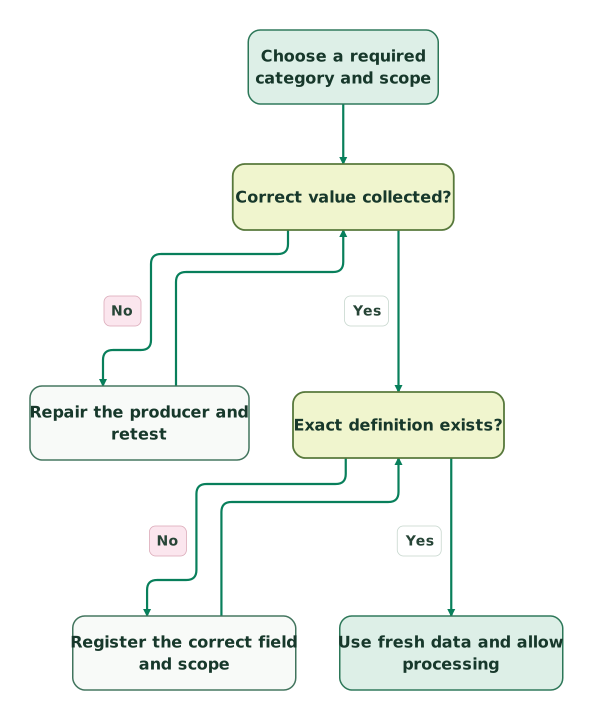
Check collection and registration
The fresh-data step continues to reporting compatibility in the next view; these are the same nodes and branches as the full diagnosis.
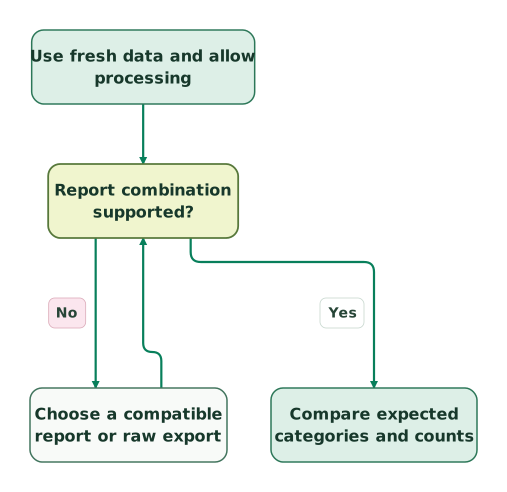
Validate the reporting surface
This view starts at the shared fresh-data step after collection and definition checks have passed.
Read diagram as text
- Choose a required category and scope to Correct value collected?.
- Correct value collected? to Repair the producer and retest: No.
- Repair the producer and retest to Correct value collected?.
- Correct value collected? to Exact definition exists?: Yes.
- Exact definition exists? to Register the correct field and scope: No.
- Register the correct field and scope to Exact definition exists?.
- Exact definition exists? to Use fresh data and allow processing: Yes.
- Use fresh data and allow processing to Report combination supported?.
- Report combination supported? to Choose a compatible report or raw export: No.
- Choose a compatible report or raw export to Report combination supported?.
- Report combination supported? to Compare expected categories and counts: Yes
After repairing collection or registration, repeat that check. If you change the reporting surface, verify its supported fields before comparing the result.
Checklist
- A named decision needs the custom field rather than a predefined dimension.
- Scope, exact key, meaning and allowed values are documented.
- The field is present on every event or item where the contract requires it.
- User state and event-time context are not being confused.
- Successful, failed, missing-value and wrong-case fixtures behave as expected.
- Registration time and the accepted reporting period are recorded.
- Quota and cardinality risks have been reviewed.
- Browser and server producers are checked separately.
- Reports, API combinations and any raw-export query use the intended scope.
- A named owner maintains dependencies and approves future changes.
The USD 99 audit includes a written assessment and a one-hour specialist call. For the tagging, custom definitions and report validation, request a detailed GA4 implementation scope.
Keep reading
Browse all Tracking & Attribution guides
 Tracking & Attribution
GA4 "(not set)": diagnose the cause and fix the right report
Diagnose GA4 missing values by dimension. Check consent, page views, Ads links and custom parameters, then verify the fix with the right denominator.
Jafrin Akter AloLast updated 11 min read
 Tracking & Attribution
GA4 key events: what they are, how to mark them and which to send to Google Ads
A GA4 key event is an event you mark as important, such as a purchase or lead. Mark one in 4 steps, mind the 30 key-event limit and use it in Google Ads.
Jafrin Akter AloLast updated 17 min read
 Tracking & Attribution
GA4 Measurement Protocol: Send Server Events With the Right Context
Send useful GA4 server events with correct identity, timestamps, consent and validation. Understand session attribution deadlines and reconcile eligible outcomes.
Jafrin Akter AloLast updated 12 min read
Tracking break map
Trace the first failing handoff and define the evidence for a repair.
Questions people ask
Can one registered parameter describe several event names?
Yes. An event-scoped custom dimension can report the same parameter across multiple events in the property, so you do not need a separate definition for each event. Keep its meaning and categories consistent across producers, and filter each analysis to the relevant event population. Reusing status for unrelated business processes would make the shared definition ambiguous. Property-wide definitions
Does changing the display label rename the field sent by the app?
No. The display label controls how the definition appears to a reader; the underlying parameter mapping is a separate field. Changing a label does not update your tag, server payload or downstream query. Scope and parameter name cannot be changed on an existing definition, so a mapping correction needs a reviewed replacement and dependency update. Definition fields
Does archiving a dimension stop the application from sending it?
No. Archiving changes the reporting definition, while the application or tag remains responsible for collection. Review the sender separately if the field should stop being collected. Before archiving, inspect affected reports, Explorations and audiences and arrange replacements; the definition cannot be restored, and dependent audience membership can stop growing. Archive effects
Should an account's plan be a user-scoped dimension?
Only when that field genuinely describes the person under the agreed identity model. If one person belongs to several workspaces, one current user property cannot describe every workspace at once. Send the relevant workspace's plan on the action when the question concerns that moment, and retain the account relationships in the business dataset used for account-level analysis.
Should unique customer IDs become custom dimensions for debugging?
Avoid turning each customer or session identifier into a registered custom dimension. Unique values create cardinality pressure and are usually poor reporting categories. Use GA4's supported User-ID feature where appropriate, and keep necessary diagnostic references in access-controlled operational records. Neither approach permits placing emails, tokens or other inappropriate personal data into ordinary analytics fields. Identifier guidance
Sources
- Google: Custom dimensions and metrics
- Google: CustomDimension resource
- Google: Create event-scoped custom dimensions
- Google: Set up event parameters
- Google: Create user-scoped custom dimensions
- Google: Send user properties
- Google: Create item-scoped custom dimensions
- Google: Archive custom dimensions and metrics
- Google: What
(not set)means - Google: The
(other)row - Google: Cardinality
- Google: Measurement Protocol reference
- Google: Validate Measurement Protocol events
- Google: BigQuery export schema
- Google: Set up BigQuery export
- Google: Core Data API dimensions and metrics
- Google: Data API metadata
- Google: Data API compatibility
- Google: Realtime API schema
- Google: Measurement Protocol sending limits

Written by
Jafrin Akter AloData Engineer and Co-founder at Martechdevs and Growth and Analytics Partners
Jafrin writes practical guides to marketing technology, customer data, analytics and AI workflows. Martechdevs is a Growth and Analytics Partners company.