
Common Google Tag Manager mistakes and how to fix them
A reliable Google Tag Manager implementation sends the right event once, with the right parameters and consent state, to the intended destination. Most failures come from installation order, broad triggers, duplicate senders or missing context between browser and server. Fix those mechanics before adding tags, and verify the full path from customer action to destination record before publishing a container version.
On this page
GTM setup mistakes are easy to miss because Preview can show “tag fired” while the destination receives the wrong transaction amount, a duplicate purchase or no usable event at all. Firing confirms that the tag ran under the container's rules. It does not validate the business result.
Which Google Tag Manager mistakes should you investigate first?
When fixing common Google Tag Manager mistakes, start with duplicate outcomes, events sent before confirmed success, and consent or tag ordering that loses session context. These failures can distort both reporting and advertising decisions. This is a diagnostic priority order, not a claim that every website loses the same amount of money from each mistake.
| Symptom | Likely boundary to inspect | First check | Detailed fix |
|---|---|---|---|
| Two purchases or leads from one action | Multiple installations or triggers | Count requests and unique outcome IDs | Duplicate senders |
| Conversions despite a failed submission | Click or form-start mistaken for success | Compare the event with the accepted business record | Confirmed outcomes |
| Events arrive with missing session source | Google-tag or consent order | Trace a fresh session from the first page | Initialization and context |
What should you check before changing the container?
Map every installation path and sender. Check the website source, platform apps, plugins, hardcoded Google tags, GTM containers, custom pixels, server containers and any Google tag gateway configuration.
Choose one test action with a known result. Record its expected event name, destination, consent state, transaction or user identifier and required parameters. Follow that action through the browser request, server processing if present and destination diagnostics.
The read-only GTM container audit skill can inspect the web container and draft findings for a person to review alongside this runtime evidence.
Martechdevs' analytics and tracking service builds and tests that full path. The server-side tracking guide explains which responsibilities move to a server and which remain in the browser.
How do you stop consent defaults arriving too late?
Consent defaults must be established before tags use them. A consent banner appearing on the page does not prove that the initial requests used the intended state.
With GTM, use a supported consent template and the Consent Initialization trigger for default state. Google's consent-template guidance specifies its consent APIs and explains why queued gtag consent commands can be processed too late for a subsequent event.
Inspect the actual sequence in preview mode. Test a fresh browser profile, a returning visitor with saved choices, a slow connection and a visitor changing their choice. A cached or delayed CMP script can behave differently from the developer's warm browser session.
The consent management platform, or CMP, captures and communicates the visitor's choices. Separate its visual banner from the underlying state update. The fix may involve script order, cache exclusions or template configuration rather than changing the banner text. If that is your CMP, review Cookiebot in Google Tag Manager against the same consent-state tests.
Does every tag obey the Google consent state?
Google tags have documented consent behaviour, but third-party templates and custom HTML require their own review. A container-wide consent setting does not establish that every vendor receives only permitted data.
Use Google's website consent-mode setup guide to distinguish defaults, updates and implementation methods. Then inspect each tag's built-in checks and any additional consent requirements against the intended behaviour.
Choose basic or advanced consent mode deliberately. Under an advanced implementation, some Google requests can be expected with denied storage; the test is whether they follow the configured policy and documented behaviour. Under a basic implementation, relevant tags remain blocked until consent. Our Consent Mode v2 guide explains the distinction.
Test rejection and withdrawal as carefully as acceptance. Replaying an event after a choice changes can create duplicates or send information collected under a different state. Define the behaviour instead of allowing an automatic replay to decide it.
How should broad triggers handle platform events?
Use an explicit business-event allowlist when a general forwarding trigger could match internal events. Google's 8 October 2026 release note says configuration commands now surface as gtag.config, so wildcard triggers may fire unexpectedly.
Inspect custom-event triggers that match every name or a broad regular expression. If a business-event tag forwards the current event name automatically, it may start forwarding platform configuration events as though they were customer actions.
Prefer explicit business-event names where practical. For example, a purchase tag should respond to the deliberately defined purchase event. A general forwarding tag should have a reviewed allowlist and tests for internal or configuration events.
Reproduce the observed behaviour in preview mode before editing. Do not blindly block all events with a particular prefix if other parts of the implementation rely on them. Google also directs sites using gtag configuration code to use the correct Google tag installation; verify the snippet and ID type instead of patching an unsupported installation with more triggers.
Why do purchases or leads arrive twice?
Duplicate collection usually means more than one sender or trigger owns the same outcome. A platform app, a hardcoded Google tag, a theme snippet and GTM can each send the same event. A gateway or CDN deployment can add another installation path that the container owner did not inspect.
Create a sender inventory for each destination and event. Name the owner of page views, purchases and advertising conversions. Then perform one action and count outgoing requests, including requests routed through a first-party endpoint.
Check enhanced measurement too. Google documents automatic history-change page views and form interactions; a custom GTM implementation can duplicate that work if both remain enabled for the same event. Review enhanced measurement settings, then choose one owner for single-page app page views without duplicates. Keep cross-domain linker settings in GTM distinct from page-view ownership.
Google's 9 July 2026 change makes the loading ID decisive: G- and AW- IDs permit only Google-provided tags and variables; GTM- IDs are not restricted in that way. Inspect unsupported /gtag/js or /gtag/destination routes rather than assuming the path alone explains the behavior. Use the documented container-ID guidance and a supported installation snippet.
A Google tag gateway changes how supported traffic is served or routed; it should be reviewed alongside the website and consent configuration. Verify its active configuration at the CDN or integration layer. Do not infer the complete setup from the GTM workspace alone.
Remove duplicate ownership through a controlled change with a saved prior version. Keep the required event and its parameters intact. Deleting the most visible tag can leave the less reliable sender in charge.
Why should success events wait for confirmation?
A click or form_start shows intent, not a completed lead or purchase. Send the success event when the application confirms the outcome the metric represents, then attach the business identifier needed for reconciliation.
For a lead, distinguish client-side validation, an accepted form request and a CRM-qualified lead. For a purchase, document which order or payment state the event means. A later refund is a separate change; it should not retroactively make an earlier button click a valid purchase signal.
Test a rejected submission, a successful submission, a double click and a page reload after completion. The acceptance result is one intended outcome, with no success event for the rejected case. If the application does not expose that state, change its event contract rather than inferring success from a visual button or URL alone.
Why is session context missing when event tags fire?
Initialize the Google tag before sending GA4 events, while establishing consent defaults first. Google identifies a missing session_start as a cause of session source/medium being (not set) and documents Initialization - All Pages for the Google tag. Google's missing-dimension guidance.
Do not move every tag to Consent Initialization. Google's trigger guidance reserves that phase for consent functions. Use Preview to establish that the consent default and Google configuration occur before the business-event tags, then inspect the actual GA4 event/session context. An automatically generated Analytics event is not necessarily a separate GTM custom-event row.
Repeat from a fresh session, including a saved-consent and denied-consent path. The guides to (not set) source and medium and sessions that end up Unassigned distinguish absent context from channel-classification rules. Google's ordering guidance also warns against a parallel standalone client-side path and server-side path for the same property.
How do you prevent stale ecommerce items or values?
Clear the previous ecommerce object before pushing the next complete ecommerce event. Google's GTM ecommerce samples use ecommerce: null; without an intentional reset, values from an earlier event can remain available to later tags.
This fictional browser data-layer example represents an already confirmed order: three items at USD 25 each, for USD 75 of item value. Replace every test value with validated application data and execute only at the agreed success point. It is not a script to paste repeatedly into a production console.
window.dataLayer = window.dataLayer || [];
window.dataLayer.push({ ecommerce: null });
window.dataLayer.push({
  event: "purchase",
  ecommerce: {
    transaction_id: "test-order-001",
    currency: "USD",
    value: 75,
    items: [
      { item_id: "SKU-1", price: 25, quantity: 3 }
    ]
  }
});
The reset is a data-layer message, not a purchase. Trigger the destination tag on the explicit purchase event and inspect its variables at that event. Check that an earlier cart's items or coupon did not leak into this order. Google requires transaction_id for purchases and refunds; use a stable nonempty order identifier and verify the destination's duplicate handling separately.
What should you check when Google Ads conversions fail?
Verify the intended conversion action, its ID/label and its click-data handling before adding more tags. A correctly fired tag can still send to the wrong action or lose the connection to the ad interaction.
Google's Conversion Linker documentation says a container loading the Google tag or Destination tag for that destination on every page does not also need a Conversion Linker. It also describes automatic Google-tag loading for Ads/Floodlight configurations without a connected Destination tag. Check which setup you actually have before installing a second solution.
| Checkpoint | Evidence to inspect | Corrective action |
|---|---|---|
| Destination | AW- conversion ID and the action's label | Copy from the intended action, not a similar test or legacy action |
| Click data | Landing URL, permitted first-party storage and consent state | Repair the documented linker path where required |
| Cross-domain journey | Linker decoration and arrival on the conversion domain | Review Auto Link Domains and supported form decoration |
| Final processing | Google Ads tag diagnostics and the test action | Separate wrong routing from processing/reporting delay |
For a standalone Conversion Linker, Google documents first-party click-data storage and Auto Link Domains for cross-domain linking. Do not treat this as permission to collect identifiers outside the consent policy. Use Google Ads conversion diagnostics to follow the destination result.
The 12 October 2026 release introduced destination-tag optimization. Its setup documentation names the Settings tab and Google Destinations section, with an upgrade banner and a guided conflict-resolution path. Review the workspace changes in Preview before submitting. Permissions are not versioned, so rolling back the container does not itself restore an earlier permission state.
Which events should become key events?
Mark the business outcome you intend to evaluate, rather than every interaction leading toward it. A purchase, accepted lead and qualified opportunity are different outcomes; form_start and a button click normally describe earlier steps.
Audit automatic markings as well as your own choices. Google's current marking guide says enabling Ads Personalization with a linked Ads account also marks events including session_start. That setting is not proof that a session should be your sales-success measure. Follow the guide to choosing which event becomes a key event for the current marking steps and property limits.
Why can Shopify orders be missing despite a working tag?
Shopify's checkout_completed documentation explains that the event usually fires on the thank-you page, can fire earlier on a post-purchase upsell page and may not fire if the relevant page never loads. A server container cannot forward a browser event it never receives.
First identify whether the missing purchase is absent at Shopify's browser event, the outgoing request, the server client or the destination tag. Each failure point needs a different fix.
If you add a backend order signal, define the order state it represents, attach a stable transaction identifier and implement the destination's deduplication requirements. Preserve customer consent and supported attribution context. A backend purchase with no browser context can have different reporting and attribution coverage.
Reconcile by order ID and status. Test an ordinary checkout, accelerated checkout, upsell path, delayed payment and cancelled or refunded order as relevant to the store. An initial success count is not a substitute for net revenue reconciliation.
Why does server-side GTM not fix attribution by itself?
A server container can improve delivery and field control, but it cannot recreate an absent browser event, missing identity or permission. Follow the server-side GTM implementation sequence after the web event and routing are correct.
Location context: Google's common event data defines ip_override as the user's IP, while first-party script serving has separate region-header requirements. Inspect the trusted proxy path and destination specification; do not substitute a server's location or trust an arbitrary forwarding header. Preserve required redaction. Common event data, region-specific setup.
Browser limits: a subdomain does not grant unlimited identifier persistence. WebKit's 2020 explanations describe distinct limits for script-writable storage and covered third-party CNAME responses. The seven-day Safari-use condition is not a blanket claim that every first-party cookie expires seven calendar days later. Test the actual browser and infrastructure. Storage explanation, CNAME defense.
Client and tag handoff: receiving an HTTP request is only the first checkpoint. Confirm which client claims it, the parsed event, any transformations, the destination trigger and outbound response. A field allowlist can remove required context; forwarding everything can expose unwanted data. Google's server data-routing guide describes the client path.
Trace one confirmed action through the actual delivery route. A browser tag firing is only one checkpoint; test the server handoff when present and reconcile the final destination before publishing and repeating the journey in production.
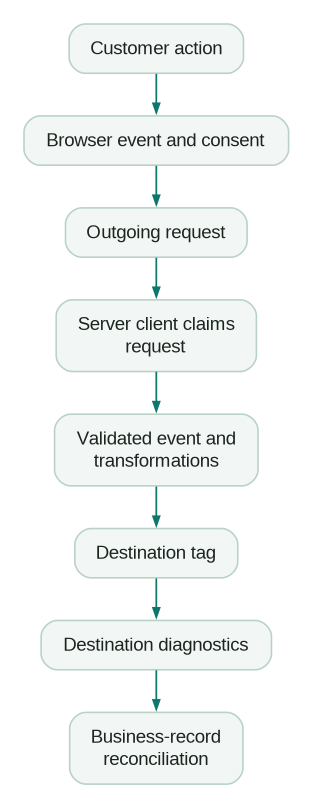
Read diagram as text
- Confirm one real outcome consent state and expected sender to The browser event and outgoing request are correct?.
- The browser event and outgoing request are correct? to Repair the first failing event consent or routing boundary: No.
- Repair the first failing event consent or routing boundary to Confirm one real outcome consent state and expected sender.
- The browser event and outgoing request are correct? to This delivery route uses a server container?: Yes.
- This delivery route uses a server container? to Inspect the claiming client parsed event and transformations: Yes.
- This delivery route uses a server container? to Inspect destination diagnostics and business-record matches: No.
- Inspect the claiming client parsed event and transformations to The server output preserves required permitted context?.
- The server output preserves required permitted context? to Repair the first failing event consent or routing boundary: No.
- The server output preserves required permitted context? to Inspect destination diagnostics and business-record matches: Yes.
- Inspect destination diagnostics and business-record matches to Unique outcomes amounts and destination checks reconcile?.
- Unique outcomes amounts and destination checks reconcile? to Repair the demonstrated destination or mapping failure: No.
- Repair the demonstrated destination or mapping failure to Confirm one real outcome consent state and expected sender.
- Unique outcomes amounts and destination checks reconcile? to Publish with rollback evidence and repeat production checks: Yes
How do you stop copied tags becoming an operating problem?
Reuse reviewed settings and variables instead of cloning slightly different tags for every change. Repeatedly cloning tags makes future edits inconsistent and consumes container capacity. Google's container-efficiency guidance recommends optimisation when the size indicator exceeds 70%, including consolidation and removal of unused configuration.
Use shared settings and reviewed variables for repeated values. Give tags, triggers and variables descriptive names, owners and purposes. Move substantial static application code into the application's normal delivery process where it can be versioned and tested appropriately.
Do not split a container solely to hide its size warning. Separate containers when sites or operating boundaries justify it, then document which one owns each event. Two poorly coordinated containers can make duplication harder to find.
How should you preview, document and roll back a change?
Test the proposed workspace on the real journey before publishing, record what changed, and identify the last known-good version. Preview is a debugging connection, not a promise that outgoing tags cannot affect a live destination; use test destinations and controlled outcomes where possible.
Google's Preview guide explains Tag Assistant, shareable preview sessions and previewing older versions. Use its event sequence to inspect triggers, resolved variables and consent behavior. A reviewer needs the test steps and expected result, not just a screenshot of green fired tags.
The publishing/version guide covers saving versions and publishing. Google's 17 September release added suggested version names and descriptions. If that suggestion appears, edit it to reflect the actual change and test evidence. Record a rollback version and the application or CMP changes that a container rollback will not undo.
Use automated tracking QA to repeat permitted and denied journeys after changes. Keep launch sign-off, container permissions and environment ownership explicit. After publishing, rerun the key journey and monitor broken-tag and reconciliation signals; a passing preview does not establish that production serves the same code.
How should you verify a repaired implementation?
Use a test matrix that covers event behaviour and customer state. At minimum, include fresh and returning browsers, accepted and denied consent, relevant devices, a normal completion, a retry and the major checkout or signup variants.
For every case, record the expected event count, required parameters, destination and outcome. Save the container version, test evidence and rollback reference together. After release, monitor the real population for changes in event volume and reconciliation gaps.
Consider an illustrative store with 100 confirmed eligible test orders. The original browser path produces 92 unique purchase IDs, while duplicate senders produce 11 additional requests. Request count is 103, yet eight orders remain missing. Comparing only totals could make the setup look healthy. These fictional counts describe different units:
| Measure | Count | What it establishes |
|---|---|---|
| Confirmed eligible test orders | 100 | Expected business population |
| Unique captured purchase IDs | 92 | Eight eligible IDs are absent |
| Additional duplicate requests | 11 | Some captured IDs were sent again |
| Total requests | 103 | A request total alone hides both defects |
After repair, the acceptance test checks unique IDs, amount and currency for the defined eligible population, plus duplicate handling. Some real-world orders can remain unobservable to a particular analytics destination because of permissions or delivery constraints. Separate those explanations from implementation defects instead of forcing the report to equal all orders.
What should pass before a GTM release?
Approve the release only when the intended events, consent states and destination records pass the agreed cases. Keep test evidence and recovery responsibility with the version. For server routes, add the server-side tracking checklist so access, launch evidence and ongoing maintenance have named owners.
Checklist
- Inventory every snippet, app, pixel, container and gateway route.
- Assign one owner for each business event and destination.
- Establish consent defaults before the relevant tags execute.
- Test acceptance, rejection, stored choices and withdrawal.
- Review broad triggers for
gtag.configand other platform events. - Validate event names, transaction IDs, currency and amounts.
- Inspect browser requests and server client handling separately.
- Verify permitted location and identity context at each hop.
- Reconcile Shopify or billing records with unique destination events.
- Remove unused configuration and consolidate repeated settings.
- Save test evidence, version notes and a rollback plan.
- Monitor production after release with a named owner.
The read-only GTM container audit skill can inventory tags and destinations, flag consent or duplicate-sender risks and draft changes for the release owner.
For the architecture and operating costs behind a server container, read the server-side tracking guide.
At Martechdevs, we implement tracking from the customer action through the records used in reporting and optimisation. Request a detailed Google Tag Manager implementation scope or book a free call. The martech AI audit framework and an AI assistant built around approved workflows become useful after the event evidence is dependable.
Keep reading
Browse all Tracking & Attribution guides
 Tracking & Attribution
Server-side GTM setup: a step-by-step implementation sequence
Set up server-side Google Tag Manager in a testable order: access, hosting, custom domain, clients, tags, consent and deduplication, then launch safely.
Jafrin Akter AloLast updated 16 min read
 Tracking & Attribution
Google Tag Manager Triggers: Events, Filters and Reliable Firing
Choose Google Tag Manager triggers by event, timing and filters. Build a custom event, diagnose repeated firing and validate consent and destination evidence.
Jafrin Akter AloLast updated 11 min read
 Tracking & Attribution
GTM Audit Checklist: Container Evidence, Consent and Release Control
Audit Google Tag Manager with a published baseline, tag inventory, journey tests, consent evidence and clear repair owners. Include permissions and live release checks.
Jafrin Akter AloLast updated 11 min read
Google Tag Manager consulting
See the setup scope, acceptance checks and handover.
Questions people ask
How long does a GTM implementation take?
Estimate after mapping the website, checkout variants, consent setup and destinations. A straightforward site with a tested data layer has different dependencies from a store with custom pixels, upsells and server-side routing. Ask for a bounded first outcome, the application changes it requires and its acceptance cases before accepting a schedule based only on the number of tags.
Can we fix everything inside GTM?
No. Application, CMP, CDN or commerce-platform changes may be necessary when the required event or context never reaches the container. GTM cannot reliably turn an ambiguous click into a confirmed business outcome. Assign an owner at each boundary, preserve a clear event contract and test the complete path after the upstream change, rather than adding more trigger exceptions.
How should we test a purchase repair without placing a real order?
Use the commerce platform's supported test-payment process and controlled measurement destinations where available. Verify that application success produces the expected data-layer values without sending a test purchase into normal campaign reporting. If production verification is necessary, agree the test record, permissions and cleanup treatment first. A synthetic data-layer push can check tag wiring, but cannot prove the real checkout emits that event.
How do I audit a GTM container nobody documented?
Export a versioned copy, inventory tags by destination and trigger, then trace the journeys the business actually uses. Record which application or person owns each event and which values must reconcile. If your team uses an AI client, you can audit a GTM container read-only with MCP, but validate its findings against Preview and destination evidence before changing anything.
When should we use an implementation partner?
Use one when the repair crosses systems or requires specialist testing your team cannot currently maintain. Ask for the event contract, consent test matrix, reconciliation evidence and a working handover. Review what Google Tag Manager costs to run separately from the implementation quote, so hosting, monitoring and future changes do not disappear from the decision.
Sources
- Google: Missing report dimensions and Initialization.
- Google: GTM ecommerce measurement.
- Google: Preview and debug containers.
- Google: Conversion Linker.
- Google: GTM release notes.
- Google: Tag-code ordering.
- Google: Consent template APIs.
- Google: Website consent-mode setup.
- Google: Trigger configuration.
- Google: Enhanced measurement events.
- Google: Container ID behavior.
- Google: Destination-tag container optimization.
- Google: Mark events as key events.
- Google: Publishing and versions.
- Google: Common server event data.
- Google: Region-specific setup.
- WebKit: Third-party blocking and storage.
- WebKit: CNAME-cloaking defense.
- Shopify: Checkout completed event.
- Google: Server data routing.
- Google: Container efficiency.

Written by
Jafrin Akter AloData Engineer and Co-founder at Martechdevs and Growth and Analytics Partners
Jafrin writes practical guides to marketing technology, customer data, analytics and AI workflows. Martechdevs is a Growth and Analytics Partners company.