
HubSpot Pricing: Seat Prices, Marketing Contacts, Credits and Onboarding
HubSpot is free for two users and up to 1,000 contacts. Paid Starter seats list at $20 a month, with limited-time new-customer offers of $7 with annual payment or $10 paid monthly; Sales Hub Professional seats cost $90 a month on annual billing ($100 paid monthly on an annual commitment), and Marketing Hub Professional starts at $800 a month paid yearly or $890 paid monthly on an annual commitment, with three seats and 2,000 marketing contacts. Your bill then depends on who needs a paid seat, how many marketing contacts you store, the credits you use and one-time onboarding, so calculate each separately.
On this page
How much does HubSpot cost at a glance?
The standard Hub-based catalogue combines product fees, seats, marketing-contact capacity and credits. Free tools cost nothing, but a Professional or Enterprise proposal needs a role map and a first-year budget. Selected accounts use a different flexible seats-and-credits contract; confirm the model before applying these prices.
USD monthly prices or equivalents, before tax and negotiated discounts. Professional monthly payment still carries an annual commitment.
| Item | Public price | Important boundary |
|---|---|---|
| Free tools | $0 | Two users; 1,000 contacts |
| Starter Core seat | $20 list; new-customer offer $7 annually or $10 monthly | Limited-time offer; renewal terms require confirmation |
| Professional Core seat | $50 catalogue; additional seats on listed annual Hub packages start at $45 | Core access follows the highest purchased edition |
| Enterprise Core seat | $75 | Does not unlock every specialist sales/service tool |
| Sales or Service Professional | $90/seat with annual payment; $100 with monthly payment | Annual commitment; $1,500 onboarding per Hub |
| Sales or Service Enterprise | $150/seat | Annual billing; $3,500 onboarding per Hub |
| Marketing Professional | $800 annually paid; $890 monthly paid | Three Core seats and 2,000 marketing contacts; $3,000 onboarding |
| View-Only seat | $0 on paid subscriptions | Viewing and permitted notes; not record editing |
Sources: seat catalogue, Sales, Service, Marketing, Starter offer.
Go to contact costs, every Hub’s price, free limits or Starter versus Professional.
The cheapest price on a HubSpot page rarely describes the package a growing marketing and sales team will use. A company can have 25 employees, ten sellers, eight CRM editors and seven people who only need to read reports. Multiplying 25 by a single seat price gives the wrong answer before contacts or AI usage enter the calculation.
The right starting point is a role map and the actual order form.
Our HubSpot implementation and onboarding starts with the processes, permissions and data your team needs, then maps them to the appropriate products and seats. The broader CRM and lifecycle scope covers workflows spanning several systems.
How much do HubSpot marketing contacts cost?
For standard Hub-based Marketing Hub, the first 1,000 Starter, 2,000 Professional or 10,000 Enterprise marketing contacts are included. Additional capacity uses blocks with declining band rates. Non-marketing contacts have no separate contact charge within the 15-million overall contact limit; flexible-pricing contracts use a different model. Marketing-contact catalogue.
These are standard USD monthly additional-capacity rates, before tax, discounts and the product base fee. Each edition's included allowance is shown first.
| Edition | Included contacts | Additional block | Total contact range and block rate |
|---|---|---|---|
| Starter | 1,000 | 1,000 | 1,001–3,000: $50; 3,001–5,000: $45; 5,001+: $40 |
| Professional | 2,000 | 5,000 | 2,001–22,000: $250; 22,001–42,000: $225; 42,001–62,000: $200; 62,001–82,000: $175; 82,001+: $150 |
| Enterprise | 10,000 | 10,000 | 10,001–50,000: $100; 50,001–100,000: $90; 100,001–200,000: $80; 200,001–500,000: $70; 500,001+: $60 |
Monthly marketing-email allowances are five times the contact tier on Starter, ten times on Professional and twenty times on Enterprise. Contact capacity and permitted email volume therefore need separate forecasts. Marketing plan limits.
What do 10,000, 25,000 or 100,000 marketing contacts add?
These are planning calculations using graduated blocks from the catalogue’s blended-rate bands. They show the extra monthly contact charge only, before the Hub base, seats, credits and onboarding. Round up to a complete block and confirm the resulting tier in HubSpot’s pricing calculator or your account before treating it as a quote.
| Actual marketing contacts | Starter extra/month | Professional extra/month | Enterprise extra/month |
|---|---|---|---|
| 5,000 | $190 | $250 | $0 |
| 10,000 | $390 | $500 | $0 |
| 25,000 | $990 | $1,225 | $200 |
| 50,000 | $1,990 | $2,300 | $400 |
| 100,000 | $3,990 | $4,000 | $850 |
For example, 25,000 Professional contacts need purchased capacity for 27,000: four $250 blocks plus one $225 block, or $1,225. Ten thousand Professional contacts need 12,000 capacity: two $250 blocks. Combined with the annually paid $800 base, that second example is $1,300 monthly equivalent, $15,600 annually, or $18,600 in year one after $3,000 onboarding, assuming the contact rates apply unchanged to that order. HubSpot’s price calculator, account tier pricing.
What does one more marketing contact cost?
For planning, calculate each additional full block at its own band rate and round required capacity up to a complete block. This is the graduated-block interpretation of the catalog's blended rate. Confirm the resulting tier price in Account & Billing → Marketing Contacts → View tier pricing or the written quote before committing; the catalog does not show a complete multi-band worked invoice. Account tier pricing.
Under that assumption, exactly 7,000 Professional marketing contacts use the included 2,000 plus one $250 block. Contact 7,001 needs the next block, buying capacity for 12,000 and adding $250 per month. A lower average price at scale can coexist with a larger total bill.
The following hypothetical USD monthly calculation includes only the product base and marketing-contact capacity. Professional uses the $890 base; Enterprise uses $3,600. It excludes added seats, credits, onboarding and tax.
| Edition and actual contacts | Purchased capacity | Additional contact charge | Base plus contacts | Subtotal per actual contact |
|---|---|---|---|---|
| Professional, 7,000 | 7,000 | $250 | $1,140 | $0.1629 |
| Professional, 7,001 | 12,000 | $500 | $1,390 | $0.1985 |
| Professional, 22,000 | 22,000 | $1,000 | $1,890 | $0.0859 |
| Professional, 42,000 | 42,000 | $1,900 | $2,790 | $0.0664 |
| Professional, 100,000 | 102,000 | $4,000 | $4,890 | $0.0489 |
| Enterprise, 100,000 | 100,000 | $850 | $4,450 | $0.0445 |
For the Professional 100,000-contact line, the calculation is four blocks at each rate: 4 × ($250 + $225 + $200 + $175 + $150) = $4,000. Enterprise uses 4 × $100 + 5 × $90 = $850. The cheaper Enterprise subtotal in this example is a reason to obtain a complete comparison, including its annual payment, seat requirements and onboarding, before changing editions.
Passing 100,000 contacts still adds cost. In this model, Professional's purchased 102,000 capacity has room before the next block; Enterprise's next contact requires capacity for 110,000, adding $80. The paid tier remains a renewal decision even if the audience later shrinks. The rate per block declines across bands; the total charge continues to rise.
What does each HubSpot hub cost?
Price the exact product and payment term. A Marketing base fee includes a small Core-seat allowance; Sales, Service and Revenue specialist products are priced per seat. Customer Platform and HubSpot for Marketers are bundles, so their headline totals are not substitutes for the seat allocation on an order.
USD monthly equivalents. Annual-payment and monthly-payment columns for Professional both require an annual commitment. Enterprise is billed annually. Starter’s $7 annual/$10 monthly offer is for eligible new customers, against a $20 per-Core-seat list price.
| Product | Starter | Professional: annual payment | Professional: monthly payment | Enterprise |
|---|---|---|---|---|
| Marketing Hub | $7 offer / $20 list per seat | $800 base | $890 base | $3,600 base |
| Sales Hub | $7 offer / $20 list per seat | $90 per Sales seat | $100 per Sales seat | $150 per Sales seat |
| Service Hub | $7 offer / $20 list per seat | $90 per Service seat | $100 per Service seat | $150 per Service seat |
| Content Hub | $7 offer / $20 list per seat | $450 base | $500 base | $1,500 base |
| Data Hub | $7 offer / $20 list per seat | $720 base | $800 base | $2,000 base |
| Revenue Hub | No paid Starter edition listed | $85 per Revenue seat | $95 per Revenue seat | $140 per Revenue seat |
| Customer Platform | $7 offer / $20 list per seat | $1,300 bundle | $1,450 bundle | $4,700 bundle |
| HubSpot for Marketers | Use Starter bundle | $900 bundle | $1,000 bundle | $3,800 bundle |
Sources: Marketing, Sales, Service, Content, Data, Revenue, Customer Platform, HubSpot for Marketers.
The following allowances describe the Professional and Enterprise packages above. Included credits are account allowances, not an amount per seat or an allowance to add across Hubs.
| Product | Included seats: Pro / Enterprise | Monthly included credits: Pro / Enterprise | Required onboarding: Pro / Enterprise |
|---|---|---|---|
| Marketing Hub | 3 / 5 Core | 3,000 / 5,000 | $3,000 / $7,000 |
| Sales Hub | Each purchased Sales seat | 3,000 / 5,000 | $1,500 / $3,500 |
| Service Hub | Each purchased Service seat | 3,000 / 5,000 | $1,500 / $3,500 |
| Content Hub | 3 / 5 Core | 3,000 / 5,000 | No required fee listed in catalogue |
| Data Hub | 1 / 1 Core | 5,000 / 10,000 | No required fee listed in catalogue |
| Revenue Hub | Each purchased Revenue seat | 3,000 / 5,000 | No required fee listed in catalogue |
| Customer Platform | 6 / 8 seats; confirm specialist allocation | 5,000 / 10,000 | Confirm bundle onboarding in the proposal |
| HubSpot for Marketers | 3 / 5 Core | 3,000 / 5,000 | $3,000 / $7,000 |
The product catalogue distinguishes paid seats from the Hub’s included Core seats. The separate credit rules grant the highest applicable allowance rather than stacking every product’s credits.
HubSpot for Marketers combines Marketing and Content. Customer Platform spans the broader products, but six included seats do not prove six advanced sellers or service agents are covered. Request the seat types, marketing-contact capacity and onboarding breakdown. Compare the bundle once several Professional Hubs are necessary, using the same people and workload.
Revenue Hub's Professional rate is $85 per seat per month with annual payment or $95 with monthly payment on an annual commitment; Enterprise starts at $140. The Revenue pricing page and HubSpot's pricing explanation distinguish these billing terms. Its conditional bundle offers $57 Professional or $98 Enterprise per seat per month, billed annually, only to eligible new Sales Hub and new Revenue Hub customers. Those are Revenue Hub seat prices; budget the required Sales Hub seats separately. Confirm the order's eligibility and renewal terms before using that discount.
Current quote creation requires Revenue Hub Professional or Enterprise and an assigned Revenue Hub seat. A Sales or Core seat by itself does not establish that entitlement. Current quote requirements. Eligible older accounts can retain legacy Sales Hub quotes under separate account-history and seat rules; legacy access is unavailable to new users. Check the actual editor and entitlement before budgeting a migration. Legacy and current quotes.
Payment-related platform and processing charges remain separate from the seat fee and depend on the method, country and applicable offer. If the only gap is quoting, compare quote and CPQ tools that work with HubSpot before replacing the wider CRM.
What are the limits of free HubSpot?
Free HubSpot supports two users, 1,000 contacts and 1,000 records across all other standard object types per account. It has no time limit. Marketing email is limited to 2,000 sends per calendar month with HubSpot branding. These are separate limits; 1,000 contacts does not mean 1,000 permitted sends per contact. Free-tools pricing, free feature catalogue.
| Free allowance | Limit | Planning implication |
|---|---|---|
| Users | 2 | A third editor requires a paid product |
| Contacts | 1,000 | Count the entire free CRM contact population |
| Other standard-object records | 1,000 combined per account | Do not budget this as 1,000 for each object type |
| Marketing email | 2,000 sends/calendar month | HubSpot branding remains; sending permission still matters |
Free is a way to validate a small process, not unlimited CRM storage or a complete Professional automation suite. Check the actual workflow against the free feature list before paying. Use how to choose a CRM to compare the same tasks and users.
Which HubSpot pricing model applies to your account?
Use your current order, subscription screen and migration notice. The standard catalogue uses Hubs, Core/specialist seats, marketing-contact capacity and credits. The flexible seats-and-credits migration FAQ explicitly applies only to customers directly notified by HubSpot; it does not establish that every customer has moved. Migration FAQ.
| Contract model | Main units | What to verify |
|---|---|---|
| Standard Hub-based | Hub base, Core/specialist seats, marketing contacts, credits | Included seats, contact tiers and highest credit allowance |
| Legacy Marketing Hub | Order-specific contact and product terms | Whether all-contact pricing applies; use the legacy schedule |
| Flexible seats and credits | Edition, GTM/Ops seats and billable actions | Migration notice, currency, record capacity and actual rate sheet |
Flexible pricing removes separate Hub base fees and marketing-contact billing. GTM seats include Ops access; Ops seats are offered at Professional/Enterprise, and the account needs at least one GTM seat. The standard supplement lists record capacities of 25,000, 250,000 and 15 million across applicable object types; Starter is limited to ten paid seats. Its public list figures are in EUR, so do not substitute them into the USD examples here. Flexible supplement.
For notified accounts, the FAQ describes migration as mandatory. It describes keeping the price unchanged at migration, with capacity informed by historical use. Increased usage and renewal changes can still add cost. Forecast scaled/automated emails, agent actions and other billed activity using that contract’s rates. One-to-one connected-inbox emails are treated separately. Keep custom-object limits by pricing model with the applicable edition.
All worked USD bills below use the standard Hub-based model. For a flexible contract, replace its contact-tier calculation with the actual action forecast; never add both for the same entitlement.
How should you compare the Starter offer with the catalog price?
The public Starter offer is $7 per seat per month with upfront annual payment and an annual commitment, or $10 per seat paid month to month. The reference list price is $20. HubSpot says new customers only and limited time; the public offer does not specify a guaranteed renewal price or a dated campaign end. Starter offer and terms.
Ten seats at the $7 offer for a full year cost $840 upfront. Ten seats at $10 for twelve unchanged monthly periods cost $1,200; ten seats at the $20 list rate cost $2,400 over twelve months. These are conditional planning totals, not a promise that the monthly promotion lasts twelve months or that renewal automatically uses any one of those prices.
Record the offer duration, which seats qualify, payment timing and renewal terms. The discount does not erase marketing-contact upgrades, purchased credits, payment processing or other usage charges.
Why is Professional so much more than Starter?
Professional adds a different operating scope, such as advanced automation and reporting, rather than only more users. Marketing Professional also has a base fee and required onboarding. Upgrade for a workflow you can name and test, then compare the same team, contacts and annual commitment before paying for it.
For a fictional five-person marketing team with at most 1,000 marketing contacts, Starter at list is 5 × $20 = $100 per month. Marketing Professional with annual payment is $800 + 2 × $45 = $890 monthly equivalent, because three Core seats are included. That is $10,680 annually plus $3,000 onboarding, or $13,680 in year one, before contact additions and credits. Starter’s list-only annual equivalent is $1,200. The $800 versus $100 comparison alone misses the two additional seats and onboarding. Marketing plan and seat prices.
What do 5, 10 and 25 Professional users cost?
These single-product examples assume the stated number of Core editors in Marketing or specialist sellers in Sales. They exclude marketing contacts above 2,000, extra credits, tax and implementation. Service Professional has the same advertised per-specialist-seat rates and onboarding as Sales.
| Users | Marketing Pro, annually paid/month | Marketing Pro, monthly paid/month | Sales Pro, annually paid/month | Sales Pro, monthly paid/month |
|---|---|---|---|---|
| 5 | $890 | $990 | $450 | $500 |
| 10 | $1,115 | $1,240 | $900 | $1,000 |
| 25 | $1,790 | $1,990 | $2,250 | $2,500 |
Marketing uses base + max(users − 3, 0) × additional Core rate: $800/$45 for annual payment or $890/$50 for monthly payment. Sales uses $90 or $100 times specialist seats. Multiply by twelve, then add $3,000 Marketing or $1,500 Sales onboarding once. Both Professional payment choices commit annually. Sales, Service.
For five Marketing users, paying monthly totals $14,880 in year one including onboarding, versus $13,680 with annual payment. The $1,200 difference is payment-term arithmetic under these assumptions, not savings from removing functionality.
How should you count HubSpot seats?
Under the Hub-based model, View-Only seats are free on paid subscriptions and allow viewing, filtering reports and logging notes on visible records. They cannot edit records, save reports or log emails. Core seats allow the relevant core work in purchased products. Sales, Service and Revenue seats provide the corresponding specialist Professional or Enterprise tools; those specialist seats also include Core access. Seat assignment and permissions are separate controls. HubSpot seat management.
Build a roster with each user's actual requirements:
User or role
Needs to view records?
Needs to edit records?
Needs advanced sales tools?
Needs advanced service tools?
Needs advanced quoting tools?
Purchased seat type
Assigned seat type
Owner of approval
A finance reader may need View-Only. An operations editor may need Core. A seller using the advanced sales workspace may need a Sales seat. Someone using several specialist products needs an entitlement review rather than an assumption that one specialist seat unlocks everything.
Do not add another Core charge to a specialist user's budget merely because they also edit records. Conversely, do not expect a Core seat to provide every Sales Hub feature.
For mixed Hub tiers, the catalogue prices Core access according to the highest applicable subscription level. Adding one higher-tier product can therefore affect the wider seat calculation. Seat pricing rules.
Which contacts belong in the paid marketing population?
For accounts using marketing contacts, the billable population is the contacts designated for supported marketing activities, rather than every CRM record. Marketing email and some advertising and workflow uses require that status. It is a billing and product setting; it should not be confused with consent or subscription permission. Understanding marketing contacts.
How do legacy Marketing Hub contracts differ?
An older order may use all-contact capacity rather than the standard marketing-contact model. HubSpot's legacy page lists Starter from $50/month with 1,000 included, with additional 1,000-contact blocks at $50 through 3,000, $45 through 5,000, $40 through 7,000, $35 through 9,000 and $30 above 9,000.
Legacy Professional starts at $800/month billed annually, with 1,000 included contacts, $50 per additional 1,000 and $3,000 onboarding. Legacy Enterprise starts at $3,600/month billed annually, with 10,000 included, $10 per additional 1,000 and $6,000 onboarding. Legacy email limits are five times the tier on Starter and ten times on Professional and Enterprise. Legacy contact pricing.
Match those terms to the order form and renewal proposal. The continued presence of a legacy price page does not establish that a new account can purchase that contract. Ask which model the new order uses before importing the legacy rates into a comparison.
How do you keep marketing contacts below the next tier?
Set the maximum marketing-contact count at or below your purchased tier and review import and automation defaults. Once that maximum is reached, affected new contacts become non-marketing. A maximum set above the purchased tier can still permit a billed upgrade. Contact billing controls.
Schedule non-marketing changes before the effective update date shown in the account: the first of each month for yearly subscriptions, or the monthly renewal day for monthly subscriptions. The catalogue also allows a contract renewal date that arrives sooner. The catalogue says exceeding the tier is billed immediately; the operational guide places the automatic tier upgrade at midnight in the HubSpot subsidiary’s time zone. It is not a grace period you can undo after crossing. Exceeding the paid tier triggers an upgrade that remains until renewal even if the count falls. Request a downgrade at least five business days before renewal through the appropriate HubSpot contact.
For example, a fictional account with 7,000 capacity should not import 3,000 additional marketing contacts while assuming that 3,000 records scheduled to become non-marketing have already freed capacity. Verify the effective status first. Control marketing-contact status on import, including form and workflow defaults, before the list arrives.
Keep useful customer history and consent evidence. Marketing status is a billing and product control; it does not itself establish permission to send an email.
How should you budget HubSpot Credits and control spending?
HubSpot Credits pay for specified actions. The USD rate is $0.01 each. A text-based Customer Agent resolution uses 50 credits, equivalent to $0.50 of credit consumption before applying an included allowance. Other actions have their own rates. HubSpot Credits overview.
A 200-resolution month therefore consumes 10,000 credits for that activity. It does not necessarily produce a $100 invoice, because included credits may cover part of the usage. It can also cost more overall if other features draw from the same balance.
For the Marketing and Sales Professional products in the examples below, use one 3,000-credit allowance. Starter generally includes 500; these Professional products include 3,000 and Enterprise 5,000. Data Hub and Customer Platform instead list 5,000 at Professional and 10,000 at Enterprise. Allowances do not stack across products; verify the highest applicable account allowance. Included-credit rules.
Credits reset each month with the account’s usage period; unused credits expire rather than rolling over. Purchased capacity packs can only be cancelled or downgraded at the end of the commitment term.
Then inspect the actual overage setting. With only included credits, usage-based features pause at exhaustion. Purchased packs support auto-upgrades for the remaining commitment or pay-as-you-go overages that reset each period. Additional-credit purchases before 16 September 2026 default to auto-upgrade; purchases from that date default to pay-as-you-go. Account and feature limits can pause usage; a feature limit does not reserve its balance. Credit billing and limits.
Include external automation, such as a Clay workflow that writes into HubSpot, in the inventory of work and its separate vendor charges. Assign an operational owner to the pause condition. A cap that stops an important customer workflow needs an alert and a fallback, not merely a finance notification after the fact.
Before requesting more credits, document action volume, useful output, retries or repeated processing, and the other features drawing from the same balance. Name the owner who responds at the cap and the fallback. An account-level limit can stop all credit-consuming tools; a feature-level limit does not reserve credits for that feature.
Pay-as-you-go overages are invoiced in increments of ten credits, rounded down, while capacity packs add 1,000 credits per month for the remaining commitment. For a fictional account with 4,000 available credits, including a purchased pack, 4,027 used credits produce 20 invoiced overage credits, or $0.20 at $0.01 each under that PAYG rule. Auto-upgrade instead adds a whole pack for the remaining term. Verify the selected setting; the same usage does not produce the same future commitment. Overage rules.
What do example HubSpot bills look like for ten, 25 and 50 people?
The example bills are $1,610, $2,860 and $4,960 per month for the specific ten, 25 and 50-person configurations below. These are fictional teams using published catalog inputs. They assume Marketing Hub Professional at $890 monthly, Sales Hub Professional at $100 per Sales seat monthly, additional Professional Core seats at $50, and the contact increments described above. The Professional subscriptions retain their applicable annual commitment despite monthly payment. Annual prepayment offers can change these amounts. Sales pricing and payment terms.
The examples assume the graduated contact-block model above, steady usage, one 3,000-credit allowance, no other credit-consuming actions and purchased credit packs sufficient for that consumption. The catalogue lists Customer Agent for Marketing or Sales Professional; the examples assume an eligible, configured text channel, not a separately priced voice workflow. Agent availability. Each extra-credit quantity is a whole number of 1,000-credit packs. They exclude implementation labour, taxes, other Hubs, messaging add-ons and external tools. In particular, no Revenue Hub quote-creator seats or payment-processing fees are included. Add those for the actual quoting users before comparing a proposal that includes CPQ.
Ten people: $1,610 per month in this configuration
Four sellers use Sales seats, three editors use the included Core seats and three readers use View-Only. The business needs 7,000 marketing contacts and 200 Customer Agent text resolutions per month.
Marketing Hub Professional                 $890
4 Sales seats × $100                       $400
1 additional 5,000-contact increment        $250
7,000 purchased credits × $0.01              $70
Monthly total                            $1,610
The agent consumes 10,000 credits; the assumed included 3,000 leave 7,000 to purchase. The ten-person headcount does not mean ten Sales seats.
Twenty-five people: $2,860 per month
Ten sellers need Sales seats, eight other editors need Core seats and seven readers use View-Only. Five Core seats are additional to the included three. The business needs 12,000 marketing contacts and 500 monthly resolutions.
Marketing Hub Professional                 $890
10 Sales seats × $100                    $1,000
5 additional Core seats × $50               $250
2 additional contact increments × $250      $500
22,000 purchased credits × $0.01            $220
Monthly total                            $2,860
This bill depends on the proposed role split. If some editors need advanced service or quoting tools, the entitlement and cost change. Compare Attio versus HubSpot at 20 seats to see how direct CRM membership and free viewer access can change a different role-mapped example.
Fifty people: $4,960 per month
Twenty sellers use Sales seats, 15 other editors use Core seats and 15 readers use View-Only. The account needs 22,000 marketing contacts and 1,000 monthly resolutions.
Marketing Hub Professional                 $890
20 Sales seats × $100                    $2,000
12 additional Core seats × $50              $600
4 additional contact increments × $250    $1,000
47,000 purchased credits × $0.01            $470
Monthly total                            $4,960
Model users, marketable audience and automated work separately: they can grow at different rates. Compare Salesforce costs at the same roles and team sizes only after mapping equivalent capabilities.
What does onboarding and implementation add to year one?
Marketing Hub Professional lists required one-time onboarding of $3,000 and Enterprise $7,000. Sales Hub and Service Hub Professional each list $1,500 and Enterprise $3,500; Starter has no required onboarding charge on these pricing pages. Marketing plan onboarding. Applying the Marketing and Sales Professional fees to the examples produces first-year software, credit and onboarding totals of $23,820, $38,820 and $64,020, respectively, assuming unchanged monthly usage and no negotiated adjustment. Marketing onboarding, Sales pricing.
Vendor onboarding provides guidance within its scope. A complete deployment may also require source-data cleanup, property design, association repair, billing integration, product-data sync and report validation. See what implementation adds to the HubSpot bill for a worked delivery budget and the responsibilities to compare across quotes.
Price those deliverables explicitly. If a partner arrangement changes the onboarding requirement, have that reflected in the actual proposal rather than assuming a public price has been waived.
For SaaS teams, syncing Stripe with HubSpot and bringing product usage into HubSpot describe work that can materially affect the implementation scope.
For partner proposals, separate the vendor subscription, vendor onboarding, implementation deliverables and ongoing support. Identify who invoices each component and which commitments survive a partner change. Require identical user, contact and usage assumptions, then compare acceptance tests, documentation and operating responsibilities. A bundled services quote is not evidence that vendor onboarding is waived.
Which HubSpot configuration fits each kind of team?
Choose the configuration from the workflow, access and audience requirements, then test the alternative against the same jobs. Headcount by itself does not select a HubSpot edition.
| Team situation | Starting fit to evaluate | Runner-up | Reason to choose between them |
|---|---|---|---|
| Two people testing a basic CRM process | Free tools within their limits | Starter | Pay only when a required capability or capacity exceeds free access |
| Sellers need advanced sales work; few others edit | Sales seats for those sellers, appropriate access for others | Simpler CRM plus a separate tool | Compare the complete activity history, reporting and maintenance burden |
| Marketing depends on CRM-triggered automation | Hub-based Marketing package and a controlled contact population | CRM plus separate lifecycle email | Check which workflows and reporting joins would need rebuilding |
| Large marketable audience | Quote Professional and Enterprise at the actual tier | Split email from CRM | Base, contacts, seats and implementation can change the apparent winner |
| Account offered flexible seats and credits | Its applicable GTM/Ops quote plus action forecast | Revised scope or another platform | Compare normal, campaign-heavy and renewal periods using the correct terms |
How can you reduce the HubSpot bill without breaking workflows?
Start with unused purchased seats and incorrectly assigned specialist access. Reassign ownership before removing a departing user, and distinguish removing access from reducing the purchased commitment. HubSpot notes that seat removal does not change the current invoice. Seat-management rules.
Next, review the marketing-contact population under the applicable model. Keep contacts as marketing when the planned, permitted activity needs it. Schedule changes ahead of the effective update date and evaluate the tier required at renewal.
Then inspect credit-consuming automation. Look for repeated processing of unchanged records, duplicated workflows and actions that generate output nobody uses. Compare the credit cost with a useful result, such as an accepted qualification or a correctly resolved support case.
Finally, compare annual prepayment with monthly payment only after the package is right. A discount on unused functionality is still spending on unused functionality.
Before purchasing a qualifying product, check startup programs for the rest of your stack and model the later subscription cost without assuming an award.
Choose the calculation that matches the actual contract before combining seats, contacts and credits. Rework an unaffordable growth or renewal case, and test the operational response to limits before approving the budget.
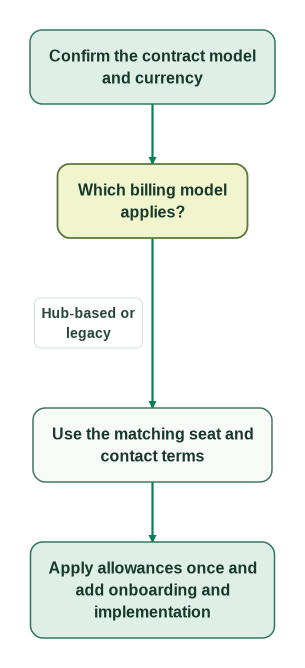
Use the standard or legacy contract
This shows the Hub-based branch; the flexible-contract branch uses the same allowance and cost check in the next view.
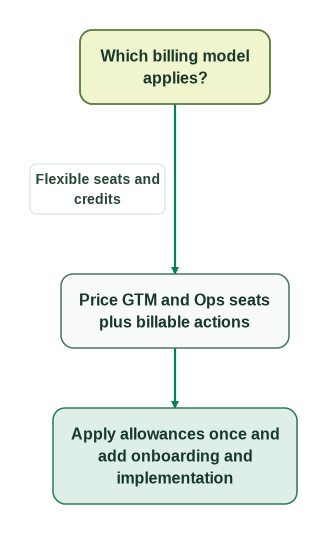
Use flexible seats and credits only when applicable
This is the alternative branch of the same contract decision, not another fee to add to Hub-based pricing.
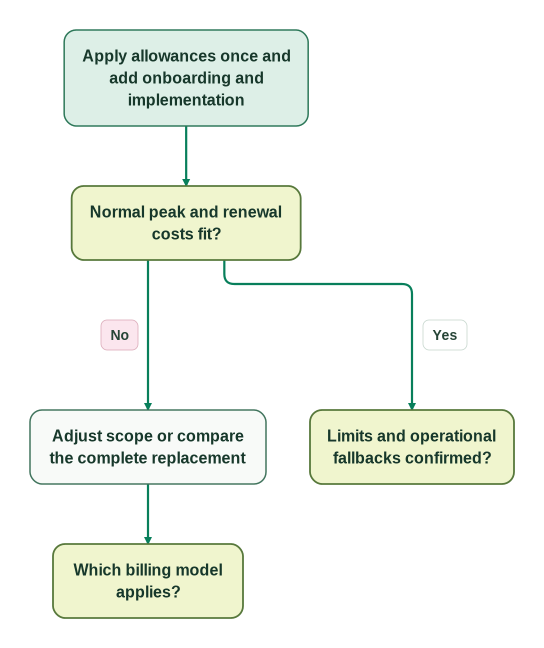
Check normal, peak and renewal cost
Returning to the model decision requires pricing the complete revised configuration again. The fallback check continues in the final view.
Confirm limits and response owners
This loop is an acceptance plan; no native HubSpot test was performed for this pricing guide.
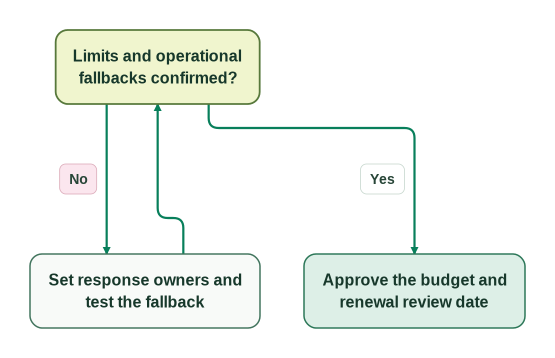
Read diagram as text
- Confirm the contract model and currency to Which billing model applies?.
- Which billing model applies? to Use the matching seat and contact terms: Hub-based or legacy.
- Which billing model applies? to Price GTM and Ops seats plus billable actions: Flexible seats and credits.
- Use the matching seat and contact terms to Apply allowances once and add onboarding and implementation.
- Price GTM and Ops seats plus billable actions to Apply allowances once and add onboarding and implementation.
- Apply allowances once and add onboarding and implementation to Normal peak and renewal costs fit?.
- Normal peak and renewal costs fit? to Adjust scope or compare the complete replacement: No.
- Adjust scope or compare the complete replacement to Which billing model applies?.
- Normal peak and renewal costs fit? to Limits and operational fallbacks confirmed?: Yes.
- Limits and operational fallbacks confirmed? to Set response owners and test the fallback: No.
- Set response owners and test the fallback to Limits and operational fallbacks confirmed?.
- Limits and operational fallbacks confirmed? to Approve the budget and renewal review date: Yes
When is a HubSpot alternative cheaper?
An alternative is cheaper when it covers the required workflow at a lower total cost, including migration and ongoing operations. For a contact-heavy marketing account, evaluate keeping the CRM while moving lifecycle email to Customer.io or Klaviyo. Include consent synchronization, suppression handling, event delivery and report reconciliation in that split. If Mailchimp remains the sender, use the HubSpot–Mailchimp field and unsubscribe checks to scope the integration and its ongoing ownership.
Use the CRM selection guide linked above to test the same process with each candidate. A lower subscription can be outweighed by maintaining two systems or losing a workflow the team relies on. Price the whole replacement before the renewal decision.
When should you review HubSpot renewal costs?
Review the package 60 to 90 days before renewal as an internal planning rule. HubSpot's general terms prohibit subscription downgrades during the current term and allow renewal fees to increase up to then-current list price, with at least 30 days' notice of that increase. The non-renewal mechanism and any order-specific terms also matter. The 30-day price-notice provision is not a universal deadline for every customer action. Customer terms.
At that review, reconcile purchased seats, assigned users, contact capacity, credits, discounts and planned projects. That gives the team time to agree on a smaller package or an alternative without rushing through data exports and procurement. The renewal contract checklist separates supplier price notices from customer actions and shows how to reconcile quantity, discount and unit-price changes.
Eligible startups can receive 90%, 50% and 25% off across the first three years on the funding track, or 30% then 15% through approved entrepreneurial organizations. The funding track covers pre-seed, Seed or Series A, excludes Series B or later, and requires approved-partner affiliation or verified venture funding. The offer applies to net-new Professional or Enterprise products with an annual commitment, followed by standard pricing. Eligibility requires approval. HubSpot for Startups.
If an eligible, unchanged hypothetical package has a $12,000 annual list subscription and every component qualifies, the funding-track subscription is $1,200 in year one, $6,000 in year two, $9,000 in year three and $12,000 in year four. This excludes onboarding, usage growth, tax and later list-price changes. Confirm eligibility and the complete renewal budget alongside the broader startup-program review above.
For a platform comparison, use the complete cost model in HubSpot versus Salesforce for startups. Map the same roles and requirements before substituting another platform’s headline seat rate.
What should you confirm before buying or renewing HubSpot?
Confirm the contract model, required capacity and operating responsibility before approving the purchase.
Checklist
- The applicable pricing model and currency are identified.
- Each paid seat maps to a named role and required entitlement.
- Included Core seats and credits are counted once.
- Contact tiers or usage rates match the actual contract.
- Payment schedule and commitment length are distinguished.
- Onboarding and implementation have separate scopes.
- Credit caps have an operational fallback.
- Renewal pricing and expiring discounts are modelled.
- A review date is scheduled before renewal decisions become urgent.
At Martechdevs, we connect CRM, product and billing data to the customer workflows your team needs to run. Start with the free AI readiness checklist, explore an AI assistant built around your approved workflows, or request a detailed HubSpot scope.
What should you read next?
Use HubSpot implementation costs to separate delivery work from software, HubSpot alternatives for a complete replacement comparison, or HubSpot for Startups to check eligibility and later-year commitments.
Keep reading
Browse all CRM & Lifecycle guides
 CRM & Lifecycle
monday CRM vs HubSpot: Workflow Fit, Automation Limits and Full Cost
Compare monday CRM and HubSpot by sales handoffs, automation units, seat bundles, integrations and full cost. Includes team budgets and migration acceptance tests.
Jafrin Akter AloLast updated 11 min read
 CRM & Lifecycle
HubSpot vs Mailchimp: Choose by the Sales Handoff and the Renewal Bill
Compare HubSpot and Mailchimp for CRM-led marketing or email campaigns. See free limits, 2,000/10,000-contact costs, renewal bills and a lead-to-deal test.
Jafrin Akter AloLast updated 16 min read
 CRM & Lifecycle
HubSpot Quote Tool Alternatives: 4 Options and When to Stay
Compare PandaDoc, Qwilr, DealHub and Portant for HubSpot quotes, with plan costs, CPQ limits, approval checks and when to keep native Revenue Hub quotes.
Jafrin Akter AloLast updated 14 min read
CRM & marketing automation
See the implementation scope, deliverables and acceptance checks.
Questions people ask
Is HubSpot free?
Yes. HubSpot’s free tools support two users and up to 1,000 contacts without a time limit. They provide basic CRM, forms and marketing-email functionality with separate feature limits. Paid Starter lists at $20 per seat monthly; eligible new customers can receive the limited-time $7 annual-payment or $10 monthly-payment offer. Check the required workflow and the actual offer terms before assuming free access or an introductory price covers a growing team.
How much does HubSpot cost per seat?
Standard Core seats list at $20, $50 or $75 monthly for Starter, Professional or Enterprise. Sales and Service Professional cost $90 per specialist seat with annual payment, or $100 paid monthly on an annual commitment; Enterprise is $150. Revenue seats have different rates. Specialist seats include Core access, while View-Only is free on paid plans. Count required entitlements and included seats once, rather than multiplying headcount by one price.
How much does HubSpot onboarding cost?
Marketing Hub Professional requires $3,000 onboarding and Enterprise $7,000. Sales and Service Professional each require $1,500; each Enterprise product requires $3,500. Starter has no required onboarding fee. Partner implementation can add migration, integrations, testing and training, so obtain separate scopes and invoice owners. Any waiver must appear in the proposal. Compare HubSpot implementation costs before treating vendor onboarding as the complete deployment budget.
How does HubSpot marketing contact pricing work?
Under the standard marketing-contact model, included contacts depend on edition and extra capacity is bought in blocks. Professional includes 2,000 contacts, then starts at $250 per 5,000 additional capacity through the first band, with lower rates at higher bands. Non-marketing contacts do not add a separate contact charge within overall limits. Crossing a tier creates a higher commitment until renewal; scheduled non-marketing changes do not immediately free capacity.
What are the limits of free HubSpot?
Free HubSpot allows two users, 1,000 contacts and 1,000 records across all other standard object types combined per account. Marketing email allows 2,000 sends per calendar month with HubSpot branding. The free feature set also has restrictions on automation, properties and reporting. These are independent limits, not a general unlimited CRM allowance. Check actual records and the workflow’s requirements before deciding that only the user count matters.
Sources
- HubSpot: Seats, included credits and rates
- HubSpot: Sales Hub pricing
- HubSpot: Service Hub pricing
- HubSpot: Marketing Hub pricing
- HubSpot: Starter offer and terms
- HubSpot: Product prices and marketing-contact bands
- HubSpot: Bundle price calculator
- HubSpot: Marketing-contact billing
- HubSpot: Content Hub pricing
- HubSpot: Data Hub pricing
- HubSpot: Revenue Hub pricing
- HubSpot: Customer Platform pricing
- HubSpot: HubSpot for Marketers pricing
- HubSpot: Free-tools pricing
- HubSpot: Free feature catalogue
- HubSpot: Flexible-pricing migration FAQ
- HubSpot: Flexible seats-and-credits supplement
- HubSpot: Assign and manage seats
- HubSpot: Marketing-contact status
- HubSpot: Legacy Marketing Hub pricing
- HubSpot: Credits and action rates
- HubSpot: Credit billing and spending limits
- HubSpot: Marketing onboarding scope
- HubSpot: Customer terms
- HubSpot: Startup programme
- HubSpot: requirements for current quote creation
- HubSpot: legacy and Revenue Hub quoting requirements
- HubSpot: Revenue Hub billing terms

Written by
Jafrin Akter AloData Engineer and Co-founder at Martechdevs and Growth and Analytics Partners
Jafrin writes practical guides to marketing technology, customer data, analytics and AI workflows. Martechdevs is a Growth and Analytics Partners company.