
HubSpot vs Salesforce for startups: compare the workflow and the full bill
Data Engineer and Co-founder, martechdevs
Last updated 10 min read
HubSpot is a strong starting point when a small team needs shared marketing, sales and service workflows with limited administration. Salesforce deserves a closer look when your operating model requires more elaborate data relationships, access rules and sales processes. Choose the edition that passes your real workflow tests, then compare its full cost, including integrations, implementation and ongoing ownership.
Last updated: 29 September 2026. Prices below are public USD starting prices, before tax, discounts and usage charges.
A CRM comparison becomes misleading when it compares HubSpot's entry plan with an extensively configured Salesforce deployment. The reverse is equally unhelpful. Both vendors sell several editions, and the features that determine your bill may sit above the plan used in the headline.
Start with what your team needs to do every day. A founder logging opportunities, a marketing team running nurture programmes and a sales organisation managing complex account access are buying different operating systems even if all three call the purchase “CRM.”
The recommendation by operating situation
For a founder-led team with a straightforward pipeline, evaluate the entry editions first. The immediate priorities are complete records, reliable follow-up and a usable view of open opportunities. Buying advanced configuration capacity before anyone owns the basic process rarely improves that work.
For a team that needs marketing and sales to share acquisition context, trial activity and lifecycle stages, HubSpot is worth testing early. The critical question is which paid features and integrations that shared process needs.
For a team with several sales motions, complex account relationships or demanding permission boundaries, give Salesforce a serious trial. Verify those requirements in the proposed edition rather than assuming that every Salesforce product includes every platform capability.
Martechdevs' CRM and lifecycle service starts with that process and data model. It helps turn a comparison into a working implementation with defined ownership, integrations and acceptance tests.
What three, ten and 25 seats cost
These examples compare base subscriptions for the stated number of paid users. They are arithmetic illustrations, not equivalent feature bundles or complete project quotes.
HubSpot Starter
The live USD page displayed $7 per seat per month when paid annually and $10 per seat per month on the monthly option when checked. The page also showed a $20 reference price, which should not be mistaken for the active monthly offer. At the displayed annual rate, three, ten and 25 seats are $21, $70 and $175 per month, or $252, $840 and $2,100 per year. HubSpot Sales pricing.
An introductory offer is not a forecast of every renewal. Save the quoted price, eligibility, term and renewal basis before using it in a multiyear budget.
HubSpot Sales Hub Professional
The same page displayed $90 per Sales seat per month paid annually, with required one-time onboarding of $1,500. Three, ten and 25 Sales seats therefore produce subscription equivalents of $270, $900 and $2,250 per month. Including that listed onboarding, first-year totals are $4,740, $12,300 and $28,500, before other products or charges. Sales Hub Professional pricing.
This is a sales-focused calculation. Marketing Hub Professional, additional Core seats or other products may add separate costs. Our HubSpot pricing guide works through mixed-role teams.
Salesforce Starter Suite
Salesforce lists $25 per user per month, with monthly or annual billing. Three, ten and 25 users cost $75, $250 and $625 per month, or $900, $3,000 and $7,500 over 12 months at that unchanged rate. Salesforce small-business pricing.
Check the exact integration and automation requirements before choosing it. A low base price is useful only if the edition can run the intended process.
Salesforce Pro Suite
Pro Suite lists $100 per user per month, billed annually. Three, ten and 25 users produce $300, $1,000 and $2,500 monthly equivalents, with $3,600, $12,000 and $30,000 annual subscriptions. Pro Suite pricing.
The detailed sales price page lists Web Services API access for Pro Suite as an additional $25 per user per month. If that add-on applies to every paid user in these examples, it adds $900, $3,000 or $7,500 annually. Confirm the licensed scope in the order form. A connector's listing alone does not establish that your chosen edition includes its required API access. Salesforce API add-on pricing.
The Salesforce pricing breakdown adds current higher-tier plans, AI usage and renewal terms to this initial seat comparison.
HubSpot's separate pricing model needs its own calculation
HubSpot also has a flexible seats-and-credits model for selected accounts. Its migration FAQ says the model applies to customers notified about the transition; the existing Hub-based calculation should not be applied automatically to those accounts. Under the alternative model, usage such as scaled email can consume credits instead of being priced through marketing-contact tiers. HubSpot migration FAQ.
HubSpot's published supplement and migration FAQ were using different seat terminology when researched. Confirm the applicable supplement and actual seat entitlements in the quote. Do not combine a promotional USD Hub price, an alternative-model euro seat price and a legacy contact allowance into one fictional package.
This distinction is especially relevant when comparing proposals from different regions or purchase dates. The vendor name can stay the same while the billing mechanism changes.
Add the costs that seat arithmetic misses
Build a three-year model with separate lines for:
- Base products and paid seats by role.
- Marketing contacts, message volume or credits under the applicable model.
- API access and third-party connectors.
- Data cleanup, migration and implementation.
- Training and operational documentation.
- Ongoing administration and integration maintenance.
- Renewal changes and the expiry of discounts.
For an illustrative ten-user comparison, suppose one option has $900 in monthly subscriptions and requires six hours of administration at an assumed internal cost of $60 per hour. Its combined monthly cost is $1,260 before other items. Another option with $1,000 in subscriptions and 15 administrative hours would total $1,900 on the same assumptions.
Those hours are fictional inputs, not measured averages for either vendor. Replace them with evidence from your trial. The useful result is that a $100 subscription difference can be much smaller than the operational difference you actually experience.
Ask implementation providers what the onboarding fee covers. Product onboarding, historical migration, custom integrations and process design are distinct tasks. A required vendor onboarding purchase should not be interpreted as a promise that every integration in your scope will be built.
Run the same five workflows in both trials
A trial should end with evidence your team can review.
1. Capture and qualify a new lead
Create a lead from a real test form or approved import. Verify its acquisition source, consent fields, owner and next action. Then change its qualification state and inspect the downstream effects.
Measure how many manual steps remain and whether the user understands why the record was routed that way. A successful demo conducted by a vendor specialist does not prove your own team can operate the workflow.
2. Connect people to the right account and opportunity
Use a company with several contacts, two open deals and a consultant who works with more than one customer. Check associations, reporting and visibility. This exposes weaknesses that a one-contact, one-deal demonstration misses.
Decide which object represents a product workspace or subscription. Do not force every commercial concept into a contact property simply because it is easy to create.
3. Show product activity where sales works
Provide a small test dataset with activation time, active users, recent usage and the last successful sync timestamp. Make a sales view that explains who needs attention and why.
The CRM choice should not require every product event to become a CRM record. Often the useful input is a reliable account summary. See product usage data in HubSpot for the identity and scoring design.
4. Restrict access deliberately
Test an ordinary seller, a manager and an operations user. Confirm who can read, edit, export and change ownership. Repeat the test through an integration or AI connection where relevant.
Document each requirement as a result, such as “a seller can see their assigned accounts but cannot export the entire customer base.” That is easier to verify than a feature checklist containing only “advanced permissions.”
5. Reconcile a business report
Build a report for qualified opportunities created last month and reconcile it to source records. Include a reopened deal, a duplicate contact and an opportunity with several associated people.
If two teams interpret “qualified” differently, switching CRM will not resolve the disagreement. Set the business definition and then test how clearly the system represents it.
AI and MCP access are edition questions too
HubSpot provides a remote MCP server for CRM access and a separate local developer server. Current documentation describes read and write capabilities across supported CRM objects, with access governed through the connection and its scopes. A developer tool and a sales assistant are different use cases. HubSpot MCP documentation.
Salesforce's hosted MCP servers became generally available in 2026, with documented edition requirements. Its current technical overview says hosted MCP is intended for customers with Flex Credits and that usage may be billed. Do not assume the $25 Starter price includes the entire hosted MCP capability. Salesforce GA announcement, current hosted MCP requirements.
For either platform, test one read-only task before allowing updates: for example, summarising stalled opportunities with links to the underlying records. Then evaluate whether the answer is accurate, permission-correct and useful. Our HubSpot MCP guide covers that progression.
The cost model should include the AI client, vendor credits and any integration operation costs. “AI included” does not describe every action, volume allowance or third-party subscription.
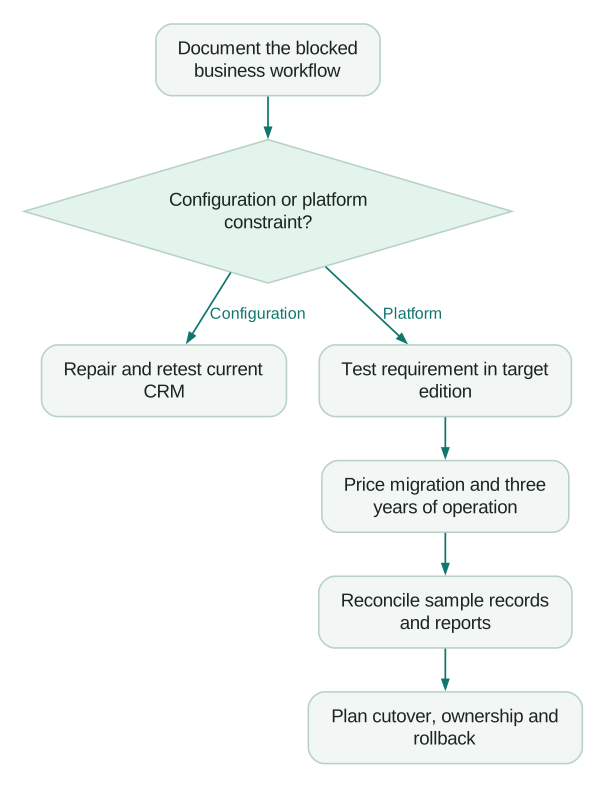
When moving from HubSpot to Salesforce makes sense
A move deserves investigation when a persistent business requirement cannot be supported cleanly in your current setup and the proposed Salesforce edition demonstrably handles it better.
Examples include a more demanding account model, multiple coordinated sales processes, specific ecosystem dependencies or access requirements that have become expensive to maintain. The trigger is a documented operational constraint, not a particular employee count or funding round.
Before migrating, separate a platform limitation from an implementation problem. Duplicate records, unreliable lifecycle stages and missing product data can follow you into a new system. A migration that copies them faithfully can make an expensive project look technically successful while leaving the original problem untouched.
Moving in the other direction can also be rational when the team pays for complexity it does not use and can demonstrate a simpler target process. Measure the cost of rebuilding integrations and retraining people before assuming licence savings become immediate cash savings.
Startup discounts change timing, not requirements
HubSpot's startup programme advertises up to 90% off the first year for eligible funded startups, with lower discounts in later years. The current page ties eligibility to funding stage and approved affiliation or verified venture funding, and applies programme pricing to net-new Professional or Enterprise products. HubSpot for Startups.
Check eligibility before purchasing the qualifying products. Then model the later years using the actual approved discount schedule. A heavily discounted first year can be useful, but the team still needs to afford and operate the system after that discount decreases.
Decision checklist
- The required workflows pass in the exact quoted editions.
- Paid users are counted by role and entitlement.
- API and connector requirements are priced.
- The applicable HubSpot pricing model is identified.
- AI features, credits and client costs are explicit.
- Migration includes associations, history and reconciliation.
- A named person owns ongoing administration.
- Three-year costs include discount expiry and realistic growth.
- The decision records the constraint each extra product solves.
At Martechdevs, we connect CRM, product and billing data to the customer workflows your team needs to run. Start with the free martech AI audit, or explore an AI assistant built around your approved workflows.
Questions people ask
Which is easier to set up for a startup?
For a straightforward shared CRM process, HubSpot is often a sensible first trial. Ease depends on the proposed configuration and the team's experience. Compare the time your own users need to complete the same workflows, including integrations and reporting.
Is Salesforce always more expensive?
No. Compare the editions and complete operating scope. A HubSpot deployment with several products, contact tiers and specialist seats can cost more than a narrower Salesforce deployment. Entry-level seat prices do not settle the comparison.
Should we switch when we reach 25 salespeople?
Headcount alone is a weak trigger. Switch when a documented requirement, tested target design and credible economic case justify the migration. A well-run existing system can remain appropriate as the team grows.
How should we use Reddit comparisons?
Use them to collect failure modes and questions for the trial. Ask which edition, contract date, workflow and team structure produced the reported experience. An anonymous complaint is useful context, but it is not a current feature specification or a price quote.
Should we include Zoho or another CRM?
Include another option if it passes the same requirement screen and has a plausible total cost. Keep the shortlist small enough to test properly. Adding vendors without running comparable workflows produces more opinions rather than better evidence.
Sources
- HubSpot: Sales pricing. Accessed 29 September 2026.
- Salesforce: small-business pricing. Accessed 29 September 2026.
- Salesforce: detailed sales and API pricing. Accessed 29 September 2026.
- HubSpot: flexible-pricing migration FAQ. Accessed 29 September 2026.
- HubSpot: flexible-pricing supplement. Accessed 29 September 2026.
- HubSpot: MCP documentation. Accessed 29 September 2026.
- Salesforce: hosted MCP GA announcement.
- Salesforce: hosted MCP requirements. Accessed 29 September 2026.
- HubSpot: startup programme. Accessed 29 September 2026.
Written by
Jafrin Akter AloData Engineer and Co-founder, martechdevs
Jafrin Akter Alo is a data engineer and co-founder of martechdevs, where the team has delivered 74+ martech, data and growth stack implementations.