
HubSpot Mailchimp Integration: Sync Contacts Without Undoing Unsubscribes
Connect HubSpot and Mailchimp around three separate jobs: contact details, campaign activity and permission to send. Choose the native app that handles the required data, assign an owner to each field, and test unsubscribe behaviour in both directions before enabling production journeys. Two-way contact sync does not establish two-way consent enforcement, and an old CRM value must never become a new customer opt-in.
On this page
A common operating split is sensible: sales manages relationships in HubSpot while marketing sends through Mailchimp. The failure usually appears at the boundary. A contact changes their email address, leaves an audience or unsubscribes while a delayed sync still carries the previous state. If store purchase flows drive most of your email, compare Klaviyo and Mailchimp before building the sync around Mailchimp.
The integration should preserve both the customer record and the customer's choice. Our CRM and lifecycle implementation work defines those responsibilities before adding another connector or workflow. Otherwise, several working automations can compete to write the same fields.
Which HubSpot–Mailchimp integration should you use?
Start by identifying the exact installed app. HubSpot's Mailchimp Data Sync and Mailchimp Campaign Sync have different purposes; the older forms integration is not a complete bidirectional contact-and-preference system.
| Required job | Route to evaluate | Boundary to test |
|---|---|---|
| Keep selected contact fields aligned | Mailchimp Data Sync | Actual mappings, direction and conflict rules |
| Show Mailchimp sends, opens, clicks and bounces in HubSpot | Mailchimp Campaign Sync | Eligible campaigns and existing contact match |
| Add new non-HubSpot form submitters to Mailchimp | The documented forms connection | Limited fields and no historical form backfill |
| Enforce a cross-tool subscription policy | Explicit preference integration | Audience/type scope, current evidence and acknowledgement |
The current Data Sync listing requires Data Hub Starter or above. It supports one- or two-way contact sync and historical records, but excludes groups, tags and email opens/clicks. The listing directs activity requirements to the separate Campaign Sync app. Check the app-specific prerequisite rather than applying the general data-sync page's availability to this connector. Mailchimp Data Sync listing.
Campaign Sync sends email activity to existing HubSpot contacts. Campaign Sync listing. The forms guide limits contact transfer to HubSpot-to-Mailchimp, first name, last name and email. Earlier form submissions are not backfilled, and required Mailchimp merge fields that HubSpot does not supply prevent the sync. Forms integration limits.
Do not remove a required business field merely to make a connector appear healthy. Either collect and map the required value through an appropriate route or choose an audience design that genuinely does not require it. A successful record creation with missing operational context can be worse than a visible error.
How should contact fields and identities be mapped?
Give each field one authoritative writer and make every reverse update deliberate. HubSpot may own sales owner, lifecycle stage and company association, while Mailchimp owns its delivery result and audience subscription state. A customer-facing preference service may own a broader cross-tool decision.
Write the mapping before switching on a two-way connection:
| Data | Suggested owner | Allowed behaviour |
|---|---|---|
| Sales owner and qualification | HubSpot | Send only fields needed by the email programme |
| First and last name | Agreed profile source | Update names without changing subscription status |
| Mailchimp audience membership and status | Mailchimp plus approved preference policy | Interpret within the specific audience and channel |
| HubSpot subscription type | HubSpot preference mechanism | Update the mapped type, not an unrelated custom boolean |
| Delivery failures | Sending platform | Preserve separately from voluntary opt-out |
Data Sync normally matches contacts by email. Its default conflict setting chooses which app wins a discrepancy, but does not override the selected sync direction; an empty value in the preferred app does not overwrite the other app. Review each mapping and the actual matching result rather than assuming “HubSpot wins” resolves every edge case. Data Sync configuration.
Email can change, and it is not always a safe universal person identifier. Keep a cross-reference between the HubSpot record, Mailchimp audience/member and the business customer ID where your design needs it. When an address changes, verify whether the configured route updates the intended record or creates another one. Preserve suppression for the old record while resolving the new identity under the approved policy.
The CRM property ownership guide explains how to avoid conflicting writers. Use the single customer view guide when duplicate or shared identities are the underlying problem.
Can a sync filter enforce ongoing consent?
Not by itself. HubSpot's Data Sync filters limit which records initially enter the sync. Once a record is synced, later mapped changes continue to sync. A filter that excluded unsubscribed contacts at setup is therefore not evidence that a future opt-out stops every downstream message. Initial-filter behaviour.
Use filters to control the population you intentionally connect. Use the sending platform's subscription controls and your explicit propagation design to enforce later choices. Test the transition after a record already exists in both tools; testing only whether a new unsubscribed record is excluded misses the more important case.
How do Mailchimp audiences map to HubSpot subscriptions?
Map the communication's purpose and scope, not just similar labels. Mailchimp treats audiences independently: an unsubscribe from one audience does not automatically unsubscribe the person from another. It recommends one primary audience with tags when a single organisation would otherwise create overlapping audiences. Mailchimp unsubscribe scope.
HubSpot subscription types represent categories of communication, with Subscribed, Unsubscribed and Not specified states. Not specified behaves differently with data privacy settings enabled or disabled; do not translate it into a verified opt-in. HubSpot's email-sending requirements also require appropriate direct permission and exclude people who opted out or marked mail as spam in another tool. Subscription states, sending requirements.
For example, suppose Mailchimp audience brand_a_news represents Brand A newsletters. Map it to the corresponding HubSpot brand and newsletter subscription type. Do not map it to every subscription in the account unless that is the approved scope the customer was promised.
| Mailchimp condition | What it means | Integration action to design |
|---|---|---|
| Subscribed | An opt-in is recorded for that channel/audience | Check its scope and evidence before any corresponding permission increase |
| Unsubscribed | A previous subscriber opted out | Propagate the restriction to the matching purpose |
| Non-subscribed | No marketing opt-in recorded | Keep outside marketing sends; do not treat as subscribed |
| Cleaned | Address is undeliverable | Preserve delivery suppression separately from preference |
These contact definitions come from Mailchimp's contact model. An archive or deletion is another lifecycle action; neither should be casually substituted for a subscription update.
HubSpot also has broader opt-out states and brand-specific subscription context. Read both the relevant type and the applicable wider restriction. A blank global-opt-out property does not prove that a specific newsletter is permitted. HubSpot subscription inspection.
How should opt-outs travel between the two tools?
Capture the restrictive change durably, map its scope, apply it to the affected sender and record the sender's acknowledgement. Keep ordinary profile updates out of that path. A name correction or sales-stage change must not include a default subscription value.
For each direction, define four things:
- Which customer interaction or source state creates the change.
- Which audience, channel, brand and subscription type it affects.
- Which destination operation enforces the restriction.
- What happens to queued optional messages until enforcement is confirmed.
A contact update in HubSpot is not the same operation as a communication-preference update. HubSpot provides a dedicated API for reading and updating subscription states, including brand context. Use that supported preference mechanism for the intended scope, then read back the resulting state. HubSpot communication-preferences API.
Do not assume an automation called “update contact” has changed the subscription type. Inspect the actual destination fields and the contact's communication subscriptions. A custom property named mailchimp_unsubscribed can be useful evidence, but it only suppresses HubSpot sends if the designed sending rules actually use it.
When a restrictive change cannot reach a sender, hold the affected optional messages according to the operating policy, retry the update and alert the owner. If the chosen native tools cannot provide that hold, the limitation needs a different design or a narrower rollout. The customer preference-centre guide covers authority, durable delivery and acknowledgement across senders.
These holds belong before dispatch. HubSpot says a deferred marketing or transactional send cannot be manually stopped after the initial attempt. Do not promise recall after handing a message to the sender; preserve the attempt and preference-change evidence when investigating an already-started delivery. HubSpot delivery boundary.
How should resubscription work?
Treat resubscription as a new, explicit customer action with appropriate evidence. Mailchimp says contacts who unsubscribed themselves must sign up again through its hosted signup form. Manually unsubscribed contacts have a different administrative route. An old subscribed value copied from HubSpot is neither of those actions. Mailchimp resubscription rules.
Preserve the source, scope and accepted version of a new choice. Do not use the arrival time of a delayed CSV import as proof that the customer recently changed their mind. A new authorised action can change a preference; replaying a stale mirror should not.
What should a custom integration keep separate?
Use separate profile and preference operations. For profile updates, allow only the intended ordinary fields. For preferences, require explicit scope, current evidence, source verification and enforcement acknowledgement. This separation makes accidental permission changes easier to prevent and review.
Mailchimp's member API distinguishes merge_fields, current status and status_if_new. The latter applies when creating a member; it is not a command to update an existing member's status. Do not place status: subscribed into every routine upsert. Mailchimp member API.
This Python helper builds only a name-update body for an already verified, existing Mailchimp member. It makes no network request, performs no identity matching and changes no subscription state. FNAME and LNAME must be the actual configured merge tags in the target audience; the 128-character bound is this example's local validation choice, not a Mailchimp platform limit.
def profile_only_update(fields):
    allowed = {"FNAME", "LNAME"}
    if not isinstance(fields, dict) or not fields:
        raise ValueError("Provide a non-empty field dictionary")
    if not set(fields).issubset(allowed):
        raise ValueError("Only FNAME and LNAME are allowed")

    result = {}
    for name, value in fields.items():
        if not isinstance(value, str):
            raise ValueError("Name values must be strings")
        if not value.strip() or len(value) > 128:
            raise ValueError("Name values must contain 1 to 128 characters")
        result[name] = value
    return {"merge_fields": result}
The helper deliberately rejects blank values rather than silently clearing existing names. Add a separately reviewed clearing operation if the business needs it. New-contact creation, address changes and preference commands need their own validation and permission rules.
Mailchimp webhooks can notify an integration about subscription, address and other audience changes. Its current webhook documentation supports HMAC signing over the timestamp and raw request body. Enable and verify that mechanism when using a custom receiver, retain the unmodified body for verification and reject invalid or stale deliveries according to the documented method. Mailchimp webhook handling.
Do not turn that transport check into permission to trust every field indefinitely. Validate the audience mapping, deduplicate processing, retrieve current state when needed and avoid writing a response that immediately triggers an equal-and-opposite update. Record the accepted business change separately from retry attempts.
How do you test stale writes and partial failures?
Use a controlled contact already present in both systems, then introduce the changes in an order that can expose a broken design. The most important result is what the sender will do after the sync, not whether the connector reports success.
Consider a synthetic Brand A newsletter contact. HubSpot initially holds an old subscribed mirror. The contact then unsubscribes in Mailchimp. Before the restriction finishes propagating, a routine CRM update changes their last name. The correct result is the new last name with the newsletter still suppressed.
| Test | Expected result | Evidence to inspect |
|---|---|---|
| Mailchimp opt-out followed by profile update | Restriction survives | Destination subscription plus changed name |
| Same opt-out delivered twice | One effective preference change | Accepted change and retry records |
| Older subscribed export arrives later | No new opt-in | Rejected stale write or profile-only handling |
| A different audience remains subscribed | Only mapped scope changes | Audience and subscription-type states |
| Destination update fails | Affected optional sends wait | Hold, retry and alert record |
| Customer completes the supported resubscription route | Only the authorised scope reopens | New evidence and sender acknowledgement |
Include a message already queued before the opt-out. The sender must apply the latest effective restriction before dispatch. Also test a cleaned address, a missing subscription mapping, a changed email and a duplicate CRM record. Each needs an explicit outcome rather than a guessed default.
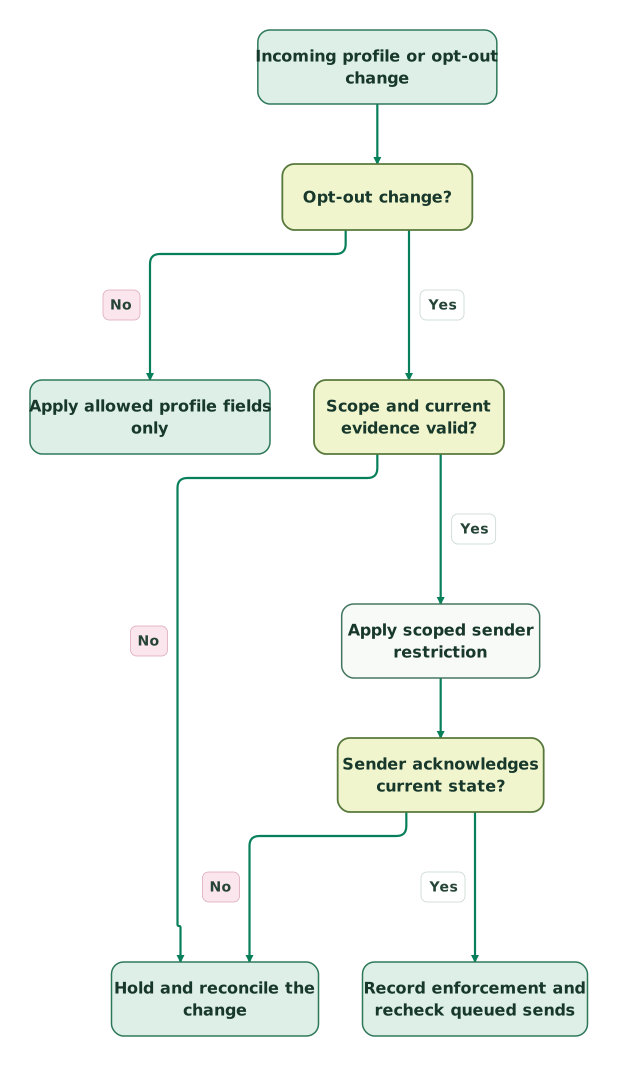
Read diagram as text
- Incoming profile or opt-out change to Opt-out change?.
- Opt-out change? to Apply allowed profile fields only: No.
- Opt-out change? to Scope and current evidence valid?: Yes.
- Scope and current evidence valid? to Hold and reconcile the change: No.
- Scope and current evidence valid? to Apply scoped sender restriction: Yes.
- Apply scoped sender restriction to Sender acknowledges current state?.
- Sender acknowledges current state? to Hold and reconcile the change: No.
- Sender acknowledges current state? to Record enforcement and recheck queued sends: Yes
The preference branch above represents the restriction-propagation path. Permission increases use the separate supported resubscription process. Do not interpret the diagram as an instruction to subscribe a contact whenever a source field looks positive.
Why are contacts or campaign activities missing?
Classify the missing item before reconnecting the apps. A field, an audience member and a campaign event have different requirements. Reinstalling a connector can obscure the evidence and restart work without fixing the cause.
| Symptom | First investigation | Useful next step |
|---|---|---|
| Existing form submitters never appeared | Was the form connected after those submissions? | Plan a controlled historical import with correct status |
| Required-field error in Mailchimp | Does the route supply every required merge field? | Fix the schema or choose a suitable route |
| Tags or groups absent | Is the app Data Sync? | Use an explicitly supported alternative for those fields |
| Contact sync works but opens/clicks do not | Is Campaign Sync installed and enabled? | Inspect campaign eligibility and contact match |
| Contact unexpectedly still receives email | Which sender and subscription scope permitted it? | Trace actual enforcement, not just the CRM mirror |
The forms integration's activity sync includes only qualifying campaigns: no earlier than 30 days before connection, with non-empty subject and title, outside A/B tests and Customer Journeys. Enabling it retrieves only the previous month's historical campaign data. Those are coverage limits, not evidence that the campaign failed to send. Campaign activity conditions.
For Data Sync, inspect the record-level In Sync, Failing and Excluded views and the error detail. Initial indexing can take time, and saving the configuration restarts initial sync. Make a targeted correction and preserve the failing record's evidence before changing the entire connection. Data Sync operation and record states.
Monitor four outcomes separately: profile changes delivered, preference changes acknowledged, queued messages suppressed and unresolved failures. A high contact-sync success rate can coexist with an unsafe preference path if that path is not measured.
What should pass before production rollout?
Release a small, controlled population after the actual sender obeys the mapped choices. Expand only when the operating owner can explain both a successful update and a failed one.
Checklist
- The installed apps and their separate jobs are recorded.
- App-specific plan and permission requirements are satisfied.
- Each ordinary field has an authoritative source and direction.
- Audience, channel, brand and subscription-type scopes are mapped.
- Ordinary profile updates cannot set subscription status.
- Unsubscribe and resubscribe routes are distinct and supported.
- Stale imports cannot restore an old opt-in.
- Failed enforcement holds the affected optional sending path.
- Queued messages use current restrictions before dispatch.
- Address changes, duplicates and cleaned contacts have tested outcomes.
- Activity coverage is understood independently of contact sync.
- An owner monitors failures and can stop or roll back the integration.
If the stack is connected but the customer choices do not agree, get the $99 martech audit. Bring the field map, audience/type map and one redacted failure trace. A useful repair targets the specific ownership or enforcement gap instead of adding another full-contact sync that can repeat it.
Keep reading
Browse all CRM & Lifecycle guides
 CRM & Lifecycle
Salesforce to HubSpot migration: plan, field mapping and cutover checklist
Plan a Salesforce to HubSpot migration: phases, a field mapping template, load order, Smart Transfer limits, reconciliation checks and a safe cutover.
Jafrin Akter AloLast updated 21 min read
 CRM & Lifecycle
HubSpot implementation: a phased plan, template and launch checklist
Implement HubSpot in five phases: scope, data model, migration, integrations and launch. Includes a plan template, a worked example and a go-live checklist.
Jafrin Akter AloLast updated 22 min read
 CRM & Lifecycle
HubSpot Email Tracking: 8 Reasons Opens, Clicks and Logs Disagree
Fix confusing HubSpot email tracking with eight checks for logging, seats, link formats, inferred opens, privacy filters and report definitions.
Jafrin Akter AloLast updated 14 min read
CRM & marketing automation
See the implementation scope, deliverables and acceptance checks.
Questions people ask
Can HubSpot and Mailchimp both send the same newsletter?
They can technically be configured to send, but assign one owner to each customer-facing message. If both systems remain active during migration, define the audience split and suppression path explicitly. Test customers present in both tools and a person who opts out while a message is queued. Two independent send schedules should not accidentally become two copies of the same campaign.
Does a Mailchimp tag mean a person has subscribed?
No. A tag is organisational metadata, while subscription status determines the relevant sending state. Use tags for segmentation only after checking the audience and channel permission. A tag such as “newsletter” may describe an old import or internal interest classification. It should not be treated as a new customer instruction or used to overwrite an unsubscribe.
Is a HubSpot marketing contact automatically eligible for Mailchimp email?
No. Marketing-contact status concerns the relevant HubSpot product and billing model; it does not establish permission in another sender. HubSpot marketing contacts. Check the Mailchimp audience state and the underlying approved permission evidence. Keep the commercial population estimate separate from the subscription mapping, so an import intended to support sales does not silently become a marketing list.
Can we fix a mismatch by deleting and recreating the contact?
Avoid that as a routine repair. Deletion can remove identity, history and suppression evidence while leaving the original mapping defect unresolved. Inspect the current records, source of the conflicting write and supported recovery route first. Preserve the customer choice during any authorised repair, then verify the intended person, audience and subscription state before allowing messages again.
How should we measure whether the integration works?
Measure the delay and success of both profile updates and restrictive preference changes, then inspect actual sends after an opt-out. Track unresolved mapping errors, duplicate records and stale-write attempts. Keep campaign-activity coverage separate because missing history may reflect connector limits. The useful success measure is correct customer-facing behaviour, supported by traceable records, rather than the number of contacts copied.
Sources
- HubSpot: Mailchimp forms and activity integration.
- HubSpot: Mailchimp Data Sync.
- HubSpot: Mailchimp Campaign Sync.
- HubSpot: Data Sync configuration.
- Mailchimp: Contact types.
- Mailchimp: Unsubscribe scope.
- HubSpot: Subscription types and states.
- HubSpot: Marketing-email requirements.
- HubSpot: Inspect subscription status.
- HubSpot: Communication-preferences API.
- Mailchimp: Resubscribe a contact.
- Mailchimp: Member-update fields.
- Mailchimp: Audience webhooks and signatures.
- HubSpot: Marketing-contact classification.

Written by
Jafrin Akter AloData Engineer and Co-founder at Martechdevs and Growth and Analytics Partners
Jafrin writes practical guides to marketing technology, customer data, analytics and AI workflows. Martechdevs is a Growth and Analytics Partners company.