
HubSpot custom objects: when to use them and how to model them
Data Engineer and Co-founder, martechdevs
Last updated 12 min read
Use a HubSpot custom object when you need to manage a distinct business entity with its own identity, properties and relationships, and the standard objects do not fit. A workspace, installation or service entitlement may qualify. A customer's latest activity date usually needs a property. Raw product events usually belong in your analytics system.
Last updated: 13 October 2026.
Start with the job, then choose the record
An object defines a type of thing. A record is one instance of that thing. A property describes the record, and an association connects it to another record.
Suppose a company has three product workspaces. Each workspace has a different administrator, activation state and renewal context. If customer success must act on those workspaces separately, a Workspace object may help.
If sales only needs to know whether the company has activated at least one workspace, an account-level summary field may be enough. Creating three records adds little value unless somebody uses the distinction.
Write the operational question first: “Which active workspaces need an onboarding intervention, and which contact owns each one?” That question exposes the required grain, relationships and fields.
Avoid deciding from the database alone. A table can exist in your product without deserving a CRM object. The CRM should hold the information people need to manage the customer relationship.
Property, standard object or custom object?
Use a property when the information describes one existing record at the level you need. Examples include a company's latest successful product-data refresh, current account segment or maintained count of active workspaces.
Use a standard object when its meaning and built-in behaviour fit the work. HubSpot's object guide covers more than contacts, companies and deals, including subscriptions, invoices, services and other business records. Check the available object and tools before recreating it.
Use a custom object when several independently managed instances can belong to an account, or when the entity has its own relationships and lifecycle that you need to operate in HubSpot.
A repeating set of company properties such as Workspace 1 status, Workspace 2 status and Workspace 3 status is a sign to reconsider the model. What happens when the customer creates a fourth workspace, closes the second or transfers its administrator?
That does not automatically justify buying a higher edition. You can retain the detailed records in the product or warehouse and expose a useful summary plus a link for investigation. The single customer view guide explains how to keep those entities separate without copying everything into one profile.
Check native subscriptions before building a duplicate
A custom subscription object is not the default answer for every SaaS.
HubSpot's subscription creation documentation includes an option to avoid generating invoices or collecting payments for subscriptions managed outside HubSpot. Assess that route against your required fields, editing behaviour, associations and supported integration operations.
The same documentation distinguishes Stripe payment processing from creating subscriptions in Stripe. Using Stripe as the processor for HubSpot-created subscriptions does not make those subscriptions Stripe subscription records.
For an existing Stripe Billing setup, establish which system owns billing and how the chosen integration represents its records. A field that says “Stripe connected” does not answer that question.
A custom object may still be useful when the supported native route cannot represent or maintain the operational information you need. Explain that gap before adding a parallel subscription model. Our Stripe and HubSpot guide covers the broader sync and revenue-definition decisions.
Which HubSpot tier do custom objects require?
HubSpot's standard custom-object setup documentation lists eligible Enterprise subscriptions. However, its separate Limited Release Pricing supplement includes custom objects in Professional and Enterprise for covered customers and overrides conflicting catalogue information for that programme. A universal Enterprise-only claim would be incorrect.
Confirm the exact subscription, user permissions and dependent reporting or workflow features. Buying access to the object does not establish that every intended user can perform every action.
For Hub-based subscriptions, the Product and Services Catalog currently lists these examples:
- Sales Hub Enterprise includes up to 10 object definitions and 1,000,000 total custom-object records.
- Data Hub Enterprise includes up to 20 definitions and 1,500,000 total custom-object records.
- The Custom Objects Limit Increase is listed at $500 a month, adding 10 definitions and 1,000,000 records across custom objects for eligible Enterprise products.
Those record allowances are totals, not a fresh allowance for each custom object. These are public catalog figures checked on the date above. Do not carry them into a Limited Release quote without confirming its applicable capacity and terms.
The $500 capacity pack is not a way to unlock custom objects on Starter. Budget the eligible subscription, required seats, any onboarding, implementation and ongoing integration work. The HubSpot pricing guide explains the wider bill.
Three useful SaaS designs
The following are illustrative designs, not claims about client implementations. Start with the one that resolves an actual operational gap.
Workspaces that need separate action
Create one record per product workspace when the team needs to inspect or act on each workspace independently.
Useful fields could include a stable product workspace ID, display name, status, activation date, active users over a defined window and the timestamp through which those usage figures are complete.
Associate the workspace with the commercial account. Associate relevant people by their role, such as workspace administrator or billing contact, if those relationships support the workflow.
Avoid using a company domain as the workspace ID. One company may own several workspaces, and a workspace can contain users from several organisations.
A commercial owner change should not casually create a new workspace identity. Decide whether it changes the association, the account model or the underlying product entity.
Entitlements that differ within one customer
A customer may have several purchased service entitlements with different start dates, limits or responsible teams.
An entitlement object can be useful when staff need to manage those instances separately and no standard object fits. Define what one record means: one purchased entitlement for one account under one agreement, for example.
Keep the commercial opportunity in the deal. Keep the entitlement's fulfilment state on the entitlement. A won deal does not prove that service delivery started.
Decide how amendments work. Does a quantity change update the current entitlement, create a new version or replace it? That choice determines reporting and audit needs.
A current usage summary for each workspace
If the workspace already has a record, current usage can be a set of properties on it. Define active_users_30d precisely: qualifying activity, rolling window, excluded users and refresh time.
An additional Usage Snapshot object is justified only if people need to work with distinct periods inside the CRM and the volume is manageable. Otherwise, retain historical usage in the warehouse or analytics system.
For an illustrative 2,000 workspaces producing 20 events each day, storing every event as a custom-object record creates 40,000 records daily, or 1,200,000 over a 30-day period. That can exhaust a million-record allowance before other custom objects are counted.
Keeping one current workspace record uses 2,000 records. Adding one monthly snapshot per workspace for 12 months would add 24,000. Those designs answer different questions; a snapshot is not a replacement for an event log.
Design identity before designing the screen
Give each record a stable source identifier and maintain the mapping to its HubSpot Record ID. A readable workspace name can change or be reused; it is a poor sole matching key.
If different source systems or environments can generate the same ID, include a stable namespace. For example, product:ws_demo_001 can identify one fictional source record without depending on its display name.
Separate identity from presentation. Users need a recognisable name. The integration needs an unambiguous key.
HubSpot's schema API supports properties that require unique values through hasUniqueValue. Establish the unique property before backfilling, then test duplicate and missing identifiers.
Uniqueness protects a record key. It does not establish that the incoming data is current, that the account association is correct or that repeated processing will avoid every downstream side effect.
Also decide who owns each field. Product status should not be overwritten by an enrichment tool simply because both integrations can write to the object. User-entered notes and source-controlled values need different rules.
Make the associations express the actual relationship
An association says that records are connected. A label explains the connection, such as administrator, account owner or implementation contact.
HubSpot's association-label documentation describes using those labels in segments, workflows and custom reports. Default associated-record filters can consider any associated record; labels let you narrow the relevant relationship.
For a workspace reminder, “any associated contact” is often too broad. Decide whether the recipient is the workspace administrator, the commercial buyer or someone else. Then verify that the chosen action uses that relationship.
Do not confuse a defined association between object types with populated associations between records. Creating Workspace-to-Company as a permitted relationship does not identify which company owns each workspace.
Keep the relationship rules visible:
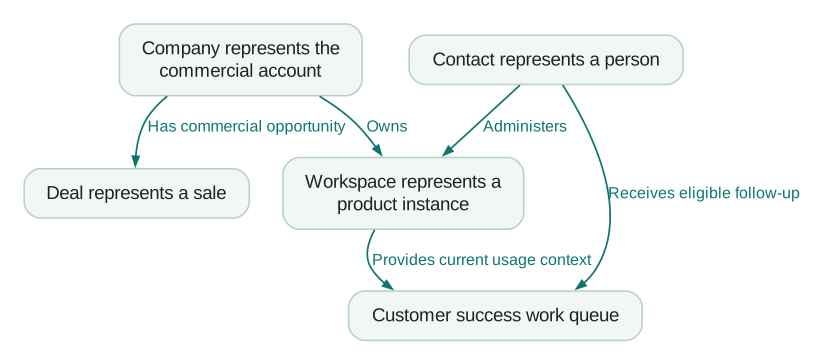
This is an illustrative business model. Configure the actual association directions, labels and limits for your portal. A diagram does not establish HubSpot automation behaviour.
Populate records without creating a second set every time
For an initial import, use an explicit unique identifier. HubSpot's multi-object import guide supports custom unique-value properties for custom objects and explains that Record ID takes precedence when included as the identifier.
Keep a record of created, updated and rejected rows. Reconcile associations as well as object counts. An import can produce the expected number of workspaces while linking them to the wrong companies.
For an ongoing API sync, the documented batch upsert endpoint creates or updates records using a unique property. The current reference uses:
POST /crm/objects/2026-09/{objectType}/batch/upsert
Use the object type identifier from your portal's schema. The following fictional body assumes that the object and properties already exist, source_workspace_id requires unique values, workspace_status accepts trial, and usage_as_of is a compatible date-time property:
{
  "inputs": [
    {
      "id": "product:ws_demo_001",
      "idProperty": "source_workspace_id",
      "properties": {
        "source_workspace_id": "product:ws_demo_001",
        "workspace_name": "North trial workspace",
        "workspace_status": "trial",
        "active_users_30d": "3",
        "usage_as_of": "2026-10-13T00:00:00Z"
      }
    }
  ]
}
This is a request-body example, not an executed integration. Test it in an isolated setup with relevant outbound actions disabled and appropriate app permissions.
The object upsert is only one part of the sync. Maintain and verify record associations separately through the supported route. Inspect per-record results and retain returned IDs rather than assuming that an HTTP response means every intended change succeeded.
Protect against late updates in the integration. A delayed snapshot of a trial should not overwrite a later paid state merely because it arrived last. Decide how you compare source versions or timestamps and how ambiguous updates are handled.
Define what an omitted field, an explicit clear and a zero mean for your connector. Those are different business states. Test the actual integration's behaviour before using missing usage data as evidence that a customer is inactive.
Test the workflow and the report at the right grain
Start with a small fixture that includes two workspaces under one company, a person associated with more than one workspace, a closed workspace and an account with incomplete data.
Specify expected results before importing:
Checklist
- Replaying a source record does not create a second workspace.
- Renaming a workspace preserves its identity and associations.
- A late update does not reverse a newer source state.
- Missing account mapping becomes an owned exception.
- The correct labelled contact receives the intended task or eligible message.
- A closed workspace does not qualify because another associated workspace is active.
- Missing usage data is distinguishable from measured zero activity.
- Record and association counts reconcile to the source fixture.
For filters combining several conditions, include a case where each condition is true on a different associated record. Verify that the workflow applies the intended conditions to the intended entity. Do not infer that from a human-readable filter label.
For reporting, state the unit being counted. Two qualifying workspaces under one company are two workspaces and one company. Which number belongs in the report depends on the question.
If reporting revenue, preserve its grain and currency. Associating one commercial amount with several workspaces does not make it several amounts. Validate the actual report against a small example with known totals.
Keep standard-object behaviour where it matters
A custom object does not automatically inherit every feature associated with a standard object.
HubSpot's setup guide notes that bulk marketing emails are sent to contacts and that deal attribution and sales forecasting are tied to deals. Model additional context around those objects when you need those capabilities; do not replace deals with a custom “Sales” object just to rename the process.
Similarly, creating a custom “Customer” object for every company can create two competing account records. If the distinction is only a relationship stage, a property on the existing account may be enough.
Customisation should make the work easier to explain. If users cannot tell where to update a customer fact, the model needs another pass.
Plan for changes and eventual retirement
Maintain a short dependency list: imports, sync jobs, workflows, views, reports and other systems that reference the object.
Use stable internal property names in integrations. Changing a visible label is not a migration of the internal field contract.
Before retiring an object, export the data and relationships you need, replace dependent operations and verify the replacement. HubSpot documents that deleting a custom object cannot be undone and that references in other tools can block deletion.
A subscription downgrade also matters. For the Hub-based subscriptions described in its downgrade documentation, HubSpot says removing all Enterprise subscriptions leaves custom-object records viewable but removes creation and editing capabilities, along with other custom-object functionality. Confirm the post-downgrade entitlement for your pricing programme rather than applying that rule to a Limited Release account that may retain Professional custom-object access.
Review that dependency before committing essential operations to the model. A cheaper renewal should not unexpectedly stop customer-state updates.
Decide whether the extra model earns its cost
Create the object when a named user needs to act on its records, the entity cannot be represented adequately with available standard objects, and you can maintain its identity and relationships.
Keep a summary field when it answers the decision honestly. Keep detailed history in the product or warehouse when the CRM does not need to operate on it.
If the difficult part is choosing between those designs, CRM and lifecycle implementation support can help scope the model and verify the handoffs. The useful deliverable is a record structure that supports an actual customer process, with working updates and clear ownership.
Questions people ask
What is the difference between a custom object and a custom property?
A custom object represents a type of entity with separate records. A custom property adds a fact to a record that already exists. Several independently managed workspaces may need an object; a company's maintained active-workspace count may need only a property.
Are HubSpot custom objects available on Professional?
The Limited Release Pricing supplement includes them on Professional for covered accounts. The standard Hub-based setup documentation lists eligible Enterprise subscriptions. Confirm which programme governs your account, then verify object limits, permissions and the other features your design needs.
How many HubSpot custom objects can I create?
The allowance varies by product and purchased capacity. The catalog currently lists 10 definitions for Sales Hub Enterprise and 20 for Data Hub Enterprise, with different total record allowances. Confirm your portal's entitlement and existing usage before sizing a backfill.
Should I create a custom object for Stripe subscriptions?
Only after checking the supported native subscription and integration routes against your requirements. Establish where billing is managed, which records the sync maintains and whether the CRM needs each subscription separately. A custom representation can be appropriate, but it should resolve a specific gap.
Can custom objects be used in workflows and reports?
Yes, with the required subscription capabilities and configuration. Verify record associations, label selection, filter behaviour and reporting grain. A useful test includes several related records with deliberately different states, so the wrong relationship cannot produce an apparently correct result.
Sources
- HubSpot: objects for business processes.
- HubSpot: create subscriptions for buyers.
- HubSpot: create and edit custom objects.
- HubSpot Product and Services Catalog.
- HubSpot API: create a custom object schema.
- HubSpot: create and use association labels.
- HubSpot: import records for multiple objects.
- HubSpot API: batch upsert by unique property.
- HubSpot: effects of a subscription downgrade.
- HubSpot: Limited Release Pricing supplement.
Written by
Jafrin Akter AloData Engineer and Co-founder, martechdevs
Jafrin Akter Alo is a data engineer and co-founder of martechdevs, where the team has delivered 74+ martech, data and growth stack implementations.