
HubSpot Quote Tool Alternatives: 4 Options and When to Stay
Use PandaDoc for document-led sales agreements, Qwilr for interactive proposals, DealHub for governed product and subscription configuration, or Portant for generating and signing your own templates from HubSpot. Keep HubSpot Quotes when its native pricing and approval controls meet the requirement. Choose by the quoting problem, then verify the accepted quote reaches the correct deal, product records and billing process.
On this page
Which HubSpot quote tool alternative fits your team?
Start with the part of quoting that fails today: presentation, product selection, discount approval, signature collection or the handoff to billing. A document generator can solve presentation and signing. Configure-price-quote software, or CPQ, becomes useful when valid product combinations and commercial rules must be enforced before a seller sends the offer.
| Your main requirement | First evaluation | What must pass |
|---|---|---|
| Branded sales documents and agreements from CRM data | PandaDoc Business | Required fields, line items, approval and signed-document return |
| Interactive proposals with buyer-selectable pricing | Qwilr | Product import, accepted selections and CRM updates |
| Bundles, renewals and governed subscription amendments | DealHub CPQ | Valid configuration, pricing rules and downstream order |
| Existing Google or Microsoft templates, PDF output and signatures | Portant | Template fidelity, document volume and status tracking |
| One native quoting process inside HubSpot | HubSpot Quotes | Required Revenue Hub edition, seat and commercial controls |
For a five-person services team, a proposal tool may remove most of the manual work. A software company with co-terminated renewals, regional price books and dependent products has a different problem. Give both teams the same software and one may inherit unnecessary administration while the other still relies on a pricing spreadsheet.
Our HubSpot implementation work starts by defining the approved deal-to-billing handoff. This article assumes you want to retain HubSpot as the CRM. If the wider CRM and marketing platform is the problem, use the HubSpot alternatives guide before selecting another quoting application.
Should you keep HubSpot Quotes instead of buying another tool?
Keep HubSpot Quotes when the native editor, products, approvals and acceptance process can support your sales motion with less operating work than an external application. First establish whether the account uses current Revenue Hub quotes or legacy Sales Hub quotes. Their seat requirements, templates and available controls differ, so an old tutorial can describe the wrong product.
Current quote creation requires Revenue Hub Professional or Enterprise and an assigned Revenue Hub seat. HubSpot includes standard approvals, while advanced workflow-based approvals and quote rules require Enterprise. Its quote comparison explains these boundaries. The current quote workflow covers products, acceptance and payment settings.
Legacy quotes remain conditional on account history and entitlement; they are unavailable to new users. Eligible older accounts should check the legacy-creation setting and seat assignment before assuming they must migrate. HubSpot documents an account cutoff of 3 September 2025, with additional conditions for Free accounts. Confirm the actual account against the legacy requirements.
Use a real test quote to answer three questions:
- Can the seller select the valid products and apply the permitted discount without a separate calculation?
- Can the approver see the exact commercial version being released?
- Can operations identify the accepted version and produce the correct invoice or subscription?
If those pass, a new layout preference alone may be easier to solve with template work. If the same failed requirement recurs across deals, evaluate an alternative against that case. Preserve accepted legacy documents. Plan to rebuild and test templates in the chosen editor: legacy and current HubSpot quote templates cannot be used interchangeably.
How do the four alternatives differ in practice?
PandaDoc and Qwilr are useful first evaluations for proposals and agreements; Portant is a focused route for producing documents from existing templates; DealHub deserves a trial when product and contract rules drive the complexity. Evaluate the exact integration and edition. A product that generates a good PDF has not yet proved complex CPQ behavior.
When should you choose PandaDoc?
- Best for: A sales team that needs reusable agreements, approvals and CRM-driven documents.
- Pros: Its HubSpot integration supports Contacts, Companies, Deals and, in the new experience, Tickets.
- Cons: External automations and full CPQ can require additional commercial scope.
- Free tier and startup offer: Free supports five documents monthly, but the HubSpot integration requires Business or Enterprise. Do not budget from Free or Starter for this workflow.
- Choose it if: The proposed plan handles your document, signature and CRM-return requirements.
- Skip it if: Required bundle or subscription logic is being promised through an ordinary pricing table without a CPQ demonstration.
PandaDoc's integration guide lets you configure line-item updates when a document is Sent or Completed. That choice matters: a draft offer sent to a buyer should not automatically overwrite the commercial record used by finance. Its optional-item rules can also remove unselected items from the deal, so include that case in the trial.
The pricing page separates ordinary Business quotes from Enterprise CPQ. PandaDoc describes full CPQ as a paid Enterprise add-on. Ask for the supported configuration rules, approval behavior and integration scope as named deliverables.
When should you choose Qwilr?
- Best for: Teams selling through interactive, web-based proposals with pricing choices.
- Pros: Deal, contact and company data can populate proposals; accepted documents can return useful sales activity.
- Cons: Product integration and automated CRM updates have requirements beyond a basic proposal editor.
- Free tier and startup offer: A trial is available. Budget the relevant paid plan; do not assume trial access establishes a continuing free production allowance.
- Choose it if: Buyers need to compare packages or select options, and those choices return correctly to HubSpot.
- Skip it if: You need a full product-configuration rules engine but have only tested an attractive quote block.
Qwilr's HubSpot integration records views and acceptances, attaches the signed PDF as a note, and offers automations for deal updates. Its Products integration requires a paid HubSpot Professional or Enterprise account with Sales Hub and the appropriate permissions; products must have a Product Type. Include that HubSpot dependency in the budget.
Test optional quantity changes and add-ons against the accepted total. Decide whether the deal amount means first payment, annual contract value or total contract value. Sending the right number into a field with the wrong business meaning still damages pipeline reporting.
When should you choose DealHub?
- Best for: Revenue teams with governed bundles, price books, recurring terms and contract changes.
- Pros: Its CPQ covers new business, renewals, co-terminated expansions and amendments.
- Cons: Commercial configuration and the billing handoff need maintained ownership.
- Free tier and startup offer: Pricing is quoted; do not infer a public free production plan or a universal seat price.
- Choose it if: A controlled product and pricing model replaces recurring manual deal-desk work.
- Skip it if: The actual requirement is a few branded PDFs and signatures with simple line items.
DealHub's CPQ scope includes pricing rules and approval workflows, and its HubSpot integration keeps deal data connected to the CRM. Request a demonstration of your hardest valid amendment and one deliberately invalid product combination.
Ask the pricing team to separate CPQ, billing, implementation and any external connector or API requirement. A quote-to-cash proposal can change more systems than you intended. Preserve the current billing owner unless replacing it is an explicit project outcome.
When should you choose Portant?
- Best for: A small team that wants its own Google or Microsoft templates populated from HubSpot and signed.
- Pros: It supports line items, document records, signatures and CRM workflow connections.
- Cons: A template/formula workflow needs separate validation for sophisticated configuration rules.
- Free tier and startup offer: Free includes one user and 30 generated documents monthly; evaluate the paid allowance and collaboration requirements before rollout.
- Choose it if: Document preparation and signing are the bottleneck, while pricing rules are already controlled elsewhere.
- Skip it if: The proposed design leaves important product dependencies or amendment calculations in an unowned spreadsheet.
The Portant HubSpot guides cover record-based generation, approvals, document status and captured-field updates. Its pricing is package-based, with document allowances and no separate per-signature fee. Confirm which actions require a HubSpot workflow entitlement even when the basic integration works with a free CRM account.
Keep the generated document and its source values together. When a seller changes the deal after generation, decide whether to regenerate an unsigned document or create a new version. A live template should never silently change the evidence of what a customer already accepted.
What will these HubSpot quoting alternatives cost?
Compare the edition that supports the actual HubSpot workflow, including seats, automation, document volume and CPQ. Annual monthly equivalents are useful for comparison but still represent an annual commitment. Keep the existing HubSpot subscription, payment fees, implementation and ongoing administration separate from the additional quoting subscription.
Published USD starting amounts below exclude applicable tax. Annual billing applies where stated; negotiated terms and promotions can differ.
| Option | Published starting scope | Cost boundary to check |
|---|---|---|
| HubSpot Revenue Hub | Professional displayed from $85/seat/month; Enterprise from $140/seat/month | Confirm billing selection, seats, promotions and required edition |
| PandaDoc Business | $49/seat/month billed annually | CPQ is a separately quoted Enterprise add-on; automation may need credits |
| Qwilr | Starter $35/user/month annually; Growth $55, minimum five users, annually | Growth supplies automation; required CRM product integration can add HubSpot cost |
| DealHub | Custom quote | Define CPQ, billing and connector scope separately |
| Portant | Pro $42/month for one user; Team $125/month for five, both billed annually | Pro 2,000 documents/month; Team 5,000; validate required workflow and volume |
HubSpot also advertises bundle offers limited to eligible new customers. Do not apply an advertised bundle discount to an existing renewal without written eligibility. Its Revenue Hub page distinguishes quoting seats from payments and billing, which can be adopted separately.
For a five-user evaluation, the following arithmetic compares specified subscription configurations. It does not establish equal functionality. Assume the current HubSpot edition already meets the integration requirements and usage stays inside the included allowance.
| Configuration | Monthly equivalent | Annual subscription |
|---|---|---|
| Five PandaDoc Business seats | 5 × $49 = $245 | $2,940 |
| Same seats plus its documented Business external-automation add-on | $245 + $39 = $284 | $3,408 |
| Five Qwilr Growth seats | 5 × $55 = $275 | $3,300 |
| Portant Team with five included users | $125 | $1,500 |
PandaDoc's HubSpot guide lists external automations on Business at $39 per account per month, or $468 annually. Its current pricing also identifies usage-credit charges for API and automated document creation. Confirm both entitlements and usage in the order form; the $3,408 line is not a promise of unlimited automation.
The cheaper subscription wins only after the required process passes. In a hypothetical comparison, saving $150 monthly while spending $3,000 to migrate takes 20 months to recover the change cost before added maintenance or overlap. Improving approval control may justify a project sooner, but describe that benefit separately from cash savings.
What should remain in HubSpot, the quote tool and billing?
Give each important field one authoritative owner and define when other systems may update it. HubSpot can remain the sales record while the quote tool owns the approved commercial version and billing owns invoices, payments and subscription state. Explicit ownership prevents two successful integrations from repeatedly overwriting each other's values.
| Information | Proposed owner | Contract for other systems |
|---|---|---|
| Customer, company and deal relationship | HubSpot | Preserve stable CRM record IDs and associations |
| Product identity and allowed configuration | Approved product catalogue or CPQ | Match by SKU or stable product ID; preserve retired products in history |
| Offer version and approval | Quote tool | Store version, approver, approved terms and acceptance evidence |
| Invoice, payment and recurring subscription | Billing platform | Return durable IDs and actual state to CRM |
| Tax treatment and accounting classification | Finance-approved configuration | Validate jurisdiction, item and timing with the responsible finance team |
Choose one definition for the deal amount. A $12,000 annual subscription billed monthly has a $1,000 first payment, $12,000 annual contract value and potentially a different total contract value if the term changes. Those values should occupy separate fields when the business uses them differently.
HubSpot distinguishes quote line items from the product library: editing a quoted line does not modify the catalogue product. Its quote guide also distinguishes checkout amounts from future payments. Preserve those distinctions when mapping an external tool, particularly for onboarding fees and future-start subscriptions.
Model acceptance, signature and payment as separate events. An accepted quote may await a countersignature; a signed agreement may await payment terms; a failed payment does not erase the signed agreement. Use the CRM property ownership guide to document the authorized writes and their recovery route.
How should you test pricing, approvals and signed versions?
Test the smallest set of quotes that covers your commercial exceptions, then trace each one through approval, acceptance and billing. A seller should be unable to bypass a required rule by editing a field, cloning a document or changing a line item after approval. Preserve the version that was approved and the version that was signed.
Use fictional customers and non-production payment settings. Record expected totals before creating the quotes so the application is being checked against an independent calculation.
| Case | Example | Required result |
|---|---|---|
| Base quote | Ten units at $100 | $1,000 before tax and other charges |
| Discount boundary | 10% versus 10.01% under a hypothetical 10% approval rule | Approval follows the configured threshold |
| Product dependency | Add-on requires a base subscription | Invalid combination is blocked or routed for resolution |
| Revision after approval | Seller changes term or quantity | A new approval is required where policy demands it |
| Two competing offers | Buyer receives versions A and B | Only the accepted current offer drives the intended handoff |
| Partial acceptance | Buyer selects an optional item | Final selections and totals match CRM and billing |
| Renewal or amendment | New seats start midway through an existing term | Agreed proration and dates reconcile |
| Duplicate status delivery | Acceptance arrives twice | One downstream order or subscription is created |
Include currency precision. In a hypothetical tax-free example, ten units at $19.99 total $199.90; a 10% discount is $19.99, leaving $179.91. A quote, CRM and invoice that use different rounding sequences can diverge even when each interface looks reasonable. Define the rounding rule and test the smallest supported currency unit.
Test the failed handoff too. Disconnect the billing integration after signing, restore it and replay the accepted version. Operations should see an unresolved handoff and know how to recover it without asking the customer to sign again. The quote's identifier and version should prevent a retry from creating a second order.
How do you choose and roll out the replacement safely?
Keep the native workflow when it passes the required cases; otherwise choose the narrowest alternative that closes the specific gap. Roll out with one sales motion and a small group of operators. Expand after signed documents, deal values and billing records reconcile, with a documented route for quotes already in flight.
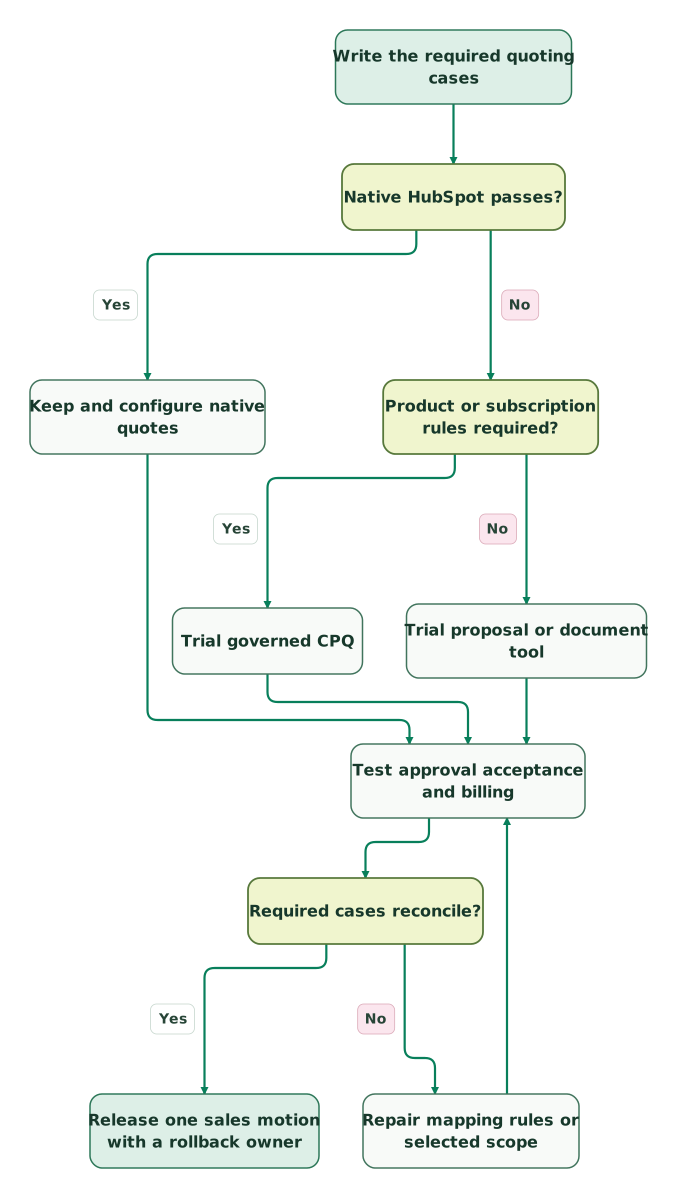
Read diagram as text
- Write the required quoting cases to Native HubSpot passes?.
- Native HubSpot passes? to Keep and configure native quotes: Yes.
- Native HubSpot passes? to Product or subscription rules required?: No.
- Product or subscription rules required? to Trial governed CPQ: Yes.
- Product or subscription rules required? to Trial proposal or document tool: No.
- Keep and configure native quotes to Test approval acceptance and billing.
- Trial governed CPQ to Test approval acceptance and billing.
- Trial proposal or document tool to Test approval acceptance and billing.
- Test approval acceptance and billing to Required cases reconcile?.
- Required cases reconcile? to Repair mapping rules or selected scope: No.
- Repair mapping rules or selected scope to Test approval acceptance and billing.
- Required cases reconcile? to Release one sales motion with a rollback owner: Yes
- Inventory current templates, approval rules, products and integrations. Identify quotes awaiting signature or payment.
- Agree which system owns each field and status. Record the accepted-quote identifier used by the downstream handoff.
- Configure one representative template and product set. Restrict installation and write permissions to the intended scope.
- Run the test cases above and resolve discrepancies with sales and finance.
- Train the initial operators on revisions, withdrawn offers and failed handoffs, not only document creation.
- Route new quotes for one sales motion through the replacement. Let existing quotes finish in their original system where practical.
- Reconcile accepted quotes to deals and invoices before expanding. Retain signed documents and audit history under the company's retention policy.
Before release, confirm:
Checklist
- Every required integration is included in the selected edition.
- Sellers, approvers and viewers have the correct paid or included access.
- Product IDs, currencies, terms and discounts have a single owner.
- A material revision follows the required approval path.
- Accepted, signed and paid statuses remain distinguishable.
- Duplicate events cannot create duplicate commercial records.
- Existing quotes have a deliberate completion or withdrawal policy.
- Document exports and recovery remain available if the connector or subscription ends.
If the problem is wider than quoting, use the HubSpot implementation checklist to inspect the surrounding CRM workflow. At Martechdevs, we connect the sales record to the approved offer and billing result. The $99 audit includes a written assessment and a one-hour specialist call; a HubSpot implementation scope can cover the selected fixes and handover.
Keep reading
Browse all CRM & Lifecycle guides
 CRM & Lifecycle
HubSpot implementation cost: onboarding fees, partner prices and your team's time
HubSpot implementation cost by layer: onboarding fees from $1,500, published partner prices, migration, integrations, internal time and a worked budget.
Jafrin Akter AloLast updated 14 min read
 CRM & Lifecycle
HubSpot Pricing: Seat Prices, Marketing Contacts, Credits and Onboarding
HubSpot is free for 2 users. Starter seats list at $20, Professional seats at $50 to $100, plus $250 per 5,000 marketing contacts and $1,500 to $3,000 onboarding.
Jafrin Akter AloLast updated 19 min read
 CRM & Lifecycle
Salesforce to HubSpot migration: plan, field mapping and cutover checklist
Plan a Salesforce to HubSpot migration: phases, a field mapping template, load order, Smart Transfer limits, reconciliation checks and a safe cutover.
Jafrin Akter AloLast updated 21 min read
HubSpot implementation
See the implementation scope, deliverables and acceptance checks.
Questions people ask
Can I keep HubSpot CRM and replace only its quote tool?
Yes. The alternatives in this guide can work alongside HubSpot, so a quoting change does not require a CRM migration. Define which records and statuses travel in each direction, then test the accepted offer through the billing handoff. Keep the CRM deal and signed commercial version linked by stable identifiers rather than relying on matching document names.
Does the cheapest e-signature plan include HubSpot CPQ?
No. E-signature, CRM integration and configure-price-quote functionality can belong to different editions or add-ons. For example, PandaDoc's HubSpot integration starts on Business or Enterprise, while full CPQ is an Enterprise add-on. Compare the package that can execute your pricing rules and return the accepted result to HubSpot, including automation usage and required CRM entitlements.
Should a signed quote automatically mark a HubSpot deal closed-won?
Use the definition of closed-won agreed by sales and finance. Some businesses close on signature; others require countersignature, credit approval or payment. Configure the transition from the specific accepted version and preserve those separate statuses. A document-view event or an offer merely being sent should not satisfy a rule that requires a binding commercial acceptance.
What happens to open quotes when we change tools?
Give every open quote a named completion path. Let it finish in the original tool when that preserves the agreed terms and audit history, or withdraw it explicitly before issuing a replacement. Avoid leaving two payable offers active for one purchase. Retain the original document, correspondence and status so operators can explain what the buyer actually received and accepted.
Can AI-generated quotes skip approval when the CRM data is correct?
Correct input data does not establish that a proposed offer follows pricing, product or contract policy. Apply the same approval rules to AI-generated quotes as to seller-created ones. Validate the allowed products, discount, term, legal entity and version before sending. Automation can prepare the document, while the authorized control still determines whether that specific offer may reach the buyer.
Sources
- HubSpot: Compare legacy quotes and Revenue Hub quotes
- HubSpot: Create and send quotes
- HubSpot: Revenue Hub pricing
- PandaDoc: Plans and pricing
- PandaDoc: HubSpot CRM integration
- PandaDoc: CPQ scope and Enterprise add-on
- Qwilr: HubSpot integration
- Qwilr: HubSpot products and workflows
- Qwilr: Pricing and plan limits
- DealHub: CPQ
- DealHub: HubSpot integration
- DealHub: Pricing and scope
- Portant: HubSpot integration
- Portant: Pricing and document allowances

Written by
Jafrin Akter AloData Engineer and Co-founder at Martechdevs and Growth and Analytics Partners
Jafrin writes practical guides to marketing technology, customer data, analytics and AI workflows. Martechdevs is a Growth and Analytics Partners company.