
HubSpot vs Mailchimp: Choose by the Sales Handoff and the Renewal Bill
Choose HubSpot when marketing needs to work from the same customer, company and deal records as sales. Choose Mailchimp when the main job is producing and automating email campaigns, with a separate process for sales follow-up. Keep both when an existing CRM and email programme each earn their place, and someone owns the integration, permissions and combined bill.
On this page
The deciding question is what happens after a useful click or form submission. Does a person need an owner, an account relationship, a sales stage and a next action? Or does the business mainly need to send the right campaign to an eligible audience? Those jobs overlap, but they do not justify the same software purchase.
Martechdevs earns implementation fees for CRM and lifecycle work. Our recommendation starts with the operating job and the cost of maintaining it, including the option to improve the tools already in place.
Which platform should your team pilot first?
Pilot HubSpot first for a meaningful marketing-to-sales handoff, and Mailchimp first for a campaign-led operation whose sales process is already handled elsewhere. These are starting recommendations; the actual workflow and budget must pass before purchase.
| Business situation | First pilot | Runner-up | Deciding test |
|---|---|---|---|
| Founder and marketer need a shared lead pipeline | HubSpot | Mailchimp with a separate CRM | Can a qualified enquiry reach the right owner with its context? |
| Small service business mainly sends newsletters and offers | Mailchimp | HubSpot Starter | Can the required campaign and simple follow-up run at the renewal price? |
| Sales already uses HubSpot and the newsletter runs well in Mailchimp | Keep both for a bounded pilot | Consolidate into HubSpot | Does the saved subscription or operator time outweigh integration upkeep? |
| Store needs purchase, checkout and replenishment journeys | A commerce-specific shortlist | The existing platform if its flows pass | Compare the store data and stop conditions, not CRM branding |
For the last scenario, use Klaviyo vs Mailchimp for store journeys. This comparison focuses on the CRM and sales handoff rather than repeating that commerce evaluation.
HubSpot
- Best for: A team that needs shared contact, company and deal context for marketing and sales decisions.
- Pros: Customer records sit alongside forms and sales activity; the platform can support broader record automation; a small team can start with free tools.
- Cons: Advanced actions depend on the purchased edition; marketing-contact capacity, seats and add-ons need separate budgeting; a shared database still needs ownership and association rules.
- Free tier and startup offer: Free tools support a limited pilot. HubSpot for Startups applies to qualifying net-new Professional or Enterprise products, not Starter. Startup eligibility.
- Choose it if: The sales handoff is a recurring operational problem and the required edition passes the budget.
- Skip it if: The proposed purchase mainly replaces a functioning newsletter while adding unused features and administration.
Mailchimp
- Best for: An operator whose core work is audience management, email production and defined marketing automations.
- Pros: Campaigns and audiences are the centre of the workflow; paid send capacity is explicit; a small free tier supports a limited sending test.
- Cons: CRM opportunity ownership must still be handled where sales works; billable contacts can include people who cannot receive a campaign; deeper automation and team access depend on the plan.
- Free tier and startup offer: Free is available within the limits below. Introductory offers are conditional promotions, not a permanent startup entitlement.
- Choose it if: The email programme can operate effectively without moving the sales team's system of record.
- Skip it if: The workaround for every campaign is a spreadsheet of owners, deal stages and manual follow-up tasks.
HubSpot's CRM product overview establishes the shared records and sales tools. Mailchimp's plan comparison establishes audience, automation and user limits. Treat these capabilities as inputs to the pilot, rather than assuming every feature is included in the lowest paid tier.
What changes when email and sales share a customer record?
Sharing the customer record reduces the number of handoffs your implementation must maintain, but it does not automatically produce a trustworthy revenue report. The record still needs the correct company, deal association, owner and business meaning.
Consider a hypothetical B2B service business. A newsletter subscriber asks for a consultation, a salesperson accepts the enquiry, and the company later signs a project. The reporting question is which qualified enquiries produced accepted opportunities and won business. Email engagement alone cannot answer it.
In HubSpot, design the contact-to-company-to-deal relationship and the rules for qualification. In a Mailchimp-led setup, decide which CRM receives the qualified enquiry and what evidence follows it. A tag such as sales-ready is useful only if someone acts on it and the outcome returns to the reporting process.
Do not force an email address to represent the whole account. Two people from one company can engage with the same campaign; that does not create two opportunities. Likewise, an open opportunity should not be recreated because a second person submits a form.
Use the CRM selection method to write the required operating jobs, and the lead-scoring guide to distinguish an actionable signal from a high engagement score.
What can the free plans actually support?
Both free plans can test basic campaign work, but neither free allowance should be mistaken for the capacity of a growing marketing operation.
| Free-plan limit | HubSpot | Mailchimp | Practical consequence |
|---|---|---|---|
| Users | Up to 2 | 1 | Include the person who will approve or maintain campaigns |
| Contacts | 1,000 in a free account | 250 | Count the actual database before importing |
| Email sends | 2,000 per calendar month | 500 per month, maximum 250 per day | Reserve capacity for tests and additional campaigns |
| Branding | HubSpot branding | Mailchimp branding | Check the customer-facing template |
Sources: HubSpot free tools, Mailchimp plans. Mailchimp pauses sending when the Free contact or sending limit is exceeded.
A hypothetical list of 800 recipients receiving four campaigns needs 3,200 sends before tests or automated messages. That workload exceeds HubSpot's free monthly sending allowance even though the contact count fits. The same list exceeds Mailchimp's free contact allowance before a campaign is sent.
Write the entire workload before judging a free plan: broadcasts, welcome messages, reminders, tests and any extra sends caused by re-entry. A free account that proves one email can send has not proved the production programme.
Why do the same people produce different contact bills?
HubSpot's Marketing Contacts plans and Mailchimp's contact tiers meter different populations. Start with those definitions before putting the prices side by side.
On HubSpot's Marketing Contacts model, marketing contacts count toward the paid tier and non-marketing contacts do not. Changing a contact to marketing is immediate; changing it to non-marketing takes effect on the applicable update date. An unsubscribe is not a substitute for managing that commercial status. HubSpot marketing-contact rules.
HubSpot also offers flexible seats-and-credits pricing where Marketing Contacts are included in record capacity instead of separately billed. The worked budget below explicitly uses the Marketing Contacts model. Apply the terms on your order form rather than combining the two models. HubSpot catalog billing distinction.
Mailchimp's current contact model counts subscribed, unsubscribed and non-subscribed records; archived, cleaned and pending records are excluded. Mailchimp contact types. The same address in separate audiences can count more than once. Mailchimp audience counting.
For a hypothetical 10,000-person CRM database, only 2,000 might be selected for marketing under the agreed permission and activity policy. That is a 2,000-marketing-contact HubSpot scenario. If all 10,000 remain billable in Mailchimp, it is a 10,000-contact Mailchimp scenario. A comparison that labels both columns “10,000 contacts” without defining the meter is misleading.
Mailchimp uses peak contact totals during the billing period and can charge additional blocks for contact or send overages. Archiving after a peak does not reverse the earlier count. Additional-charge rules.
Keep suppressions and the evidence of customer choices. Cost cleanup should remove unnecessary billable storage or acquisition, not erase the information that prevents unwanted messages.
What do 2,000 and 10,000 billable contacts cost?
At the illustrated workload, Mailchimp Standard has the lower email-platform subscription, while HubSpot's value must come from the CRM work it also supports. The following budget is a feature-scoped comparison, not a claim that the packages are equivalent.
Assume two operators, USD prices before tax, fixed contact counts for each scenario, four broadcasts plus automated sends equal to 20% of the contact population each month. That means 8,400 sends at 2,000 contacts and 42,000 at 10,000. Exclude SMS, transactional products, extra credits, implementation and other CRM subscriptions.
The Mailchimp rows use monthly Standard list prices and the tier that actually accommodates the population. The HubSpot rows use Marketing Contacts list prices: Starter paid monthly, and Professional paid monthly with an annual commitment. These figures exclude temporary HubSpot offers and annual-prepayment reductions. Mailchimp pricing, HubSpot Marketing pricing, HubSpot contact-tier catalog.
| Plan and billable population | Purchased contact capacity | Included operator seats | Emails/month | Ongoing USD/month |
|---|---|---|---|---|
| Mailchimp Standard, 2,000 | 2,500 | 5 | 30,000 | 60 |
| HubSpot Starter, 2,000 | 2,000 | 2 budgeted Core | 10,000 | 90 |
| HubSpot Professional, 2,000 | 2,000 | 3 Core | 20,000 | 890 |
| Mailchimp Standard, 10,000 | 10,000 | 5 | 120,000 | 135 |
| HubSpot Starter, 10,000 | 10,000 | 2 budgeted Core | 50,000 | 430 |
| HubSpot Professional, 10,000 | 12,000 | 3 Core | 120,000 | 1,390 |
Mailchimp Essentials is another option when the required flow fits its smaller allowance: its corresponding list prices are USD 45 and USD 110 monthly, with three seats. Standard should be purchased for a needed capability, not because it appears in a comparison table. Mailchimp's public USD calculator data.
The HubSpot Starter calculation uses two USD 20 seats. At 2,000 marketing contacts, add one USD 50 contact block: 2 × 20 + 50 = 90. At 10,000, add two USD 50 blocks, two USD 45 blocks and five USD 40 blocks: 40 + 100 + 90 + 200 = 430.
Professional includes 2,000 contacts. The 10,000-contact scenario needs two additional 5,000-contact blocks at USD 250 each, giving 12,000 purchased capacity and 890 + 2 × 250 = 1,390 monthly. Professional also requires USD 3,000 onboarding. HubSpot contact blocks and onboarding.
Do not add two Professional Core Seats to the package again; three are included. Equally, do not assume those Core Seats grant the full sales features of separately purchased Sales Seats.
What happens to that budget after the promotion ends?
Use the ongoing list price as the baseline, then apply an introductory discount only when the account qualifies. Hold the same workload and list price constant to make the effect visible; actual renewal prices can change.
Mailchimp's advertised 15% offer applies to eligible monthly plans at 10,000-plus contacts for twelve months. Eligibility includes new customers or qualifying Free accounts within 90 days in selected countries. Dropping below the qualifying contact tier ends that offer. It is not a discount every existing customer receives. Mailchimp promotion terms.
Annual totals below are USD. Year one includes required HubSpot Professional onboarding; year two does not. No implementation or migration cost is included.
| Scenario | Year one, USD | Year two at unchanged list, USD | Two-year total, USD |
|---|---|---|---|
| Mailchimp Standard, 2,000, no promotion | 720 | 720 | 1,440 |
| HubSpot Starter, 2,000 | 1,080 | 1,080 | 2,160 |
| HubSpot Professional, 2,000 | 13,680 | 10,680 | 24,360 |
| Mailchimp Standard, 10,000, eligible 15% offer | 1,377 | 1,620 | 2,997 |
| HubSpot Starter, 10,000 | 5,160 | 5,160 | 10,320 |
| HubSpot Professional, 10,000 | 19,680 | 16,680 | 36,360 |
For the discounted row, 135 × 0.85 × 12 = 1,377; without that offer, Mailchimp's two-year total is USD 3,240. The HubSpot 2,000-contact Professional first year is 890 × 12 + 3,000 = 13,680.
HubSpot's startup programme can change the Professional economics, but qualifying product scope and the later-year step-up still matter. Evaluate the actual offer using the HubSpot pricing guide, not a percentage applied to an unrelated plan.
Monthly payment does not necessarily mean monthly cancellation. Record the subscription term, renewal notice, allowed downgrade and purchased capacity on the signed order form. HubSpot's customer terms govern those commitments alongside the order. Mailchimp's pricing page also offers annual Standard and Premium options through sales at 10,000-plus contacts; obtain that quote separately from the monthly promotion.
Which automation requirements justify the higher edition?
Upgrade when a required trigger, action, branch, reporting capability or access control cannot be delivered reliably on the lower edition. Do not remove an exit condition just to fit a cheaper plan.
HubSpot's full workflow tool is available through specified Professional and Enterprise subscriptions, with individual actions depending on the purchased product. Simple form or email automation is a different scope. HubSpot workflow availability.
Mailchimp Free excludes marketing automation flows; Essentials allows up to four flow steps, while Standard supports a larger automation scope. Standard also includes five user seats versus Essentials' three. Mailchimp plan features.
Sketch the whole journey: qualification, permission, wait, ownership, follow-up, reply or meeting, suppression and re-entry. Then price the exact plan that represents it. A broadcast plus one follow-up has a different requirement from account-based nurture that changes after a seller accepts an opportunity.
Also distinguish a pipeline report from multi-touch revenue attribution. The latter is listed under HubSpot Marketing Hub Enterprise; a shared CRM database does not make that feature part of Starter or Professional. HubSpot reporting entitlements.
What should the lead-to-deal pilot prove?
The pilot should prove that a useful marketing response becomes one correct sales action, with its permissions and outcome preserved. Run the same controlled cases in the proposed configuration, including a second operator who did not build it.
| Case | Controlled input | Passing result | Evidence to keep |
|---|---|---|---|
| New enquiry | One form submission with campaign context | One contact and the intended owner/action | Submission, CRM record and owner history |
| Existing account | A second employee from an open opportunity's company | Correct association without an unnecessary duplicate deal | Company and deal IDs |
| Qualification changes | A low-fit enquiry becomes relevant after review | Intended follow-up starts once | Qualification reason and entry record |
| Permission withdrawn | An eligible person opts out while waiting | The relevant future marketing send is blocked | Preference state and queue decision |
| Won business | A controlled opportunity closes | The chosen report counts it once under its stated model | Source opportunity and report detail |
Set passing conditions before the trial. “Easy to use” becomes observable when the next operator can locate a failed handoff, explain the eligibility decision and repair the cause without exporting the entire database.
For measurement, separate campaign engagement, opportunity sourcing and credited revenue. A click can be associated with a later sale without proving it caused the sale. The GA4-to-HubSpot guide helps reconcile the web and CRM portions of that journey.
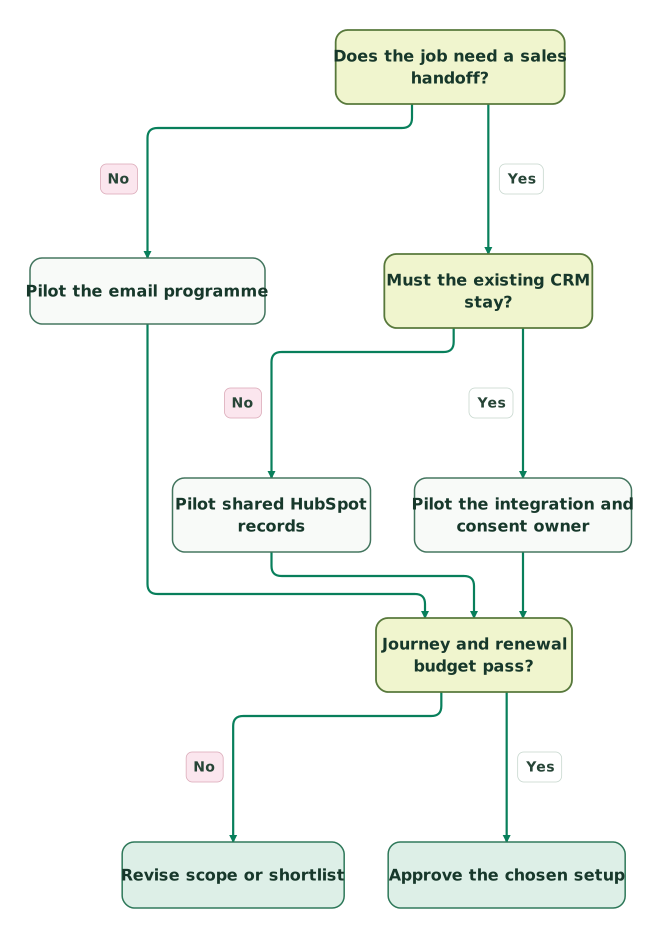
Read diagram as text
- Does the job need a sales handoff? to Pilot the email programme: No.
- Does the job need a sales handoff? to Must the existing CRM stay?: Yes.
- Must the existing CRM stay? to Pilot shared HubSpot records: No.
- Must the existing CRM stay? to Pilot the integration and consent owner: Yes.
- Pilot the email programme to Journey and renewal budget pass?.
- Pilot shared HubSpot records to Journey and renewal budget pass?.
- Pilot the integration and consent owner to Journey and renewal budget pass?.
- Journey and renewal budget pass? to Revise scope or shortlist: No.
- Journey and renewal budget pass? to Approve the chosen setup: Yes
When is keeping HubSpot and Mailchimp a sensible choice?
Keep both when each platform performs a required job and the integration has a clear owner, measurable acceptance checks and a lower total operating cost than migration. Keeping both by accident is a different decision.
The HubSpot-built Mailchimp Data Sync app requires Data Hub Starter or above. It synchronizes contacts, while groups, tags and email opens/clicks are excluded from that app; email activity needs the separate integration. Official Mailchimp Data Sync listing.
Choose one authority for each field and message purpose. For example, HubSpot can own sales qualification while Mailchimp owns newsletter execution. A sales-stage change must not become an instruction to resubscribe a person.
HubSpot subscription types express distinct communication categories and their statuses. Map the intended category to the relevant Mailchimp audience and sender behaviour rather than treating a generic contact tag as permission. HubSpot subscription types.
Before a campaign, prove that a recent withdrawal reaches the actual sender and blocks the relevant queued message. Record failed propagation and hold the affected audience until it is resolved. Budget the connector, monitoring and operator time beside the two subscription totals.
How should AI and MCP affect the decision?
Evaluate AI against a specific operator task and the records it can access, not the presence of an AI label. A useful test is preparing a segment or diagnosing a failed handoff with traceable evidence and reviewable proposed changes.
HubSpot's remote Model Context Protocol server supports authorized access to CRM data, including read and write operations. Its developer server has a separate development purpose. HubSpot MCP scope. The HubSpot MCP setup guide explains that access boundary.
Mailchimp's Marketing documentation MCP searches published technical content; it does not connect to your audience or campaigns. Its separate Transactional Messaging MCP can call Transactional API operations. Marketing documentation MCP, Transactional MCP.
Do not compare those two Mailchimp products as if they were one account-wide assistant. Require the same useful output, access scope, approval rule and ongoing usage cost from the proposed setup. Faster content generation cannot repair an incorrect recipient or deal association.
What do user reviews help you test?
User reviews help identify friction to reproduce in your own pilot; aggregate ratings cannot determine whether your handoff or contract will work.
G2's product pages show these ratings out of five. Review counts change as submissions are added.
| G2 product | Rating | Review count | Useful follow-up test |
|---|---|---|---|
| HubSpot Marketing Hub | 4.4 | 15,990 | Have a second operator diagnose a workflow and explain its plan requirements |
| Intuit Mailchimp Email Marketing | 4.3 | 12,995 | Build the real campaign, then forecast the bill after audience growth |
Sources: HubSpot G2 page, Mailchimp G2 page.
The inspected HubSpot review comments describe useful automation and CRM integration alongside learning effort and cost at larger contact counts. The Mailchimp comments describe straightforward campaign creation alongside list-growth pricing and specific integration gaps. These are reported user experiences, not controlled comparisons. Match the reviewer's business model, role and invitation or incentive label to your evaluation.
How do you switch without losing customer choices?
Move identity and permission evidence before activating replacement campaigns, then prove new capture and suppression after cutover.
- Inventory the operating programme. List forms, campaigns, automations, audiences, sales handoffs, sender domains and reports. Name the owner of each replacement.
- Export status and evidence. Mailchimp exports contacts in status-specific files; preserve the distinction when mapping the destination. Mailchimp contact exports.
- Map customer relationships and message categories. Resolve duplicate people, company links and the exact purpose of each subscription. Do not convert every stored CRM contact into a subscriber.
- Rebuild the required workflows. Test entry, re-entry, suppression and stop conditions with controlled records. Imported history must not look like fresh customer intent.
- Authenticate the intended sender and switch capture sources. Coordinate forms and integrations so new signups cannot disappear into the retired system. Keep one sender per campaign or journey during overlap.
- Reconcile the cutover. Confirm new signups, opt-outs, qualified enquiries and opportunities from source evidence. Preserve withdrawals received during any rollback window.
Use the customer preference-centre guide and bulk-sender requirements for the preference and sending foundations. Moving a list is only one part of moving the programme.
What should be true before you buy or migrate?
Approve the decision when the required journey passes and the ongoing cost fits the business without relying on an expiring offer. If HubSpot fails that test and sales still needs a CRM, compare HubSpot alternatives beyond email tools.
Checklist
- The sales handoff or email-only job is explicit.
- Contact counts follow each vendor's actual billing definition.
- Send volume includes broadcasts, automations and tests.
- Required actions, reports and operator access fit the quoted edition.
- Year two uses the expected ongoing price and subscription term.
- A hybrid setup has a field owner, consent owner and failure process.
- Migration preserves suppressions and captures new signups after cutover.
- Another operator can explain and maintain the chosen workflow.
Use the two-tool selection method to record the decision. If the handoff or migration needs implementation work, request a detailed CRM and lifecycle scope with the audience, required journeys and cutover constraints already defined.
Keep reading
Browse all CRM & Lifecycle guides
 CRM & Lifecycle
HubSpot implementation cost: onboarding fees, partner prices and your team's time
HubSpot implementation cost by layer: onboarding fees from $1,500, published partner prices, migration, integrations, internal time and a worked budget.
Jafrin Akter AloLast updated 14 min read
 CRM & Lifecycle
HubSpot Pricing: Seat Prices, Marketing Contacts, Credits and Onboarding
HubSpot is free for 2 users. Starter seats list at $20, Professional seats at $50 to $100, plus $250 per 5,000 marketing contacts and $1,500 to $3,000 onboarding.
Jafrin Akter AloLast updated 19 min read
 CRM & Lifecycle
Salesforce to HubSpot migration: plan, field mapping and cutover checklist
Plan a Salesforce to HubSpot migration: phases, a field mapping template, load order, Smart Transfer limits, reconciliation checks and a safe cutover.
Jafrin Akter AloLast updated 21 min read
CRM & marketing automation
See the implementation scope, deliverables and acceptance checks.
Questions people ask
Can a newsletter stay in Mailchimp while only qualified leads enter HubSpot?
Yes, that can be a useful design when sales needs a small, well-defined subset of the audience. Write the qualification rule and retain a stable mapping to the originating contact. Decide how later corrections and opt-outs reach each system. The reduced CRM population should follow an operational purpose, not conceal missing handoffs or discard permission history.
Does a Mailchimp click prove a lead belongs in a sales sequence?
A click is a signal to evaluate, not automatic evidence of sales readiness or permission for every message. Combine the interaction with the person's request, account fit and current relationship. Define what action is appropriate and who owns it. Test repeated clicks and an existing opportunity so the same person does not receive duplicate or conflicting follow-up.
Is HubSpot Starter automatically enough to replace Mailchimp Standard?
No. Compare the actual journey and operator requirements before substituting plan names. A newsletter and simple follow-up may fit Starter, while broader branching, record actions or reporting can require a different edition. Recreate the required workflow and inspect its stop conditions. The replacement is viable when the needed behaviour works within the quoted capacity and ongoing budget.
Should all subscribers become HubSpot marketing contacts immediately after import?
Only classify the contacts needed for the approved marketing programme after validating their permissions and source data. Commercial marketing-contact status and subscription permission are separate decisions. Review import defaults and any automation that changes that status, then reconcile the processed count. An unnecessary classification can affect the paid tier even when the imported contact receives no campaign.
Can we judge the migration by a higher open rate?
Use open rate as one diagnostic signal, not the acceptance criterion for the migration. Differences in tracking and recipient behaviour can change it without improving qualified demand. Verify signup capture, suppression, sales handoffs, complaints and business outcomes under consistent definitions. A higher reported open rate cannot compensate for a missed enquiry or a message sent after withdrawal.
Sources
- HubSpot: CRM overview.
- HubSpot: free tools.
- HubSpot: Marketing Hub pricing.
- HubSpot: product pricing and feature catalog.
- HubSpot: billing-model overview.
- HubSpot: marketing contacts.
- HubSpot: startup programme.
- HubSpot: workflow availability.
- HubSpot: customer terms.
- HubSpot: Mailchimp Data Sync listing.
- HubSpot: subscription types.
- Mailchimp: pricing and features.
- Mailchimp: public USD calculator data.
- Mailchimp: plan definitions.
- Mailchimp: contact types.
- Mailchimp: audience counting.
- Mailchimp: additional charges.
- Mailchimp: introductory offer terms.
- Mailchimp: contact exports.
- HubSpot: remote and developer MCP.
- Mailchimp: Marketing documentation MCP.
- Mailchimp: Transactional Messaging MCP.
- G2: HubSpot Marketing Hub.
- G2: Mailchimp Email Marketing.
- G2: HubSpot user comments.
- G2: Mailchimp user comments.

Written by
Jafrin Akter AloData Engineer and Co-founder at Martechdevs and Growth and Analytics Partners
Jafrin writes practical guides to marketing technology, customer data, analytics and AI workflows. Martechdevs is a Growth and Analytics Partners company.