
HubSpot Alternatives: What You Gain and What You Must Rebuild
Data Engineer and Co-founder, martechdevs
Last updated 9 min read
The right HubSpot alternative depends on which jobs you are replacing. A sales CRM can replace deal management without replacing forms, marketing subscriptions, workflows, website content or support history. Start with the active jobs in your account, choose an architecture for them, and compare the complete replacement cost before committing to a migration.
Last updated: 4 September 2026.
“Replace HubSpot” can mean three very different projects: simplify a sales workspace, move to a more configurable revenue system, or split a customer platform into specialist tools.
Those projects need different shortlists. A list of products ranked by entry price hides the most consequential decision: which team becomes responsible for making the parts work together?
Before shopping, document one complete customer journey and the systems involved. Martech integration work becomes easier to scope when the target architecture has explicit boundaries.
What are you actually replacing?
Inventory the work currently performed in the account, including features outside the CRM screen.
For each active job, record its owner, business consequence if it stops, data inputs, outputs and replacement destination. Typical jobs include lead capture, contact identity, sales follow-up, marketing preferences, deal reporting, support routing and renewal reminders.
Add website dependencies if HubSpot hosts or powers them. A form embedded on an otherwise independent website can still depend on the subscription being cancelled.
HubSpot documents separate exports for records, activities, content, marketing assets and workflow information. Its workflow spreadsheet export does not contain workflow history, performance data or the associated email content. It also warns that forms lose paid features when an account is deactivated. HubSpot export documentation
Treat export availability as a starting point. It does not mean the destination can recreate the same behaviour automatically.
A useful inventory has four dispositions:
- Keep: the job stays in a retained HubSpot configuration.
- Replace: a named product takes responsibility.
- Rebuild: your team must implement the behaviour.
- Retire: nobody needs the job anymore.
The final category can reduce cost more safely than migrating obsolete automation.
Route 1: a simpler sales CRM
Pipedrive when the essential job is managing sales activity
Pipedrive is worth evaluating when the team needs a clear pipeline, consistent follow-up and manageable sales reporting, while other systems already handle marketing and service.
Its current plans include core sales records, with email sync and automation from Growth and further reporting and team controls on Premium. The exact tier matters. Pipedrive plan features
The gain to test is operational simplicity: can a seller identify the next action and a manager understand pipeline without navigating unrelated functions?
The work to account for is everything outside that sales workflow. If HubSpot currently captures leads, stores consent and triggers nurture, those responsibilities need a destination.
Do not assume moving contacts completes the replacement. Test the form-to-owner handover, the response that stops nurture, and the closed deal that starts delivery.
Close when communication is the daily bottleneck
Close is a candidate for teams whose sales motion depends heavily on calling, email and SMS. Its public offering combines those channels with CRM workflows, while separating seats, telephony usage and AI credits in the cost model. Close capabilities and pricing
The gain to test is reduced switching between communication and record management. Use a representative follow-up sequence and inspect the resulting activity history.
The rebuilding question is customer context outside that sequence. Determine how marketing preferences, product activity and open support issues will affect outreach.
A communication-focused workflow is a poor trade if it becomes easier to call someone while losing the reason that person should not be contacted.
Neither route should be selected because the starting subscription looks smaller. Compare the tools and work that remain after the sales team moves.
Route 2: a CRM model built around your business
Attio for relationships that do not fit a single pipeline
Attio is worth evaluating when the account model needs explicit relationships among companies, workspaces, agreements or other entities.
Custom objects are available on Pro and Enterprise. Its documentation distinguishes them from standard people and company records, which retain specific email-related functions. Attio custom objects
The gain to test is whether important business relationships become easier to represent and act on. Use the awkward account with multiple subscriptions and overlapping commercial owners, not only the simplest prospect.
The work you take on is model governance. Someone must define identity, attribute ownership, relationships and the difference between an entity and a process.
The Attio versus HubSpot guide expands this comparison. Before migration, build the proposed model using a small test dataset and prove that it answers questions the current configuration cannot.
Salesforce for a governed, configurable revenue operation
Salesforce is a candidate when the organisation has defined requirements for its sales processes, access model, automation and integrations, plus the capacity to administer that configuration.
Its live sales pricing page separates suite and Sales Cloud editions, with capabilities and additions varying by package. API use also requires the appropriate organisation and user access. Avoid budgeting from an old edition name or assuming every entry plan has the same integration entitlement. Salesforce sales editions, API access requirements
The gain to prove is control over a genuinely complex operation. The trade-off is the responsibility to design, test and maintain it.
Write the requirement that justifies the complexity. “We need different approval paths for partner and direct deals, with auditable ownership and finance handover” is useful. “We may become enterprise someday” is not a sufficient buying specification.
The HubSpot versus Salesforce guide for startups helps separate necessary structure from complexity purchased too early.
Route 3: retain CRM and replace lifecycle messaging
A partial replacement can be better than a full migration when the main constraint is product-triggered communication.
Customer.io supports automations triggered by attributes, segments, events, forms and changes involving objects or relationships. That makes it a candidate for evaluating product-behaviour journeys. It does not make it a substitute for every sales, content and support job in HubSpot. Customer.io automation triggers
This architecture keeps commercial ownership in a CRM while a messaging platform handles eligible lifecycle communication. Product and billing events feed the decisions.
The gain to test is a journey that reacts correctly to customer behaviour. The cost is maintaining identity, preferences, current state and cross-system coordination.
For example, a trial user may receive onboarding guidance while a sales representative works with the account owner. A trial conversion must update both systems without producing an inappropriate follow-up in either.
Our Customer.io implementation mistakes guide covers event identity, entry rules and suppression. Those details determine whether the specialist architecture improves customer experience or merely adds another sender.
A worked example: lower software cost, higher operating cost
Consider an illustrative SaaS company using HubSpot for forms, CRM, nurture and a small support queue. Its team wants a cheaper sales subscription.
Assume its current annual software cost is USD18,000. This is a hypothetical baseline, not a HubSpot quote.
A replacement proposal contains:
- USD6,000 annually for sales software.
- USD3,600 for lifecycle messaging.
- USD2,400 for support.
- USD1,200 for integration infrastructure.
- USD8,000 one-time migration and rebuild work.
The recurring software total is USD13,200, a USD4,800 annual reduction. But the first-year total becomes USD21,200 before internal time, parallel operation or any additional usage. Simple payback on the USD8,000 transition cost is about 20 months at that recurring saving.
Now include an illustrative three hours of weekly integration maintenance at an internal planning rate of USD50 per hour. That is USD7,800 annually across 52 weeks. Under that assumption, the split architecture no longer saves operating cost.
This example does not argue against specialist tools. They may deliver better targeting, data control or team productivity. It shows why the business case must include those outcomes and their operating requirements instead of comparing one CRM seat price with the entire current invoice.
Use your actual quotes and observed maintenance needs. Do not borrow the example's assumptions as a benchmark.
Which dependencies are easiest to miss?
Subscription preferences
A contact export is not permission to send. Preserve the appropriate opt-outs, topic preferences, source and evidence needed by your process.
Map the old system's meaning to the destination's delivery controls. A field named “Subscribed” may not represent the same scope across tools.
Active journeys and scheduled work
Decide what happens to people already waiting in workflows. Restarting everyone at the beginning can duplicate messages; abandoning them can break a promised follow-up.
Define a migration state for each active journey: finish in the old system, resume at an equivalent step, or stop with a documented reason.
Sales and support context
Preserve the context a person needs to continue a conversation. Old notes without timestamps, authors or associations can be less useful than a well-indexed archive.
Prioritise active opportunities and open issues, then determine how older history remains accessible.
Website and measurement dependencies
Inventory embedded forms, tracking scripts, redirects, gated content and notifications. Test a real submission after replacing the dependency.
A website that loads normally can still have a broken lead route. The acceptance test ends when the right person receives the correct context and the source is recorded.
How should you run the evaluation?
Choose two architecture candidates, not ten product demos. For each, define a complete operating path and the team responsible for maintaining it.
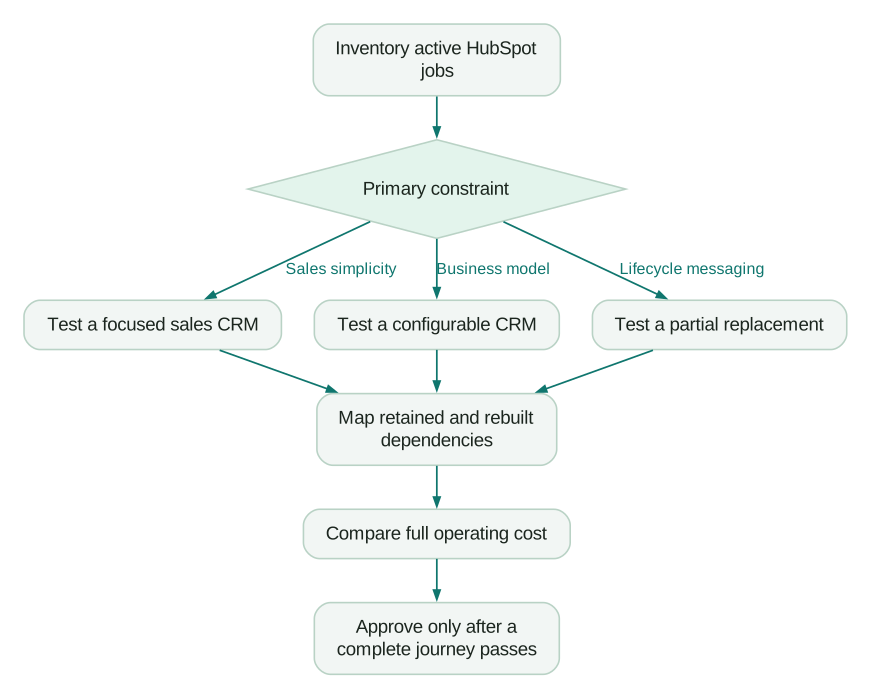
Use an agreed migration rehearsal:
Checklist
- A form submission produces the correct identity, source and owner.
- Marketing preferences survive the transfer and affect actual delivery.
- An active sales conversation retains enough history for continuity.
- A converted customer stops the appropriate acquisition journey.
- An open support issue remains assigned and visible.
- The core revenue report reconciles to a known baseline.
- Active workflow participants have an explicit transition plan.
- Every retained or rebuilt integration has an owner and failure alert.
- The old system can remain available until the cutover evidence is satisfactory.
If the rehearsal reveals that most value already sits in HubSpot, revisiting scope and HubSpot pricing may be more sensible than continuing a full migration. If the replacement demonstrably improves the work, move with a clear acceptance record and a controlled cutover.
Questions people ask
Which product can replace all of HubSpot?
That depends on which HubSpot jobs your company actually uses. A broad platform may cover several functions, while a focused CRM may replace only sales work. Build the replacement inventory before deciding how many products are necessary.
Is it cheaper to split HubSpot into specialist tools?
It can be, but compare recurring software, usage, integration maintenance and transition cost together. A smaller CRM invoice may be offset by the systems required around it. Use actual quotes and a named operating owner for each connection.
Should we move marketing and sales at the same time?
Only if the dependency and cutover plan justify it. A staged move can reduce disruption, but it also creates a period when two systems must coordinate ownership and preferences. Define which system is authoritative at every stage.
Can exported workflows be imported into another platform?
Do not assume so. HubSpot's documented exports help inventory workflows but do not constitute a portable equivalent of their full behaviour. Rebuild and test the required logic, including people already waiting in active journeys.
When should we avoid migrating?
Avoid a move when the complaint is an undefined process, unused capacity or a configuration problem that can be repaired economically. Also avoid committing before essential dependencies have a tested destination. A justified migration should improve a defined business job.
Sources
- HubSpot: Export your content and data. Accessed 4 September 2026.
- Pipedrive plan features. Accessed 4 September 2026.
- Close pricing and capabilities. Accessed 4 September 2026.
- Attio custom objects. Accessed 4 September 2026.
- Salesforce sales editions. Accessed 4 September 2026.
- Salesforce REST API access requirements. Accessed 4 September 2026.
- Customer.io automation triggers. Accessed 4 September 2026.
Written by
Jafrin Akter AloData Engineer and Co-founder, martechdevs
Jafrin Akter Alo is a data engineer and co-founder of martechdevs, where the team has delivered 74+ martech, data and growth stack implementations.