
Attio vs HubSpot for startups: compare the workflow, the data model and the full bill
Data Engineer and Co-founder, martechdevs
Last updated 12 min read
Attio deserves a close look when your team needs a flexible CRM around accounts, product users and relationships. HubSpot deserves a close look when marketing, sales and service need to operate together. The decision turns on the work you need to run, the edition that supports it and what you would have to replace. A cheaper CRM seat can leave you with a more expensive customer acquisition system.
Last updated: 8 October 2026.
This comparison uses current vendor documentation and public pricing. It does not claim hands-on usability results or a universal winner. Both products can support a startup. Neither removes the need to define your customer, your sales process or the people responsible for the data.
Start with the reason you are buying or switching
Write the problem as an observable failure. “We need a modern CRM” gives you no way to judge the result. “A seller cannot see which workspace a trial user belongs to, and follows up on accounts that already converted” gives you a data requirement and a test.
Separate three buying situations:
- Your first CRM: evaluate the smallest complete process that captures a prospect, assigns responsibility and tracks the next action.
- A CRM that no longer fits: identify the specific relationship, permission, automation or reporting constraint.
- A bill you want to reduce: inventory everything the existing subscription does before calculating a replacement.
A founder managing twenty active opportunities has a different requirement from a growth team coordinating forms, newsletters, trials, sales handoffs and support. Company headcount alone does not tell you which system fits.
If your requirements are still a feature wish list, use the CRM selection guide to turn them into tasks a vendor must demonstrate.
Where Attio's data model can earn its place
For a product-led company, the person you email, the user in your product, the workspace they join and the company paying the bill can be different entities. Compressing them into one contact record can make a simple sales screen look tidy while making the underlying business impossible to describe.
Attio provides standard objects including People, Companies, Deals, Users and Workspaces. Its documented system relationships include Users connected to People and a many-to-many relationship between Users and Workspaces. Custom relationship attributes require Pro or Enterprise. Attio relationship documentation.
That is a useful starting point for an original example: one person has access to a free personal workspace and a paid company workspace. Your sales task concerns the free workspace; your renewal task concerns the paid workspace. Both tasks should identify their context without marking the person as simultaneously “free” and “paid” in a single ambiguous field.
Attio's custom objects also require Pro or Enterprise. Pro currently allows twelve objects in total, including standard objects such as People and Companies. Twelve custom objects on top of the standard model is a different claim, and the documentation does not support it. Custom-object requirements.
Before creating another object, test whether a standard object and its attributes cover the need. Then test the actual view a seller will use: which workspace is at risk, who owns the account, which person should receive the follow-up and when the product data last refreshed.
Good modelling is useful only when it reaches the working screen. A beautiful relationship graph that requires six manual searches before every call has not solved the operational problem.
HubSpot's custom-object comparison now needs a pricing-model qualifier
HubSpot's standard custom-object documentation lists eligible Enterprise subscriptions. However, its separate Limited Release Pricing supplement includes custom objects in Professional and Enterprise for customers covered by that programme. The supplement overrides conflicting catalogue information for those customers. “HubSpot always requires Enterprise for custom objects” is therefore too broad. Standard object entitlement, Limited Release supplement.
Ask which agreement and feature schedule apply to your proposed account. Have the vendor demonstrate the required object, associations, automation and report in that edition. Do not select a system on the strength of either an old Enterprise comparison or an offer you cannot purchase.
Also challenge whether you need a custom object at all. A company property can hold a current account-level value. A separate entity becomes useful when you must preserve several independently identified workspaces, contracts or subscriptions and their relationships. The HubSpot custom-object guide works through that design decision.
Neither CRM should become a dumping ground for every product event. Send the operational state a person needs to act on, retain stable source IDs and preserve detailed event history in the system designed to analyse it.
Sales follow-up and marketing email are separate requirements
Attio sequences are available on Pro and Enterprise. They send through connected Gmail or Microsoft accounts and suit expected, low-volume follow-up with warm leads or customers. Attio explicitly excludes marketing email, transactional email and cold or high-volume outreach from the intended sequence use cases. Attio sequence guidance.
That makes a demo follow-up and a newsletter different items in the buying checklist. Do not mark “email automation” complete after seeing one personalised sequence.
HubSpot also distinguishes sequences from marketing email. Under its Hub-based subscriptions, sequences require an assigned Sales or Service seat in the relevant Professional or Enterprise product and use an individual connected inbox. HubSpot sequence requirements.
HubSpot offers forms and marketing email within its platform. The useful comparison is the exact capability and allowance in your package: form logic, audience segmentation, automation triggers, email volume, reporting and administrative controls.
For a startup already using a separate website, form service and email platform successfully, keeping those tools and introducing Attio can be sensible. For a team already running those jobs in HubSpot, replacing the CRM may mean rebuilding much more than a deal board.
What replacing HubSpot actually requires
Walk through one customer journey from the visitor's perspective and then from the operator's perspective. Record which system performs each job today and who will own it after the switch.
- Lead capture: the form, validation, spam handling, hidden campaign fields and confirmation experience.
- Record creation: matching the person and company, assigning a source ID and preventing a retry from creating another lead.
- Permission and preferences: preserving the evidence, subscription choices and suppression behaviour needed by each sending tool.
- Follow-up: the message, sender, timing, exit condition and response owner.
- Lifecycle handoff: the event that moves a trial to sales, sales to onboarding or an account to renewal review.
- Reporting: the connection from the originating interaction to the right deal or account outcome.
For every integration, write down direction, matching key, fields, expected delay and failure handling. “There is an integration” answers none of those questions.
Test an existing contact submitting a new form, a second person from the same company, a person changing email and an opted-out recipient reaching a follow-up trigger. These cases reveal whether the proposed stack has a coherent customer record or several loosely connected address books.
The single customer view guide explains how to preserve identities and relationships across these systems without pretending that every source contains the same version of the customer.
Attio vs HubSpot pricing: use the offer you can actually buy
Attio's published USD prices are $35 per user per month for Plus and $79 for Pro when billed annually. Monthly billing is $44 and $99 respectively. Free supports up to three seats; Plus supports up to ten. Attio USD pricing.
All members of an Attio workspace must use the same plan. A team cannot budget seven Plus members and one Pro member in the same workspace to obtain a Pro-only feature. Attio plan rules.
HubSpot needs an extra check. On the date above, the public pricing journey presented a combined platform offer at $90 per seat per month for Professional with annual billing selected, and linked to its Limited Release terms. That is a dated observation of the public offer, not a guarantee that every account can adopt those terms. Confirm the actual package, seat type, onboarding and usage charges in your order. HubSpot pricing.
Existing Hub-based accounts may still have marketing-contact tiers. Under that model, exceeding a tier can increase the commitment, and reducing the contact count does not produce an immediate mid-term downgrade. Marketing-contact billing.
HubSpot also documents a flexible seats-and-credits migration programme for accounts it has directly notified. Do not assume that programme, the Limited Release offer and an existing Hub-based contract have interchangeable seat names or billing rules. Migration eligibility FAQ.
For each proposal, price the required users, functional edition, contact or record capacity, email sends, automation usage, integrations, onboarding and implementation. Use the same currency, payment schedule and forecast period.
Attio also separates personal Ask Attio allowances from shared workspace credits for automation and AI. Measure the expected workflow paths before assuming included capacity covers your operation. Credit-management rules. The Attio pricing guide explains that budgeting in more detail.
A worked cost comparison that can change the decision
Consider an illustrative startup with eight CRM users requiring Attio Pro. At the published annual rate, seats cost 8 × $79 = $632 per month equivalent, or $7,584 a year.
Now assume its replacement marketing tools cost $300 a month and its integration service costs $100. Those two amounts are fictional planning inputs, not vendor prices. Total recurring software becomes $1,032 per month equivalent, or $12,384 a year, before extra usage, tax and implementation.
Suppose an alternative integrated proposal covers the same required work for $900 a month. That is also a hypothetical quote, not a HubSpot package advertised here. It would cost $10,800 annually, making the Attio-based configuration $1,584 more expensive per year despite the lower CRM seat component.
If the startup already pays for those marketing and integration tools and will keep them under either option, the incremental comparison changes. Count costs that differ between the choices and show shared costs separately. Do not charge one option for a tool both require.
There is another threshold for a migration. Suppose switching genuinely saves $400 a month but requires $4,800 of one-time implementation. Software savings recover that initial spend after twelve unchanged months. If the new stack also requires four additional hours of monthly maintenance valued at $75 an hour, its capacity-adjusted benefit is $100 a month and the corresponding recovery period is forty-eight months.
The labour value is an explicit planning assumption, not necessarily an extra cash payment. Show both views. A founder needs to know whether a migration frees money, consumes scarce engineering time or does both.
Moving from HubSpot to Attio
Attio documents an Import2 migration path for HubSpot on paid plans, with a sample migration before the full transfer. It also states that this path creates records but does not update attribute values on records already present in Attio. Attio migration guide.
That limitation matters if a team has already connected mailboxes and started using the destination. Do not casually delete a working workspace to make a migration recipe fit. Preserve it, review the collision problem and agree on a tested import or migration approach.
Build a mapping for source IDs, owners, companies, people, deals, custom entities, notes and required relationships. Identify which values are snapshots and which histories you need to retain. Select sample records with multiple associations, departed owners, missing values and active deals.
The data transfer is only one workstream. Rebuild the forms, email journeys, routing, reports and integrations identified earlier. An imported “qualified” field does not reproduce the process that decides when someone becomes qualified.
Make the cutover conditional on a real end-to-end result: a test lead arrives, matches correctly, reaches the right owner and follows the intended communication rules. Keep the source available for reconciliation until the agreed acceptance checks pass.
Moving from Attio to HubSpot
Start by testing the export before buying a migration promise. Attio's workspace backup includes CSV data for standard and custom objects, lists, notes, tasks and other resources. It excludes emails; meetings and call recordings have separate programmatic export paths. Call-recording activity in the backup is metadata, not the recording or transcript. Attio backup coverage.
Decide which communication history remains accessible through your mailbox and which evidence needs another supported retention method. A count of exported contact records does not prove their working history survived.
Attio was not listed among the supported apps in HubSpot's Smart Transfer documentation when checked. Plan around an explicitly supported migration route, such as mapped files, APIs or a service with a written scope; do not promise a native one-click transfer. Smart Transfer app list.
HubSpot supports multi-object imports and associations, but existing emails, meetings, notes and tasks cannot be updated through import. Test activity handling before rerunning a file as a general repair mechanism. HubSpot import behaviour.
Preserve the Attio record ID as source provenance and maintain a crosswalk to the new HubSpot record ID. Then reconcile relationships, owners and business totals, not just row counts. Six imported deals attached to the wrong company are six errors even when the import reports success.
Run a short trial around the hardest requirement
Use the same acceptance cases in both systems. Have the people who will operate the workflow perform them, and record assistance required, failures and unresolved dependencies. This is a proposed evaluation protocol, not a test result from this comparison.
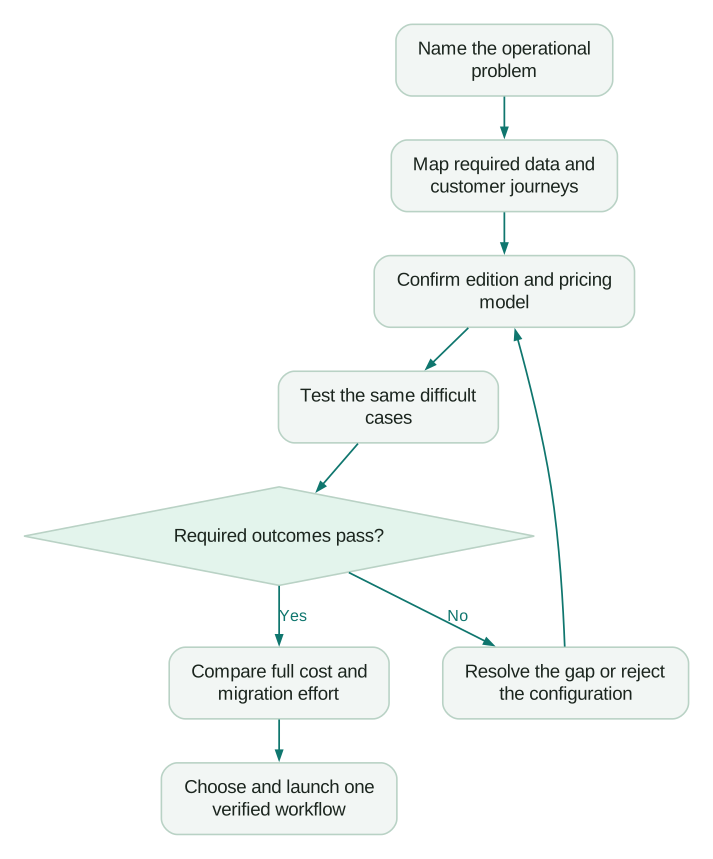
Include a permission test, a failed integration and an export. The successful demo should show how someone notices a problem and recovers, not only how a clean record moves through the happy path.
Checklist
- The buying problem has a measurable acceptance condition.
- People, companies, workspaces and deals have clear identities.
- Required custom objects and relationships work in the purchased edition.
- Marketing email and sales follow-up are priced separately where needed.
- Form, routing, suppression and reporting dependencies have owners.
- The quote names its pricing model, seat types and usage allowances.
- Sample migration results include relationships and activity coverage.
- Recurring cost, implementation cash and internal capacity are visible.
- Renewal and growth scenarios remain affordable after discounts end.
If the comparison exposes a data or integration problem you need help implementing, Martechdevs' CRM and lifecycle service can help design and connect the chosen workflow. Bring the failed acceptance case and the relevant system map. They are more useful than a long list of features you might use someday.
Questions people ask
Is Attio cheaper than HubSpot?
It can be, but the answer depends on the edition, users, usage and tools required around it. Compare the complete operating configuration and the actual HubSpot pricing model offered to your account. A seat-only comparison can omit marketing email, integrations and migration work.
Is Attio a good fit for product-led startups?
Its Users, Workspaces and relationship model make it worth evaluating. Test the specific account and workspace distinctions your product creates, then verify that product signals reach the seller's working view accurately and on time. A suitable schema does not prove an integration works.
Can Attio replace HubSpot marketing automation?
Evaluate each journey separately. Attio sequences are not intended for marketing email. A replacement may combine Attio with a dedicated email platform, forms and integration work. Check exit conditions, suppression, audience updates and reporting before treating that combination as equivalent.
Should a startup add Salesforce to this comparison?
Add it when you have a concrete requirement that neither proposed configuration meets, or an existing Salesforce dependency worth evaluating. Do not expand the shortlist merely because Salesforce is a familiar name. The HubSpot versus Salesforce guide examines that different decision.
Should I trust Reddit recommendations about Attio versus HubSpot?
Use them to discover questions to test. A recommendation without the account's edition, pricing model, workflow, migration scope and date is weak buying evidence. Translate “the integration was difficult” into a specific object, direction, field or failure case, then verify it against current documentation and your own trial.
Sources
- Attio: relationship attributes. Accessed 8 October 2026.
- Attio: custom objects. Accessed 8 October 2026.
- HubSpot: custom objects. Accessed 8 October 2026.
- HubSpot: Limited Release Pricing supplement. Accessed 8 October 2026.
- Attio: sequences. Accessed 8 October 2026.
- HubSpot: sequences. Accessed 8 October 2026.
- HubSpot: forms. Accessed 8 October 2026.
- HubSpot: marketing email. Accessed 8 October 2026.
- Attio: USD pricing. Accessed 8 October 2026.
- Attio: plan rules. Accessed 8 October 2026.
- HubSpot: live pricing. Accessed 8 October 2026; USD and annual billing selected in browser.
- HubSpot: marketing-contact billing. Accessed 8 October 2026.
- HubSpot: flexible-pricing migration FAQ. Accessed 8 October 2026.
- Attio: seat and workspace credits. Accessed 8 October 2026.
- Attio: migration. Accessed 8 October 2026.
- Attio: workspace backup. Accessed 8 October 2026.
- HubSpot: Smart Transfer. Accessed 8 October 2026.
- HubSpot: multi-object imports. Accessed 8 October 2026.
Written by
Jafrin Akter AloData Engineer and Co-founder, martechdevs
Jafrin Akter Alo is a data engineer and co-founder of martechdevs, where the team has delivered 74+ martech, data and growth stack implementations.