
How to choose a CRM for a 1 to 50 person company
Data Engineer and Co-founder, martechdevs
Last updated 12 min read
Choose a CRM by the work your team needs to complete: following up with a prospect, recognising a promising product account, managing a deal and handing a customer to the next person. Shortlist two systems that fit that work, test them with the same records and compare the full cost of operating them. A long feature list is a poor substitute for a successful handoff.
Last updated: 22 September 2026.
Start with three jobs the CRM must do
Write three sentences beginning with “A person on our team needs to…”
For a founder selling directly, those jobs might be finding the next follow-up, seeing the last conversation and keeping a reliable pipeline. For a product-led SaaS, they might be identifying an activated account, understanding its billing state and contacting the right person without interrupting onboarding.
Specify the result and the source of the information. “Integrates with Stripe” is vague. “Shows the current subscription state for the correct account, with a visible refresh time” is testable.
Separate today's requirements from possible future needs. A requirement is essential when failing it prevents the work or creates an unacceptable problem. A feature you may use after hiring a sales team belongs on a future list.
If nobody can explain the sales process yet, start with a simple, reversible setup. Moving an undefined process into an elaborate CRM makes it harder to change without making it clearer.
Choose a shortlist by how you sell
These are starting recommendations based on documented capabilities, not a ranking from a hands-on comparative trial. The right edition and implementation still need to pass your own evaluation.
Founder-led or small sales team: Pipedrive and HubSpot
Start with Pipedrive when the immediate job is managing opportunities, conversations and next actions. Its current plan comparison puts full email sync, automations and nurturing sequences in Growth, with lead generation and routing in Premium. That distinction matters if the entry plan's pipeline view looks sufficient but your actual workflow requires automated follow-up.
Evaluate HubSpot alongside it when those opportunities need a closer connection to marketing capture, nurture or customer service. HubSpot's product platform combines those functions around its CRM, with capabilities varying by product and edition.
Run the same enquiry-to-follow-up task in both. Ask the eventual user to complete it without the vendor driving the mouse. Compare missing context, manual steps and required upgrades.
Product-led sales: Attio and HubSpot
Start with the account model. You may have a person, several product users, multiple workspaces, a billing customer and an opportunity. Decide which relationships a salesperson actually needs to inspect. The Attio versus HubSpot comparison works through this choice alongside marketing email, migration limits and total operating cost.
Attio is worth evaluating when that model is central to the work. Its custom-object documentation makes custom objects available on Pro and Enterprise. Check the standard objects before assuming a custom one is necessary.
Its relationship attributes can link records in both directions. Custom relationships require Pro or Enterprise; system relationships are available across plans. The documentation also limits an attribute path to one relationship that holds multiple records. Test the exact account view you need, particularly if it crosses several collections of records.
HubSpot remains a candidate when product signals need to feed broader marketing and sales processes. Its standard custom-object documentation lists eligible Enterprise subscriptions, while the separate Limited Release Pricing supplement includes custom objects in Professional and Enterprise for covered accounts. Confirm the applicable programme and entitlement. You may instead be able to sync a few maintained account summaries, such as activation date and subscription state, into standard company records.
That simpler design has limits. It cannot represent every workspace separately. Choose it when the summary is enough for the decision, not because it hides an unresolved relationship problem.
Structured sales or an existing Zoho stack: Zoho CRM and HubSpot
Include Zoho CRM when your evaluation depends on a defined sales process, related business applications or the ability to configure your own modules.
Zoho's current feature list includes custom modules on Standard and above, while Blueprint process management begins at Professional. Read the current feature list rather than assuming that customisation requires Enterprise. Limits and related capabilities still vary by edition.
Zoho's edition and role guide distinguishes standalone CRM from CRM Plus and Zoho One bundles. A bundle can change the comparison, but count the applications you will actually operate and confirm the included editions and user licensing.
If both vendors meet the requirements, let the trial expose the difference in administration: who can change a stage, repair a bad import or explain an automation failure?
Complex hybrid sales: begin with the constraints
Selling self-serve subscriptions and negotiated contracts does not automatically require an enterprise platform. First test whether the shortlisted CRM can preserve the account relationships, access rules and commercial processes you need.
If those constraints exceed the proposed setup, extend the evaluation. Our HubSpot versus Salesforce guide covers that comparison, including edition and integration dependencies.
Keep the shortlist small. Adding a fifth vendor is useful only if it addresses a requirement the first candidates cannot meet.
Design the customer record before importing anything
Write down what each record represents. A company, an opportunity and a subscription have different lifecycles. A single account can have several opportunities without becoming several customers.
For each essential field, record its definition, identifier, source, update owner and treatment of an empty value. Keep the source system's stable ID where the chosen design supports it.
An email address may be a useful contact attribute, but your account model must also handle a person changing employers, using more than one address or joining several workspaces. Do not let a convenient import column silently become the entire identity strategy.
Ask how the CRM will display the context needed for the next action. Sales might need active workspace count and recent activation status, while customer success needs an unresolved billing issue. Neither necessarily needs every raw product event copied into the CRM.
Avoid inventing extra deal stages to represent product usage. A customer trying a feature is not automatically a new commercial opportunity. Use fields, related records or a separate operational view according to the meaning of the data.
Evaluate the actual integration, not its marketplace listing
A connector can exist without supporting your required object, direction, timing or error handling.
For every essential connection, get answers to these questions:
- Which source record creates or updates which CRM record?
- What identifier matches an existing record?
- Which fields can move in each direction?
- Which system wins when both change a value?
- What happens to missing, deleted or archived records?
- How are rejected records and stopped syncs made visible?
- What subscription, API access or connector charge does the route require?
Use a real scenario to expose ambiguity. An account upgrades, then cancels before the next sync. Which state should sales see? Which timestamp tells them how current it is? Would replaying the update create a second deal?
A native integration may be sufficient. A connector service or reverse ETL workflow may be appropriate when maintained warehouse data already exists. Do not introduce a warehouse solely to move three fields unless the broader requirements justify it.
Run a trial that can disqualify a product
Use a small synthetic or appropriately approved sample. Disable outbound actions during setup, so a trial import cannot contact real prospects.
Include cases that reflect your business: a new enquiry, an existing customer submitting a form, two people at one account, a changed email, a missing owner and a record that must not enter a campaign.
Test the proposed paid edition. Trials can expose features you will not retain on a cheaper plan. Record the dependency before calling a task successful.
Task 1: Capture and assign an enquiry
Submit a sample enquiry through the intended route. Check the record, associations, context, owner and next action.
Repeat the submission. Decide in advance whether it should update the same enquiry, create another activity or open a new opportunity. Test a missing or ambiguous account match too.
The lead routing guide provides more detail on eligibility, fallback ownership and acceptance. A notification sent successfully does not establish that someone accepted responsibility.
Task 2: Complete the daily sales routine
Have a salesperson find today's follow-ups, understand an account, record a conversation and set the next step.
Observe the work. Note where they leave the CRM to find information, re-enter data or ask someone else for help. Those gaps may be configuration problems rather than product limitations, but they still need an owner and a cost.
Use the same tasks for each candidate. A polished demonstration of unrelated features is not comparable evidence.
Task 3: Change customer state without creating a wrong action
Update a trial to paid, change an owner or mark a contact as ineligible for a particular message. Confirm that the intended views and workflows reflect the change.
Then test stale data and a failed transfer. An unresolved exception should become visible. It should not quietly look like a customer who has no activity.
Here is a reusable test record. It describes a fictional acceptance case, not a vendor configuration file:
test_id: existing_customer_demo_request
environment: isolated_trial
outbound_actions_enabled: false
given:
  account_id: acct_demo_001
  relationship: existing_customer
  owner: account_manager
when:
  event: new_demo_request
expected:
  account: existing_account_retained
  ownership: follow_defined_existing_customer_rule
  history: new_request_visible
  new_business_sequence: not_enrolled
  missing_context: visible_for_review
actual_result: pending
required_plan: to_be_confirmed
evidence_reference: to_be_recorded
Task 4: Reconcile a report and export the records
Create a small pipeline with known deal values and stages. Check that the report includes the intended deals once, in the right currency and time window.
Export the records needed to leave the product. Check IDs, associations, custom fields and the availability of activity history, attachments and relevant permission records. Some material may require a separate export or API process; establish the actual route.
An export button proves little if the result cannot reconstruct the relationships you rely on. You do not need to rebuild another CRM during the trial, but you do need to understand what a later migration would involve.
Separate requirements from preferences
Record each essential requirement as demonstrated, failed or unresolved. Keep the evidence, edition and configuration beside the result.
Reject or redesign a candidate that fails an essential requirement. Do not let a high score for appearance or AI features compensate for an inability to preserve your account model or access rules.
Then compare preferences among the candidates that remain: daily usability, configuration effort, reporting convenience, support and cost. If using weighted scores, agree the weights before the demonstrations and retain the underlying observations.
A CRM that passes through a custom integration has a different operating commitment from one that passes with a built-in feature. Both can be valid. Price and maintain the actual solution.
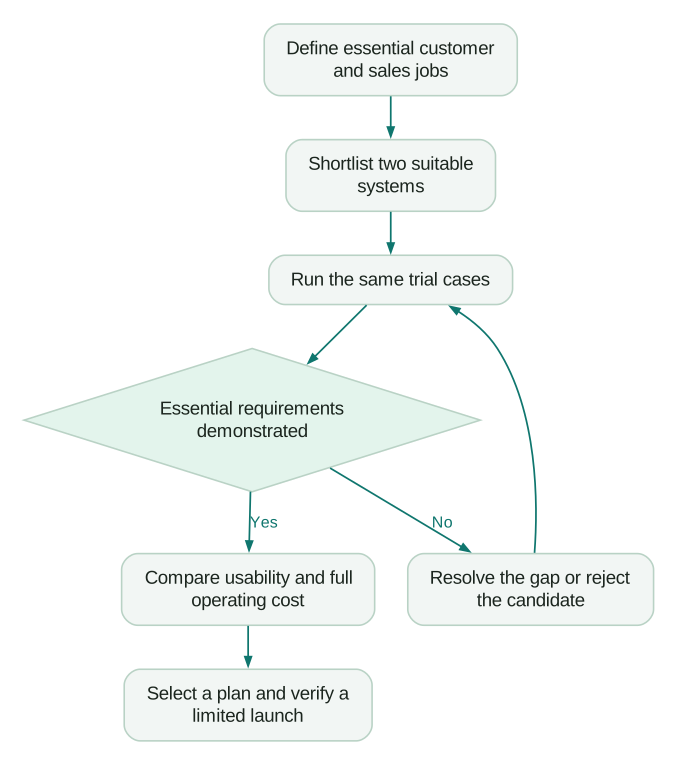
If an essential question remains unresolved, ask for a demonstrated answer before committing. A sales promise should not be recorded as a passed test.
Calculate the bill your operating model creates
Count the people who need each type of access. A 30-person company may have three daily sellers, a marketing operator and several occasional readers. Confirm the licensing rules for those roles.
Separate subscription cash, implementation cash and internal operating time. Include connectors, contact or record tiers, automation usage, credits, training and the work needed to keep the system accurate.
A fictional comparison shows why this matters. These are invented USD assumptions, not vendor prices:
- Option A has three seats at $30 a month, a $120 monthly connector and $1,000 of external setup. Subscription and connector charges total $2,520 over 12 months; first-year external cash cost is $3,520.
- Option B has three seats at $60 a month, no extra connector charge and $1,800 of external setup. Subscription charges total $2,160; first-year external cash cost is $3,960.
- If A needs four internal operating hours monthly and B needs one, valuing that time at $50 an hour adds $2,400 and $600 respectively.
- First-year cost including that internal capacity is therefore $5,920 for A and $4,560 for B.
B uses $440 more external cash in year one but $1,360 less total cost under the stated time assumptions. Internal capacity is not automatically a payroll saving. Taxes, financing, other usage charges and benefits are excluded.
Replace the assumptions with quotes and trial observations. Test a higher-volume scenario too, especially if one feature forces all users onto a more expensive edition.
Check these pricing traps before signing
Pipedrive bills purchased seats even when they are unassigned. Its billing documentation also separates add-ons and top-ups from the base plan. Removing a user and removing a billed seat are different decisions.
For HubSpot accounts using marketing-contact tiers, exceeding the tier can trigger an automatic upgrade. A later reduction in marketing contacts does not reduce that tier mid-term. Estimate the contacts you intend to market to, not just the number currently in the CRM.
HubSpot also has a separate flexible seats-and-credits migration model for accounts it has directly notified, alongside its Limited Release offer. Confirm which terms apply. Do not combine seat types, allowances or prices from different models.
For any vendor, save the quoted edition, user types, currency, billing period, included usage, renewal basis and cancellation terms. A monthly equivalent on an annual contract is not a monthly commitment.
Treat a startup discount as a temporary funding benefit. Check whether you can afford the configuration when the discount ends.
Launch the smallest useful operating system
After selection, name the administrator and the business owner. Agree who changes definitions, who approves imports and who handles failed integrations.
Launch the first complete workflow with a limited group. Verify that people can use it, reporting reconciles and exceptions are owned before expanding.
For HubSpot, the implementation checklist gives the detailed setup sequence. The same buying discipline applies elsewhere: prove the process, then add automation where it removes repeatable work.
Before the decision is final:
Checklist
- Daily users completed the agreed tasks in the intended edition.
- Essential records and relationships survived the trial.
- Integration failures and duplicate inputs had an acceptable outcome.
- Permissions and message eligibility were checked for the intended use.
- Reports reconciled to the sample records.
- Export coverage and migration limitations were documented.
- The quote includes required seats, usage and dependencies.
- Someone has time to maintain the implementation.
If the uncertainty is how product, billing, marketing and sales should fit together, CRM and lifecycle implementation support can help define and test that operating model. A useful engagement should leave you with a working process, documented ownership and evidence that the handoffs hold up.
Questions people ask
What is the best CRM for a small business?
The best choice is the system and edition that support your essential work at an operating cost you can maintain. Start with Pipedrive and HubSpot for a straightforward sales process, Attio and HubSpot for product-led account work, or Zoho CRM when structured processes and its wider applications matter. These are shortlists to test, not universal winners.
Should I choose HubSpot or Pipedrive?
Compare the actual enquiry, follow-up and handoff workflows. Pipedrive is a useful starting candidate for pipeline and sales activity work; HubSpot deserves close evaluation when marketing and service need to share the process. Price the required editions and additional tools before deciding.
Is Zoho CRM only useful on Enterprise?
No. Its current feature list includes custom modules on lower paid editions, and Professional includes Blueprint process management. Higher editions expand capabilities and limits. Establish the exact feature dependency rather than relying on an old comparison page or a generic “advanced features” label.
Do we need a CRM if only the founder sells?
Use one when a shared record, dependable follow-up or repeatable reporting solves a current problem. If a small number of opportunities are already managed reliably, start with a simple setup and explicit review triggers. Avoid paying for an elaborate process before anyone needs it.
How long should a CRM evaluation take?
Allow enough time to complete the same meaningful tasks in each candidate, investigate failures and confirm the commercial terms. The number of calendar days is less useful than the evidence produced. A short trial with the right cases can answer more than weeks of unstructured browsing.
Sources
- Pipedrive plans and capabilities.
- HubSpot product platform.
- Attio custom objects.
- Attio relationship attributes.
- HubSpot custom objects.
- Zoho CRM current feature list.
- Zoho edition and role guide.
- Pipedrive billing, seats and add-ons.
- HubSpot marketing-contact billing.
- HubSpot flexible seats-and-credits migration FAQ.
- HubSpot Limited Release Pricing supplement.
Written by
Jafrin Akter AloData Engineer and Co-founder, martechdevs
Jafrin Akter Alo is a data engineer and co-founder of martechdevs, where the team has delivered 74+ martech, data and growth stack implementations.