
Product usage data in HubSpot: build a reliable PQL and sales workflow
To make product data useful in HubSpot, sync a small set of trustworthy user and account summaries, connect them to stable customer relationship management (CRM) identities and attach a clear action to each signal. Keep detailed event history in the product analytics system or warehouse. Use HubSpot to show who needs attention, what changed and why the team should act now.
On this page
A sales rep can see every email a prospect opened and still miss the most useful fact: the prospect's team connected its data source, invited four colleagues and completed the core workflow three times this week.
That gap rarely requires another dashboard alone. It requires the right product facts on the right CRM record, with enough context to make a sensible next step.
Which sales decision should product data improve?
Choose one operating question and one accountable owner before connecting a data stream. A product-qualified lead (PQL) becomes useful when someone can act on the evidence. Start with a narrow question, such as “Which trial accounts should receive a personal onboarding offer today?” Define the owner, expected response and outcome before choosing a connector.
Check whether you need a new tracking plan before using product data: an existing event stream may already cover the decision, while an undefined success event needs repair first.
For that question, useful inputs might be account fit, activation state, trial end date, recent successful usage and an unresolved setup blocker. A raw stream of every page view adds volume without necessarily improving the decision.
Martechdevs' CRM and lifecycle service connects product behaviour to the views and workflows teams use. Where several systems need to be joined, the implementation also involves warehouse and customer data platform (CDP) design.
Treat the first release as a complete decision loop: signal arrives, the right person acts, and the result is recorded. A green connector status covers only one part of that loop.
Which HubSpot record should own the product summary?
Decide whether the commercial unit is a person, workspace, company or subscription. In business-to-business (B2B) software, product activity often belongs to a workspace while the buying relationship belongs to a company.
A person can belong to several workspaces. A company can operate several subscriptions. An agency contact may work across unrelated client accounts. Email domain matching alone cannot represent all of these relationships safely. The Attio versus HubSpot comparison examines Attio's Users and Workspaces model alongside HubSpot's corresponding entity choices.
Create an identity map that preserves:
product_user_id -> HubSpot contact ID
product_account_id -> HubSpot company or workspace record ID
membership -> user, account, role and effective dates
billing_customer_id -> commercial account ID
Use durable product IDs as the source identity. Keep the resulting HubSpot IDs for subsequent updates and record merges. After a company merge, resolve the survivor, retain the retired ID as an alias for investigation and recalculate the summary from its authorised workspaces. Reconcile existing tasks and qualification episodes before resuming sync. An email change should not create a second person if the underlying product identity is unchanged.
If several workspaces map to one company, define the aggregation: sum usage, count distinct active users across all workspaces, or expose the highest-priority workspace separately. Do not let whichever workspace synced last overwrite the company's entire usage picture.
You can model workspaces as HubSpot custom objects when the account supports them. A simpler account summary on a standard company record may be enough for the first workflow. Confirm the actual object and feature entitlements rather than assuming every design works on every subscription.
Which product properties should you sync first?
Sync identity, useful behaviour, qualification and freshness as separate fields. Use a dedicated property group with descriptions and one owner for each calculation. These are illustrative custom property names, not built-in HubSpot fields.
The following definitions assume a seven-day rolling activity window ending at a declared completeness cutoff. Percentages use a 0 to 100 scale, and timestamps must have an explicit timezone.
| Property | Type | Definition | Validation before sync |
|---|---|---|---|
product_account_id | Unique text | Durable source account key | One permitted destination record per key |
product_plan | Controlled option | Current contracted plan | Match the plan dictionary and internal option value |
trial_ends_at | Timestamp | Actual trial deadline | Preserve timezone and absent-trial state |
activated_at | Timestamp | First time the agreed milestone was met | Recompute only under an explicit correction policy |
active_users_7d | Number | Distinct eligible users with qualifying activity | Exclude tests; deduplicate users across rolled-up workspaces |
core_actions_7d | Number | Successful core workflow occurrences | Count completed business actions, not delivery retries |
last_core_action_at | Timestamp | Latest qualifying occurrence | Never replace occurrence time with sync time |
usage_limit_pct | Number | Relevant usage divided by entitlement, multiplied by 100 | An absent or zero entitlement produces unavailable, not division by zero |
pql_status | Controlled option | Current qualification state | Distinguish qualified, not qualified and unavailable |
pql_reason | Text | Conditions explaining the current result | Agree with the values and rule version used |
usage_observed_through | Timestamp | Data completeness cutoff used by the calculation | Meet the workflow’s freshness requirement |
usage_synced_at | Timestamp | Last confirmed delivery to HubSpot | Advance only after the intended update succeeds |
The two freshness fields answer different questions. A successful sync at 10:00 can contain data only through yesterday. Showing both prevents a fresh delivery timestamp from disguising stale source data.
Keep the calculation version alongside these fields when changing eligibility rules. A rep comparing today’s qualification with last week’s needs to know whether the customer changed or the rule changed.
When should you use a property instead of an event?
A property represents the current summary: an account has four active users this week. An event records something that happened: a user completed an export at a particular time.
Use the HubSpot custom events guide to define the occurrence, choose its associated record and verify delivery before using the event in a workflow.
Use properties for sales views, routing and current qualification. Use selected events when the timing and occurrence itself matter, such as the first successful integration or a request for an enterprise feature. For acquisition and form submissions, connect GA4 website activity to HubSpot with a separate deal-level reporting model.
HubSpot’s current custom-event guide lists several Professional and Enterprise products. Its webhook route specifically requires Data Hub Professional or Enterprise. The application programming interface (API), import and connector routes have their own association and setup rules; verify the exact route you intend to use. HubSpot custom-event requirements.
A particular connector can still have narrower requirements. Verify its specific action and your portal's entitlement together. Do not infer that a general HubSpot capability automatically makes every third-party event integration compatible.
When is Segment the right route into HubSpot?
Use Segment when it already receives the relevant signals and the destination needs selected event or profile updates. The current HubSpot Cloud-Mode Actions destination uses explicit mappings. Evaluate that route separately from an existing classic HubSpot destination; a migration needs its own cutover and duplicate-delivery test.
Segment’s company action stores its stable unique company identifier in segment_group_id. Existing companies may need Company Search Fields, including hs_object_id, to locate the intended record. With contact association enabled, a missing contact can prevent the company action from succeeding. Upsert the contact before the association; a company-name field on a contact does not create that relationship. The contact upsert matches on email, so test an email change against your durable identity map.
The same destination still specifies Marketing Hub Enterprise for Custom Behavioral Events. Treat this as a connector-specific compatibility check alongside HubSpot’s broader event availability. Confirm the exact action before purchasing an upgrade. Segment action requirements.
Create an allowlist of useful fields and occurrences. A connector should not receive every product property simply because the source emits it.
For a wider collection decision, see Segment versus RudderStack.
When should you sync warehouse summaries through reverse ETL?
Use reverse ETL when qualification depends on several sources or rolling calculations. Compare the delivery tools against the required HubSpot object, operation and recovery behavior. Reverse ETL, short for reverse extract, transform and load, sends warehouse data into operational tools. The warehouse can combine product activity, billing state, account fit and CRM ownership, then publish one row per destination record. For another operational destination, review data activation beyond the CRM with the same eligibility, freshness and withdrawal checks. See reverse ETL sync design for the matching, removal and reconciliation contract behind that delivery.
For example, build an account_sales_context model with a unique account key and the properties above. Recalculate it on a schedule appropriate to the workflow. An hourly or daily sales queue may be sufficient even when product events arrive continuously.
Hightouch supports HubSpot object updates and upserts. Matching on HubSpot’s read-only id is limited to update mode; a writable unique property can support other matching designs. Calculated properties cannot be mapped for writes, and enumeration values must match their internal options. Hightouch’s HubSpot destination.
Choose update-only when the first release should enrich existing CRM records. Use upsert only after agreeing which missing product accounts should become new CRM records and who will own them.
Hightouch’s mapping modes can write nulls, skip nulls or write only to empty fields. Choose deliberately: skipping a null preserves the existing destination value, while always syncing it can clear that value. Define null behaviour field by field. A missing plan because an upstream job failed should not clear a correct CRM value. A genuine change to “no active subscription” must not be ignored forever by a blanket “skip nulls” setting. Use explicit states and a freshness check to distinguish the two.
What does HubSpot’s Snowflake Direct Sync support?
HubSpot’s current guide lists Snowflake Direct Sync as a Data Hub Enterprise beta. It requires a Super Admin to opt the account in, then schedules one-way updates from a Snowflake table or view into HubSpot. It is a different direction from exporting HubSpot records into Snowflake. Snowflake Direct Sync.
Use a curated source view for row selection. The guide’s limitations say sync filters are unsupported, while a later setup step mentions applying filters. Keep required filtering in the view and confirm any additional portal controls before relying on them. Direct sync from one warehouse source does not consume HubSpot Credits; preparation in HubSpot Data Studio can. Warehouse compute and contracted fees remain separate.
Grant access to the required warehouse, schema and view, then test the actual HubSpot object write. Browsing a source schema is not evidence that matching and record creation work correctly.
Choose the route around the source data and the calculation you need. Confirm the selected action in your portal before launch.
| Route | Best fit | Modelling work | Acceptance case |
|---|---|---|---|
| Segment Actions | Existing event stream with selective record or event updates | Map incoming identities and selected properties | Existing and new contacts associate with the intended company |
| Warehouse and reverse ETL | Rolling usage joined with billing, fit and ownership | Produce one authorised summary per destination record | Zero usage, stale source and explicit withdrawal behave differently |
| Snowflake Direct Sync | A suitable Data Hub Enterprise beta account and curated Snowflake view | Prepare the required grain and row selection upstream | Scheduled writes match the expected records without unintended creation |
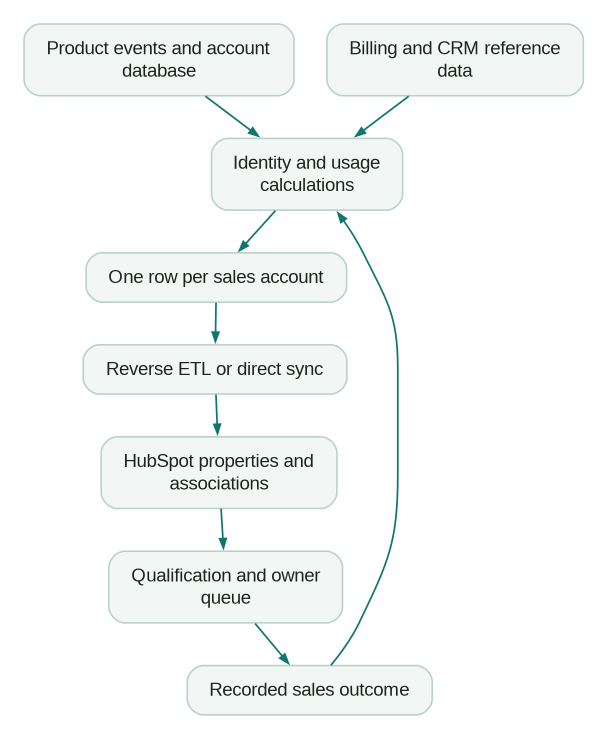
Read diagram as text
- Product events and account database to Identity and usage calculations.
- Billing and CRM reference data to Identity and usage calculations.
- Identity and usage calculations to One row per sales account.
- One row per sales account to Reverse ETL or direct sync.
- Reverse ETL or direct sync to HubSpot properties and associations.
- HubSpot properties and associations to Qualification and owner queue.
- Qualification and owner queue to Recorded sales outcome.
- Recorded sales outcome to Identity and usage calculations
How do you build a PQL rule sales can explain?
A PQL should indicate meaningful product use by an account that fits the business. It should not merely reward the largest number of clicks.
For a fictional collaboration product, start with hard eligibility gates:
Eligible account:
- target market and supported use case
- not an employee, test or excluded account
- current source data within the agreed freshness limit
- no conflicting active sales process

Qualifying behaviour:
- core workflow completed on at least 3 distinct days in 7 days
- at least 2 distinct active users in 7 days
- at least 1 relevant expansion or buying signal
These thresholds are illustrative. Choose activation milestones worth scoring, then validate the rule against the product’s conversion patterns. A developer testing an API thousands of times should not outrank a real buying team solely because event volume is higher.
If a numeric score helps prioritise eligible accounts, cap repetitive activities and preserve the components. HubSpot supports fit, engagement and combined scoring, with object availability, limits and associated-contact aggregation depending on the subscription. Review the aggregation deliberately: summing every associated contact can favour large accounts even when no individual has strong intent. HubSpot lead scoring. Use a lead scoring model with separate fit and engagement to test the ranking against the actual review capacity and a defined outcome.
A useful reason might read: “Three active teammates, core workflow used on four days, 86% of plan capacity.” That gives the rep a conversation starter and lets operations inspect the rule.
Consider these fictional account snapshots under the same rule. “Buying signal” means an agreed signal such as requesting an enterprise feature; a high usage count alone does not establish it.
| Account | Seven-day evidence | Data state and eligibility | Expected result |
|---|---|---|---|
| A | 3 active users, 4 active days, 1 buying signal | Fresh, target fit, no conflicting process | Qualify and explain the three conditions |
| B | 1 active user, 5 active days, 1 buying signal | Fresh and eligible | Do not qualify; the teammate threshold fails |
| C | 0 active users, 0 active days, 0 buying signals | Complete source and eligible account | Not qualified with a trustworthy zero |
| D | Previously 3 users and 4 days | Source is beyond the agreed freshness limit | Unavailable; hold new outreach |
| E | 3 active users, 4 active days, 1 buying signal | An equivalent sales process is already active | Suppress a duplicate qualification task |
When several workspaces roll into one company, count distinct people across their union. Two workspaces with users {u1, u2} and {u2, u3} have three distinct active people, not four. Preserve workspace-level detail so the explanation can name the activity that actually qualified.
When should qualification expire or create a new task?
Define what happens when an account qualifies, drops below the threshold and qualifies again. Otherwise, a rolling score can create a new task every time it oscillates around a boundary.
Store pql_first_qualified_at, pql_last_qualified_at, the rule version and the last handled qualification episode. Use a cooldown appropriate to the sales process. A reopened opportunity or a fresh explicit request may justify re-entry; an unchanged daily sync usually should not. Start the response clock from a valid qualification episode so you can measure and fix speed to lead without treating every refresh as a new request.
Do not overwrite the broad CRM lifecycle stage every time a product score changes. Product qualification, commercial lifecycle and sales ownership describe different dimensions. A paying customer can show expansion intent without becoming a new lead.
Keep acquisition PQLs separate from customer expansion signals and support-risk signals. The owner and next action differ even when some underlying usage properties overlap.
What should the sales queue show?
A working view should show account name, owner, plan, trial end, qualification reason, last meaningful activity, freshness and current opportunity state. Include a direct link to the relevant product workspace or internal account view where access is appropriate.
Use lead routing rules for a small team to choose the owner and fallback. Create a task only when the account crosses the agreed threshold and no equivalent task is already open. Specify the response window and a small set of outcomes: contacted, accepted, not a fit, already engaged or signal incorrect.
To turn product signals into sales actions, the task must explain the observed change and the appropriate conversation. Use the feedback to improve the model. “Signal incorrect” should lead to a reason such as stale data, wrong association or misleading activity. A generic dismissal provides little information about what needs repair.
Stripe and HubSpot integration adds the billing context that helps distinguish a trial opportunity from a payment-recovery issue.
Which test cases prove the sync is useful?
Test a new user, an email change, a company merge, a person in two workspaces, a workspace with no recent events, a late-arriving event and a failed source refresh.
If Clay writes into HubSpot as well, verify that its enrichment and this product sync own different fields or follow an explicit precedence rule.
Also test zero activity. If the model starts from the events table, inactive accounts can disappear from the output instead of receiving a zero. Build from the eligible account population and join activity onto it so inactivity remains visible.
For a fictional pilot of 100 eligible accounts, manually inspect all newly qualified accounts and a sample of those below the threshold. Track sales acceptance and later conversion by qualification version. Do not claim the score works because its highest band contains more activity; activity is what the score was designed to count.
What should be ready before sales relies on the workflow?
Place this workflow inside the wider HubSpot implementation plan, then prove the full account-to-owner path.
Checklist
- Person, workspace, company and billing identities are mapped.
- One destination record has one defined summary grain.
- Every property has a type, owner and calculation definition.
- Source freshness and delivery freshness are separate.
- Connector actions and plan entitlements are verified together.
- Null, zero, deletion and merge behaviour are tested.
- Qualification has exclusions, expiry and re-entry rules.
- Sales receives a reason and records the outcome.
- The pilot compares useful business outcomes by rule version.
At Martechdevs, we connect CRM, product and billing data to the customer workflows your team needs to run. Start with the free AI readiness checklist, or explore an AI assistant built around your approved workflows.
Keep reading
Browse all CRM & Lifecycle guides
 CRM & Lifecycle
Salesforce to HubSpot migration: plan, field mapping and cutover checklist
Plan a Salesforce to HubSpot migration: phases, a field mapping template, load order, Smart Transfer limits, reconciliation checks and a safe cutover.
Jafrin Akter AloLast updated 21 min read
 CRM & Lifecycle
HubSpot implementation: a phased plan, template and launch checklist
Implement HubSpot in five phases: scope, data model, migration, integrations and launch. Includes a plan template, a worked example and a go-live checklist.
Jafrin Akter AloLast updated 22 min read
 CRM & Lifecycle
HubSpot API Guide: Service Keys, Contacts, Pagination and Limits
Connect to the HubSpot API with Service Keys or OAuth. Read contacts, follow pagination, handle rate limits and avoid duplicate writes with current endpoint examples.
Jafrin Akter AloLast updated 12 min read
CRM & marketing automation
See the implementation scope, deliverables and acceptance checks.
Questions people ask
How should read-only product users affect a PQL rule?
Define the qualifying behaviour for each role before counting active users. A read-only user may receive value from viewing a report even though they cannot create one. Keep usage and buying authority separate, and avoid counting an invited but inactive viewer as engaged. Test the rule with creator, administrator and reader fixtures so the account's qualification reason describes its actual adoption.
Can a salesperson correct a product-derived field manually?
Give corrections a separate, auditable override path. A direct edit to a source-owned usage field may be overwritten at the next sync, leaving the rep unsure which value to trust. Record the proposed correction, reason, owner and expiry, then repair the source or approve a defined exception. Keep checks for stale and conflicting CRM data visible to operations.
How should a trial extension affect the qualification queue?
Update the trial deadline from the authoritative account or billing record and recalculate any urgency that depends on it. Preserve the history of the original deadline and the extension reason. An extension should not automatically create a second qualification episode or erase an open sales task. Decide whether the existing owner keeps the follow-up and show the revised date in that task.
What if a user joins an account after generating useful activity elsewhere?
Use membership effective dates to decide which account owned each occurrence. Do not move all historical activity to the user’s current company merely because today’s association changed. The receiving account can benefit from the person’s experience, but its usage summary should reflect its own authorised activity. Review migrations separately when a genuine workspace transfer requires a controlled historical restatement.
How should sales read the queue during a connector outage?
Show the last confirmed observation and delivery times, mark affected records as stale, and hold new automatic qualification when the freshness policy expires. Keep already-owned tasks available with that warning rather than deleting the team’s work. After recovery, reconcile current account state before reopening automation; a large backlog should not suddenly create a task for every historical threshold crossing.
Sources

Written by
Jafrin Akter AloData Engineer and Co-founder at Martechdevs and Growth and Analytics Partners
Jafrin writes practical guides to marketing technology, customer data, analytics and AI workflows. Martechdevs is a Growth and Analytics Partners company.