
HubSpot implementation guide: setup order and launch checklist
Data Engineer and Co-founder, martechdevs
Last updated 12 min read
Implement HubSpot in the order your business process depends on: agree the workflows and ownership, confirm the required subscription capabilities, design the records and identifiers, define lifecycle rules, rehearse the migration, connect source systems, then enable automation and reporting. Launch when the team can complete real work with verified records and reliable handoffs. A configured portal alone is not an implementation outcome.
Last updated: 8 October 2026.
For a product company, the first useful HubSpot release might let a salesperson see who requested a demo, identify the correct account, understand trial progress and record the next action. A second workflow might alert customer success when a paying account has an unresolved setup problem.
Start there. Every property, integration and workflow should support a job someone needs to perform. Importing every available field first creates decisions your team will have to untangle later.
This guide gives a setup sequence, a copyable implementation brief and checks for the failure modes that matter at launch. The examples are illustrative; timelines and budgets depend on your scope and data quality.
Define the first release in operational terms
Choose a small set of workflows and name the people who will use them. A founder should be able to explain what changes in the business when the release is complete.
For an illustrative SaaS implementation, the first release could include:
- A demo request creates or updates the correct contact and company.
- The request reaches an eligible owner with enough context to respond.
- The owner records acceptance, a next step or a specific rejection reason.
- Product and billing fields show current trial progress and subscription state.
- A report reconciles eligible requests, assigned requests and accepted opportunities.
Exclude work that does not support those outcomes from the initial release. A complex score, several custom objects and an AI prospecting workflow can wait if the team cannot yet reliably assign a demo request.
For each workflow, specify its trigger, eligible population, owner, required data, expected response and failure path. Include what must not happen: an existing customer should not enter a new-prospect sequence merely because they submit another form.
Check capabilities before committing to the design
Review the actual account's subscriptions, seats, limits and contract. “We have HubSpot” does not establish whether a particular action is available to the people who will use it.
Three design dependencies deserve an early check:
- Custom objects: HubSpot's standard setup documentation lists Enterprise subscriptions, while the Limited Release Pricing supplement includes them in Professional and Enterprise for covered accounts. Confirm your programme, limits and dependent reporting or workflow features before designing a workspace or subscription object. The custom-object modelling guide explains the design choices.
- Owner rotation: the Rotate record to owner action requires the relevant Sales Hub or Service Hub Professional or Enterprise access and eligible paid seats. An account containing workflows does not automatically make every user eligible for this action.
- Usage-based features: some AI and data actions consume HubSpot Credits. Check the specific feature, included capacity and exhaustion behaviour before placing it in a time-sensitive process.
Create a short dependency register: required outcome, proposed HubSpot feature, required tier or seat, confirmed availability and fallback. Resolve material gaps before migration work starts.
A fallback can be a simpler process. If a workspace object is unavailable, a verified account-level summary plus a link to the product may support the first release. It will not provide every capability of a full workspace model, so make that limitation explicit.
Design records around the business entities
Separate the person, commercial account, product workspace and purchase opportunity. Decide which of those need their own CRM records and which can remain in the warehouse with approved summary fields synced into HubSpot.
Use contacts for people, companies for the account relationships you manage and deals for actual commercial opportunities. Avoid creating a deal for every product event just to make the event visible on a timeline. It would change what the pipeline represents.
For a company with several workspaces, decide which account-level summaries are useful: active workspace count, first value date, current subscription status and the timestamp of the latest successful refresh. Retain the detailed workspace records at their proper grain.
Write down how each source ID maps to a HubSpot record ID. The single customer view guide covers these relationships and shows why joining raw one-to-many data can inflate financial totals.
For each property, record its business definition, internal name, type, allowed values, source of truth, update owner and treatment of missing data. Distinguish a display label from the internal name used by an integration.
Prefer a small set of maintained properties to several near-duplicates such as Plan, Current plan, Stripe plan and Plan new. If the fields have different meanings, name those meanings. If they are supposed to be identical, resolve the ownership conflict.
Define lifecycle, lead status and deal stages separately
These fields serve different purposes. Lifecycle stage describes the broader relationship between the person or company and your business. Lead status describes sales follow-up state. Deal stage describes progress on a specific commercial opportunity.
Agree the evidence required for each transition. For example, a demo request might create a lead, while sales qualification requires a confirmed use case and a next step. A booked meeting alone does not establish that the opportunity meets your qualification criteria.
HubSpot's lifecycle documentation explains default forward-moving updates. Tools such as imports, workflows and the API require the existing value to be cleared before setting an earlier stage. Test your chosen automation and correction paths rather than assuming a later import will overwrite any stage.
Do not use lifecycle stage as a substitute for every operational condition. Keep subscription state, churn status and temporary follow-up status in appropriately defined fields. A former customer may still be a customer in the relationship history while their current subscription is cancelled.
Before building reports, decide which timestamp represents entry to each stage and how re-entry is handled. Otherwise marketing and sales can agree on the stage names while calculating different conversion rates.
Rehearse the import with records that expose edge cases
Prepare separate, reviewed files for new records and updates to existing records. Include stable identifiers and an association plan. Export the relevant current values before making changes so there is evidence for reconciliation and repair.
HubSpot's deduplication guidance documents email and domain matching, Record IDs and custom unique-value properties for imports. It also states that companies created through the API are not automatically deduplicated by Company domain name. Your integration must therefore use a deliberate matching and create-or-update strategy.
Do not assume matching by domain always expresses the commercial relationship you want. Several subsidiaries or operating units may share a domain. Decide the intended account boundary before combining their records.
Use a small rehearsal containing a new contact, an existing contact, a changed email, a multi-contact company, an account with several workspaces, a missing identifier and a deliberately conflicting association. Record the expected result for each before importing it.
After the rehearsal, compare:
- Expected and actual created records, updated records and rejected rows.
- Source IDs and retained HubSpot record IDs.
- Contact-to-company and deal-to-company associations.
- Owner, lifecycle, consent-related fields and marketing status.
- Fields that should remain unchanged.
Do not use bulk merging as the first response to a failed matching design. HubSpot states that record merges cannot be undone. Creating replacement records later is not equivalent to restoring every prior association and activity arrangement. Review the matching rule, export evidence and test the selected survivors before merging.
Control marketing-contact status before importing a list
HubSpot's marketing-contact model distinguishes contacts counted toward the paid marketing-contact tier from non-marketing contacts. This setting is separate from whether a contact has permission to receive a particular message.
Decide who you actually intend to market to, then review the status defaults for each import, form and integration path. Do not turn every product user or historical CRM record into a marketing contact by accident.
HubSpot's billing documentation explains that exceeding the contact tier triggers an upgrade, changes to non-marketing take effect on the next update date, and a lower contact count does not downgrade the tier mid-term. It also documents a maximum-marketing-contact setting that can prevent covered imports and automated features from adding more marketing contacts after the cap is reached.
For an illustrative account with a 2,000-contact tier and 1,850 current marketing contacts, adding 300 new marketing contacts produces 2,150. Scheduling 300 existing contacts to become non-marketing later does not create immediate capacity. Check the effective dates and the maximum setting before the import.
Make someone responsible for the count, the upcoming update date and changes to the tools that set marketing status. Review the expected billable count as part of migration acceptance.
Preserve acquisition evidence without confusing it with record creation
“Imported” tells you how a record entered the CRM. It does not establish how the person first discovered your company.
HubSpot's Record Source documentation distinguishes the process that created a record from Original and Latest Traffic Source properties describing online interactions. Use those fields for their documented purposes.
If your old system contains reliable campaign or acquisition evidence, preserve it in a clearly defined migration field with its origin and timestamp. Avoid stamping an inferred channel onto thousands of records merely to make a dashboard look complete.
Allow “unknown” where the evidence is missing. A report with an explained unknown group is more useful than one that attributes imported contacts to a channel they never used.
Connect product and billing data one direction at a time
Start with a small set of fields tied to a decision. For a trial account, this could include trial_started_at, first_value_at, active_members_7d, subscription_status and source_refreshed_at, with definitions for each.
Decide which system owns each field. A salesperson can own the next step. The billing system should supply its authoritative subscription state. If two systems can update the same field, define the conflict rule and test it.
For each integration, document the match key, create-versus-update behaviour, direction, refresh expectation, exclusions, failure handling and deletion policy. Test a repeated delivery so a retry does not create another company or opportunity.
Follow one controlled change from its source into the HubSpot record and then into the view or workflow that consumes it. A connector reporting a successful job does not prove every record was matched correctly.
The guide to putting product data in HubSpot explains the handoff. Keep stale and unknown values visible so a failed sync does not make an active customer look inactive.
Enable automation only after its inputs pass
Build the routing and follow-up policy in plain language before translating it into workflows. Protect existing ownership where appropriate, include a fallback for incomplete records and make the reason for an assignment visible.
Use the lead-routing guide for precedence and exception handling. Add a lead-scoring model when it improves prioritisation, with named outcomes and capacity limits. A high score should not be required before someone can receive a response to a valid direct request.
Test workflows with controlled records while external communication is disabled or limited to your test recipients. Check enrolment, re-enrolment, exclusions, delays, owner changes and exits. A historical import can meet the same trigger as a fresh request unless you distinguish them.
For credit-consuming steps, define what happens when capacity is unavailable. HubSpot's credit guidance states that usage-based features pause by default after included credits are exhausted when no additional capacity has been purchased. Purchased capacity introduces separate upgrade or overage settings. Monitor the configuration your account actually uses and provide a fallback for essential handoffs.
Use a copyable implementation brief
This example is a planning document, not an import file or executable HubSpot workflow configuration. Replace its illustrative values with the decisions your team agrees.
release: CRM foundation v1
business_owner: Revenue operations owner
first_workflow: Demo request to accepted sales follow-up

records:
  contact: Individual person
  company: Commercial account
  deal: Qualified commercial opportunity
  workspace_detail: Product database, with company summaries in CRM

identity:
  account_key: Internal production account ID
  person_key: Internal production person ID when available
  external_mapping: Source ID to HubSpot record ID
  unresolved_match: Review queue; no speculative account merge

field_authority:
  company_owner: Sales operations
  subscription_status: Billing system
  first_value_at: Product event model
  communication_preferences: Approved preference source

launch_evidence:
  - Rehearsal import reconciled by record and association
  - Billable marketing-contact count reviewed
  - Product and billing updates traced to CRM
  - Routing and exception cases passed
  - No duplicate action on repeated delivery
  - Dashboard counts reconciled to underlying records
  - Users completed their assigned workflow

recovery:
  automation_owner: Revenue operations owner
  pause_point: New workflow enrolment
  review_queue: Records with failed matching or stale required data
  evidence: Before-state export, import logs and workflow history
Add the selected subscription dependencies, open decisions, test records and acceptance evidence to the brief. Keep unresolved items visible instead of treating a scheduled launch date as proof they are solved.
Sequence the rollout around acceptance gates
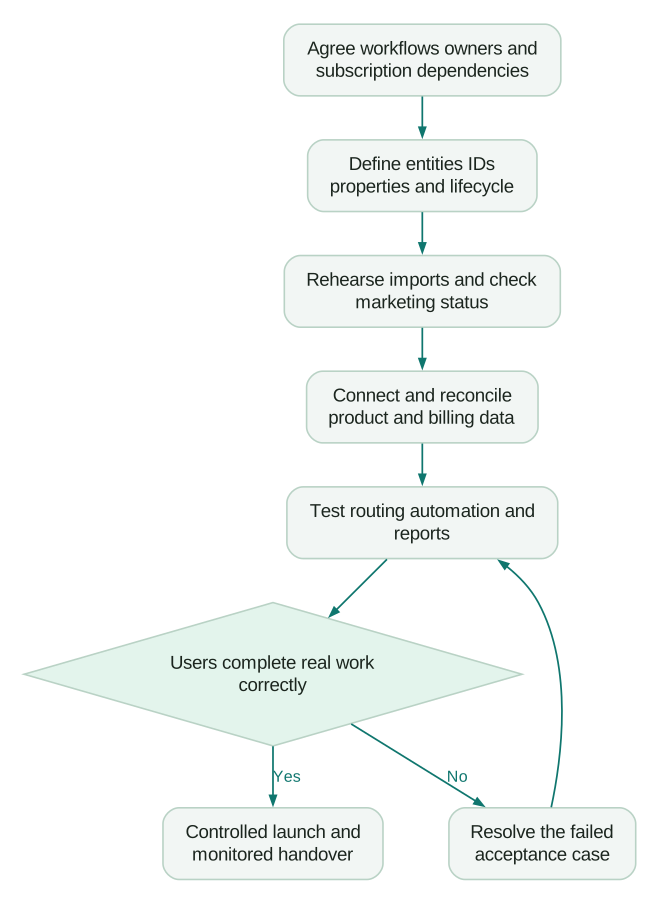
Plan the calendar from the work required at each gate: decisions, configuration, data cleanup, integration, testing and training. Identify dependencies that need someone outside the implementation team, such as access to billing data or agreement on qualification criteria.
A narrowly scoped release with clean data and existing connectors is different from a migration involving conflicting account identities, several pipelines and custom integrations. A generic promise of “two weeks” hides those differences. Request a schedule tied to deliverables, assumptions and acceptance checks.
For cost planning, separate software, onboarding obligations, implementation work, data remediation and ongoing administration. As an illustration, 80 hours at an agreed $100 per hour is $8,000 of implementation labour. It is not a HubSpot price or an industry benchmark, and it excludes every other cost category. The martech implementation-cost guide includes our published project-price guidance and a complete first-year budgeting example.
Ask a prospective implementation partner to show what is included: source mapping, migration rehearsal, integration behaviour, test cases, documentation and ownership after handover. Certificates can indicate product training; the scoped deliverables determine what your business will receive.
Launch and handover checklist
- First-release workflows and business owners are documented.
- Required subscriptions, seats, object limits and credits are confirmed.
- Person, account, workspace and opportunity identities are explicit.
- Properties have definitions, sources and update owners.
- Lifecycle and deal-stage transitions require agreed evidence.
- Rehearsal imports reconcile records and associations.
- Marketing-contact status, counts and effective dates are reviewed.
- Source provenance is preserved without fabricated attribution.
- Product and billing changes reach the correct CRM records.
- Routing has a monitored fallback and repeated deliveries are safe.
- Workflow enrolment and communication have passed controlled tests.
- Reports reconcile to the underlying records and counting rules.
- Users can perform the real workflow and explain exceptions.
- The team knows how to pause automation, investigate failures and maintain the setup.
Launch with a defined observation period and an owner checking failed syncs, unassigned requests, unexpected enrolments and report discrepancies. Fix the causes while the scope is still understandable.
If you need help connecting that first workflow to product and billing data, our CRM and lifecycle implementation service covers the data model, integration, automation and verification needed to make the process usable.
Questions people ask
What should we set up first in HubSpot?
Agree the first workflows, ownership and required capabilities. Then define the records, identifiers and lifecycle rules those workflows depend on. Rehearse a small import before loading the full database or enabling automation.
How long does a HubSpot implementation take?
It depends on scope, data quality, integrations and decision availability. Estimate each acceptance gate rather than relying on a universal duration. A usable first release can be smaller than the eventual implementation, provided its limitations and later work are explicit.
How much does implementation cost?
Build the estimate from software and seats, any required onboarding, implementation labour, data cleanup, integration work and ongoing maintenance. Ask for the assumptions and exclusions behind a quote. A low configuration fee may omit the migration or verification work your launch depends on.
Do we need a HubSpot partner?
Use internal staff when they have the product knowledge, data access and time to own the work. A partner can help when the design or integrations exceed that capacity. Evaluate the proposed process, deliverables, testing and handover alongside their credentials.
Can we import everything now and clean it up later?
You can create substantial rework if the import changes marketing status, creates duplicates or triggers automation. Rehearse representative records, confirm matching and associations, and control enrolment before the full import. Preserve evidence for repair; an export is not an automatic rollback of every CRM effect.
Sources
- HubSpot, Create and edit custom objects, documentation accessed 8 October 2026.
- HubSpot, Assign and rotate record owners using workflows, documentation accessed 8 October 2026.
- HubSpot, Use lifecycle stages, documentation accessed 8 October 2026.
- HubSpot, Deduplicate records, documentation accessed 8 October 2026.
- HubSpot, Merge records, documentation accessed 8 October 2026.
- HubSpot, Understand marketing contacts, documentation accessed 8 October 2026.
- HubSpot, Understand marketing contacts billing, documentation accessed 8 October 2026.
- HubSpot, View and use record source properties, documentation accessed 8 October 2026.
- HubSpot, Manage HubSpot Credits, documentation accessed 8 October 2026.
- HubSpot, Limited Release Pricing supplement, documentation accessed 8 October 2026.
Written by
Jafrin Akter AloData Engineer and Co-founder, martechdevs
Jafrin Akter Alo is a data engineer and co-founder of martechdevs, where the team has delivered 74+ martech, data and growth stack implementations.