
Stripe and HubSpot for SaaS: subscriptions, MRR and churn in the CRM
Data Engineer and Co-founder, martechdevs
Last updated 11 min read
A useful Stripe–HubSpot integration gives the CRM an accurate view of each customer's subscription, recurring value and payment state while preserving a clear owner for billing. Choose between payment processing, data sync and subscription migration before installing anything. For many SaaS teams, the right first step is a one-way billing summary on company records, supported by subscription-level history elsewhere.
Last updated: 21 September 2026.
A salesperson sees “customer” in HubSpot. Stripe shows two subscriptions, one scheduled to cancel and another with a failed invoice. A single lifecycle stage cannot explain that account, and copying the latest invoice amount into an MRR field makes the picture less accurate.
The integration needs a commercial data model, not just a connection between two logos.
Three Stripe integrations that solve different problems
Payment processing lets HubSpot's revenue tools collect money using a connected Stripe account. Data sync brings supported Stripe records into HubSpot. Subscription migration moves the management of eligible existing billing arrangements into HubSpot. HubSpot documents these as separate options. Using Stripe with HubSpot.
If your SaaS application already owns subscription creation, plan changes and entitlements through Stripe Billing, start by deciding whether that ownership should change. Sales visibility alone does not require a billing migration.
Write the intended outcome in a sentence: “Stripe remains responsible for billing; HubSpot receives account summaries and creates customer-success tasks.” That sentence rules out a large amount of unnecessary work.
Martechdevs' CRM and lifecycle service connects billing state to sales, retention and recovery workflows. When the account view combines billing and product usage, warehouse and CDP work provides the shared identity and calculation layer.
What HubSpot's native data sync covers
HubSpot's current documentation maps Stripe customers to contacts, invoices to invoices and products to products. Subscriptions and payment transactions map to custom objects; Stripe data can also feed Data Studio. Customer sync can be bidirectional, while the listed billing-object routes are one-way from Stripe. Supported Stripe sync objects.
The marketplace listing states that subscription sync requires Enterprise custom-object access. The listing showed a 2.1/5 rating from 91 ratings when researched. That is a dated review snapshot, not a technical specification or proof that the app cannot work for your use case. The object mapping and entitlement are the more useful starting points. Official Stripe app listing.
A common expectation gap is the word “subscription.” A Stripe subscription mapped into a custom object is not automatically the same thing as a subscription managed by HubSpot's own billing tools.
Test your required fields, associations and history against the native connector. If you only need supported records and straightforward mappings, it may be sufficient. If you need account-level MRR across multiple subscriptions, custom churn rules or joins to product usage, additional modelling can still be necessary.
Start with the account identity
Keep these identifiers distinct:
Internal commercial account ID
Product workspace ID
Stripe account ID and live/test environment
Stripe customer ID
Stripe subscription ID
HubSpot company ID
HubSpot billing-contact ID
A Stripe customer is not necessarily one human contact. It may represent the billing relationship for a company or workspace. The billing email might belong to finance, a founder or a shared mailbox.
For B2B reporting, associate the subscription with its commercial account and then associate the relevant contacts with roles. Do not use the invoice email as the sole account identifier.
Include the Stripe account and environment in integration keys when operating multiple legal entities or test environments. That prevents a test record or a record from another account from being treated as the intended live customer.
Maintain a reviewed mapping for existing data before enabling record creation. Otherwise, a connector can create a technically valid second contact while the account team continues working on the first one.
Choose subscription detail or account summaries
If the team needs to inspect each subscription inside HubSpot, use a supported subscription-level object with associations to the account and contacts. Preserve one record per source subscription and keep its source ID immutable.
If the immediate need is routing and account visibility, publish selected summaries to standard company properties. This can avoid a dependency on custom objects, subject to the account's property, API, connector and workflow entitlements. It does not magically make every automation available on a free plan.
An initial company-level field map might contain:
billing_customer_id: the mapped billing customer, or a reference to a mapping when several exist.billing_currency: the currency of the displayed value.recurring_revenue_monthly: the value under your documented MRR definition.active_subscription_count: subscriptions meeting the active definition.billing_risk_status: a controlled state such as current, overdue or review required.next_renewal_at: the next relevant renewal, with its meaning defined for multiple subscriptions.scheduled_cancellation_at: the next known cancellation date.last_payment_failure_at: the latest relevant failed-payment event.billing_observed_at: when source state was last verified.billing_synced_at: when the summary was delivered successfully.
These are illustrative custom fields. Avoid compressing contradictory subscription states into one label without preserving the explanation. “One of two subscriptions overdue” is more useful than a company-level boolean that simply says “unpaid.”
Define MRR before calculating it
MRR is a recurring-value metric. An invoice total can include tax, one-time charges, credits, prorations and usage, so it is not automatically MRR.
Stripe's own Billing analytics definition normalises eligible subscriptions monthly and has explicit treatment for subscription status, tax, free plans and metered products. Its settings can also affect discount treatment and when a subscriber is considered active. Stripe Billing analytics definitions.
Your CRM metric should either reproduce that agreed definition or carry a different, clearly named definition. Do not label two different calculations “Stripe MRR” and expect them to reconcile.
A worked subscription example
Consider a fictional customer with:
Annual base subscription                  $1,200 per year
Monthly recurring add-on                     $40 per month
One-time onboarding fee                      $300
Tax on the invoice                           excluded here
Under an illustrative definition that includes both recurring items and excludes the one-time fee and tax:
Monthly recurring value = $1,200 / 12 + $40 = $140
Annualised recurring value = $140 × 12 = $1,680
The payment collected in the first month could be much larger than $140. That does not make the monthly recurring value wrong.
For discounted, tiered, usage-based or mixed-interval subscriptions, use the actual commercial terms and your chosen metric policy. Do not multiply a simple unit price by quantity and assume that covers every Stripe pricing model.
Keep currencies separate until an explicit currency-conversion policy is applied. A dollar sign added to the sum of USD and EUR values is a reporting error, not a presentation choice.
Separate cancellation intent, effective churn and payment risk
A scheduled cancellation can exist while service remains active. Stripe documents an update event when a subscription is set to cancel at period end and a deletion event when cancellation takes effect. It also supports scheduled cancellation dates. Stripe cancellation behaviour.
Use different fields and workflows for:
- Cancellation requested or scheduled.
- Subscription actually ended.
- Payment overdue or recovery in progress.
- Account with no remaining eligible subscriptions.
A customer with one cancelled add-on and an active main subscription is not necessarily a churned customer. At account level, derive the state from all relevant subscriptions.
Likewise, past_due should not automatically trigger a win-back campaign. Stripe's subscription settings govern recovery and subsequent status changes. Current documentation also explains that active does not always mean every historical invoice has been paid. Subscription status and webhook guidance.
Choose the effective date for each metric and workflow deliberately. Retention outreach may start at cancellation intent, while a churn report follows a separate agreed revenue policy.
A reliable warehouse or service-based route
A small integration service can maintain the billing summary directly. A warehouse becomes useful when the calculation needs billing history, product usage, CRM ownership and other sources together.
The design has four layers:
- Capture source objects and changes with stable IDs.
- Reconcile the current subscription and invoice state.
- Calculate a versioned account summary.
- Deliver only the required fields to HubSpot and record the result.
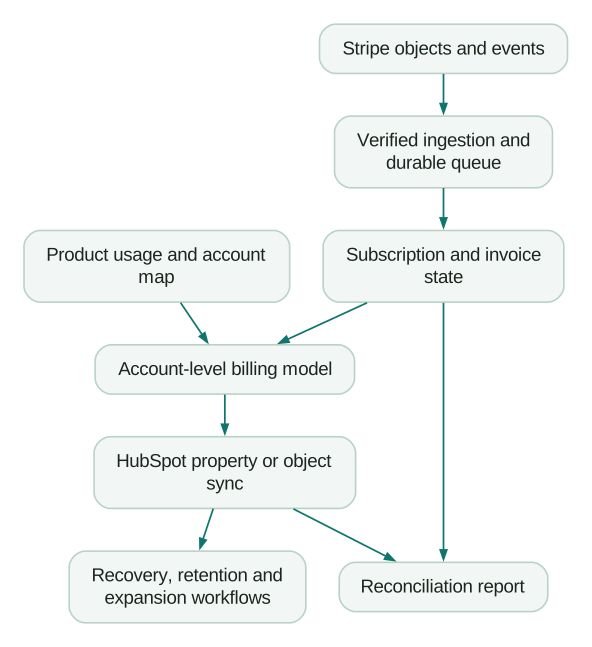
Reverse ETL tools can write the resulting properties and associations into HubSpot. For example, Hightouch documents object sync modes, matching requirements and field-level null behaviour. Choose these settings to match ownership rather than accepting every default. Hightouch HubSpot sync.
Use separate freshness fields for source observation and CRM delivery. A daily warehouse route may be suitable for a sales overview; an urgent failed-payment notification may need a faster event route. Both can share the same account identity and definitions.
Make webhook processing safe to repeat
Stripe does not guarantee event delivery order and can deliver duplicates. Verify signatures against the raw request body, track processed event IDs and avoid treating event timestamps as a complete ordering mechanism. Stripe's documentation recommends retrieving relevant objects when needed. Stripe webhook requirements.
A practical implementation acknowledges a valid event after it is durably accepted, then performs slower processing asynchronously. Keep retries separate from the business outcome so a repeated delivery does not create repeated CRM tasks.
For current-state fields, use controlled processing per subscription or account and reconcile against authoritative source objects. Two workers must not race to write an old and a new summary into the same company record.
Maintain a separate history of meaningful transitions. Refreshing the latest state is useful for CRM accuracy, but it should not erase the evidence of a failed payment followed by recovery.
A stable recovery episode might be keyed to the invoice and its relevant failure cycle. When payment succeeds, close that episode and stop its reminders. A later failed invoice is a new episode.
Four workflows worth building first
Payment recovery with a clear owner
When a relevant invoice enters an unresolved failure state, identify the billing contact and account owner. Coordinate with Stripe's own recovery messages so the customer does not receive duplicate reminders from two systems.
Before each CRM-generated reminder, recheck the current invoice state. Exit immediately after resolution or when the case moves into a managed exception.
Cancellation outreach before the end date
When a cancellation is scheduled, create an account-owner task with the affected subscription, reason if available, usage context and effective date. Suppress the task if an equivalent conversation is already open.
The objective is to understand and address the issue. Do not automatically restart billing or reverse a cancellation because a workflow labels the account “high value.”
Expansion based on usage and entitlement
Combine current plan capacity with recent product usage. A team consistently approaching its purchased capacity may need an upgrade discussion. A large invoice alone does not establish expansion intent.
Our product-data-in-HubSpot guide explains the account summaries and qualification rules that make this workflow useful.
Customer onboarding after the defined paid event
Choose whether onboarding starts at an activated subscription, a successful first payment or another commercial milestone. The correct trigger depends on your product's trial and invoicing model.
Prevent every renewal invoice from restarting new-customer onboarding. Store the first qualifying event and a stable journey entry key. The wider lifecycle journeys guide covers exit and re-entry rules.
Diagnose native sync problems in order
First confirm the integration type. A payment-processing connection alone should not be treated as proof that existing Stripe records are being imported through Data Sync.
Then inspect the object pair, subscription entitlement, sync direction, matching key, filters and field mappings. HubSpot's Data Sync documentation distinguishes initial indexing from incremental changes and provides record-level sync states. Large initial syncs can take time; repeated configuration saves can restart the initial process. HubSpot Data Sync operation.
Next, compare one known Stripe record with its expected HubSpot record. If the record exists but the company view is empty, inspect the association and summary calculation. If a field is wrong, inspect its source and conflict rule before reinstalling the app.
Finally, reconcile totals by currency and effective date. A connector can deliver every record while a downstream join duplicates the recurring value across several contacts.
Migration is a separate billing project
HubSpot offers documented migration options for eligible Stripe subscriptions. That process changes more than sales visibility and needs its own scope, eligibility review and cutover plan. Billing and subscription migration options.
Validate product compatibility, payment methods, invoicing, taxes, customer communications and application entitlements before choosing it. The acceptance test must include a real billing cycle in the appropriate test environment and a plan to prevent duplicate charging.
For a CRM visibility problem, a read-oriented sync is often a smaller first implementation. Use the HubSpot pricing guide to compare object and workflow requirements before purchasing an upgrade.
Release checklist
- Payment processing, sync and migration scopes are distinguished.
- Billing ownership remains explicit.
- Account, customer, subscription and environment IDs are mapped.
- MRR has a written definition and currency policy.
- Scheduled cancellation and effective churn are separate.
- Multiple subscriptions aggregate correctly at account level.
- Duplicate and out-of-order events are tested.
- Reminders stop after payment recovery.
- Source and CRM freshness are visible.
- Subscription counts and recurring values reconcile before automation starts.
At Martechdevs, we connect CRM, product and billing data to the customer workflows your team needs to run. Start with the free martech AI audit, or explore an AI assistant built around your approved workflows.
Questions people ask
Why do customers sync but subscriptions do not?
They use different object mappings and may have different entitlement requirements. The official native app currently maps Stripe subscriptions to custom objects and specifies Enterprise for that route. Verify that the subscription sync was configured, rather than assuming contact sync includes it.
Do we need Enterprise just to show MRR?
Not necessarily. An externally calculated account summary can be written to suitable standard-object properties if your plan and integration support them. Subscription-level custom objects and particular reporting or workflow features have their own requirements.
Can we use the most recent invoice as MRR?
That is unreliable. The invoice can contain annual charges, tax, prorations, credits or one-time items. Calculate recurring value from the appropriate subscription terms and a documented metric policy.
Should a failed payment mark the customer as churned?
Usually the first useful state is payment risk or recovery in progress. Determine churn from the agreed subscription and account policy. A temporary failure and a fully ended customer relationship require different actions.
Can HubSpot and Stripe both edit billing data?
Only where the selected integration and ownership rules support it. Start with a clear owner for each field and action. Uncontrolled two-way updates can create conflicts even when both connectors are individually functioning.
Sources
- HubSpot: using Stripe. Accessed 21 September 2026.
- HubSpot: official Stripe data-sync listing. Accessed 21 September 2026.
- Stripe: Billing analytics definitions. Accessed 21 September 2026.
- Stripe: cancellation behaviour. Accessed 21 September 2026.
- Stripe: subscription webhooks and states. Accessed 21 September 2026.
- Stripe: webhook delivery and verification. Accessed 21 September 2026.
- Hightouch: HubSpot destination. Accessed 21 September 2026.
- HubSpot: Data Sync operation. Accessed 21 September 2026.
- HubSpot: billing migration options. Accessed 21 September 2026.
Written by
Jafrin Akter AloData Engineer and Co-founder, martechdevs
Jafrin Akter Alo is a data engineer and co-founder of martechdevs, where the team has delivered 74+ martech, data and growth stack implementations.