
iOS 26 GCLID Tracking: 5 Checks to Find Missing Click IDs
iOS 26 does not justify assuming that every Safari visit loses its GCLID. Separate link parameters removed before navigation from information hidden from particular scripts, then trace the actual click through redirects, collection and conversion reporting. The useful question is where your permitted identifier stopped being available. A server-side endpoint cannot recover a value that never reached your site.
On this page
A drop in Google Ads conversions can coincide with a Safari release without being caused by that release. A redirect, changed consent default, duplicate purchase sender or broken CRM field can produce a similar chart. Start with the request path, then decide whether the repair belongs in your website, collection integration or reporting expectations.
This guide gives growth and analytics teams a controlled test method for Safari click identifiers. For the broader architecture, start with server-side tracking and its limits. The GA4 cross-domain guide covers preserving identity between related domains; that is a separate task from proving whether the original ad identifier arrived.
What did Safari 26 change, and what is a different protection?
Safari 26 added restrictions aimed at known fingerprinting scripts. WebKit describes limits on device information, long-lived script-written storage, query-parameter access and document.referrer. That is different from removing a parameter from the network request before the destination loads. Safari 26.0 features.
| Mechanism | Where evidence changes | What to inspect |
|---|---|---|
| Link Tracking Protection | Selected tracking parameters can disappear before navigation | The earliest request your own infrastructure receives |
| Script access restrictions | A script may receive less URL or referrer information | The request, the page context and the affected script separately |
| Storage restrictions | An identifier can be present initially but unavailable later | The permitted persistence method and the later conversion journey |
| Collection or delivery failure | The event or identifier fails to reach its destination | Consent state, triggers, field mapping and destination response |
WebKit's Private Browsing explanation says selected user- or click-level tracking parameters are removed before the network request. It distinguishes campaign-level parameters, which are allowed through, from granular tracking values. It also describes restricted URL access for third-party scripts after cross-site navigation. These are separate checkpoints, not interchangeable explanations for one missing field. Private Browsing 2.0.
The similar setting names cause confusion. In a WebKit issue, an Apple engineer distinguishes the new Safari 26 protections under Prevent cross-site tracking from the separate Advanced Tracking and Fingerprinting Protection setting. The comment concerns a specific extension reproduction; it is not a test result for every ad platform or every later Safari build. WebKit engineer's clarification.
Apple confirms that Private Browsing removes identifying tracking information from URLs. Link protection also has a separate history in shared Messages and Mail links. Record how the visit started instead of grouping all iPhone traffic into one behavior. Apple's Private Browsing guidance, Apple's link-protection announcement.
1. Which browser and navigation cases should you test?
Test the actual browser build, protection settings and entry route used by your customers. “iOS traffic” is too broad to identify a failure mechanism.
Record the device's OS version from its settings and the Safari version where available. Safari 26 freezes the OS-version portion of its user-agent string while the Safari version continues changing. An analytics segment that looks only for an iPhone OS 26 token can therefore miss the audience it intends to measure. WebKit's user-agent change.
Use a controlled destination you operate, with synthetic parameter values and no production conversion sender. Never send real customer identifiers to a public URL-echo service merely to inspect them. Include a direct route and your actual campaign redirect chain.
| Test case | Keep controlled | What the result can establish |
|---|---|---|
| Regular Safari at its recorded settings | Exact build, link and consent choice | Behavior of that regular-browsing route |
| Safari Private Browsing | Same destination and synthetic input | Difference associated with the private route under those conditions |
| Explicit All Browsing protection, where available | Record the changed setting and restore it after QA | Behavior when the additional protection is enabled |
| A link shared through Messages or Mail | Record the shared link and received request | Whether the link changed before reaching the site |
| An in-app browser used by your audience | Actual host app and its navigation path | Behavior of that app's browser, not Safari generally |
| Your normal redirect and form journey | Same synthetic input, controlled consent and outcome | Whether your infrastructure or integration drops the value |
WebKit documents how users can extend the advanced private protections to all browsing. Keep that setting explicit in the record; a screenshot of a regular-looking tab does not establish its protection configuration. Advanced protection settings.
Use the same consent choice when comparing browser cases, then test consent changes separately. Testing accepted consent on one route and denied consent on another does not isolate a browser effect. At Martechdevs, tracking implementation reviews separate those variables before changing the collection architecture.
2. Did the identifier reach the first request and survive redirects?
Inspect the earliest controlled HTTP request before investigating JavaScript. That observation separates a value absent on arrival from one lost inside your own route.
Capture a minimal diagnostic record: test-case label, destination, request time and the presence of the expected parameter names. If raw values are temporarily necessary to compare a synthetic fixture, limit their retention and keep real traffic out of the fixture. An edge or proxy may normalize a request before the origin sees it, so label each observation by its actual location.
Follow every redirect and compare its outgoing destination with the next request. Include locale selection, trailing-slash rules, short links, landing-page tools and booking hosts. Google specifically requires gclid to survive redirects to the final landing page for its auto-tagging flow. Google Ads auto-tagging.
Do not infer stripping from a URL that never contained the identifier. Keep the prepared input and the actual navigation mechanism as evidence. A synthetic gclid=QA_ONLY can test parameter transport; it is not a valid advertising click and must not be uploaded as a conversion.
If the value exists at the edge but disappears in the redirect destination, repair that redirect and rerun the complete journey. If it is already absent at the first request, investigate the source link and entry route. A later server container cannot establish what an upstream system never sent.
Keep URL fragments separate. The portion after # is not sent in the HTTP request. A value stored only there cannot be expected in an origin request log, and moving tracking identifiers into fragments is not a reliable recovery design. URI fragment behavior.
3. What can the page and the measurement script actually read?
Compare the server observation with the page's visible URL and the measurement path's own output. A console result in one execution context does not prove that every script on the page sees the same information.
This read-only helper summarizes a fixed set of parameter names without returning their values. Run it on the controlled test page. It does not write cookies, send a request, recover a hidden value or validate whether an ad identifier is genuine.
function summarizeClickParameters(href) {
  const url = new URL(href);
  if (!['https:', 'http:'].includes(url.protocol)) {
    throw new Error('Use an absolute HTTP or HTTPS URL');
  }
  const names = [
    'gclid', 'fbclid', 'msclkid', 'ttclid', 'gbraid', 'wbraid',
    'utm_source', 'utm_medium', 'utm_campaign',
  ];
  return names.map(name => {
    const values = url.searchParams.getAll(name);
    const status = values.length === 0 ? 'absent'
      : values.length > 1 ? 'multiple'
      : values[0].trim() === '' ? 'empty' : 'present';
    return { name, status, occurrences: values.length };
  });
}

console.table(summarizeClickParameters(window.location.href));
The helper deliberately uses getAll() so duplicate keys remain visible instead of silently selecting one value. For example, a redirect that appends a second gclid creates an ambiguous input worth investigating. Parameter names remain case-sensitive; the helper does not rename them or decode a value twice. URLSearchParams.getAll.
Compare three independent observations: what the first controlled request contained, what this page context sees, and what the relevant tag or integration actually sends. A tag might not load because of consent or blocking; it might load but receive a restricted view; or it might read the value and then map it incorrectly. Each failure calls for a different repair.
When the request contains a value but a script does not, record the script URL, runtime and browser console evidence. Check initialization order, redirects that rewrite history, and the vendor's supported integration. Do not conclude that a vendor is on a private fingerprinting list from one missing field alone. The observation identifies a boundary to investigate, not a hidden browser classification.
4. Does permitted attribution context survive until the business outcome?
Test persistence and identity after proving initial collection. An identifier that reaches the landing page can still disappear before the lead becomes qualified or the order completes.
Trace the intended path through the form, CRM or order record and later conversion worker. Preserve the acquisition timestamp separately from the conversion timestamp, and keep the actual business-event identifier stable across retries. Use the offline conversion import guide for destination-specific fields and delivery handling.
| Checkpoint | Evidence to retain | Common false conclusion |
|---|---|---|
| Initial page request | Expected parameter presence and controlled entry route | Missing now means Safari removed it |
| Permitted collection | Consent state, collector and mapped field | A visible URL means the tag stored it |
| Form or order creation | The correct business record and retained acquisition context | A hidden field proves the backend accepted it |
| CRM update or delayed conversion | Field ownership, original timestamp and stable outcome ID | A later overwrite still describes the original acquisition |
| Destination delivery | Supported payload, response and later diagnostics | HTTP success proves usable attribution |
WebKit applies storage restrictions independently of URL filtering, including restrictions on script-written storage and some cloaked third-party responses. A first-party-looking hostname is not a universal exemption. Review the actual storage and deployment route rather than promising one cookie lifetime for every Safari case. Tracking prevention in WebKit.
Respect the chosen collection policy through the whole path. A consent refusal is not an implementation defect to repair with a different transport. A server-side order event can establish that an order occurred, but it does not by itself establish permission to disclose matching information to an advertising platform. The consent implementation guide separates those controls.
5. Is the destination receiving the right type of signal?
Keep click identifiers, campaign labels and business outcomes as separate data. A surviving parameter does not guarantee that the selected destination accepts it or attributes the conversion.
| Signal | Useful role | Limit to preserve |
|---|---|---|
gclid or another platform's click identifier | Match a captured advertising interaction where supported | Preserve the actual value and platform meaning; do not fabricate one |
gbraid or wbraid | Google's supported measurement routes for relevant iOS app/web journeys | They are distinct fields with route-specific support |
| Campaign UTMs | Group visits by a declared campaign | A campaign label is not a unique ad click or proof of incrementality |
| Transaction or lead ID | Identify the business outcome and prevent duplicate delivery | It does not recreate a missing advertising interaction |
| Supported customer-provided data | Supplement eligible conversion matching | Account requirements, consent and destination policies still apply |
Google documents gbraid for relevant web-to-iOS-app clicks and wbraid for relevant iOS-app-to-web clicks. Keep the field you actually received and use the current integration's rules. Do not rename either to gclid, assume every connector accepts both, or promise that either survives every browser path. Google's conversion import fields.
For journeys that continue into an app, the mobile attribution fundamentals skill can separate deep-link behavior, tracking permission and attribution reports from these web click-ID checks.
For eligible lead integrations, supported customer-provided information can contribute to matching even without a GCLID. That is a distinct measurement route with its own prerequisites, not reconstruction of a stripped click ID. Verify it through the enhanced conversions setup, including the actual outcome, consent and diagnostics. Google recommends retaining genuine captured click identifiers where available. Conversion import guidance.
Do not disguise an identifier under an unrelated parameter name, repack it into campaign fields or introduce fingerprinting to defeat a visitor's protections. WebKit treats circumvention of shipped anti-tracking measures as a serious issue and may add restrictions. Build around supported measurement and truthful coverage limits. WebKit tracking-prevention policy.
How does a checkpoint comparison change the repair decision?
A checkpoint comparison limits each fix to the loss it can actually explain. Consider this hypothetical QA exercise using twelve controlled navigations with synthetic identifiers and twelve separate accepted test leads.
| Observation | Runs with the synthetic parameter | What the evidence shows |
|---|---|---|
| Prepared input links | 12 | The intended fixtures contained the parameter |
| Earliest controlled request | 9 | Three routes arrived without it; the upstream cause still needs evidence |
| Final landing request | 8 | One additional loss occurred inside the controlled redirect chain |
| Accepted lead's mapped field | 6 | Two additional losses occurred between landing and lead mapping |
Fixing the redirect can address the one demonstrated redirect loss. Fixing the mapping can address the two demonstrated mapping losses. Neither repair explains the three inputs missing at the first observation point. Reproducing those routes with the same input and recorded settings is the next task; blaming Safari before that comparison would skip the evidence.
These counts describe a transport test, not conversion rates, browser market share or recoverable revenue. Twelve fabricated click values also tell you nothing about real ad-platform match quality. After the transport repair, validate a permitted real measurement route using its appropriate test procedure and account diagnostics.
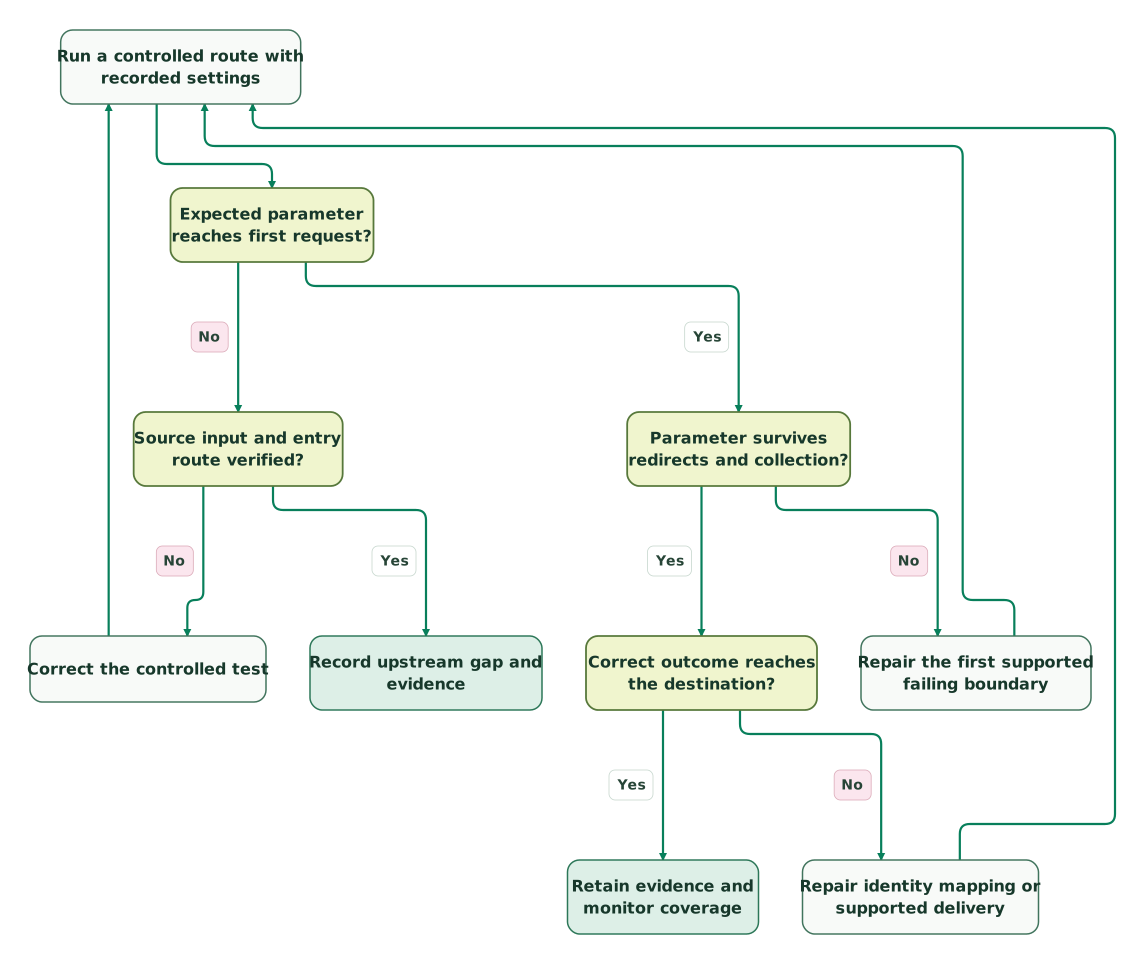
Read diagram as text
- Run a controlled route with recorded settings to Expected parameter reaches first request?.
- Expected parameter reaches first request? to Source input and entry route verified?: No.
- Source input and entry route verified? to Correct the controlled test: No.
- Correct the controlled test to Run a controlled route with recorded settings.
- Source input and entry route verified? to Record upstream gap and evidence: Yes.
- Expected parameter reaches first request? to Parameter survives redirects and collection?: Yes.
- Parameter survives redirects and collection? to Repair the first supported failing boundary: No.
- Repair the first supported failing boundary to Run a controlled route with recorded settings.
- Parameter survives redirects and collection? to Correct outcome reaches the destination?: Yes.
- Correct outcome reaches the destination? to Repair identity mapping or supported delivery: No.
- Repair identity mapping or supported delivery to Run a controlled route with recorded settings.
- Correct outcome reaches the destination? to Retain evidence and monitor coverage: Yes
An unexplained upstream loss remains a documented limitation. A confirmed site defect returns through the same test after repair. This prevents a successful downstream request from being mistaken for recovery of every missing identifier.
What should your Safari measurement acceptance record contain?
Retain enough evidence for another person to reproduce the result without collecting unnecessary visitor data. Separate controlled test results from production coverage trends.
Checklist
- Exact OS and browser build, protection settings and entry route are recorded.
- Synthetic input is preserved and excluded from production conversion uploads.
- Edge, redirect, landing, script and business-record observations are identified separately.
- Empty, duplicate and absent parameters are distinguished.
- Consent is held constant for browser comparisons and tested separately for collection behavior.
- A real business outcome remains identifiable across retries and later CRM changes.
- Platform-specific identifier fields and diagnostics are verified for the chosen route.
- Every claimed repair has a repeated test of the originally failing path.
- Missing evidence remains unknown rather than being assigned to Safari automatically.
- Monitoring distinguishes transport coverage, destination acceptance and commercial outcomes.
For ongoing reporting, track identifier coverage within an explicitly defined, permitted population. Do not divide identifiable purchases by all Safari visits and call the result a click-ID survival rate. That denominator mixes people who never clicked an ad, different entry routes and different consent states. Use the Google Ads versus GA4 reconciliation guide when the final issue is a disagreement between reporting definitions.
Bring the first failed checkpoint to the $99 martech audit. A useful implementation scope names the lost field, responsible boundary, affected decision and evidence required after the repair.
Keep reading
Browse all Tracking & Attribution guides
 Tracking & Attribution
Stape Implementation Mistakes: Domains, Clients and Event Delivery
Trace Stape-hosted events from browser to destination. Diagnose domain, client, consent, duplicate and release problems with a practical reconciliation example.
Jafrin Akter AloLast updated 10 min read
 Tracking & Attribution
Stape vs Elevar for Shopify: Choose by Implementation Responsibility
Compare Stape and Elevar for Shopify by event coverage, consent, operating responsibility and total cost. Includes current prices and a practical pilot plan.
Jafrin Akter AloLast updated 10 min read
 Tracking & Attribution
Server-side GTM hosting cost: Stape, Cloud Run, Usercentrics and Google tag gateway
Compare current server-side GTM hosting prices, request limits and operating costs. Learn when Google tag gateway is enough and how to budget a rollout.
Jafrin Akter AloLast updated 11 min read
Analytics & tracking
See the implementation scope, deliverables and acceptance checks.
Questions people ask
Does an empty query string in a vendor script prove that Safari removed the URL parameters?
No. A script can receive a restricted view while the original request contained the parameters. Compare the earliest controlled request, the page context and the relevant script's output. Also check whether a redirect or history update changed the visible URL. The missing value tells you where to investigate; it does not identify the cause without those separate observations.
Can campaign UTMs replace GCLID for Google Ads conversion imports?
No. A UTM describes a campaign label and does not become a genuine Google click identifier. Keep campaign reporting useful while using the conversion route's supported matching inputs. Do not place a click ID in a UTM to disguise it, and do not present campaign-level allocation as the same evidence as a matched advertising interaction or a causal test.
Why can an iOS 26 device appear as an older iOS version in analytics?
Safari 26 freezes the operating-system version portion of its user-agent string. WebKit explains that Safari's own version portion continues changing, so an OS-only filter can misclassify the tested browser population. Record the device's actual settings during controlled QA and inspect how your reporting tool derives its labels before interpreting an apparent absence of iOS 26 traffic.
Can a successful curl request reproduce Safari's tracking protection?
No. A command-line HTTP request can test your server and redirect handling, but it does not exercise Safari's browser settings, script restrictions or navigation context. Use it to isolate infrastructure behavior and keep the result labelled accordingly. The Safari test still needs the actual browser, controlled input, recorded protection settings and the same route used in the failing case.
Should every Safari visit with no click identifier be classified as direct traffic?
No. Missing a click identifier does not erase every other permitted source signal, and it does not establish that the person typed the address. Preserve the available campaign and referral evidence under your reporting rules, separate unknown acquisition from direct where your model supports it, and avoid inventing a precise campaign assignment when the necessary evidence is absent.
Sources
- WebKit: Features in Safari 26.0
- WebKit: Private Browsing 2.0
- WebKit: Advanced tracking and fingerprinting issue discussion
- Apple: Private Browsing on iPhone
- Apple: Privacy and link-protection announcement
- Google Ads: About auto-tagging
- MDN: URI fragment
- MDN: URLSearchParams.getAll
- WebKit: Tracking prevention
- Google Ads: Manage offline conversions
- WebKit: Tracking-prevention policy

Written by
Jafrin Akter AloData Engineer and Co-founder at Martechdevs and Growth and Analytics Partners
Jafrin writes practical guides to marketing technology, customer data, analytics and AI workflows. Martechdevs is a Growth and Analytics Partners company.