Stripe server-side tracking: send paid orders and subscriptions to GA4, Meta and Google Ads
Data Engineer and Co-founder at Martechdevs and Growth and Analytics Partners
Last updated 16 min read
Stripe server-side tracking turns confirmed payment activity into analytics and advertising events. Your backend receives webhooks, resolves the original measurement context and sends a controlled conversion to each destination. The difficult parts are deciding what counts, joining it to the right visit, handling retries and reconciling the result. A successful payment should create one logical outcome, even when several notifications describe it.
What is Stripe server-side tracking?
It is a backend integration that translates Stripe payment outcomes into events for GA4, Meta or Google Ads. The browser supplies permitted acquisition context before checkout; Stripe supplies payment evidence afterward. The two roles should remain distinct.
A success-page view is incomplete evidence. A customer can pay and never reach that page, while a delayed payment or renewal can finish without an active browser. Stripe therefore requires webhooks for reliable fulfilment and warns that the same fulfilment function may run concurrently for one Checkout Session. Stripe fulfilment guide
The server-side tracking architecture guide explains the broader implementation options. For a Stripe build, tracking implementation for your checkout should begin with a payment-to-event contract and a reconciliation report, not merely a webhook URL.
Server delivery cannot recreate a visit you never measured, establish missing consent or guarantee that an ad platform attributes every purchase. It can make the business outcome and delivery process observable.
Which Stripe event should count as the conversion?
Choose one authoritative route for each outcome. Do not let Checkout, PaymentIntent and Invoice notifications independently create three purchases for the same payment.
| Business outcome | Candidate signal | Required decision |
|---|---|---|
| Paid one-time Checkout order | checkout.session.completed | Confirm the retrieved session is paid |
| Delayed Checkout payment | checkout.session.async_payment_succeeded | Wait for successful payment, not completion alone |
| First qualifying subscription payment | invoice.paid | Confirm the invoice meets your paid-acquisition definition |
| Later subscription payment | invoice.paid | Classify renewal separately from new acquisition |
| Successful refund | Refund creation or update | Verify status and link to the original transaction |
| Failed payment or free trial | Failure or subscription state | Record its own outcome; do not invent paid revenue |
Stripe documents the delayed-payment event separately from Checkout completion. Its fulfilment example permits payment_status != unpaid, which also accommodates cases where no payment is required. For a paid-purchase metric, use a stricter business rule: distinguish paid from a zero-cost order or free trial. Immediate and delayed payment handling
Separate first payment, renewal and adjustment
Stripe's subscription guide identifies invoice.paid for successful invoice payment. The event catalog also says it can fire when an invoice is marked paid outside Stripe. A paid invoice is therefore not automatically proof of a new Stripe-collected acquisition. Subscription webhooks, event definitions
Inspect the invoice's amount, payment evidence and purpose. billing_reason distinguishes subscription creation, a new billing cycle and subscription updates, but your own history still determines whether this is the customer's first qualifying paid outcome. A trial's first non-zero invoice may occur on a later cycle. Invoice fields
Write down whether acquisition means the first payment per person, commercial account or subscription. If one company buys a second subscription, that may be expansion rather than a second acquired customer. Store the first-paid decision in your business data so retries and backfills reach the same classification.
Handle refunds as their own business occurrences
Keep each refund ID and its relationship to the original transaction. Stripe emits refund creation, update and failure events, and refunds can be partial. Inspect the refund's state before reporting a completed refund. Stripe refunds
GA4's refund event references the original transaction; item details support item-level reporting. Do not send a negative second purchase as an improvised reversal. GA4 ecommerce events
Our GA4 refund guide covers the reporting model. Ad-platform adjustments have their own contracts; a GA4 refund does not automatically retract every separately uploaded advertising conversion.
How do you carry acquisition context into Checkout?
Capture context on your own site before redirecting, subject to the permitted measurement purposes. Attach it to a specific checkout attempt, rather than looking up the customer's latest visit when a webhook arrives.
| Context | Why retain it | Do not substitute |
|---|---|---|
| GA4 client and session IDs | Associate a web outcome with measured context | CRM contact ID or invented session |
| GCLID, GBRAID or WBRAID when present | Match an eligible Google Ads interaction | A UTM campaign name |
Meta fbp and fbc when present | Supply permitted matching context | The Stripe server's IP or user agent |
| Campaign tags and landing context | Explain acquisition independently | A fabricated advertising click |
| Consent decision and timestamp | Decide which destinations and fields are permitted | The fact that a payment occurred |
| Internal checkout-attempt ID | Join browser, session, invoice and delivery records | Email address as the sole join key |
Use Google's supported get API for GA4 identifiers rather than parsing undocumented cookie layouts. Google tag API
Record begin_checkout before the redirect. Stripe's own funnel guide describes tagging your product and return pages and excluding checkout.stripe.com as an unwanted referral. Its optional client/server linking example still contains an older Universal Analytics /batch request; use the current GA4 protocol described below instead. Stripe's funnel guide
Referral exclusion does not carry identifiers or prove attribution. Preserve the original context explicitly, and use the Unassigned traffic guide if the resulting event lacks usable session information.
Prefer an opaque reference to a large metadata payload
A useful design stores the full approved context in your own database and puts a short internal reference in Checkout Session metadata. Stripe permits 50 metadata keys, with 40-character keys and 500-character values, and advises against storing sensitive information. It explicitly supports using metadata to reference an external record. Stripe metadata
Keep a mapping such as:
checkout_attempt_id -> permitted measurement context
checkout_session_id -> checkout_attempt_id
invoice_id -> subscription_id and original acquisition context
logical_conversion_id -> destination delivery records
These are distinct identities. A Stripe event ID identifies a notification, while the invoice or order identifies the business outcome. Do not overwrite the stored acquisition context every time the customer visits the billing page.
Do not assume metadata automatically propagates between every Stripe object. Resolve the mapping you actually created. A subscription renewal should not depend on the original Checkout Session being present in its webhook payload.
Put the Checkout Session ID on the return URL
For hosted Checkout, include {CHECKOUT_SESSION_ID} in the configured success URL so your server can retrieve the relevant session. Stripe documents a possible wait of up to ten seconds for the webhook response before redirecting in the applicable hosted flow; do not treat that as proof that your asynchronous analytics worker has finished. Checkout return and fulfilment flow
The return page must verify the session through your backend and authorize access to the displayed order. A session ID in a URL is not permission to expose the customer's details. If the business outcome is still pending, show a pending state and avoid firing a browser Purchase merely because the page loaded.
Payment Links need a per-attempt reference too
Payment Links can carry client_reference_id into the completed Checkout Session. Allowed values are alphanumeric characters, dashes and underscores, up to 200 characters; invalid values are silently dropped. UTM values have a 150-character limit and are carried to the return URL when the confirmation behavior redirects. Payment Links parameters
Use an opaque lookup key, not personal information or secrets, in a shared link. A single static reference reused by everyone cannot identify each buyer's browser context. If acquisition matching matters, route the person through your own measured page to create a specific attempt reference before opening the Payment Link.
How do you build a webhook handler you can trust?
Verify the raw body against Stripe-Signature using the endpoint's signing secret. Keep test and live secrets separate. Stripe's libraries use a five-minute default timestamp tolerance; do not disable that protection to hide a broken clock or signature implementation. After durable acceptance, acknowledge quickly and queue slow work. Webhook verification and delivery
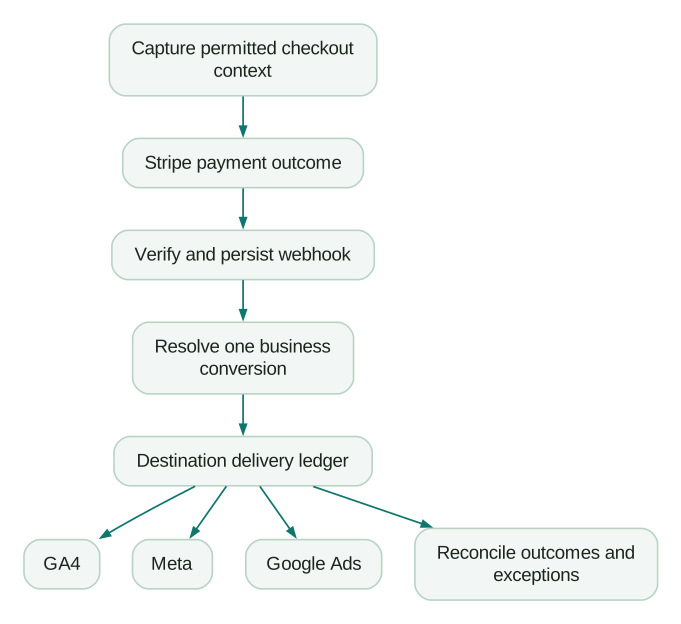
Implement the handler in this order:
- Verify the signature, Stripe account and test/live mode.
- Persist the accepted notification using an atomic event-ID uniqueness check.
- Commit the notification and the work required to process it durably.
- Acknowledge Stripe before calling slow analytics destinations.
- Resolve the payment outcome in a worker and create its destination outbox rows atomically.
- Deliver each pending row under the destination's retry policy and record the result.
Acknowledging before durable storage can lose an event if the process crashes. Waiting for three external ad APIs before acknowledging can cause unnecessary webhook retries.
Use three levels of identity:
| Level | Example key | What it prevents |
|---|---|---|
| Notification | Stripe account, mode and event ID | Reprocessing the same delivery |
| Business occurrence | Invoice ID or paid Checkout Session ID | Several event types reporting one purchase |
| Destination delivery | Business occurrence and destination | Re-sending completed work to every platform |
Stripe retries live deliveries for up to three days, does not guarantee order and can deliver duplicates. It recommends event IDs for repeated deliveries and object ID plus event type for separately generated duplicate Event objects. Stripe webhook behavior
Your conversion key must go further than notification deduplication when several event types describe one payment. For one-time Checkout, a paid session can be the key. For subscriptions, using the invoice as the canonical payment key makes Checkout and invoice notifications converge instead of compete.
Make duplicate protection atomic
A “check whether seen, then insert” sequence can fail when two workers run together. Use a durable uniqueness constraint or equivalent atomic operation, and persist the business outcome and its destination outbox entries together.
This illustrative SQL fragment defines the local uniqueness boundary. It is not a complete webhook service or worker:
CREATE TABLE conversion_outbox (
  stripe_account TEXT NOT NULL,
  livemode INTEGER NOT NULL CHECK (livemode IN (0, 1)),
  conversion_key TEXT NOT NULL,
  destination TEXT NOT NULL,
  mapping_version INTEGER NOT NULL,
  delivery_state TEXT NOT NULL DEFAULT 'pending',
  PRIMARY KEY (
    stripe_account, livemode, conversion_key, destination
  )
);
Store the mapping version as evidence, not as a way to bypass the uniqueness key and send the same purchase again. The worker also needs durable payloads, attempts, leases and a recovery policy.
A delivery ledger might distinguish pending, in_progress, accepted, rejected, ineligible and unknown. An HTTP timeout belongs in unknown until handled by a documented retry or reconciliation policy: the destination may have received the request even though your worker missed the response.
Do not claim universal exactly-once delivery across Stripe, a queue and several external APIs. You can enforce one local business record and one intended delivery per destination, use each platform's supported deduplication and reconcile the remaining ambiguity.
Choose the payload version deliberately
Thin events require resource retrieval; snapshot events carry a versioned object. Stripe recommends thin handlers for most new integrations. Confirm supported event types before reading payment fields. Webhook formats
Do not use a webhook's created value as a complete ordering mechanism. Resolve missing objects and authoritative state, while preserving the original occurrence time for reporting. A later retrieval can show a refund or subscription change that happened after the payment notification.
How do the destination rules differ?
Keep destination-specific mappings and deadlines separate. A valid Stripe payment can be ineligible for one measurement path while remaining a valid financial record.
| Destination | Event identity | Timing distinction |
|---|---|---|
| GA4 purchase | Stable transaction_id | Backdating, tagged-event processing and session attribution have different rules |
| Meta browser plus server | Matching event name and event ID | Deduplication window is separate from event-age acceptance |
| Google Ads import | Stable transaction reference and conversion action | Preserve original conversion time and applicable attribution eligibility |
GA4 through Measurement Protocol
Use the web stream's measurement_id, a server-held API secret and the captured client_id. Include session_id only when it represents the actual session relevant to the outcome. Use the current /mp/collect endpoint, and validate development payloads through /debug/mp/collect. GA4 sending guide, validation guide
The general backdating allowance is 72 hours; strict validation rejects older timestamps. Google separately recommends arrival within 48 hours for events intended to be processed with tagged events. Session attribution is stricter: receipt within 24 hours of session start and an event timestamp inside that online session. Timestamp rules, session-attribution requirements
A bank payment settling several days later must retain its real payment time. Do not backdate it into the checkout session to force attribution. The Measurement Protocol guide explains the identifier and time boundaries in more detail.
Send purchase from one authoritative path. Supply the stable transaction ID, currency, value and meaningful items; Google documents transaction IDs as a purchase deduplication mechanism. Transaction IDs
Convert amounts using the currency's actual Stripe minor-unit rules. USD 4,900 minor units means USD 49, while JPY 4,900 means JPY 4,900. Special currency cases make a universal division by 100 unsafe. For GA4 purchase value, sum the item prices times quantities and report tax and shipping separately; do not blindly copy Checkout's tax-inclusive total. GA4 ecommerce value fields. Stripe currency rules
Meta Conversions API
For a browser and server copy of the same Purchase, the Pixel's eventID must match CAPI's event_id, and the event names must match. Use the same business key and value on both sides. Meta generally prefers the first equivalent event received. Meta deduplication
Meta's server-event reference describes a 48-hour matching window and permits event_time up to seven days old; an older event in a batch can reject the entire request. action_source is required and must describe where the conversion happened. These rules do not make browser refreshes or arbitrary server retries safe. Server event parameters
On the return page, fetch the verified logical conversion key from your backend before firing the Pixel. For a delayed payment, there may be no browser Purchase at settlement; the server event can still represent the outcome. Do not invent fbc, use the webhook server's network identity as the visitor, or treat a missing browser copy as an error by itself.
The Meta CAPI setup guide covers matching and testing. Improve Event Match Quality through valid permitted context, not by filling every field with something that merely passes validation.
Google Ads through Data Manager API
For a new click-conversion import, use Data Manager API with the stored click identifier, actual conversion time, currency and value. Google's June 2026 migration notice includes legacy access for allowlisted developer tokens; it is not evidence that every old integration stopped on the same day. Google's import migration notice
The offline route requires an UPLOAD_CLICKS conversion action, shown as Website (Import from clicks), in the account that owns the action. The event schema supports transaction IDs, timestamps and ad identifiers; validateOnly validates without executing. Offline import setup, Data Manager event schema
Avoid counting the same acquisition through a GA4-imported primary conversion, a direct website conversion and a separate uploaded primary action. Decide which action is used for bidding, document the other reporting paths and test the configuration. An identical transaction string across separate conversion actions is not your integration's global deduplication policy.
Use the offline import guide and enhanced conversions guide to choose the appropriate matching route. Multi-source supplementation of an existing website tag is a different Data Manager use case; confirm its eligibility before treating it as interchangeable with a click import.
How should a first payment, renewal and refund appear?
The first qualifying paid invoice creates the acquisition outcome; renewals and refunds retain their own business meaning and destination policy. Consider a fictional USD 49 monthly SaaS subscription, with no tax, shipping, discount, credit balance or proration. Acquisition means the commercial account's first qualifying paid subscription invoice. Renewals are retained for lifecycle analysis but are not new-acquisition conversions.
Before Checkout, the application saves permitted browser and click context under attempt attempt_001. The completed session maps to first paid invoice in_first. The business conversion key is stripe_live_in_first. A duplicate Checkout notification and invoice.paid both resolve to this same key.
| Occurrence | GA4 | Meta | Google Ads |
|---|---|---|---|
| First paid invoice, USD 49 | One purchase, value 49 | Purchase with shared browser/server key if both copies exist | One eligible acquisition import |
| Webhook redelivery | No new intended event | Reuse key under delivery policy | No new intended import |
| Month-two invoice, USD 49 | Custom subscription_renewed | Not sent under this acquisition policy | Not sent under this acquisition policy |
| Successful USD 20 refund of first payment | Refund references first transaction | Apply separately chosen reporting policy | Evaluate adjustment of original import |
A custom renewal event does not automatically populate GA4 purchase-revenue metrics. If you want every renewal in those metrics, choose that different event model deliberately and prevent recurring purchases from becoming unintended new-customer bidding signals.
After the two payments and the partial refund, the illustrative net collected amount is USD 78: 49 + 49 − 20. Acquisition gross value is USD 49. They answer different questions and should not be forced to equal each other.
Use the invoice ID for subscription payments and the session ID for one-time Checkout orders under this design. The success-page session ID remains the lookup bridge. It is not necessary to force every business object into the same key type.
How do you verify the setup?
Use Stripe test mode, separate signing secrets, a GA4 test property and Meta Test Events. Keep live and test routing explicit in configuration and in every ledger key. No production destinations should receive a test payment merely because its payload has a familiar event name.
Run a fixture that includes immediate payment, delayed success, delayed failure, free trial, first paid invoice, renewal, partial refund, duplicated notification, two workers processing together and a destination timeout. For each case, define the expected business occurrence and each destination's eligibility before sending anything.
Reconcile by business ID as well as totals. In a hypothetical day with 100 confirmed payments, suppose 15 are excluded by the collection policy and five lack required matching context for the chosen route. The eligible population is 80. If 78 are observed and two remain unresolved, coverage is 97.5% of eligible outcomes, not 78% technical success or 100% overall coverage.
Track the 100 financial outcomes, 20 documented exclusions, 78 observed deliveries and two exceptions separately. Also report duplicate business keys, value mismatches and event-to-destination delay. For example, observed delays of 5, 10, 20, 40 and 300 seconds have a 20-second median; the 300-second tail still deserves investigation.
A destination's accepted-request count is not necessarily an exportable list of attributed event IDs. Preserve request IDs and diagnostics, use event-level exports where available, and state where only aggregated reporting can be reconciled. Do not promise that an ad platform exposes a complete row-level attribution ledger.
Does server-side GTM change the design?
A server container can centralize destination mapping when your team already operates it. It does not remove signature verification, durable acceptance, consent decisions, business deduplication or reconciliation. Direct backend calls can also implement those controls.
Keep payment fulfilment independent from analytics availability. A reporting destination outage should create a delivery exception, not prevent a paid customer receiving access. If a custom sGTM client receives Stripe notifications, identify who maintains verification, queueing and supported event versions. The server-side GTM guide covers the operational responsibilities.
What must pass before Stripe tracking goes live?
Release when a paid outcome can be traced from Stripe through its business key to each eligible destination, with exclusions and ambiguous deliveries visible. Run these checks before enabling live reporting.
Checklist
- Define paid acquisition, renewal, free trial, adjustment and refund separately.
- Choose one authoritative event route and business key for each outcome.
- Capture permitted context before checkout and store an opaque lookup reference.
- Verify webhook signatures with the correct environment's secret and raw body.
- Persist valid notifications before acknowledging and process slow work asynchronously.
- Use atomic uniqueness for business records and destination outbox entries.
- Test duplicates, out-of-order delivery, concurrency and ambiguous timeouts.
- Preserve actual event time and apply each destination's deadline.
- Check currency units, tax treatment and partial refunds.
- Keep renewals from silently inflating acquisition bidding.
- Prove test traffic stays in test destinations.
- Reconcile eligible business IDs, exclusions, values and unresolved deliveries.
Advertising events are only one view of revenue. Reconcile Stripe with CRM deals, connect the Stripe and HubSpot account view, and maintain an explicit MRR model for recurring value.
Bring a sample payment journey and its mismatches to a free Martech AI audit, or get a scoped Stripe tracking quote. The implementation scope should include the acceptance fixture and reconciliation, alongside destination setup.
Questions people ask
Can my GA4 tag run on Stripe-hosted Checkout?
Treat Stripe-hosted Checkout as a separate hosted payment surface. Instrument your own product and return pages, then use verified backend outcomes for payment reporting. Embedded Checkout has a different page integration. Neither approach makes a return-page view sufficient evidence that a payment succeeded.
Should free trials count as paid conversions?
Record trial start as its own outcome. Define the first qualifying paid invoice separately, including trials that convert on a later billing cycle. Choose explicitly which event each ad platform optimizes toward; a useful trial-start signal and collected revenue are different business facts.
Can I add another advertising destination later?
Yes, if it provides a supported server conversion route and you implement its matching, consent, timing and deduplication requirements. Add a destination adapter to the same business ledger, with its own delivery state. Do not copy Meta or Google's field names and assume another API interprets them identically.
Do test-mode payments reach live reports?
Only if your integration forwards them there. Validate mode and account identifiers, use separate configuration and secrets, and include a negative test that proves a test event cannot select a live destination. Keep this routing check after deployments, not just during the initial build.
What if a destination times out after accepting a conversion?
Treat the delivery as unknown rather than automatically failed. Preserve the original business key, payload and timestamp, inspect available request diagnostics, and follow that destination's documented retry or reconciliation policy. Do not create a new conversion ID merely to retry. Keep unresolved outcomes visible because a timeout does not prove the destination received nothing.
Sources
- Stripe: Checkout fulfilment
- Stripe: Subscription webhooks
- Stripe: Event definitions
- Stripe: Invoice object
- Stripe: Refunds
- Google: GA4 ecommerce
- Google: Google tag API
- Stripe: Checkout conversion funnel
- Stripe: Metadata
- Stripe: Payment Links parameters
- Stripe: Webhooks
- Google: Send Measurement Protocol events
- Google: Validate Measurement Protocol events
- Google: Measurement Protocol use cases
- Google: Transaction-ID deduplication
- Stripe: Currency rules
- Meta: Pixel and server event deduplication
- Meta: Server event parameters
- Google: Offline conversion imports
- Google: Data Manager offline conversion setup
- Google: Data Manager event schema

Written by
Jafrin Akter AloData Engineer and Co-founder at Martechdevs and Growth and Analytics Partners
Jafrin writes practical guides to marketing technology, customer data, analytics and AI workflows. Martechdevs is a Growth and Analytics Partners company.