
B2B Form Conversion Tracking: Connect Submissions to Qualified Pipeline
Business-to-business (B2B) form conversion tracking should connect a confirmed submission to the contact, account and eventual opportunity it creates or influences. Count successful submissions separately from button clicks, retries and qualification. Preserve a submission identifier, safe acquisition context and lifecycle timestamps so you can diagnose lost leads, compare lead quality and explain pipeline without multiplying revenue across repeated forms.
On this page
What should count as a successful form conversion?
Count the agreed acceptance of a valid commercial request, then measure delivery and qualification separately. A demo form promises a sales conversation. A newsletter form promises content. A support form requests help for an existing customer. Treating all three as the same conversion makes the website look productive while obscuring its contribution to acquisition.
Create a tracking-plan entry for the form outcome: who it serves, what successful submission means, which system accepts the request, what should happen next and who owns failure. A demo request might count when the form service accepts a valid request, even if asynchronous customer relationship management (CRM) delivery is still pending. That pending state then needs monitoring rather than being silently called a CRM lead.
Keep at least four distinct observations: an eligible form was displayed, a visitor attempted submission, the service accepted it and the business qualified it. You can measure form interaction too, but it is a diagnostic step rather than evidence that a lead exists.
Analytics and tracking implementation becomes valuable when those boundaries connect. A tag that fires perfectly on every click can still answer the wrong business question.
Google Analytics 4 (GA4) enhanced measurement documentation describes form_start and form_submit interaction events. Those events do not establish your CRM acceptance or sales qualification rules. Test their behavior on the actual form implementation before treating them as commercial outcomes.
Choose which form outcomes to mark as GA4 key events after verifying what the event means on the actual form. An automatic form_submit interaction can replace a dedicated success signal only when that test establishes the same accepted outcome.
Which form outcome should trigger the accepted event?
Trigger the accepted event from the receiving service’s documented successful response or callback. A click can fail validation. A spinner can end in a server error. A thank-you URL can be revisited from history or opened directly. A success message may appear before a downstream integration fails. Decide which system's acknowledgement your event represents.
For custom forms that post to HubSpot, verify the submission response and the later CRM outcome separately.
For a custom form, emit your accepted-submission signal from the confirmed successful response, using the same durable submission ID stored by the receiving service. For a third-party embed, use its documented success callback rather than inspecting fragile CSS classes or copying a listener written for another editor generation.
For example, HubSpot's current global form events apply to its updated forms editor. They distinguish hs-form-event:on-submission:success from failure and multi-step navigation events. Its form instance exposes getConversionId() after successful submission. Legacy forms use a different integration. Confirm the form type before implementing either. For the broader property and event configuration, use the GA4 setup guide for B2B SaaS.
Do not read every form field into a shared analytics payload just because an application programming interface (API) allows it. Most measurement questions need the form's stable identifier, intent, placement and outcome, not the submitted message, name or email.
A submission event and CRM delivery event can have different timestamps. That is useful: it shows whether the form worked while the integration queue stalled. Monitor both instead of changing the meaning of success each time the CRM is slow.
| Observation | Evidence it establishes | What remains unproven |
|---|---|---|
| Submit-button click | The visitor attempted the action | Validation, acceptance and downstream delivery |
| Provider success receipt | The provider accepted this occurrence | CRM handoff, ownership and commercial quality |
| CRM delivery receipt | The integration recorded the occurrence | Sales response and qualification |
| Qualified account or opportunity | A later business rule was satisfied | Whether this form caused the outcome |
How do you identify and deduplicate a submission?
Use a durable occurrence ID for each accepted submission and separate it from contact and form identities. A contact ID identifies a contact. A form ID identifies a form definition. Neither identifies an individual submission. One contact can submit the same form several times, and one form can appear in several locations.
Use an opaque submission ID generated by the accepting system or supplied by the provider. Preserve it in the submission ledger and downstream integration where supported. For a custom service, an idempotency key can ensure that retrying the same accepted request does not create a second business occurrence. A later intentional submission should receive a new occurrence ID.
Document three separate deduplication rules: repeated delivery of the same submission, contact identity resolution and opportunity attribution. Solving one does not solve the other two. Removing every second submission from the same email would erase legitimate repeat interest; retaining every delivery retry would inflate activity.
The following original browser adapter illustrates local repeat suppression after a custom form has already received success. It is a normalized application example, not a HubSpot callback implementation:
function createAcceptedFormRecorder(push) {
  if (typeof push !== "function") {
    throw new TypeError("A synchronous enqueue function is required");
  }
  const seen = new Set();
  const allowedForms = new Set(["demo_request", "contact_sales"]);
  return function record(receipt) {
    if (!receipt || typeof receipt !== "object" ||
        receipt.status !== "accepted" ||
        !allowedForms.has(receipt.form_id) ||
        typeof receipt.submission_id !== "string" ||
        receipt.submission_id.trim().length === 0 ||
        receipt.submission_id !== receipt.submission_id.trim()) return false;
    const key = JSON.stringify([receipt.form_id, receipt.submission_id]);
    if (seen.has(key)) return false;
    seen.add(key);
    try {
      push({
        event: "b2b_form_accepted",
        form_id: receipt.form_id,
        submission_id: receipt.submission_id
      });
      return true;
    } catch {
      seen.delete(key);
      return false;
    }
  };
}

window.dataLayer = window.dataLayer || [];
const recordAcceptedForm = createAcceptedFormRecorder(
  payload => window.dataLayer.push(payload)
);
Call recordAcceptedForm with an application-validated receipt after success. The enqueue function must be synchronous; this example does not await promises. A thrown enqueue error returns false and clears the local seen key so a controlled retry can try again. Instantiate it once in the page or application lifecycle. Recreating it for every callback clears its memory; a full reload also clears it. Durable deduplication belongs in the submission service and integration ledger. If an enqueue performed a side effect before throwing, the adapter cannot establish whether that side effect happened; reconcile downstream using the occurrence ID rather than claiming exactly-once delivery.
The adapter contains an opaque ID for internal correlation. Explicitly map only approved fields to each destination; do not automatically forward every data-layer field to GA4 or advertising platforms. This snippet neither implements consent controls nor guarantees that a downstream tag is delivered. A denied or blocked analytics request must not stop the customer request itself.
Which form fields belong in analytics?
For ordinary GA4 events, send only approved measurement fields, using an allowlist such as form ID, form intent and controlled placement label. Free-text responses, email addresses and phone numbers belong in the appropriate customer systems, not generic event parameters, URLs or campaign tags.
Google's personally identifiable information (PII) guidance specifically addresses form inputs and page URLs. Inspect the final outgoing request, including automatically collected page location, rather than only checking the fields you configured manually. A thank-you URL containing an email address can leak information even when the custom event itself looks clean.
Where advertising measurement uses supported user-provided data, implement the designated feature and its requirements separately. Google's enhanced conversions overview explains the use of hashed first-party data for matching, including enhanced conversions for leads. That feature is not permission to put hashed emails into arbitrary analytics dimensions.
Keep consent and collection eligibility attached to the relevant measurement path. Do not label a form's essential operational receipt as proof that every analytics or advertising use is permitted. Test both consent states without breaking the customer's ability to submit a legitimate request.
How do you connect submissions to CRM history?
Maintain a submission record even when the contact already exists. Useful fields include provider and submission IDs, accepted time, form intent, contact and account links, delivery status and the first successful CRM delivery time. Preserve the source of every identity association.
Acquisition context should distinguish the original known source, the context of this submission and later touches. If someone originally arrived through a referral and returns through a paid campaign, overwriting original source loses history. Copying the original source into every later touch also misrepresents the return visit.
Store allowed campaign identifiers and normalized landing context as separate fields. Use the UTM naming convention guide to keep campaign values consistent, but do not require a UTM for a request to be valid. Direct, unknown and unavailable context are legitimate states. For assistant referrals and buyer-reported discovery, see keeping AI search evidence on the lead record before joining it to opportunities.
Keep opaque ad identifiers separate from normalized campaign names: the GCLID preservation guide covers exact values, returning visitors and CRM conversion.
Keep qualification as a dated business decision. HubSpot's lifecycle stage documentation distinguishes stages such as marketing-qualified lead, sales-qualified lead and opportunity, and explains configurable stage behavior. Your organization still needs explicit criteria for those labels.
Define stages and exclusions for the full customer journey after the form alongside the submission outcome. A contact's current stage cannot answer when a submitted lead qualified. Preserve transition history or snapshots so that later changes do not rewrite every historical cohort. Likewise, preserve rejected and duplicate-request outcomes rather than deleting them from the denominator.
How should submission, account and opportunity rates be calculated?
Calculate each rate using a consistent unit and a fully observed outcome window. Consider this hypothetical 30-day cohort with a further 30 days allowed for qualification. There are 100 accepted commercial submissions. Ten are identified as spam or tests under documented rules, leaving 90 valid submissions from 75 distinct contacts at 60 distinct accounts.
Of those 60 accounts, 24 meet the agreed qualification criteria within the follow-up window and 12 of those qualified accounts each create one new opportunity associated with the cohort. The valid-submission share is 90%. Account qualification is 24 ÷ 60 = 40%. Qualified-account to opportunity conversion is 12 ÷ 24 = 50%.
Hypothetical cohort, with stated counts and assumptions. The qualification window is complete for every included account; exclusions stay visible.
| Measure | Numerator | Denominator | Result |
|---|---|---|---|
| Valid-submission share | 90 valid submissions | 100 accepted submissions | 90% |
| Account qualification | 24 qualified accounts | 60 distinct accounts | 40% |
| Qualified accounts creating an opportunity | 12 accounts | 24 qualified accounts | 50% |
Twelve divided by 90 is not the same funnel rate: it mixes account-level opportunities with submission-level activity. It may be a useful productivity ratio if named honestly, but it is not the probability that a distinct account becomes an opportunity.
For a form completion rate, use an eligible exposure denominator that you can actually observe consistently. In a separate matched measurement example, 90 accepted valid requests from the population represented by 1,500 measurable form exposures gives a 6% submission-per-exposure ratio. Repeated exposures can make that different from visitor conversion. Consent or browser coverage can also make the measurable sample differ from the full operational population.
Report the exclusions and coverage next to the rates. Removing spam from quality analysis is sensible; removing it from the operational workload report would hide a problem the team still has to handle.
How do you attribute pipeline without multiplying its value?
Count each opportunity amount once before applying the chosen attribution relationship. Suppose the 12 opportunities have a combined open amount of USD 180,000. Joining them to all related submissions produces 30 rows. Summing opportunity amount after that join could inflate the reported pipeline far beyond USD 180,000. This is a fictional open-pipeline example, not a customer result or collected revenue.
Build the opportunity amount at one row per opportunity first. Then apply an explicit attribution rule: originated by this submission, associated with an account in the cohort, or influenced under a defined window. These are different claims. An existing late-stage deal does not become newly sourced pipeline because a second stakeholder downloads a guide.
When distributing credit across submissions, ensure weights sum to one per opportunity for the allocation view. Keep an unallocated bucket where the evidence does not support a link. A separate influenced-pipeline view can deliberately allow overlapping audiences, but its totals should not be added across campaigns as if they were exclusive.
Track stage and amount as of a dated snapshot. Open pipeline is not booked revenue, and a later closed-won outcome should use its own metric. The GA4 lead-generation event reference distinguishes initial generate_lead, qualification and converted-lead events; it does not replace your CRM's opportunity model.
Use offline conversion imports when advertising optimization should learn from later qualified or converted outcomes. Preserve event identity, actual outcome timing and the destination's matching requirements. Do not assign every initial form submission the full eventual contract value.
How do you find where a lead stopped progressing?
Compare accepted submissions with delivered CRM receipts using the same submission IDs and time window. If 100 were accepted and 97 delivered, inspect the three missing deliveries before discussing attribution models. A contact already existing is not a reason to lose its new submission activity.
If Salesforce receives the form directly, verify the Web-to-Lead handoff; a return-page redirect alone does not establish that a Lead exists.
Then inspect assignment and response. A correct CRM record without an owner can still waste the request. Track time from acceptance to routing, routing to first useful response and response to qualification. The lead-routing guide addresses ownership and exceptions; the speed-to-lead guide connects response timing to an actionable process.
Only after the operational path works should you compare browser analytics with the receipt ledger. Browser consent, blockers, redirects and delivery timing can create expected differences. Segment those differences rather than forcing GA4 totals to match by sending ungoverned duplicate events from the server.
Follow the accepted submission through delivery and ownership before interpreting attribution. A provider receipt, a CRM receipt and a qualified opportunity are separate business facts, with separate identifiers and counting rules.
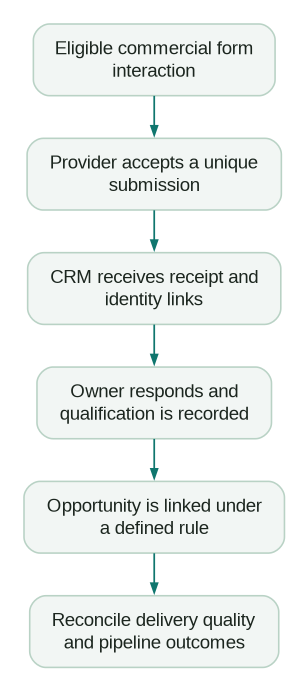
Read diagram as text
- Observe an eligible commercial request to The receiving service confirms valid acceptance?.
- The receiving service confirms valid acceptance? to Record the failure without creating an accepted conversion: No.
- The receiving service confirms valid acceptance? to Preserve one durable submission receipt and safe source context: Yes.
- Preserve one durable submission receipt and safe source context to The CRM received the receipt and assigned accountable ownership?.
- The CRM received the receipt and assigned accountable ownership? to Repair delivery identity or routing with the same occurrence ID: No.
- Repair delivery identity or routing with the same occurrence ID to The CRM received the receipt and assigned accountable ownership?.
- The CRM received the receipt and assigned accountable ownership? to Record response and qualification as separate dated outcomes: Yes.
- Record response and qualification as separate dated outcomes to A qualified opportunity has a supported attribution association?.
- A qualified opportunity has a supported attribution association? to Retain submission history without claiming sourced pipeline: No.
- A qualified opportunity has a supported attribution association? to Count each opportunity once and reconcile its allocated value: Yes
Which checks should pass before the form goes live?
Trace one accepted request through the complete operating path and exercise failure cases independently. The local adapter tests cover its own branches; they do not establish that a real provider callback, consent manager or CRM integration works. When that journey feeds a dedicated attribution platform, use the B2B attribution comparison to check CRM coverage and reporting scope before choosing the subscription.
Checklist
- Invalid input and failed service responses produce no accepted-submission event.
- A successful request produces one operational receipt with a stable occurrence ID.
- A repeated callback or delivery retry does not create a second occurrence.
- A genuine second request from an existing contact remains visible as new activity.
- Multiple embeds and multi-step navigation do not create false completions.
- Denied analytics collection does not prevent the form or CRM handoff from working.
- Outgoing analytics payloads and URLs contain only approved measurement data.
- One test request can be traced through delivery, ownership, qualification and opportunity association without multiplying value.
Keep the test receipt and expected outcomes with the implementation record. Re-run the relevant cases when the form editor, consent setup, routing logic or CRM mapping changes. The most useful report is the one that can identify exactly where a real request stopped progressing.
Want a second pair of eyes on your stack? Get the $99 martech audit. For implementation, request a tracking scope covering the form provider, CRM handoff, qualification rules and acceptance evidence.
Keep reading
Browse all Tracking & Attribution guides
 Tracking & Attribution
Meta Conversions API setup, with deduplication done correctly
Implement Meta Conversions API with reliable purchase events, matching and deduplication. Compare setup routes and validate browser and server records.
Jafrin Akter AloLast updated 10 min read
 Product Analytics
AppsFlyer Implementation Mistakes: SDK Start, ATT, Postbacks and Revenue
Fix the AppsFlyer setup errors that distort ROAS: SDK start order, ATT waits, missing SKAN and AdAttributionKit postbacks, duplicate revenue and deep links.
Jafrin Akter AloLast updated 16 min read
 Tracking & Attribution
Google Ads conversion diagnostics: "setup is incomplete" and "needs attention" explained
Diagnose incomplete setup, inactive tags and enhanced-conversion alerts. Verify campaign goals, event delivery, offline uploads and the 2026 API changes.
Jafrin Akter AloLast updated 15 min read
Analytics & tracking
See the implementation scope, deliverables and acceptance checks.
Questions people ask
Should a booked meeting count as the same event as a form submission?
Keep them separate when they represent separate commitments. A request can be accepted before a meeting is scheduled, and a scheduled meeting can later be cancelled or missed. Preserve the link between those occurrences and their timestamps. Choose the outcome that matches the campaign's promise, then report scheduling and attendance as later stages rather than silently upgrading every submitted request into a meeting.
How should a partner-hosted form enter our funnel?
Agree on the receipt identifier, accepted timestamp, field mapping and permitted data exchange before including it. Label the partner and form source explicitly, then reconcile delivered receipts with the partner's accepted population. Browser acquisition context may be unavailable; keep it unknown rather than copying a campaign assumption onto every lead. Apply your qualification and account-deduplication rules after the handoff is verified.
What should survive a change of form provider?
Preserve the historical provider and submission identifiers, definitions, accepted timestamps and CRM relationships. Give the new provider a distinct source namespace so reused identifiers cannot collide with old receipts. Compare a controlled set of successful and failed submissions before cutover, and monitor any period when both providers remain active. A new form ID should not silently erase the old cohort's history.
How should one enquiry linked to two opportunities be reported?
Report the enquiry once, the account once under the account-cohort rule, and each distinct opportunity once in the opportunity ledger. Separate the rate of accounts creating any opportunity from the count or value of opportunities created. If allocating pipeline back to enquiries, define the relationship and weights for each opportunity independently. Two valid deals do not turn one accepted form occurrence into two submissions.
Can translated versions of a form share one performance report?
Yes, when their intent, accepted outcome and observation rules are comparable. Retain language, placement and provider identifiers so differences remain diagnosable. Compare like-for-like populations and note material changes in offer, required fields or sales coverage. A combined total can support operations, while segmented rates show whether one version fails validation or attracts a different mix of accounts. Avoid interpreting language alone as the cause.
Sources

Written by
Jafrin Akter AloData Engineer and Co-founder at Martechdevs and Growth and Analytics Partners
Jafrin writes practical guides to marketing technology, customer data, analytics and AI workflows. Martechdevs is a Growth and Analytics Partners company.