OpenAI Ads Conversion Tracking: Set Up the ChatGPT Ads Pixel and Conversions API
Data Engineer and Co-founder at Martechdevs and Growth and Analytics Partners
Last updated 14 min read
OpenAI ads conversion tracking uses a browser Measurement Pixel, a server Conversions API, or both with shared event IDs. A conversion event setting selects the outcome, and the campaign must use that setting for goal reporting. Start with one confirmed purchase or lead, preserve its permitted attribution references and verify receipt, deduplication and reporting separately before using the numbers to change budgets.
Which access and integration route do you need?
You need an eligible advertising account and access to its conversion resources; a normal OpenAI developer API key is not the Advertiser API credential described here. Self-service availability depends on the country of the legal entity advertising and being billed. Check the current Ads Manager availability list before planning a launch.
| Route | Use it for | Implementation owner |
|---|---|---|
| Measurement Pixel | Browser actions and permitted landing-page references | Website and consent implementation |
| Conversions API | Backend-confirmed orders, leads or other outcomes | Server event and retry pipeline |
| Both | Browser coverage plus confirmed server outcomes | One shared event contract and deduplication policy |
A server-only integration still needs a Pixel ID identifying its data source; it does not require the browser SDK. When both routes serve the same website, reuse the source. OpenAI's conversion setup guide.
For conversion tracking set up and tested with your developers, the first deliverable should be an event contract: what happened, which system confirms it, which ID identifies it and what evidence proves it arrived once. The offline conversion guide applies that same discipline to later CRM outcomes on other advertising platforms.
What API permissions should you confirm first?
OpenAI documents Advertiser API key creation in Ads Manager's Settings. Verify the account before creating resources:
curl "https://api.ads.openai.com/v1/ad_account" \
  -H "Authorization: Bearer ${OPENAI_ADS_API_KEY}"
Compare the returned account, currency and timezone with your implementation note. Advertiser API overview.
Pixel management, Conversions API key creation and conversion bidding have separate account enablement requirements. OpenAI's partner guide identifies permission-related 403 responses and 404 Not found from disabled conversion setup endpoints. Investigate access with the account or partner representative before changing a documented URL. A valid credential does not establish entitlement to every operation. API partner prerequisites.
How do Pixel IDs, source IDs and API keys differ?
The Pixel ID identifies event delivery; the source's separate id selects that source in a conversion setting. Keep both in your configuration record.
| Value | Used for | Where it belongs |
|---|---|---|
pixel_id | SDK initialization, server events, recent-event monitoring | Browser configuration and server configuration |
Source id | source_ids in a conversion event setting | Setup workflow |
| Advertiser API key | Account, source, key, setting and campaign management | Server-side secret storage |
| Conversions API key | Event delivery to bzr.openai.com | Server-side secret storage |
The browser Pixel needs no API key. Follow this setup sequence using Ads Manager or the API operations available to your account:
- Retrieve existing sources before creating another one for the same website.
- Save the chosen source's Pixel ID and source ID separately.
- Provision a Conversions API key if the backend will send events.
- Define the event contract and configure the matching conversion setting.
- Attach the intended setting to the campaign before evaluating goal results.
For enabled API accounts, source creation uses POST /v1/conversions/pixels; key creation uses POST /v1/conversions/api_keys, both on api.ads.openai.com with the Advertiser key. Source and key API reference.
A purchase setting can use this documented shape:
{
  "name": "Confirmed purchases",
  "event_type": "order_created",
  "attribution_window_days": 30,
  "source_ids": ["REPLACE_WITH_SOURCE_ID"]
}
Send it to POST https://api.ads.openai.com/v1/conversions/event_settings with the Advertiser key. The placeholder must be the source id, not its Pixel ID. Save the returned setting ID. For an existing campaign, retrieving its configuration before updating conversion_event_setting_ids matters because that update replaces the entire list. Conversion settings and campaign attachment.
How do you install the Pixel through Google Tag Manager?
Use a Custom HTML tag for the documented Pixel snippet, preserve its initialization order and connect consent changes before sending events. Google documents Custom HTML for tags without a suitable built-in template; OpenAI explicitly supports deployment through a tag manager that loads the Pixel reliably. Google Custom HTML tags, OpenAI's deployment guidance.
The following adapts OpenAI's loader for a site where measurement requires consent. Replace the Pixel ID and keep this base tag separate from outcome-event tags:
<script>
(function (w, d, s, u) {
  if (w.oaiq) return;
  var q = function () { q.q.push(arguments); };
  q.q = [];
  w.oaiq = q;
  var js = d.createElement(s);
  js.async = true;
  js.src = u;
  var first = d.getElementsByTagName(s)[0];
  first.parentNode.insertBefore(js, first);
})(window, document, "script",
   "https://bzrcdn.openai.com/sdk/oaiq.min.js");

oaiq("consent", false);
oaiq("init", { pixelId: "REPLACE_WITH_PIXEL_ID", debug: true });
</script>
Fire the base tag at the earliest point allowed by your consent design, before dependent event calls. If your tag manager already blocks the whole SDK pending consent, document that path and test it; do not accidentally install a second copy directly on the site.
How should consent updates reach the Pixel?
Where consent is required, set false before init, then call oaiq("consent", true) after permission is granted. The SDK otherwise defaults to consent being true unless it finds a stored denial. Blocked events are not replayed after approval, and setting false removes its attribution cookies. Pixel consent controls.
Your consent manager should provide both the initial state and later changes. In GTM, test the base tag, consent update and outcome tag in that order. A late approval must not cause an old purchase to be resent as a newly completed purchase. Decide which subsequent events may be measured, using the actual business event time and permission state.
Which CSP entries matter?
Merge the SDK's required hosts into the existing policy rather than replacing the site's policy. OpenAI documents bzrcdn.openai.com in script-src and connect-src, and bzr.openai.com in connect-src and img-src. Use the site's nonce or hash mechanism for the inline loader. Pixel CSP guidance.
For a page that cannot run JavaScript, OpenAI documents an image-tag integration sending one event per request. Render it only under the applicable measurement permission; it does not provide the same browser-SDK behavior automatically.
Which event names and data shapes should you use?
Use a standard event that describes the confirmed action and its required data shape. OpenAI currently lists twelve standard names plus the custom event route:
| Event family | Names | data.type |
|---|---|---|
| Web content and commerce | page_viewed, contents_viewed, items_added, checkout_started, order_created | contents |
| Customer actions | lead_created, registration_completed, appointment_scheduled | customer_action |
| App lifecycle, server-only | app_installed, app_opened | customer_action |
| Subscription lifecycle | trial_started, subscription_created | plan_enrollment |
| Other defined actions | custom, with custom_event_name | custom |
App lifecycle events require CAPI with action_source: "mobile_app"; the JavaScript Pixel does not support them. Android GAID is supported, while IDFA is not. OpenAI's CAPI guide says native mobile SDK setup and mobile data sources are not currently supported. Supported events.
For a hypothetical SaaS trial, send trial_started only after the application confirms that the trial exists:
oaiq("measure", "trial_started", {
  type: "plan_enrollment",
  plan_id: "pro_trial"
}, { event_id: "trial_12345" });
For a hypothetical store order worth USD 89.00:
oaiq("measure", "order_created", {
  type: "contents",
  amount: 8900,
  currency: "USD"
}, { event_id: "order_12345" });
Amounts are integers in the currency's standard minor unit, and amount requires currency. Thus 8900 means USD 89.00, but JPY 8,900. An item's amount is its per-unit price; event-level amount is the complete event value. Two units at USD 44.50 use item amount 4450, quantity 2 and event amount 8900, assuming no other adjustments. Amount semantics.
A button click that starts payment is not order_created. Feed the confirmation page from the backend's order result so the browser and server use the same ID, value and currency. Keep test orders distinguishable from business reporting.
For custom events, pass event name custom, data type custom and the descriptive name in the fourth argument's custom_event_name. Use one lowercase name consistently. The documented syntax permits 1 to 64 letters, digits, underscores or hyphens, starting and ending with a letter or digit; standard names are reserved. CAPI normalizes custom names to lowercase. Match the setting to that name. Naming guidance, API normalization.
How do you send a backend-confirmed order?
Build the server event from the confirmed order record, preserve its original timestamp and send it with the Conversions API key. The endpoint is POST https://bzr.openai.com/v1/events?pid=PIXEL_ID.
Batches allow 1,000 events and fail as a whole. Use integer Unix milliseconds within seven days past or ten minutes future, a web source_url, and validate_only: true for unsaved validation. Conversions API reference.
This JavaScript example builds a validation-only batch from your order record. Use an ISO timestamp with an explicit timezone for confirmedAt. Its amountMinor must already use the confirmed currency's minor units; it deliberately avoids converting decimal display text.
Configure the allowlist with your real, stable confirmation-page URLs. Keep customer identifiers and tokens out of the path; the builder strips query strings and fragments and rejects URL credentials or unapproved pages. Do not substitute an invented page when the actual route fails this check. Resolve the application mapping first. Set measurementAllowed only after the server checks the applicable measurement permission for this action, and use opaque internal order IDs.
const allowedSourcePages = new Set([
  "https://shop.example.com/checkout/confirmation"
]);

function buildOrderBatch(order, refs = {}, measurementAllowed = false,
                         nowMs = Date.now()) {
  if (measurementAllowed !== true) {
    throw new Error("Measurement is not permitted for this action");
  }
  const timestampMs = Date.parse(order.confirmedAt);
  const ageMs = nowMs - timestampMs;
  if (!order.id || !Number.isSafeInteger(order.amountMinor) ||
      !Number.isFinite(timestampMs) ||
      ageMs > 7 * 24 * 60 * 60 * 1000 || ageMs < -10 * 60 * 1000) {
    throw new Error("Invalid order identity, amount or event time");
  }
  const currency = String(order.currency).toUpperCase();
  if (!/^[A-Z]{3}$/.test(currency)) throw new Error("Invalid currency shape");
  const url = new URL(order.confirmationUrl);
  const sourcePage = url.origin + url.pathname;
  if (url.protocol !== "https:" || url.username || url.password ||
      !allowedSourcePages.has(sourcePage)) {
    throw new Error("Source page is not approved for measurement");
  }

  const event = {
    id: "order_" + order.id,
    type: "order_created",
    timestamp_ms: timestampMs,
    action_source: "web",
    source_url: sourcePage,
    data: { type: "contents", amount: order.amountMinor, currency }
  };
  if (refs.oppref) event.oppref = refs.oppref;
  if (refs.obref) event.user = { obref: refs.obref };
  return { validate_only: true, events: [event] };
}
The shape check is not a complete ISO currency validator. Validate supported currency and all optional fields against the API before production. Pass only permitted references in refs. The caller supplies the permission decision; this function does not collect consent or read browser cookies. The URL allowlist is our implementation safeguard, not an additional OpenAI API requirement.
Serialize the returned object to openai-events.json, then send from the server:
curl -X POST "https://bzr.openai.com/v1/events?pid=${PIXEL_ID}" \
  -H "Authorization: Bearer ${OPENAI_CONVERSIONS_API_KEY}" \
  -H "Content-Type: application/json" \
  --data-binary @openai-events.json
After validation passes, a real test requires validate_only: false and a newly confirmed test action. Keep a delivery record with event ID, action time, attempt time and result. Retry the same event with the same ID; repair failed payloads before repeating a batch.
The builder was checked with local synthetic fixtures, not an authenticated OpenAI delivery. Your account test still needs to prove acceptance, receipt and attribution separately.
How should you preserve click references and customer matching fields?
Forward the original oppref on the event and the permitted, unhashed browser reference in user.obref. CAPI does not capture the landing reference for you. Server attribution fields.
The Pixel requests 30 days for __oppref and 365 for __obref; browser limits can shorten them. Capturing any non-empty oppref resets its expiry; reading it does not. Storage lifetime differs from attribution windows. Pixel cookie behavior.
Capture these values with the permitted customer interaction and pass them to the backend's order or lead context. Stop forwarding them when consent is revoked. Do not invent a click reference for an order that has none. OpenAI recommends submitting eligible conversions even without oppref, so the delivery pipeline should not discard every order lacking a click ID.
How should customer identifiers be normalized?
Encode normalized values as UTF-8, hash with SHA-256, then send lowercase 64-character hexadecimal digests. The documented distinctions matter:
| Field | Normalization before hashing | Example result before hashing |
|---|---|---|
| Trim outer whitespace; lowercase | person@example.com | |
| Phone | Keep country code; remove specified formatting, leading plus and leading zeroes; require 8 to 15 digits | 14155552671 |
| External ID | Trim outer whitespace; preserve case | Customer_A17 |
| Names | Lowercase; remove whitespace and ASCII punctuation; preserve non-ASCII characters | O'Connor → oconnor; José → josé |
CAPI hash lists, such as emails_sha256, allow three values. Pixel uses singular fields; geography and obref remain unhashed. CAPI matching fields, Pixel user data.
Keep normalization tests beside the integration so a library change cannot silently lowercase a case-sensitive external ID or remove accents. The event matching guide explains that field-mapping discipline; Meta's numerical quality score is not an OpenAI score.
Is automatic advanced matching enabled by default?
OpenAI's current partner setup guide says web pixels created through the Ads API automatically use automatic advanced matching. That establishes the API creation route, not a universal default for every existing pixel or an undocumented Ads Manager toggle. API-created pixel behavior.
Review the actual pixel configuration and consent design before relying on it. The documented feature detects supported customer information and hashes it in the browser; it does not require manually passing the same fields. Keep the manual mapping and automatic behavior distinguishable during testing so you can explain which data was sent.
How do you prevent browser and server double counting?
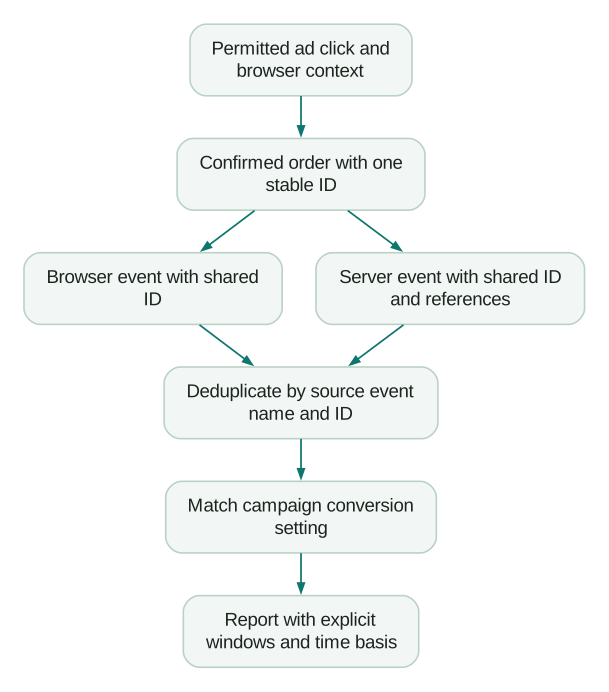
Match Pixel ID, event name and ID across copies: Pixel event_id maps to CAPI id. Custom names must agree too. OpenAI keeps the first matching event. Deduplication contract.
For the illustrative order above, both routes send order_12345, order_created and USD 89.00. A browser retry must not generate order_12345_retry2; that changes the identity and defeats the intended protection. A different order needs a different ID even if its value and customer match.
The first-arrival rule also means a second payload should not be treated as a correction mechanism. Populate the browser event from confirmed backend data, and test inconsistent-value cases before launch. The Meta CAPI guide uses a similar shared-ID principle, but its vendor-specific fields and processing behavior remain separate.
Should you use server-side Tag Manager or the application backend?
Use the backend that confirms the outcome when it can maintain event delivery and retries cleanly. A custom server-side Tag Manager implementation is another option, but its request mapping, secrets and failure handling become code your team owns.
This guide's Custom HTML and backend routes do not depend on an official GTM template. The official sources checked document those integration primitives; no first-party server-side GTM client or template is assumed. For the surrounding architecture, use the server-side GTM setup sequence.
Keep the event-delivery key on the server. A server container should preserve the original event ID, event time and available references rather than generating new values at receipt. Prove the JSON with validation-only requests before adding retries or campaign-scale traffic.
How do you prove an event arrived and became a campaign goal?
Verify schema, recent receipt, setting match and attributed reporting as separate stages. A validation-only response does not save an event and will not appear in monitoring.
For an enabled account, use the Advertiser key to check recent events:
curl -G "https://api.ads.openai.com/v1/conversions/events" \
  -H "Authorization: Bearer ${OPENAI_ADS_API_KEY}" \
  --data-urlencode "pid=${PIXEL_ID}" \
  --data-urlencode "limit=50"
The endpoint samples roughly the last fifteen minutes; browser events use pixel_sdk, server events server_to_server. Compare event type, source and channel with the test. Use Insights for historical attributed results. Recent-event troubleshooting.
| Test | Expected evidence | Failure to investigate |
|---|---|---|
| Validation-only batch | Schema accepted; no saved event | Invalid shape, field or timestamp |
| One real browser action | Correct source and pixel_sdk event | Initialization, consent, CSP or trigger order |
| One real server action | Correct source and server_to_server event | Wrong key/host, rejected batch or delivery failure |
| Duplicate copies/retry | One logical outcome under the shared key | Changed ID, source or event name |
| Eligible campaign outcome | Correct attached setting and later attributed result | Wrong source/setting, timing, access or attribution eligibility |
A conversion-optimized campaign needs exactly one active standard event setting when created, and the campaign objective and selected optimization event cannot later be changed. Custom events can be measured but cannot serve as that optimization event. Confirm account enablement before building around conversion bidding. Conversion optimization setup.
Choose that event before launching the campaign. A high-volume page view is easier to collect than a qualified lead, but it may teach the campaign to pursue the wrong business result.
How should you compare OpenAI attribution with GA4 and Meta?
Compare one defined business outcome with explicit reporting windows, date range and timezone. Do not add several platforms' attributed totals and call the sum unique orders or incremental sales.
OpenAI's current reporting documentation specifies click windows of 7, 14 or 30 days and view windows of 0 or 1 day; API defaults are 30 and 1, with ad-event time. Eligible clicks take precedence over views. Setting the view window to 0 gives a click-only reporting comparison. These reporting choices do not change campaign optimization. Reporting and attribution.
There is a documentation mismatch to account for. The current canonical Help Center page says Ads Manager's Conversions total includes clicks plus eligible views when its view window is 1 Day. The Pixel/CAPI pages still describe a click-only main column. Follow the current report's selected windows and inspect the components instead of assuming that every UI-versus-API difference is caused by views. Current Ads Manager reporting.
For a hypothetical report with three click-through and two view-through goal conversions, the combined total is five; a view window of zero yields three. Also match the reporting clock: ad-event time groups by the credited interaction date, while conversion time groups by the action date. A purchase today credited to yesterday's click can move between daily rows without changing the underlying order.
Allow processing time: OpenAI's Help Center says attributed conversions can take 24 to 48 hours to appear. Recent-event monitoring is not a real-time attribution report. Use why platform conversion counts disagree to structure the reconciliation, and measure unpaid ChatGPT referrals in GA4 separately from paid ChatGPT ads.
What should pass before the tracking goes live?
Launch when the confirmed business outcome, permissions, delivery identity and report interpretation have passed a recorded test:
Checklist
- Account availability and required API/resource permissions confirmed.
- Pixel ID, source ID, Advertiser key and event-delivery key distinguished.
- One reused data source for browser and server copies of the website outcome.
- Consent state established before initialization and updated correctly.
- CSP, base tag and event tags tested in their actual order.
- Standard event names and matching data shapes verified.
- Integer minor-unit values and currencies reconciled with the source record.
- Browser, server and retry copies retain the same logical event ID.
- Original permitted references preserved without invented identifiers.
- Server permission gate and approved non-sensitive source pages tested.
- Hash normalization and optional field limits tested locally.
- Validation-only checks followed by a separate real test event.
- Conversion setting matched to the source and attached to the intended campaign.
- Report windows, timezone, time basis and processing delay recorded.
Bring the first failing test to a free martech audit, or request a conversion-tracking implementation quote for the website, backend and reporting work required.
Questions people ask
Is there an OpenAI Ads Conversions API?
Yes. OpenAI documents server event delivery using a dedicated Conversions API key and a Pixel ID identifying the source. Confirm the account's access before using setup endpoints. A working event request is only the delivery stage; the event must also match the intended campaign setting and attribution conditions to appear as a goal conversion.
What is oppref in ChatGPT ads?
oppref is an opaque reference supplied with an eligible ChatGPT ad click. Keep a synthetic test that follows this reference from the landing page to the confirmed order and server payload. If it disappears, identify the redirect or state transfer responsible. Do not fill the gap with a different platform's identifier or a made-up value.
What should the developer hand over with an OpenAI Ads tracking integration?
Keep an event contract, source and setting IDs, permission logic, URL allowlist, retry policy and test evidence in the handover. Record who owns credentials and how access is changed without putting key values in the document. Include the exact report settings used for acceptance so the next operator can reproduce the result.
Can I optimize a campaign for a custom event?
OpenAI currently requires an active standard event for conversion-optimized campaigns; custom events remain available for measurement. Choose the standard outcome and confirm account enablement before campaign creation, because the objective and selected optimization event cannot later be changed. Keep a test plan for the actual business action, not just the event's display name.
How should we handle a backlog of failed server events?
Prioritize diagnosis before repeatedly resending the queue. Group failures by validation, permission and temporary delivery errors, then check the original action times against the documented acceptance window. Preserve each event’s ID and time when retrying. Quarantine expired or unfixable records with a reason, and report the resulting coverage gap instead of rewriting old outcomes as new.
Sources
- OpenAI: Conversion setup API reference. Accessed 17 October 2026.
- OpenAI: Ads troubleshooting. Accessed 17 October 2026.
- OpenAI: Ads Manager availability. Accessed 17 October 2026.
- OpenAI: Conversion tracking. Accessed 17 October 2026.
- OpenAI: Advertiser API overview. Accessed 17 October 2026.
- OpenAI: API partner setup. Accessed 17 October 2026.
- Google: Custom HTML tags. Accessed 17 October 2026.
- OpenAI: Measurement Pixel. Accessed 17 October 2026.
- OpenAI: Image tag. Accessed 17 October 2026.
- OpenAI: Supported events. Accessed 17 October 2026.
- OpenAI: Conversions API. Accessed 17 October 2026.
- OpenAI: Reporting. Accessed 17 October 2026.
- OpenAI: Measure results in Ads Manager. Accessed 17 October 2026.

Written by
Jafrin Akter AloData Engineer and Co-founder at Martechdevs and Growth and Analytics Partners
Jafrin writes practical guides to marketing technology, customer data, analytics and AI workflows. Martechdevs is a Growth and Analytics Partners company.