
GCLID Tracking: Capture the Click ID and Keep It Through Your CRM
A GCLID is Google's click identifier, carried in an ad's landing-page URL so later outcomes can be connected to the advertising interaction. To use it in HubSpot or Salesforce, preserve its exact value through redirects, permitted collection, form submission and CRM changes. Then send the real business outcome through a supported conversion-import route. A populated CRM field proves capture; it does not prove Google attributed the sale.
On this page
The most useful starting point is a single lead you can follow across the whole journey. Compare the identifier arriving at the site, the value submitted with the form, the value retained in the CRM and the value selected for the conversion upload. Repair the first boundary where the evidence changes.
This guide covers that preservation work. The offline conversion import guide covers choosing the upload route, conversion actions and delivery controls. If several teams own the handoffs, our Google Ads conversion tracking implementation brings the website, CRM and advertising checks into one scope.
What does a GCLID tell you, and what does it not tell you?
A GCLID provides an advertising identifier for measurement; it is not a readable campaign name, a contact identifier or proof that a visitor became a customer.
Google's auto-tagging adds a gclid parameter to eligible destination URLs and requires redirects to preserve it. Google also describes cases where the same GCLID can accompany more than one click. Do not make it the primary key of your lead or transaction table. Google's auto-tagging explanation.
Keep three identities separate:
| Identity | Question it answers | Example in your system |
|---|---|---|
| Advertising identifier | Which advertising interaction can this outcome match? | The captured GCLID |
| Submission identifier | Which specific request did the person send? | A server-issued demo-request ID |
| Business outcome identifier | Which sale or qualification are we reporting? | An opportunity milestone or order ID |
One contact can submit twice, qualify later and buy more than once. Joining every outcome to the contact's most recently overwritten GCLID can give an old opportunity the attribution context of a new visit. Keep the acquisition evidence attached to the relevant submission or outcome, even if the CRM also exposes a convenient latest-click property.
UTM parameters remain useful for readable campaign reporting, but they cannot be converted into a valid GCLID. Apply the UTM naming convention alongside click-ID capture, without asking either system to invent the other's data.
How should you handle GCLID, GBRAID and WBRAID?
Keep each identifier under its original name and use only the identifiers supported by the destination you have chosen.
Google introduced GBRAID and WBRAID for affected iOS measurement flows. Its Analytics guidance describes GBRAID for web-to-app measurement and WBRAID for app-to-web measurement. Their presence depends on the journey and privacy conditions, so a missing GCLID does not establish that auto-tagging is broken. Google's iOS measurement guidance.
| Observed parameter | Collection rule | Destination check |
|---|---|---|
gclid | Preserve the exact value and case | Confirm the import's GCLID mapping |
gbraid | Store separately from GCLID | Confirm support for this identifier and event route |
wbraid | Store separately from both other identifiers | Confirm support for this identifier and event route |
| None of these | Record the absence without filling a placeholder | Evaluate a supported alternative matching route |
The Data Manager API exposes separate gclid, gbraid and wbraid fields inside adIdentifiers. That schema is not evidence that every CRM's native connector accepts all three. Verify the connector rather than renaming one value to fit its only available field. Data Manager event schema.
For browser-specific losses, use the iOS click-ID checks. They distinguish a value missing before your site receives the request from one your own redirect or collection code drops.
What evidence should survive the four handoffs?
Retain a small acquisition record that connects the observed click context to a submission and its later outcome.
Agree on the record with the tracking, website and CRM owners before adding another tag. This is part of tracking and conversion implementation, because a browser-only fix cannot resolve a CRM mapping that discards the field.
| Handoff | Evidence to compare | Owner of a mismatch |
|---|---|---|
| Entry URL to final landing page | Parameter names and exact values before and after redirects | Website or routing owner |
| Landing context to submitted form | Permitted captured context and actual outgoing form fields | Form implementation owner |
| Submission to CRM outcome | Submission ID, stored identifier and lead-to-contact or opportunity mapping | CRM integration owner |
| CRM outcome to import result | Selected identifier, outcome ID, event time and delivery diagnostics | Conversion pipeline owner |
Use restricted operational records for this work. A general analytics event does not need the raw GCLID, email address and full landing URL merely to count a missing mapping. Your operational trace can retain the necessary identifiers under controlled access while aggregate monitoring records statuses and counts.
A useful record includes the identifier type and value, capture time, submission ID, permitted-use state, chosen acquisition policy and the CRM record associated with the submission. Keep capture time separate from conversion time. The first tells you when the site observed context; the second tells Google when the reported business event occurred.
Choose whether your form should use the first eligible paid click, the latest eligible paid click or a separate record for every submission. Document the choice. A field called gclid cannot explain an overwrite policy by itself.
How do you capture the identifier without silently changing it?
Parse the landing URL once, reject ambiguous input and preserve the parsed value rather than normalizing it as ordinary campaign text.
- Confirm auto-tagging in the actual advertising account and identify the landing routes used by ads.
- Test redirects, locale changes and canonical-host redirects with a synthetic marker that is excluded from production conversion delivery.
- Run collection through the site's approved permission logic before persisting identifiers or forwarding them.
- Read the final URL before application navigation removes its query string, where that collection is permitted.
- Attach the selected context to the particular form submission and inspect the actual outgoing payload.
Google explicitly identifies GCLID as case sensitive. Lowercasing it, truncating it to a convenient CRM field length or decoding it repeatedly can break the identifier. GCLID collection requirements.
This small JavaScript helper illustrates parsing only. It performs no storage or network request, and it does not decide whether collection is permitted. Call it from the approved collection path. The rejection of whitespace and repeated parameters is an application rule for investigating malformed input, not a complete specification of Google's identifier format.
function readAdClickIds(href) {
  let url;
  try {
    url = new URL(href);
  } catch {
    return { state: "invalid_url" };
  }

  const identifiers = {};
  for (const name of ["gclid", "gbraid", "wbraid"]) {
    const values = url.searchParams.getAll(name);
    if (values.length > 1) {
      return { state: "ambiguous", field: name };
    }
    if (values.length === 0) continue;
    const value = values[0];
    if (!value || /[\s\u0000-\u001f\u007f]/u.test(value)) {
      return { state: "invalid_value", field: name };
    }
    identifiers[name] = value;
  }

  return Object.keys(identifiers).length
    ? { state: "observed", identifiers }
    : { state: "absent" };
}
getAll() exposes repeated values instead of quietly choosing one. URL parsing already handles encoded query values; do not add another decoding pass to the returned string. MDN's URLSearchParams reference.
Only an observed result should reach the subsequent selection logic. An absent result must not automatically blank a previously selected, still-permitted value. An ambiguous result belongs in investigation rather than a guess about which click to keep. The function also does not prove the URL came from Google: keep synthetic markers, forged parameters and other ineligible traffic out of production uploads.
How do consent, storage and embedded forms change the implementation?
Treat permission, persistence and form delivery as separate controls, and test the combinations your visitors actually use.
Custom capture code needs its own integration with the site's consent policy. Adding a consent-management platform or changing Google tag consent settings does not make every custom local-storage write follow the same policy. Google's collection instructions specifically tell implementers to observe applicable cookie-consent requirements. Have the responsible privacy owner define the collection, storage, sharing and deletion behavior.
Persist only what the approved design needs, with an explicit lifetime and a documented overwrite rule. A configured lifetime is an upper bound, not a promise that a browser will retain the record. Storage may be unavailable, cleared or separated between origins. If a storage operation fails, the form should still work and the attribution outcome should remain explicitly unavailable.
For an embedded form, a value on the parent page is not evidence that the form submitted it. Cross-origin scripts have restricted access to another document's contents. Use the form provider's supported API or message contract to transfer the permitted fields; do not build a solution around reaching into a third-party iframe's DOM. Browser same-origin policy.
Test the actual lifecycle of the form. A form can load after the page's initial load event, rerender when its language changes or replace its fields after a validation error. Populate fields through supported callbacks and verify the outgoing submission after those transitions. Do not regard a value visible in developer tools before a rerender as proof of delivery.
How should the identifier reach HubSpot or Salesforce?
Map click context into the fields your chosen integration actually reads, then verify the mapping after contact updates and lead conversion.
HubSpot: distinguish native capture from custom properties
HubSpot has a default Google ad click ID contact property that it populates from Google's identifier. First inspect that property and the native Ads integration before introducing a second field with a similar label. HubSpot's default contact properties.
If your custom form needs a separate acquisition record, define its internal property name and the intended destination explicitly. An illustrative property named ads_gclid_capture is your own field; its existence does not make HubSpot's native Google Ads sync read it. Either verify the documented native path or map the custom field through the supported import route you operate.
For HubSpot forms, hidden fields can set properties from supplied values. HubSpot warns that returning-visitor prepopulation can overwrite a hidden field's value, depending on the property type. Test a new visitor and an existing contact, not only a clean browser. HubSpot hidden-field behavior.
For a custom submission backend, use the form's actual internal field names and keep browser context separate from business fields. The HubSpot Forms API guide covers payload construction, consent options, timeouts and verifying downstream routing. Do not manufacture a tracking cookie or overwrite system-managed properties to make one test appear successful.
Salesforce: test the field after lead conversion
Create or reuse appropriately sized text fields on the relevant objects, then configure the lead conversion mapping deliberately. The field API names and the Web-to-Lead form's generated field identifiers are separate contracts; copy neither from another Salesforce organization.
Salesforce lets administrators map custom lead fields to target fields, with type and length restrictions. Its guidance says target fields must be at least as long as their source and warns about truncation in certain mappings. Salesforce custom lead mapping.
Native lead conversion fills empty mapped Account and Contact fields but does not overwrite populated fields on existing records. A Contact can therefore retain an earlier click ID even when the newly converted Lead has a different one. Preserve the submission or opportunity's selected acquisition record separately, and inspect any custom automation that changes the native behavior. Salesforce considerations for converting leads.
For the complete transition, use the Salesforce Lead conversion guide to check field mappings, campaign evidence and reporting alongside the stored click identifier.
Run these checks on both a new-contact conversion and a conversion into an existing contact:
- Submit a controlled lead with the expected click context and submission ID.
- Read the stored Lead fields and confirm exact values.
- Convert through the process sales actually uses, including the intended account and opportunity path.
- Read the destination records and identify which object the conversion export uses.
- Verify that a later visit or another contact's activity cannot silently replace the opportunity's selected acquisition record.
If an opportunity can involve several contacts or submissions, a single field on the Account is too coarse to establish which interaction belongs to that outcome. Preserve the relationship your measurement policy requires rather than spreading one contact's latest value across the whole company.
When should you send the CRM outcome back to Google Ads?
Send the defined business event promptly through the chosen supported route, with its real occurrence time and the acquisition record selected for that event.
Do not send a qualified-lead conversion just because a GCLID field became populated. Qualification, sale and collection are different events. Decide which CRM state transition represents the conversion and how retries preserve the same business occurrence.
Google's Data Manager API supports offline conversions and enhanced conversions for leads. Native connectors have their own account and mapping requirements. Data Manager event types.
For HubSpot's native route, check the conversion-event eligibility and account structure separately from capture. HubSpot documents an Enhanced Conversions limitation for Google Ads Manager accounts: an event can be created in HubSpot while the form data does not sync. A populated contact property is therefore insufficient acceptance evidence. HubSpot Google Ads conversion requirements.
Three different clocks can affect a record:
| Clock | What it controls | What to verify |
|---|---|---|
| Your retention policy | How long the acquisition record remains available for permitted use | Storage lifetime, deletion and withdrawal behavior |
| Google's import-age limit | Whether the outcome can still be imported against the interaction | Standard offline imports: 90 days; enhanced conversions for leads: 63 days |
| Connector retrieval window | Whether the source record is fetched in the current run | Initial backfill and subsequent-update behavior for that connector |
Google's import guidance gives the 90-day and 63-day limits relative to the associated last click. These are not guarantees that every stored identifier will match, and a conversion action's settings also matter. Offline-import timing guidance.
For example, Google describes HubSpot and Salesforce Data Manager connections as retrieving the previous 14 days on the first successful run, then changes reported since the last successful run. A record can be within the advertising age limit and still be outside the connector's initial retrieval window. Source-specific retrieval windows.
Keep the full retry, account and conversion-action checks in the offline import workflow. Once delivery is established, use Google Ads versus GA4 conversion reconciliation to investigate reporting differences rather than expecting the two interfaces to show identical totals.
How do you prove the GCLID survived end to end?
Prove each handoff with controlled tests, then distinguish transport coverage from actual attribution in production.
A synthetic marker can test your website, form and CRM plumbing. It cannot prove that Google recognizes a real ad interaction. Exclude synthetic markers from production exports and use authorized real records for destination attribution checks.
| Test | Expected evidence | Failure it catches |
|---|---|---|
| Direct landing with a mixed-case marker | Same parsed value in the submitted fields | Normalization or wrong field name |
| Marketing URL through redirects | Marker survives every intended redirect | Query string dropped by routing |
| Returning contact with an existing value | Documented first/latest/submission policy is followed | Hidden-field prepopulation or stale overwrite |
| No identifier on a later page | No accidental blank overwrite | Treating absence as a deletion instruction |
| Permission denied or withdrawn | Behavior matches the approved collection and sharing policy | A custom script bypassing the consent design |
| Embedded form or validation rerender | Actual outgoing request contains the selected permitted context | Fields populated before the final form exists |
| Lead converted into an existing contact | Correct outcome retains its selected record | Mapping only tested for newly created contacts |
| Delivery retried after a timeout | Same business occurrence, with diagnostic status retained | Duplicate events or an invented success state |
The diagnostic path keeps permission restrictions, malformed input and true absence separate. After a repair, repeat the affected checks before considering an upload. An expired outcome remains ineligible; correcting delivery never means changing its real occurrence time.
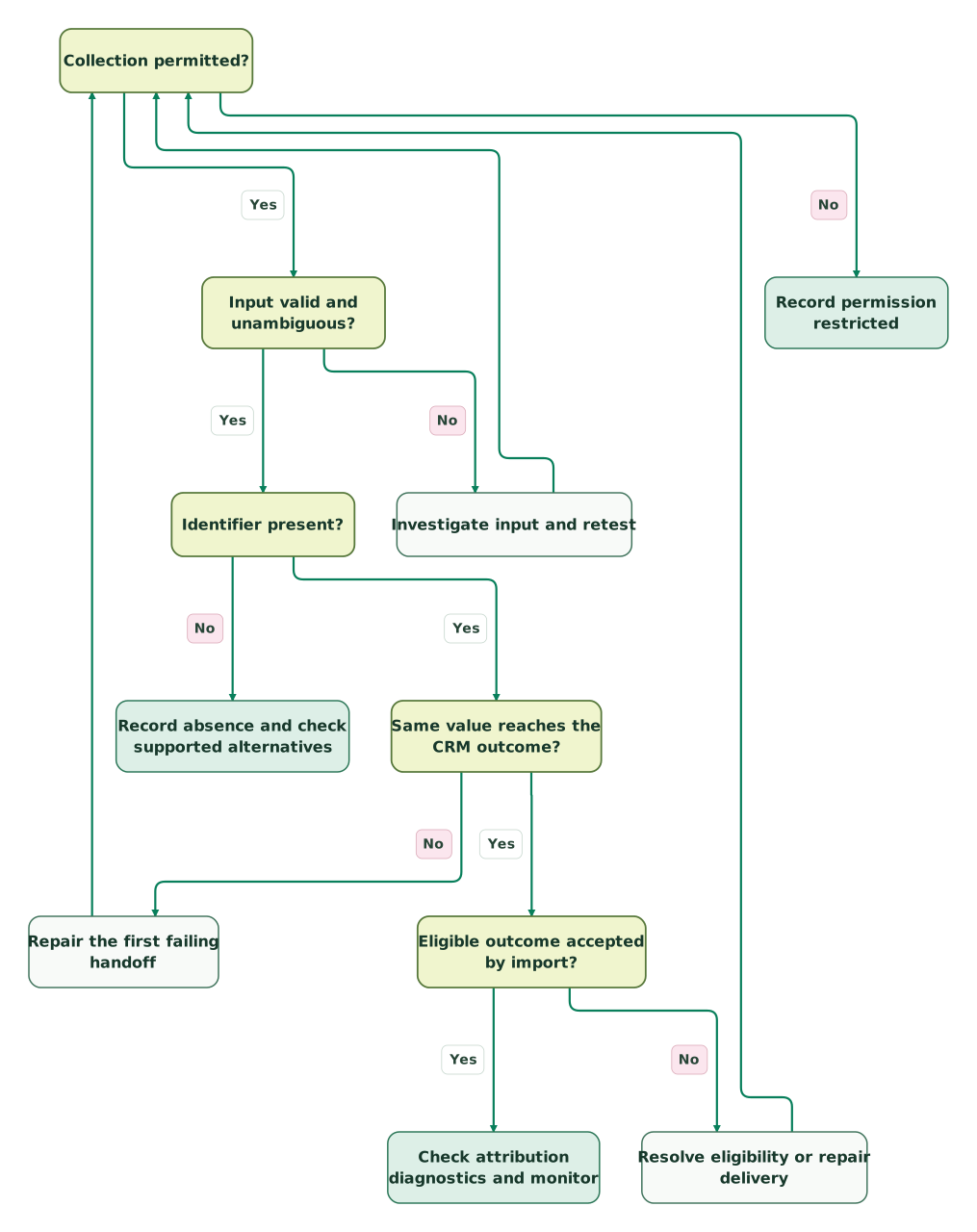
Read diagram as text
- Collection permitted? to Record permission restricted: No.
- Collection permitted? to Input valid and unambiguous?: Yes.
- Input valid and unambiguous? to Investigate input and retest: No.
- Investigate input and retest to Collection permitted?.
- Input valid and unambiguous? to Identifier present?: Yes.
- Identifier present? to Record absence and check supported alternatives: No.
- Identifier present? to Same value reaches the CRM outcome?: Yes.
- Same value reaches the CRM outcome? to Repair the first failing handoff: No.
- Repair the first failing handoff to Collection permitted?.
- Same value reaches the CRM outcome? to Eligible outcome accepted by import?: Yes.
- Eligible outcome accepted by import? to Resolve eligibility or repair delivery: No.
- Resolve eligibility or repair delivery to Collection permitted?.
- Eligible outcome accepted by import? to Check attribution diagnostics and monitor: Yes
Consider a hypothetical QA set with ten eligible submissions whose entry context contained a test marker. All ten reach the form payload, eight reach the intended CRM outcome and six enter the local export queue. Form-to-CRM preservation is 8/10, or 80%. CRM-to-export preservation is 6/8, or 75%. Overall preservation to the queue is 6/10, or 60%. None of these percentages measures Google's attribution rate.
The first repair belongs to the two records lost between form and CRM. The next belongs to the two retained in the CRM but excluded from the queue. Counting all ten forms as tracked would hide both losses; blaming the ad platform would send the investigation to the wrong boundary.
In production, report missing-at-entry, permission-restricted, malformed, lost-in-transit, outside-window, rejected and awaiting-attribution states separately. Preserve the denominator for each measure. Do not count visitors who never arrived with an eligible identifier as a failure of your hidden-field script.
What belongs in the release checklist?
- Ad destinations and redirects preserve supported identifiers where collection is permitted.
- Identifier type, exact case, capture time and submission ID remain distinct fields.
- Duplicate or malformed query values are investigated without guessed attribution.
- Permission, retention, withdrawal and unavailable-storage behavior have been tested.
- New and returning visitors follow the documented acquisition-selection policy.
- Embedded forms and rerendered forms deliver the actual intended payload.
- CRM conversion into new and existing records preserves the outcome's selected context.
- Synthetic test markers cannot enter production conversion uploads.
- Connector retrieval windows and import-age limits are checked independently.
- Upload status, attribution status and business outcomes have separate monitoring.
Use the tracking break map skill to record the first failing boundary and its owner. If you have incomplete attribution but no clear failure point, the $99 martech audit includes a written assessment and a one-hour specialist call. For an implementation covering capture, CRM mapping and conversion delivery, request a detailed Google Ads tracking scope.
Keep reading
Browse all Tracking & Attribution guides
 Tracking & Attribution
Offline conversion import: send qualified leads and revenue back to Google Ads and Meta
Send qualified leads and customer outcomes back to ad platforms. Design stable IDs, consent handling, upload monitoring and a controlled bidding rollout.
Jafrin Akter AloLast updated 15 min read
 Tracking & Attribution
HubSpot Forms API: Fix Missing Submissions, Consent and Attribution
Build and troubleshoot HubSpot form submissions with correct fields, cookie context, consent mapping, response handling, retries and a CRM delivery checklist.
Jafrin Akter AloLast updated 12 min read
 Tracking & Attribution
Google Ads conversion diagnostics: "setup is incomplete" and "needs attention" explained
Diagnose incomplete setup, inactive tags and enhanced-conversion alerts. Verify campaign goals, event delivery, offline uploads and the 2026 API changes.
Jafrin Akter AloLast updated 15 min read
Google Ads conversion tracking
See the implementation scope, deliverables and acceptance checks.
Questions people ask
Can a GCLID reveal the visitor's keyword or campaign by itself?
A GCLID is an opaque identifier, so you should not try to decode it into a campaign, keyword or person. Use authorized advertising reports and your configured integrations to retrieve the supported context. Keep readable UTM fields separately when useful, and retain the actual click identifier for the matching route that needs it.
Should a GCLID field be required on every lead form?
No. Visitors can arrive without a GCLID, including through non-ad channels or journeys using different measurement identifiers. Making the field mandatory can block legitimate leads or encourage placeholder values that cannot match anything. Validate required contact information separately, record attribution availability, and test the form successfully with no advertising identifier present.
Does adding GCLID to a URL create an attributable ad click?
No. A made-up parameter can test whether your own redirects, forms and CRM preserve a value, but it does not create a Google-recognized advertising interaction. Mark synthetic records clearly and exclude them from production uploads. Destination attribution checks require eligible real data and the correct account, action, timing and permission conditions.
Can the same click be associated with more than one business outcome?
Yes. One advertising interaction can precede a qualification and a later purchase, or multiple purchases. Keep a separate identifier and occurrence time for each legitimate business outcome, apply the intended conversion actions and counting settings, and make retries refer to the same occurrence. Never deduplicate your CRM's entire outcome history solely by GCLID.
Will storing a GCLID for 90 days guarantee that a sale is counted?
No. Your storage lifetime only describes how long your system intends to retain the record. Google applies import-age limits, conversion settings and matching requirements, while a connector can have a shorter retrieval window. Browser restrictions or deletion can remove local data sooner. Verify timely collection, eligible delivery and attribution separately instead of treating retention as a guarantee.
Sources
- Google Ads: About auto-tagging.
- Google Analytics: Updates to iOS campaign measurement.
- Google Ads: Set up offline conversions using GCLID.
- Google Data Manager: Event ingestion schema.
- Google Data Manager: Events overview.
- Google Ads: Guidelines for importing offline conversions.
- HubSpot: Default contact properties.
- HubSpot: Set property values with hidden form fields.
- HubSpot: Create and sync Google Ads conversion events.
- Salesforce: Mapping custom lead fields for conversion.
- MDN: URLSearchParams getAll.
- MDN: Same-origin policy.
- Salesforce: Considerations for converting leads.

Written by
Jafrin Akter AloData Engineer and Co-founder at Martechdevs and Growth and Analytics Partners
Jafrin writes practical guides to marketing technology, customer data, analytics and AI workflows. Martechdevs is a Growth and Analytics Partners company.