
Meta Conversions API setup, with deduplication done correctly
Data Engineer and Co-founder, martechdevs
Last updated 9 min read
Meta Conversions API sends events from your server, CRM or integration provider to Meta. Start by choosing one delivery owner, defining the business event and preserving the identifiers needed for matching. If the browser Pixel also sends that event, both copies need the same event name and event ID so Meta can recognise the overlap.
Last updated: 23 September 2026.
The difficult part is rarely sending an HTTP request. It is making sure a purchase reaches Meta once, represents a real purchase and carries information from the correct customer interaction.
A successful response does not prove that the event was matched, attributed or useful for optimisation. Treat those as separate checks.
Choose the route your team can maintain
Start with an existing platform integration
If your ecommerce platform or CRM already has a supported Meta integration, inspect its capabilities before building a second route. Establish which browser and server events it already sends, how it handles consent and which identifiers it uses.
An additional integration can quietly duplicate the same outcome. Keep an inventory covering theme code, plugins, GTM, native integrations and backend jobs.
Use server-side GTM when you need shared routing
A server container can receive an event and map it into the destination's required format. This is useful when several destinations share a collection layer. You still need a suitable Meta template or custom implementation, infrastructure ownership and verification of the outgoing request.
Do not infer that every community template is maintained or implements the latest parameter rules. Review its permissions, version and actual payload. The server-side tracking guide covers the wider architecture and costs.
Distinguish Conversions API Gateway from Signals Gateway
Meta describes Conversions API Gateway as a route for events from new or existing Meta Pixels to the Conversions API. Signals Gateway supports more flexible pipelines with different sources and destinations. They share underlying gateway components, but the required pipeline and operating responsibilities still need to be scoped. Meta's gateway product overview.
Use a direct backend integration for application-owned outcomes
A direct route suits confirmed purchases, subscription events or other outcomes your application already controls. Engineers own authentication, payload construction, queues, retries and API maintenance.
Martechdevs' analytics and tracking work covers selecting the route and validating its behaviour against the actual orders or leads. The useful deliverable is a reliable event flow with clear ownership.
Step 1: define the event before creating the payload
For each event, document its trigger, source system, stable ID, occurrence time, value, consent requirements and expected destinations.
For example, a fictional store defines Purchase as the first successful capture of payment for an order. It excludes failed authorisations and does not trigger a new purchase on thank-you-page refresh.
That definition leaves several decisions visible:
- Does a split shipment create another purchase? Usually the measurement design should follow the transaction definition, not the shipping callback.
- Does a recurring invoice represent a new outcome? Give each billable occurrence its own identity.
- Which system owns the final value when discounts or tax change?
- What happens when a webhook is delivered twice?
Agree on these answers before mapping fields. Otherwise, the browser, payment webhook and CRM can each implement a different version of “purchase.”
Step 2: establish one ID per logical event
Meta's recommended deduplication method matches the browser event name and eventID with the server's event_name and event_id, sent to the same Pixel ID. The documented window is 48 hours from receipt of the first event with that ID. Deduplication documentation.
Generate or derive the ID once at the business-event boundary, then pass it to both delivery paths. A stable order-event key can work for a purchase. A random identifier can work for an interaction without an intrinsic key, provided both copies receive the same value.
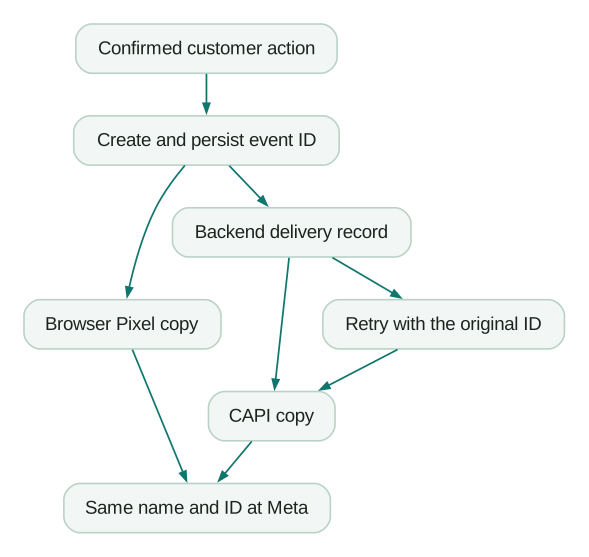
For a purchase, the backend can return the persisted event ID with the confirmation data. The browser then uses it in the Pixel call. Avoid independently generating a random ID in the browser and another in the server worker.
The single-page-app trap
Suppose an app generates event-123 when the page initially loads. The visitor adds three different items during that session, and all three AddToCart events reuse event-123. The integration has made distinct actions look identical.
Move ID creation to the action itself. A new add-to-cart action receives a new ID; its paired browser and server copies share that ID. A retry of the same action retains it.
For purchases, do not generate a fresh ID whenever the confirmation component mounts. Reloading a page should not create another logical order event.
Step 3: map the required fields accurately
Core server fields include the event name, actual occurrence timestamp, customer information and action source. Website events also require the source URL and browser user agent under the relevant parameter rules. Use the action source that describes where the outcome happened. Server event parameters and customer information parameters.
Do not label an automatic subscription renewal as a website action just because the customer originally signed up on the website. Preserve the event's real origin.
The following is an illustrative mapping, not a complete request ready to send. Values must come from the actual event and the implementation's permitted data collection.
Business record: paid order 7421
Logical event ID: purchase_7421

Browser:
  event name       = Purchase
  eventID          = purchase_7421
  value            = 89.50
  currency         = USD

Server:
  event_name       = Purchase
  event_id         = purchase_7421
  event_time       = actual occurrence time in Unix seconds
  action_source    = website
  event_source_url = actual checkout confirmation URL
  user_data        = permitted identifiers from this interaction
  custom_data      = { value: 89.50, currency: USD }
The equivalent browser call places the ID in the fourth argument:
// Illustrative: run only after the real purchase and consent checks.
fbq('track', 'Purchase', {
  value: 89.50,
  currency: 'USD'
}, {
  eventID: 'purchase_7421'
});
Keep access tokens in server-side secret storage. They do not belong in the browser data layer, page source or a public repository.
Step 4: handle customer identifiers without corrupting them
Meta requires hashing for contact fields such as email and phone after the specified normalisation. Email is trimmed and lowercased; phone formatting includes the country code. Some SDKs perform hashing, so confirm whether the library expects raw normalised input or an already hashed value. Double hashing produces a different identifier.
The click ID, browser ID, IP address and user agent follow different rules and must not be hashed. Check each field independently rather than applying one transformation to the whole object. Customer information field rules.
Hashing does not remove the need to govern collection and sharing. Keep the permission decision attached to the event and avoid retaining raw identifiers in general-purpose logs.
Why fbc is missing
fbc represents a Meta click identifier in the documented format. Use the available _fbc value or construct it from a genuine fbclid captured from the request. Preserve its case and use the original observation time for the timestamp component. Click ID and fbc guidance.
An event with no relevant Meta click identifier should not receive a fabricated one. A low fbc coverage figure can reflect the audience and traffic mix as well as an implementation defect.
To diagnose a real loss, trace a permitted ad-click journey through every redirect, landing page, form and backend record. Find the exact point where the value disappears or gets overwritten.
Why IP coverage is low
The CAPI client IP field refers to the visitor's browser, not the server worker. A webhook request from a payment provider contains the provider's network context; copying that IP into the customer's event is incorrect.
Where appropriate, capture the original interaction context through a trusted request path and associate it with the business record. If proxies are involved, configure which forwarded headers can be trusted. Accepting any client-supplied forwarding header can introduce false data.
A later CRM action may not have current browser context. Do not fill the gap with the CRM server's address or an unrelated contact's previous interaction merely to make the field non-empty.
Step 5: send promptly and preserve retry identity
Meta's API uses the versioned /{PIXEL_ID}/events endpoint. Select a supported version deliberately and keep credentials out of logged URLs. The current API guide recommends prompt delivery and documents a seven-day age limit for the usual event path, with a separate allowance for physical-store events. Using the Conversions API.
Design the normal path for delivery close to the event time. The maximum accepted age is a recovery boundary, not an operating target.
Persist the event before attempting delivery. Store its ID, occurrence time, destination, payload version and delivery state. Retries should preserve the logical identity and original time rather than manufacture a new action.
Classify failures. A temporary network failure may be retryable; an invalid field needs correction; an event that cannot be shared under the applicable controls should be excluded. A worker that retries every error forever can create both cost and data-quality problems.
Step 6: verify receipt, deduplication and usefulness separately
Meta's verification guide distinguishes received events, delivery freshness, deduplication and Event Match Quality. Its overview can show events before all processing and policy controls have been applied. It is therefore not equivalent to attributed conversions in Ads Manager. Verifying your setup.
Use a controlled test set covering:
- One normal successful action with browser and server copies.
- A repeated page render after the same action.
- Two distinct actions during one app session.
- A server retry following a simulated delivery failure.
- An action with no Meta click identifier.
- Each consent state your implementation supports.
The API's Test Events tool uses test_event_code, but Meta explicitly says those events are not automatically discarded from targeting and measurement. Use an appropriately isolated test setup and remove the code from production payloads. Test Events instructions.
A high match-quality score cannot establish that an event represents a real purchase. Compare the intended event cohort with the order or CRM system as well as reviewing platform diagnostics.
Sending HubSpot lead stages
HubSpot supports Meta conversion events for form submissions and lifecycle-stage changes under eligible Marketing Hub subscriptions. Its documented integration counts changes after event creation and limits form-submission events to HubSpot-created forms. Installing the Pixel through HubSpot can itself start browser and server tracking, so check existing installations before adding it. HubSpot's Meta integration guide.
Choose the relevant Meta account in Marketing > Ads, create the event, select the lifecycle stage and review the contact-sharing and consent configuration. Check campaign eligibility for the intended lead optimisation workflow; a CRM stage arriving in Events Manager does not mean every campaign can optimise against it.
Model the stage as a business transition. If sales repeatedly moves a contact into and out of “qualified,” decide which transition should count and how repeated updates are handled.
For B2B reporting, distinguish a contact becoming qualified from an account generating a new opportunity. Sending five associated contacts as five purchases would misrepresent one deal. The CRM lifecycle service and offline conversion guide cover that mapping.
Go-live checklist
- One owner is identified for each browser and server event route.
- Event names and IDs match for overlapping copies.
- Distinct actions receive distinct IDs, including within single-page apps.
- Retries retain the original identity and occurrence time.
- Click and browser identifiers come from the correct interaction.
- Contact fields follow their individual normalisation and hashing rules.
- The payload respects consent and destination data restrictions.
- Test events and production events use the intended destinations.
- Platform diagnostics and business-record reconciliation both pass.
- Failed deliveries and unusual volume changes have a named owner.
At Martechdevs, we implement tracking from the customer action through the records used in reporting and optimisation. Start with the free martech AI audit, or explore an AI assistant built around your approved workflows.
Questions people ask
Do I need both the Pixel and Conversions API?
Meta recommends using both for overlapping website measurement, with deduplication configured. Some backend outcomes have no browser equivalent. Choose the collection path for the event you actually need rather than inventing a browser copy of every CRM change.
Why is deduplication failing?
Compare the destination, exact event name, ID and arrival timing for one paired event. Common defects include generating the IDs independently, using the wrong browser argument, reusing IDs across different actions or sending through an unnoticed third integration.
Should every event contain fbc?
Send a genuine available value when appropriate. Its absence can be valid when the event has no captured Meta click identifier. Investigate loss on journeys where it should exist, and never fabricate a value to satisfy a coverage recommendation.
Does a successful API response mean the conversion appears in Ads Manager?
No. Receipt, matching, deduplication, eligibility and attribution are different processing steps. Check the event diagnostics and the report's attribution settings before interpreting a difference as data loss.
What is the difference between the two gateway products?
Conversions API Gateway focuses on forwarding Meta Pixel events into CAPI. Signals Gateway supports broader source-to-destination pipelines. Evaluate the sources, destinations and maintenance responsibilities required by your implementation before choosing either.
Sources
- Meta gateway products. Accessed 23 September 2026.
- Handling duplicate Pixel and server events. Accessed 23 September 2026.
- Server event parameters. Accessed 23 September 2026.
- Customer information parameters. Accessed 23 September 2026.
- Click ID, fbc and fbp. Accessed 23 September 2026.
- Using the Conversions API. Accessed 23 September 2026.
- Verifying your setup. Accessed 23 September 2026.
- HubSpot's Meta conversion integration. Accessed 23 September 2026.
Written by
Jafrin Akter AloData Engineer and Co-founder, martechdevs
Jafrin Akter Alo is a data engineer and co-founder of martechdevs, where the team has delivered 74+ martech, data and growth stack implementations.