
GA4 and HubSpot: connect website activity to reliable pipeline reporting
Data Engineer and Co-founder, martechdevs
Last updated 12 min read
A useful GA4–HubSpot setup lets you trace a campaign visit to a submitted request, a qualified opportunity and the commercial outcome. That requires more than adding a Measurement ID. You need reliable collection, preserved campaign context, an explicit identity link and a reporting model that counts each deal correctly.
Last updated: 13 October 2026.
Start with the question you want answered. “Which landing page loses visitors?” needs different data from “Which acquisition channels created qualified pipeline?” Build the connection around those decisions so you do not pay for a connector that moves the wrong fields.
Separate the three integration jobs
The first job is collecting GA4 events on pages hosted by HubSpot. HubSpot provides a native setting for this. It installs analytics on your content; it does not, by itself, establish a contact-to-deal reporting model.
The second job is preserving acquisition context in HubSpot. That can involve HubSpot's own tracking, form fields, campaign parameters and a controlled process for retaining first and subsequent touches.
The third job is combining website activity with CRM outcomes. You might use a CRM report with captured source fields, a warehouse model, or selected server-side events sent to GA4. Choose the route according to the reporting question and the identifiers you can legitimately retain.
For a small team, begin with a verified form submission and a trustworthy deal report. Add individual journey stitching when a real decision requires it. A complicated join with poor coverage can make a report look precise while representing only a small part of the pipeline.
Give each system a clear responsibility
Use GA4 for website events, acquisition analysis and behaviour within its measurement limits. Use HubSpot for contact ownership, qualification, associated companies and deals, and the sales process. Use your billing or finance records for the revenue definition they actually govern.
A closed-won amount might represent contract value, annual recurring value or a sales estimate. It is not automatically cash collected or recognised revenue. Name that measure before displaying it beside advertising spend.
Write a short measurement agreement covering:
- The eligible request, contact, account or deal population.
- The event that means a lead was successfully captured.
- The qualification and opportunity definitions.
- The acquisition rule and the point at which its value is saved.
- The report's date boundary, time zone, currency and exclusions.
- The system and owner responsible for each field.
Keep this with your tracking plan. Otherwise, one team can change “qualified” while another continues presenting the old conversion rate.
Install and verify the tags once
For HubSpot-hosted content, open Settings > Content > Pages, choose the relevant domain, open Integrations, enable the GA4 integration and enter the Measurement ID. Domain-specific settings can override defaults. HubSpot documents alternative header-code installation and consent behaviour for its native integration. HubSpot's GA4 setup instructions.
Check what is already installed before adding anything. A Measurement ID in HubSpot, the same tag in Google Tag Manager and another copy in a template can all look reasonable when inspected separately. Review the rendered page and requests to establish which route owns collection.
On an externally hosted site, install GA4 through the site's chosen implementation route. HubSpot's tracking code is a separate installation: it is automatic on HubSpot pages but must be added to external pages, with external domains configured appropriately. An embedded HubSpot form can receive submissions without providing full site tracking. HubSpot tracking-code requirements.
Verify a known page view in the intended GA4 property, then inspect the successful lead event. Test your consent choices too. The desired result is collection that follows the configured permissions, not maximum event volume under every condition.
Understand which source field you are looking at
GA4 has user-, session- and event-scoped traffic-source dimensions. First-user acquisition, the source of a later session and credit assigned to a key event answer different questions. Google's scope definitions.
HubSpot's Original Traffic Source describes the first known interaction source; Latest Traffic Source describes the most recent known source. Record Source explains how the CRM record was created, such as through an import or integration. The traffic-source drill-down fields are system-managed, and manually changing the broad source clears those drill-downs. HubSpot source-property definitions.
Do not rename a GA4 session field “original source” and treat it as equivalent to HubSpot's property. Keep the source system and scope visible in the data dictionary.
For example, an illustrative buyer discovers your site through organic search, returns through an email and later requests a demo after an ad click. An original-acquisition view, a demo-session view and a model that distributes credit across interactions can each produce a different answer. The disagreement is not sufficient evidence of broken tracking.
Investigate comparable records and definitions first. Our attribution model guide explains how the rule changes the question a report answers.
Capture UTMs where the form can use them
HubSpot can populate form fields, including hidden fields, from URL query parameters that match the property's internal name. Create the required custom properties, add them to the form, and test the submitted values rather than assuming that the label shown in the editor is the internal name. Query-string population.
A simple acquisition record can include utm_source, utm_medium, utm_campaign, an agreed campaign ID, the landing-page path and the observation time. Add content or term only when someone will use them. Use controlled campaign names so spelling variations do not create separate reporting categories.
Hidden fields capture values available at submission. They do not automatically preserve a campaign from a page visited earlier. HubSpot also warns that pre-population for returning visitors can override hidden-field values depending on the property type. Hidden-field behaviour.
Test this path explicitly: arrive on an article with campaign parameters, navigate to pricing without them, then open the demo form. If your capture depends only on the form page's current URL, the campaign is already gone.
Where permitted by your consent and retention design, preserve the approved acquisition fields across that journey and pass them into the form through a supported mechanism. Record when and where they were observed. Do not copy arbitrary URL parameters, entire form payloads or personal data into an attribution record.
Define three separate behaviours instead of letting one field do everything:
- First observed acquisition: write once when valid evidence first becomes available, with a timestamp and source.
- Latest eligible acquisition: update under a documented rule, including how direct visits and missing parameters behave.
- Conversion context: capture what was known when this specific request was submitted.
These are recommended custom data rules, not a promise about HubSpot's built-in property behaviour. A contact-level field can hold only its current value. Preserve a submission or touch history separately when you need to explain several requests over time.
Avoid clearing a known source just because the next submission lacks UTMs. Equally, do not silently present an old campaign as the current request's source. Retain the observation time and make “unknown for this submission” a valid state.
Count a successful request, not just a button click
For forms built with HubSpot's updated editor, the documented success event is hs-form-event:on-submission:success. Its form instance API exposes the form ID and a conversion ID after success. Legacy forms use a different event interface. Current global form events.
Use the relevant success signal for the form version you actually embedded. A submit-button click can occur before validation fails; a generic thank-you-page view can happen on reload or through a bookmarked URL.
Map the successful business action to one deliberate GA4 event, such as a demo-request lead event. Restrict the trigger to the intended forms. A newsletter signup, support request and sales demo should not all become the same sales conversion because they share an embed library.
Choose one collection path and test repeated callbacks, redirects and repeat submissions. A conversion ID can help your own processing recognise the same submission, but adding an arbitrary ID parameter does not establish universal GA4 deduplication. A second legitimate request should remain distinguishable from a replay of the first.
Inspect both destinations: the form submission and expected contact changes in HubSpot, and the event in GA4. One can succeed while the other is blocked, misconfigured or sent to a different property.
Link identity without exporting the contact record to GA4
HubSpot can associate earlier page views with a contact through its tracking cookie when the visitor identifies themselves. Manually created or imported contacts do not automatically acquire browser history. Server-side form submissions that omit the HubSpot tracking cookie may also fail to connect the visit. HubSpot visitor identification.
A GA4 client ID, a HubSpot tracking cookie, a CRM contact ID and your application's user ID have different meanings. Never assume two values identify the same person merely because they were collected near the same time.
If your implementation needs a bridge, store the observed relationship, its timestamp and the permitted use in a controlled location. A browser can have multiple users, and a person can have multiple browsers. Limit the join to evidence you actually have and retain an unmatched category.
Do not send email addresses, phone numbers or form text as ordinary GA4 event parameters, campaign fields or User-IDs. Check page URLs and titles as well. Google's PII guidance covers those surfaces and describes redaction as a best-effort control, not a substitute for preventing collection. Google Analytics PII guidance.
Keep raw CRM information in the systems authorised to hold it. A hashed email is not a general-purpose workaround for ordinary analytics parameters; any dedicated user-provided-data feature needs its own supported implementation and requirements.
Build the pipeline report at deal level
This is where a technically working integration can produce an inflated business result. Website events, form submissions, contacts and deals have different row counts. Joining them directly can repeat a deal amount for every associated contact or interaction.
Consider three fictional closed-won deals in one reporting currency: D101 is worth $24,000, D102 is worth $10,000 and D103 is worth $10,000. D101 has two associated contacts; the other deals have one each. Joining deals to contacts and summing the amount produces $68,000. The correct deal total is $44,000.
SUM(DISTINCT amount) is not the fix. It would return $34,000 because the two separate $10,000 deals have the same amount. Deduplicate by the entity's identifier, not by its price.
For a deliberately simple single-channel report, establish one row per deal and an explicit acquisition-channel snapshot before aggregation. This illustrative SQL uses your own prepared tables, not a HubSpot query endpoint:
WITH eligible_deals AS (
  SELECT DISTINCT deal_id
  FROM contact_deal_associations
  WHERE is_in_scope = 1
)
SELECT
  COALESCE(d.acquisition_channel, 'Unknown') AS channel,
  COUNT(*) AS won_deals,
  SUM(d.amount_reporting_currency) AS won_deal_value
FROM deals AS d
JOIN eligible_deals AS e ON e.deal_id = d.deal_id
WHERE d.is_closed_won = 1
  AND d.close_date >= '2026-09-01'
  AND d.close_date < '2026-10-01'
GROUP BY COALESCE(d.acquisition_channel, 'Unknown');
The deals table must have one current row per deal, with amounts already converted under your reporting policy. is_in_scope represents a documented contact eligibility rule. This query deliberately excludes deals without an eligible contact association; reconcile those exclusions separately instead of hiding their value.
A multi-touch model needs a different structure: deal-to-touch credit rows whose weights reconcile to the intended allocation for each deal. Do not add the totals from several alternative attribution models together. They are different views of the same outcomes.
HubSpot's native attribution tools distinguish Contact Create, Deal Create and Deal Revenue reports. Their filters and available models matter; the current documentation lists Empirical alongside first touch, last touch, linear and time decay. Confirm reporting access for your purchased package. HubSpot attribution reports.
Use server-side GA4 events only for a defined purpose
Sending selected CRM outcomes to GA4 can support specific reporting or advertising uses. It does not remove the need for a CRM or warehouse record of what happened.
For web-stream Measurement Protocol events, Google requires the correct Measurement ID and client ID, with the API secret kept out of browser code. Historical event timestamps have a 72-hour backdating limit. Measurement Protocol event submission.
Session attribution has a separate, tighter requirement: include the session ID, send within 24 hours of that online session's start, and keep an overridden event timestamp within the session. Measurement Protocol use-case requirements.
A deal closing six weeks after a demo cannot be made into an event from the original demo session by copying its session ID. Record the actual close time and choose a supported reporting route. Do not falsify the event timestamp to force attribution.
If the central question is pipeline by original acquisition over a long sales cycle, a maintained CRM or marketing warehouse model is often easier to explain. Preserve the original acquisition evidence, the commercial outcome and the attribution rule as separate inputs.
Reconcile the journey before trusting the dashboard
Use an end-to-end test record, then inspect every transition:
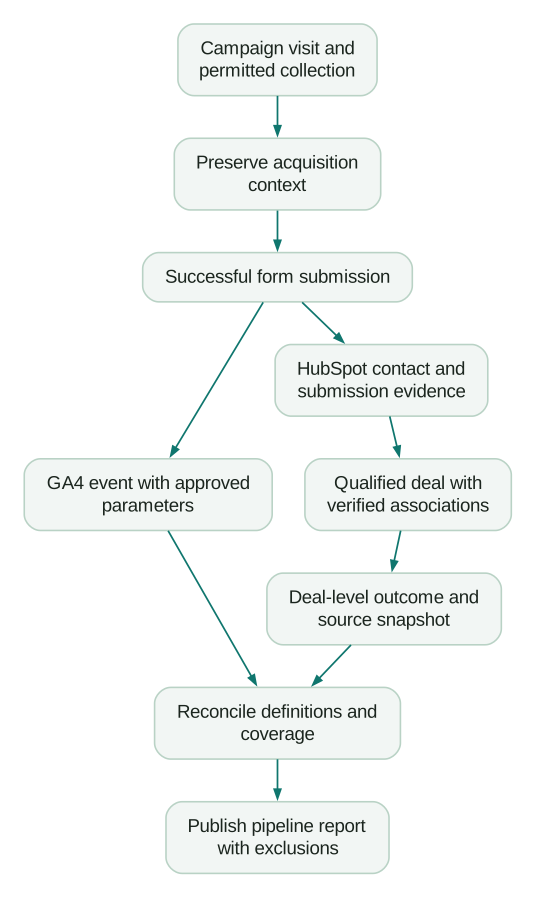
Test a new visitor, a returning contact, internal navigation before submission, a failed form, a successful redirect, a repeated submission and denied analytics consent. Include a deal with several contacts and a deal with no eligible contact association.
For each case, record the expected source, event count, contact identity, deal treatment and permitted tracking behaviour. Separate product defects from intentional exclusions. A privacy choice or an ineligible support request should not be “repaired” into a sales conversion.
Then monitor coverage: successful eligible submissions, CRM records created or matched, observed acquisition fields, valid deal associations and unmatched outcomes. Report the unknown portion alongside attributed pipeline. A rising unknown share is an investigation signal; replacing it with “Direct” only conceals the problem.
Implementation checklist
- The reporting question, commercial measure and entity are explicit.
- One installation path owns GA4 collection on each page type.
- HubSpot tracking and form submission behaviour are verified separately.
- Current URL, preserved acquisition and submission context are distinguished.
- First-source and latest-source write rules are documented.
- Form success tracking matches the actual editor and embed version.
- Personal data is excluded from ordinary GA4 payloads and URLs.
- Identity links have evidence, permitted use and an unmatched state.
- Deal amounts reconcile before and after joins and channel allocation.
- Consent, redirects, retries and returning visitors are tested.
- Delayed CRM events follow the selected destination's timing rules.
- Unknown sources and excluded deals remain visible in the report.
If you need help with the collection side, bring a failing journey and expected events to Martechdevs' analytics and tracking service. For CRM source fields, associations and pipeline reporting, use the CRM and lifecycle service. A useful implementation scope should name the test cases and reconciliation results you will receive.
Questions people ask
Does HubSpot's GA4 integration sync contacts and deals automatically?
The native content integration adds GA4 collection to HubSpot-hosted pages. Treat contact identification, CRM outcome delivery and pipeline reporting as separate requirements. Verify the exact objects, fields and directions of any additional connector before relying on it.
Can I pass UTMs into HubSpot without a paid connector?
HubSpot supports query-string population of form fields, including hidden fields. The values must reach the form, match the intended internal property names and survive your actual visitor journey. Earlier-page persistence and historical attribution require additional design; a hidden field alone does not provide them.
Why do GA4 and HubSpot show different lead counts?
First compare the same successful action, population and time boundary. GA4 events, form submissions, new contacts and qualified leads are different units. Then inspect repeated submissions, consent, blocked requests, identity matching and collection errors using known records.
Should we use original source or latest source for pipeline reporting?
Choose the field that answers the stated question. Original acquisition is useful for how the relationship began; later interactions help explain subsequent demand. Preserve a source snapshot for the relevant deal decision, and avoid letting a later contact update silently rewrite a historical report.
Can we send closed-won deals to the original GA4 session?
Only events meeting Google's session-attribution requirements can inherit that session's attributes through Measurement Protocol. A deal closing weeks later does not meet the 24-hour request condition. Keep the true close time and use a CRM, warehouse or other supported outcome-reporting route.
Sources
- HubSpot: integrate Google Analytics with HubSpot content. Accessed 13 October 2026.
- HubSpot: install the tracking code. Accessed 13 October 2026.
- Google: traffic-source scopes. Accessed 13 October 2026.
- HubSpot: Original and Latest Traffic Source properties. Accessed 13 October 2026.
- HubSpot: populate form fields from query strings. Accessed 13 October 2026.
- HubSpot: hidden form fields. Accessed 13 October 2026.
- HubSpot: global events for the updated forms editor. Accessed 13 October 2026.
- HubSpot: visitor identification and tracking. Accessed 13 October 2026.
- Google: avoiding PII in Analytics. Accessed 13 October 2026.
- HubSpot: attribution report types and models. Accessed 13 October 2026.
- Google: sending Measurement Protocol events. Accessed 13 October 2026.
- Google: Measurement Protocol use-case requirements. Accessed 13 October 2026.
Written by
Jafrin Akter AloData Engineer and Co-founder, martechdevs
Jafrin Akter Alo is a data engineer and co-founder of martechdevs, where the team has delivered 74+ martech, data and growth stack implementations.