
What is reverse ETL, and when do you need it?
Data Engineer and Co-founder, martechdevs
Last updated 13 min read
Reverse ETL moves modelled data from a warehouse or database into applications where people and automated workflows can use it. Examples include product-qualified account signals in HubSpot, renewal context in Salesforce and eligible audience membership in advertising tools. You need it when a useful business definition already exists in your data platform and another system needs a reliable, maintained version of that definition to act.
Last updated: 7 October 2026.
A query can correctly identify an account that needs help while the account owner never sees it. Reverse ETL closes that delivery gap. The difficult part is deciding what should happen when the account changes, leaves the audience, fails to match or receives a conflicting update from another system.
Treat the sync as an operating contract. Specify the customer or account, destination record, fields, timing, removal behaviour and evidence of successful delivery before enabling an action.
What reverse ETL does in the data flow
An ingestion pipeline brings application data into your data platform. Transformations turn it into useful models. Reverse ETL sends selected model outputs back into business tools.
Twilio's Segment Reverse ETL documentation describes using a warehouse query to sync event and object data to downstream destinations. The important idea is reuse: the account definition used in analytics can also supply a controlled operational signal.
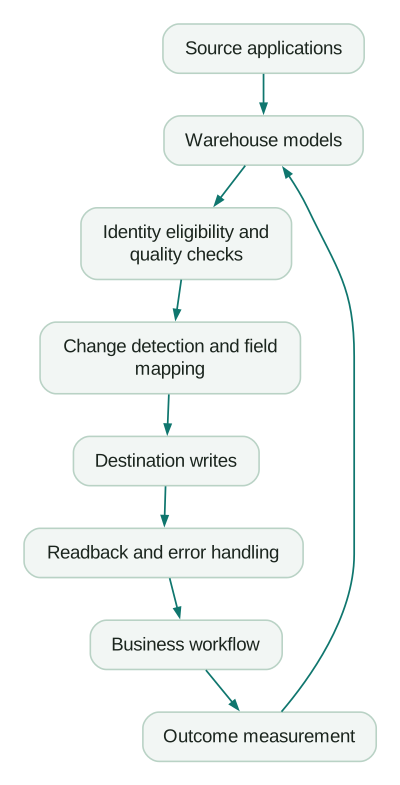
This flow is different from an application emitting an event directly when something happens. A direct event path may be more suitable for an immediate payment confirmation. Reverse ETL is useful when the decision depends on combined or historical data already modelled in the warehouse.
It is also one part of a composable CDP. It does not independently establish identity, define customer value or prove that a campaign improves retention.
Decide whether the workflow needs it
Start with a concrete action and work backwards.
Product-qualified accounts in HubSpot: combine the account's fit, recent meaningful product activity and commercial state. Give the owner a signal, a reason and a link to supporting evidence. Keep the scoring definition in the lead-scoring model, and define who follows up.
Renewal or churn context in a lifecycle tool: combine renewal timing, product-use changes and unresolved obstacles. Sync enough context to choose an appropriate intervention. A risk score alone does not tell the tool which treatment will help; the AI churn guide explains that distinction.
Advertising audiences: use approved customer attributes to add eligible people to a list or remove people who should no longer be there. Define the intended use, matching identifiers and destination policy before exporting.
Reverse ETL is a strong candidate when these definitions combine several sources, recur frequently and serve more than one operational tool. It is less compelling for a one-time analysis or a simple supported integration that already delivers the required field reliably.
If the model is not trustworthy, improve it first. Sending an uncertain account identity to five destinations increases the number of places that need correction.
Define two identities: the model row and the destination record
The model needs a stable unique key so the sync can recognise the same entity across runs. The destination also needs a reliable way to find the record it should update. Those keys can be different.
For example, account_id can identify a warehouse account while hubspot_company_id identifies its existing CRM company. Store their mapping and define what happens when either side is missing, merged or replaced.
Do not silently fall back from a missing company ID to a non-unique company name. Quarantine the row with a useful reason or use a separately approved creation process.
For account-level signals, avoid copying the account's full value to every member and then treating each copy as an independent customer. For person-level audiences, explicitly resolve which members qualify and which relationship the action concerns.
Hightouch's change data capture documentation explains that its comparison depends on a unique primary key. It also notes that changing the key can alter how records are recognised across runs. Treat a key change as a migration requiring a plan, not a cosmetic model edit.
Choose state updates, audience membership or events
These operations have different meanings.
State updates set fields such as paid status, account fit or renewal date. Repeating the same intended state should leave the record in the same state, although destination workflows may still react to repeated writes.
Audience membership adds or removes an entity from a particular set. The removal policy is part of the audience definition. An acquisition-suppression list and a customer newsletter list may need different rules.
Events record distinct occurrences, such as a first qualifying product milestone. Each occurrence needs its own stable identity. Reusing a user ID as an event key can collapse several real events into one.
Hightouch documents destination-specific sync types and modes, including insert, update and upsert. Its event sync guidance requires an event-unique key because insert processing recognises new keys. Confirm the exact operation supported by your chosen connector instead of treating all destinations as interchangeable tables.
For an initial CRM enrichment, updating known records can be easier to control than creating new records automatically. Enable creation only when matching, required fields, ownership and duplicate handling have been deliberately designed.
Write a field-ownership and removal contract
Consider a product-qualified account signal. The warehouse owns the computed signal and its reason. The CRM owns the salesperson's notes and named owner. Neither system should overwrite the other's fields through a broad “sync everything” mapping.
An illustrative contract could look like this:
sync: account_product_signal_v1
source_model: activation_account_product_signal
source_key: account_id
destination_object: hubspot_company
destination_match: hubspot_company_id
write_mode: update_existing
warehouse_owned_fields:
  - product_signal_status
  - product_signal_reason
  - product_signal_effective_at
protected_fields:
  - account_owner
  - sales_notes
unknown_signal: hold_write_and_open_exception
missing_destination_id: quarantine
missing_model_row: do_not_delete_company
stale_input: pause_dependent_signal_updates
remediation_owner: revenue_operations
This is a planning contract, not a file to import into HubSpot or a reverse ETL product. Configure and test the corresponding behaviour in the selected tools.
Use explicit signal states such as qualified, not_qualified and unknown. A model that includes every managed account can send a known transition from qualified to not qualified. A query containing only currently qualified accounts needs a separate exit operation when an account disappears.
Distinguish three cases:
- Known change: the account no longer meets the rule. Send the intended new status or audience removal.
- Missing evidence: a source is stale or a required relationship cannot be resolved. Raise an exception and apply the documented fallback.
- Deletion or prohibited use: a separate requirement says the destination must stop holding or using specified data. Execute and verify that process explicitly.
Do not assume the same treatment is correct for all three. Preserving yesterday's CRM context during an ingestion outage can be reasonable when it is visibly stale. Preserving a person's campaign eligibility after a valid suppression change is a different decision.
Hightouch's sync overview separates deletion behaviour from sync mode. Depending on the destination, a removed row can leave the record untouched, clear mapped fields or delete a record. Its documented handling also depends on tracked changes; a full resync is not a universal way to remove historically missing records.
Keep a destination-side freshness or eligibility gate where the workflow needs it. Pausing warehouse writes alone does not stop an already enrolled customer from receiving the next scheduled message.
Make null behaviour an explicit choice
A null value can mean unknown, intentionally empty, not applicable or a broken source. An empty string, false and zero can each mean something else. Standardise those meanings before field mapping.
Hightouch's HubSpot connector documentation provides field behaviours that include syncing nulls, skipping nulls and writing only to empty fields. Skipping a null retains the existing HubSpot value; it does not communicate that the previous value is now unknown.
Use that distinction deliberately. An incomplete enrichment source might justify leaving an existing phone number untouched. A warehouse-owned flag that must be cleared needs a tested clearing operation or an explicit replacement state. Otherwise, a supposedly cautious setting can preserve a false fact indefinitely.
The same connector documentation highlights property types, editability, enumeration values and associations. Test using internal field names and actual allowed values. A value that looks right on a dashboard can still be rejected by the destination's schema.
Set freshness from the business action
Define how old the underlying evidence may be when someone acts. Measure from the relevant source change through ingestion, transformation, sync and destination processing.
Run dependent steps after successful completion where possible. A sync starting every fifteen minutes can repeatedly read an incomplete model if upstream work runs on an unrelated schedule.
Separate meaningful change timestamps from routine refresh timestamps. Updating a mapped computed_at field on every run may turn every row into a changed record even when the business attributes are identical. Keep run-level freshness in monitoring, or map it deliberately when the destination needs it and the extra writes are acceptable.
Show users the effective time and reason for important signals. “High risk” with no timestamp is difficult to interpret after an outage. A signal that explains the missing setup step and when it was observed is more useful to an account owner.
For a workflow that needs a response within seconds, test a direct event or serving path. Do not promise that scheduled warehouse queries will meet that requirement without measuring the complete system.
Plan retries without duplicating the action
Temporary destination failures need bounded retries and backoff. Permanent validation failures need correction. Repeating an invalid payload indefinitely consumes capacity without improving the record.
Keep the intended operation identity, source version and destination result. If an older update retries after a newer update succeeds, prevent it from restoring stale state through ordering or version-aware processing where the tools support it.
State writes and business actions require separate reasoning. Setting an account field twice can leave the same value in place while triggering two tasks, messages or webhooks. Test the destination automation's enrolment and deduplication behaviour, not just the record value.
For events, preserve the event key across retries and understand the destination's deduplication scope. A timeout can mean the request failed, or that it succeeded and the response was lost. Investigate ambiguous delivery before replaying an operation that cannot be safely repeated.
Use a visible exception queue for rejected rows, with a responsible owner and the minimum information needed to diagnose them. Do not put full customer payloads into unrestricted alerts.
Verify delivery with separate counts and readback
A successful job label is not enough to establish that every intended record is correct.
Track the funnel from model rows to valid rows, changed rows, attempted operations, accepted operations and verified destination state. Record permanent failures separately from retryable failures and deliberate exclusions.
Suppose an illustrative run contains 1,000 managed accounts. Thirty fail identity or data checks, leaving 970 valid rows. Change detection identifies 340 rows needing delivery. Of those operations, 330 apply successfully, eight need retry and two fail permanent validation.
The arithmetic reconciles: 330 + 8 + 2 = 340. Reporting “970 customers synced” would overstate delivery; 970 is the valid input count, including rows that did not require a write.
Now read back a representative sample of 50 applied records. If 48 match the intended state and two were overwritten by another integration, the transport result was insufficient. Investigate field ownership and competing automations. Do not extrapolate the sample into a guaranteed whole-population success rate.
For critical flags, automate reconciliation over the relevant records where destination APIs and limits permit. For larger audiences, combine supported status reporting with sampled checks and explicit coverage limits.
Google's Data Manager Customer Match flow includes checking upload results and list size after adding data. Upload acceptance, matching and audience availability are distinct stages; do not assume an accepted source-row count equals a usable advertising audience.
Check current tools against your actual sync contract
Hightouch, Fivetran Activations and Segment are examples worth considering when their supported sources and destination operations fit the workflow. The Hightouch and Fivetran Activations comparison shows how sync counts, active-row usage and destination requirements change the evaluation. A maintained custom integration can also be appropriate for a narrow, stable need.
Fivetran's Activations FAQ describes the integration of Census reverse ETL capabilities into Fivetran. It states that Activations usage is tracked through Monthly Active Rows. The old answer that Fivetran only moves data into a warehouse is no longer sufficient.
For each candidate, demonstrate record matching, updates, exits, null handling, retry behaviour, logs and recovery with your sample data. Check feature availability, source permissions, destination limits and how pricing responds to changed rows, refreshes and backfills. Connector count alone cannot answer those questions.
Advertising integrations deserve a current API check. Google's customer-list management documentation states that, from 1 April 2026, most new Customer Match integrations must use the Data Manager API; eligible existing integrations can continue using the Google Ads API. Verify the path supported by your provider before following an older implementation tutorial.
A tool's scheduled frequency is also not a delivery guarantee. Inspect how long a realistic run takes and what happens when the destination throttles it.
Price the operating workflow, then prove its value
Include platform charges, warehouse queries, implementation, monitoring and ongoing repair. If an implementation queries a large model frequently but only a few rows change, warehouse computation can remain material even when destination writes are low.
For an illustrative internal decision, suppose a manual weekly export consumes four hours at an allocated labour cost of $60 per hour. Across 52 weeks, that is $12,480 of effort. If the automated workflow costs $9,000 per year including maintenance, the potential capacity value is $3,480 before implementation cost.
That is not automatically cash savings. It depends on whether the freed time is put to useful work and whether the manual task is actually removed. Add implementation and transition costs to the first-year comparison.
Improved response timing or better targeting may create additional value, but measure it separately. A sync delivering churn scores proves that data moved. A controlled comparison of interventions is needed to support a claim that those scores helped retain customers.
Release one sync with explicit acceptance checks
Begin with a test destination or a limited set of known records. Preview the output, inspect the proposed operations and confirm that production automations will behave as intended.
Checklist
- The action and its business owner are documented.
- Model keys are unique, stable and distinct from destination matching rules.
- Missing and ambiguous matches enter a visible exception process.
- Field ownership prevents competing systems from overwriting each other.
- Known exits, unknown values and deletion requirements have separate handling.
- Null, false, zero and empty-string cases have been tested.
- End-to-end freshness is measured and stale data has a defined fallback.
- Retry, timeout and out-of-order cases do not duplicate or reverse the intended action.
- Destination records or supported audience results have been checked after delivery.
- Stopping, repairing and replaying the sync has a documented procedure.
Save the approved model version and mappings before expanding. If a sync writes the wrong values, stop the affected path, identify the records and actions involved, then restore intended state through a reviewed correction. A model rollback alone cannot reverse messages already sent.
For help designing the models and operating the delivery path, our data warehouse and CDP service can build a first sync with matching, removal rules and verification defined from the start.
Questions people ask
What is the difference between ETL and reverse ETL?
ETL generally extracts source data, transforms it and loads it into a target such as an analytical store. Modern warehouse ingestion also commonly uses ELT, with transformation after loading. Reverse ETL takes useful data from that analytical environment into operational tools such as a CRM, messaging platform or advertising destination.
Can reverse ETL replace a CDP?
It can supply the activation component of a customer-data architecture. It does not automatically provide collection, identity resolution, persistent profiles, audience interfaces or governance. Decide which functions your workflows need and where they are owned before treating one product category as a replacement for another.
Does Fivetran support reverse ETL now?
Yes. Fivetran documents Census reverse ETL capabilities through Activations. Check current source and destination coverage, operations and usage terms for your workflow. Older descriptions of Fivetran and Census as entirely separate ingestion and activation purchases may no longer match the current product offering.
Can Segment sync data from a warehouse?
Yes. Segment's Reverse ETL documentation covers warehouse queries supplying event and object data to destinations, including profile enrichment and marketing activation use cases. Confirm the specific source, destination operation, mapping and limits needed by your implementation rather than assuming that every event-stream destination supports every warehouse operation.
What happens when a row disappears from the model?
That depends on the configured sync mode and destination-specific removal behaviour. The destination might retain the record, clear selected fields, remove audience membership or delete a record. Define the desired result before launch, distinguish an intended exit from a source outage and verify the destination after testing the transition.
Sources
Written by
Jafrin Akter AloData Engineer and Co-founder, martechdevs
Jafrin Akter Alo is a data engineer and co-founder of martechdevs, where the team has delivered 74+ martech, data and growth stack implementations.