
Salesforce to HubSpot migration: a checklist for data, workflows and cutover
Data Engineer and Co-founder, martechdevs
Last updated 13 min read
A CRM migration is complete when the team can run its customer processes in the destination and explain what happened to the source data. Moving contacts and opportunities is one part of that job. Owners, relationships, activity history, suppression rules, integrations and reporting definitions need their own acceptance checks before you switch the business over.
Last updated: 2 September 2026.
Use this guide to plan a Salesforce-to-HubSpot move, with a separate section for the reverse direction. The examples are illustrative. They are not a claim that a particular account was migrated or that every feature transfers automatically.
Agree on the outcome before selecting a migration tool
Write down why the company is moving and what must work on the first operating day. “Reduce CRM complexity” should become something a seller or marketer can demonstrate: capture a lead, find its account, assign the right owner, progress an opportunity and see the correct customer history.
Name a business owner for acceptance, a technical owner for data and integrations, and the person authorised to decide whether cutover proceeds. The same person can hold several roles in a small team, but the decisions still need to be explicit.
Then classify the source inventory:
- Migrate: records and relationships needed for ongoing work.
- Rebuild: workflows, reports, forms and integrations that must function in the destination.
- Archive: history that must remain retrievable but does not need to operate in the new CRM.
- Retire: material the responsible owner has approved for removal under the applicable retention requirements.
Do not let the tool's default object selection make those decisions. A custom object missing from an importer can contain your entire renewal process.
If the business is still choosing platforms, finish the CRM selection exercise first. Migration effort belongs in that decision, alongside the recurring subscription cost.
Choose a route and document its boundaries
HubSpot Smart Transfer supports Salesforce and provides an audit, configuration transfer, data sync and optional post-sync transfer. It is one-way into HubSpot. Its documentation requires a Data Hub subscription for custom field mappings and recommends disabling automatic sync when mappings or filters need review first. Smart Transfer process.
The current Salesforce support list includes accounts, contacts, leads, person accounts, opportunities, cases, users and several activity types. Leads and person accounts map to HubSpot contacts. Attachments and campaign membership lists use a separate one-time transfer. Smart Transfer excludes custom objects and lists unsupported Salesforce field types, including calculated and reference fields; specific supported associations have their own mappings. Salesforce transfer coverage.
Use that list as a starting boundary, then inspect your actual audit result. “Salesforce supported” does not mean that every package object, lookup, file version or business rule is included.
Other routes can include structured imports, API migration work or a specialist service. Select them for a defined gap, such as a custom entity or history that the standard path cannot preserve. Require a written coverage and exception report from a service provider.
The native ongoing HubSpot-Salesforce connector is another option for coexistence, with its own pairing, filters and write rules. Do not assume its behaviour is the same as Smart Transfer. The sync troubleshooting guide covers that separate integration.
Build a mapping that preserves meaning
For each source object and field, record its destination, type, transformation, default, identity key and acceptance test. Include what happens to nulls, unknown options and values too long for the destination.
Start with the business entity. A Salesforce Account may represent a parent company, billing entity or operational site. If the HubSpot company model means something different, a straightforward field copy can attach deals to the wrong level of the customer hierarchy.
Map stages by their entry and exit criteria. A stage called “Qualified” in the source may require a completed discovery call, while the destination template uses it for an initial lead screen. Keeping the same label would conceal a changed pipeline definition.
For every owner, identify the destination user or an explicitly managed exception queue. Preserve the historical owner separately when needed. Assigning all departed users' records to the integration administrator makes the import simpler and the operating system less useful.
Confirm that required destination objects, associations, permissions and reports exist in the actual purchased package. HubSpot has more than one pricing programme, so use the account's entitlements. The custom-object design guide explains when a separate entity is worth maintaining and where plan distinctions matter.
Preserve identity before importing relationships
Keep the source organisation, object type and record ID. Store a crosswalk to the destination object and ID, along with whether the source record was created, matched, consolidated, excluded or rejected.
For a deliberately fictional example, a source contains 1,200 leads and 800 contacts. Review establishes that exactly 200 people appear once in each object, with no other duplicates. There are 2,000 source records but 1,800 distinct people to represent. If 300 of those people already exist in the destination, the expected result is 1,500 newly created contacts and 300 matched contacts.
The 200 consolidations need traceability from both source IDs to the surviving destination record. They should not look like unexplained missing rows. Do not infer those consolidations from a shared email alone when the evidence could represent a shared mailbox or a different person.
HubSpot imports support record IDs and eligible unique properties for matching. Required properties and association identifiers depend on the object and import route. Import-file requirements.
Separate identity decisions from display-name cleanup. A customer changing its company name should not create a new account, while two unrelated businesses with similar names should not collapse into one.
Prepare parent entities and their ID mappings before importing dependent relationships. Reconcile contact-to-company, deal-to-company, contact roles and relevant custom associations. Keep unresolved relationships in an exception file with an owner and reason.
Take an export you can actually use
Create a dated source snapshot and verify that it opens, contains the expected objects and retains the IDs needed to reconnect relationships. Preserve schemas, option definitions, user mappings and operational settings alongside the records.
Salesforce's Data Export documentation describes separate options for attachments, documents and Salesforce Files. It also notes that formula and roll-up summary fields are excluded from that export. Salesforce backup export.
Decide whether each derived value should be recalculated, captured through another supported extraction path or retained as a historical snapshot. Label a snapshot with its observation time; do not present it as a live calculation after its dependencies stop updating.
For files, test the actual document download and its association to the customer or deal. An exported file URL that stops working when the old account is closed is not a retained document.
Protect the export according to the data it contains. Give the migration team the access it needs and record where retained copies live, who owns them and when they should be reviewed or removed.
Inspect the history that row counts miss
For every important activity type, define which attributes must survive: occurrence time, author, direction, body, participants, attachments and record associations. A note imported as plain text may be acceptable; a negotiation email without its date or related deal may be useless.
HubSpot recommends including Activity date when importing activities. Without it, the activity date defaults to the import time. Also, existing emails, meetings, notes and tasks cannot be updated through import. Activity-date requirements, activity import limitations.
Test reruns explicitly. A retry that safely updates a company may duplicate an activity if the selected route cannot recognise and update that existing activity. Keep migration batch IDs and source activity IDs in your reconciliation record, and define the supported recovery method before the full load.
Preserve subscription preferences, suppression states and their available evidence as a separate workstream. A successful contact import does not establish permission to send marketing. Make sure the sending system can apply the intended rules before enabling campaigns.
For reporting, retain the distinction between source creation time, business event time and destination migration time. These dates answer different questions. A migration date should not make a five-year customer look like a newly acquired account.
Rebuild automations from their purpose
Inventory each active process by trigger, eligible population, actions, delay, exit condition, re-entry rule and owner. Identify the external systems it calls and the reports that depend on its output.
Then decide whether the process should survive. An obsolete workflow with a familiar name does not deserve a rebuild. Keep the behaviour that serves a current customer or operational need.
Do not mistake migration helper workflows for copies of your business automation. Smart Transfer can create and activate workflows to handle differences between data models. Inspect those helpers and their effects before adding the workflows the team will use after launch. Transfer configuration behaviour.
Use an acceptance case for each necessary journey. For example: a trial reaches its agreed activation threshold, the account owner gets one task, the trial leaves the pre-activation nurture and no duplicate task appears when the same product update is retried.
Test failures as well as success: no owner, missing company, a suppressed contact, an expired trial and a delayed product update. The customer journey guide helps identify which paths deserve this attention first.
Repoint integrations deliberately
List every producer and consumer of CRM data: forms, product events, billing, support, outbound tools, enrichment, warehouse jobs and executive reporting.
For each connection, specify the future destination, object and field names, authentication owner, identity mapping, direction, expected delay and retry behaviour. Test the real payload shape using approved representative data.
Keep one authoritative writer for a field during the transition. Letting both CRMs accept uncontrolled edits while connectors copy changes in both directions creates a reconciliation problem that a final CSV cannot reliably solve.
Check failure destinations too. A webhook can be repointed successfully while its dead-letter queue, alert or scheduled backfill still references the old system. Update the operating instructions and the person responsible for recovery.
Rehearse before setting the final cutover date
Run a representative migration into an appropriate test destination. Include the difficult cases: converted or duplicate leads, multiple companies, departed owners, custom relationships, attachments, old activities and open opportunities.
Measure extraction, transformation, loading and reconciliation separately. The duration of a small clean import is not a reliable estimate for the final run with exceptions and API limits.
Use an explicit readiness record. This original YAML is a planning template, not executable migration configuration:
migration_readiness:
  scope_owner: name_before_cutover
  source_snapshot: verified_export_location
  source_to_target_crosswalk: reviewed
  critical_record_exceptions: zero_unresolved
  required_relationship_checks: passed
  suppression_and_preferences: verified
  live_customer_journeys: tested
  final_change_capture: rehearsed
  workflow_activation_order: documented
  post_cutover_write_capture: ready
  rollback_decision_owner: name_before_cutover
  archive_retrieval_test: passed
Set thresholds around business risk. An unresolved owner on an active opportunity may block launch even when overall record completeness looks high. A deliberately archived obsolete field may be an accepted exception. Record both decisions instead of hiding them inside one “99% migrated” score.
Reconcile records, relationships and business totals
Use three layers of verification.
First, account for every in-scope source ID. It must map to a destination record or have a documented disposition. Reconcile created and matched records separately; they do not necessarily add up to the number of source rows.
Second, verify the relationships and required values. Check open opportunities with their accounts, owners, contacts, stages, close dates and amounts. Inspect activities and files from the representative difficult cases, not just the first records alphabetically.
Third, compare business totals using equivalent definitions. Reconcile pipeline by currency, stage and an agreed date boundary. Do not sum unrelated currencies or compare source close dates with destination creation dates. When a definition changes intentionally, document the bridge between the old and new reports.
For the earlier 1,800-person example, the destination should have 1,800 mapped contact IDs across the migration population. The creation log should explain 1,500 new contacts; the matching log should explain 300 existing ones. A result of 2,000 newly created contacts would contradict the agreed identity decisions even if every source row loaded successfully.
Have actual users perform their first-day work. A technically valid association is insufficient if the seller cannot find the right contact, open the history or assign the next action with their normal permissions.
Cut over with a defined change boundary
Keep parallel operation controlled. The destination can be used for validation while the source remains authoritative, or each system can own explicitly separated work. Avoid an undefined period where both own everything.
At cutover, record the time boundary and capture changes after the baseline snapshot. Your process must cover newly created records, edits, merges, deletions and relationship changes. A query for recent modified records may not cover all of those categories, so verify the capture method for each.
Then follow the rehearsed sequence:
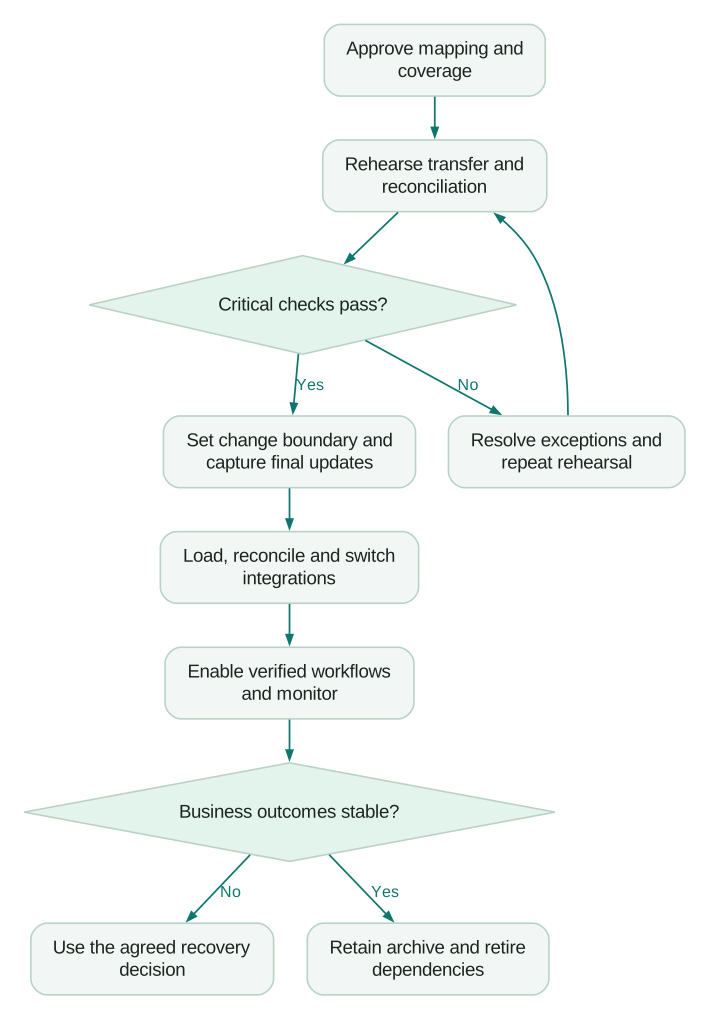
Control customer-facing sends and other irreversible side effects until the required data and suppression checks pass. Enable processes in a documented order. Confirm that a new lead, a deal update and a customer service event each reach the right destination after the switch.
Continue capturing destination changes during the observation period. Those writes matter if you later need to return to the source.
A rollback plan must include work created after launch
Restoring yesterday's source snapshot can lose today's deals, notes and customer responses. Define how post-cutover writes will be preserved, reconciled and replayed before calling the old system a fallback.
Specify the trigger for rollback, who decides, which integrations are paused or redirected and how users know where to work. Keep a method to identify communications already sent so recovery does not send them again.
Smart Transfer has a revert function, but it removes transfer-created configuration and records within its documented scope. It does not undo an arbitrary standard sync connection or reverse every business action performed afterward. Smart Transfer revert scope.
Test recovery on representative data and retain the evidence. A button labelled “revert” is not a substitute for understanding which new work will be removed and which external effects remain.
If you are moving from HubSpot to Salesforce
Use the same acceptance process, then adapt the extraction and destination rules.
HubSpot's normal record export contains current properties and selected associations. Its defaults can omit properties outside the view and limit association coverage; CSV export offers an all-associated-records option. Activities require separate supported extraction routes. HubSpot record export.
Inventory assets beyond CRM records. HubSpot provides separate export routes for content, files, property history and marketing data. Its workflow exports describe workflows but do not provide their execution history or the email data used inside them. Rebuild and test the intended behaviour in the destination. HubSpot content and data export.
Choose whether a HubSpot contact becomes a Salesforce Lead, Contact or another supported entity according to the business process. Preserve lifecycle meaning in explicit fields and transition rules. Do not create both a Lead and Contact for everyone as a shortcut.
Salesforce Data Loader supports upserts using a Salesforce record ID or an external ID. Use a tested matching key, preserve success and error outputs, and load dependent relationships against confirmed destination IDs. Data Loader behaviour.
Historical audit fields need special attention. Salesforce's audit-field permission supports setting eligible fields when records are created; it does not make existing audit fields generally editable. Verify the selected object and creation path before the load. If preservation is unsupported, retain clearly named source-history properties instead of falsifying the destination audit trail. Audit-field considerations.
Finally, test embedded forms and other HubSpot dependencies before cancelling anything. HubSpot documents that deactivated accounts' forms lose paid functionality. The sales database can move successfully while the website's lead capture quietly degrades.
Final migration checklist
- The destination supports the essential first-day customer processes.
- Every source object has a migrate, rebuild, archive or retire decision.
- Unsupported fields, activities and custom objects have explicit treatment.
- Source IDs and destination IDs have a reconciled crosswalk.
- Owners, associations, dates, currencies and stage definitions are verified.
- Files and retained history are retrievable without relying on expiring access.
- Suppression and preference behaviour works before sending is enabled.
- Workflows and integrations pass representative success and failure cases.
- Final-change capture and post-cutover recovery have been rehearsed.
- Business owners accept the remaining documented exceptions.
- Old credentials, jobs, forms and reporting dependencies have a retirement plan.
To scope implementation help, bring this inventory, the difficult record examples and the proposed cutover conditions to Martechdevs' CRM and lifecycle service, where you can request a fixed-price quote. A useful scope names the outcomes and exceptions the migration team will own, so the final sign-off is more specific than “the import finished.”
Questions people ask
Can HubSpot automatically migrate everything from Salesforce?
No. Select a supported transfer route and inspect its object, field, activity and association coverage. Custom objects and unsupported types need separate treatment. Data transfer also does not establish that your business workflows, integrations and reports have been rebuilt correctly.
How long should a Salesforce-to-HubSpot migration take?
Estimate from the inventory and rehearsal. Complexity depends on data relationships, exceptions, automation, integration changes, access and reconciliation work as well as record volume. Give the team a tested cutover duration and a project scope rather than a generic promise based on company size.
Should we clean the data before or after migrating?
Resolve identity conflicts, invalid required values and decisions that affect the destination model before the main load. Keep an untouched source snapshot and record every transformation. Cosmetic improvements can follow when they do not change matching or operational behaviour.
Can we keep both CRMs running during the move?
Yes, with explicit ownership and a controlled change process. Define where users make each kind of update, which direction data moves and when authority switches. Capture changes needed for recovery. Unrestricted editing in both systems makes the final reconciliation harder.
When can we close the old CRM account?
After users accept the required processes, retained records and files are independently retrievable, integrations no longer depend on the source, and the recovery and retention decisions are satisfied. Check subscription and access terms before scheduling cancellation; the end of an import is not that milestone.
Sources
- HubSpot: Smart Transfer process. Accessed 2 September 2026.
- HubSpot: supported transfer apps and Salesforce coverage. Accessed 2 September 2026.
- HubSpot: import file requirements. Accessed 2 September 2026.
- Salesforce: backup data export. Primary indexed article inspected 2 September 2026.
- HubSpot: multi-object and activity imports. Accessed 2 September 2026.
- HubSpot: revert a Smart Transfer. Accessed 2 September 2026.
- HubSpot: record exports. Accessed 2 September 2026.
- HubSpot: content and data exports. Accessed 2 September 2026.
- Salesforce: Data Loader operations. Accessed 2 September 2026.
- Salesforce: audit fields during migration. Accessed 2 September 2026.
Written by
Jafrin Akter AloData Engineer and Co-founder, martechdevs
Jafrin Akter Alo is a data engineer and co-founder of martechdevs, where the team has delivered 74+ martech, data and growth stack implementations.