
HubSpot Custom Events: Send Product and Billing Signals
HubSpot custom events record something that happened, such as a trial starting, a seat being added or a payment attempt failing. Define the event and its properties, link each occurrence to the intended CRM record, and preserve a stable occurrence ID when sending it. Then verify the stored event separately from the workflow action. Professional and Enterprise accounts support custom events, but API access, reporting and the chosen setup method need their own checks.
On this page

Which HubSpot editions include custom events?
Custom events are available on Professional and Enterprise subscriptions across Marketing, Sales, Service, Data, Content and Revenue Hub, and Smart CRM. The current feature is broader than the older Marketing Hub Enterprise requirement. Custom-event availability
| Account entitlement | Event definitions | Monthly occurrences |
|---|---|---|
| Professional | 500 distinct event types | 10 million |
| Enterprise | 500 distinct event types | 30 million |
HubSpot's rollout announcement confirms these plan limits. A definition describes an event type; an occurrence is one instance of it. Sending ten million instances does not require ten million definitions. Professional rollout and limits
Confirm the intended route before purchasing or changing a subscription. The webhook-based event creation option specifically requires Data Hub Professional or Enterprise. The API, JavaScript and import routes have different setup and association behavior. Creation methods
Separate feature access from API authorization. Check analytics.behavioral_events.send for sending and behavioral_events.event_definitions.read_write for definition management in the app’s scope selector. HubSpot's legacy scope table still lists narrower tier requirements. Check the available scopes and endpoint access in the actual app/account rather than treating that table as proof that Professional lacks the current feature. Use the Event Management interface to define the event when programmatic definition management is unavailable. Scope names, current scope guidance
For a new integration, agree the subscription, record model and acceptance checks together in the HubSpot implementation scope.
Should this data be an event, a property or a custom object?
Use an event for an occurrence, a property for current state and an object for a separately managed entity. One business process can need all three.
| Information | Suitable representation | What the CRM user can infer |
|---|---|---|
| A payment attempt failed at a particular time | Custom event | That failure happened |
| The invoice is currently unpaid | Current property on the appropriate invoice or account record | The latest agreed state, subject to freshness |
| An invoice with its own owner, amount and follow-up | Available standard object or a justified custom object | A distinct business record that can be managed |
A failure occurrence remains true after the invoice is paid. It should not keep a recovery message eligible forever. Preserve both history and the current state needed before acting.
The product-data-in-HubSpot guide covers product summaries and qualification. Use the custom-object decision guide when staff need to work with separate workspaces, subscriptions or other records. Keep detailed analytics in its source system unless a defined CRM decision needs it.
A custom event also differs from a form submission and an outbound webhook. Use the Forms API when the required result is a submission against a HubSpot form. The webhook guide covers HubSpot notifying an external receiver; this article sends occurrences into HubSpot.
How do you define the event and its properties?
Define the business meaning, target object and allowed properties before sending the first occurrence. The running example is a fictional payment_failed event associated with an existing billing contact. It represents one failed payment attempt for one invoice, not every time a delivery worker retries its request.
In Data Management > Event Management, create a custom event using Send via API. Enter the event name, add its properties, choose Contacts as the primary object and copy the returned tracking/internal name. Use the exact names shown by HubSpot in the sender. API-event setup in HubSpot
The example's properties are:
| Property | Type | Contract |
|---|---|---|
source_event_id | String | Stable namespaced identity for one source occurrence |
invoice_id | String | Invoice involved in that occurrence |
amount_due_minor | Number | Nonnegative integer in the stated currency's minor unit |
currency | String | Approved three-letter currency code |
delivery_mode | Enumeration | test, live or backfill |
For an account/app authorized to manage definitions through the API, the equivalent illustrative request is POST /events/2026-09/event-definitions with this JSON body:
{
  "name": "payment_failed",
  "label": "Payment failed",
  "description": "One failed payment attempt for an invoice, linked to its verified billing contact.",
  "primaryObject": "CONTACT",
  "includeDefaultProperties": false,
  "propertyDefinitions": [
    {"name": "source_event_id", "label": "Source event ID", "type": "string"},
    {"name": "invoice_id", "label": "Invoice ID", "type": "string"},
    {"name": "amount_due_minor", "label": "Amount due in minor units", "type": "number"},
    {"name": "currency", "label": "Currency", "type": "string"},
    {
      "name": "delivery_mode",
      "label": "Delivery mode",
      "type": "enumeration",
      "options": [
        {"label": "Test", "value": "test"},
        {"label": "Live", "value": "live"},
        {"label": "Backfill", "value": "backfill"}
      ]
    }
  ]
}
Save the returned fullyQualifiedName; do not manufacture a name from a display label. This body deliberately omits default browser properties because the occurrence comes from a billing system. Create an event definition
The event's internal name and primary object cannot be changed after creation. Choose them before connecting workflows. Event properties belong to the event schema; defining invoice_id here does not create or populate a contact property with that name. Definition contract
Use the event naming convention to separate the action from delivery mechanics. Names such as trial_started and seat_added should describe agreed occurrences, with required properties and a named owner.
How does an occurrence reach the correct CRM record?
Resolve the source identity to a verified HubSpot Record ID before building the request. In this example, the mapping is from a namespaced billing customer to exactly one authorized billing contact. A company domain or the last person who logged in is not sufficient evidence of that role.
HubSpot checks supplied identifiers in this priority order:
| Identifier | Priority | Boundary |
|---|---|---|
| Configured custom matching property | 1 | Matches an event property to a unique object property |
objectId | 2 | HubSpot Record ID; recommended by HubSpot |
email | 3 | Contacts only |
utk | 4 | Contact usertoken; contacts only |
The example sends only objectId and uses a definition without a custom matching rule. Sending several identifiers is not an extra safety check: a higher-priority identifier can decide the match. Occurrence identity rules
If you choose custom matching, create the unique target property first and match compatible data types. Verify a missing key, a changed email, a merged record and a customer with two billing contacts. Hold ambiguous mappings for review. Do not silently select the first result. Custom matching configuration
The contact is the recipient context; the invoice remains the business entity. One contact may represent several invoices. Keep invoice_id in the event and in the follow-up decision so a later paid invoice does not accidentally resolve every failure associated with that person. The Stripe-to-HubSpot guide covers the billing ownership and current-state model.
Which limits should the sender validate?
Validate the event's exact schema and the account's volume budget before delivery. Do not rely on the endpoint to repair field names or truncate oversized data for you.
| Boundary | Limit or rule | Sender check |
|---|---|---|
| Properties on one occurrence | Up to 50 | Send an explicit allowlist |
| Property internal name | Up to 50 characters; lowercase letters, digits and underscores; starts with a letter | Compare with the stored definition |
| Ordinary string value | Up to 256 characters | Reject oversize values before queueing |
| URL, referrer or link string property | Up to 1,024 characters under the documented naming rules | Do not use the exception to hide arbitrary payloads |
| Number property | Up to one decimal place | Use an integer minor-unit amount and a separate currency |
These limits are defined in HubSpot's event schema guide and event payload guidance.
The custom-event endpoint supports up to 1,250 requests per second and batches of up to 500 occurrences. Those endpoint limits are separate from monthly occurrence entitlements and other app/API constraints. Budget for all senders and use bounded retry delays when rate-limited. API-specific limits
For scale planning, a fictional population of 20,000 accounts producing five selected events a day over 30 days generates 20,000 × 5 × 30 = 3,000,000 occurrences. That calculation excludes other event types and does not establish a portal's remaining allowance. Keep high-frequency telemetry out of the CRM when it does not change a decision.
How do you send events from an application or warehouse?
Send each committed source occurrence with its original timestamp, resolved record ID and stable uuid. An application can write the occurrence to a durable queue when the business transaction commits. A warehouse export should select actual occurrences with durable source keys, rather than turn every daily snapshot into a new event.
The current versioned single-occurrence route is POST /events/2026-09/send. It requires the event's fully qualified name, a properties object and appropriate record identity. The documented success response is 204 No Content, so a client must not require a JSON success body. Send an occurrence
Use an authorized server-side credential and JSON content type. Keep tokens out of browser code, source exports and event properties. Store the request manifest before transmission, then record the real response and correlation details separately from the payload.
For a batch, use POST /events/2026-09/send/batch with {"inputs": [...]} containing the same occurrence objects. The batch endpoint also documents 204; it does not return a row-by-row receipt in that success body. Batch completion schema
Use the API version supported by the integration deliberately. The examples use HubSpot's current 2026-09 reference; do not mix those paths with copied /events/v3/... examples without checking the migration and client configuration.
Keep occurrence identity stable across delivery attempts
HubSpot's uuid must be unique within the event type. If repeated occurrences use the same ID within one year, HubSpot accepts the first and rejects the later ones; omitting uuid causes HubSpot to generate one. UUID duplicate handling
Generate that value from a stable source occurrence, not the send time or retry count. Two genuine failed payment attempts on the same invoice need two occurrence IDs. Two deliveries of the same attempt need one. Keep a persistent source ledger beyond the provider's one-year duplicate window and hold payload conflicts for review.
Do not treat every rejected request as an acknowledged duplicate. Read the actual error, retain the original UUID and reconcile the stored occurrence. A timeout also leaves the outcome uncertain. Retry only under a bounded policy using the same persisted payload; a replay outside the duplicate window needs explicit recovery review.
How can you validate a payload and its readback locally?
Use a small deterministic builder and a strict comparison against downloaded event data. The following Python 3 helper sends no network requests. It validates this article's five-property billing contract, collapses identical duplicates within one input batch and holds conflicting versions of an occurrence. It rejects more than 500 distinct occurrences in one batch.
Save it as events.py. The example's input policy uses ASCII source identifiers, uppercase currency codes, integer minor-unit amounts and extended ISO timestamps with seconds and either Z or a whole-minute timezone offset. Timestamp values must represent whole milliseconds. These are deliberate integration rules; they are not a replacement for HubSpot's complete schema validation or your currency dictionary.
from datetime import datetime, timezone
from decimal import Decimal, InvalidOperation
import json
import re
import uuid

FIELDS = {'source_event_id', 'contact_key', 'invoice_id', 'amount_due_minor',
          'currency', 'occurred_at', 'delivery_mode'}


def identifier(value):
    if not isinstance(value, str) or not re.fullmatch(r'[A-Za-z0-9:_-]{1,256}', value):
        raise ValueError('Invalid source identifier')
    return value


def timestamp(value):
    pattern = (r'(\d{4}-\d{2}-\d{2}T\d{2}:\d{2}:\d{2})'
               r'(?:\.(\d+))?(Z|[+-]\d{2}:[0-5]\d)')
    match = re.fullmatch(pattern, value) if isinstance(value, str) else None
    if not match:
        raise ValueError('Use ISO seconds with Z or a whole-minute timezone offset')
    clock, fraction, offset = match.groups()
    if fraction and any(digit != '0' for digit in fraction[3:]):
        raise ValueError('Occurrence must represent whole milliseconds')
    precision = '.' + fraction[:3].ljust(3, '0') if fraction else ''
    zone = '+00:00' if offset == 'Z' else offset
    instant = datetime.fromisoformat(clock + precision + zone)
    return instant.astimezone(timezone.utc)

def prepare(rows, contact_map, event_name, now):
    if not re.fullmatch(r'pe[1-9][0-9]*_[a-z][a-z0-9_]{0,49}', event_name):
        raise ValueError('Use the returned fully qualified event name')
    if now.tzinfo is None:
        raise ValueError('Reference time needs a timezone')
    unique = {}
    for row in rows:
        if set(row) != FIELDS:
            raise ValueError('Unexpected or missing source fields')
        source_id = identifier(row['source_event_id'])
        contact_key = identifier(row['contact_key'])
        invoice_id = identifier(row['invoice_id'])
        matches = contact_map.get(contact_key, [])
        if (not isinstance(matches, list) or len(matches) != 1
                or not isinstance(matches[0], str)
                or not re.fullmatch(r'[1-9][0-9]*', matches[0])):
            raise ValueError('Missing or ambiguous contact mapping')
        amount = row['amount_due_minor']
        if type(amount) is not int or amount < 0 or len(str(amount)) > 256:
            raise ValueError('Amount must be a nonnegative integer in minor units')
        currency = row['currency']
        if not isinstance(currency, str) or not re.fullmatch(r'[A-Z]{3}', currency):
            raise ValueError('Use the approved three-letter currency code')
        if row['delivery_mode'] not in {'test', 'live', 'backfill'}:
            raise ValueError('Unknown delivery mode')
        occurred = timestamp(row['occurred_at'])
        if occurred > now:
            raise ValueError('Future occurrence: investigate source clock')
        identity = json.dumps([event_name, source_id], separators=(',', ':'))
        payload = {
            'eventName': event_name,
            'objectId': matches[0],
            'occurredAt': occurred.isoformat(timespec='milliseconds').replace('+00:00', 'Z'),
            'uuid': str(uuid.uuid5(uuid.NAMESPACE_URL, identity)),
            'properties': {
                'source_event_id': source_id,
                'invoice_id': invoice_id,
                'amount_due_minor': str(amount),
                'currency': currency,
                'delivery_mode': row['delivery_mode']
            }
        }
        if source_id in unique and unique[source_id] != payload:
            raise ValueError('Conflicting payload for one source occurrence')
        unique[source_id] = payload
        if len(unique) > 500:
            raise ValueError('Split exports into batches of at most 500 occurrences')
    return list(unique.values())


def check_readback(expected, pages):
    wanted = {(e['eventName'], e['properties']['source_event_id']): e for e in expected}
    if len(wanted) != len(expected) or not expected or not pages:
        raise ValueError('Expected manifest must be nonempty and unique')
    seen, cursors = set(), set()
    for index, page in enumerate(pages):
        cursor = page.get('paging', {}).get('next', {}).get('after')
        if bool(cursor) != (index < len(pages) - 1) or cursor in cursors:
            raise ValueError('Incomplete or inconsistent result pages')
        if cursor:
            cursors.add(cursor)
        for event in page['results']:
            key = (event['eventType'], event['properties'].get('source_event_id'))
            if key not in wanted or key in seen:
                raise ValueError('Unexpected or duplicate occurrence')
            target = wanted[key]
            if (str(event['objectId']) != target['objectId']
                    or timestamp(event['occurredAt']) != timestamp(target['occurredAt'])):
                raise ValueError('Wrong record or occurrence time')
            for name, value in target['properties'].items():
                observed = event['properties'].get(name)
                if name == 'amount_due_minor':
                    try:
                        number = Decimal(str(observed))
                    except InvalidOperation:
                        raise ValueError('Invalid amount in readback') from None
                    if not number.is_finite() or number != Decimal(value):
                        raise ValueError('Amount differs from manifest')
                elif observed != value:
                    raise ValueError('Event property differs from manifest')
            seen.add(key)
    if seen != set(wanted):
        raise ValueError('Missing occurrences: hold and investigate')
    return len(seen)
Use the helper with this entirely fictional input. Replace the fully qualified name and identity mapping only after verifying the real event definition and test contact.
from datetime import datetime, timezone
from events import prepare

row = {
    'source_event_id': 'billing_demo:test:evt_001',
    'contact_key': 'billing_demo:test:customer_1',
    'invoice_id': 'in_demo_001',
    'amount_due_minor': 12000,
    'currency': 'USD',
    'occurred_at': '2026-10-29T10:00:00Z',
    'delivery_mode': 'test'
}
payloads = prepare(
    [row], {'billing_demo:test:customer_1': ['101']},
    'pe1234567_payment_failed',
    datetime(2026, 10, 30, 12, tzinfo=timezone.utc)
)
payloads[0] is the single-occurrence request body. Use {"inputs": payloads} for the batch body. The fixed reference time makes the local exercise reproducible; a running integration supplies its current aware time. Preserve the resulting UUID and exact body before the first send.
The helper's in-memory duplicate check covers only the supplied batch. Production workers need durable ownership of pending requests so overlapping jobs cannot change a payload or lose its receipt. Local validation does not prove an event reached HubSpot.
Retrieve and compare the stored occurrences
Use GET /events/event-occurrences/2026-09 with the relevant eventType, objectType, record ID and occurrence window. Request the five custom properties, follow paging.next.after until exhausted, and keep the actual query scope with the downloaded pages. The response includes event type, record, occurrence time and properties. Retrieve event occurrences
Call check_readback(payloads, pages) after collecting all pages for the same bounded manifest. It checks the source occurrence key, event type, destination record, timestamp and five properties. It raises on missing, duplicate, unexpected or inconsistent results, including an unfinished page sequence. HubSpot's returned event id is not assumed to equal the supplied uuid; the custom source_event_id gives this comparison its explicit business key.
A result of 1 means one expected occurrence matched that downloaded evidence. It does not prove workflow execution. If the event is absent, check the query window, record mapping, processing state and actual send response before creating another occurrence. Do not infer permanent loss from one early read.
How do you use the event in a workflow?
Start with a contact-based workflow that routes a verified test occurrence to an internal owner. Keep customer messages disabled until the identity, timing and repeated-event cases pass.
For this example:
- Create the test contact before generating the test occurrence, and verify its billing mapping.
- Choose When an event occurs, select the payment-failure event and refine its
delivery_modetotestfor the controlled test workflow. - Turn the test workflow on, then generate a new test occurrence. Inspect enrollment history and the resulting internal task or notification.
- Repeat with the same source occurrence and then a genuinely different occurrence. Verify event counts and action outcomes separately.
- Configure the production workflow to admit only
liveoccurrences and the intended contact conditions. Keepbackfillandtestexcluded.
Event enrollment requires an existing record and events occurring after the workflow is enabled. Additional filters are evaluated at event time. HubSpot's enrollment-test tool does not test the event trigger itself, so a passing filter test is insufficient. Event enrollment requirements
Re-enrollment is a separate decision. A contact already active in a workflow cannot re-enroll in that same workflow until it exits. Two invoices for one contact can therefore produce two stored events without two concurrent workflow runs. Re-enrollment constraints
When every invoice needs independent handling, use a suitable invoice/case record or an external work queue keyed by invoice and recovery episode. Before any customer action, recheck that invoice's current state and the recipient's eligibility. Receiving payment_failed does not authorize charging a card or sending every possible reminder.
How do segments and reports change the acceptance check?
Segments select records; event reports count occurrences. Keep those units explicit. Two payment-failure occurrences associated with one contact are two events and one contact, not two customers.
HubSpot lists custom events for segments, workflows, reporting and record timelines. Verify the specific filters exposed for the selected object and subscription. For a test segment, combine the chosen event with delivery_mode=test and a bounded occurrence window, then confirm the exact contact membership. Custom-event feature scope
The custom report builder currently allows data from one custom event per report. Test the event count against the source manifest before combining it with CRM dimensions. A chart joining an event to several associated records can answer a different question from the source event count. Rolling date ranges in the event analysis tool exclude the current day, which matters when checking today's test. Custom-event analysis
Attribution adds further requirements. Deal Create and Deal Revenue attribution require Marketing Hub Enterprise; receiving an event does not unlock those reports. Custom-event attribution also needs the appropriate interaction configuration and asset/source properties. Do not invent browser or campaign context for a backend billing event. Attribution eligibility, event attribution setup
What should happen when delivery or validation fails?
Hold the occurrence at the boundary that failed and preserve its identity. A schema error, an unknown record, a missing readback and an ineligible customer action require different repairs.
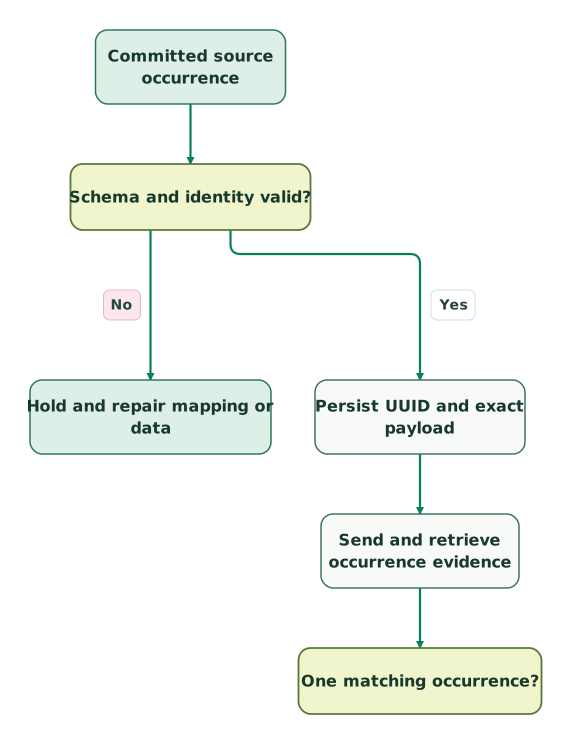
Prepare and send one occurrence
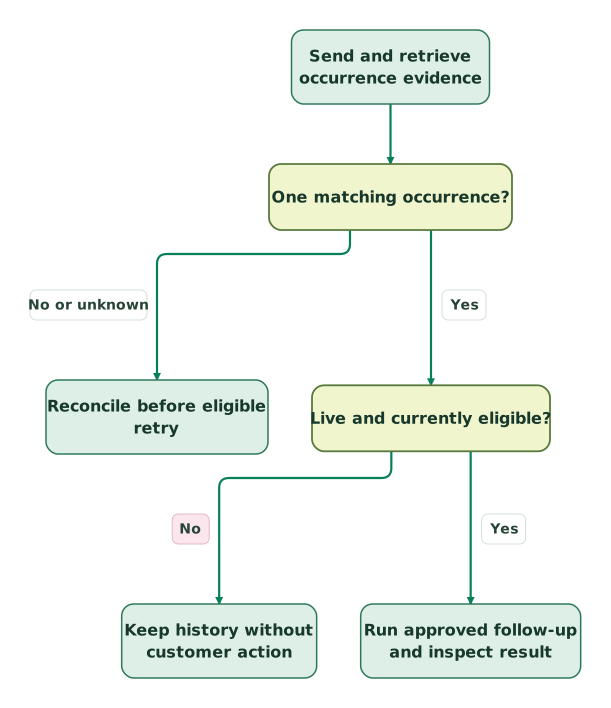
The readback gate continues in the second view. Both views use the same source nodes and connections.
Verify the event before acting
Successful event storage is separate from authorization to contact the customer. Tests, backfills and ineligible cases remain history-only.
Read diagram as text
- Committed source occurrence to Schema and identity valid?.
- Schema and identity valid? to Hold and repair mapping or data: No.
- Schema and identity valid? to Persist UUID and exact payload: Yes.
- Persist UUID and exact payload to Send and retrieve occurrence evidence.
- Send and retrieve occurrence evidence to One matching occurrence?.
- One matching occurrence? to Reconcile before eligible retry: No or unknown.
- One matching occurrence? to Live and currently eligible?: Yes.
- Live and currently eligible? to Keep history without customer action: No.
- Live and currently eligible? to Run approved follow-up and inspect result: Yes
For a rate limit, pause according to the actual response and the integration's bounded retry policy. For permission or schema errors, repair the cause. For an unknown delivery outcome, reconcile before retrying with the persisted identity. Avoid a loop that turns each failure into a new UUID.
Keep the evidence needed to explain one occurrence: source key and time, definition version, resolved record, payload hash, UUID, delivery attempts, response details, readback and workflow outcome. Redact credentials and unnecessary personal data from shared logs.
Before release:
Checklist
- The subscription and app support the chosen creation, sending and readback routes.
- The event's primary object and business meaning are fixed and documented.
- Internal property names, types and options match the actual definition.
- Missing and ambiguous identity mappings stop before delivery.
- Stable UUIDs distinguish genuine new occurrences from transport retries.
- Duplicate conflicts and payload changes enter an exception queue.
- Complete readback matches expected counts, records, timestamps and properties.
- Tests and backfills stay outside live customer-action triggers.
- Active-workflow and multi-invoice cases have an explicit handling rule.
- Current state and recipient eligibility are checked before follow-up.
Use the event naming convention skill to make the event contract reviewable. The USD 99 audit includes a written assessment and a one-hour specialist call. For the definition, sender, identity map and workflow checks, request a detailed HubSpot implementation scope.
Keep reading
Browse all CRM & Lifecycle guides
 CRM & Lifecycle
Product usage data in HubSpot: build a reliable PQL and sales workflow
Bring useful product signals into HubSpot with stable account IDs and clear ownership. Compare events, properties and sync routes before building workflows.
Jafrin Akter AloLast updated 14 min read
 CRM & Lifecycle
HubSpot custom objects: when to use them, how to create one and the limits
Decide when a HubSpot custom object beats a property, create one step by step, check the limits on your pricing model and sync records without duplicates.
Jafrin Akter AloLast updated 18 min read
 Tracking & Attribution
HubSpot Forms API: Fix Missing Submissions, Consent and Attribution
Build and troubleshoot HubSpot form submissions with correct fields, cookie context, consent mapping, response handling, retries and a CRM delivery checklist.
Jafrin Akter AloLast updated 12 min read
HubSpot implementation plan
Define the events, records, owners and acceptance checks for the workflow.
Questions people ask
Does an event property automatically update a contact property?
No. An event property belongs to that occurrence's schema, while a contact property represents data on the contact record. If a workflow needs current account or invoice state, maintain that state through an explicit, owned update path. Do not let the latest arriving historical event overwrite a newer value merely because both fields have similar labels.
Can an objectless event still appear in reports or the timeline?
No. HubSpot's NO_OBJECT events can trigger workflows, but their occurrences are not stored or retrievable and do not appear in record timelines, reports or segments. They still consume the monthly occurrence allowance. Choose an associated object when history and reconciliation are requirements; an objectless definition cannot later be converted into a record-associated event. Objectless-event limits
Does changing the UUID let me correct an earlier occurrence?
A new UUID can create another occurrence; it is not an update instruction for the earlier one. Reusing the original UUID within the duplicate window also does not replace its payload. Define a correction policy that preserves the original evidence and tells downstream consumers which value is authoritative. Do not silently turn a correction into an extra payment failure.
Why can a webhook-created event be absent from the contact timeline?
The creation route matters: HubSpot says timeline activity is unavailable for custom events created through its webhook setup. Check the event method before diagnosing a missing timeline entry as a delivery failure. If visible contact history is a requirement, select and test a route that supports it, then verify the intended record association. Timeline boundary
Should we delete and recreate an event when its meaning changes?
Treat a meaning change as a versioned migration with a dependency review. HubSpot warns that deleting a definition removes its events and references from tools such as workflows and reports; deleted event names cannot be reused. Introduce the replacement, update consumers and reconcile the transition before retiring anything that carries required history. Definition deletion
Sources
- HubSpot: Create custom events
- HubSpot: Professional custom-event rollout
- HubSpot: Legacy app scopes
- HubSpot: Developer-platform scopes
- HubSpot: Create an event definition
- HubSpot: Define custom events
- HubSpot: Send custom event occurrences
- HubSpot: API usage guidelines and limits
- HubSpot: Send one event occurrence
- HubSpot: Send a batch of occurrences
- HubSpot: Retrieve event occurrences
- HubSpot: Event enrollment triggers
- HubSpot: Workflow re-enrollment
- HubSpot: Product features catalog
- HubSpot: Analyze custom events
- HubSpot: Attribution reports

Written by
Jafrin Akter AloData Engineer and Co-founder at Martechdevs and Growth and Analytics Partners
Jafrin writes practical guides to marketing technology, customer data, analytics and AI workflows. Martechdevs is a Growth and Analytics Partners company.