
HubSpot API Guide: Service Keys, Contacts, Pagination and Limits
The HubSpot API lets your systems read and update CRM records, submit forms and react to changes. For a new single-account data integration, start with a scoped Service Key; use a project-based app for webhooks or an OAuth app for multiple customer accounts. Build one working contact read first, then add pagination, identity rules and recovery before expanding the integration. Authentication choices, Service Keys.
On this page
Which HubSpot API should you use?
Choose the API that represents the business action: CRM object APIs manage records, Forms APIs record submissions, and webhook subscriptions notify your system about changes. These operations have different inputs and downstream effects. Begin by writing the outcome you need, then choose the endpoint and authentication that support it.
| Your job | Starting point | What to verify |
|---|---|---|
| Read or maintain contacts, companies and deals | CRM object APIs | Object scopes, internal property names and identity |
| Record a website form submission | Forms submission API | Form fields, consent and attribution context |
| Respond when a CRM record changes | Project-based app with webhook subscriptions | Supported events, signature validation and replay |
| Represent an entity beyond standard CRM objects | Custom object APIs | Subscription entitlement, schema and associations |
| Connect an application to several customer accounts | OAuth app | Installation consent and per-account token isolation |
The HubSpot API reference organizes these capabilities. Our Forms API guide, webhook implementation guide and custom objects guide explain their specific operating requirements.
A contact create request does not express the same business event as a submitted form. Decide whether you need a CRM record, a submission history entry or a change notification before writing the integration. Our CRM and lifecycle implementation service maps that action to field ownership, routing and reporting so the integration produces a usable result.
Where do you get a HubSpot API key now?
For a new data-only integration in one account, create a Service Key with the scopes the job needs. HubSpot has removed new legacy private-app creation from the account UI; existing legacy private apps continue operating. A tutorial that starts with creating another legacy private app therefore needs a different setup path. Private-app creation change.
Follow the current Service Key setup:
- In HubSpot, open Development → Keys → Service keys with Super Admin or Developer tools access.
- Create a descriptively named key for this integration.
- Add the required scopes. Start a contact-read test with
crm.objects.contacts.read. - Review the access and create the key.
- Save the value in your deployment's secret store and inject it as an environment variable.
- Make one read request, then inspect the key's logs and confirm the intended account and data.
Service Keys cannot supply webhook or UI-extension functionality. For those jobs, use a project-based app with the appropriate authentication. A personal access key authenticates development tooling; it is a different credential from the one your production data integration needs. HubSpot's credential distinctions.
Avoid placing a reusable credential in browser JavaScript, a public form, a URL or a committed configuration file. Keep separate credentials for development and production, and assign an owner who can rotate them. For a planned Service Key rotation, HubSpot supports a seven-day transition; a compromised credential should be revoked promptly rather than left active for convenience. Rotation controls.
Should you use Service Keys, private apps or OAuth?
Use Service Keys for single-account REST data work, a project-based app when you need app features, and OAuth when distributing an app across accounts. An existing legacy private app needs an inventory and migration plan. Replacing its token without checking its subscriptions and features can leave an integration only partly working.
| Integration | Credential or app model | Operating responsibility |
|---|---|---|
| Scheduled warehouse pull from one account | Service Key | Scope, rotation and extraction recovery |
| Single-account integration with app features | Project-based app, supported static authentication | App configuration and feature lifecycle |
| Product installed by multiple customers | OAuth app | Consent, refresh tokens and tenant isolation |
| Existing legacy private app | Retain during a tested migration | Inventory endpoints, webhooks and owners |
These choices follow HubSpot's authentication overview and Service Key guidance. OAuth access tokens have a lifetime; store the returned expiry and refresh under that contract. A 401 alone does not prove that refreshing is the right fix. Token and limit guidance.
Which HubSpot API version should a new integration use?
Use the current date-based API version and copy the complete endpoint path from its reference. This guide's contact examples use 2026-09. Legacy v1 through v4 paths have their own migration requirements, and replacing only the version string can produce an invalid path because its position can change. API migration guide.
For example, the legacy contacts list path is /crm/v3/objects/contacts; its current counterpart is /crm/objects/2026-09/contacts. Both use https://api.hubapi.com as the host. HubSpot's current API overview documents the latter structure.
Keep an endpoint inventory with method, path, scopes, request fields and response fields. For each migration, compare the two contracts and test missing values, pagination and errors. HubSpot’s breaking-change notice gives separate support deadlines: March 30, 2027 for v4, and September 2027 for v1–v3. Plan against the version-specific notice rather than applying one deadline to every endpoint. Legacy API support timelines.
How do you read contacts with the HubSpot API?
Send an authenticated GET to the contacts endpoint, request only the properties you need and inspect both the records and the pagination cursor. Start with a small read in a test account. A successful response proves that request worked; it does not prove that the full contact population has been copied.
With the scoped credential already supplied through HUBSPOT_TOKEN, this request reads up to ten non-archived contacts and asks for their modification property. It performs no writes. Contacts list reference.
curl --fail-with-body --silent --show-error --get \
  'https://api.hubapi.com/crm/objects/2026-09/contacts' \
  --header "Authorization: Bearer ${HUBSPOT_TOKEN}" \
  --data-urlencode 'limit=10' \
  --data-urlencode 'archived=false' \
  --data-urlencode 'properties=lastmodifieddate'
Check that results contains the expected record IDs. Where more records exist, paging.next.after supplies the next cursor. Preserve that value exactly; do not assume it is a page number or calculate it from the last record ID. The list endpoint describes the cursor and available query fields.
Requesting fewer properties reduces unnecessary data handling. For troubleshooting, log the endpoint, response status, correlation identifier when present and record counts. Keep tokens and full customer payloads out of routine logs.
How do you paginate without silently dropping records?
Continue from the cursor returned by the previous successful page, and stop only when no next cursor remains. Save a checkpoint after the destination has durably accepted that page. If a run fails between receipt and storage, restarting from the last committed checkpoint should safely replay the uncommitted page.
This Python standard-library example is a bounded read test, limited to three pages of ten records. It reports whether more pages remain instead of labelling a partial read complete. It intentionally stops on an HTTP error; add the classified retry behavior below when building the production worker.
import json
import os
import time
from urllib.parse import urlencode
from urllib.request import Request, urlopen

endpoint = "https://api.hubapi.com/crm/objects/2026-09/contacts"
token = os.environ["HUBSPOT_TOKEN"]
after = None
ids = set()

for page_number in range(3):
    params = {
        "limit": 10,
        "archived": "false",
        "properties": "lastmodifieddate",
    }
    if after is not None:
        params["after"] = after
    request = Request(
        endpoint + "?" + urlencode(params),
        headers={"Authorization": "Bearer " + token},
    )
    with urlopen(request, timeout=30) as response:
        page = json.load(response)
    ids.update(record["id"] for record in page["results"])
    after = page.get("paging", {}).get("next", {}).get("after")
    if after is None:
        break
    time.sleep(1)

print({"unique_records_read": len(ids), "more_pages": after is not None})
The cursor contract comes from the contacts list reference. The three-page bound and one-second delay are choices for this teaching example. Remove the bound only when the worker has a tested checkpoint, retry policy, quota budget and destination write strategy.
A read conducted while records are changing is an operational extraction, not a guaranteed transactionally frozen snapshot. Reconcile changes around the extraction window and retain a recovery path. If the business requires a point-in-time report, define how the downstream model represents updates and deletions.
When should you use CRM search instead of listing contacts?
Use CRM search to select records by supported properties and filters. Use listing or an appropriate export mechanism when you need broad extraction. Search has its own ceilings and indexing delay, so it is a poor substitute for a complete change log or an immediate read-back of a newly written record.
HubSpot's CRM Search API limits searches to five requests per second per account, 200 results per page and 10,000 results per query. Archived records are excluded, and changes can take time to appear.
For an incremental sync, a timestamp filter needs more than a stored maximum timestamp. Use overlapping windows, deduplicate by stable record identity, and periodically reconcile the population. If a window exceeds the search result ceiling, split it into smaller non-overlapping filter ranges while retaining overlap at processing boundaries. Do not advance the final watermark until every subrange has completed.
Deletion handling needs a separate design because absence from search does not prove deletion. Our HubSpot webhook guide covers event handling and recovery; pair notifications with reconciliation rather than making a single delivery channel the only evidence of current state.
How do you create or update contacts without duplicates?
Define the unique identity and which system owns each field before enabling writes. Use the stored HubSpot record ID for an existing record, and choose an explicitly supported unique property for upsert workflows. A timeout after a create can leave the outcome uncertain, so inspect the result before blindly submitting another create.
An upsert creates a missing record or updates the matching existing one. HubSpot supports contact upserts by email or a custom unique identifier, but partial upserts using email are unsupported. Use a suitable custom unique property when that partial-upsert behavior is required. Contact write semantics.
For a simple controlled test, creating a contact uses POST to /crm/objects/2026-09/contacts with a properties object. This illustrative payload should be used only for a designated test record in a test account with the appropriate write scope:
{
  "properties": {
    "email": "integration-test@example.com",
    "firstname": "Integration",
    "lastname": "Test"
  }
}
Read back the returned record ID and requested properties before testing associations or workflow consequences. Updating that record uses PATCH with its ID. Batch writes require inspection of each item, including partial failures, rather than counting an accepted HTTP response as all records updated. Contacts guide, batch error handling.
In a hypothetical product-to-CRM sync, the product owns product_customer_id and an agreed usage summary; the CRM owns sales qualification. An API write should update the owned fields without resetting a seller's qualification work. Test null values, changed email addresses, merged records and replay before allowing the worker to process the full population.
What are the HubSpot API rate limits?
Limits depend on subscription, app distribution and endpoint. Service Keys follow privately distributed-app limits, while marketplace OAuth apps have a separate general burst allowance. Daily quotas can be shared across the account, so independently healthy connectors can collectively exhaust the budget. Give the integration a quota below the remaining account capacity.
General published limits, excluding endpoint-specific exceptions and purchased increases. API usage guidelines, Service Key limit mapping.
| Authentication or subscription | General burst allowance | Daily allowance |
|---|---|---|
| Private distribution, Free or Starter | 100 calls per 10 seconds per app | 250,000 shared per account |
| Private distribution, Professional | 190 calls per 10 seconds per app | 625,000 shared per account |
| Private distribution, Enterprise | 190 calls per 10 seconds per app | 1,000,000 shared per account |
| Marketplace-distributed OAuth app | 110 calls per 10 seconds per installed account | Check endpoint and applicable rules separately |
Inspect the returned rate-limit headers where supplied. Search responses omit those headers, and OAuth responses omit daily-limit headers. A missing header therefore does not establish unlimited access. Header exceptions.
Use batches where supported, cache relatively stable metadata and avoid re-reading the same contact separately for every report visual. A hypothetical 20,000-record list at 100 records per page needs about 200 page requests before retries and other operations. A per-record read pattern can need 20,000 calls for the same population. Verify the endpoint's actual page and batch limits before applying that comparison.
How should you handle errors and retries?
Classify the failure before retrying. Authentication, permissions and invalid fields need correction; temporary throttling or availability failures need delayed retry. A write with an unknown outcome needs reconciliation before replay. Retain enough request context to investigate without copying secrets or complete customer records into the error log.
| Response or symptom | First action | Resume condition |
|---|---|---|
| 400 validation error | Inspect field names, values and request shape | Corrected request passes a small test |
| 401 or 403 | Check token validity, account, scopes and product access | Required access is deliberately restored |
| 423 lock | Wait at least two seconds | Retry within a bounded policy |
| 429 quota exceeded | Identify burst versus daily limit | Capacity is available under the applicable reset |
| 5xx or timeout | Back off with jitter; inspect uncertain writes | Read retry or reconciled write can proceed safely |
| Batch partly fails | Separate accepted and failed items | Retry only the eligible failed subset |
HubSpot documents these categories in its error-handling reference. Honor a returned Retry-After when applicable, set a retry ceiling and alert the integration owner when it is reached. A rapid retry loop can turn a temporary failure into sustained throttling.
The release decision should test both the successful path and the repair path:
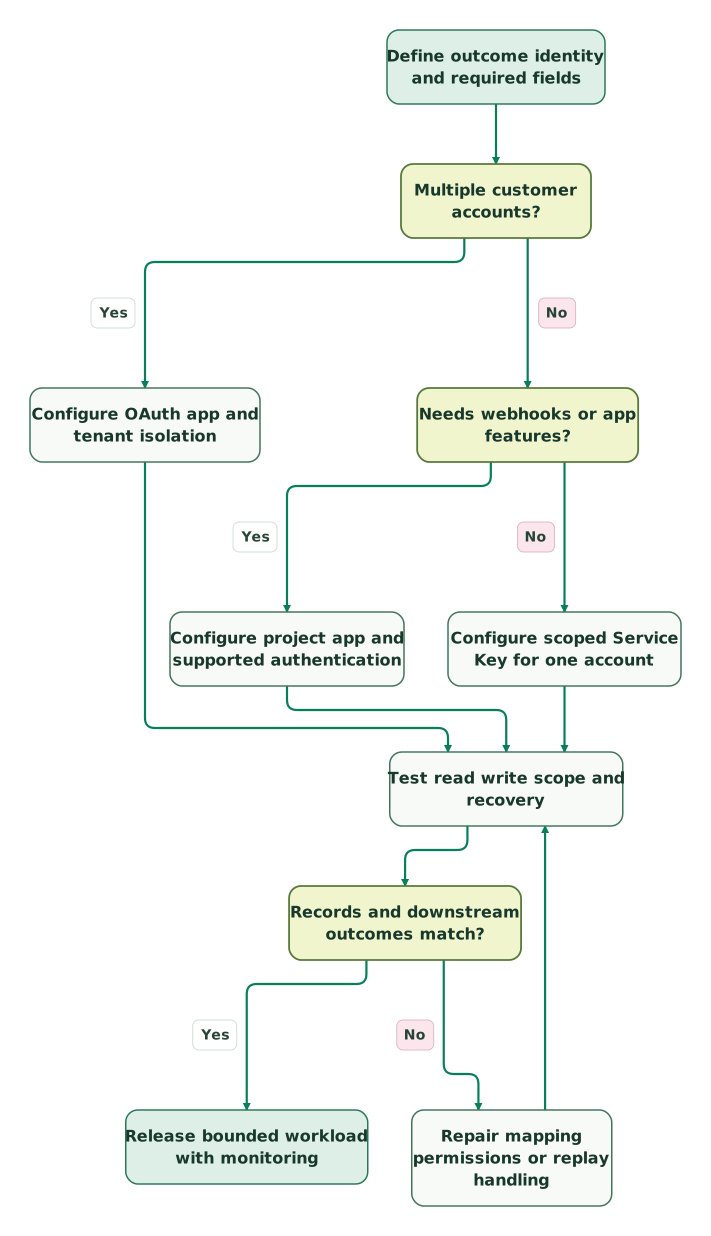
Read diagram as text
- Define outcome identity and required fields to Multiple customer accounts?.
- Multiple customer accounts? to Configure OAuth app and tenant isolation: Yes.
- Multiple customer accounts? to Needs webhooks or app features?: No.
- Needs webhooks or app features? to Configure project app and supported authentication: Yes.
- Needs webhooks or app features? to Configure scoped Service Key for one account: No.
- Configure OAuth app and tenant isolation to Test read write scope and recovery.
- Configure project app and supported authentication to Test read write scope and recovery.
- Configure scoped Service Key for one account to Test read write scope and recovery.
- Test read write scope and recovery to Records and downstream outcomes match?.
- Records and downstream outcomes match? to Repair mapping permissions or replay handling: No.
- Repair mapping permissions or replay handling to Test read write scope and recovery.
- Records and downstream outcomes match? to Release bounded workload with monitoring: Yes
For a multi-account product, use the OAuth branch described above even when the first prototype connects only one customer. Authentication architecture should match the intended distribution.
What should pass before the integration goes live?
Release when the intended business outcome, data completeness and recovery behavior pass together. One successful API call is the beginning of that test. Record the expected customer population, field rules and downstream effects, then run a bounded sample that includes the exceptions most likely to change the result.
Checklist
- The credential belongs to the correct account and has only required scopes.
- Current endpoint paths and requested properties match the pinned API contract.
- Pagination reaches its true end, or the run clearly reports partial completion.
- Identity, null handling, field ownership and associations produce the intended records.
- Throttling, token rotation and uncertain-write recovery have been tested.
- The destination reconciles records and business outcomes against the source.
- An owner can inspect failures and replay a bounded failed set.
Use the integration design skill to capture the system boundaries and recovery requirements. Then follow the Forms API, webhooks or custom objects guide for the next specific job. Our HubSpot implementation service covers the mapping, automation and reporting needed to turn the connection into a working process.
Keep reading
Browse all CRM & Lifecycle guides
 CRM & Lifecycle
HubSpot Webhooks: Verify Requests, Prevent Duplicate Actions and Recover Missed Updates
Build a dependable HubSpot webhook receiver: choose the right app model, verify signatures, store batches safely and recover without duplicate actions.
Jafrin Akter AloLast updated 14 min read
 CRM & Lifecycle
HubSpot custom objects: when to use them, how to create one and the limits
Decide when a HubSpot custom object beats a property, create one step by step, check the limits on your pricing model and sync records without duplicates.
Jafrin Akter AloLast updated 18 min read
 CRM & Lifecycle
HubSpot implementation: a phased plan, template and launch checklist
Implement HubSpot in five phases: scope, data model, migration, integrations and launch. Includes a plan template, a worked example and a go-live checklist.
Jafrin Akter AloLast updated 22 min read
HubSpot implementation
See the implementation scope, deliverables and acceptance checks.
Questions people ask
Do existing HubSpot private-app tokens stop working when creation is removed?
The creation change leaves existing legacy private apps working. Inventory their endpoints, scopes and features before migration, then test the replacement and retire the old credential deliberately. HubSpot has a separate support transition for legacy apps and APIs, so an existing token continuing to work does not remove the need for a migration plan. Creation change.
Can I put a HubSpot Service Key in my website's JavaScript?
Keep reusable account credentials on a trusted server or in the connector's protected credential store. A key delivered to a visitor's browser can be copied and used with its granted access. For public form collection, use the supported submission flow and its consent requirements, then restrict any server-side enrichment to the fields that job needs.
Does creating a contact through the CRM API record a form submission?
Creating a contact and submitting a form are different operations. Choose the Forms API when the business needs the form submission, matching fields and consent context. Use the CRM object API for the record-management task. Validate the resulting submission history, routing and reporting instead of assuming that a contact appearing means the entire lead journey was recorded. See our Forms API guide.
Why does CRM search miss a contact I just created?
HubSpot's search index can take time to include a new or changed record. Read the returned record ID directly when checking an immediate write, then allow for indexing delay in search-dependent work. Archived contacts are also absent from search. Investigate those conditions before creating another record or treating the original request as lost. Search behavior.
Can buying more API capacity remove every HubSpot limit?
An API limit increase changes specified general allowances, while individual endpoints can retain tighter limits. Marketplace OAuth apps and CRM search also have their own rules. First identify the exact limit and request pattern, then compare batching, caching or event-driven updates with additional capacity. A larger general allowance cannot repair an incorrect cursor or duplicate-write loop. Limit rules.
Sources
- HubSpot authentication overview
- Make API requests with Service Keys
- HubSpot Service Keys and integration types
- Legacy private-app creation change
- Current HubSpot API reference
- Legacy API migration guide
- Retrieve contacts
- Contacts API guide
- CRM Search API
- API usage guidelines and limits
- API error handling
- Legacy APIs and apps: separate support timelines

Written by
Jafrin Akter AloData Engineer and Co-founder at Martechdevs and Growth and Analytics Partners
Jafrin writes practical guides to marketing technology, customer data, analytics and AI workflows. Martechdevs is a Growth and Analytics Partners company.