
Server-side GTM setup: a practical implementation sequence
Data Engineer and Co-founder, martechdevs
Last updated 13 min read
Set up server-side Google Tag Manager by proving one complete event path: a real website action reaches your collection endpoint, the correct client reads it, permitted fields reach the intended destination and the result can be reconciled. Then add destinations and production traffic. The server container gives you another place to control delivery and data handling. It also creates infrastructure and configuration your team must maintain.
Last updated: 30 September 2026.
Start with a reason that justifies another system
Server-side GTM is useful when your team needs explicit control over which destinations receive event data, how fields are transformed or how measurement traffic is operated. It will not correct an event that fires before a purchase succeeds, resolve an undefined customer identity or decide which CRM stage deserves campaign credit.
Name the problem you intend to solve. “Remove unapproved fields before forwarding to advertising destinations” is testable. “Get better tracking” is not a sufficient implementation requirement.
Define the first event's trigger, source of truth, identity, timestamp, value, currency, destinations and consent behaviour. Record the existing delivery path so you can recognise accidental parallel sending. The tracking-plan guide provides a structure for these decisions.
Choose a modest first slice: one website, one event and one destination. Keep complicated checkout paths, mobile apps and additional advertising platforms as explicit follow-on work. Starting small lets you identify which change caused an unexpected result.
Understand the request path before provisioning
A server container needs software to send it HTTP requests. A client inside the container claims a compatible request and converts it into event data. Tags then use that data to send requests to their destinations. Google's server-side tagging introduction explains this architecture.
Installing a server container does not automatically move every existing browser tag into it. The web and server configurations remain separate, and each destination needs an intentional path.
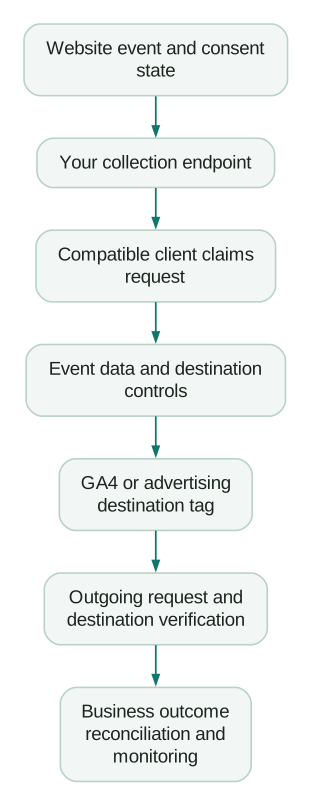
Use that sequence as the debugging order. If the server receives no request, changing an outbound tag cannot fix the browser's route. If the incoming event is correct but an outbound field is missing, inspect transformations and tag mappings before rewriting the application's event.
1. Create the container and assign operating ownership
Create a Server container in the organisation's GTM account. Record the container ID, publishing permissions, responsible team and the environment it serves. Avoid leaving a production measurement service dependent on one person's private cloud project.
Choose who can edit templates, who can publish the container and who can change hosting. These are different kinds of access. A marketer who needs to inspect a conversion does not necessarily need permission to alter infrastructure or read server credentials.
Provision the tagging service using the route your team can support. Google's Cloud Run setup guide supports automatic provisioning from GTM and manual provisioning in Google Cloud. Establish the required project and billing access first.
For other hosting environments, Google's manual setup guide describes the container-based deployment and the relationship between preview and tagging services. Follow that model rather than treating a preview instance as the complete production architecture.
For production on Cloud Run, Google recommends at least two instances to reduce outage risk. That is a recommendation, not an uptime guarantee. Configure scaling and cost alerts against expected load; an aggressively low maximum can create a capacity problem during a traffic spike. Use the current cloud estimate for your region and configuration instead of budgeting from an old tutorial's monthly price.
Record the operating questions now: who responds to an outage, who sees cost alerts and who approves runtime updates? They become harder to answer after traffic depends on the endpoint.
2. Configure the collection domain and routing
Choose a collection endpoint under a domain the business controls. Common patterns include a dedicated subdomain or a path routed through the website's existing CDN or load balancer. Google's custom-domain guide describes the available approaches and required routing work.
Keep the terminology precise. https://collect.example.com and https://www.example.com have different origins because their hosts differ. A path such as https://www.example.com/metrics can share the website's origin when scheme, host and port match. MDN defines that same-origin test. A first-party subdomain and a same-origin path are not identical browser configurations.
For the chosen route, check DNS, TLS, request forwarding and the server-container URL. If a CDN fronts the service, verify its behaviour for measurement requests. A route that returns a cached website page instead of reaching the tagging service can look superficially healthy while collecting nothing useful.
Check how the route handles methods, paths, query strings and response headers. Apply the documented hosting configuration and inspect actual requests instead of assuming a generic website rewrite is enough.
Do not disable the site's Content Security Policy to get a green test. Google's data-routing guide identifies the endpoint permissions needed for the supported image, connection and iframe transports. Add only the requirements for the implementation you use and check the browser's reported violations.
Serving a tag script through your domain is a separate configuration decision from forwarding event requests. Prove event routing first, then evaluate script serving as another controlled change.
3. Route the existing web implementation to the server
For a gtag.js implementation, Google's introduction documents the server_container_url configuration option. The following illustrates the change to an existing configuration call; it is not a second tag installation:
gtag('config', 'G-EXAMPLE123', {
  server_container_url: 'https://collect.example.com'
});
Replace both example values. Preserve the settings your existing configuration needs, and apply the equivalent server-container setting if your implementation uses web GTM. Follow Google's routing instructions for that implementation rather than mixing two installation methods.
Do not add another initialisation call just to paste this snippet. That can alter page-view behaviour or create a second route. Make the smallest controlled change to the existing configuration and inspect the resulting browser traffic.
Trigger the selected action in an isolated test destination or environment. Confirm the request goes to your endpoint with the expected event and consent state. If it still goes directly to the previous destination, inspect the actual loaded configuration, container version and any other tag that can send the same event.
The server container includes a Google Analytics client by default. A compatible client must claim the incoming request; the first matching client by priority handles it. Google's data-routing documentation covers these client settings.
If nothing claims the request, check its path and protocol. Raising a client's priority randomly is not a substitute for understanding which client should own that request. Keep custom clients narrow enough that they do not accidentally claim unrelated traffic.
4. Prove one outbound destination
Configure the server's GA4 tag for the intended destination and the selected event path. Inspect the destination ID, event name and required parameters. Initially, keep triggers narrow enough to understand what the tag will forward.
Use server-container Preview to follow the incoming request, the claiming client, event data, fired tags and outgoing requests. Google's server-side debugging guide explains those inspection surfaces.
A tag firing proves that part of the container executed. Continue to the outgoing request and then the destination's available diagnostic or reporting surface. Preserve the event's identity and timing so you can compare the same occurrence across checkpoints.
For a purchase, inspect more than the event name. Compare transaction ID, value, currency and item details against the underlying order. For a SaaS milestone, confirm that the event came from a successful transition and carries the intended person or account context.
Avoid forwarding every available property simply because it appears in Preview. Decide which fields each destination needs. A debugging convenience should not become an undocumented data-sharing policy.
5. Apply consent and field controls before adding traffic
Google's server-side Consent Mode guide describes the web container collecting preferences, the request carrying consent signals and supported server tags adapting their behaviour. The banner alone is not the complete control path.
Write expected behaviour for initial state, consent granted, consent denied and a later preference change. Verify each state through the browser request and the outbound server request. Test a returning visitor as well as a clean session because stored preferences can expose timing mistakes.
Basic and advanced Consent Mode have different behaviours. Basic implementations block tags until consent; advanced implementations can send limited cookieless pings under denied consent. Google's Consent Mode overview explains the distinction. Test against the organisation's approved implementation rather than assuming that any request under denial is always a bug or always acceptable. The cookieless measurement guide explains the identity and reporting limits of those modes.
For third-party templates, inspect their consent handling separately. Do not assume that a Google-specific signal automatically blocks every non-Google destination. Verify the trigger, template behaviour and outgoing fields under the required states.
Use server-side transformations to allow, exclude or augment event parameters before tags read them. Scope the rule to the intended destinations and inspect its order. A broad allowlist can remove fields another tag needs; a late augmentation can reintroduce a field an earlier rule removed.
For example, a destination may require a supported hashed identifier while ordinary analytics events must exclude the corresponding raw customer data. Check the resulting outbound payload for each destination. Do not route a raw email through a normal GA4 event parameter to make it available elsewhere.
Transformations control what tags can use after the client has produced event data. They do not undo the original browser request or erase data already written to infrastructure logs. Minimise collection at the source as well as forwarding at the destination.
6. Add advertising tags with explicit event identity
Once the initial path is understood, add one advertising destination at a time. Record the relevant account, conversion action, destination credentials and event mapping. Keep credentials in the supported server configuration rather than exposing them to the browser.
For Google Ads conversion tags, Google's server-side Consent Mode documentation identifies the server-container Conversion Linker as a prerequisite. Verify the conversion ID, label, event timing and consent behaviour together. If the event uses enhanced conversions, follow the destination-specific field rules in the enhanced-conversions setup guide.
For Meta or another destination supplied through a third-party template, review the template's publisher, requested permissions, documented field mappings and maintenance status. Installing a gallery template does not establish that its defaults match your business event. The LinkedIn CAPI guide explains its separate browser/server conversion rules and shared occurrence IDs, which differ from other platforms.
If browser and server routes describe the same occurrence, implement that platform's deduplication contract. Generate or retain the occurrence identity in a place both routes can reference. A person ID cannot stand in for every purchase or milestone that person may produce.
The Event Match Quality guide separates matching identifiers from event identity and delivery coverage. Better matching fields do not compensate for duplicated outcomes or a missing half of the event pipeline.
Keep the existing browser implementation until you understand which functions still depend on it. Then remove or change only the delivery path you intend to replace. “Server-side” does not mean the browser no longer participates in collection, consent or useful advertising context.
7. Test failure cases, not only the successful page load
Create a small acceptance set based on the real customer journey:
- A successful outcome with all required fields.
- A failed action that must not become a conversion.
- A repeated page load or application retry after one success.
- An outcome with an optional identifier missing.
- Each approved consent state and a later preference change.
- A malformed or unexpected event that must not reach an unintended destination.
- A destination failure or interrupted request with an understood recovery path.
Use isolated destinations where possible. Previewing a container is not a promise that outgoing tags cannot affect real systems. Inspect the actual configured destination before sending invented purchases or customer records.
For each case, record expected count, permitted fields and destination. Check the browser request, client claim, event data, transformation result and outgoing delivery. Keep enough evidence for another engineer to repeat the check after a template or application update.
Do not infer reliable delivery from a single successful event. Compare a sample of eligible business outcomes to the captured occurrences using the same time range and counting unit. Separate deliberately excluded events from technical failures.
If ten of 100 legitimate eligible outcomes are absent, an otherwise perfect payload still leaves 10% of the intended outcomes missing. If ten outcomes arrive twice, a total of 100 requests can conceal both losses and duplicates. Reconcile stable occurrence IDs, not just aggregate request counts.
8. Release with a rollback and a measurement owner
Publish the reviewed web and server versions in a coordinated change. Record the versions, time, selected traffic and expected delivery path. Where practical, expand from a controlled slice rather than changing every site and destination at once.
Define rollback before releasing. If the new route fails, know which setting returns traffic to the previous working path and which new outbound tags must stop. A fallback that sends to both routes indefinitely can replace a loss problem with duplicate measurement.
Monitor infrastructure health and business coverage separately. Useful signals include endpoint error rates, latency, outbound failures, unexpected event names, field availability and missing eligible outcomes. Compare changes with actual website traffic and deployments before deciding an event-count drop is an outage.
Review request logging as part of the release. Google's Cloud Run guide notes that request paths and query parameters can be logged and that volume affects cost. Retain the operational evidence you need with appropriate field handling and retention. Disabling every diagnostic signal to reduce the bill leaves the next failure difficult to explain.
Keep a named owner for runtime updates, template changes, access reviews and cost alerts. Add a small repeatable journey check to relevant website releases, especially checkout, identity and consent changes.
Treat apps and backend events as separate integration work
A web server_container_url setting does not automatically reroute a mobile SDK or a backend uploader. Each sender must use a protocol and endpoint that an installed client actually understands.
Be careful with examples labelled Measurement Protocol. Google's send-data guide includes protocol-specific examples and limitations. Check the actual payload version and client compatibility before adapting them to GA4 or a mobile application. Changing a hostname alone is not a general migration strategy.
For backend events, define authentication or abuse controls appropriate to that sender, event validation and destination eligibility. Browser collection endpoints have different constraints from trusted internal services. Do not assume that owning the domain makes every incoming request authentic business activity.
Preserve the original business occurrence time and stable identity. If an application retries a payment webhook, your measurement system should understand that it may be the same payment occurrence rather than another sale.
Acceptance checklist
- A business problem and first event scope are written down.
- Container, hosting, billing and publishing responsibilities are assigned.
- Domain, TLS, routing and CSP requirements are verified.
- The intended client claims the request and produces correct event data.
- Each destination receives only the fields and events it should receive.
- Consent behaviour is checked through the full request path.
- Duplicate-source events use the destination's correct identity rules.
- Failure cases, rollback and operating alerts have been reviewed.
- Business outcomes reconcile to delivery evidence after release.
Use the server-side GTM hosting comparison for the operating tradeoffs behind the infrastructure choice. An analytics and tracking implementation should deliver this verified request path and a maintainable operating process, not just a container that returns a successful response.
Questions people ask
Do I still need web GTM or a website tag?
The server needs a sender. A website implementation usually still collects the browser action and relevant consent state before sending to the server. A backend integration can be another source, but it requires its own compatible request path.
Is a first-party subdomain the same as same-origin hosting?
No. Same-origin requires the scheme, host and port to match. A collection subdomain can be part of the same site while having a different origin from the main website. Choose and test the intended configuration explicitly.
Does server-side GTM bypass consent requirements?
No. Implement the organisation's approved collection and destination rules across the whole flow. Server-side delivery changes where processing happens; it does not turn a denied preference into permission.
Why does Preview show a fired tag but the destination has no event?
Check the outgoing request, destination configuration, response and destination-specific processing. Also inspect field transformations and consent behaviour. A fired tag is one step in the path, not proof of final reporting.
Can I move all tags and apps at once?
Different tags and senders have different protocols, data needs and identity rules. Verify one route first, then extend the setup in controlled changes. This makes failures easier to locate and prevents accidental duplication during migration.
Sources
- Google: Introduction to server-side tagging
- Google: Cloud Run setup
- Google: Manual server setup
- Google: Custom-domain configuration
- MDN: Same-origin policy
- Google: Send data to server-side GTM
- Google: Debug server-side tags
- Google: Server-side Consent Mode
- Google: Consent Mode overview
- Google: Event-data transformations
Written by
Jafrin Akter AloData Engineer and Co-founder, martechdevs
Jafrin Akter Alo is a data engineer and co-founder of martechdevs, where the team has delivered 74+ martech, data and growth stack implementations.