
Google Tag Manager MCP Server: Choose a Connector and Audit a Container
Google Tag Manager (GTM) servers using Model Context Protocol (MCP) exist, including Stape’s hosted and local implementations; the options reviewed here are community-maintained. They expose container configuration through Google’s application programming interface (API). Use them to investigate tags, triggers and variables against a published baseline; prove actual firing with runtime and destination evidence before approving a change.
On this page
In a fictional incident, a founder notices that reported purchases rose sharply after a website release. Revenue did not. The team opens Tag Manager and finds several similarly named tags, two workspaces and a trigger nobody remembers creating. Asking an assistant to explain that configuration could save time. Asking it to remove everything that looks duplicated could remove working measurement.
This guide walks through an AI-assisted GTM container audit over MCP, using a conversion defect as the example. The useful output is an evidence-backed change request: what is happening, why it matters, which configuration contributes to it and how the team will prove the correction works. That is also the point of an analytics and tracking implementation: reliable decisions from events whose meaning survives website changes.
Is there an official Google Tag Manager MCP server?
The Google Tag Manager MCP servers covered here are community-maintained implementations, including Stape. Their maintenance and access rules are separate from the Google APIs they call. Google's documented programmatic route is Tag Manager API v2. Community servers wrap that API; Google's separate Analytics MCP server serves a different reporting job.
The following are examples found in that review, not an exhaustive directory or a security endorsement. A repository description proves neither a deployed service's behaviour nor successful operation in your account.
| Project | Documented route | What matters before use |
|---|---|---|
| Stape | Hosted HTTP or local command-line server | Same documented set of twenty GTM tools; different credential and data paths |
| A1-x-Tech | Independent MCP implementation using the GTM API | Inspect its actual permissions, token storage and release history |
| jinchliu/tagmanager-mcp | Local Python implementation | Repository archived on 21 September 2026; maintenance needs a separate owner |
Sources: Stape repository, A1-x-Tech project, archived jinchliu project. For other tools, the directory of MCP servers for GA4, Google Ads and Meta distinguishes their own publishers and access models.
How to vet another GTM MCP project
Read the authorization code and tool registrations before connecting a production identity. Check which GTM scopes it requests, whether write tools can be removed, and whether a credential is shared across containers or sessions. Pin an inspected release where the installation method supports it, review its update history and inspect outbound network calls.
Find where refresh tokens are stored and who can revoke them. Check whether logs or client transcripts retain container exports, custom code or variable values. Local hosting changes the service boundary; Google API requests and the AI client's processing still exist. Use the full MCP security checklist for the broader review.
How do you connect Stape without confusing the hosted and local routes?
Stape's documented hosted endpoint is https://gtm-mcp.stape.io/mcp. Its hosted service handles Google OAuth; the local package uses credentials you supply. Review the scope discussion below before authorizing either route.
For the hosted server in Claude Code:
claude mcp add --transport http gtm-mcp-server https://gtm-mcp.stape.io/mcpRun /mcp in Claude Code to complete sign-in, then inspect the connection status. A project-scoped hosted definition can live in .mcp.json; each teammate authorizes their own account. Keep credential-bearing local definitions outside a shared repository. Stape connection instructions.
For Claude Desktop, use Customize → Connectors → Add custom connector, enter the hosted URL and select Register automatically for the OAuth client. Team/Enterprise owners add the organization connector before members authorize. The local npx package uses your own credentials.
Keep a connection record with maintainer, endpoint or installed version, authentication owner, approved container, client and revocation owner. Confirm the readable account and container against Tag Manager's interface. Installing several similarly named servers during diagnosis makes it harder to know which identity answered.
How do you keep the first audit read-only?
Use both restricted Google permissions and a connector whose actual scope matches the audit. Google's read-only scope is https://www.googleapis.com/auth/tagmanager.readonly; editing and publication have separate scopes. API authorization.
Each scope below uses the prefix https://www.googleapis.com/auth/. The third column is an audit-design judgment, not a different Google scope.
| Scope suffix | Documented capability | Need for an initial configuration audit |
|---|---|---|
tagmanager.readonly | View containers | Appropriate reading boundary |
tagmanager.edit.containers | Manage containers | Unneeded for inspection |
tagmanager.edit.containerversions | Manage container versions | Unneeded for inspection |
tagmanager.publish | Publish containers | Keep outside the audit role |
tagmanager.delete.containers | Delete containers | Unneeded for inspection |
tagmanager.manage.users | Manage user permissions | Unneeded for inspection |
tagmanager.manage.accounts | Manage accounts | Unneeded for inspection |
Stape's public scope constants include all seven GTM scopes plus email and profile. Its hosted authorization handler sends that set to Google. This source review does not prove which revision is deployed or replace inspection of the actual consent screen.
Consequently, do not describe the default hosted connector as read-only by OAuth scope. A Read-only GTM identity limits its effective container actions, but an organization requiring a read-only OAuth grant should use an appropriately controlled implementation or an exported configuration review instead.
Container permissions provide another boundary. Read access allows inspection without modification. Edit access permits workspace changes but excludes creating versions and publishing. Approve and Publish are broader levels. Grant the audit identity access only to the container under investigation and review its effective access, including inherited permissions. These distinctions come from Google's permissions documentation.
An instruction such as “do not publish” is useful context for an assistant. It should sit alongside technical restrictions. If the available hosted authorization is broader than your policy permits, use a controlled implementation or an exported configuration review instead of quietly accepting the mismatch.
Teams building a private server can also restrict exposed tools. Stape's core package documentation describes replacing the default tool registrations. That is implementation work: hiding a tool in one interface does not revoke permissions held by the credential elsewhere.
A sensible first result is a list of readable resources and their identifiers. Check those against Tag Manager's interface. Stop if the assistant has selected a similarly named test container, a previous agency's account or an unrelated client.
What should the assistant collect before judging a tag?
Begin with a single business question: “Why might one completed order produce more than one purchase event?” Define the expected behaviour before examining suspicious objects. A written tracking plan gives the assistant something concrete to compare against.
For this investigation, the event contract might specify:
- A purchase represents a successfully confirmed order, with a stable order identifier.
- The event uses the agreed currency and revenue definition.
- A page refresh does not represent another order.
- A failed or abandoned payment does not qualify.
- Consent handling follows the implementation's documented requirements.
These are illustrative requirements, not a universal ecommerce specification. A subscription renewal, offline order or partial payment may require different treatment.
Next, ask for a configuration inventory tied to a named baseline:
Investigate purchase tracking in the specified container.
Use the currently published version as the baseline.
Record account, container, version and retrieval time.
List candidate purchase tags and their destinations.
Resolve each tag's firing triggers, exceptions and referenced variables.
Identify relevant pending workspace changes separately.
Report missing evidence and competing explanations.
Do not create, update, delete or publish anything.
The separation between the published configuration and pending work matters. A defect visible in a draft may never have reached visitors. A published defect may already have a correction waiting in another workspace. Mixing those states produces an impressive explanation of a system that does not actually exist.
For each candidate, preserve its identifier, meaningful name and the relationships supporting the finding. “The purchase tag is duplicated” is too vague for a developer to act on. “Two tags target the same analytics destination through different triggers that may both occur during checkout” is a testable hypothesis.
How do you turn a suspicious configuration into evidence?
Test the configuration hypothesis against runtime behaviour and the events received by the destination. Consider an illustrative container with two purchase tags. One listens for an order_confirmed event. Another runs when the URL contains /thank-you. Both use the same analytics destination.
The assistant can reasonably flag an overlap. It cannot establish from those names alone that two purchase requests reach the destination. Exceptions, missing variables, consent state or application behaviour may prevent one path from executing. Conversely, a tag that appears correct could receive the same application event twice.
Collect runtime evidence in an isolated test-browser session, with the intended staging URL, container version and test identity recorded. Establish a known consent state for each test rather than inheriting an unrelated session.
Google's preview and debug tools show which tags fired and the data and trigger conditions involved. Use that runtime evidence alongside the configuration review. The official preview documentation explains the available inspection flow; server containers have their own debugging context. The server-side GTM setup guide covers the separate collection and delivery path.
Build a short test record for the suspected defect:
Checklist
- Successful order: complete a test purchase and record the event sequence, tag firings and order identifier.
- Confirmation refresh: reload the confirmation page and check whether another purchase request appears.
- Failed payment: verify that a failed attempt cannot enter the successful-order path.
- Return visit: revisit the confirmation URL under the conditions your application permits.
- Relevant consent states: verify the expected behaviour under the configuration your team has approved.
Record the observed results beside the expected results. Keep test customer details and credentials out of the assistant's context. A minimal event trace is usually more useful than an indiscriminate capture of the entire session.
A worked example: three paths explain the excess
Suppose a controlled test produces these observations. Ten successfully confirmed orders each cause the application event and the thank-you page trigger to run. Three confirmation pages are refreshed, and each refresh activates the page trigger again. Failed payments produce neither event.
This hypothetical test produces the following counts, using orders and outbound attempts as different units.
| Observed path | Successful orders | Outbound purchase attempts | Interpretation |
|---|---|---|---|
| Confirmed-order event | 10 | 10 | Intended event path |
| Initial thank-you page | 10 | 10 | Additional request path for the same orders |
| Confirmation refresh | 0 new | 3 | Repeated requests without new orders |
| Total | 10 distinct | 23 | Configuration overlap merits correction |
The arithmetic is 10 + 10 + 3 = 23 outbound attempts from ten distinct orders. This arithmetic describes the illustrative outbound requests. It does not guarantee that an analytics interface reports 23 purchases, because downstream processing and deduplication may change the reported total.
The evidence suggests replacing the page-based purchase path with the confirmed-order event path, subject to checking all supported checkout routes. Before removing it, test whether an alternative checkout still depends on that page trigger. A fix that solves the main checkout while dropping another payment method would exchange overcounting for undercounting.
Also inspect the application's event emission. If the confirmation event itself repeats, removing the page trigger addresses only part of the defect. The investigation must follow the event from the business action through to the destination.
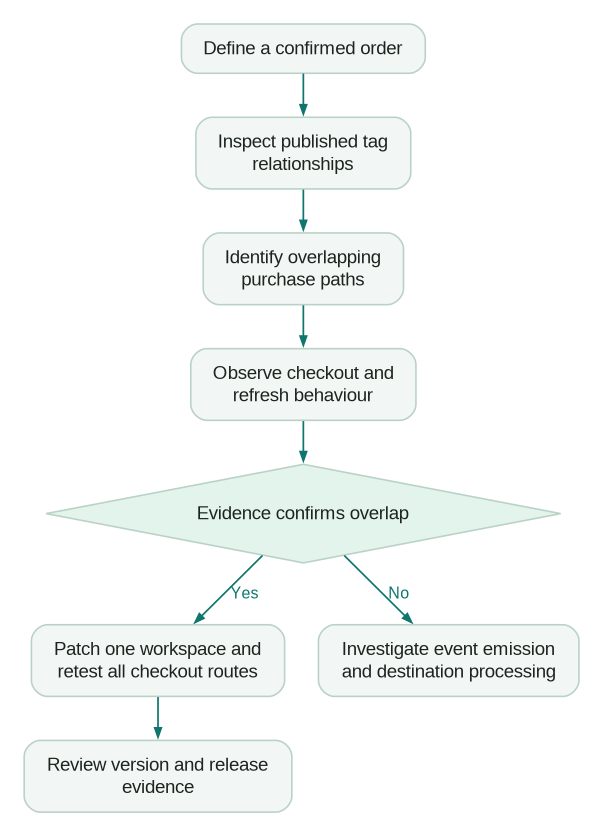
Read diagram as text
- Define a confirmed order to Inspect published tag relationships.
- Inspect published tag relationships to Identify overlapping purchase paths.
- Identify overlapping purchase paths to Observe checkout and refresh behaviour.
- Observe checkout and refresh behaviour to Evidence confirms overlap.
- Evidence confirms overlap to Patch one workspace and retest all checkout routes: Yes.
- Evidence confirms overlap to Investigate event emission and destination processing: No.
- Patch one workspace and retest all checkout routes to Review version and release evidence
What belongs in the change request?
Translate the investigation into a compact implementation brief. Include the baseline version, the affected tags and triggers, the observed failure, the proposed change and the reason it should correct that failure. Attach evidence that another teammate can inspect independently.
Be explicit about the scope. “Remove duplicate purchase tracking” can expand into renaming tags, rebuilding variables, changing consent settings and cleaning folders. Those additional changes make the original hypothesis harder to test. Keep unrelated cleanup in a separate task unless it is required for the fix.
For the example above, the change request should say which page-based path will be disabled, which confirmed-order path remains, how alternate checkout routes were tested and what result would trigger reversal. It should also name the destination owner who will verify received events.
The main implementation risks are often outside the connector. A variable may use a stale data-layer value. A single-page application may emit an event before required properties are available. A server-side destination may receive an additional copy from another integration. Our guide to Google Tag Manager implementation mistakes covers the wider failure patterns worth checking when the first hypothesis does not explain the evidence.
When is the fix ready to publish?
Publish only after the workspace diff, runtime tests and destination evidence pass the agreed contract. Google treats a version as a configuration snapshot and publication as the step that activates changes for the chosen environment. Review the complete workspace diff before release, including changes added by other contributors. Google documents version history and recovery through earlier versions in its publishing guide.
Your release evidence should answer three questions: did the intended configuration change, did runtime behaviour match the contract, and did the destination receive the expected event? A positive answer to the first question cannot substitute for the other two.
The built-in request-approval workflow is a Tag Manager 360 feature. A smaller team can still separate editing from publication through permissions and its normal task-review process. Use the process your account supports rather than designing around a feature it may not have.
Before release, run a repeatable staging QA pass across the supported checkout paths and failure cases. Save its evidence with the proposed version.
After release, stop preview mode and repeat the most consequential checks against the published environment in a fresh test session. Annotate the deployment time in the investigation record. If purchase totals move, compare them with actual orders and with the expected direction of the correction. A decline in reported conversions may be evidence that overcounting was removed, so communicate the measurement change before somebody interprets it as a marketing collapse. Use the data-quality triage workflow to match a recorded conversion drop to published configuration and runtime evidence without assuming the nearest release caused it.
Close the task with the final version, test evidence, known exceptions and event-contract owner. For help turning an inconclusive audit into a repair, bring that evidence to the $99 martech audit, or request a detailed Google Tag Manager implementation scope.
Keep reading
 Tracking & Attribution
Server-side GTM setup: a step-by-step implementation sequence
Set up server-side Google Tag Manager in a testable order: access, hosting, custom domain, clients, tags, consent and deduplication, then launch safely.
Jafrin Akter AloLast updated 16 min read
 Tracking & Attribution
Common Google Tag Manager mistakes and how to fix them
The Google Tag Manager mistakes behind duplicate events, missing sessions and wrong conversions, with the fix for each and a pre-publish checklist.
Jafrin Akter AloLast updated 16 min read
 Tracking & Attribution
Google Tag Manager pricing: is GTM free, what 360 costs and what you actually pay for
Google Tag Manager is free; 360 is quoted. Compare server-side hosting: about $45 per Cloud Run instance, with two recommended, or $20/month on Stape.
Jafrin Akter AloLast updated 14 min read
AI readiness score
Check your tracking, data, context and access before connecting an agent.
Questions people ask
Can a GTM MCP server create tags from our tracking plan?
With the necessary tools and edit permissions, it can propose or apply workspace changes. Use a separate workspace and compare the draft against event definitions, required parameters and supported user journeys. Keep publication with an accountable reviewer. A generated tag is an implementation candidate; its name and syntax do not prove the application emits the correct data or the destination receives it.
How should an agency separate GTM MCP access between clients?
Use the approved identity and container boundary for each engagement, with a connection record that names the owner and revocation process. Check the effective Google permissions before asking for an inventory. Avoid mixing client exports or credentials in a shared assistant context. When work ends, remove the integration access through the agreed process and verify what retained evidence the agency may keep.
What if the workspace changes while an assistant is auditing it?
Treat the findings as bound to the retrieved version and time. Compare the latest workspace with that baseline before applying a proposal, and investigate changes from other contributors. Re-run affected checks after reconciling the differences. A correct recommendation for yesterday's draft can be inappropriate today, especially when a parallel change already alters the same trigger or parameter.
Does publishing an earlier GTM version correct events already collected?
It changes the configuration used for subsequent traffic in the selected environment. Historical events and reports need their own correction or annotation process where the destination supports it. Record the affected period, event definition and known processing behaviour before deciding what to restate. Do not promise that a container rollback will remove every duplicate purchase already received by an analytics product.
What should the developer receive when the MCP audit is inconclusive?
Send the named baseline, the suspicious relationships, observed runtime results and the missing evidence. List competing explanations and the smallest next test that can distinguish them. For example, separate repeated application emission from overlapping triggers or another server-side sender. An inconclusive audit is useful when it narrows that investigation; it should not become an unsupported instruction to delete a tag.
Sources
- Google: Tag Manager API v2.
- Stape: Stape connection instructions.
- A1-x-Tech: A1-x-Tech project.
- jinchliu: archived jinchliu project.
- Google: API authorization.
- Stape: scope constants.
- Stape: hosted authorization handler.
- Google: Google's permissions documentation.
- Stape: core package documentation.
- Google: preview documentation.
- Google: publishing guide.

Written by
Jafrin Akter AloData Engineer and Co-founder at Martechdevs and Growth and Analytics Partners
Jafrin writes practical guides to marketing technology, customer data, analytics and AI workflows. Martechdevs is a Growth and Analytics Partners company.